

A customer emails you six weeks after buying a pair of headphones. The left earcup has gone silent. They want it sorted, and they want to know what happens next. You dig through the order, hunt for a reply you half-remember sending, ask them to ship it back, then forget which inbox thread is which. Two weeks later they email again, annoyed, and you have no record of where the return stands. No reference number, no status, nothing.
That is what handling returns without a system feels like, and it is exactly the gap WooCommerce Returns and Warranty Request fills. It bolts a real returns and RMA pipeline onto WooCommerce, so every one of those messy email threads becomes a tracked request with a number, a status, and a paper trail. The plugin handles the full lifecycle: attach a warranty to a product, let the customer file a request from their account, then move it through statuses, return shipping, and a refund (cash or a store-credit coupon). If you have ever wished your WooCommerce returns and warranty handling looked less like a shoebox of receipts, this is the tool that fixes it.
I have run returns the manual way and the structured way on real stores. The difference is not subtle. So this is a long, honest walk through what the plugin actually does, how the request workflow hangs together, the developer hooks worth knowing, and the one setting you should not flip on without thinking first.
Table of Contents
- What WooCommerce Returns and Warranty Request actually is
- Three warranty types: included, paid add-on, or none
- Inside the request workflow: statuses, RMA codes, and emails
- Getting money back: refunds, store credit, and restocking
- Don’t enable refund requests without a policy
- Who should run this (and who can skip it)
- How it stacks up: plugin vs refund button vs SaaS
- Developer reference: hooks, filters, shortcodes, REST
- Performance, multi-vendor, and the gotchas
- FAQ
- Final thoughts
What WooCommerce Returns and Warranty Request actually is
It is the official WooCommerce extension for returns and warranties. Built by WooCommerce itself (the Automattic team), it ships under the GNU GPL v3, and it needs nothing but WooCommerce to run. Installation is the standard two clicks any store owner already knows: upload the zip under Plugins » Add New » Upload Plugin, activate, and a new top-level Warranties menu appears in your admin. There is no wizard to sit through and no second plugin to chase down. It activated cleanly in my test sandbox with only WooCommerce present.
The thing to understand up front is that this is not a fancier refund button. WooCommerce already gives you a refund button on the order screen. What it does not give you is a request model: a way for the customer to start the conversation, a reference number to track it by, a warranty attached to the product, or a status pipeline to move the request through. This plugin adds all of that.
If you have never dealt with the term, an RMA (Return Merchandise Authorization) is the number a store issues so both sides can reference a specific return. That number is the spine of the whole system here. Every request gets one, every email about it can quote it, and your support team can search by it.
You can grab WooCommerce Returns and Warranty Request from GPL Times and have the Warranties menu live on a real install in a couple of minutes, which is the fastest way to click through the settings tabs as we walk them.
The admin surface is laid out as a single Warranties menu with a handful of submenus:
- RMA Requests is the main list of every request, the queue you live in day to day.
- New Request lets a staffer open an RMA on a customer’s behalf by searching their order, useful when someone phones in instead of using the form.
- Manage Warranties is a bulk tool to add or change warranties across many products at once.
- Reports gives you Active and Completed request tables so you can see what is open and what is closed.
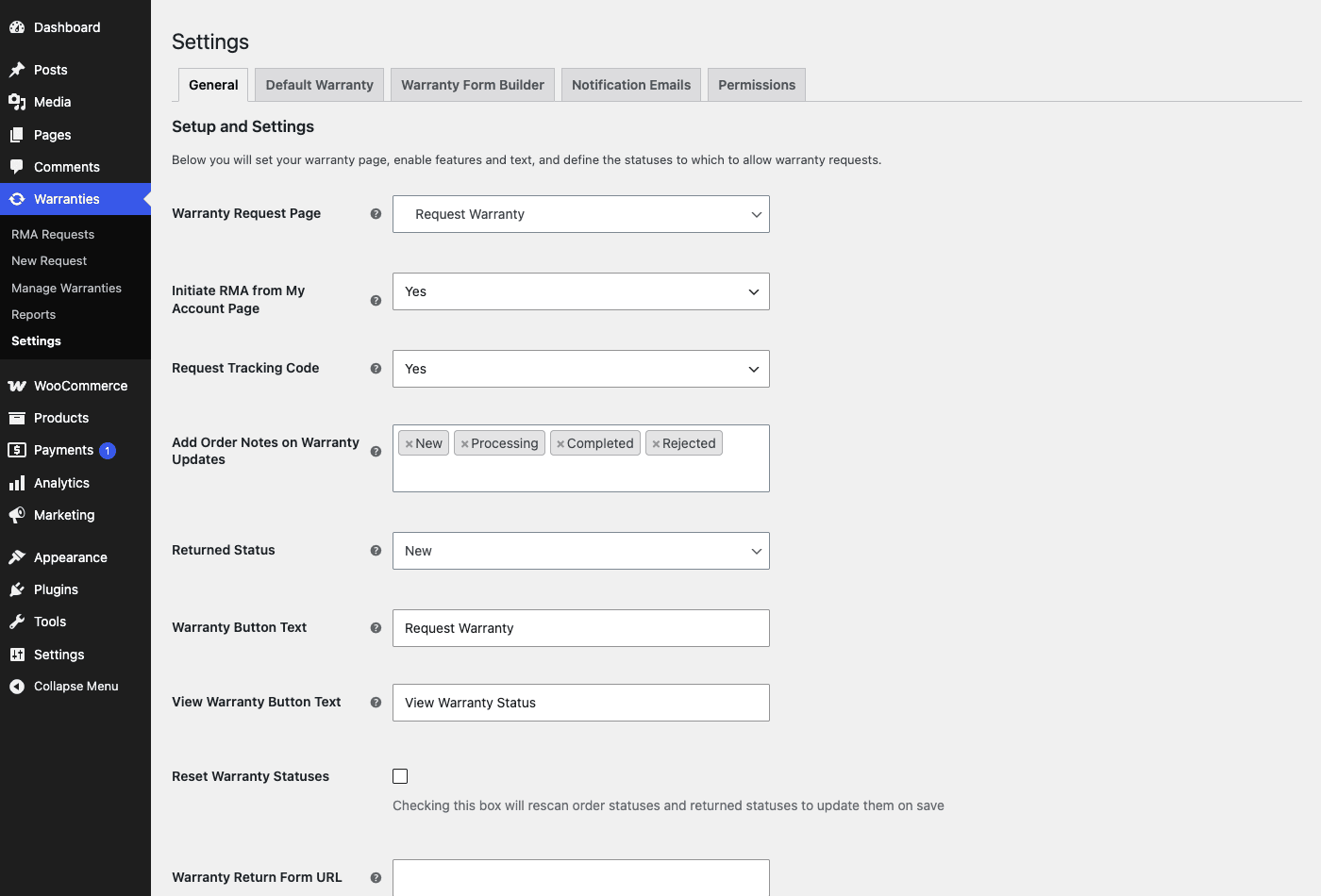
- Settings is where the five configuration tabs live: General, Default Warranty, Warranty Form Builder, Notification Emails, and Permissions.
That is the whole map. The rest of this article is really just a tour of those screens and the workflow they drive.
Three warranty types: included, paid add-on, or none
The defining concept is the warranty type, and there are exactly three of them: No Warranty, Warranty Included, and Warranty as Add-On.
- No Warranty is the default. The product simply has no warranty attached, and no Request Warranty option shows for it.
- Warranty Included is a free warranty bundled with the product. Buy the item, you get the coverage at no extra cost. This is your standard "12 months against defects" line.
- Warranty as Add-On is a paid warranty. The customer can buy extended coverage as an uptier at the cart. Internally the plugin’s cart class adds the warranty as a line item, which is how it turns into revenue rather than a cost.
That Add-On type is the one most stores overlook, and it is genuinely interesting. An extended warranty is one of the highest-margin things a store can sell, because most are never claimed. The plugin rides the WooCommerce Product Add-Ons add-to-cart flow to present that paid warranty as an option on the product page, so if you already run Product Add-Ons the two work together.
Every warranty has a length, expressed as a value plus a duration unit. The duration units are days, weeks, months, years, and lifetime. So "90 days", "2 years", and "lifetime" are all valid. Lifetime is its own unit, not a giant number, which is the right way to model it.
Here is the part that saves you from configuring warranties product by product on a large catalog: warranties can be set at three levels, and they cascade. Precedence runs product over category over store default. A store-wide default covers everything, a category warranty overrides it for one group of products, and a per-product setting overrides both.
| Level | Where you set it | When to use it |
|---|---|---|
| Store default | Settings » Default Warranty | One blanket policy for the whole catalog |
| Per category | Default Warranty » Category Warranties table | Different coverage for, say, electronics vs apparel |
| Per product | The product’s Warranty data tab | A specific item with its own terms |
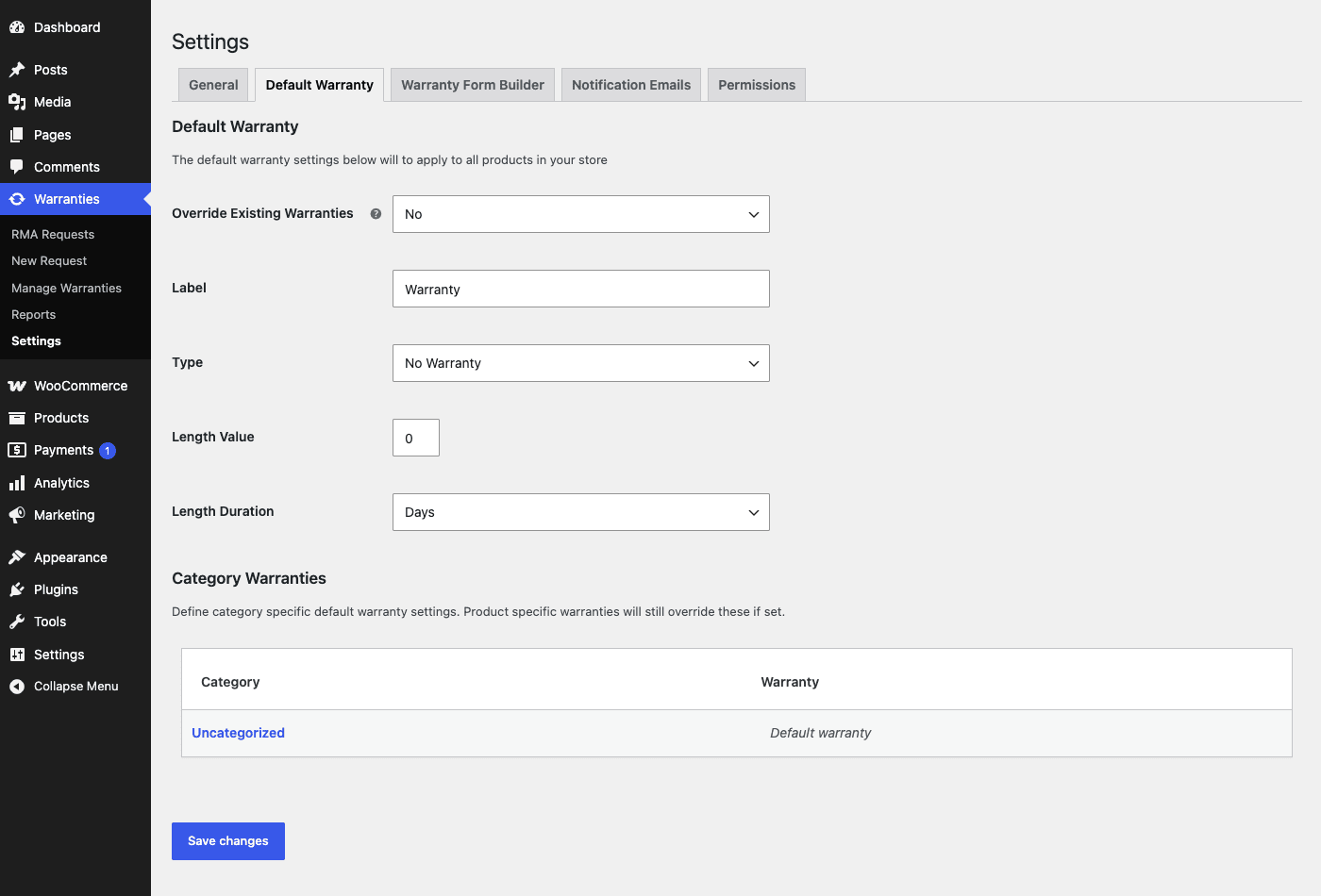
The Default Warranty tab is where the store-wide policy lives: a label, a type, a length value, and a duration. It also carries an Override Existing Warranties toggle, which forces the default onto products that already have their own setting, so handle that one carefully on a catalog you have already configured. Below it sits the Category Warranties table, where you map a warranty to each product category in one screen instead of editing hundreds of products.
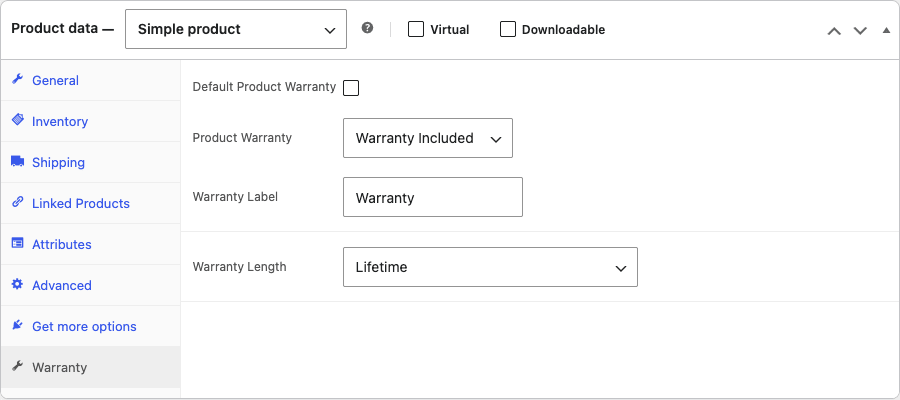
For a single product, the warranty lives in its own Warranty data tab inside the product editor, alongside the General, Inventory, and Shipping tabs you already know. You pick the type (No Warranty, Warranty Included, or Warranty as Add-On) and the length right there. The screenshot of that panel shows a Lifetime warranty selected, which is the kind of thing a premium-hardware store would set on its flagship item.
Tip: set a sensible store default first (say, 30 days, Warranty Included), then only reach for category and per-product overrides where the terms genuinely differ. That keeps your warranty config readable instead of a thousand one-off settings.
Inside the request workflow: statuses, RMA codes, and emails
This is the heart of the plugin, so it is worth slowing down here.
Every return is stored as its own record. Under the hood each request is a custom post type called warranty_request, and its status is a taxonomy term from shop_warranty_status. That sounds like plumbing, but it has a real consequence for you: because statuses are just terms, they are fully editable and extensible. You are not locked into the vendor’s idea of a workflow.
Out of the box the plugin seeds five statuses on install: New, Reviewing, Processing, Completed, and Rejected. That already covers most real workflows, and because statuses are just terms, the seeded set is a starting point rather than a ceiling. Add "Awaiting Return Shipment" or "Inspecting" if your process needs it. They are terms, so adding one is a one-line edit (or a filter, which we cover in the developer section).
Every request gets an RMA code, and the format is yours to control. In Settings » General you set the RMA Code Start, Length, Prefix, and Suffix. Want codes that look like RMA-1042-RET? Set the prefix to RMA-, the start to 1042, and the suffix to -RET. The plugin tracks the last code issued so numbers never collide. This is the reference both you and the customer quote in every email about the return.
The request form is fully custom, built with a drag-and-drop Form Builder. Under Settings » Warranty Form Builder you drag field types onto the form: Paragraph (static text, for instructions), Text Field, Multi-line Text Field, Drop Down, and File Upload Field. That File Upload field is the one I would never skip, because a photo of the damage on day one ends a lot of arguments on day ten. The Drop Down is where you force a structured reason instead of a free-text ramble.
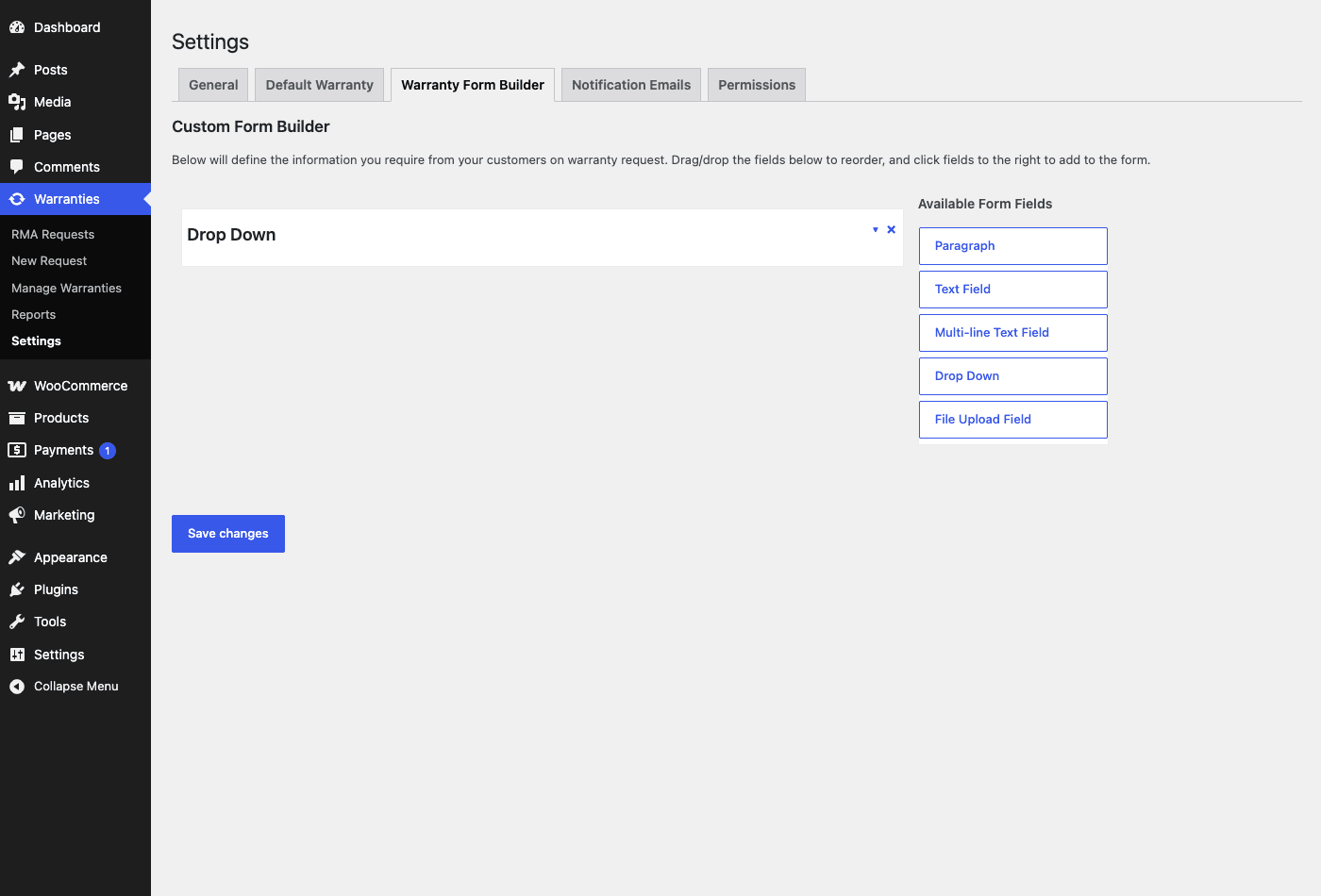
Two shortcodes back the front end if you want to place these flows on custom pages: [warranty_request] and [warranty_return_form]. Most stores never touch them because the My Account integration handles placement automatically, but they are there if you build a bespoke returns page.
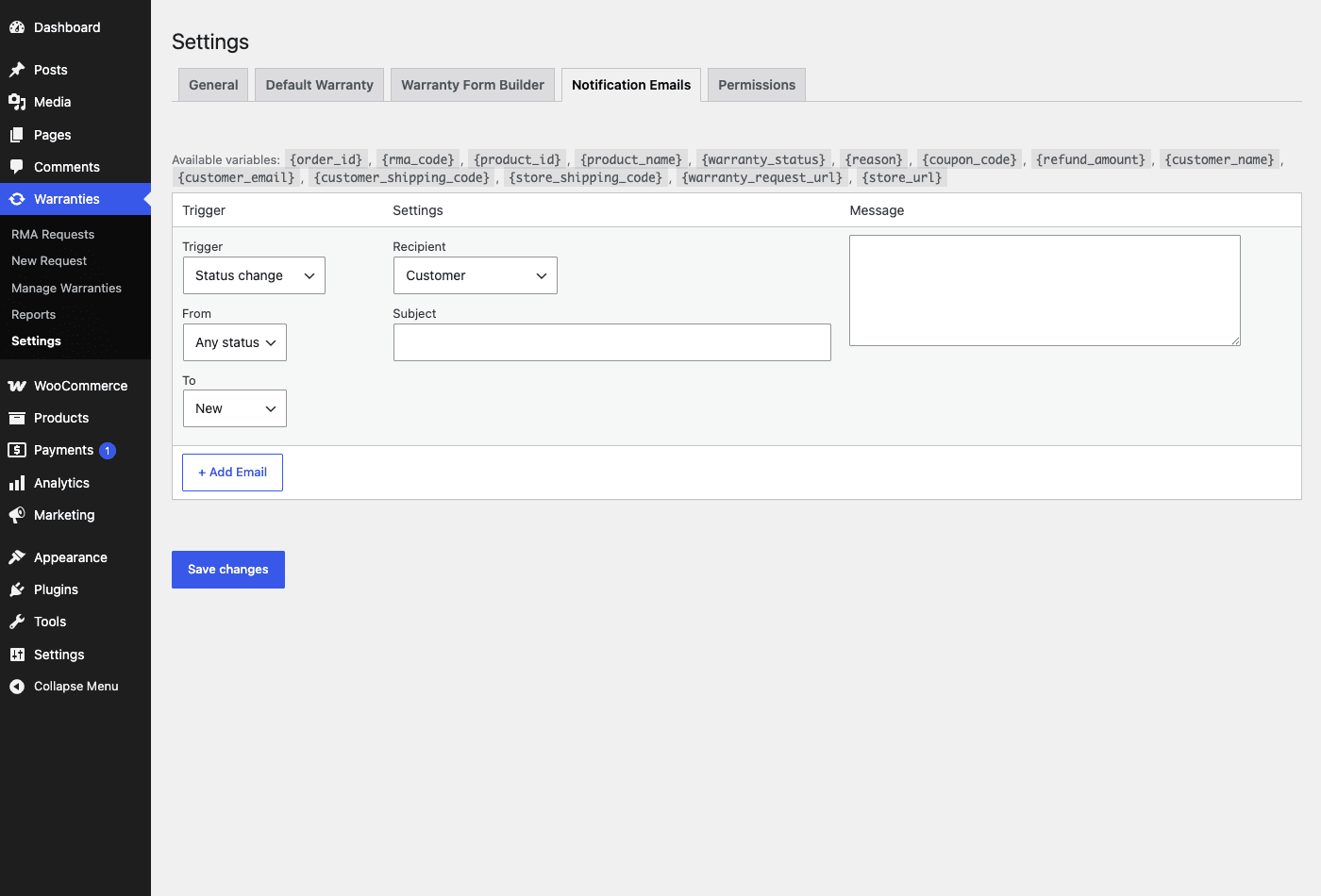
Status-based notification emails are where the workflow comes alive for the customer. Under Settings » Notification Emails you define emails that fire when a request moves between statuses. Each email has a trigger (a status change), a from-status and to-status, a recipient (Customer, Admin, and so on), a subject, and a message body. So you can send the customer a "We received your request, your RMA is {rma_code}" email the moment a request hits New, and a "Your refund of {refund_amount} is on its way" email when it hits Completed.
Heads-up: these are not standard WooCommerce email templates (WC_Email subclasses). The plugin runs its own admin-defined email engine instead. That is good news for flexibility (you compose them in the admin, no code) but it means they will not appear in WooCommerce » Settings » Emails with your other transactional emails. Look for them only under the plugin’s own Notification Emails tab.
The merge variables you can drop into those emails are generous. The verified list includes {order_id}, {rma_code}, {product_id}, {product_name}, {warranty_status}, {reason}, {coupon_code}, {refund_amount}, {customer_name}, {customer_email}, {customer_shipping_code}, {store_shipping_code}, {warranty_request_url}, and {store_url}. Notice the two shipping codes: one for the tracking number the customer uses to send the item back, one for the number you use to ship a replacement or the item back to them. Returns are a two-way street and the plugin models both directions.
You can also write an order note automatically when a request changes status. In General settings, Add Order Notes on Warranty Updates lets you pick which statuses (New, Processing, Completed, Rejected) leave a note on the original order. That keeps the return history visible right on the order screen, which your future self will thank you for.
Getting money back: refunds, store credit, and restocking
A return usually ends in money moving, and the plugin gives you two levers, controlled by two toggles in Settings » General.
Enable Refund Requests lets the customer request a cash refund as part of their warranty request. Enable Coupon Requests lets them (or you) settle the return as store credit instead. These are independent, so you can offer one, both, or neither.
The store-credit path is the one I would push most stores toward, and the reasoning is plain money math. A cash refund leaves your store. A store-credit coupon keeps the money in the store and usually gets spent on a higher-value basket than the original order. When a coupon is issued, the plugin generates a real WooCommerce coupon (the prefix is configurable in settings), so it behaves like any other coupon at checkout.
If you already run WooCommerce Smart Coupons for gift cards and store credit, it is worth being clear about the boundary: the coupon generated here comes from this plugin’s own refund-as-coupon path, not from Smart Coupons. The two do not clash, but the warranty refund coupon is created and prefixed by the warranty extension. Smart Coupons is the better tool if you want a full store-credit program with balances and gift-card UX; the warranty coupon is the quick "here is X back as credit" settlement for a single return.
Return shipping is tracked in both directions. The customer can supply the tracking code for the item they are sending back, and you record the code for whatever you send them. On the admin side you can also upload a shipping label to the request, so the customer can print and use it. None of this is a carrier integration (there are no prepaid label purchases here), but it captures the tracking numbers so nothing falls through the cracks.
Returned items can go back into stock with one decision. When you process a return, the plugin can add the returned quantity back to the product’s stock and write a stock note recording the change. That sounds trivial until you picture the alternative: a returned item that never gets re-counted, so your inventory quietly drifts out of sync and you oversell. The restock step keeps your stock numbers honest.
Note: restocking is a decision, not an automatic certainty. A returned item that arrives damaged should not go back into sellable stock, and the plugin lets you make that call per request rather than blindly re-adding everything. We will come back to why that matters in the next section.
Don’t enable refund requests without a policy
Here is the mistake I have watched stores make, and it costs money.
You flip on Enable Refund Requests because it sounds customer-friendly, and you leave it at that. No required reason. No photo. No rule about which orders even qualify. A customer files a request on an item they used hard for two months and then damaged. A busy staffer sees the request, clicks approve on autopilot, and the refund goes out. Now you have given back the cash and eaten the value of an item you cannot resell. Do that a few dozen times and it is a line item on your P&L.
It gets worse if a chargeback follows. With no documented reason and no photo on file, you argue with a payment processor from nothing. Money lost, trust strained, and in some regions a consumer-law exposure, all from one open toggle.
The fix is to treat refunds as a policy, not a button. Use the Form Builder to require a reason via a Drop Down field and a photo via the File Upload field on every request, so no request reaches your queue without evidence. Decide which order statuses can request a return at all, so a year-old order cannot spawn a fresh refund. Choose refund-versus-coupon on purpose: the store-credit coupon path keeps the money in the store and softens the loss. Write an actual returns policy and link it on the request page so the rules are stated before the customer files, not argued after.
Then do the thing almost nobody does: run one full test request yourself. File it from My Account, move it through every status to Completed, issue the refund, and read every email the customer gets. You will catch the awkward wording and the missing field before a real customer does.
Who should run this (and who can skip it)
Not every store needs a returns pipeline, so let me be honest about the fit.
If you run an electronics or appliance store, this is close to mandatory. You can bundle a free Warranty Included period on every product and sell extended coverage as a paid Add-On warranty at the cart. That second part is the upsell most hardware stores leave on the table. Picture a $400 espresso machine with a free 1-year warranty and a $49 add-on that extends it to 3 years. A slice of buyers take it, most never claim, and the coverage you already model in the plugin turns into margin.
If you run a multi-vendor marketplace, the Product Vendors integration is the headline. With WooCommerce Product Vendors active, each vendor only sees and manages the RMA requests for their own products. So every vendor gets their own returns desk inside one store, and you are not personally triaging returns for goods you never stocked. The same is true if you run a WooCommerce dropshipping store, where every item ships from a supplier you never physically handle, so a clean returns workflow matters even more. For a marketplace operator that separation is the difference between a workable returns process and a support nightmare.
If you run a clothing or footwear store, you probably do not care about "warranties" at all, and that is fine. What you need is a clean returns request flow plus a fast store-credit settlement, because fashion returns are constant and most are about fit, not defects. Set the warranty type aside, enable Coupon Requests, build a short reason-and-photo form, and you have a returns desk that keeps revenue in the store via credit instead of bleeding cash refunds.
Who can skip it? If you are a small store handling one or two returns a month, you do not need this yet. WooCommerce’s built-in refund button plus a polite email covers you, and adding a request pipeline for two events a month is overhead you will not use. The plugin starts to matter once returns become a recurring queue rather than the occasional one-off, which is usually somewhere north of a handful a week. Buy the structure when the volume earns it, not before.
How it stacks up: plugin vs refund button vs SaaS
Stores reaching for a returns solution usually weigh three options: this plugin, the bare WooCommerce refund button, or a hosted returns app like AfterShip Returns or Loop. Here is the honest comparison.
Against the bare WooCommerce refund button, it is not really a contest, because they solve different problems. The built-in button is free and processes a refund, full stop. It has no request form, no RMA number, no warranty model, and no status pipeline. The customer cannot start a return themselves, and you have no reference to track. This plugin adds all of that. The refund button is a checkout, not a returns desk.
Against a hosted returns SaaS, the trade is cost and ownership versus convenience features. A returns SaaS typically bills a monthly fee or takes a percentage per return, every month, forever. This plugin is a one-time GPL purchase on GPL Times with $0/month recurring after that. Over a couple of years on a store doing steady volume, the difference adds up fast.
Here are the concrete numbers worth putting side by side:
| Capability | WooCommerce refund button | WooCommerce Returns and Warranty Request | Hosted returns SaaS |
|---|---|---|---|
| Recurring cost | $0/mo | $0/mo (one-time GPL) | monthly fee or % per return |
| Customer request form | none | drag-drop Form Builder, 5 field types | yes |
| RMA number | none | configurable (prefix/suffix/length) | yes |
| Warranty model | none | 3 types, 5 duration units | partial |
| Status pipeline | none | 5 editable status terms (New/Reviewing/Processing/Completed/Rejected) | yes |
| Data location | your DB | 100% your own database | vendor’s cloud |
| Prepaid carrier labels | no | no (manual label upload) | yes |
The fair counter-argument: the SaaS apps do bring things this plugin does not. Prepaid carrier return labels generated automatically, and cross-store analytics benchmarked against other merchants, are genuinely useful and absent here. If automated label purchasing is core to your operation, weigh that honestly. But for most stores, the math of 2 shortcodes, 3 warranty types, 5 duration units, 9 action hooks, 17 filter hooks, and 100% of your refund and RMA data sitting on your own database, for no monthly fee, is the stronger position.
Developer reference: hooks, filters, shortcodes, REST
If you are extending this plugin, here is the surface that is actually there. I have kept this to verified hooks only, with their real argument lists, because nothing is more annoying than a tutorial hook that does not exist.
Action hooks
There are nine action hooks. The four you will reach for most:
wc_warranty_created fires when a new request is created, with the request ID.
add_action( 'wc_warranty_created', function ( $request_id ) {
    // Log every new RMA to your own audit trail.
    error_log( 'New warranty request: ' . $request_id );
} );
wc_warranty_status_updated fires on every status change, with the request ID, the new status, and the previous status. This is the one to hook for outbound alerts.
add_action( 'wc_warranty_status_updated', function ( $warranty_id, $new_status, $prev_status ) {
    if ( 'Completed' !== $new_status ) {
        return;
    }
    // Ping a Slack channel when a return is completed.
    wp_remote_post( 'https://hooks.slack.com/services/XXX/YYY/ZZZ', array(
        'body' => wp_json_encode( array(
            'text' => sprintf( 'Warranty #%d completed (was %s).', $warranty_id, $prev_status ),
        ) ),
        'headers' => array( 'Content-Type' => 'application/json' ),
    ) );
}, 10, 3 );
wc_warranty_item_returned fires when an item is marked returned, with the request ID and the status.
add_action( 'wc_warranty_item_returned', function ( $request_id, $status ) {
    // Trigger your own QA-inspection task queue here.
}, 10, 2 );
after_warranty_create_coupon fires when the refund-as-coupon path issues a coupon, with the coupon ID, the order ID, and the warranty (request) ID.
add_action( 'after_warranty_create_coupon', function ( $coupon_id, $order_id, $warranty_id ) {
    // Tag store-credit coupons so reporting can separate them later.
    update_post_meta( $coupon_id, '_source', 'warranty_refund' );
}, 10, 3 );
The remaining actions are warranty_page_controller (no args, front-end routing), wc_warranty_settings_tabs and wc_warranty_settings_panels (for adding your own settings tabs), and fue_updated, which passes warranty events to the Follow-Up Emails engine if you run it.
Filter hooks
There are seventeen filters. The ones that matter most for real customization:
warranty_statuses lets you register a custom status in code instead of clicking through the admin.
add_filter( 'warranty_statuses', function ( $terms ) {
    $terms[] = 'Awaiting Return Shipment';
    return $terms;
} );
warranty_variable_replacements lets you add your own merge variable to notification emails. Say you want a {tracking_url} that links straight to a carrier’s tracking page:
add_filter( 'warranty_variable_replacements', function ( $input, $request_id ) {
    $code = get_post_meta( $request_id, '_customer_shipping_code', true );
    $input['{tracking_url}'] = 'https://track.example-carrier.com/' . rawurlencode( $code );
    return $input;
}, 10, 2 );
warranty_refund_restock_note lets you rewrite the note recorded when stock is returned, with the note, the old stock, the new stock, the order, and the product.
add_filter( 'warranty_refund_restock_note', function ( $note, $old_stock, $new_stock, $order, $product ) {
    return sprintf( 'RMA restock: %s went %d -> %d', $product->get_name(), $old_stock, $new_stock );
}, 10, 5 );
Other useful filters: order_has_warranty($has, $order) to override whether an order qualifies, get_default_warranty($warranty) and get_product_warranty($warranty, $product_id) to adjust the resolved warranty, addons_add_to_cart_text and addons_add_to_cart_url for the paid Add-On warranty button, and warranty_use_product_vendor_query for multi-vendor query scoping. The rest (get_warranty_string, warranty_get_item_amount, warranty_get_request_item_amount, warranty_email_query, warranty_user_search, warranty_load, woocommerce_order_item_display_meta_value, woocommerce_product_addons_add_to_cart_product_types) cover string formatting, amount math, and integration edge cases.
Shortcodes, REST, CLI, and roles
Be clear-eyed about the developer surface, because it is smaller than you might assume:
- Shortcodes and blocks: exactly two shortcodes,
[warranty_request]and[warranty_return_form]. It also registers one block,extension/woocommerce-warranty, but only for the new WooCommerce product editor (the warranty data panel); there are no content blocks for the front end. - REST: a single read-only endpoint, not a REST API. It extends WooCommerce’s own
wc/v3namespace with one GET route,default_warranty/{product_id}, which returns a product’s default warranty. There is no warranty-request CRUD over REST, so do not plan a mobile returns app expecting full API coverage. - WP-CLI: none. The plugin registers no CLI commands.
- Roles and capabilities: it does not create custom user roles. It adds a single capability,
manage_warranties, to four existing roles: administrator, shop_manager, and the two Product Vendors vendor roles (wc_product_vendors_admin_vendorandwc_product_vendors_manager_vendor). If you want a custom role to manage returns, grant it that cap yourself.
Performance, multi-vendor, and the gotchas
On performance, there is very little to worry about, and the reason is architectural. Each request is a regular custom post type row and each status is a taxonomy term, so all the storage rides WordPress’s own indexed wp_posts and wp_term_relationships tables rather than some bolted-on schema. The Warranties admin queries are admin-side, so they do not touch front-end page rendering at all. Your storefront speed is untouched by having a returns pipeline.
The one caching caveat is the My Account area. The customer’s Request Warranty page and the request-status views live under My Account, which should already be excluded from full-page caching on any sane setup (it shows logged-in, per-user data). If you run aggressive caching, confirm your cache plugin is leaving /my-account/ and its sub-pages uncached, and that AJAX requests are not being served stale. This is the same rule you already follow for cart and checkout, so it is rarely a new problem.
The multi-vendor story is the standout integration. With Product Vendors active, the plugin scopes every RMA query so a vendor sees only their own products’ requests, enforced throughout via the warranty_use_product_vendor_query filter and the vendor capability grants mentioned above. That is real per-vendor isolation, not a cosmetic filter, which is why I would call this the default returns choice for any Product Vendors marketplace. If you are weighing that setup, our WooCommerce Product Vendors review digs into the vendor side in depth.
On privacy and GDPR, the plugin does the right thing, and I want to state it plainly because the topic is usually fudged. It registers a real personal-data exporter and a real eraser with WooCommerce’s privacy tools. Concretely, it ships a privacy class extending WC_Abstract_Privacy that calls WooCommerce’s add_exporter and add_eraser for woocommerce-warranty-data. The practical result: warranty-request data flows into WordPress and WooCommerce’s built-in Tools » Export Personal Data and Tools » Erase Personal Data workflows. So when a customer files a GDPR data-subject request, their warranty history is included automatically, the same way their orders are. This rides the standard WordPress personal-data exporter API, so it integrates with the tooling rather than reinventing it. To be precise about scope: it covers the warranty data the plugin holds, exposed through WooCommerce’s privacy framework, not your entire store’s data.
A couple of honest gotchas to set expectations:
- The customer-facing request form needs an eligible order to render. The My Account Request Warranty page shows "No order selected" until the logged-in customer has an order with a warranty-eligible item. That is correct behavior, but it means you cannot preview the populated customer form on a fresh demo store that has no orders. Place a real test order first, then file a request against it.
- There are no prepaid carrier labels. The plugin captures tracking codes and lets you upload a label file, but it does not buy postage from a carrier. If automated label purchasing is a hard requirement, that gap is the main reason you would still look at a hosted app.
- The notification emails live in their own engine. As noted earlier, they are not under WooCommerce » Settings » Emails. New staff will look there first and not find them, so document where they actually are.
FAQ
Does this replace WooCommerce’s built-in refund button?
No, it sits on top of it. The built-in refund button still processes the actual money movement on the order. What this plugin adds is everything around the refund: the customer request, the RMA number, the warranty model, the status pipeline, and the emails. Think of it as the returns desk that decides whether and how to refund, while WooCommerce still does the refund itself.
Can a customer abuse refund requests on used or damaged items?
Yes, and this is the real trade-off to plan for, not wave away. Nothing stops a customer from filing a request on something they wore out or broke. The plugin’s defense is process, not magic: require a reason via a Drop Down field and a photo via the File Upload field, restrict which order statuses can even request a return, and review each request before approving. Used-item returns are a policy problem; the plugin gives you the form and the pipeline to enforce a policy, but you still have to write one.
How do chargebacks fit in?
They do not, directly, and that is worth being honest about. A chargeback is a dispute the customer raises with their bank, outside your store entirely. Where this plugin helps is the evidence trail: the request record, the reason, the uploaded photo, and the status history give you documentation to contest a chargeback. It will not stop one from happening, but it stops you from facing one empty-handed.
Is this a SaaS or self-hosted?
Fully self-hosted. Every request, status, RMA code, and refund record lives in your own WordPress database, with no external service in the loop and no monthly fee. The trade-off versus a hosted returns app is that you do not get their prepaid carrier labels or cross-store analytics; the upside is you own all the data and pay nothing recurring.
Does it work on a multi-vendor marketplace?
Yes, and well, if you run WooCommerce Product Vendors. Each vendor is scoped to only their own products’ RMA requests, so vendors run independent returns desks inside one store. Without Product Vendors it still works fine as a single-operator returns system; the per-vendor isolation just does not apply because there are no vendors to isolate.
Can I sell extended warranties as a paid upsell?
Yes, that is the Warranty as Add-On type. The customer can buy extended coverage at the cart, and it rides the WooCommerce Product Add-Ons add-to-cart flow. Extended warranties are high-margin because most go unclaimed, so for hardware and electronics stores this is often the feature that justifies the plugin on its own.
Can I refund as store credit instead of cash?
Yes. Enable Coupon Requests and the plugin issues a real WooCommerce coupon (with a configurable prefix) as store credit instead of returning cash. It keeps the money in the store and customers usually spend the credit on a larger basket. If you want a full store-credit and gift-card program with balances, pair it with WooCommerce Smart Coupons; for a simple per-return credit, the built-in coupon path is enough.
Are the statuses fixed, or can I add my own?
You can add your own. The five default statuses (New, Reviewing, Processing, Completed, Rejected) are just taxonomy terms, so you can add Inspecting, Awaiting Return Shipment, or anything your process needs, either in the admin or in code via the warranty_statuses filter. The workflow bends to your process rather than forcing you into a fixed pipeline.
Does it handle GDPR data requests?
Yes. It registers a personal-data exporter and eraser with WooCommerce’s privacy tools, so a customer’s warranty-request data is included automatically in Tools » Export Personal Data and Tools » Erase Personal Data. You do not have to manually dig warranty records out of the database when a data-subject request comes in.
Will it slow my store down?
No. Requests are stored as a standard custom post type and statuses as taxonomy terms, all on WordPress’s own indexed tables, and the admin queries never touch front-end rendering. The only thing to verify is that your caching leaves the My Account pages uncached, which is the same rule you already follow for cart and checkout.
Final thoughts
I came away from this thinking it is one of the more sensible WooCommerce extensions I have set up, precisely because it does not try to be clever. It models returns the way a real store thinks about them: a request, a number, a status, a refund or some credit, and a note on the order. The warranty types are well chosen, the status pipeline bends to your process, and the privacy integration is the rare case of a plugin doing the GDPR work properly instead of claiming it and not delivering.
It is not perfect. The lack of prepaid carrier labels is a genuine gap against the hosted apps, and the separate email engine will confuse new staff who go hunting in the wrong settings screen. But neither is a dealbreaker, and both are easy to work around once you know about them.
WooCommerce Returns and Warranty Request is an official WooCommerce.com extension, normally sold there as a yearly subscription. On GPL Times it is available under its GPL v3 license as a one-time purchase, with the documentation intact, so you can install it and click through every settings tab on a real store before you decide how to shape your returns policy. For any store where returns have stopped being occasional and started being a queue, that structure is exactly what turns a shoebox of email threads into a process you can actually run.