

WooCommerce can sell a coffee mug. It cannot reserve room 207 from June 14 to June 17 for two adults and a child, hold inventory while the guest is on the payment screen, and decline a clashing iCal import from Airbnb at the same time. That last sentence is the entire reason MotoPress Hotel Booking exists. It treats nights of inventory as the product, not a checkout line item, and the difference shows up the moment a real hotel touches it.
This is a long walk through the plugin from two angles. The first half is for a property owner who needs to put a working booking engine on a WordPress site this week. The second half is for the developer who’ll be holding the site together six months later. If you’ve never built a hotel site on WordPress, the MotoPress Hotel Booking listing on GPL Times gives you the full plugin zip so you can spin it up on a sandbox install and click through every panel as we go.
Table of Contents
- What MotoPress Hotel Booking actually is
- Room types vs physical rooms (the model most people get wrong)
- The booking lifecycle: search, quote, reserve, pay, confirm
- Setting it up: a thirty-minute path from zero to a working booking
- Rates, seasons, and minimum-stay rules
- Payment gateways and deposit policies
- iCal sync with Airbnb, Booking.com, and Vrbo
- Multi-property setups on one WordPress install
- Don’t sync iCal both ways without a buffer
- Hotel Booking vs WooCommerce Bookings vs Amelia vs JetBooking
- Developer reference: hooks, filters, REST
- Performance, compatibility, and the things that bite
- FAQ
What MotoPress Hotel Booking actually is
MotoPress Hotel Booking is a WordPress plugin built by MotoPress, the same shop behind a handful of booking and content tools for WordPress. It turns a regular WordPress install into a property booking engine. You define the kinds of accommodation you sell, how many of each you have, what they cost, when they’re available, and the plugin handles the search, the date math, the inventory holds, the payments, and the confirmation emails.
The "Hotel" in the name is a bit misleading. The plugin is just as comfortable running a three-villa holiday let, a twelve-room guesthouse, a hostel with mixed dorms and privates, or a single Airbnb-style apartment. The data model is generic enough that any "rentable physical unit, sold by the night" works. What it isn’t is an appointment booking plugin (you don’t book a haircut with MotoPress), and it isn’t a Property Management System (it won’t print a housekeeping report or do payroll). Knowing what’s outside the box matters before you commit.
What you get on the front end is a search form (pick check-in, check-out, number of guests), a list of available accommodation types, a checkout that holds inventory while the guest enters card details, a confirmation page, and a "my bookings" account area. On the back end you get a calendar grid, a booking list, a customers table, a rate editor, season management, coupons, taxes and fees, iCal sync, an extensions store, and a REST API for everything.
It’s been around for years and it shows up in two flavors: a free Lite version on the WordPress.org repo with the basics, and the full Hotel Booking plugin (Pro we’re walking through) that ships with all the bells. The Lite skips iCal sync, payment gateways beyond test/manual, and the REST API. So for any real-world property you’re working with the paid build.
Room types vs physical rooms (the model most people get wrong)
This is the single most important concept to understand before you click anything, so I’m putting it up front. MotoPress separates "Accommodation Type" from "Accommodation". They are not the same thing and conflating them is how people end up overselling rooms.
An Accommodation Type is a template. It says: "Deluxe Garden Suite, two adults, one child, 45 m squared, king bed, garden view, with photos and a description." It’s a mphb_room_type post in the database.
An Accommodation is a physical, bookable instance. "Deluxe Garden Suite #1", "Deluxe Garden Suite #2", "Deluxe Garden Suite #3". Each one is its own mphb_room post. When the plugin checks availability, it counts instances, not types.
If you set up three Deluxe Garden Suites and only one is booked on June 15th, the engine will still let two more guests book a Deluxe Garden Suite for that night. If you only created the type and forgot to spawn instances, no one can book anything because there’s zero inventory to allocate.
The good news is that the plugin has a "Generate Accommodations" tool that creates the physical instances for you. When you save a new Accommodation Type, you set a count (we set 3 for the Deluxe Garden Suite and 5 for the Standard Twin Room in our sandbox), and the plugin spawns numbered instances. You can also go into Accommodation → Accommodations and rename, edit, or delete individual physical units (which is useful when "Room 207" is being repainted for a week and you want it pulled from inventory).
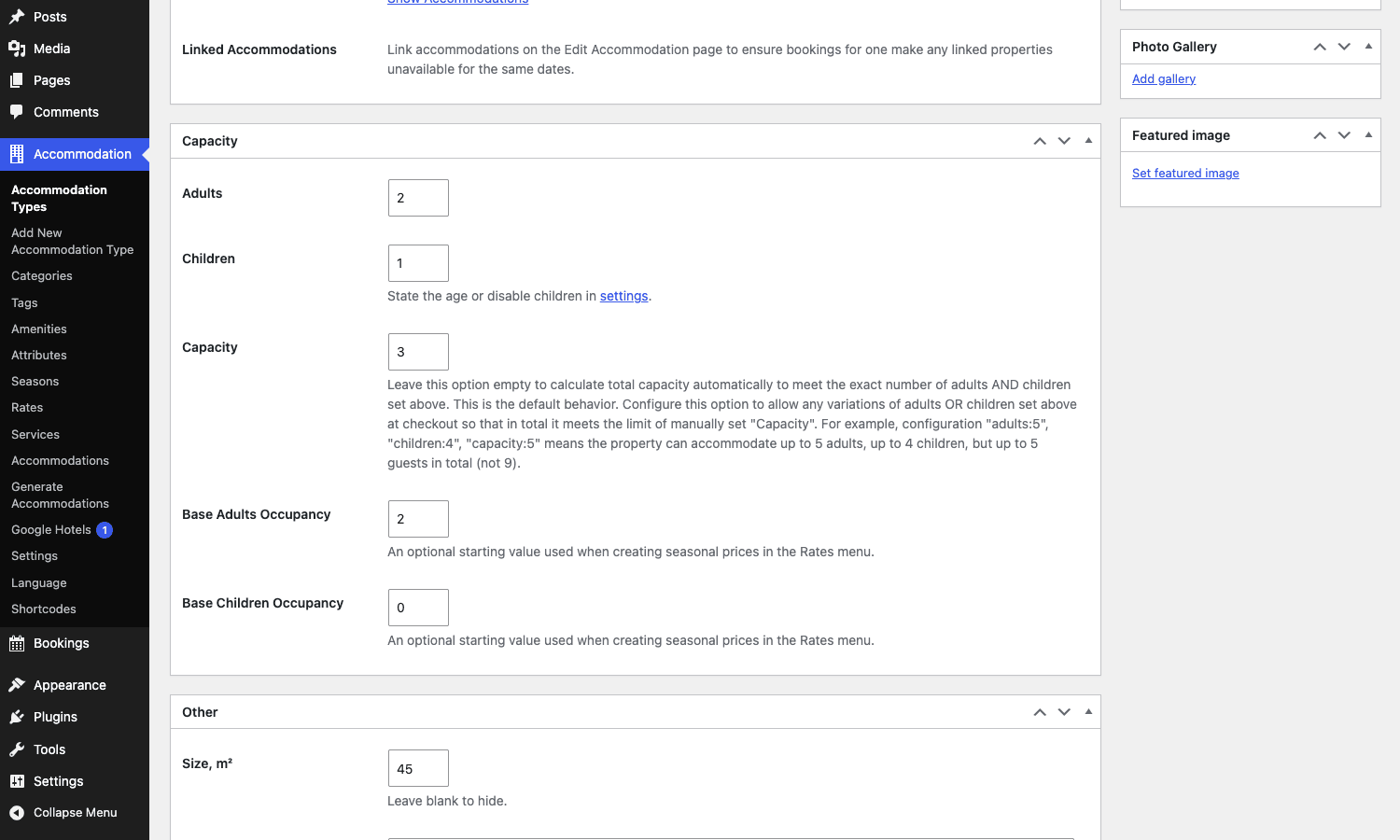
That Capacity metabox is worth a second look. "Adults" and "Children" are the per-instance limits a guest can pick at checkout. "Capacity" is the total head count allowed in one unit, which lets you express "this room sleeps up to 5 in any combination of 4 adults plus 1 kid or 3 adults plus 2 kids". "Base Adults / Base Children Occupancy" is what your rates assume in the price-per-night, so when someone adds an extra adult above the base, you can charge an extra-guest fee. Few plugins get this part right.
The booking lifecycle: search, quote, reserve, pay, confirm
Once the data is in place, the booking flow walks through five distinct states that you should know by name because that’s how the hooks, statuses, and admin notifications are organized.
- Search. The guest hits the page with
[mphb_availability_search]and picks dates plus guest count. The plugin does an availability query againstmphb_reserved_roomrecords and returns a list of Accommodation Types with at least one free instance. - Quote. The guest picks a type, optionally chooses a rate plan, and the plugin generates a per-night quote with taxes and fees applied. No inventory is held yet.
- Reserve. When the guest hits "Book Now", the plugin creates a
mphb_bookingpost inpendingstatus and a matchingmphb_reserved_roomrecord that holds the inventory. This is the moment the room comes out of the pool. - Pay. The guest goes to the checkout shortcode (
[mphb_checkout]), enters card details, and the selected gateway runs. While the payment is in flight, the booking ison_hold. There’s a "Pending Payment Time" setting (default 60 minutes) that controls how long the inventory is held. If the guest abandons, the booking flips toabandonedand the inventory comes back. - Confirm. Payment success fires
mphb_payment_completed, the booking moves toconfirmed, the customer email goes out (you can customize the template), and the admin notification firesmphb_focus_on_booking. If you’ve set "Confirmation by Admin Manually" instead, the booking stayspendinguntil you click confirm in the admin.
That five-step model is exposed everywhere. The status filter on the bookings list, the calendar color legend (Booked, Pending, External, Blocked), the email templates, the REST endpoints. Once you know the lifecycle, the rest of the admin makes sense.
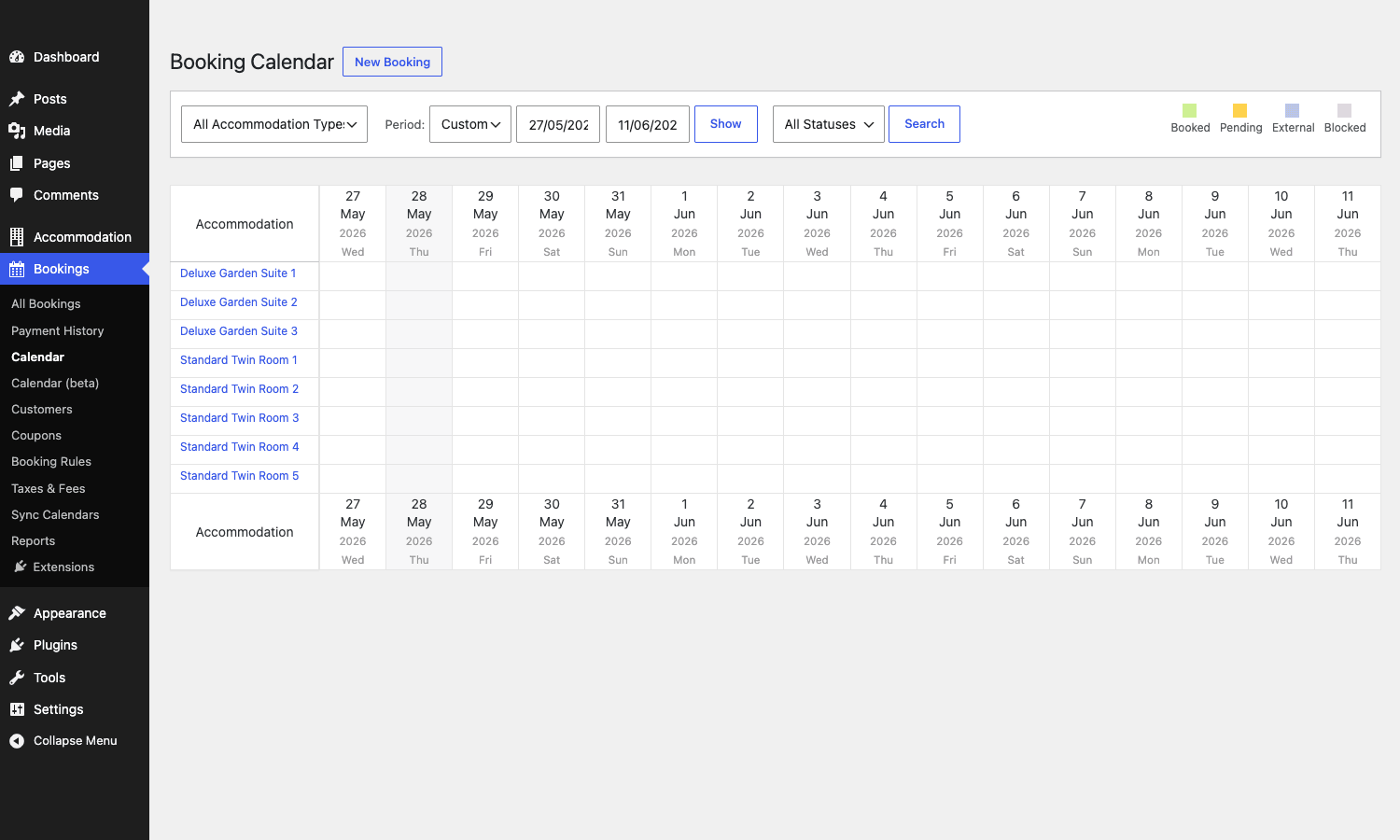
That calendar is where you’ll spend most of your time. Rows are physical rooms, columns are dates, colored cells are bookings. The color legend in the top-right is the lifecycle. Click a cell to drill into the booking, click a date in a row to manually block a unit. It’s a tool you can read at a glance.
Setting it up: a thirty-minute path from zero to a working booking
Here’s the path I’d give to someone who has never installed MotoPress Hotel Booking and wants a real, working booking site on a WordPress test instance in under an hour.
- Upload the plugin via Plugins → Add New → Upload Plugin, activate it. You’ll see two new top-level menus appear in the WordPress admin: "Accommodation" and "Bookings".
- Go to Bookings → Calendar. The plugin will show an "Install Pages" notice at the top of the screen. Click that button. It creates four pages for you in one go: Search Availability, Search Results, Booking Confirmation, Reservation Received, Transaction Failed, plus a My Account page. These pages are pre-wired with the right shortcodes, so don’t move or rename them in Pages later or things break.
- Head to Accommodation → Add New Accommodation Type. Set a title, write the description, set Adults and Children capacity, set a Size, set a Bed Type and View, upload at least one image to the Photo Gallery metabox, set a Featured Image. Save.
- Right after saving, the Accommodations metabox on the right shows "Total Accommodations: 0". Click Show Accommodations or Generate Accommodations, and create as many physical instances as you have. Three suites means three Accommodations posts.
- Go to Accommodation → Seasons and add at least one season ("Year-round" with a wide date range is fine to start, then break out "High Summer", "Christmas Week" etc later).
- Go to Accommodation → Rates and create a rate. Tie it to one or more Accommodation Types. Inside the rate, you set season pricing: in the Year-round season, charge X; in High Summer, charge Y.
- Go to Accommodation → Settings → Payment Gateways and enable at least Test Payment so you can complete a real test booking. Save.
- Open the Search Availability page on the front end of your site, pick dates, run a search, click an accommodation, fill out the checkout, complete the test payment. You should land on the Booking Confirmation page and get a confirmation email at the admin email address.
That’s it. Thirty minutes if you don’t get distracted. Once the loop works end-to-end, then you go back and enable Stripe or PayPal, customize email templates, set up booking rules, add coupons.
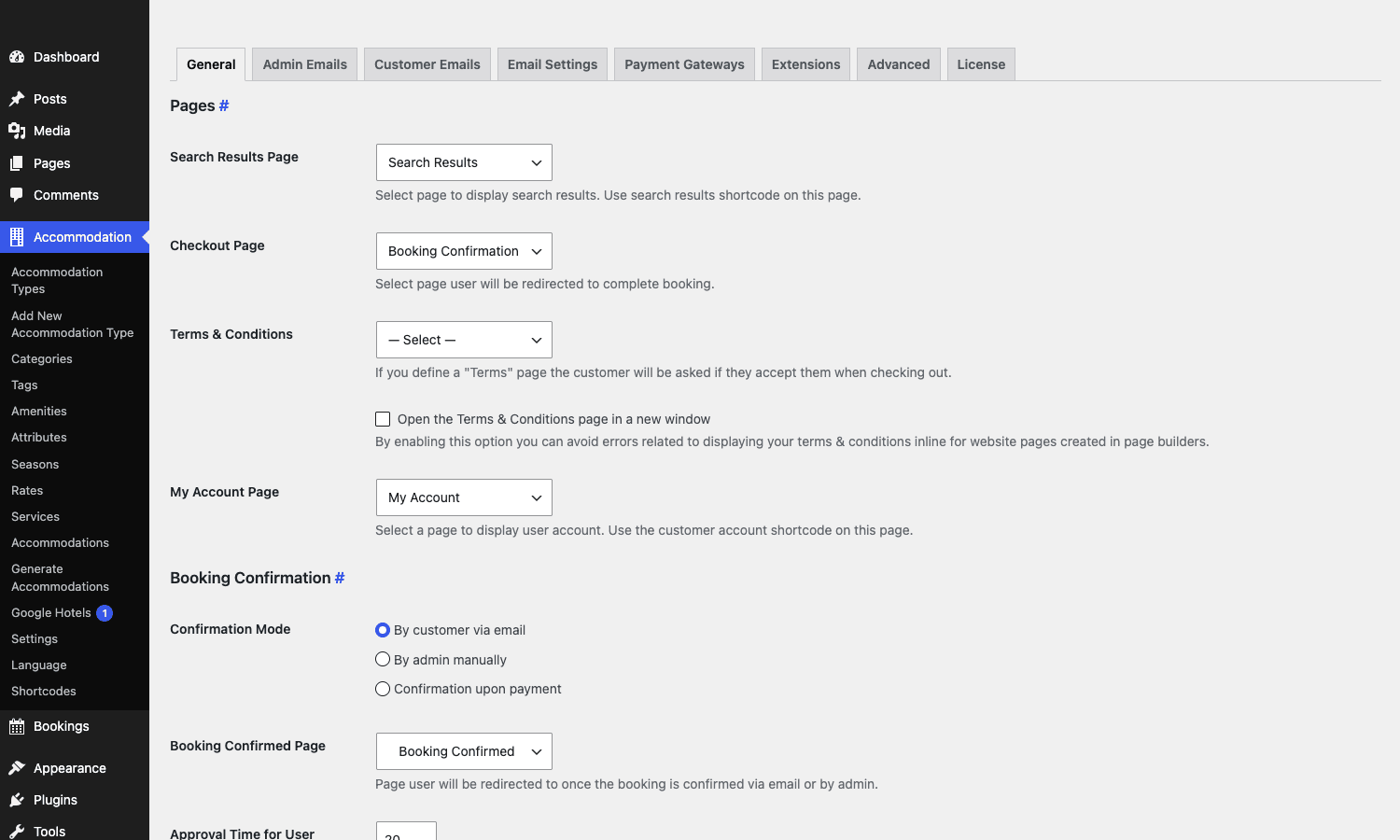
One choice on this screen deserves a callout: Confirmation Mode. "By customer via email" sends the customer a verification link they have to click before the booking is committed (useful for spam-prone properties). "By admin manually" forces every booking into a pending queue you approve from the admin (useful for a small B&B where you want to vet guests). "Confirmation upon payment" is the one most hotels want, the booking is locked the moment Stripe says yes. Pick wrong here and you’ll spend a week wondering why bookings aren’t showing up in your calendar.
Rates, seasons, and minimum-stay rules
This is where most booking plugins fall apart and MotoPress doesn’t. The pricing engine is one of the more sophisticated ones in the WordPress space, and it took me a while to internalize it.
A rate plan is a named price structure, and you can have several per accommodation type. The classic example is "Standard Rate" and "Non-Refundable Rate". The Standard might be $200/night with free cancellation up to 48 hours before check-in. The Non-Refundable is $170/night with no refund. Same room, two rate plans, the guest picks one at quote time.
Inside each rate, you define seasonal pricing. A season is a date range, and you set the per-night cost for that range. So for the Standard Rate on a Deluxe Garden Suite, you might have:
- High Season (June 1 to Sep 15): $250/night
- Shoulder (Oct 1 to Nov 30, Apr 1 to May 31): $180/night
- Low Season (Dec 1 to Mar 31): $140/night
- Christmas Week (Dec 22 to Jan 2, repeats every year): $400/night
The "repeats every year" toggle is one of the small details that saves you from rebuilding the calendar every January. The plugin’s season editor supports a repeat_period of year, so once you set a recurring season it just keeps coming back.
On top of seasonal base price you can stack per-night variations by length-of-stay (different price for 1 night vs 7 nights), per-guest pricing (charge $30 extra per adult over the base occupancy), and weekly/monthly discounts. The pricing engine is doing real arithmetic at quote time, not just multiplying a flat number by night count.
And then Booking Rules sit on top of all of that to constrain when bookings can even be made.
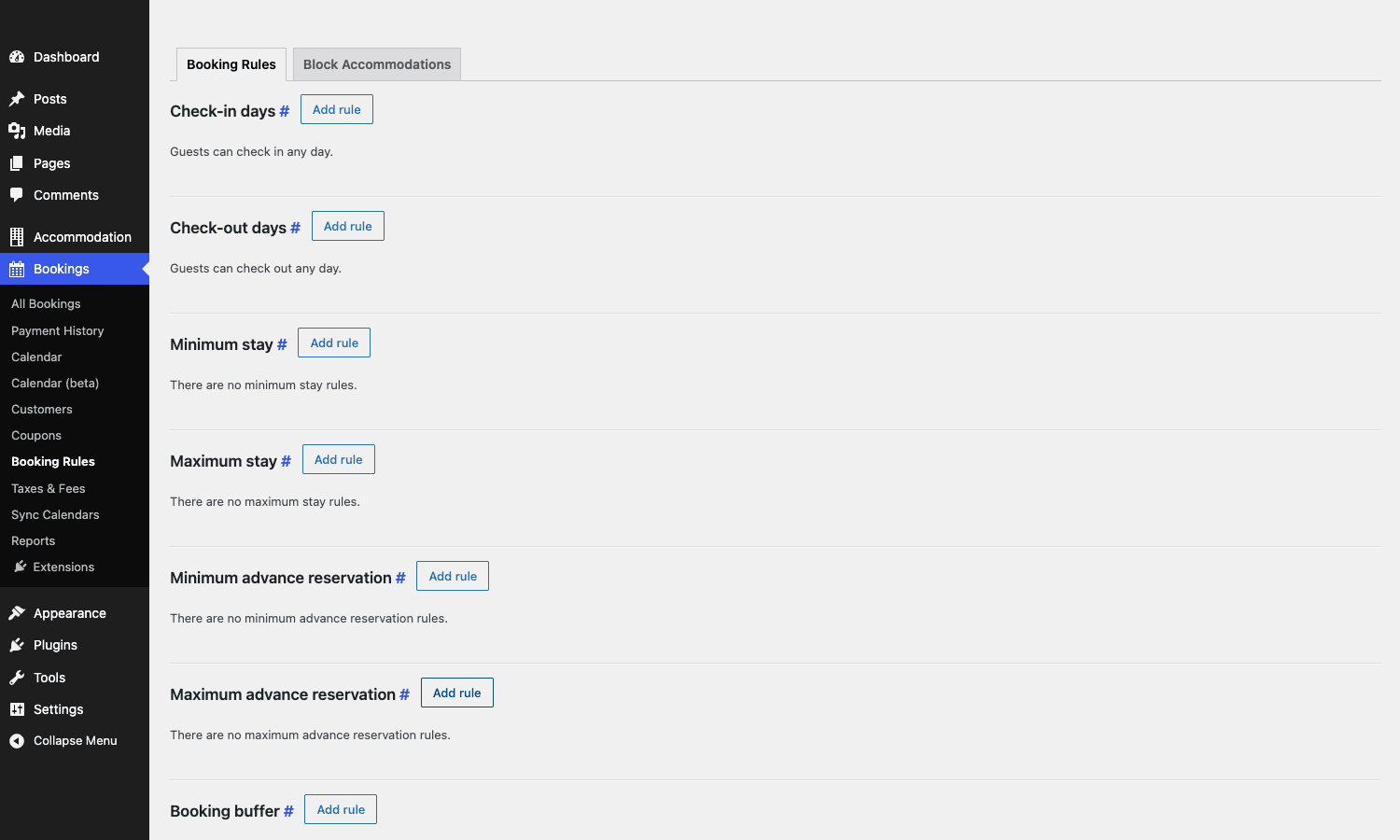
The rules are simple in concept but powerful in combination. "Check-in days = Saturday only" turns a property into a strictly Sat-to-Sat rental (common for villas). "Minimum stay = 3 nights in June, 5 nights in August" enforces high-season minimums. "Booking buffer = 1 day" forces a gap between bookings for cleaning crew. "Maximum advance reservation = 365 days" stops someone booking three years out before you’ve set your prices. Each rule can be scoped to a season and to specific accommodation types, so you can have wildly different rules per villa on the same site.
Payment gateways and deposit policies
Out of the box you get a respectable list of gateways. Stripe (cards plus Apple Pay / Google Pay via the Payment Element), PayPal, Braintree, 2Checkout, Beanstream/Bambora, Direct Bank Transfer, Pay on Arrival (cash on check-in), and a Test gateway for sandbox runs.
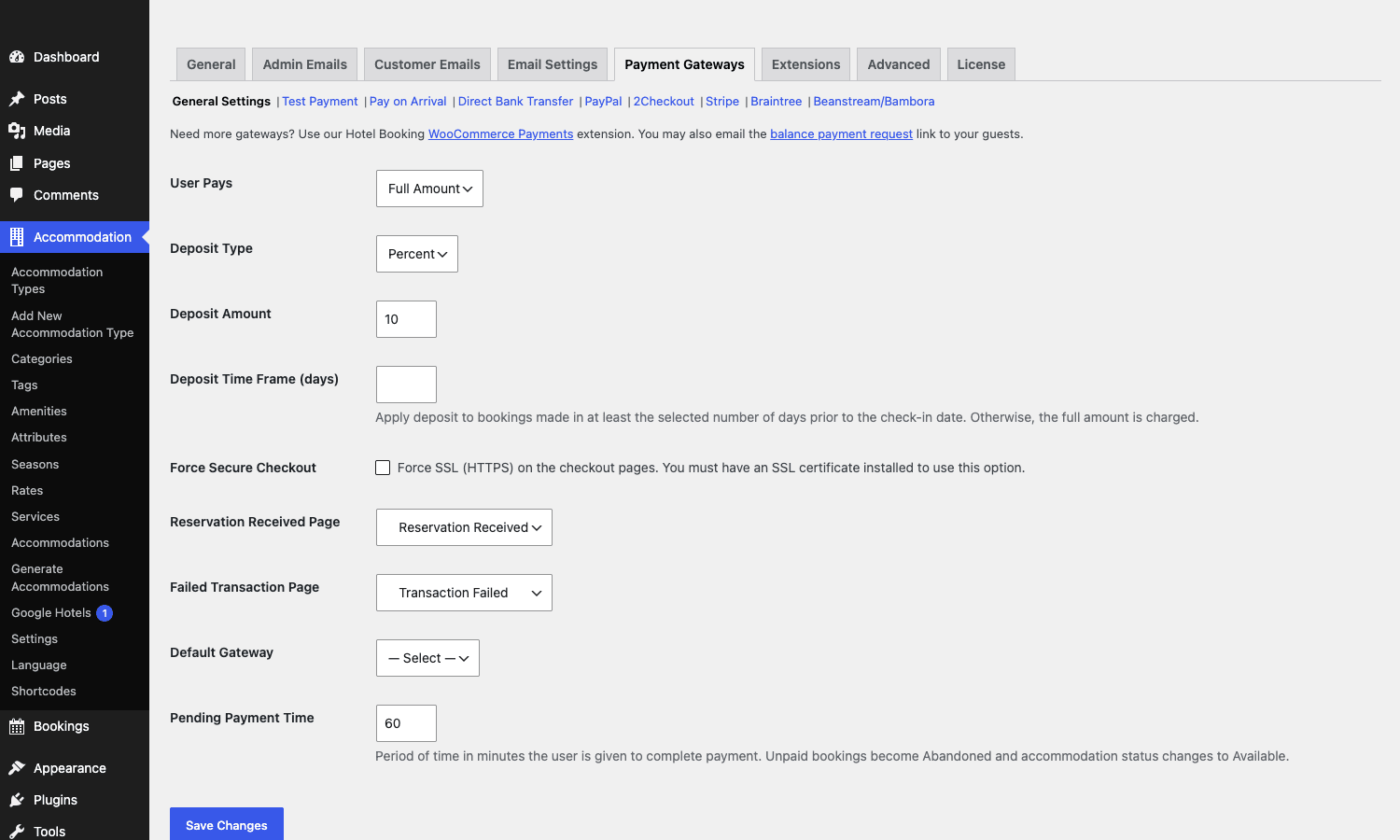
What’s interesting is the deposit policy section above the gateway list. You can set "User Pays = Full Amount" (charge the whole stay at booking), "Full or Deposit" (let the customer choose), or "Deposit". Deposit type is a percent or a flat amount. Deposit Time Frame is a "only require a deposit if the booking is at least N days before check-in" rule, which is exactly what you want: a six-month-out booking takes a 10% deposit, a three-days-out booking takes the full amount.
That deposit model is one of the reasons not to try to wedge hotel bookings into WooCommerce. WooCommerce doesn’t natively understand "deposit now, balance later", and the plugins that try to bolt it on are fragile. MotoPress treats deposits as a first-class concept and the rest of the checkout adapts.
For Stripe specifically, the integration uses Stripe’s Payment Element (the newer UI) so you get SCA-compliant 3D Secure flows for free. Refunds inside Hotel Booking trigger real Stripe API refunds, which is something the bargain-bin plugins skip. PayPal is the standard "redirect to PayPal then come back" flow. Braintree and 2Checkout are similar redirect-back patterns.
iCal sync with Airbnb, Booking.com, and Vrbo
This is probably the headline feature for anyone selling on multiple platforms. MotoPress exposes one iCal export feed per physical accommodation, and accepts external iCal feeds to import. So if you list a villa on Airbnb, Booking.com, and your own MotoPress site, you can keep all three calendars roughly in sync without manually copying dates.
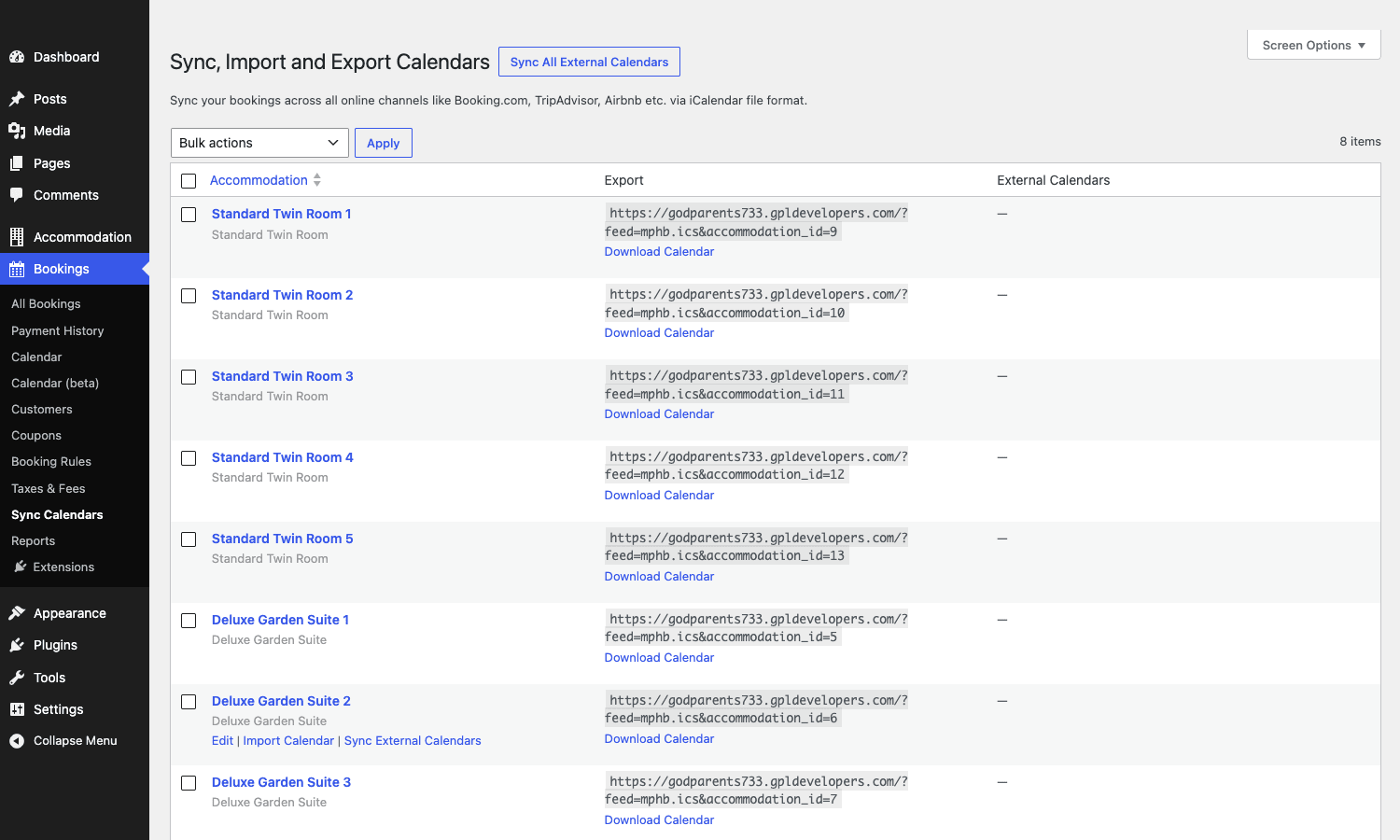
The grid is exactly what you’d hope for. Each row is a physical room. The Export column is the read-only iCal feed URL you paste into Airbnb’s "Sync calendars" and Booking.com’s "iCal" import field. The External Calendars column is where you paste the URLs from Airbnb, Booking.com, Vrbo, going the other direction. The plugin polls those URLs on a schedule, parses any new external bookings, and creates mphb_booking records with status imported so they block the inventory in MotoPress.
Some honest words about this. iCal sync is not real-time. The polling interval defaults to once an hour, and the receiving platforms (Airbnb, Booking.com) only poll your export feed every two hours or so. So there’s always a window where a booking on platform A hasn’t yet reached your calendar before someone books on platform B. This is true of every iCal-based sync product, not a MotoPress flaw. The mitigation is in the "Don’t sync iCal both ways without a buffer" section below.
If you need true real-time sync with rate push, MotoPress sells a separate Channel Manager service (paid SaaS) that uses direct API connections to Booking.com and Airbnb. That’s outside the scope of the GPL plugin, but worth knowing it exists if you outgrow iCal.
Multi-property setups on one WordPress install
The plugin is built assuming one WordPress install runs one hotel. You can stretch that to one WordPress install runs multiple types of rooms in one property (which is the common case), but if you’re running a chain with three independent hotels (separate front desks, separate ownership, separate tax setups), the supported answer is WordPress multisite with the plugin activated per subsite, and a mphb_multisite_limit filter that controls the activation cap. Default is 100 sites, which is fine for any chain that fits in a WordPress multisite anyway.
You can fudge it with categories and accommodation tags if you really want one site to look like three. Use Accommodation Categories to group rooms under "Property A" and "Property B", build separate landing pages with [mphb_rooms category="property-a"], run separate search forms. The inventory is still shared in one calendar though, and the bookings list mixes them. If you want clean separation, use multisite.
Don’t sync iCal both ways without a buffer
The number one way to get a double-booking with MotoPress (or any iCal-based system) is to set up two-way sync between MotoPress and Airbnb, MotoPress and Booking.com, and accept full payment on the MotoPress side without a buffer. Here’s how that fails, with real-world numbers.
Airbnb’s outbound iCal feed updates roughly every two hours. Booking.com’s updates roughly every thirty minutes to an hour. MotoPress polls external feeds on the interval you set (default sixty minutes). That means there’s a worst-case window of around three hours between "a booking happens on Airbnb" and "MotoPress notices and blocks the inventory". In that three-hour window, anyone hitting your search form sees the same dates as available. They can book. They can pay. You now have two confirmed bookings for one physical room.
I’ve seen this happen on a five-villa property. A guest booked on Booking.com at 14:02 on a Tuesday, paid in full. Another guest booked the same villa for the same dates on the MotoPress site at 15:47, also paid in full. Booking.com’s feed didn’t update MotoPress until 16:20. Both guests got confirmation emails. The owner refunded the second guest, ate a chargeback fee plus the difference in card-processing cost (around $42 on a $1,400 booking), spent an hour writing the "we are so sorry" email, and Booking.com’s review system marked the cancelation against her future ranking. Total cost of a single double-booking: roughly $200 and three hours.
Mitigations that work. First, set a Booking Buffer of at least one day on every accommodation type in MotoPress. That gives you a cushion for sync delay even if everything else fails. Second, require a deposit, not full payment, on bookings made within 24 hours of check-in so a chargeback hurts less. Third, if you absolutely need true real-time inventory, the iCal model is not enough and you should look at MotoPress Channel Manager, Cloudbeds, or another API-direct sync service. Don’t sync iCal both ways without a buffer. The math doesn’t work in your favor.
Hotel Booking vs WooCommerce Bookings vs Amelia vs JetBooking
This is the comparison I get asked most often, so here are the numbers. All four sell on the GPL Times store, all four are GPL-licensed builds.
Inventory model. MotoPress models accommodation types and physical instances separately, which is essential for hotels and impossible to fake in WooCommerce. WooCommerce Bookings sees each booking as a WooCommerce product variation, which works for appointments and rentals but starts to creak when you have five Deluxe Suites that share a pool of inventory. Amelia is purpose-built for appointments (haircuts, dentist slots) and doesn’t model multi-night rentals well at all. JetBooking (the Crocoblock plugin) is a flexible date-range booker that you have to assemble yourself from JetEngine custom post types and a fair amount of glue logic. MotoPress gives you the data model out of the box.
Plugin weight on a fresh install. The MotoPress Hotel Booking plugin zip is around 9 MB, gzipped. WooCommerce Bookings is around 5 MB but requires WooCommerce itself (another 18 MB), so the real footprint is 23 MB. Amelia is the heaviest at around 22 MB on disk. JetBooking is around 4 MB but it requires JetEngine and Elementor underneath, easily 30+ MB combined. So MotoPress is the lightest setup that gives you a full hotel engine without dragging in WooCommerce or a page builder.
Date math support. Multi-night stays with seasonal pricing: MotoPress yes, WooCommerce Bookings yes, Amelia no (designed for hours, not nights), JetBooking yes but you build the price logic yourself.
Vendor cadence. MotoPress ships updates every two to four months. The plugin has been actively maintained for well over a decade. WooCommerce Bookings updates on a slower cycle, roughly six to eight months between releases. Amelia ships quarterly. JetBooking moves with the wider Crocoblock release train, monthly minor versions.
Price (vendor direct, for reference). MotoPress is around $99/year retail. WooCommerce Bookings is $249/year. Amelia ranges $54 to $284/year by tier. JetBooking is bundled into Crocoblock’s $199/year Crocoblock All-Inclusive subscription. The GPL-licensed copies on the GPL Times store give you the same code for the cost of the GPL store membership.
For a hotel, villa, or guest house, MotoPress is the right answer. For an appointment-based service business (consultations, salon, therapy), Amelia or Bookly makes more sense. For a flexible custom date booker that you’ll build into an existing Crocoblock site, JetBooking earns its place.
Developer reference: hooks, filters, REST
This is the section the developer who’s going to maintain the site cares about. I’ve grouped them by what you’re trying to do.
Custom post types you’ll query
$args = array(
 'post_type' => 'mphb_room_type',
 'posts_per_page' => -1,
 'tax_query' => array(
 array(
 'taxonomy' => 'mphb_room_type_category',
 'field' => 'slug',
 'terms' => 'villa',
 ),
 ),
);
$villas = new WP_Query( $args );
The post types are mphb_room_type (accommodation types), mphb_room (physical units), mphb_booking (booking records), mphb_reserved_room (booking lines), mphb_payment (payment records), mphb_rate (rate plans), mphb_season, mphb_coupon, mphb_room_service (paid add-ons). Taxonomies are mphb_room_type_category, mphb_room_type_tag, mphb_room_type_facility (amenities), plus a dynamic per-attribute taxonomy for things like "bed type" or "view".
React to a confirmed booking
When a payment completes and the booking is locked in, this fires:
add_action( 'mphb_payment_completed', function( $payment ) {
 $booking_id = $payment->getBookingId();
 $booking = MPHB()->getBookingRepository()->findById( $booking_id );
 if (! $booking ) {
 return;
 }
 $email = $booking->getCustomer()->getEmail();
 $check_in = $booking->getCheckInDate()->format( 'Y-m-d' );
 $check_out = $booking->getCheckOutDate()->format( 'Y-m-d' );
 do_your_crm_sync( $email, $check_in, $check_out, $payment->getAmount() );
} );
mphb_focus_on_booking fires whenever a booking enters the "focus" state (a new pending one, or one that just got confirmed). It’s the right hook for "send a Slack message when a new booking lands":
add_action( 'mphb_focus_on_booking', function( $booking ) {
 $msg = sprintf(
 'New booking #%d: %s, %s to %s',
 $booking->getId(),
 $booking->getCustomer()->getName(),
 $booking->getCheckInDate()->format( 'M j' ),
 $booking->getCheckOutDate()->format( 'M j' )
 );
 wp_remote_post( 'https://hooks.slack.com/services/XXX/YYY/ZZZ', array(
 'body' => wp_json_encode( array( 'text' => $msg ) ),
 'headers' => array( 'Content-Type' => 'application/json' ),
 ) );
} );
React to iCal events
When an external iCal feed delivers a booking from Airbnb or Booking.com, mphb_create_booking_via_ical fires:
add_action( 'mphb_create_booking_via_ical', function( $booking ) {
 error_log( sprintf(
 'iCal import: booking %d, source feed: %s, dates %s -> %s',
 $booking->getId(),
 $booking->getMeta( '_mphb_ical_source' ),
 $booking->getCheckInDate()->format( 'Y-m-d' ),
 $booking->getCheckOutDate()->format( 'Y-m-d' )
 ) );
} );
When MotoPress builds its outbound feed for a specific room, mphb_export_room_calendar fires:
add_action( 'mphb_export_room_calendar', function( $calendar, $room_id, $args ) {
 // You can attach extra VEVENT lines to the calendar before it's served.
}, 10, 3 );
You can also kill sync runs entirely with the mphb_block_sync filter, useful for staging environments that copy production data:
add_filter( 'mphb_block_sync', function() {
 return defined( 'WP_ENV' ) && 'staging' === WP_ENV;
} );
Customize templates
MotoPress uses a template-loader pattern lifted from WooCommerce. Drop a file at wp-content/themes/your-theme/hotel-booking/single-room-type.php and the plugin will use it instead of its own. The template path is filterable:
add_filter( 'mphb_template_path', function() {
 return 'hotel-engine/'; // now use yourtheme/hotel-engine/* instead
} );
To swap a single template programmatically:
add_filter( 'mphb_get_template_part', function( $template, $slug, $atts ) {
 if ( 'single-room-type/gallery' === $slug ) {
 return WP_CONTENT_DIR. '/mu-plugins/my-room-gallery.php';
 }
 return $template;
}, 10, 3 );
Customize schema markup
MotoPress emits Hotel / Hostel JSON-LD on single accommodation pages. You can adjust the microdata payload before render with:
add_filter( 'mphb_single_room_type_microdata', function( $microdata, $room_type_id, $room_type ) {
 $microdata['starRating'] = array(
 '@type' => 'Rating',
 'ratingValue' => '4.5',
 );
 $microdata['petsAllowed'] = false;
 return $microdata;
}, 10, 3 );
This is one of the reasons MotoPress sites do well on Google Hotels: the JSON-LD is correct out of the box and you can customize it without editing template files.
REST API
The REST namespace is mphb/v1. Endpoints map onto the post types. To list accommodations:
curl -u username:application_password \
 https://yoursite.com/wp-json/mphb/v1/accommodation_types
To create a booking via REST:
curl -u username:application_password \
 -X POST https://yoursite.com/wp-json/mphb/v1/bookings \
 -H 'Content-Type: application/json' \
 -d '{
 "check_in_date": "2026-07-15",
 "check_out_date": "2026-07-18",
 "reserved_accommodations": [
 { "accommodation_type": 42, "adults": 2, "children": 0 }
 ],
 "customer": {
 "first_name": "Asha",
 "last_name": "Kumar",
 "email": "asha@example.com"
 }
 }'
You authenticate with WordPress Application Passwords or with MotoPress’s own REST API Keys (see Accommodation → Settings → Advanced → REST API). The keys give you per-key read/write/delete permissions, which is what you want when you’re integrating a mobile app or a third-party CRM.
Filterable REST behavior includes mphb_rest_check_permissions (override the permission gate), mphb_rest_batch_items_limit (default 100), mphb_rest_query_vars (whitelist extra query vars). The dynamic action mphb_rest_insert_{post_type} fires after a REST POST creates a record, so mphb_rest_insert_mphb_booking is the hook for "react to a REST-created booking".
Customer email template merge tags
The customer email template editor uses simple percent-wrapped tags. Useful ones to know:
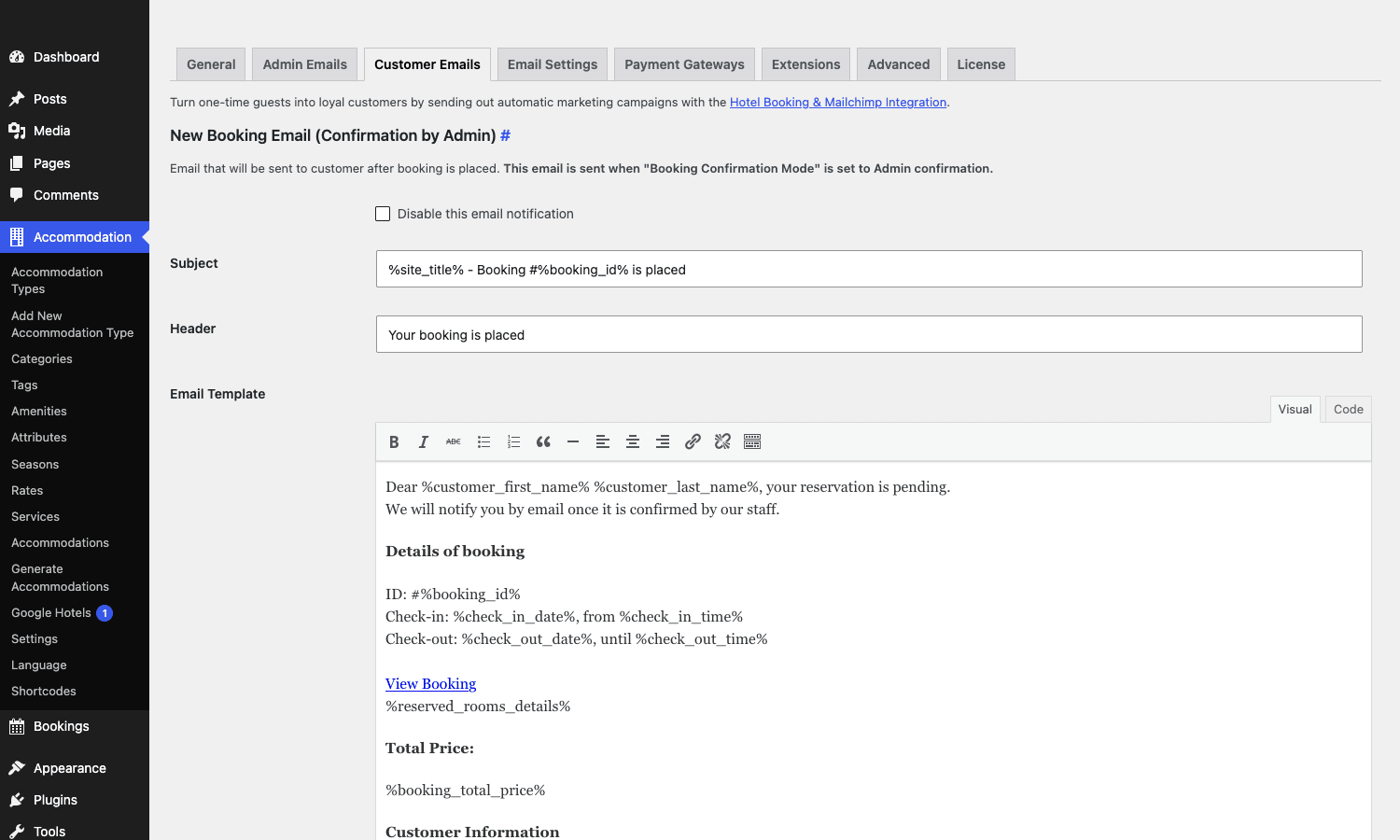
%customer_first_name%, %customer_last_name%, %customer_email%, %booking_id%, %check_in_date%, %check_out_date%, %check_in_time%, %check_out_time%, %reserved_rooms_details%, %booking_total_price%, %booking_deposit_amount%, %booking_balance_amount%. Wrap any of those in your template and the plugin substitutes at send time.
Performance, compatibility, and the things that bite
This section is the unvarnished list of gotchas I’ve hit, the kind of things that take a day to debug if no one warns you.
The flatpickr datepicker conflicts with bot calendars. MotoPress uses jQuery datepick under the hood, while many WordPress themes load flatpickr or a different date library. If both initialize on the same input, the date format silently breaks and the search form sends an invalid date to the server. Fix: dequeue the theme’s calendar JS on pages that use the MotoPress search shortcode.
Pages must not be moved. The Search Availability, Search Results, Checkout, Booking Confirmation, and Reservation Received pages are referenced by ID in Hotel Booking Settings. If you "tidy up" Pages and accidentally trash one of these, the front-end booking flow throws errors with no clear message. Recovery: go to Accommodation → Settings → General and reassign the page dropdown.
Caching plugins need to exclude checkout pages. If WP Rocket caches your Checkout page, every guest sees a stale CSRF nonce and bookings silently fail to submit. Add the checkout page slug, the my-account page slug, and the search-results page slug to your caching plugin’s "never cache these URLs" list. Same goes for Cloudflare APO.
WPML works, but only for the front-end strings. Booking dates, customer info, and admin emails come through fine in the configured user language. Admin notifications are always in the site’s default language regardless of where the booking came from. If you need translated admin emails (multilingual operations team), you’ll need to template those manually.
Multisite scaling caps at 100 by default. If you’re running a chain with more than 100 properties on a single multisite network, you’ll hit the mphb_multisite_limit ceiling. Bump it with the filter shown earlier.
iCal poll interval is global, not per-feed. You can’t set "poll Booking.com every 30 minutes but Airbnb every 2 hours" through the UI. It’s one global interval. If you need per-feed scheduling, you can re-implement with wp_schedule_event against the importer class.
Database row growth. Every booking creates one mphb_booking post, one mphb_reserved_room post (or more, if the booking spans multiple rooms), and one mphb_payment post per payment attempt. A property doing 50 bookings a month adds roughly 200 rows a month to wp_posts plus their postmeta. After three years that’s around 7,200 rows. WordPress handles this fine, but if you’re running on a 256MB shared host, watch your database size.
Stripe SCA flows can timeout. The default Stripe payment timeout is 60 minutes (controlled by the "Pending Payment Time" general setting). On a 3D Secure challenge that pops up an SMS code, guests sometimes take longer than the 60-minute window to enter the code. The booking flips to abandoned, the inventory is released, the guest comes back with their 3DS code and the page errors. Bump Pending Payment Time to 120 minutes if you serve regions with slow SMS delivery.
FAQ
Will MotoPress Hotel Booking replace my Property Management System?
No, and it doesn’t try to. MotoPress is a booking engine for the public-facing website. It handles search, availability, reservations, payments, customer emails. It doesn’t handle housekeeping schedules, daily reports, room status updates from the front desk, payroll, supplier invoices, or POS integration. If you’re a hotel with operations beyond "take bookings online", you keep your PMS (Cloudbeds, Mews, Little Hotelier) and use MotoPress to power the website’s booking flow. Many properties run both, with the PMS as source of truth and MotoPress feeding it via iCal or API.
How does Hotel Booking handle overbookings from iCal sync?
It doesn’t, because the iCal protocol has no inventory locking. Two systems can confirm bookings for the same room in the same window because they’re each making decisions on stale data. MotoPress will block the inventory as soon as it imports the external booking, but there’s a sync delay where both sides think the room is free. The mitigations are in the "Don’t sync iCal both ways without a buffer" section above. If you can’t tolerate any double-booking risk, iCal isn’t enough and you need an API-direct channel manager.
Can a guest book multiple rooms in one reservation?
Yes, the booking model supports multiple mphb_reserved_room records per mphb_booking. The cart UX for selecting multiple rooms in one transaction is workable but rough. The guest finds room A, adds it, goes back to search for room B, adds it, then checks out. It’s two clicks more than I’d want and the back-button behavior is fragile. If your typical booking is a family taking three rooms, MotoPress will do it but consider a custom checkout template.
Does Hotel Booking work with Stripe Connect for multi-property hosts?
Not in the way Airbnb-clone vendors use Stripe Connect. The Stripe gateway in MotoPress is a standard direct integration, one Stripe account per WordPress install. If you’re building a marketplace where each property owner has their own Stripe account and gets paid directly, you need to extend the gateway. The free WooCommerce Hotel Booking & MotoPress Channel Manager extensions don’t add Connect either. Roll your own or pick a different platform if you need true marketplace payments.
Will it work with my existing WordPress theme?
Probably. The plugin’s templates are designed to render inside any theme’s content area, and the front-end CSS is namespaced under .mphb- classes. The two failure modes are: themes that override the page template completely (looking at you, certain Bricks templates) and themes with aggressive CSS reset that crushes the booking form styling. Switch to a default theme for ten minutes to confirm if the issue is your theme or the plugin.
Does the search engine see my room pages?
Yes. Accommodation Types are publicly published custom post types with the rewrite slug accommodation. The single-accommodation template emits Hotel/Hostel schema markup as JSON-LD. They show up in Google Search and (with the Google Hotels extension MotoPress sells) they can also surface in Google Hotels listings. Pair this with Yoast SEO Premium or Rank Math and you get clean titles and breadcrumbs across all accommodation pages.
Can I sell paid add-ons like breakfast or airport pickup at checkout?
Yes. The mphb_room_service post type is exactly for this. Create a service ("Continental breakfast, $15 per person per day"), set whether it’s per-night or one-off, set whether the guest can opt in or it’s mandatory, attach it to one or more accommodation types. At checkout, the guest sees the service as a checkbox. Refunds on cancellation work correctly with services attached.
What happens to existing bookings if I delete an accommodation type?
Bookings store the accommodation type ID and a snapshot of the room name at booking time. If you delete the type, existing bookings still display correctly (they show the snapshot). But future searches can’t book that type because it doesn’t exist anymore. Best practice: deactivate the type instead of deleting (set the physical units to "trashed" but keep the type post).
is GPL-licensed the same as buying from MotoPress directly?
Yes, the code is identical, that’s what GPL means. The difference is no support contract from MotoPress (you get community + GPL Times support instead) and updates come through the GPL Times update channel rather than the vendor’s licensed update server. The plugin will keep working without an active vendor license, which the boilerplate code in the main plugin file confirms.
There’s no version-locked update grace period either. New releases land on the GPL Times store as MotoPress publishes them.
You can install the MotoPress Hotel Booking from GPL Times on a staging WordPress instance, run a real test booking end-to-end, and decide whether the data model fits your property before you commit to it as the engine for the next three years.