

You want your members, contributors, or customers to submit content, but the only way WordPress offers out of the box is to hand them a login to wp-admin. That’s a bad trade. Give someone the Author role and they can see your drafts, poke at settings, and land in a dashboard that confuses them and worries you.
WP User Frontend Pro exists to close that gap. It lets people register, edit their profile, submit posts, and manage everything they’ve created entirely from the front end of your site, while they stay a plain Subscriber with no backend access. It’s built by weDevs (the team behind Dokan), and the Pro version turns that core idea into a full system for user-generated content, paid submissions, and memberships.
I set it up on a clean install and worked through the form builder, the subscription packs, the modules, and the developer hooks. Here’s everything it does, where it’s genuinely useful, and the one thing you must not get wrong.
Table of Contents
- What WP User Frontend actually is
- The frontend post form builder
- Registration and profile forms
- Subscriptions: charging for posts and access
- Content restriction and the member directory
- What your users actually see
- The 21 modules, and which ones matter
- Settings worth knowing
- Setting it up without regrets
- Five sites WP User Frontend is built for
- Don’t give untrusted users a backend role
- WPUF vs Ultimate Member vs Profile Builder
- Developer reference: shortcodes and hooks
- Performance, compatibility, and gotchas
- FAQ
- Final thoughts
What WP User Frontend actually is
WP User Frontend (WPUF for short) is a frontend content and user-management plugin from weDevs. The free version on WordPress.org handles the basics; the Pro version, which is the "paid module" that extends it, adds the form builder fields, subscriptions, payments, content restriction, and a stack of integrations. Pro needs the free base installed alongside it, so think of them as one product in two parts.
The core idea is simple and it’s the whole reason to use it: everything your users do happens on the front end. They sign up through a form on a page, not wp-login. They write a post through a form on a page, not the WordPress editor. They edit their profile and see their submissions on a front-end dashboard, not the admin. To WordPress, they’re just Subscribers, which means they can’t reach anything you don’t explicitly show them.
Around that, Pro adds the money and the polish: charge for submissions, sell membership packs that unlock posting or content, restrict who sees what, and connect the whole thing to your email and CRM tools.
The short version: if you need users to create or access content without handing them the keys to your dashboard, WP User Frontend is the plugin built for that exact job.
The frontend post form builder
The heart of WPUF is the post form builder. You create a form, drop it on a page with a shortcode, and logged-in users (or guests, if you allow it) submit posts through it.
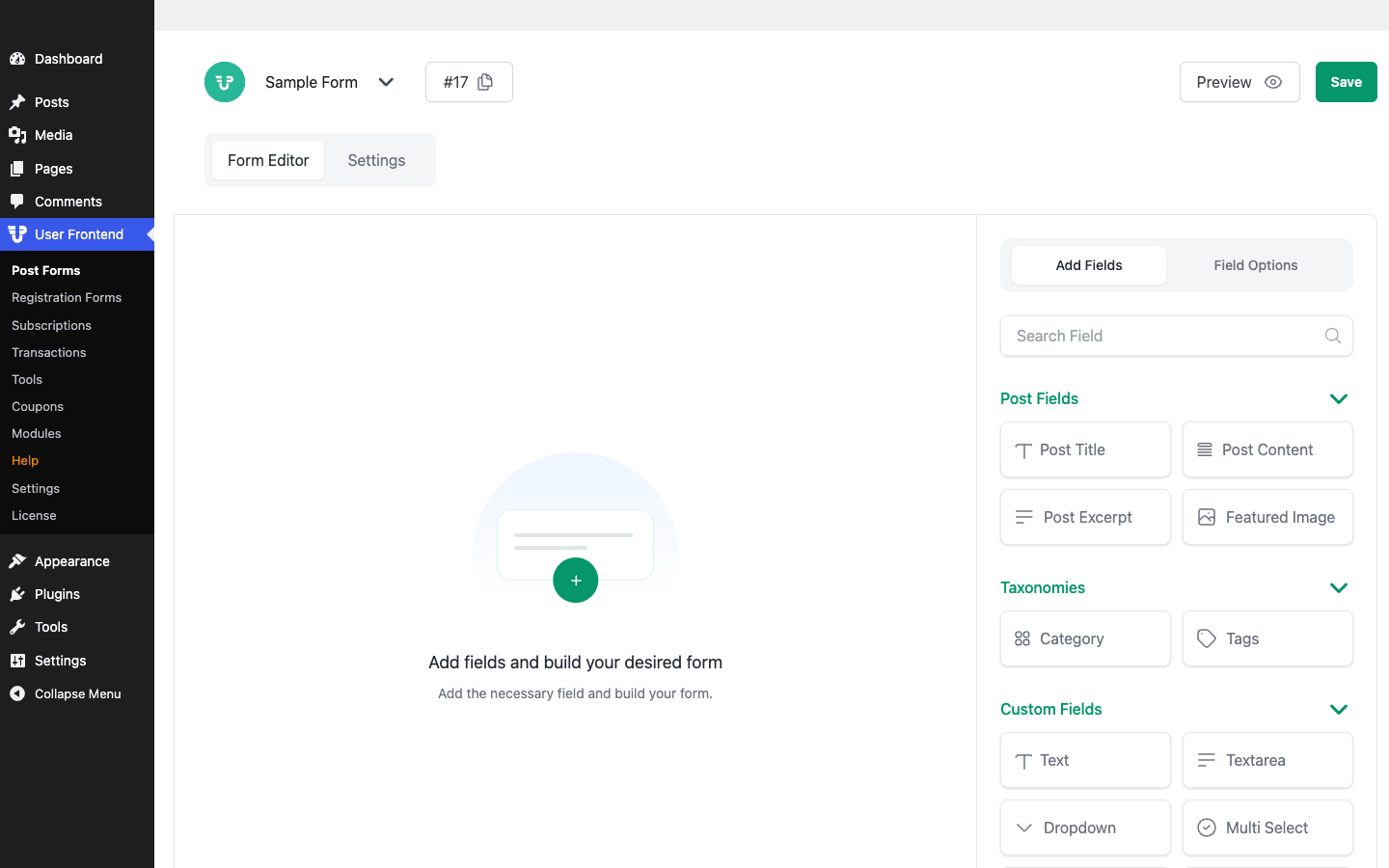
The builder is drag-and-drop, with a field panel grouped into three buckets:
- Post Fields map straight to the post: Post Title, Post Content, Post Excerpt, and Featured Image.
- Taxonomies let submitters pick a Category or Tags.
- Custom Fields add anything else: Text, Textarea, Dropdown, Multi Select, and more, each of which saves as post meta you can display in your template.
You’re not starting from a blank page, either. WPUF ships a library of pre-made form templates so you pick the closest one and adjust.
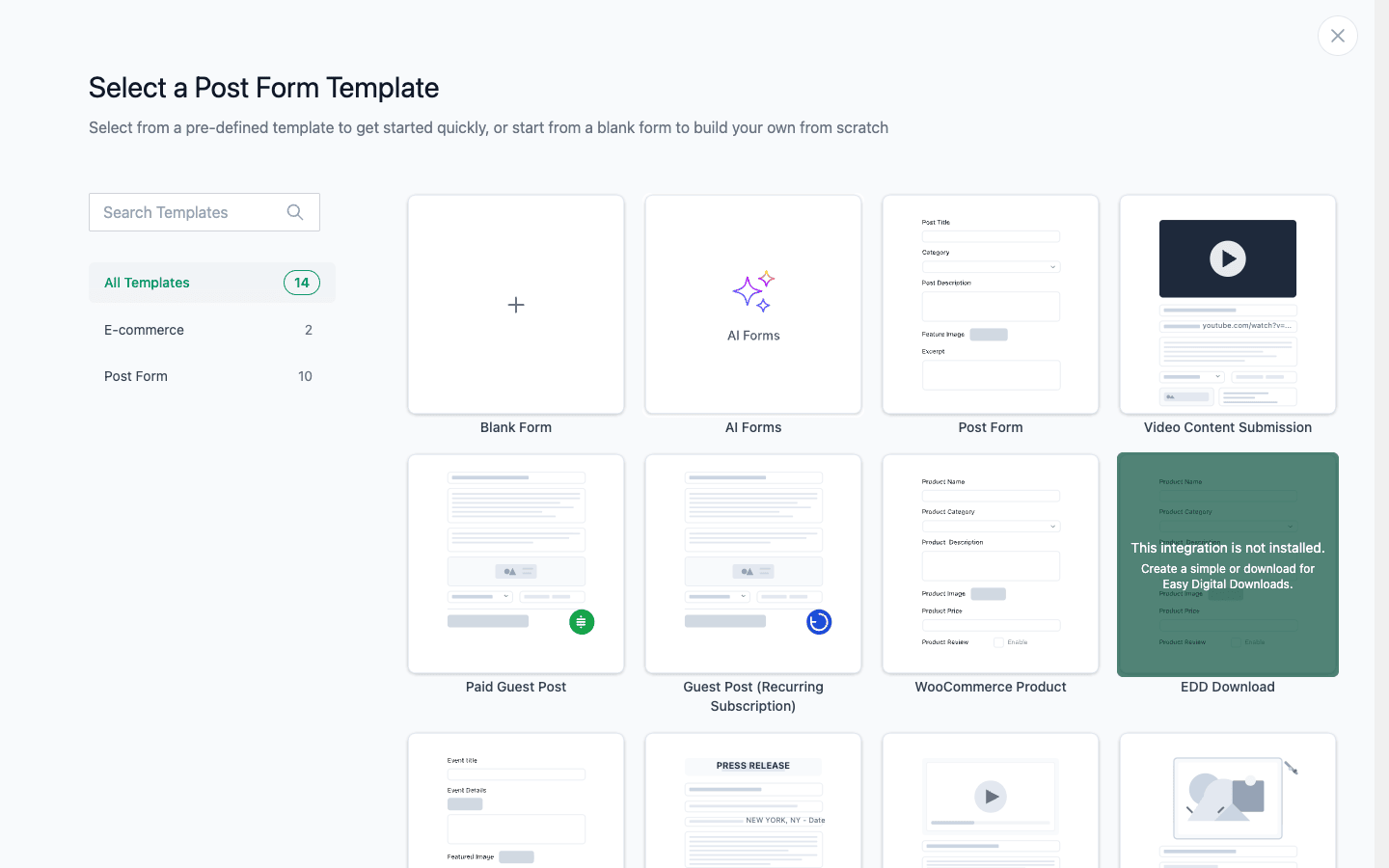
The template picker covers the common jobs: a plain Post Form, a Paid Guest Post, a Guest Post with a recurring subscription, a WooCommerce Product submission (so vendors add products from the front end), an EDD Download, a Video Content Submission, an Event, a Press Release, and a blank form to build your own. There’s even an AI Forms option that drafts a form from a prompt.
Two builder features lift it above a basic form plugin. Conditional logic shows or hides fields based on earlier answers, so a "listing type" dropdown can reveal different fields for a job versus a product. And multi-step forms break a long submission into tabs with a progress bar, which dramatically improves completion rates on anything longer than a few fields. You can also set per-field validation, placeholder text, and whether a field is required.
The builder maps everything to real WordPress data. A custom Text field becomes post meta under a key you choose, a Dropdown can populate from a taxonomy, and the Featured Image field handles the upload and attachment for you. That means the content users submit is normal WordPress content you can query, template, and export like anything else, not locked inside the plugin.
The catch worth knowing: submitted posts should land as Pending, not Published, so you review before anything goes live. WPUF supports that, but it’s a setting you have to get right (more on why in the anti-pattern section).
To put a form on a page, you use a shortcode like [wpuf_form id="123"]. That’s the only place it appears; everywhere else the form is just a normal page.
Registration and profile forms
Posting is half the story. The other half is getting users registered and letting them manage themselves, again without wp-admin.
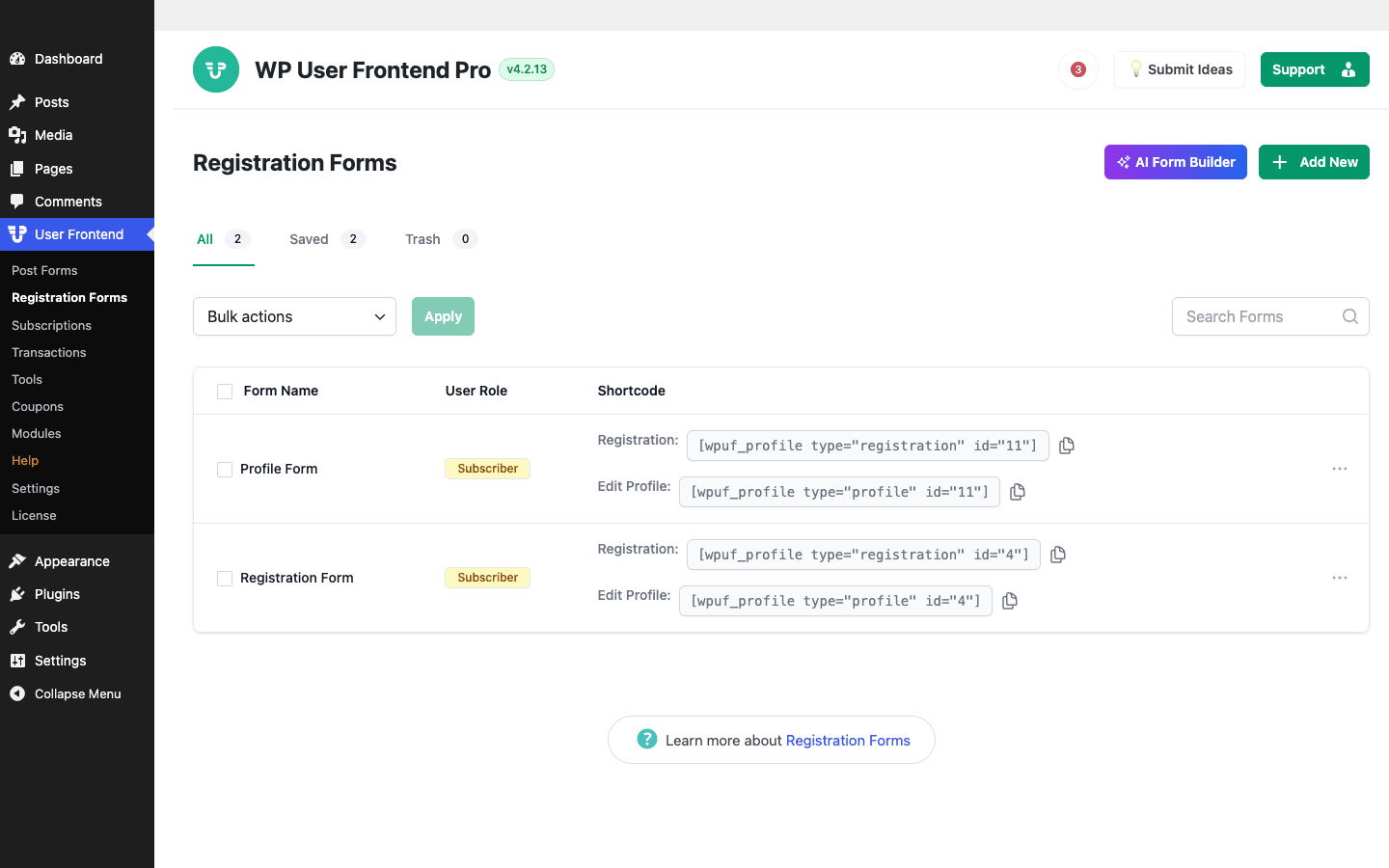
WPUF gives you a separate Registration Forms builder (technically profile forms, since the same form handles signup and editing). You design the fields a new user fills in, assign the user role they get (keep it Subscriber), and drop it on a page. The same form, in a different mode, becomes the user’s profile editor.
The shortcodes make this concrete. A form exposes two: [wpuf_profile type="registration" id="11"] for the signup page and [wpuf_profile type="profile" id="11"] for the edit-profile page. There’s also a front-end account area, [wpuf_account], that gives each user a dashboard of their posts, profile, and subscription, all without the WordPress admin bar in sight.
Tip: this is where WPUF beats rolling your own. Building a custom registration form, a profile editor, and a front-end dashboard by hand is days of work. Here it’s three shortcodes on three pages.
Subscriptions: charging for posts and access
This is the feature that turns WPUF from a forms plugin into a business tool. Under User Frontend » Subscriptions, you create subscription packs that gate posting or content behind a payment.
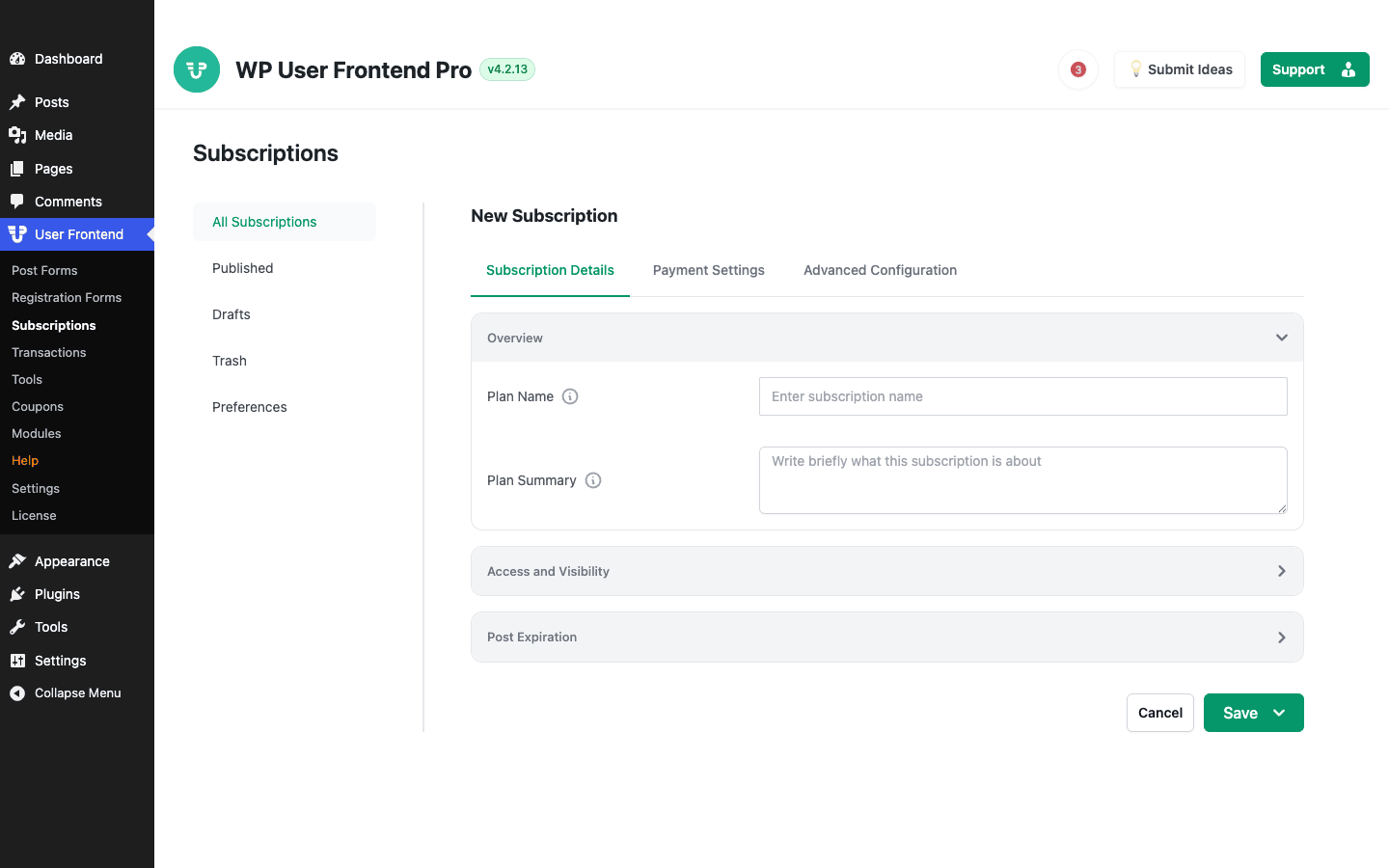
A pack has three tabs: Subscription Details (plan name, summary, access and visibility, and post-expiration rules), Payment Settings (price, one-time or recurring), and Advanced Configuration. You can limit how many posts a pack allows, set the post types it covers, and expire posts after a period, which is exactly how a classified-ads or job-board site charges per listing.
Two common models it supports cleanly:
- Pay per post: a one-time charge to publish a listing, optionally expiring after 30 days.
- Recurring membership: a monthly fee that unlocks posting or restricted content.
The post-expiration rule is the detail that makes a classifieds or job site work: you sell a pack that lets a user publish, say, three listings, each of which auto-expires after 30 days, after which they buy again to relist. That’s the entire business model of a paid directory, and WPUF builds it in rather than making you script it. You can also cap the number of posts per pack and scope a pack to specific post types, so a "Job Listing" pack is separate from a "Resume" pack on the same site.
Payments run through Stripe, PayPal, or manual (bank transfer), and WPUF tracks everything in Transactions and generates Invoices, with Coupons and Tax settings to round out the commerce side. The coupon system is genuinely useful for launch promotions or partner deals (a percentage or fixed discount on any pack), and the invoices are the kind of thing accountants ask for, so having them generated automatically saves a recurring headache. Heads-up: the gateways need their own API keys, so budget a few minutes to connect Stripe or PayPal before you test a live payment, and always run a test-mode transaction before you go live.
Content restriction and the member directory
WPUF also handles the read side, not just the write side. The [wpuf_restrict] shortcode wraps content so only logged-in users, specific roles, or active subscribers can see it, and [wpuf_partial_restriction] shows a teaser and hides the rest behind the wall. That’s enough to build a basic paid-content site without a separate membership plugin.
There’s also a member directory via [wpuf_user_listing], which renders a searchable, filterable grid of your users, handy for a community, a freelancer marketplace, or a "find a member" page. Paired with the profile forms, it means users control what appears about them in that directory.
What your users actually see
It’s worth picturing the experience from the visitor’s side, because that’s where WPUF either earns its place or doesn’t.
A new user lands on your Register page, fills in a form that looks like part of your site, and becomes a member without ever seeing wp-login or wp-admin. They’re redirected to a front-end dashboard (the [wpuf_account] page) that shows their submissions, a profile editor, and, if you sell packs, their current subscription and billing. When they want to contribute, they open your Submit page, fill in the post form, and hit submit; they see a friendly confirmation, and the post quietly enters your moderation queue.
What they never see is the WordPress admin. No grey dashboard, no menu of settings they don’t understand, no other users’ drafts. For a non-technical contributor, that’s the difference between "I submitted my article" and "I got lost in WordPress and emailed it to you instead." For you, it’s the difference between trusting a few hundred Subscribers and worrying about a few hundred backend logins.
That front-end-only experience is the product. Everything else (the form builder, the packs, the modules) exists to make it work without compromise. Where this matters most: the less your users know about WordPress, the more valuable WPUF is, because it hides every part of WordPress they’d otherwise trip over.
The 21 modules, and which ones matter
WPUF Pro keeps its weight down by shipping features as toggleable modules. You turn on only what you need from User Frontend » Modules, which keeps the plugin from loading code for features you’ll never use.
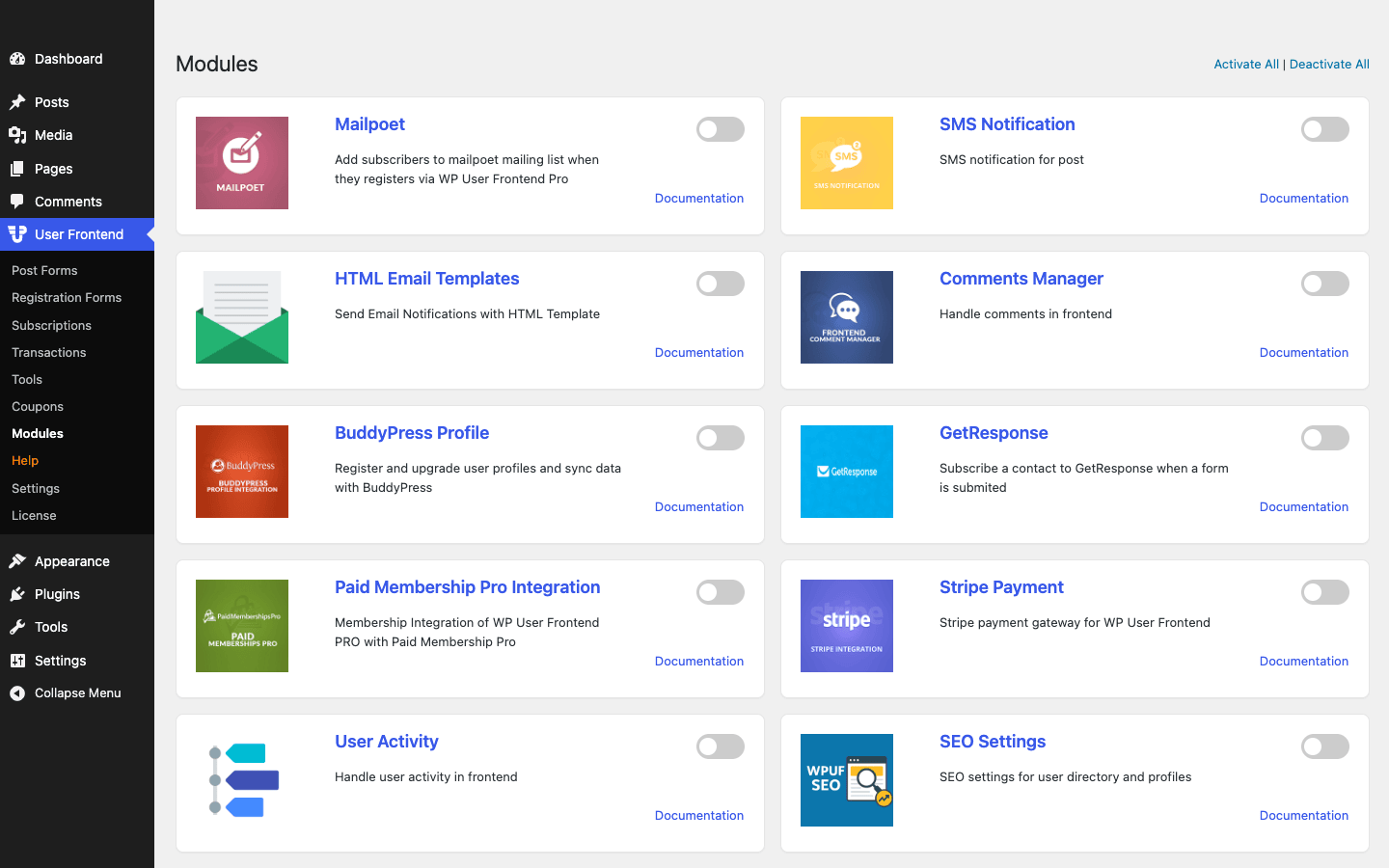
There are 21 of them. Here’s how I’d group the ones that matter, with the ones I reach for first in bold:
| Group | Modules | When to turn them on |
|---|---|---|
| Payments | Stripe Payment, Paid Membership Pro Integration | To charge for posting or memberships |
| Email / CRM | Mailpoet, GetResponse, HTML Email Templates | To add submitters to your list and send branded emails |
| Community | BuddyPress Profile, Comments Manager (frontend comments), User Activity | When WPUF powers a social or community site |
| Notifications | SMS Notification | To alert admins or users on new submissions |
| Discoverability | SEO Settings | To make user profiles and directories indexable |
A few are worth calling out individually. The Comments Manager module lets users moderate comments on their own submissions from the front end, which is essential for a multi-author site where you don’t want every writer in wp-admin. User Activity logs what members do, useful for moderation and trust. SEO Settings makes your user profiles and member directory indexable (and lets you noindex the ones you’d rather keep private). The Paid Membership Pro Integration is the one to reach for if you already run PMP and want WPUF to handle the front-end posting side while PMP handles the paywall. And the HTML Email Templates module is the difference between plain-text notification emails and ones that match your brand.
Where this shines: the modular approach means a simple "let members submit posts" site stays light, while a full community-plus-membership site can switch on BuddyPress, Stripe, and email integrations without installing five more plugins. There’s an Activate All / Deactivate All toggle, but resist the urge to flip everything on; each active module is more code to load, and a module you’re not using is just weight. Turn on what a feature actually needs, and leave the rest off until you do.
Settings worth knowing
The settings panel is deeper than you’d expect, and a few options are worth setting on day one.
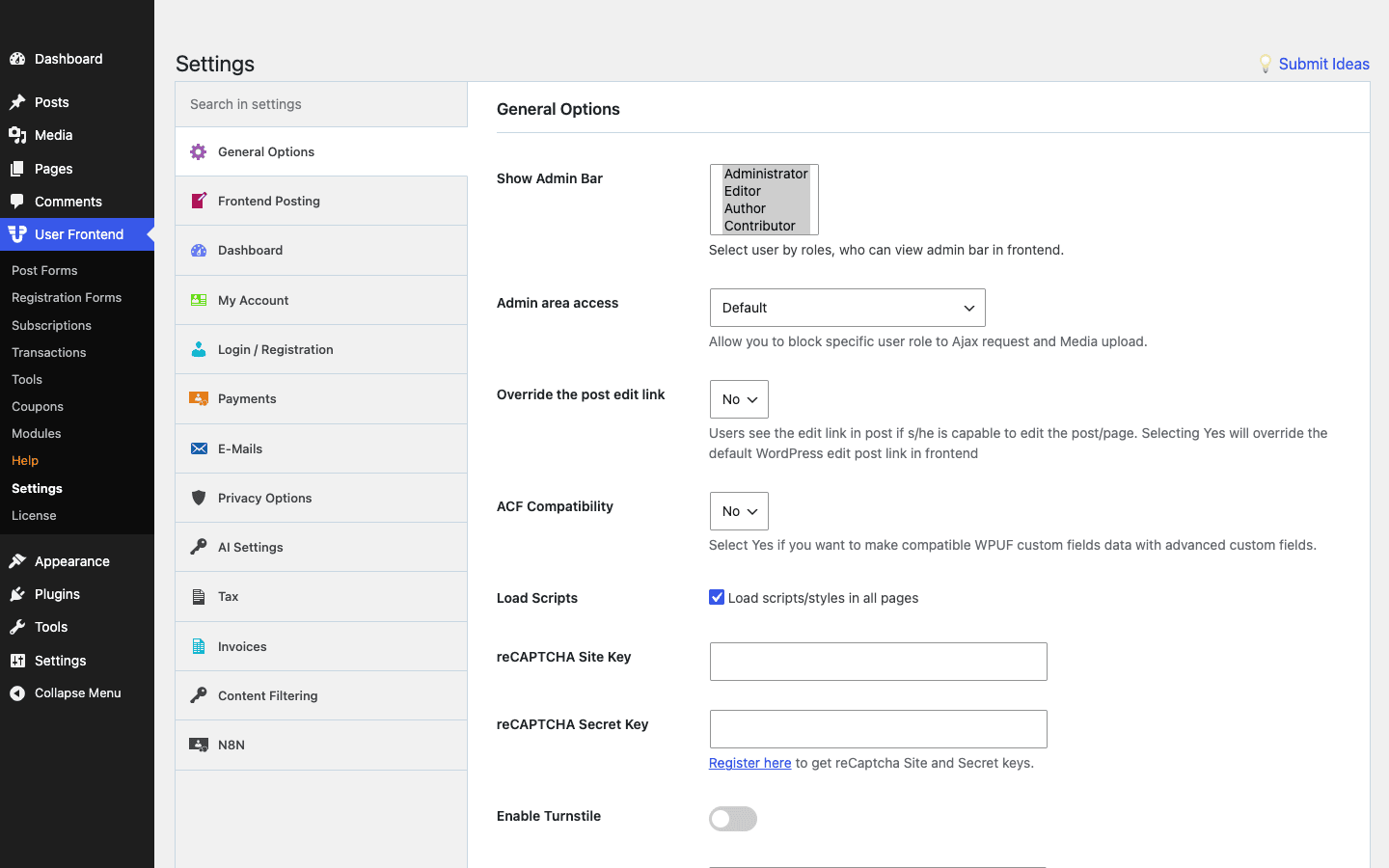
The sections that matter most:
- General Options: the single most important setting here is Show Admin Bar, where you choose which roles see the WordPress admin bar on the front end. Set it so Subscribers never see it. There’s also Admin area access, which blocks chosen roles from reaching wp-admin at all, and an ACF Compatibility toggle if you map fields to Advanced Custom Fields.
- Frontend Posting: default post status (set this to Pending for moderation), default category, and what happens after submission.
- Login / Registration: redirect rules and social login providers.
- Payments, Tax, Invoices: the commerce settings that pair with subscriptions.
- Content Filtering and Privacy Options: for restricting content and handling user data.
Note: there’s a search box at the top of the settings. With this many options across a dozen sections, type what you want ("admin bar", "pending") rather than hunting tab by tab.
Setting it up without regrets
The order you build things in matters, because a couple of defaults are wrong for most sites until you change them. Here’s the sequence I’d follow.
- Activate both plugins. WP User Frontend (free) and WP User Frontend Pro both need to be active. On most hosts they’re installed together.
- Lock down the admin bar and admin access first. Go to User Frontend » Settings » General Options and hide the admin bar for Subscribers, then block admin-area access for that role. Do this before you invite anyone.
- Set the default post status to Pending. Under Frontend Posting, so user submissions wait for review instead of going live.
- Build your registration form and set the role to Subscriber. Drop
[wpuf_profile type="registration"]on a Register page and[wpuf_account]on a Dashboard page. - Build your post form from the closest template, and place it on a "Submit" page with
[wpuf_form]. - Add subscription packs only if you’re charging. Connect Stripe or PayPal, then create your packs.
- Turn on only the modules you need from the Modules screen.
Tip: test the whole flow as a real Subscriber, not as admin. Register through your form in an incognito window, submit a post, and confirm it lands as Pending and that the user never sees wp-admin. Admins experience none of the restrictions, so testing as admin proves nothing.
Five sites WP User Frontend is built for
WPUF isn’t a general-purpose plugin; it’s sharp at a specific set of jobs.
A multi-author blog or magazine. Let guest writers submit articles through a front-end form that lands as Pending for your editors. No contributor accounts in wp-admin, no training, no risk.
A classified ads or directory site. Pay-per-listing with WPUF subscriptions, posts that expire after 30 days, and a front-end form for submitting listings. The member directory becomes your "browse sellers" page.
A paid-content or membership site. Recurring packs plus content restriction give you a working paywall: members pay monthly, and [wpuf_restrict] gates the premium posts.
A job board. Companies register, post jobs through a form (paid or free), and manage their listings from the front-end dashboard, while candidates browse without anyone touching the admin.
A community or UGC platform. Turn on the BuddyPress and Comments modules, let members submit content and manage rich profiles, and keep the whole experience on the front end.
If you only need a simple contact form or a one-off submission, WPUF is overkill; a form plugin is lighter. WPUF earns its place when users need accounts, ongoing submissions, or paid access.
Don’t give untrusted users a backend role
This is the mistake WPUF exists to prevent, so it gets its own section.
The tempting shortcut, when you want people to submit posts, is to make them Authors or Contributors and send them to wp-admin. Don’t. A backend role, even a limited one, lets a user into your dashboard, where they can see other people’s drafts, read your site’s configuration, fish for plugin and theme details, and generally poke at things they have no business seeing. Multiply that by a few hundred user-generated-content submitters and you’ve built an attack surface and a support nightmare. One compromised contributor account with backend access is a far worse day than one compromised Subscriber.
The second half of the mistake is auto-publishing what users submit. If posts go live the instant someone hits submit, you’ve handed every spammer and bad actor a megaphone on your domain, with your SEO and your reputation attached. The web is full of sites whose "submit your story" page became a wall of casino spam overnight.
The fix is the whole point of WPUF: keep users as Subscribers with no admin access, collect their content through front-end forms, and set submissions to Pending so a human approves them. It costs you a moderation step and it saves you from both the security hole and the spam flood. If you take one thing from this review, make it this: never trade a backend role for the convenience of letting users post, because WPUF gives you the same result without the risk.
WPUF vs Ultimate Member vs Profile Builder
The honest comparison is WPUF against the other two big frontend-user plugins, Ultimate Member and Profile Builder. They overlap, but each leans a different way.
| WP User Frontend Pro | Ultimate Member | Profile Builder Pro | |
|---|---|---|---|
| Main strength | Front-end posting + submissions | Community profiles + member directories | Registration + user fields |
| Frontend post submission | Yes, full form builder | Limited | Limited |
| Subscriptions / paid posting | Built in | Via extensions | Via add-ons |
| Pricing | around $49-99/year | free core, paid extensions | around $69-149/year |
| Bundled modules | 21 | add-on based | add-on based |
The split is real. Ultimate Member is the community/profile plugin, strongest when your site is about member profiles, activity, and directories. Profile Builder is the registration plugin, strongest when you mostly need custom registration and user-field management. WPUF is the posting plugin, the only one of the three with a real front-end post form builder and built-in paid submissions. On price, WPUF and Profile Builder are paid up front (roughly $49-99 and $69-149 a year), while Ultimate Member’s core is free with paid extensions, so a feature-complete UM setup can cost more than its "free" label suggests once you add the extensions you need.
If your site is fundamentally about users creating content (articles, listings, products, jobs), WPUF is the pick. If it’s about users being a community or just registering, the other two deserve a look. They can also coexist: WPUF for submissions, Ultimate Member for the social layer.
Developer reference: shortcodes and hooks
WPUF is built around shortcodes for placement and a deep wpuf_* hook system for customization.
The shortcodes you’ll actually use
[wpuf_form id="123"]                              // a post submission form
[wpuf_profile type="registration" id="11"]        // a registration form
[wpuf_profile type="profile" id="11"]             // the edit-profile form
[wpuf_account]                                     // the front-end user dashboard
[wpuf_restrict]Members-only content here[/wpuf_restrict]
[wpuf_user_listing]                                // a member directory
Hooks for the submission flow
The action hooks let you run code at the key moments, which is how you wire WPUF into the rest of your stack without editing its files.
// Do something after a new user registers through a WPUF form
add_action( 'wpuf_after_register', function ( $user_id, $form_id, $form_settings ) {
    // e.g. tag the user, send a welcome email, add to a CRM
    update_user_meta( $user_id, 'signup_source', 'frontend_form' );
}, 10, 3 );
// Adjust the price of a subscription pack at checkout (e.g. a member discount)
add_filter( 'wpuf_payment_amount', function ( $amount ) {
    if ( current_user_can( 'returning_member' ) ) {
        return $amount * 0.9; // 10% off
    }
    return $amount;
} );
There are filters for almost every moving part: wpuf_get_pack to alter a subscription pack, wpuf_module_list to register your own module, wpuf_get_profile_form_templates to add form templates, wpuf_hidden_user_roles to hide roles from the role picker, and wpuf_duplicate_username_error to customize validation messages. The commerce side exposes wpuf_get_tax_rates, wpuf_invoices_per_page, and wpuf_pm_max_file_size, and the login flow exposes provider configs like wpuf_linkedin_provider_config for social login.
Restricting and templating submitted content
Because submissions are normal posts with custom fields saved as post meta, you template them like anything else. A custom field added in the builder under the key listing_price is just get_post_meta() with that key in your theme. That’s a deliberate design choice: WPUF doesn’t trap your data in a proprietary store, so a "switch off WPUF and your content is gibberish" problem never happens. The shortcodes for restriction ([wpuf_restrict] and [wpuf_partial_restriction]) accept attributes for the roles or subscription levels allowed, so you can gate a block of content to "subscribers on the Gold pack" inline in any post.
The AI form builder hooks
A newer addition, the AI form builder, fires wpuf_ai_review_before, wpuf_ai_review_completed, and wpuf_ai_review_failed, and wpuf_ai_review_default_prompts lets you change the prompts it uses, so you can hook your own logic into AI-generated forms. Between the shortcodes, the action and filter hooks, and the module API (wpuf_module_list lets you register a custom module), WPUF is genuinely extensible rather than a closed box, which is what you want if you’re building a real product on top of it.
Performance, compatibility, and gotchas
No honest review skips the rough edges, and WPUF has a few.
It depends on the free base. WPUF Pro is the paid module on top of the free WP User Frontend, so both must be active. If the free plugin is deactivated, Pro does nothing. Keep both updated together.
The defaults favor openness, not safety. Out of the box, the admin bar shows and posts can publish immediately depending on your form settings. As covered above, you must set the admin bar, admin access, and default-to-Pending yourself. The plugin gives you the safe setup; it doesn’t force it.
Common problems and fixes:
- Users still see wp-admin or the admin bar. You missed the General Options settings. Hide the admin bar by role and block admin-area access for Subscribers.
- Submitted posts go live without review. Your form or the global setting is set to Publish. Switch the default post status to Pending.
- Payments don’t process. The gateway isn’t connected. Add your Stripe or PayPal API keys in Settings » Payments, and test in the gateway’s test mode first.
- A custom field doesn’t show on the post. WPUF saved it as post meta, but your theme template isn’t outputting it. Echo the meta key in your template, or turn on ACF Compatibility if you use ACF.
Compatibility is broad. WPUF works with WooCommerce and EDD (product and download submission), BuddyPress (the profile module), Paid Memberships Pro (a dedicated integration module), Advanced Custom Fields, and the major email and CRM tools through its modules. It’s from weDevs, so it sits naturally alongside their other plugins like Dokan if you’re building a marketplace where vendors submit products from the front end.
FAQ
What does WP User Frontend Pro actually do that the free version doesn’t?
The free WP User Frontend covers basic frontend posting and registration. Pro adds the full form-builder field set, subscriptions and payments, content restriction, the member directory, conditional logic, the 21 modules (Stripe, BuddyPress, email integrations, and more), and the AI form builder. Pro is the paid module that sits on top of the free base, so you run both together.
Can users submit posts without a WordPress admin account?
Yes, and that’s the entire point. Users register and post through front-end forms while remaining Subscribers with no wp-admin access. You hide the admin bar and block admin-area access in the settings, so they never see the dashboard. This is far safer than giving them Author or Contributor roles.
Will user-submitted posts go live automatically?
Only if you let them. WPUF lets you set the default post status to Pending so every submission waits for a human to approve it. You should absolutely do this; auto-publishing user content invites spam and puts unreviewed material on your domain. Set it under Frontend Posting before you go live.
Can I charge people to post or to read content?
Yes. Subscription packs let you charge per post (with optional expiration, ideal for classifieds and job boards) or sell recurring memberships that unlock posting or restricted content. Payments run through Stripe, PayPal, or manual transfer, with coupons, tax, and invoices built in.
How is it different from Ultimate Member or Profile Builder?
WPUF is the posting plugin: it’s the one with a real front-end post form builder and built-in paid submissions. Ultimate Member focuses on community profiles and directories; Profile Builder focuses on registration and user fields. If your site is about users creating content, WPUF fits; if it’s about profiles or just registration, look at the other two.
Does it work with WooCommerce?
Yes. WPUF has a WooCommerce Product form template, so vendors or users can submit products from the front end, and it pairs with EDD for digital downloads. For a full multi-vendor marketplace, it sits alongside Dokan from the same maker.
Can I customize the forms with my own fields and logic?
Yes. The form builder includes text, textarea, dropdown, multi-select, and many other custom fields that save as post meta, plus conditional logic to show or hide fields based on answers, and multi-step forms for long submissions. Developers can extend it further through the wpuf_* hooks.
How much does it cost, and is there a GPL version?
WP User Frontend Pro is sold as a yearly license (roughly $49 to $99 depending on tier). On GPL Times, WP User Frontend Pro is available under the GPL, so you can install it with the free base, build a submission flow, and test subscriptions before deciding if it fits your project. Remember it needs the free WP User Frontend plugin active alongside it.
Does it support social login and email integrations?
Yes. The Login / Registration settings include social login providers, and the modules add Mailpoet and GetResponse integrations (plus Mailchimp through filters) so new registrants flow into your email lists automatically.
Final thoughts
WP User Frontend Pro solves a problem that trips up a lot of site owners: how do you let people contribute or access content without handing them your dashboard? Its answer (front-end forms, Subscriber-only roles, and a real submission and membership system) is the right one, and the execution is mature. The form builder is capable, the subscription packs turn it into a genuine business tool, and the modular design keeps it from bloating a simple site.
It does ask you to be deliberate. The defaults lean open, so you have to hide the admin bar, block admin access, and set submissions to Pending yourself. Skip that and you’ve built the very thing the plugin was meant to prevent. Do it, and you get a clean, safe, front-end content system that your users will actually understand.
For multi-author blogs, classifieds, job boards, paid-content sites, and any community where users create the content, WPUF is one of the few plugins purpose-built for the job. Set it up on a staging site, register through your own form as a test Subscriber, and submit a post; once you see a contributor flow that never touches wp-admin, it’s hard to go back to handing out backend logins.