

The promise of the WordPress block editor was that you’d build pages by combining small, well-designed blocks instead of running a page builder. Five years in, the native block editor still ships with 20 boring building blocks (paragraph, heading, image, columns, you know the list) and that’s where it stops. To actually build something modern, with hero sections, pricing tables, testimonials, accordions, tabs, dynamic post grids, count-up stats, you need either a page builder or a block library plugin. Stackable Premium is the most mature block library, and the one most blog and marketing-site teams pick when they want to stay Gutenberg-native instead of bolting Elementor or Divi on top.
This article walks through what Stackable Premium actually adds to Gutenberg, the design library (the killer feature), the block-by-block tour of what’s in it, the dynamic-content support, the performance story (lazy CSS, no jQuery), the developer hooks, and how it compares to Kadence Blocks, Spectra, and GenerateBlocks.
Table of contents
- What Stackable Premium is
- Free Stackable vs Premium
- Installation and onboarding
- The block library: what’s in it
- The design library: the killer feature
- Wireframes and starter layouts
- Dynamic content in blocks
- Conditional display
- Custom fields without ACF
- theme.json integration
- Block style inheritance
- Settings, performance, defaults
- Developer reference: hooks and filters
- Real-world use cases
- Stackable vs Kadence vs Spectra vs GenerateBlocks
- Performance, compatibility, gotchas
- Pricing and licensing
- FAQ
- Final thoughts
What Stackable Premium is
Stackable Premium is a WordPress plugin by Gambit Technologies that adds 50+ design-focused blocks to the native Gutenberg editor, plus a Design Library of 500+ pre-built block layouts (hero sections, pricing tables, team grids, testimonial sliders, contact forms, etc) you can insert with one click and edit inline.
It’s a block library plugin, not a page builder. Important distinction:
- A page builder (Elementor, Divi, Beaver Builder) replaces or wraps Gutenberg with its own editor. The output is HTML/CSS managed by the builder; moving away from the builder is painful.
- A block library like Stackable ships Gutenberg blocks. The output is standard Gutenberg block markup. Migration to another block library or to vanilla Gutenberg is straightforward.
If your strategy is "stay Gutenberg-native, get power features as blocks", Stackable is the answer. If your strategy is "build the whole site in a single visual builder", you’d use Elementor instead.
What makes Stackable Premium specifically the leader in this category:
- Design library breadth and quality. 500+ professionally designed block layouts you can insert with one click.
- Native dynamic content. Pull post meta, ACF fields, custom fields directly into blocks. No shortcodes.
- Conditional display. Show/hide blocks based on user role, login state, post meta, time of day.
- Custom Fields without ACF. Stackable ships its own custom-field manager.
- theme.json compatibility. Inherits colors, fonts, spacing from your theme’s theme.json.
- Performance-conscious. Lazy CSS per block, no jQuery, no bloat.
- White-label support for agencies.
These are the kind of features that make the difference between "I installed a block library" and "I built my entire client site on Gutenberg + Stackable and feel good about it".

The welcome screen above is what you see on first activation: a progress tracker, learning cards for the major features, and a video tutorial. It’s a good orientation for the team’s first session with the plugin.
Free Stackable vs Premium
The free version on WordPress.org includes the core 50+ blocks plus basic design library access. It’s a generous free tier. Premium adds:
- Full design library access (500+ premium designs vs ~50 free).
- Dynamic Content (post fields, taxonomy fields, custom fields, query loops).
- Conditional Display (show/hide based on conditions).
- Custom Fields (Stackable’s own field manager, Text, Number, Email, URL, Image, Boolean).
- Block style inheritance (inherit a parent block’s styles in nested blocks).
- White-label (rebrand the plugin for agency client sites).
- Custom font upload support.
- Premium support from Gambit Technologies.
For agencies, designers, or anyone building marketing sites at any scale, Premium.
Installation and onboarding
Install via Plugins -> Add New -> Upload Plugin -> stackable-ultimate-gutenberg-blocks-premium.zip -> Activate. On activation, the Stackable menu appears in WP admin with the Welcome dashboard. A few notable steps:
- Welcome tour. Optional walkthrough of the main features.
- Block Manager. Enable/disable specific blocks (you usually keep everything on).
- Settings. Tweak performance, theme.json behavior, and default styling.
After activation, every page/post editor gets the new Stackable blocks in the block inserter under their own category, plus the Design Library button in the top toolbar.
The onboarding tour is one of the better-done ones in the WP space. It walks you through inserting a Design Library template, configuring a block, using dynamic content. ~5 minutes total. Don’t skip it on first install.
The block library: what’s in it
The 50+ blocks fall into a few categories.
Layout and structure:
- Container (with backgrounds, padding, margin, columns inside).
- Columns (2/3/4-column responsive grid).
- Card (rounded box with shadow).
- Hero (full-width hero with title, subtitle, CTA).
- Spacer, Divider (vertical/horizontal separators).
Content:
- Heading (with subtitle support, alignment, color presets).
- Subtitle.
- Text.
- Subscript, Superscript.
Media:
- Image Box (image + caption + button overlay).
- Image (extended version of WP’s image block).
- Video Popup (embed YouTube/Vimeo in a modal).
- Slider.
Lists and content groups:
- Icon List (bulleted list with custom icons).
- Number Box (counted callouts).
- Star Rating.
- Pricing Box (full pricing table cell).
- Feature.
- Feature Grid.
- Team Member.
- Testimonial.
Interactive:
- Accordion (collapsible Q&A).
- Tabs (tabbed content).
- Expand (show more / show less).
- Notification (dismissible banner).
- Map (embedded Google Map).
Stats and dynamic:
- Count Up (animated number from 0 to target on scroll).
- Progress Bar.
- Progress Circle.
- Posts (dynamic post grid with query controls).
Buttons:
- Button.
- Buttons (group of buttons).
- Icon Button.
- Social Buttons.
Each block has a sidebar with extensive style controls: color, typography, spacing, borders, shadows, hover states, animations. The depth of control is similar to a page builder, with the difference that you’re staying in Gutenberg.
The design library: the killer feature
The Design Library is the single most useful Stackable feature. Click the Design Library button in the toolbar (or the prompt in the welcome modal), browse 500+ pre-designed sections, click Insert, the section appears in your page exactly as previewed. Edit text and images inline, ship.
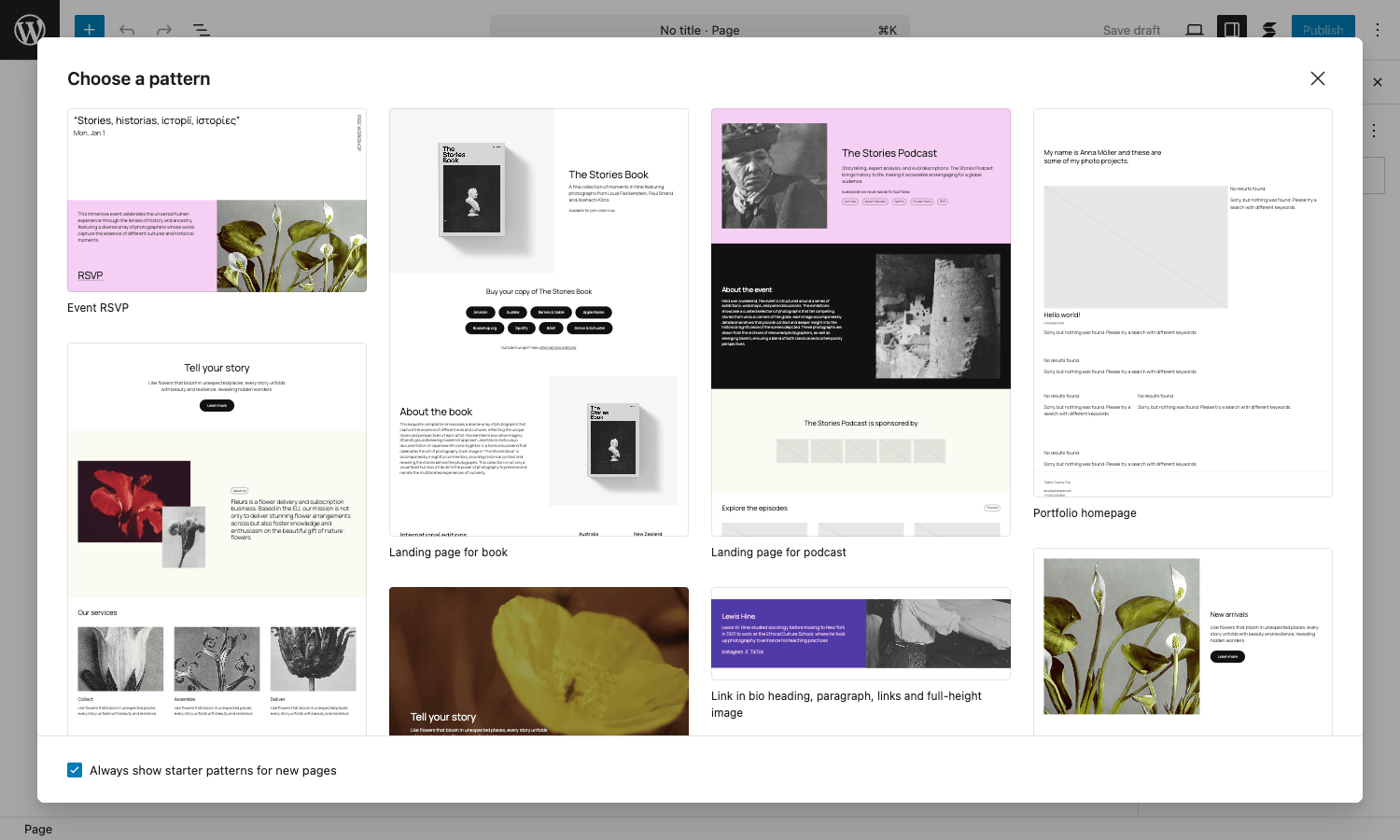
The patterns are organized by category: Hero, About, Services, Features, Pricing, Testimonials, Team, Stats, FAQ, CTA, Contact, Footer, Header. Most categories have 20-40 distinct designs in a mix of styles (modern minimal, bold, magazine-style, illustration-heavy).
Each pattern uses only Stackable blocks (and core WP blocks where appropriate), so once inserted you can edit any element, change colors, swap images, adjust spacing, restructure columns, without leaving Gutenberg.
This is what makes Stackable a real alternative to a page builder for marketing pages. The standard objection to staying Gutenberg-native ("I don’t have time to design and code every section") evaporates when there’s a button that gives you 500 done-for-you sections.
The Free version has ~50 design library patterns. Premium unlocks the full 500+. For agencies building marketing landing pages, the Premium-only patterns are where the use is.
Wireframes and starter layouts
Beyond design library patterns, Stackable also includes Wireframes, gray-box low-fidelity layouts you insert before you’ve decided on the visual style. Useful when you’re sketching out a page structure and don’t want to commit to specific colors/typography yet.
Starter layouts are full-page templates: complete landing pages, podcast pages, portfolio pages, restaurant pages, etc. Insert one and you have an entire page scaffolded; edit each section to match your brand.
The combination of Wireframes (structure) + Design Library patterns (sections) + Starter Layouts (full pages) is what lets a non-designer build a credible marketing site in a few hours instead of a few weeks.
Dynamic content in blocks
The Premium Dynamic Content feature lets any Stackable block pull its content from another source instead of holding it statically:
- Post fields, title, excerpt, featured image, author, date, comment count.
- Post meta, any post meta key (custom fields).
- Taxonomy, categories, tags, custom taxonomies.
- ACF fields, if Advanced Custom Fields is installed.
- Meta Box, Pods, JetEngine, other custom field plugins.
- Site fields, site title, tagline, admin email.
- User fields, current user’s display name, email, avatar.
- Query, pull from a custom WP_Query.
In the block sidebar, click the "Dynamic" icon next to any text/image input. Pick the source (e.g., "Post field -> Excerpt"). The block now displays the dynamic value. On the front-end, each visit renders the value for the current post or user.
This unlocks a lot of patterns:
- Build a single-post template with Stackable blocks; each post automatically populates the template with its own data.
- Build a single-product template that pulls WooCommerce price/SKU/stock dynamically.
- Build a "welcome back, {name}" hero that uses the current user’s display name.
- Build a recent-posts grid where each card pulls title + excerpt + featured image from the latest 6 posts.
Dynamic Content is what turns Stackable from "design blocks" into "design blocks that can also build templates and theme-like layouts".
Conditional display
Conditional Display (Premium) lets you show/hide blocks based on:
- User login state, show only to logged-in users, only to logged-out users, or both.
- User role, show only to Administrators, Subscribers, custom roles.
- Post meta value, show only when the current post has a specific meta value.
- URL parameter, show only when
?source=emailis in the URL. - Date/time, show only between specific dates, only during business hours.
- Cookie value, show based on cookie presence/value.
- Custom PHP condition, write a callback that returns true/false.
Conditional Display is essential for:
- A/B testing variants (cookie-based variant assignment).
- Member-only content sections.
- Holiday banners that auto-show/hide on date.
- Referrer-specific content ("welcome from Twitter" etc).
- Campaign-specific content (
?utm_source=newslettervariants).
The combination of Dynamic Content + Conditional Display covers a lot of what you’d otherwise need a page builder for.
Custom fields without ACF
Stackable Premium ships its own Custom Fields manager. Unlike ACF, it’s lightweight and Gutenberg-first: fields are inserted via blocks and edited in the block sidebar, no separate field-group admin UI.
Field types supported:
- Text
- Number
- URL
- Image
- Boolean (checkbox)
- Date
- Range
- Color
- Multi-select
For simple cases where you’d previously install ACF just to add 2-3 fields to a post type, Stackable’s Custom Fields is enough. For complex schemas (Repeaters, Flexible Content, Relationships) you still want ACF.
theme.json integration
Stackable respects your theme’s theme.json. If your theme defines a color palette, Stackable’s color pickers use that palette. If your theme defines typography presets, Stackable inherits them. If your theme has spacing scale, Stackable uses it.
This matters because it means your Stackable blocks stay visually consistent with the rest of your theme. Without theme.json integration, you’d have to manually configure each block’s colors to match the theme, pain at scale.
For block themes (WordPress Full Site Editing themes), Stackable works inside the Site Editor too, not just in the Post/Page editor. You can build templates, parts, and reusable blocks with Stackable blocks alongside core blocks.
Block style inheritance
A small but useful Premium feature: if you set a style on a parent block (e.g., a Container with a specific background and text color), child blocks inside it inherit the style. Change the parent’s color once and every child updates.
Without this, you’d manually set the color on each child block. For long pages with many nested blocks, the inheritance saves a lot of repetitive editing.
Settings, performance, defaults
The Stackable Settings page covers global plugin behavior.

Key sections:
- General settings, block defaults, default fonts, color presets.
- Editor settings, enable/disable blocks (block manager), default block selector behavior.
- Performance, lazy load CSS, defer JS, disable specific block CSS site-wide if unused.
- Optimization, generate optimized CSS per page, cache control.
- Custom CSS, global custom CSS for Stackable blocks.
- Editor role permissions, restrict who can edit Stackable blocks.
The performance section is the one most teams visit. Lazy load CSS sounds simple but matters a lot: Stackable’s blocks each have their own CSS chunk, and the plugin only loads chunks for blocks actually used on the current page. Combined with WP Rocket page caching, the front-end stays fast.
Developer reference: hooks and filters
Stackable exposes filters for the patterns developers most often want to extend.
Disabling specific blocks
add_filter( 'stackable_disabled_blocks', function( $blocks ) {
 // Disable the count-up block site-wide.
 $blocks[] = 'stackable/count-up';
 return $blocks;
} );
Modifying the Posts block query
add_filter( 'stackable/posts/post_query', function( $query_args, $attributes ) {
 // Filter posts the block fetches: only published in last 30 days.
 $query_args['date_query'] = array(
 array( 'after' => '30 days ago' ),
 );
 return $query_args;
}, 10, 2 );
Excluding post types from Dynamic Content
add_filter( 'stackable_dynamic_content/exclude_post_types', function( $post_types ) {
 $post_types[] = 'private_cpt'; // Hide this CPT from the dynamic content picker.
 return $post_types;
} );
Modifying the Design Library
add_filter( 'stackable_design_library', function( $library ) {
 // Add a custom category of patterns.
 $library['mycategory'] = array(
 'label' => 'My Custom Designs',
 'patterns' => array( /* pattern data */ ),
 );
 return $library;
} );
Custom block category
add_filter( 'block_categories_all', function( $categories ) {
 array_unshift( $categories, array(
 'slug' => 'mybrand',
 'title' => 'My Brand Blocks',
 ) );
 return $categories;
} );
Inline styles dependency for inheritance
add_filter( 'stackable_block_style_inheritance_inline_styles_nodep', function( $deps, $block ) {
 // Force inline styles even when not strictly needed.
 return $deps;
}, 10, 2 );
The hook surface is documented in the Stackable knowledge base. The combination of Dynamic Content (declarative) + filters (programmatic) covers most extension needs.
Integrations with the WordPress ecosystem
Stackable plays well with the major WordPress plugins you’re likely already running. Worth knowing what works smoothly out of the box and what needs configuration.
WooCommerce. The Dynamic Content feature can pull WooCommerce product fields (name, price, stock, SKU, custom product meta) into any Stackable block. A common pattern: build a single-product layout once using Stackable blocks with dynamic content, every product inherits the layout. Combine with the Posts block (set to query the product post type) for product grids on category pages.
ACF (Advanced Custom Fields). Stackable Premium reads ACF field values via Dynamic Content. Set up ACF field groups as normal, then in any Stackable block click the dynamic-content icon, pick "ACF Field", and pick the field. Repeater fields aren’t directly supported (use the Posts block with a custom WP_Query that loops the repeater data instead), but Text, Image, URL, Number fields all work.
WPML / Polylang. Stackable’s block content gets picked up by WPML/Polylang for translation. The text inside a block is translatable like any post content. Design Library patterns translate the same way: insert a pattern, edit text in your primary language, run the translation flow in WPML.
SEO plugins. Stackable doesn’t interfere with Rank Math or Yoast SEO. The rendered HTML is clean and uses semantic tags (<section>, <article>, <h2>) where appropriate, so SEO plugins read it correctly. The Schema addon support is theme-level (Stackable doesn’t add page-level JSON-LD; your SEO plugin does).
Caching. WP Rocket, W3 Total Cache, LiteSpeed Cache all cache Stackable pages correctly. The block CSS is fingerprinted so cache busting works on plugin updates. Don’t enable "combine CSS" if you’re relying on Stackable’s per-block lazy CSS, combining defeats the lazy loading.
Form plugins. Stackable doesn’t include a form block. Use Gravity Forms, Fluent Forms, or WPForms blocks inside a Stackable Container for visual styling. The container’s spacing/background settings give you the section feel; the form plugin handles the input fields and submission logic.
Migrating between block libraries
A real concern with any block library: if you build everything in Stackable and later want to switch, how painful is the migration?
The honest answer: medium-painful, but easier than migrating off a page builder.
Stackable to vanilla Gutenberg. Stackable’s blocks render as Gutenberg block markup. If you uninstall Stackable, the blocks become "unsupported block" placeholders that still hold their text content. You can manually convert each to its core-block equivalent: Stackable Heading -> core Heading, Stackable Container -> core Group, Stackable Columns -> core Columns. Tedious but doable.
Stackable to Kadence Blocks. No automatic migration. Each Stackable block needs manual replacement with the Kadence equivalent. For a 5-page site, this is a day’s work; for a 50-page site, it’s a project.
Stackable to another premium library (Spectra, GenerateBlocks). Same story, manual replacement.
Stackable to a page builder (Elementor, Divi). A rebuild. The output formats are incompatible.
In practice, the migration path most teams take is "lock into Stackable for the long term". This is fine as long as Stackable stays maintained (Gambit Technologies has been actively shipping updates for years). If you want absolute portability, build with core Gutenberg blocks only and accept the design limitations.
Real-world use cases
A few patterns Stackable Premium handles well.
-
Marketing site for a small business. Pick a starter landing page from the Design Library, swap text and images, ship. Total time: 2 hours for a polished 5-section landing page. Compare to building it from scratch in Elementor or Divi (8-12 hours).
-
Single-post template. Build a Stackable single-post layout once with Dynamic Content (title, featured image, excerpt, content, author info, related posts). Every post inherits the layout. Replaces theme-level template editing in some cases.
-
Landing pages for paid traffic. Each campaign gets its own landing page from a Design Library hero pattern. UTM parameter via Conditional Display swaps headline copy. A/B test variants live in the same plugin.
-
Internal documentation / knowledge base. Use Tabs, Accordions, Icon Lists, Notifications to structure docs. Consistent visual language across all docs without theme work.
-
Membership site content. Combine Conditional Display + Custom Fields + Stackable blocks to build gated content sections that show different content based on subscription tier. Pair with Restrict Content Pro for the gating logic.
-
Restaurant / menu site. Use the Pricing Box and Feature blocks to build menu pages with prices, descriptions, dietary icons. Combine with the dynamic Posts block for "today’s specials" that auto-update.
-
Agency client sites. White-label the plugin under your agency’s branding. Clients see "Agency Blocks" instead of "Stackable" in their admin. Premium feature.
Stackable vs Kadence vs Spectra vs GenerateBlocks
The four major block libraries.
Stackable Premium has the most design library patterns and the most polished blocks. Slightly heavier than the lightest libraries but very fast in practice. Best all-rounder for marketing sites and agency work.
Kadence Blocks Pro is similar in feature scope; comes from the GeneratePress / Kadence team. Tight integration with Kadence Theme. Has a smaller design library but matched-quality blocks.
Spectra (formerly Ultimate Addons for Gutenberg) is free and capable, from the Brainstorm Force team behind Astra. Lighter than Stackable, smaller design library. Good if you’re already on Astra.
GenerateBlocks Pro is the most minimal of the four. Focused on Container, Headline, and Grid as primary blocks. Best for performance-obsessed sites that want to build their own designs from primitives.
The honest take:
- Agency or marketing-team building many client sites: Stackable Premium. Design Library is the productivity win.
- Performance-first single site that builds custom designs: GenerateBlocks Pro.
- Already on Astra/Kadence theme: Spectra or Kadence Blocks for matched ecosystem.
- Need every fancy feature (accordion, tabs, slider, count-up, pricing tables) without writing CSS: Stackable Premium.
You can use one block library plus core; multiple block libraries are technically possible but confusing for the team and a maintenance burden.
Performance, compatibility, gotchas
- CSS lazy loading. Stackable loads only the CSS for blocks actually used on the current page. Verify this with PageSpeed Insights, you shouldn’t see CSS for blocks not on the page.
- Gutenberg compatibility. Stackable updates regularly to track WP core block editor changes. Keep both up-to-date; running an old Stackable on a new WP version sometimes causes editor glitches.
- theme.json conflicts. If your theme’s theme.json is restrictive (e.g., only 3 colors), Stackable inherits the restriction. Add colors at the theme level or use the per-block Stackable color picker for overrides.
- Design Library template inserts can be heavy. Some Design Library patterns have multiple deeply-nested blocks. After insert, simplify if you don’t need all the layers.
- Custom Fields not as flexible as ACF. Stackable’s Custom Fields is good for 2-4 simple fields per post type. For Repeaters, Flexible Content, or complex relations, use ACF.
- Plugin conflicts. Generally none. Running Stackable alongside Kadence Blocks works but the editor inserter gets crowded with two block libraries. Disable unused blocks in one of them.
- White-label affects admin only. The label stays "Stackable" on the support site and documentation, only the in-admin UI is rebranded.
- Page builder migration. Migrating from Elementor or Divi to Stackable requires rebuilding pages. The output formats are incompatible. Plan accordingly.
Pair Stackable with WP Rocket for caching and the Stackable Performance settings (lazy CSS, defer JS) for asset optimization. With these, pages built in Stackable hit 90+ on PageSpeed Insights routinely.
Pricing and licensing
Stackable Premium pricing direct from wpstackable.com:
- Yearly: $59/year (1 site), $99/year (5 sites), $149/year (unlimited sites).
- Lifetime: $199 (1 site), $299 (5 sites), $499 (unlimited).
For a single site, the yearly $59 tier is right. For agencies, the unlimited yearly or lifetime tiers make more sense.
The plugin is GPL-licensed. Reasonable if you’re running multiple sites or want Stackable + other premium plugins in one annual fee.
FAQ
Will Stackable work with my theme?
Yes. Any WordPress theme that supports the block editor (most modern themes) works with Stackable. theme.json-aware themes get the best integration; Classic themes work fine too.
Does it conflict with Elementor or Divi?
No technical conflict, but it’s weird to have both. Stackable blocks live in Gutenberg; Elementor/Divi replace Gutenberg with their own editor. Pages built in one don’t render in the other. Pick one for new pages; keep the other running only for legacy pages.
Can I use Stackable in the Site Editor (FSE)?
Yes. Stackable blocks work in Templates, Template Parts, and Reusable Blocks in the Site Editor for block themes.
Will it slow down my site?
With lazy CSS enabled (default in Premium), no. Stackable’s per-page CSS chunks are small. The total CSS for a typical Stackable-built page is under 50KB.
Does the Design Library work offline?
The patterns are fetched from Stackable’s CDN on first use, then cached locally. After first load, the library works offline.
Can I export Stackable blocks to use on another site?
Yes. Use WP’s Reusable Blocks feature or export/import the page content as JSON. Stackable’s block markup is standard Gutenberg, so it round-trips correctly.
Does it work with WooCommerce?
Yes. The Dynamic Content feature can pull WooCommerce product fields. The Posts block can query the product CPT. Stackable + WooCommerce is a common combo for product landing pages.
Is the free version enough?
For a basic site with 1-2 simple sections, yes. For a polished marketing site with multiple landing pages, the Premium Design Library + Dynamic Content + Conditional Display is the productivity tier.
Final thoughts
The Gutenberg block editor was supposed to make WordPress competitive with Squarespace and Webflow for visual page-building. By itself, it didn’t. The native block set is too sparse for real marketing-page work, the styling controls are too primitive, and the design discovery (how do I make this look professional?) is non-existent. Page builders filled the gap.
Stackable Premium is the strongest argument that Gutenberg can still win the visual-page-building game without becoming a page builder. The 50+ blocks plus 500+ design library patterns are the missing piece between "core Gutenberg" and "professional marketing page". Native dynamic content and conditional display close the rest of the gap.
The big practical advantage is portability. Pages built in Stackable are standard Gutenberg block markup. Migrating away from Stackable later, or to a different block library, or downgrading to vanilla Gutenberg if budgets get tight, all are far easier than migrating off Elementor or Divi. You’re not married to the plugin in the way page builders demand.
The answer is usually "much further than I expected".