

Sliders have a bad reputation on WordPress. Half of them ship a megabyte of JavaScript before the first slide paints, and the other half feel like 2012. Soliloquy is the one I keep coming back to when a client says "we just need a clean image rotator at the top of the homepage". It’s small, mobile-first, supports image, video, HTML, WooCommerce, and dynamic-post slides, and it doesn’t slow the page down.
This walkthrough covers what the plugin actually does, how to set up your first slider in the admin, every option on the Configuration and Mobile tabs, the hooks and filters developers will want, and where Soliloquy fits next to alternatives like Smart Slider 3 Pro, LayerSlider, and Envira Gallery.
Table of contents
- What is Soliloquy
- Core features at a glance
- Installation and first slider
- The slider builder, tab by tab
- Placing the slider on a page
- Slider types beyond images
- Real-world use cases
- Developer reference
- Performance and compatibility
- Soliloquy vs other WordPress sliders
- Pricing and licensing
- Frequently asked questions
- Final thoughts
What is Soliloquy
Soliloquy is a WordPress slider plugin from the Awesome Motive family (the same team behind Envira Gallery, WPForms, MonsterInsights, and AIOSEO). Its tagline, "the best responsive WordPress slider plugin", is corny in the way every plugin’s tagline is corny, but it points at the right thing. Soliloquy was built specifically to be small, fast, and mobile-friendly. Not a page builder, not a timeline animator, not a Photoshop replacement. A slider. The kind you actually use.
In practical terms the plugin gives you:
- A custom post type called
soliloquywhere each slider lives as its own post. - A drag-and-drop builder where you assemble slides from the WordPress Media Library (or by uploading new images directly).
- A Configuration panel for picking transitions, dimensions, autoplay, navigation arrows, and caption placement.
- A Mobile panel for serving different image sizes and toggling captions on phones.
- A shortcode (
[soliloquy id="N"]) and a Gutenberg block to drop the rendered slider anywhere. - Addons that extend the same builder to video sliders, WooCommerce product carousels, dynamic post sliders, Instagram feeds, and a few more sources.
That’s the entire scope. There’s no canvas, no layered timeline, no animation timeline panel. If you want a hero section that fades through five photos and lets visitors swipe on mobile, Soliloquy is enough. If you want layered text animating in over a video, that’s Slider Revolution or LayerSlider territory.
The narrower scope is the feature. Slider Revolution’s main file is about ten times the size, parses a JSON timeline, and registers its own custom shapes, animations, and layers. Soliloquy registers a few admin pages, a CPT, a Gutenberg block, and a shortcode, and the front-end runtime is a single ~26 KB JavaScript file with no jQuery dependency.
Core features at a glance
A quick bullet list of what the plugin gives you out of the box, before the addons:
- Drag-and-drop slider builder. Each slider is a WordPress post; each slide is an attachment. Reorder by dragging in the admin grid.
- Five slider themes shipped by default. Base, Classic, Dark, Light, and Metro. Each is a small CSS file that styles arrows, dots, captions, and the slide frame.
- Multiple slider types. Image slider, video slider (YouTube, Vimeo, Wistia, or self-hosted MP4), HTML slider, and via addons: featured-post, dynamic, WooCommerce, Instagram, and Pinterest sliders.
- Mobile-specific assets. Optionally generate a separate cropped image size for phones, so a 1920-pixel hero doesn’t ship full-resolution to a 360-pixel screen.
- Adaptive height, gutter, and position. Sliders can adapt to slides of different heights, get spaced from the surrounding content with a configurable gutter, and align center / left / right.
- Five transitions and a ticker. Fade, scroll horizontal, scroll vertical, ticker (continuous horizontal scroll for image strips), and a couple of variants in the addons.
- Keyboard and mousewheel navigation, swipe gestures, ARIA live regions. Accessibility-friendly defaults, screen-reader-aware announcements when slides change.
- Caption positioning. Top, bottom, left, right per slider. Captions are full-HTML and Soliloquy applies them through a filter so you can override.
- Lazy loading and image cropping. Soliloquy can crop uploaded images to the slider’s dimensions at upload time using
wp_get_image_editor, and emitsloading="lazy"plus its own lazyload markup so off-screen slides don’t pre-fetch. - Schema-friendly markup. The front-end output is filterable; the plugin can produce structured-data image lists if you want them.
- Per-slider shortcode and Gutenberg block.
[soliloquy id="N"](orslug="...") drops the slider anywhere, and the block does the same from the editor. - Custom CSS per slider. Add slider-specific classes from the Misc tab without editing a stylesheet.
- Import and export. Move sliders between sites as JSON.
Installation and first slider
Soliloquy installs like any premium plugin.
Activation registers the soliloquy custom post type and adds three submenu items: Soliloquy (the slider list), Add New Soliloquy Slider, and Settings. After you connect a license under Settings, an Addons submenu also appears.
Step 1: open the slider list
Head to Soliloquy -> Soliloquy in the sidebar. On a clean install the list is empty and the page tells you so plainly. There’s an "Add New Soliloquy Slider" button at the top, and the same item lives in the submenu.
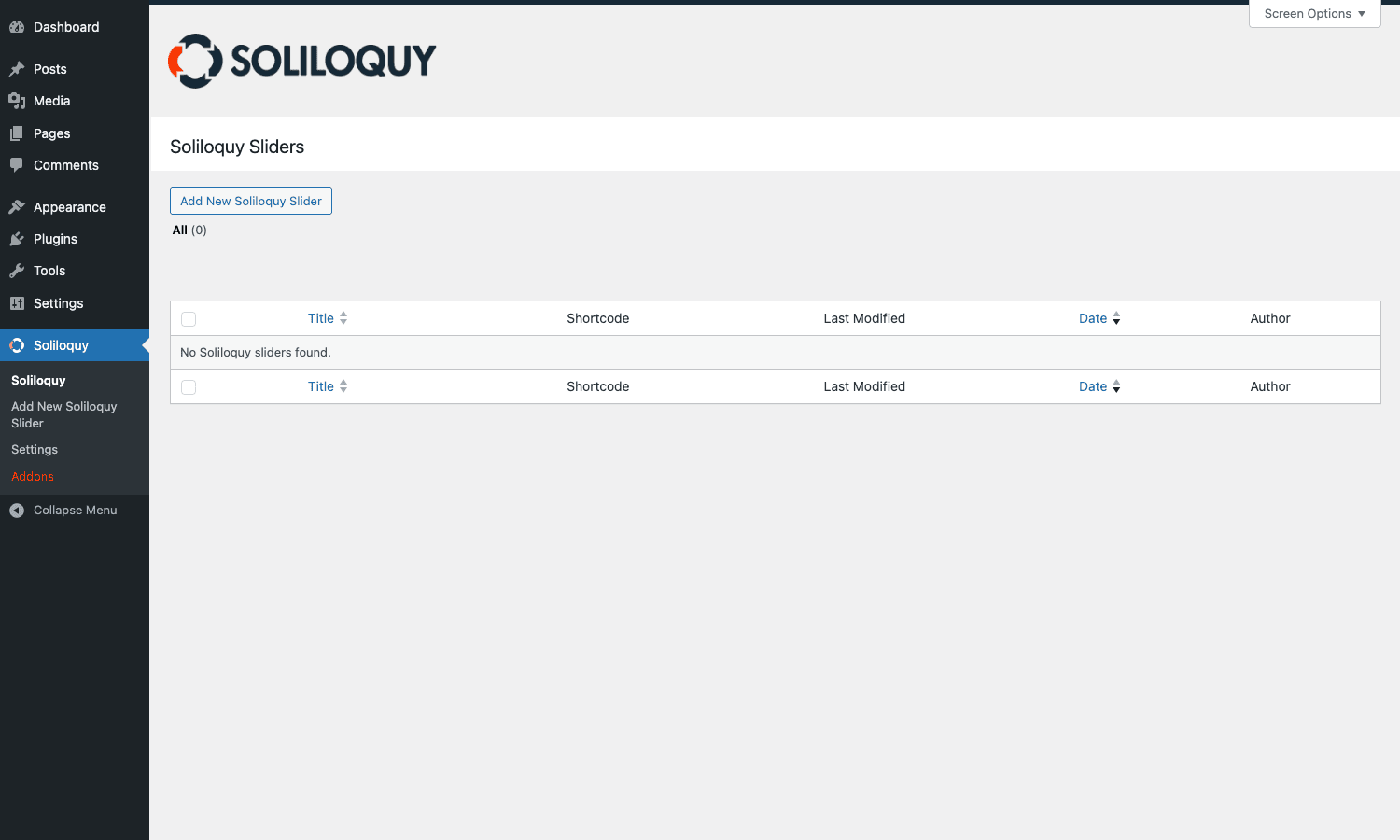
The list table is a standard WordPress one. Title, Shortcode column (so you can copy [soliloquy id="N"] without opening the slider), Last Modified, Date, Author. Sliders behave like posts: trash, restore, bulk delete all work.
Step 2: create a slider
Click Add New Soliloquy Slider. You get a familiar-looking edit screen with a Soliloquy panel where the post body normally sits. The very first decision is Native Slider vs External Slider. Native is "build the slider here in the WordPress media library"; External is "point at an external feed or post query" and that mode unlocks once an appropriate addon is active (WooCommerce, dynamic, featured-content, Instagram).
Give the slider a working title (this is the title users never see, it’s just for the admin list), then in the Native Slider drop zone either drag images directly from your computer or click Select Files from Other Sources to pick from the WordPress Media Library. As soon as you drop a file, Soliloquy uploads it, runs it through wp_get_image_editor if cropping is enabled, and adds a slide tile to the grid below.
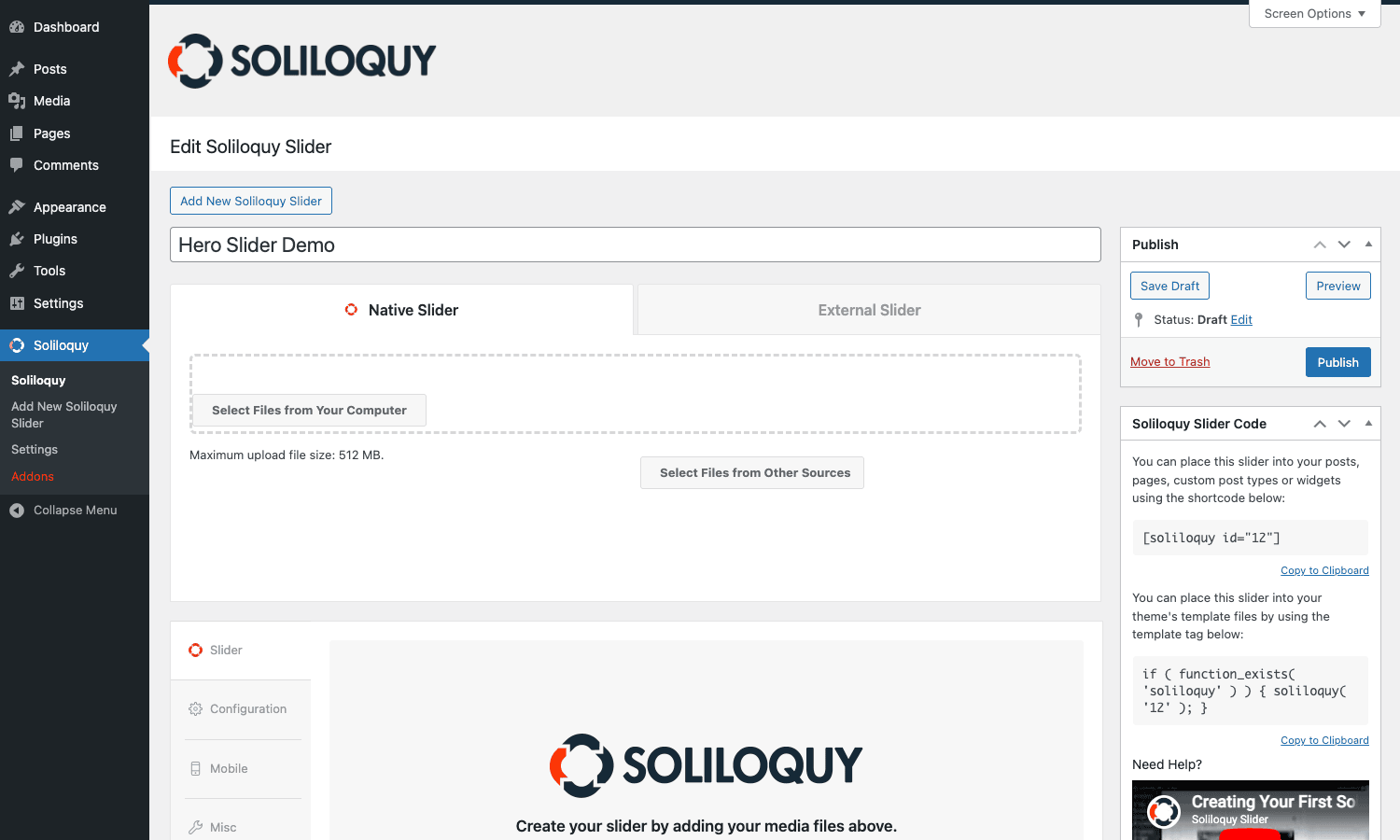
Notice the right sidebar already shows the shortcode and template tag for the slider you’re building, even before you save. Soliloquy assigns the post ID first so it can show you [soliloquy id="12"] immediately. The template-tag equivalent (if ( function_exists( 'soliloquy' ) ) { soliloquy( '12' ); }) is right below for theme files.
Step 3: configure the slider behavior
Click the Configuration tab in the vertical nav below the slide grid. This is where the slider’s actual personality lives.
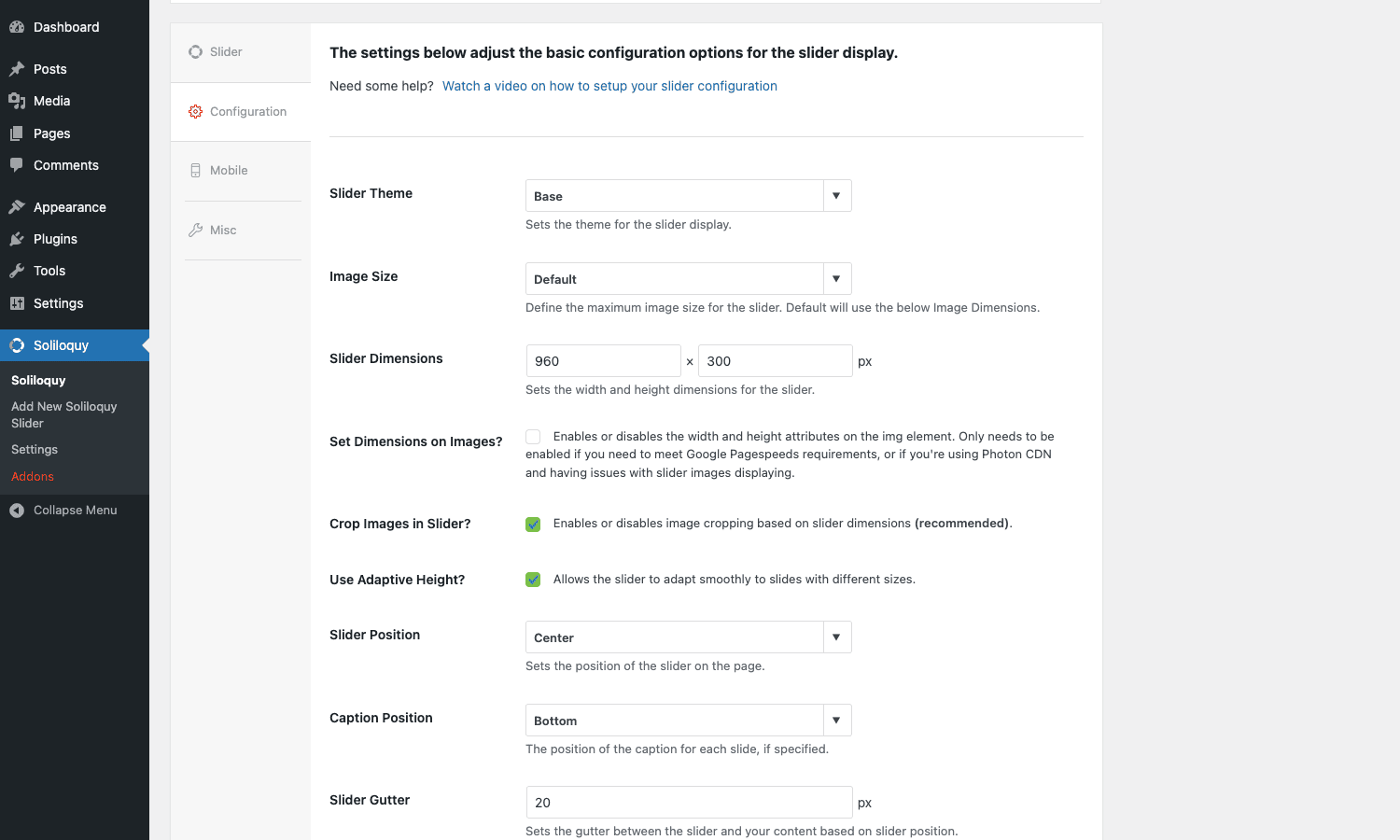
The top of the panel sets visual defaults: Slider Theme (Base / Classic / Dark / Light / Metro), Image Size (any registered WordPress image size or "Default" to use the dimensions below), Slider Dimensions (width x height in pixels), Crop Images (recommended on, otherwise odd-aspect slides break the layout), Adaptive Height (good for portrait-and-landscape mixes), and Slider Position. Caption Position toggles where the per-slide caption sits relative to the image.
Scroll past those and you get the navigation block: arrows, dot navigation (Soliloquy calls these "control nav"), pause/play buttons, keyboard navigation, mousewheel navigation, swipe gestures (separate Mobile tab), and Loop Slider.
Below that is the autoplay block: Autostart Slider, Slider Delay (ms between transitions), Start On Slide (zero-indexed starting slide), Slider Transition (Fade / Scroll Horizontal / Scroll Vertical / Ticker), Transition Duration, Transition Speed, Caption Transition Delay, Pause on Hover, Pause on Navigation, Autoplay Video, Use CSS Transitions, and ARIA Live Value.
For most homepage sliders the sensible defaults are: Fade transition, 5000 ms delay, Pause on Hover on, ARIA Live polite, dimensions matching your design grid (often 1200×600), Crop Images on, Adaptive Height off. Switch to Scroll Horizontal if your slides are wider than they are tall and you want a "next" feel rather than a cross-fade.
Step 4: tune the mobile rendering
Open the Mobile tab.
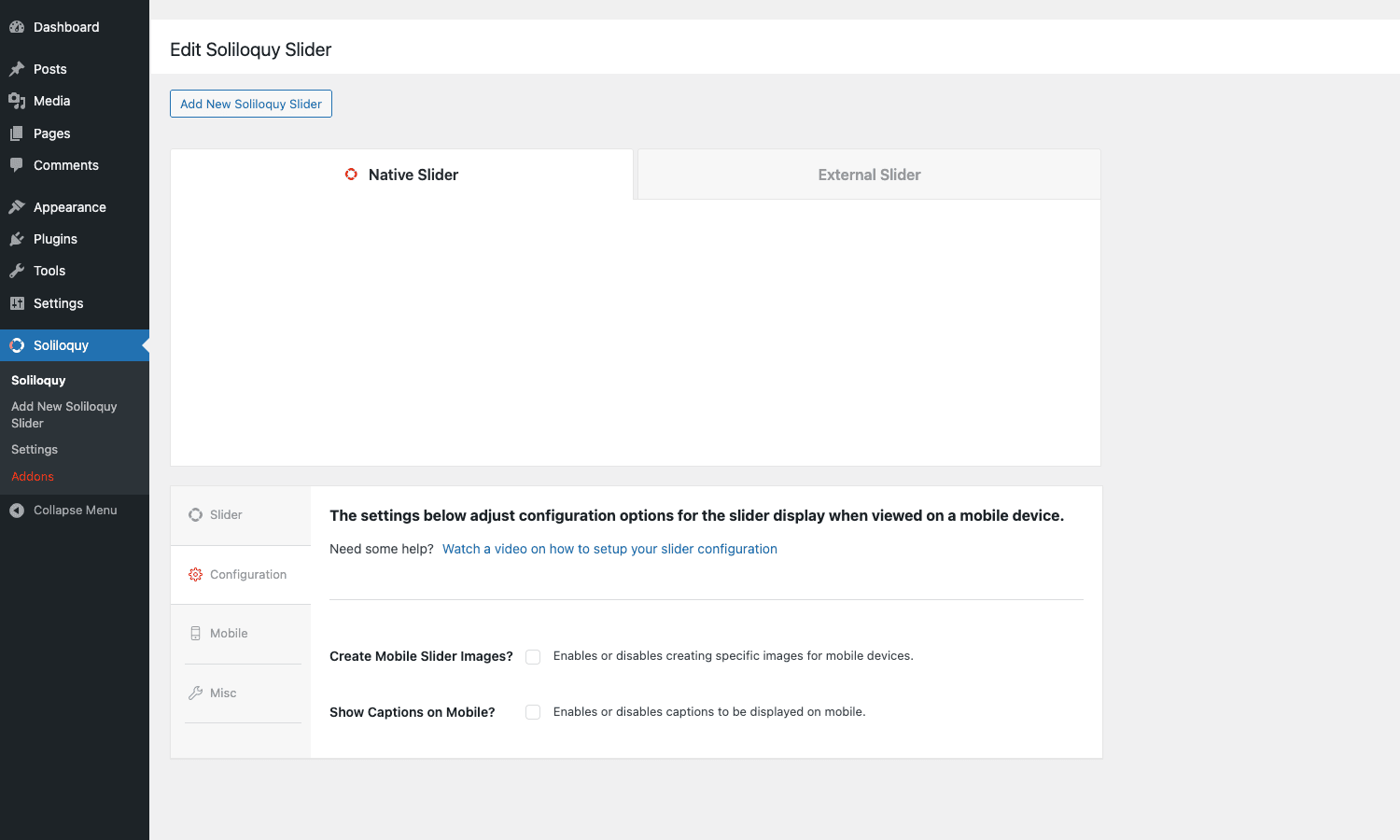
Two key toggles live here. Create Mobile Slider Images? asks Soliloquy to generate a separate crop sized for phones, so the same hero slider can ship a 1200-pixel image to desktop and a 600-pixel image to mobile, using the right srcset. Show Captions on Mobile? strips captions when the viewport is narrow, which is usually what you want because a 320-pixel screen with a four-line caption looks claustrophobic.
If you flip Create Mobile Slider Images on, you’ll get a Mobile Dimensions input (typically 640×480 or whatever your design system says) and Soliloquy will run the resize at save time. The mobile asset is stored as a sibling attachment and served via the same lazy loader.
Step 5: misc niceties and saving
The Misc tab gets you: RTL Support, Custom Slider Classes (one CSS class per line, attached to the slider container), Import/Export, Slider Title, and Slider Slug. The last two are admin-only metadata: the slug is what [soliloquy slug="hero-home"] will look up, and it’s stable across IDs (handy when you’re moving sliders between staging and production).
Click Publish in the right sidebar. The slider is now saved and the shortcode is ready to drop into a page.
Placing the slider on a page
Soliloquy gives you four ways to render the slider on the front end. Pick whichever fits the surface you’re working with.
The shortcode
The fastest path: copy [soliloquy id="12"] (or the slug form [soliloquy slug="hero-home"]) and paste it into any post, page, custom post type, or any builder that runs shortcodes. Page builders like Elementor, Beaver Builder, Bricks, and Brizy all accept it via a Shortcode widget. Both the ID and slug variants work; slug is friendlier because IDs change between environments.
The Gutenberg block
In the block editor, search "Soliloquy" in the inserter, drop the block, then pick a slider from the dropdown that appears in the block inspector.
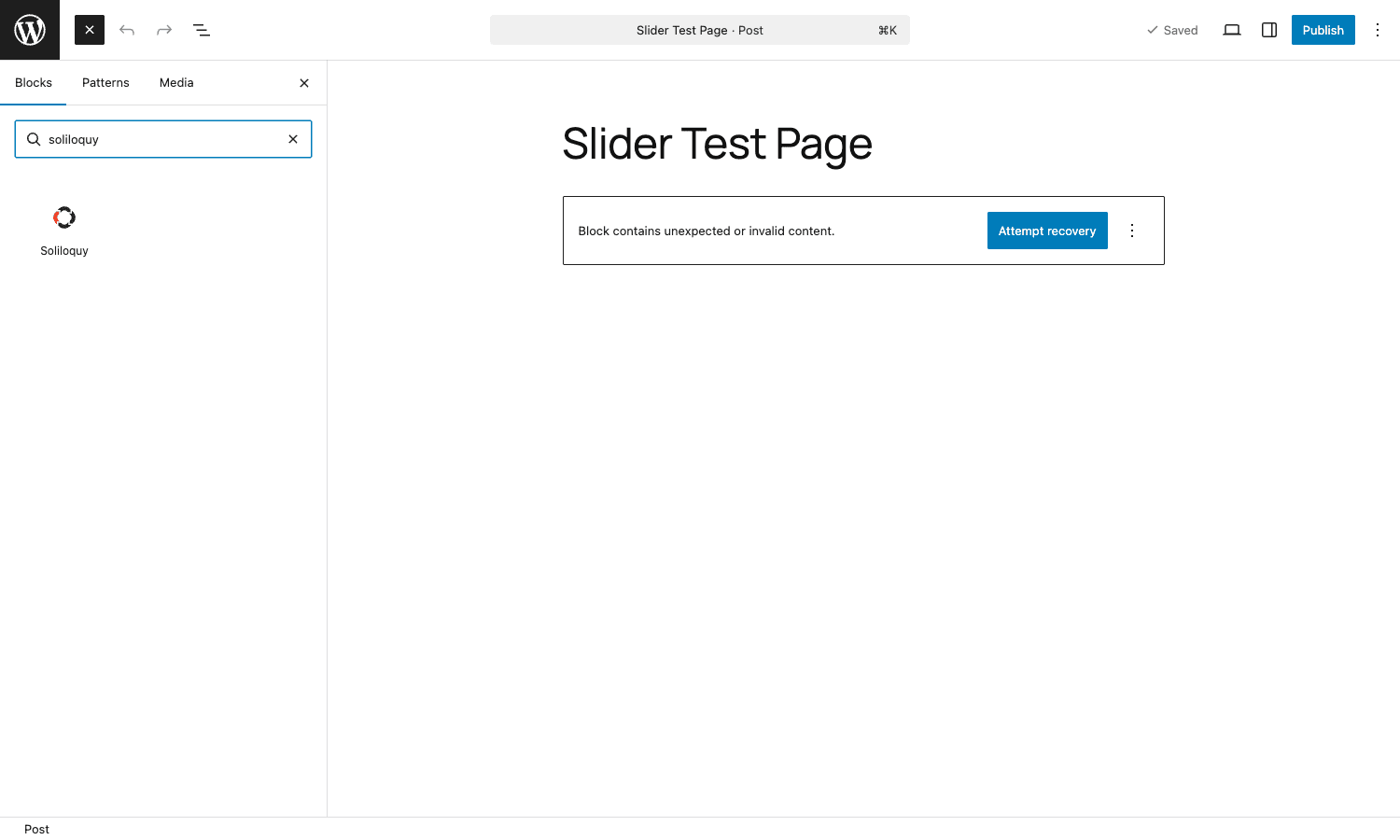
The block stores the slider ID in the sliderId attribute (see blocks/soliloquy/block.json) and renders the same shortcode under the hood when the page is served. It supports align: wide and align: full, which is what you want for a homepage hero that breaks out of the content column.
The template tag
For theme files, the documented pattern is:
if ( function_exists( 'soliloquy' ) ) {
 soliloquy( '12' ); // accepts ID or slug
}
The function_exists guard is important. If a future developer disables the plugin and your theme calls soliloquy() directly, the site fatals. The guard turns that into a silent no-op.
The widget
Soliloquy registers a classic widget too, in case your theme still uses sidebars. It exposes a slider picker and renders the same output.
Slider types beyond images
The free core handles image and HTML slides directly. Everything else is an addon:
Video slider
A Soliloquy slide can be a video URL. Paste a YouTube, Vimeo, or Wistia URL, or upload an MP4 to the Media Library and pick it. Soliloquy detects the host, emits the right embed code, and the Configuration tab’s "Autoplay Video?" toggle controls whether the video starts when the slide arrives. The soliloquy_embed_args filter lets you customise the YouTube/Vimeo URL params (mute, controls, related videos, etc.) and soliloquy_local_video_args does the same for self-hosted MP4.
Featured-content slider
Pull recent posts from any post type, optionally filtered by category, taxonomy, or "is_featured". Soliloquy builds slides from the post thumbnail, title, and excerpt. Great for a magazine-style "latest articles" hero.
Dynamic slider
Pass a WP_Query-style arg array (or hook a filter) and render the result as slides. This is the most flexible mode. You can build a slider from any custom query: ACF relationship fields, "events happening this week", "products tagged X", and so on.
WooCommerce slider
Render a slider of WooCommerce products. Pick a product category, "on sale", "featured", or a manual list. Each slide is a product image with a price overlay and a link to the product page. Combine with WooCommerce shop pages to put a hero slider above the product grid.
Instagram and Pinterest sliders
Pull from an Instagram feed or a Pinterest board. These addons rely on the same authentication flow Envira uses for its Instagram galleries. Helpful for visual brands where the social feed already is the marketing asset.
Schedule, Lightbox, Thumbnails, Slider Themes
A few more addons that don’t add new slider types but extend the existing ones. Schedule sets a start and end date so a "Summer Sale" slider auto-retires. Lightbox lets visitors click into a full-screen viewer. Thumbnails draws a strip of small previews below the slider. Slider Themes adds extra theme files beyond the five that ship in core.
Real-world use cases
Where I actually use Soliloquy on client sites:
- Homepage hero. Three to five images, fade transition, 6-second delay, autoplay, swipe enabled on mobile. The most common use, the one Soliloquy is calibrated for.
- Testimonial slider. Five HTML slides, one quote per slide, ticker scroll, no images. Soliloquy’s HTML mode is more flexible than most "testimonial" plugins because you write the markup yourself.
- Product showcase. WooCommerce slider on a brand landing page, pulling all products in a "Featured" category. Saves the work of hand-curating a "Shop Now" section.
- Portfolio carousel. Featured-content addon pulling recent custom-post-type entries ("project"), with the post thumbnail as the slide image and a "View Project" link in the caption.
- Restaurant menu rotator. Three slides: lunch, dinner, brunch. Image slides with overlay captions. Schedule addon hides the brunch slide on weekdays.
- Webinar countdown. Single-slide "slider" with custom HTML, used purely as a banner. Easier than dropping in a static banner because the same surface can be reused once the event passes.
Developer reference
The plugin exposes a generous public API. Below are the bits I actually reach for. All of them are stable and have shipped for years.
Class architecture
The plugin namespace prefix is Soliloquy_. Important classes you’ll touch:
Soliloquy(main file): singleton bootstrap, constants, plugin file path. UseSoliloquy::get_instance()to grab the singleton.Soliloquy_Posttype: registers thesoliloquyCPT.Soliloquy_Shortcode: parses[soliloquy]into a slider render call.Soliloquy_Settings: the Settings admin page.Soliloquy_Metaboxes: the slider-edit metabox UI.Soliloquy_Common_Admin: shared admin helpers.Soliloquy_License: license activation logic.
Shortcode under the hood
The shortcode is registered with:
add_shortcode( 'soliloquy', [ $this, 'shortcode' ] );
The shortcode method accepts id, slug, plus arbitrary extra attributes that are passed into the slider output. You can render programmatically with:
echo do_shortcode( '[soliloquy id="12"]' );
// or:
echo do_shortcode( '[soliloquy slug="hero-home"]' );
Using the slug form is friendlier when you’re deploying across environments because IDs differ between staging and production but slugs don’t.
Gutenberg block
The block is at blocks/soliloquy/block.json and uses apiVersion: 3. Key attributes:
{
 "name": "soliloquy/soliloquywp",
 "category": "widgets",
 "supports": { "html": true, "align": ["wide", "full"] },
 "attributes": {
 "sliderId": { "type": "number", "default": null }
 }
}
It registers via register_block_type( SOLILOQUY_DIR. '/blocks/soliloquy' ), so if you ship a child theme that disables most blocks, allow this one through your allowed_block_types_all filter.
Modifying slider defaults
Every newly-created slider starts with the values returned by Soliloquy::default_options(). Override them with the soliloquy_defaults filter:
add_filter( 'soliloquy_defaults', function ( $defaults ) {
 $defaults['config']['slider_size'] = 'medium_large';
 $defaults['config']['delay'] = 7000; // ms between transitions
 $defaults['config']['pause'] = 1; // pause on hover
 $defaults['config']['transition'] = 'horizontal';
 $defaults['config']['arrows'] = 1;
 $defaults['config']['control_nav'] = 0; // hide dots by default
 return $defaults;
} );
This sets the defaults for new sliders without touching existing ones. Useful when every site you build has the same "house style".
Hooking into the front-end output
The HTML the shortcode returns is filterable in three layers. The outermost is soliloquy_output, which gives you the whole rendered string. More surgically, soliloquy_output_before_container and soliloquy_output_after_container let you wrap the slider, and the per-item filters (soliloquy_output_before_item, soliloquy_output_after_item) let you decorate each slide.
add_filter( 'soliloquy_output_before_container', function ( $html, $data ) {
 return '<div class="my-hero-wrapper">'. $html;
}, 10, 2 );

add_filter( 'soliloquy_output_after_container', function ( $html, $data ) {
 return $html. '</div>';
}, 10, 2 );
Useful when your theme expects a known wrapper and you don’t want to add it in every template.
Rewriting image URLs (CDN, BunnyCDN, KeyCDN)
Soliloquy emits the canonical WordPress attachment URL for each slide. To swap that for a CDN host on the fly:
add_filter( 'soliloquy_image_src', function ( $src, $id, $item, $data ) {
 return str_replace(
 'https://example.com/wp-content/uploads/',
 'https://cdn.example.com/uploads/',
 $src
 );
}, 10, 4 );
The same filter fires for both the standard src attribute and the srcset entries. Combine with WP Rocket or any other host-level cache for a complete edge setup.
Custom caption rendering
If you want full control over the per-slide caption markup (more than the built-in Top/Bottom/Left/Right positioning), filter the caption output:
add_filter( 'soliloquy_output_caption', function ( $caption, $id, $item, $data, $i ) {
 if ( empty( $item['caption'] ) ) {
 return '';
 }
 return sprintf(
 '<div class="my-caption"><h3>%s</h3><p>%s</p></div>',
 esc_html( $item['title']?? '' ),
 wp_kses_post( $item['caption'] )
 );
}, 10, 5 );
JS API for slide-change events
On the front end, every slider exposes a JS lifecycle through actions Soliloquy fires from its own runtime. Two of them are essential:
soliloquy_api_before_transitionruns before a slide change starts.soliloquy_api_after_transitionruns after the transition completes.
jQuery(window).on('soliloquy.transition.before', function(e, slider, oldIndex, newIndex) {
 if (typeof window.gtag === 'function') {
 gtag('event', 'slider_transition', {
 slider_id: slider.id,
 from_slide: oldIndex,
 to_slide: newIndex,
 });
 }
});
The events also fire on the slider element itself, so a vanilla-JS analytics hook is a one-liner:
document.querySelectorAll('.soliloquy-container').forEach(function(el) {
 el.addEventListener('soliloquy.transition.after', function(e) {
 console.log('Slider', el.id, 'moved to slide', e.detail.index);
 });
});
Programmatic license key
If you deploy Soliloquy across many sites and want to centralise the license, define a constant in wp-config.php:
define( 'SOLILOQUY_LICENSE_KEY', 'YOUR-LICENSE-KEY-HERE' );
Soliloquy will pick it up via get_license_key() when the option is empty, so you don’t have to enter the key on each site’s Settings page. There’s also a filter:
add_filter( 'soliloquy_license_key', function ( $key ) {
 return defined( 'MY_SECRET_KEY' )? MY_SECRET_KEY : $key;
} );
Gating access by capability
Soliloquy ships sensible capability defaults, but if you’ve got a multi-author install and only editors should manage sliders:
add_filter( 'soliloquy_menu_cap', function () {
 return 'edit_others_pages';
} );

add_filter( 'soliloquy_export_cap', function () {
 return 'manage_options';
} );
Same pattern for soliloquy_import_cap. The menu cap also gates who sees the Soliloquy menu item at all, so it’s the right place to lock out shop managers and contributors.
Flushing the slider cache after a programmatic update
Sliders are cached as post meta keyed by config hash, so if you change a slider’s data via code (wp_update_post, custom CLI script), the next front-end render keeps showing the old HTML. Call:
do_action( 'soliloquy_flush_caches', $slider_id );
after any direct data write. The same action fires automatically when the slider is saved through the admin.
REST endpoints
The soliloquy CPT is registered with show_in_rest = true, so the standard /wp-json/wp/v2/soliloquy endpoints work out of the box for listing, reading, creating, and updating sliders programmatically (admin-authenticated). Combine with the WordPress Application Passwords flow to drive Soliloquy from a deployment script, CI job, or external CMS.
Performance and compatibility
The front-end footprint is one of the reasons I keep recommending Soliloquy.
- JavaScript:
slider.min.jsis about 26 KB minified, with no jQuery dependency on modern versions. Soliloquy’s runtime is vanilla JS plus a small touch-gesture polyfill. Compared to Slider Revolution’s ~120 KB main bundle plus per-slider JSON parsing, that’s roughly an order of magnitude lighter. - CSS: the base theme is ~12 KB minified. Themes are CSS-only swaps; switching from Base to Metro doesn’t add JS, only restyles arrows and dots.
- Lazy load: off-screen slides don’t pre-fetch their images. The plugin emits
loading="lazy"and uses its owndata-soliloquy-srcattribute the runtime swaps when the slide becomes visible. - Adaptive images: with Mobile Dimensions on, the plugin generates a smaller crop and serves it via
srcsetso phones don’t download desktop-sized images. - Schema markup: the plugin can output
ItemListstructured data for image sliders via thesoliloquy_indexable_imagesfilter set, which is useful for image SEO. - No jQuery requirement. Critical for performance-budget themes (Astra free, GeneratePress, Kadence) that already ship without jQuery.
Page-builder compatibility
I’ve used Soliloquy alongside Elementor, Beaver Builder, Bricks, Brizy, Divi, and Oxygen with no issues. Drop a Shortcode widget, paste [soliloquy slug="hero-home"], save. Most builders also auto-detect the shortcode and render a preview. The block-editor block works inside Gutenberg-first pages.
Cache plugin compatibility
The output is just HTML once rendered, so it caches cleanly with WP Rocket, WP-Optimize Premium, or any host-level cache. The only thing to watch: if you have aggressive HTML minification turned on, test that the slider’s inline CSS for per-slider settings (caption position, dimensions) survives the minification. I’ve never seen it break, but it’s the kind of thing that’s worth a smoke test on staging.
Gotchas worth knowing
- If you migrate the site to a new domain and run a search-replace on
wp_postmeta, slider image URLs can get half-replaced (the meta stores both attachment IDs and serialised URLs). The Settings page has a "Fix Broken Migration" button that re-resolves the image references. Run it once after the move. - The plugin caches resized images per slider. If you change a slider’s dimensions from 1200×600 to 1600×900, run Soliloquy -> Settings -> Fix or save the slider once to force the recrop. Otherwise the front-end keeps serving the old crops.
- The "Adaptive Height" option fights with "Crop Images". If you turn cropping off (so slides retain their native aspect), turn adaptive height on, or every slide will display at the tallest one’s height with white space on the others.
- If a child theme strips the WP toolbar globally, the Gutenberg block’s inserter icon may not appear in the block-category sidebar. Re-enable for admins or whitelist the block via
allowed_block_types_all.
Soliloquy vs other WordPress sliders
This is the comparison I get asked the most. Honest take:
- vs Slider Revolution. Slider Revolution is a full timeline-animation tool. If you need text fading in over a video, parallax shapes, or canvas-level effects, Soliloquy can’t do that. If you need a hero rotator on a brochure site, Slider Revolution is overkill and adds ~100 KB of JS for features you won’t use. Pick by use case: animation-heavy hero -> Slider Revolution; clean image rotator -> Soliloquy.
- vs LayerSlider. Similar story to Slider Revolution, with a slightly different UI philosophy. LayerSlider is layer-and-keyframe focused; Soliloquy is image-first.
- vs Smart Slider 3 Pro. Smart Slider is closer to Soliloquy in scope but with a more visual canvas editor. It feels more like Canva-meets-WordPress. Slightly heavier on the front end, more powerful in the editor. Worth comparing side by side if you build sliders for clients regularly.
- vs MetaSlider. MetaSlider is the closest direct competitor. Free at wp.org, paid Pro upgrade, multiple slider libraries (Flex / Nivo / Coin / Responsive). The codebase is older and bundles multiple slider engines, which makes it heavier than Soliloquy. Pick MetaSlider if you specifically need Nivo or Coin’s animation styles; pick Soliloquy if you want the lighter footprint.
- vs Master Slider. Master Slider has nice transitions but feels dated UX-wise. Heavier front-end assets. Soliloquy is the modern choice.
- vs Envira Gallery. Same team makes both. Envira is for grid galleries; Soliloquy is for sliders. Envira’s slider mode exists but is less feature-rich than Soliloquy’s grid mode is non-existent. Use Envira for masonry and lightbox galleries, Soliloquy for hero rotators. They share the same codebase patterns so if you know one, the other feels familiar.
If you want to see what the comparable "build a slider on WordPress" workflow looks like in Slider Revolution or LayerSlider, the Slider Revolution walkthrough and LayerSlider walkthrough on the GPL Times blog cover the alternatives end to end.
Pricing and licensing
Soliloquy is a commercial plugin. Direct from soliloquywp.com, plans are tiered by feature set: Lite (free, with image slides only), Standard, Multi, Developer, and Master. The paid tiers add addons: video sliders, WooCommerce, dynamic, Instagram, Pinterest, Schedule, Lightbox, Thumbnails, Slider Themes, Featured Content, CSS Add-on, and Protection.
Soliloquy Responsive Slider is on GPL Times. It’s the same code under the GPL v2 license the plugin already ships with. You get the full plugin including the addon machinery, install on as many sites as you operate, and there’s no license-key gating for the front-end output. The premium plan’s main extras (vendor automatic updates and vendor support) are the only things you trade off.
For trying the plugin first, the free Soliloquy Lite on wordpress.org is enough to evaluate the builder and basic image slider. Once you need video, WooCommerce, or any of the dynamic/feed sources, the full version is what you want.
Frequently asked questions
Does Soliloquy work with the block editor?
Yes. There’s a native Gutenberg block called Soliloquy that picks any slider from a dropdown. The block stores the slider ID, supports align: wide and align: full, and renders the same output as the shortcode. The block.json is at blocks/soliloquy/block.json if you want to read it.
Can I have multiple sliders on the same page?
Yes. Each slider has its own ID, its own JS instance, and its own DOM. Drop two [soliloquy] shortcodes on the same page and they’ll initialise independently. The runtime stores per-slider config in window.soliloquy_slider[ID].
Does Soliloquy support video?
YouTube, Vimeo, Wistia, and self-hosted MP4 via the Video addon. The runtime detects the URL host and picks the right player. Autoplay is controlled per slider (Configuration tab) and respects browser autoplay-with-sound restrictions, so the slide muted-autoplays on most browsers but won’t force sound on.
Is Soliloquy good for WooCommerce stores?
Yes. The WooCommerce addon lets you build sliders from product categories, "featured" products, "on sale" products, or a manual list of product IDs. Each slide gets the product image, name, price, and a link to the product page. Useful for "shop the lookbook" sections or category landing pages.
Will Soliloquy slow down my site?
Almost never. The front-end runtime is ~26 KB minified with no jQuery dependency, and off-screen slide images don’t pre-fetch. On a typical homepage with one slider, total cost is around 40 KB of JS and CSS combined. That’s less than a single Google font weight.
Can I use Soliloquy without a license key?
Yes, on GPL Times’s build. The license check gates "create new slider" in the upstream plugin, but the front-end rendering and existing sliders work either way.
How do I migrate sliders between sites?
The Misc tab has an Import/Export button. Export from staging, import on production. The exported file is JSON, contains the slider config and slide references by attachment ID, so make sure the same media is available on the target site (or re-attach manually after import).
Can I run Soliloquy alongside Envira Gallery?
Yes. They’re built on the same patterns by the same team, and they don’t conflict. I’ve shipped sites with both: Envira for portfolio galleries on a "Work" page, Soliloquy for the homepage hero. Asset overhead is small because both runtimes are lean.
Does it work with WPML or Polylang?
Yes. Each slider is a WordPress post, so WPML and Polylang treat it like any other CPT. Translate the slider, get a per-language slider ID, and reference the right one from each language’s template. The slug parameter ([soliloquy slug="hero-home"]) is the friendlier option here because you can use the same slug across languages and let the multilingual plugin’s connector pick the right post.
Are sliders responsive by default?
Yes. The output uses fluid widths and srcset for the slide images. The Mobile tab generates a separate smaller crop and serves it via srcset so phones don’t download desktop-sized images. Touch and swipe gestures are on by default.
Does it support RTL languages?
Yes. The Misc tab has an "Enable RTL Support?" toggle that flips the slider’s transitions, navigation arrows, and caption positioning for right-to-left languages like Arabic, Hebrew, and Farsi.
What about accessibility?
Reasonable defaults. Soliloquy emits proper role and aria- attributes, supports keyboard navigation (left/right arrow keys), and the ARIA Live Value option lets screen readers announce slide changes. It’s not WCAG-perfect out of the box (auto-rotating content is itself a WCAG concern), but the building blocks for an accessible implementation are in place.
Final thoughts
Soliloquy is the slider plugin that doesn’t make a fuss. It does the job a homepage slider needs to do: load fast, render cleanly on phones, accept any media source you throw at it, expose enough hooks for developers to swap markup or push events into analytics, and stay out of the way. There’s no "AI slide generator" feature, no Photoshop-style canvas, no 200-style preset library. Just a builder, a sensible Configuration panel, a Mobile panel, and a shortcode.
That’s why I keep coming back to it. Half the slider plugins I evaluate try to be page builders. Soliloquy stays on its lane. The codebase is mature, the runtime is small, the developer API is stable, and the addons (video, WooCommerce, dynamic, Instagram) cover almost every case where "more than images" is the requirement.
If you’ve been hand-rolling jQuery slick sliders into your theme to keep page weight low, Soliloquy is the supported alternative that doesn’t add the weight you were avoiding. If you’ve been stuck on Slider Revolution because of one homepage hero, this is the lighter swap.
Soliloquy Responsive Slider page. Install it, build your first slider in five minutes, drop the shortcode where you need it, and you’re done.