


WordPress sliders sit in a weird place. Half the WordPress community loves them, half thinks they’re an antipattern from 2013, and the other half just need a hero section that auto-rotates and don’t have strong feelings either way. Smart Slider 3 has been quietly serving all three groups since 2014. It’s the modern alternative to LayerSlider and Slider Revolution, with a cleaner visual builder and a one-time license model that’s friendlier than the older sliders’ annual renewals.
This article is a working tour of Smart Slider 3 Pro from a builder’s perspective: what the plugin actually ships, how the canvas editor works in practice, how dynamic post slides and the developer hook surface look, and the gotchas that turn up on real sites.
Table of contents
- What is Smart Slider 3 Pro?
- Free version vs Pro
- Key features
- The slider types
- Installation and first run
- Touring the admin UI
- How dynamic slides work
- Real-world use cases
- Developer reference: hooks, shortcodes, integrations
- Performance, compatibility, and gotchas
- Pricing and licensing
- FAQ
- Final thoughts
What is Smart Slider 3 Pro?
Smart Slider 3 is a WordPress slider plugin by Nextend, a small Hungarian dev team. It first shipped in 2014 as a free WordPress.org plugin (the "3" in the name refers to the major version, not the third release). The free version has over 3 million active installs and remains the entry point. Smart Slider 3 Pro is the paid extension that unlocks the full feature set: 180+ premium templates, dynamic slides (Posts, WooCommerce, custom DB queries), advanced video controls, layer animation library, and more.
The plugin sits in a category populated by three other major players: LayerSlider, Slider Revolution, and the older MetaSlider. Smart Slider 3’s pitch against the older two: a cleaner Vue-based editor, faster runtime JS, and a one-time license tier that doesn’t require yearly renewal. Against MetaSlider: more layout flexibility and a full canvas editor instead of a list-of-images interface.
The official product page lives at smartslider3.com. The free core remains on wordpress.org/plugins/smart-slider-3.
Free version vs Pro
A lot of Smart Slider reviews you’ll find online don’t split the two clearly. Here’s the honest line:
Free version ships the core slider engine, the canvas editor, a smaller template library (~50 free templates), basic slide types (image, static), basic layer types (text, image, button, area, icon, HTML), animation library essentials, responsive controls per breakpoint, lazy loading, RTL support, and WPML/Polylang multilingual support. This is a complete working slider plugin on its own.
Pro adds 100+ premium templates, dynamic slides (Posts, WooCommerce, custom DB queries, iCal events, photo galleries, YouTube/Vimeo feeds, Twitter/Instagram feeds), 35+ slide types vs the free version’s smaller set, advanced video controls (auto-play, mute, lazy load, sticky video), the full layer animation library (hundreds of premade animations), Yoast SEO integration, backup/restore tooling, and the unlimited license tier with white-label support.
A rough rule: if your site needs a static hero with a few image slides and some text overlay, the free version is enough. If you need recent-posts carousels, WooCommerce product sliders, or anything dynamic, you need Pro.
Key features
What you actually get when you install Smart Slider 3 Pro:
- 180+ pre-made templates. Heroes, content sliders, photo galleries, before/after sliders, full-screen scrolling sliders, post carousels. Click "Import", everything drops into the dashboard, customize from there.
- Canvas editor. Drag-and-drop layered editing similar to Photoshop or Figma’s layers panel. Each slide is its own canvas; each layer is independently positioned and animated.
- 60+ layer types. Text, image, button, icon, area (clickable region), group (container), transform (rotate/scale a sub-element), HTML, video, audio, YouTube, Vimeo, before-after, countdown, input field.
- Slider types: Simple, Block, Carousel, Showcase, Accordion. Five layout engines. Simple is the classic image+text slideshow. Block is a flexbox container that breaks slides into responsive sections. Carousel shows multiple slides at once with auto-advance. Showcase does a 3D cover-flow effect. Accordion is a vertical/horizontal expanding-panel layout.
- Responsive controls. Set different layout, font sizes, layer positions per breakpoint (desktop, tablet, mobile, portrait, landscape).
- 180+ premium templates. Pro tier.
- Animation library. 20+ slide transitions, 100+ layer animations. CSS-based, no jQuery required.
- Multi-axis parallax. Layers move at different speeds as the user scrolls or hovers.
- Ken Burns effect. Slow zoom on slide backgrounds. The classic.
- Lazy loading. Per-slider opt-in. Slides only load when the slider scrolls into view.
- Touch + keyboard + mouse wheel. Multiple input methods supported simultaneously.
- Deep linking. Each slide gets a URL hash (
#slide-2). Visitors can link to specific slides; the browser back button moves between slides. - Dynamic slides. Posts, WooCommerce products, custom DB queries, iCal events, photo galleries, social media feeds. Build a hero from WordPress data, refresh automatically.
- WPML / Polylang multilingual. Built-in translation handling. Each slide can be translated.
- WooCommerce integration. Pull product data (title, price, image, SKU) into slides. Sale countdown timers.
- Auto-play + pause-on-hover. Configurable per slider.
- Custom CSS + JS per slider. Override anything.
- Reverse animations. Animations run in reverse when the slide changes back.
- Image filters. CSS-based filters (blur, brightness, contrast, sepia, grayscale) per slide background.
- Yoast SEO integration. Pro feature. Slider content gets indexed via Yoast’s content scanner.
The slider types
The five slider types are the plugin’s most distinctive feature. Most slider plugins ship one layout engine; Smart Slider ships five.
- Simple. Classic full-width slideshow. One slide visible at a time, auto-advance, navigation arrows, pagination dots. This is what 80% of WordPress slider use cases need: a hero section with three rotating slides.
- Block. A flexbox-based engine. The slider is broken into sections that flow based on screen size. Use it when the layout needs to rearrange on mobile (e.g. a desktop two-column slide becomes a stacked one-column on phones).
- Carousel. Multiple slides visible at once. Configure how many slides show per breakpoint. Great for product sliders, testimonial sliders, logo carousels.
- Showcase. A 3D "cover flow" effect. The center slide is full-size; adjacent slides are smaller and angled to the back. Useful for premium-feel hero sections.
- Accordion. Slides stack vertically (or horizontally) and expand on hover/click. Useful for image-heavy product showcases where you want to show all options at once.
You pick the slider type when you create a new slider; you can change it later but some settings won’t carry over.
Installation and first run
Smart Slider 3 Pro requires the free Smart Slider 3 plugin to be installed first. The Pro plugin extends the free core; it doesn’t replace it.
- Install the free Smart Slider 3 from WordPress.org. Activate.
- Install Smart Slider 3 Pro zip via
Plugins -> Add New -> Upload Plugin. Activate. - Navigate to Smart Slider in the admin sidebar. The plugin’s dashboard opens at
/wp-admin/admin.php?page=smart-slider3.
The first time you load the admin, the plugin shows a "Welcome to Smart Slider 3" video walkthrough screen. Click "Don’t show again" or "GO TO DASHBOARD" to skip. From there, you land on the project dashboard:
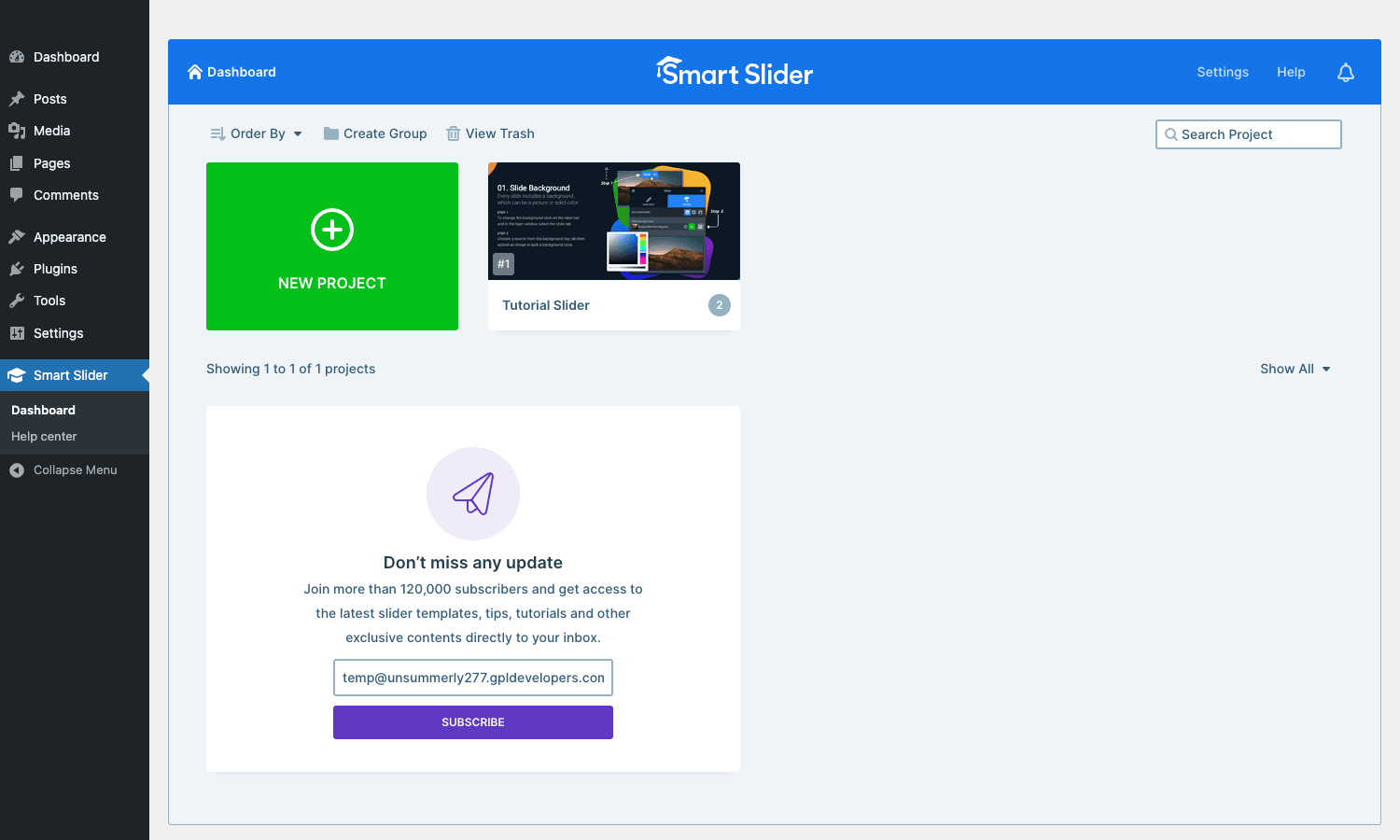
The dashboard has two starting tiles: a green NEW PROJECT button (creates a slider from scratch or from a template) and a Tutorial Slider that ships with the plugin. The top bar has Order By, Create Group (folder organization for many sliders), View Trash, and a search box. Click NEW PROJECT and Smart Slider walks you through picking a slider type, then offers a template library you can browse.
Touring the admin UI
Smart Slider 3’s admin breaks into three views: the project dashboard (above), the slider editor (configuring a slider’s behavior + slide list), and the canvas editor (designing an individual slide’s layout).
The slider editor (Simple Edit mode)
For quick edits, the Simple Edit view shows a flat form for the whole slider:
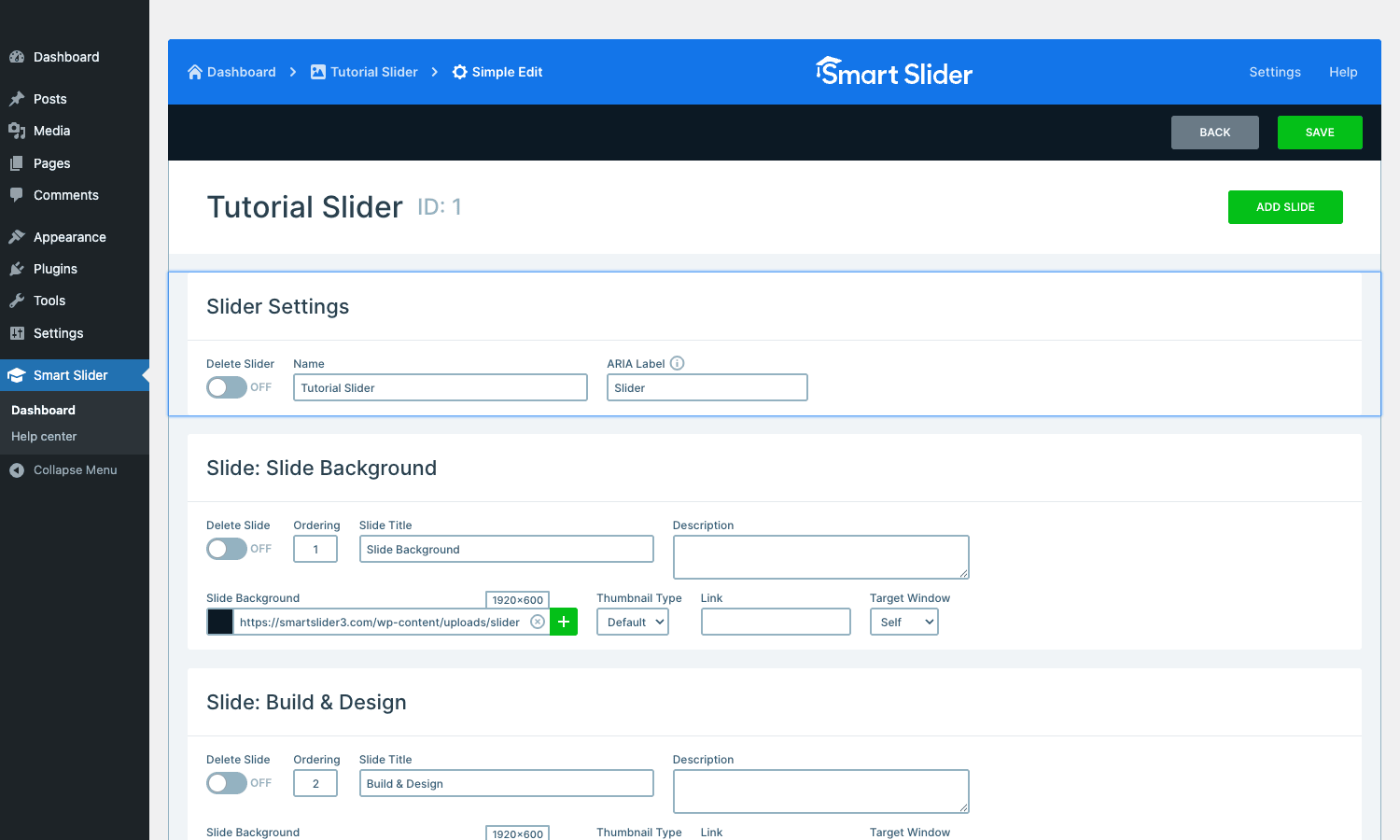
You see the Slider Settings (name, ARIA label, delete toggle) and a list of slides with their Slide Title, Description, Slide Background URL, Thumbnail Type, Link, and Target Window. The top bar shows breadcrumbs (Dashboard > Tutorial Slider > Simple Edit) and BACK / SAVE buttons. ADD SLIDE creates a new slide.
This view is what you’d use to quickly swap an image, change a slide title, or remove a slide. For anything more complex, you go to the full editor.
The full slider editor
The full editor opens a tabbed configuration page:
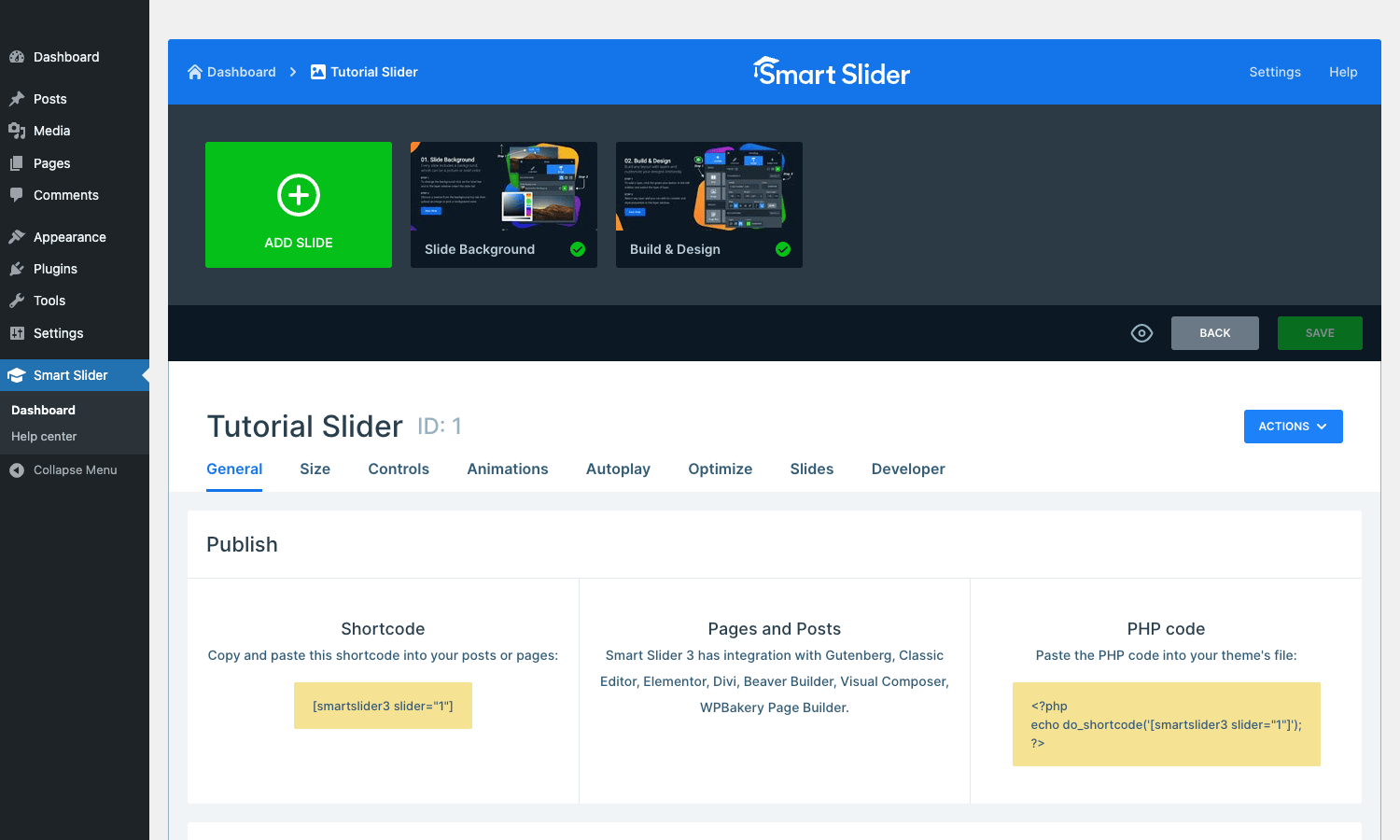
Top section shows the slides as horizontal thumbnails (Slide Background, Build & Design tutorial slides, ADD SLIDE button). Below that, the slider’s settings are organized into tabs: General, Size, Controls, Animations, Autoplay, Optimize, Slides, Developer.
The Publish row is where most users start: it shows the Shortcode to paste anywhere ([smartslider3 slider="1"]), tips for Pages and Posts (mentions Gutenberg, Classic Editor, Elementor, Divi, Beaver Builder, WPBakery integration), and the PHP code to paste into theme files (echo do_shortcode('[smartslider3 slider="1"]');).
The Size tab handles responsive breakpoints. The Controls tab covers arrows, bullets, autoplay buttons. Animations handles slide transition effects (fade, slide, kenburns, scale, rotate, plus dozens more). Optimize covers lazy loading, async loading, sub-image generation. The Developer tab exposes custom CSS, custom JS, init JS callbacks.
The canvas editor
The canvas editor is where the slide actually gets designed:
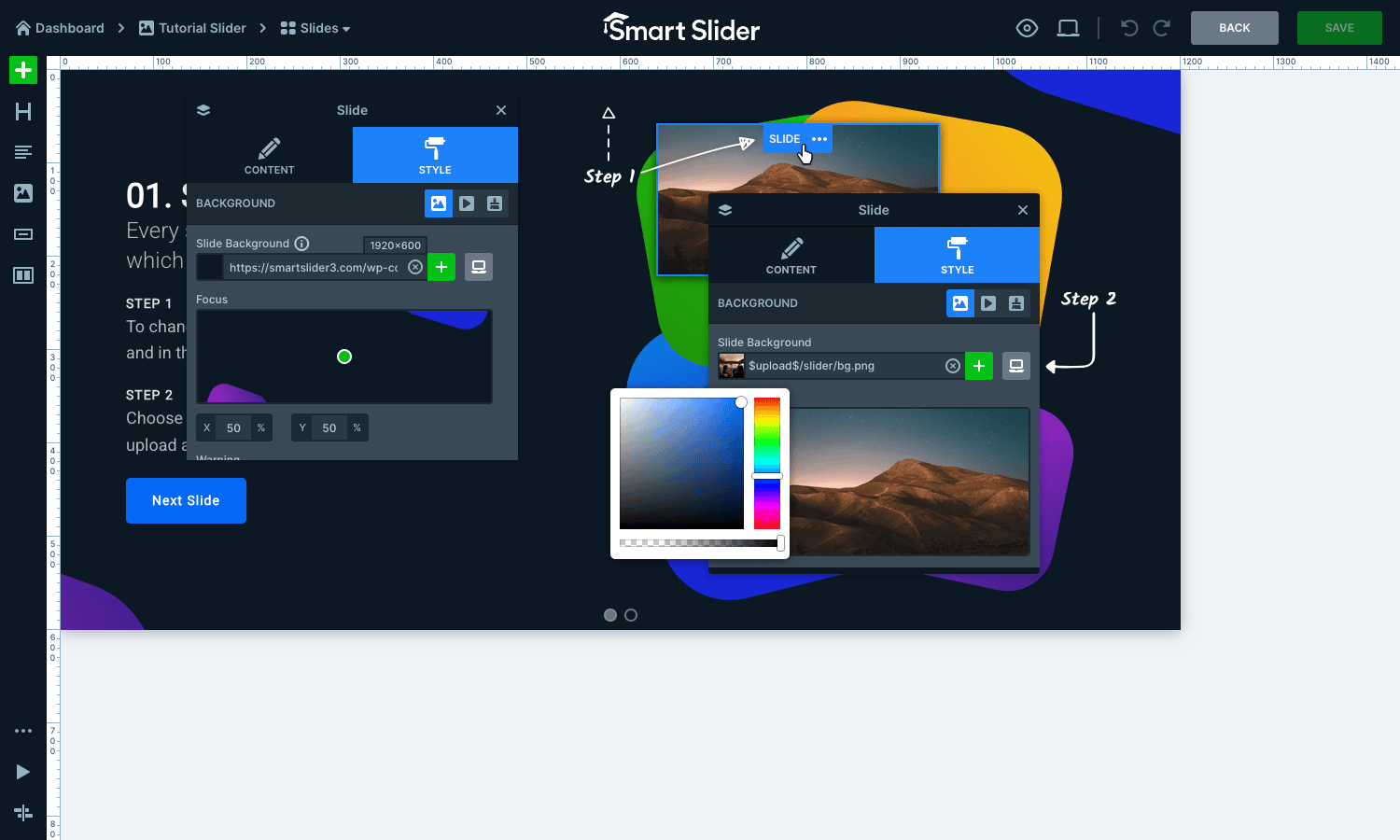
Left rail has the layer types (text, image, button, icon, group, transform, HTML, video, audio, area). Center is the canvas itself, showing the slide background and any layers you’ve added. Right rail has the layer’s properties (content, style, animation, position, size, breakpoints).
The example slide here ("Step 1 / Step 2" tutorial content) shows the plugin’s standard layered approach: each text block, each image, each button is an independent layer that can be positioned absolutely on the canvas, animated separately, and styled with its own font/color/spacing.
The canvas editor is where Smart Slider 3 most resembles a design tool. If you’ve used Figma, Sketch, or Photoshop, the mental model translates cleanly: layers, layer properties, canvas, ruler, snap-to-grid.
How dynamic slides work
The Pro version’s biggest non-template feature is dynamic slides. The idea: instead of manually adding each slide as a static image, you point the slider at a WordPress data source and Smart Slider generates the slides automatically from that data.
The data sources Smart Slider Pro can pull from:
- Posts. Latest posts, posts in a specific category, posts by author, custom post types, sticky posts.
- WooCommerce products. Featured products, on-sale products, products in a category, product tag, recent additions, top sellers.
- iCal events. Pull events from any iCal feed (Google Calendar, Apple Calendar, EventON, The Events Calendar).
- Photo galleries. WordPress media library, NextGen Gallery, Photo Gallery by Supsystic, Envira Gallery folders.
- YouTube / Vimeo channels. Latest videos from a channel or playlist.
- Twitter / Instagram feeds. Latest posts from a handle or hashtag.
- Custom DB queries. Write a raw SQL query, map result columns to slide fields. Use for anything not covered above.
Once you point a slider at a data source, you design one slide template in the canvas editor using {post.title}, {product.price}, {event.start_date} placeholders. Smart Slider renders that template once per item in the data source, substituting the placeholders with real values.
So you build a "Latest 5 Posts" hero slider once and it stays fresh forever as you publish new posts. The slider automatically refreshes its slide content when the underlying data changes, or on a schedule you configure.
This is the same conceptual model as Elementor Pro’s Posts widget or Bricks Builder’s dynamic data. Smart Slider implements it inside the slider context, which is what you want for a hero or carousel that needs to look like a designed slide rather than a list of cards.
Real-world use cases
Where Smart Slider 3 Pro fits well:
Hero sections on home pages. The 80% use case. A 3-slide rotating hero with a headline, subhead, and call-to-action per slide. Smart Slider’s Simple slider type plus a 30-second template selection gets you there in 5 minutes.
WooCommerce product carousels. Featured products, on-sale products, recent additions. Use the Carousel slider type with dynamic WooCommerce slides; the slider auto-updates as your catalog changes.
Blog post sliders. "Recent posts" or "Most popular posts" carousels. Dynamic Posts slides with category filtering. Set it once, forget it.
Testimonial sliders. Use the Carousel type with three testimonials visible at a time. Each slide pulls from a testimonials custom post type.
Photo galleries with the Showcase slider type. A premium-feel 3D coverflow for portfolio sites. The Showcase type makes regular photo galleries feel curated.
Event/conference landing pages. Use dynamic iCal slides pointed at the event organizer’s Google Calendar. Each upcoming event shows as a slide with date, title, location, register button.
Restaurant menu showcases. Use Block sliders with dynamic Posts slides pointed at a "menu items" custom post type. Each menu item becomes a slide with photo, name, price.
Real estate property carousels. Carousel slider type, dynamic Posts slides from a "properties" custom post type. Filter by price range, bedrooms, location.
Before-and-after sliders. Pro ships a dedicated before-and-after layer type. Useful for renovation sites, dental clinics, fitness coaches.
Full-screen scrolling sliders. Each slide is the full viewport height. Visitors scroll-wheel through slides. Used for portfolio sites and product launches.
Developer reference: hooks, shortcodes, integrations
Smart Slider 3’s developer surface is smaller than some plugins, but well-organized. The plugin source lives under wp-content/plugins/nextend-smart-slider3-pro/. The free core is at wp-content/plugins/smart-slider-3/.
Shortcodes
The main shortcode for rendering a slider anywhere:
[smartslider3 slider="1"]
[smartslider3 slider="2" align="center"]
[smartslider3 slider="3" classes="my-hero-slider"]
The slider attribute takes either a numeric ID or a slug if you’ve named your sliders.
For Avada/Fusion theme users, the plugin also registers [fusion_smartslider3]. For WPBakery / Visual Composer users, a smartslider element appears in the visual composer’s element picker. For Elementor and Divi, dedicated blocks appear in those page builders’ libraries.
PHP API
Render a slider in a theme file:
echo do_shortcode( '[smartslider3 slider="1"]' );
Or, equivalently:
N2SmartSliderRenderer::render( 1 );
Hooks
// Fires when a slider's content changes (slide added, removed, reordered).
add_action( 'smartslider3_slider_changed', function( $slider_id ) {
 // Invalidate any cache that depends on this slider.
 wp_cache_delete( "slider-{$slider_id}", 'my-app' );
} );

// Filter the JSON URL options passed to the slider's JS init.
// Useful for adding custom data attributes the slider should fetch.
add_filter( 'smartslider3_json_url_get_options', function( $options, $slider_id ) {
 $options['my_custom_param'] = 'value';
 return $options;
}, 10, 2 );

// Register a custom dynamic slide generator (for non-built-in data sources).
add_filter( 'smartslider3_skip_license_modal', '__return_true' );
REST / AJAX
Smart Slider 3 uses WordPress’s standard admin-ajax.php rather than a REST API. Most of the plugin’s runtime requests go through ?action=nextend_admin_ajax with various sub-action parameters. The plugin handles these internally; you wouldn’t typically call them from external code.
Custom DB tables
The plugin creates four custom tables, all prefixed with nextend2_smartslider3_:
nextend2_smartslider3_sliders– one row per slider, holds the slider’s config.nextend2_smartslider3_slides– one row per slide, child of sliders.nextend2_smartslider3_generators– dynamic slide generator configurations.nextend2_smartslider3_slider_xref– cross-references between sliders and slides.
A useful query for finding all active sliders:
SELECT id, title, type, status
FROM wp_nextend2_smartslider3_sliders
WHERE status = 'published'
ORDER BY id DESC;
Page builder integration
Out of the box, the plugin integrates with:
- Gutenberg (Smart Slider block)
- Classic Editor (TinyMCE button)
- Elementor (Smart Slider widget)
- Divi (Smart Slider module)
- Beaver Builder (Smart Slider module)
- WPBakery Page Builder (Smart Slider element)
- Avada / Fusion Builder (Smart Slider element)
- Oxygen Builder (shortcode wrapper)
In each case, the integration shows your existing sliders in a picker so you don’t have to remember IDs.
Performance, compatibility, and gotchas
A few things worth knowing before betting a site on Smart Slider 3 Pro.
JS payload. Smart Slider 3’s runtime is ~80KB minified gzipped. Larger than the bare-minimum CSS-only sliders, smaller than Slider Revolution’s ~120KB. On a tight performance budget, enable async loading in Optimize -> Async Non Primary so the slider JS doesn’t block first paint.
Cache compatibility. Compatible with WP Rocket, WP Fastest Cache, W3 Total Cache, and LiteSpeed. The plugin’s CSS is generated server-side and cached with the page; the JS bundle is static and cacheable forever.
Core Web Vitals. A slider with auto-play above the fold can hurt CLS (Cumulative Layout Shift) if slide heights vary. Pin the slider to a fixed height per breakpoint to avoid this. Lazy-loaded sliders below the fold are safe.
Lazy loading. Disabled by default; enable in the Optimize tab for any slider not above the fold. Smart Slider’s lazy load uses loading="lazy" on images plus an IntersectionObserver for the slider JS itself.
Mobile autoplay. Browser autoplay policies block sliders from auto-advancing on mobile if the slides contain video with sound. Use muted videos or disable autoplay on mobile via the responsive controls.
Image source URLs. If you bulk-import slider templates from the plugin’s library, the images come from smartslider3.com’s CDN. For production sites, you’ll want to replace these with locally-hosted versions to avoid the external dependency.
Dynamic slides + caching. Dynamic Posts slides re-query on every render unless you enable the slider’s cache option. On a busy site, set the dynamic slider’s cache to 1+ hour to avoid hammering the database.
Multilingual. WPML and Polylang both work, but you’ll need to translate each slide’s content separately (the plugin doesn’t auto-translate). The Pro plugin has a "Translate" tab on each slide for this.
Mobile editing. The canvas editor doesn’t work well on touch screens. Edit on desktop; preview on mobile. The plugin is upfront about this in its docs.
WooCommerce product slides + variant prices. The dynamic WooCommerce generator shows the regular price by default. If your products have variable pricing, you may need a custom DB query to show the "from $X" range.
Theme conflicts. Most modern themes work fine. Some older themes that aggressively enqueue jQuery or override CSS box-sizing globally can break Smart Slider’s positioning. The plugin’s Developer tab has a "Force iframe" option that isolates the slider from theme CSS as a last resort.
Multisite. Works on WordPress Multisite. Each subsite has its own sliders. The plugin doesn’t support network-wide slider sharing out of the box.
Pricing and licensing
Smart Slider 3 Pro’s pricing tiers (current at time of writing):
- Single: $35/year or $99 lifetime. One site. All Pro features.
- Business: $75/year or $189 lifetime. Five sites.
- Unlimited: $169/year or $469 lifetime. Unlimited sites, agency features (white-label, branding removal).
The lifetime option is the unusual one. Most slider plugins ship subscription-only. Smart Slider’s lifetime tier means you pay once and get updates forever, which is friendlier for sites you’ll run for years.
The plugin is GPLv3-licensed (WordPress requires GPL compatibility), which is why GPL Times can legally redistribute it.
For a production site where you’d want the official update channel and direct support, the official lifetime license is worth buying outright.
FAQ
Does Smart Slider 3 work with the block editor? Yes. There’s a Gutenberg block called "Smart Slider 3" that lets you pick a slider from a dropdown and drop it into any post or page.
Can I use it without Smart Slider 3 free? No. The Pro plugin extends the free core; you need both installed.
How does it compare to Slider Revolution? Slider Revolution has a deeper template library and more polished animations. Smart Slider 3 has a cleaner editor UI and a one-time license option. For most sites either works; if you’re price-sensitive or building many sites, Smart Slider’s lifetime tier wins.
How does it compare to LayerSlider? LayerSlider’s animation engine is smoother for complex layered animations. Smart Slider’s responsive controls are better for mobile-friendly designs. Pick LayerSlider for elaborate animated heroes; pick Smart Slider for general-purpose sliders that need to work cleanly on phones.
Will it slow my site down? A single slider above the fold adds ~80KB JS plus your slide images. With lazy loading enabled on below-fold sliders, the impact is minimal. Profile with PageSpeed Insights to confirm on your specific site.
Can I export/import sliders between sites? Yes. Slider settings export as .ss3 files (essentially zipped JSON). Import on another site to recreate the slider with all its slides.
Does Smart Slider work with WPML? Yes, full WPML support. Each slide can be translated; sliders inherit the post’s language context.
The Pro plugin includes the 180+ premium templates. The template library API points to smartslider3.com’s CDN; if the CDN is ever unreachable, the templates already imported into your site still work.
Can I use Smart Slider as a page builder? No. It’s a slider plugin. You use it inside another page builder (Gutenberg, Elementor, etc.) or via shortcode in classic-editor content.
Does the Pro version need an active license to work? The plugin itself works without a license, but the auto-update channel and the official Nextend support require an active license.
Will Smart Slider be updated for Gutenberg / FSE changes? Yes, the Nextend team ships major releases 2-3 times a year. The block editor and FSE compatibility have been kept current.
Final thoughts
Sliders aren’t fashionable in WordPress design these days. The conventional wisdom says they hurt conversions, distract visitors, and add JS weight. Most of that critique is fair for the bad implementations: auto-playing video heroes, three-slide carousels with text nobody reads, animation-heavy sliders that delay first paint.
But sliders done well still serve real purposes. Featured product carousels on e-commerce homepages. Photo galleries that visitors actually want to browse. Testimonial rotators. Before-and-after sliders that genuinely demonstrate value. Smart Slider 3 Pro is one of the better tools for building those well-implemented sliders, because the canvas editor lets you compose layouts that aren’t generic, the dynamic slides keep content fresh, and the responsive controls actually work on mobile.
The one-time license option is also worth highlighting. In a market where Slider Revolution, LayerSlider, and most other paid sliders run annual subscriptions, Smart Slider’s lifetime tier is genuinely friendlier for long-term WordPress builds.
Install both the free WordPress.org plugin and the Pro add-on, import one of the 180+ premium templates, drop the shortcode in a page, and see whether the canvas editor matches how you think about layouts. Twenty minutes is enough to know if it fits.