

WordPress security plugins fall roughly into two philosophies. The firewall-first camp (Wordfence, Sucuri, WPMU DEV Defender) puts a WAF between visitors and your site, scanning every request for known attack patterns. The hardening-first camp (Solid Security, formerly iThemes Security) starts at the WordPress level: enforce stronger passwords, hide the login URL, require 2FA, prevent brute force, scan files for unauthorized changes, restrict admin access to known IPs. Both philosophies work; they protect against different things.
Solid Security Pro is the WordPress install where the security policy lives at the WordPress level rather than at the edge. For sites where most of the threat surface is "someone tries to log in as admin" or "an outdated plugin gets exploited", the hardening approach is the right primary defense. For sites under heavy DDoS or sophisticated WAF-grade attacks, you’d pair this with edge protection (Cloudflare in front of it).
This article walks through what Solid Security Pro is (formerly iThemes Security Pro, rebranded after iThemes/Liquid Web spun off StellarWP), the free vs Pro split, the dashboard, the brute force and 2FA features, file change detection and site scanning, restrict-admin-access, security headers, the developer hook surface, and how it compares to Wordfence, Defender, and Sucuri.
Table of contents
- What Solid Security Pro is
- Free Solid Security vs Pro
- Installation and the setup wizard
- The Security Dashboard
- Brute force protection and login security
- Two-factor authentication
- Hide the login URL
- Firewall and IP management
- Site Scanner and vulnerability detection
- File change detection
- User Security: login attempts, sessions
- Restrict Admin Access (Pro)
- Security Headers (Pro)
- Magic Links and passwordless login (Pro)
- User Logging and audit trail (Pro)
- Logs
- Developer reference: hooks and filters
- Real-world use cases
- Solid Security vs Wordfence vs Defender vs Sucuri
- Performance, compatibility, gotchas
- Pricing and licensing
- FAQ
- Final thoughts
What Solid Security Pro is
Solid Security Pro is a WordPress security plugin from SolidWP (formerly iThemes, now part of StellarWP / Liquid Web). It was renamed from iThemes Security Pro in 2023 as part of the iThemes -> Solid brand transition. Same plugin, new label.
The plugin’s positioning is the security manager for the WordPress layer itself. It doesn’t sit at the edge intercepting traffic (the way Cloudflare does); it sits inside WordPress, hooking into login attempts, file changes, user actions, and configuration changes. The result is a security policy implemented at the application level: brute force protection on the WP login, 2FA enforced for admin users, file integrity scans, sensible permission requirements, restrictive admin access.
For most WordPress sites, this is the right primary defense. The single biggest risk to a WordPress install is "someone gets admin access", through a weak password, a brute-force-cracked password, a session hijack, or a privilege escalation. Hardening the login flow and the admin area prevents the bulk of real-world WordPress compromises.
What you get with Solid Security Pro:
- Brute force protection (local + network).
- Two-factor authentication with multiple methods.
- Hide the login URL.
- File change detection (daily scans).
- Site Scanner (vulnerability detection against the Solid database).
- IP management (allowlist/blocklist).
- Security headers (CSP, HSTS, X-Frame-Options, etc).
- Restrict Admin Access (Pro).
- Magic Links / passwordless login (Pro).
- Password expiration (Pro).
- User logging / audit trail (Pro).
- Privilege escalation detection (Pro).
- Geolocation blocking (Pro).
- WP-CLI integration.
The hook surface lets developers extend the plugin with custom rules, integrations, and notifications.
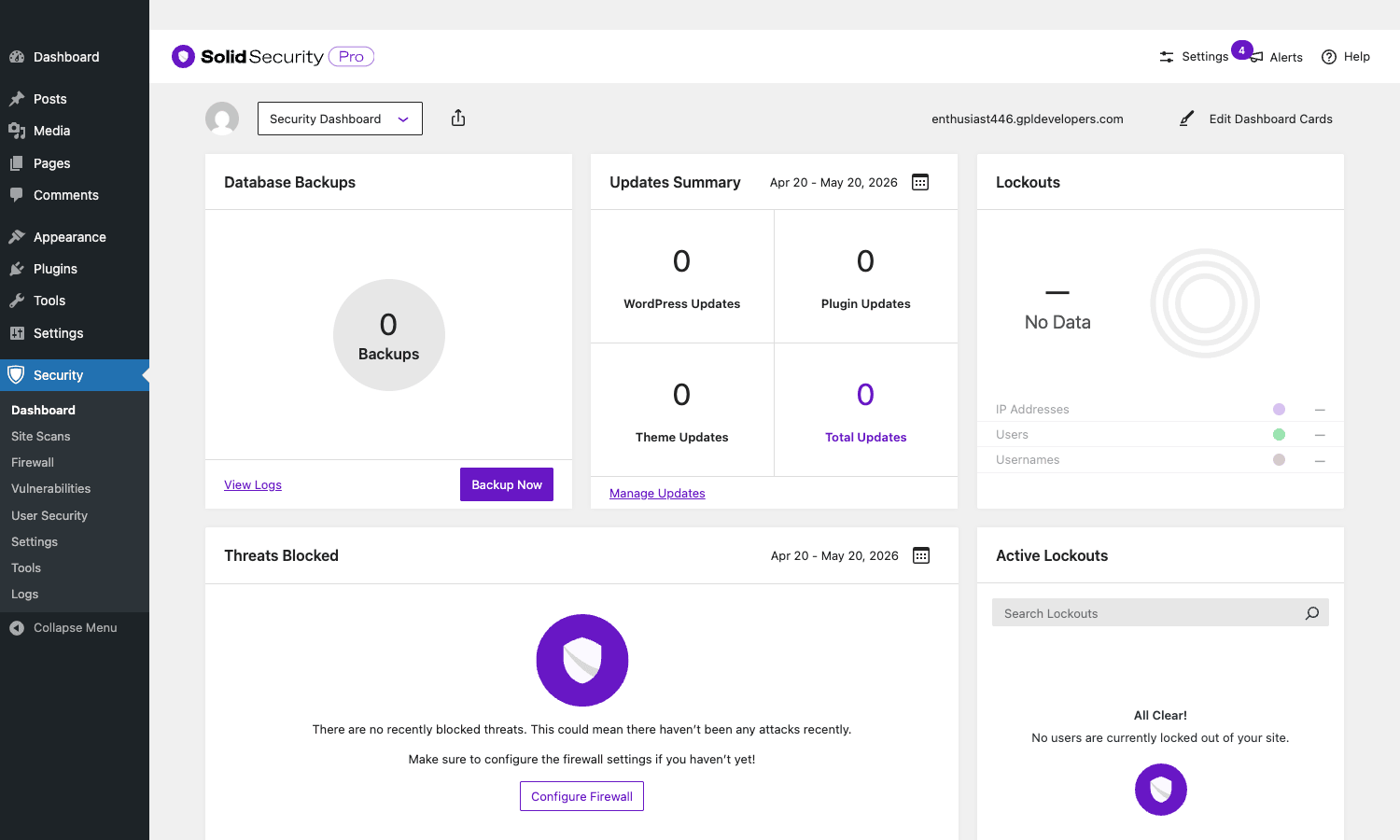
The dashboard above is the central operational view: backups, update status, lockouts, threats, active sessions. From here you navigate to specific subsystems via the left sidebar (Site Scans, Firewall, Vulnerabilities, User Security, Settings, Tools, Logs).
Free Solid Security vs Pro
Solid Security has a generous free tier on WordPress.org. Free includes:
- Brute force protection (local).
- Hide login URL.
- 404 detection.
- File change detection.
- Basic two-factor authentication (email + TOTP / Google Authenticator).
- Strong password enforcement.
- Database backup (one-off).
- Site Scanner (manual).
- WordPress / PHP / SSL tweaks.
- Admin user rename.
For a small personal site, free is enough.
Pro adds:
- Pro 2FA, WebAuthn biometric, magic links, passwordless login.
- Network brute-force protection, cross-site threat intelligence shared with other Solid Security users.
- Restrict Admin Access, IP-whitelist /wp-admin.
- Scheduled malware scans, automated daily/weekly.
- Password expiration, force users to rotate passwords every N days.
- Magic Links / Passwordless login, one-time-use login emails.
- User logging, audit trail of user actions.
- Version Management, auto-update plugins/theme; track outdated versions.
- reCAPTCHA integration, Google reCAPTCHA on login and registration.
- Geolocation blocking, country-level blocks.
- Privilege escalation detection, alert when user roles change.
- Online files validation, verify core WP files match canonical.
- Security headers, CSP, HSTS, X-Frame-Options.
- Import/export settings, replicate config across sites.
- WP-CLI commands, automate from the command line.
- Pro dashboard, additional dashboard widgets.
For any site beyond a personal blog, Pro is the right tier. The price difference compared to free is small relative to the operational risk of going without 2FA + audit logging + restrict-admin-access.
Installation and the setup wizard
Installation is one part: Solid Security Pro is a single plugin (the free Solid Security is bundled inside the Pro download; you don’t need to install both separately).
Plugins -> Add New -> Upload Plugin -> ithemes-security-pro.zip -> Activate. After activation, the Security menu appears in WP admin and the setup wizard launches.
The wizard walks through:
- Telemetry opt-in. SolidWP asks for permission to collect anonymous usage data. Decline if you’re privacy-conscious; the plugin works either way.
- Site type. Pick what kind of site this is (eCommerce, Blog, Brochure, Network, Portfolio, Non-Profit). The choice preconfigures sensible defaults; you can change later.
- Site context. "My Own Website" or "Client Website". Affects user-facing copy in some places.
- Pre-flight scan. Optional vulnerability scan before configuration.
- Brute force settings. Lockout thresholds, network protection toggle.
- 2FA setup. Configure 2FA for the admin account (recommended: TOTP plus a backup method).
- Other modules. Walk through hide-backend, file change detection, security headers.
- Summary. Review the configuration; click Finish.
Each step has a Skip button if you want to come back later. The wizard takes 5-10 minutes if you go through every step; 2 minutes if you skip the optional modules.
After the wizard, the Security menu has Dashboard, Site Scans, Firewall, Vulnerabilities, User Security, Settings, Tools, Logs.
The Security Dashboard
The dashboard surfaces the metrics that matter: database backups status, updates summary (WordPress core, plugins, themes), lockout count, threats blocked, active lockouts (currently-banned IPs and users).
Each card is drillable: click Database Backups to see backup history, click Lockouts to see which IPs are blocked and why, click Threats Blocked to see the last N attack attempts.
The dashboard is configurable, Edit Dashboard Cards rearranges, hides, or adds widgets. For a multi-site agency, the Dashboard Widget addon (Pro) puts a Solid Security summary on the main WordPress Dashboard so security status is visible at a glance.
Brute force protection and login security
Brute force protection is Solid Security’s flagship feature. Two layers:
Local brute force (free + pro). Tracks failed login attempts per IP and per username. After N failures (default 5 per username, 10 per IP) within a configurable window, the IP/user is auto-banned for a configurable duration.
Network brute force (Pro). Solid Security operates a shared threat intelligence network across its install base. If an IP is attacking other Solid Security sites (with N or more failed logins across many sites), your site auto-blocks it before it even tries you. This catches botnet-driven attacks that target many sites simultaneously.
Configuration:
- Max attempts per username, default 5, after which the username is locked.
- Max attempts per IP, default 10, after which the IP is banned.
- Time period, over what window the attempts are counted (default 5 minutes).
- Lockout period, how long the ban lasts (default 15 minutes; can be permanent).
- Lockout escalation, repeat offenders get progressively longer bans.
The Login Page also includes:
- Strong password enforcement, admins must use strong passwords; can be enforced for all roles.
- Disable Force Password Login, block password login entirely once magic links / WebAuthn are set up.
- Hide login error messages, don’t reveal whether the username or password was wrong (mild but useful obscurity).
- HIBP (Have I Been Pwned) check, refuse passwords known to have been breached in public dumps.
Two-factor authentication
2FA is the single biggest security win for most WordPress sites. Solid Security Pro supports:
- TOTP (Google Authenticator, Authy, 1Password), free.
- Email codes, free.
- Backup codes, free; printable one-time codes for emergency access.
- WebAuthn / biometric, Pro. Hardware keys (YubiKey), fingerprint, FaceID.
- Magic links, Pro. One-time-use login link sent via email.
- Passwordless login, Pro. Login via magic link only, no password.
Configuration:
- Required for which roles, Pro lets you require 2FA for Administrators, Editors, etc.
- Grace period, how many days after first login the user has to set up 2FA before being locked out.
- Bypass for known IPs, skip 2FA if logging in from a whitelisted IP (office).
- Per-user enrollment, each user picks which 2FA methods they use.
For any site with multiple admins or any site that’s been targeted, 2FA is essentially mandatory in 2026. Solid Security’s implementation is among the cleaner ones; the Pro WebAuthn support specifically is what lets you require hardware keys for high-privilege accounts.
Hide the login URL
The default WP login URL is /wp-login.php. Every WordPress bot in the world tries this URL first. Hiding it (e.g., to /secret-portal/) means the bots get 404s and don’t get a chance to brute-force.
This is "security by obscurity", not a real defense by itself, but it dramatically reduces attack surface. A site with a hidden login URL might see 50-90% fewer brute-force attempts simply because the bots can’t find the login form.
Configure under Settings -> Hide Backend. Pick your custom slug; the plugin sets up a redirect so anyone hitting /wp-login.php gets a 404 unless they know the new URL.
Don’t pick a guessable slug ("login", "admin", "dashboard"). Pick something specific to your site ("yourbrand-portal") or random. Document the new URL for your team; without it they’ll be locked out.
Firewall and IP management
The Firewall module is Solid Security’s newer addition (post-rebrand). It’s not a full WAF (web application firewall) like Wordfence, it’s a request-level filter for the login and admin areas.
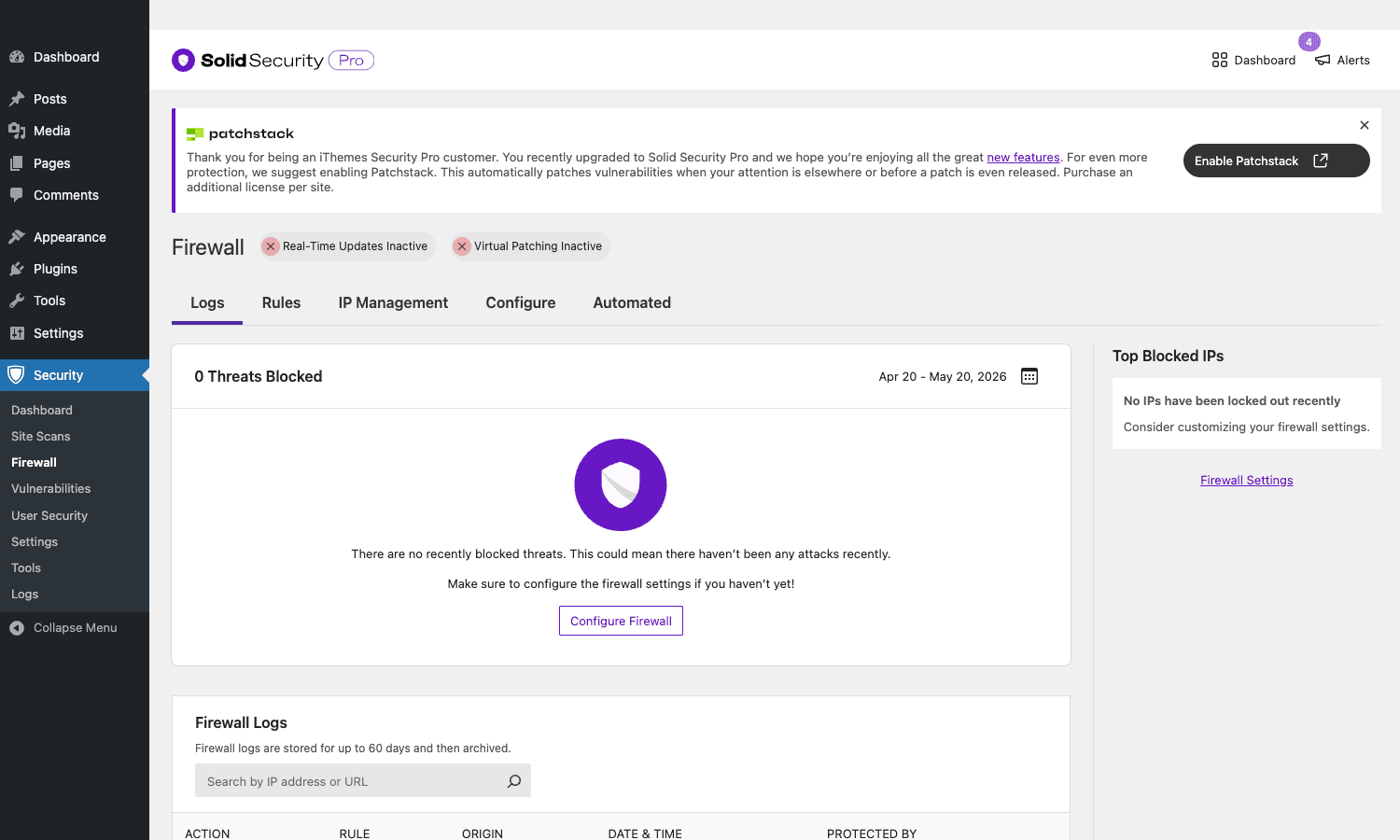
Tabs:
- Logs, list of blocked requests with IP, URL, rule that triggered.
- Rules, pre-configured rules + custom rules. The Patchstack integration (optional, additional cost) auto-applies virtual patches for newly-discovered vulnerabilities.
- IP Management, manually allowlist/blocklist IPs and ranges.
- Configure, rule sensitivity, log retention.
- Automated, auto-respond rules (block N attempts from same IP in M minutes, etc).
The Patchstack integration is the differentiator. Patchstack maintains a database of known WordPress plugin/theme vulnerabilities and ships virtual patches that block attempted exploits before you have a chance to update the affected plugin. Optional separate subscription on top of Pro.
Site Scanner and vulnerability detection
The Site Scanner checks your site against Solid Security’s vulnerability database. It identifies:
- Plugins with known vulnerabilities.
- Themes with known vulnerabilities.
- Outdated WordPress core.
- Configuration issues (e.g., readable wp-config.php, exposed debug log).
- Common security misconfigurations.
Free scanner is manual (click "Scan Now"). Pro scanner is scheduled (daily/weekly) with email notifications when new issues are found.
For sites running many plugins, scheduled scans are essential, vulnerabilities get discovered after-install all the time, and you need to know within hours of disclosure (not whenever you next manually scan).
The Vulnerabilities submenu shows the current vulnerability list with severity, affected plugin/theme, fix recommendation, and a link to the security advisory.
File change detection
File change detection hashes every WordPress file (core, plugins, themes, uploads) and rescans on a schedule. If a file changes unexpectedly, added, modified, deleted, you get an email alert.
This is malware detection by another name. If a WordPress site is compromised, attackers typically modify PHP files in plugins or themes to inject backdoors. File change detection catches this within hours.
Configuration:
- Scan frequency, twice daily by default.
- Ignore patterns, exclude paths that change legitimately (cache directories, logs).
- Email alerts, sent to the security email recipient.
False positives are common in active development (plugin updates, autosaves modify files). Configure ignore patterns once for your normal workflow; after that, the alerts are signal.
User Security: login attempts, sessions
The User Security module covers post-login security: who’s logged in right now, where from, with what.
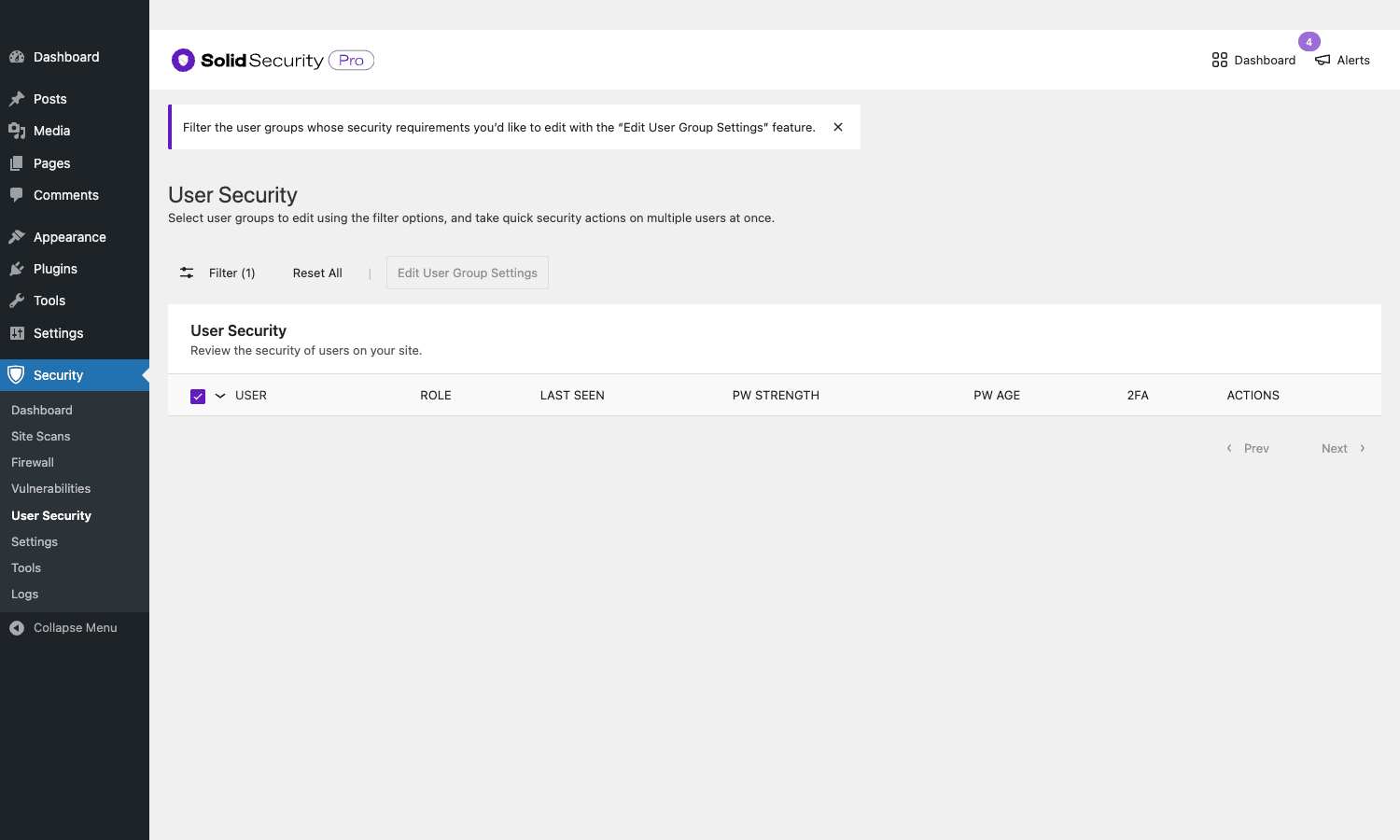
Features:
- Active sessions, list of currently-logged-in users with IP, browser, last activity. Force-logout any session.
- Login history, per-user login timestamps, IPs, successful/failed.
- Concurrent session limits, restrict how many simultaneous sessions a user can have.
- Session expiration, auto-logout after N minutes of inactivity.
- Password expiration (Pro), force password rotation every N days.
- Strong password enforcement, site-wide strong password requirement.
- Login attempt notifications, alert on failed admin logins from new IPs.
The active-sessions view is what you check when you suspect a compromise, see who’s currently logged in, identify suspicious sessions, force-logout immediately.
Restrict Admin Access (Pro)
Restrict Admin Access (RAA) is one of the most impactful Pro features. It limits access to /wp-admin/ (the WordPress admin area) to a whitelist of IPs or IP ranges.
Configuration:
- Allowed IPs, single IPs or CIDR ranges.
- Allowed countries, if you’re in one country, block /wp-admin from everywhere else.
- Exception URLs, pages that should remain accessible (e.g., /wp-admin/admin-ajax.php for front-end AJAX).
- Fallback behavior, what unauthorized visitors see (404, redirect to homepage, custom message).
For agencies and businesses with fixed office IPs, RAA reduces the attack surface dramatically. Even if someone has valid admin credentials, they can’t use them from outside the office network. Combined with 2FA, this makes admin account compromise nearly impossible without insider involvement.
For sites where admins travel or work remotely, configure RAA carefully, you can lock yourself out. Use a fixed VPN IP or a known-stable home IP. Test before locking down.
Security Headers (Pro)
Security headers are HTTP response headers that tell the browser to enforce security policies. Solid Security Pro adds:
- Content-Security-Policy (CSP), restricts which sources can load scripts, styles, images. Hardest to configure (CSP breaks things) but most powerful.
- Strict-Transport-Security (HSTS), forces HTTPS for all future visits.
- X-Frame-Options, prevents your site from being iframed (clickjacking protection).
- X-Content-Type-Options: nosniff, prevents MIME-type sniffing attacks.
- Referrer-Policy, controls what referrer information is sent.
- Permissions-Policy, restricts which browser APIs the page can use.
Each header can be configured in the Settings UI. For sites that haven’t set up CSP before, Solid Security has a "Learning mode" that watches your traffic for a period and suggests a CSP that won’t break legitimate resources.
Implementing security headers usually breaks something (a CDN-hosted script, an external font, an embedded video). Plan for an hour of testing after enabling each header.
Magic Links and passwordless login (Pro)
Magic Links replace passwords with one-time-use email links. The user clicks "Login with Magic Link" on the login form, enters their email, gets a link in their inbox, clicks it, and they’re logged in.
Benefits:
- No password to forget.
- No password to leak in a database breach.
- Same security model as email account (which the user already protects with their email provider’s 2FA).
- Friction-free login for occasional users.
Passwordless login is the broader pattern, same idea, but extended to WebAuthn (hardware keys, biometric). The user never sets a password at all.
Configuration:
- Magic link expiration, how long the link is valid (default 15 minutes).
- One-use enforcement, link invalidates after first use.
- Rate limit, max links per user per hour.
- Per-role availability, enable for all roles or specific ones.
For sites where users complain about password management, Magic Links can dramatically reduce support load.
User Logging and audit trail (Pro)
User Logging tracks every user action: logins, content changes, plugin installs, settings changes, role changes. Similar to the audit-log functionality in WP Activity Log but built into Solid Security.
Each event has:
- Timestamp.
- User.
- Event type (login, edit, install, etc).
- Object (what was acted upon).
- IP address.
For compliance use cases (HIPAA, GDPR, ISO 27001 audit trails), this is required. For day-to-day operations, it’s what you check when something unexpected happened.
The User Logging is less feature-rich than the dedicated WP Activity Log plugin (no report builder, no email notifications). If audit logging is a core requirement, the dedicated WP Activity Log is a better fit. If it’s a nice-to-have alongside the security features, the built-in is enough.
Logs
The Logs submenu shows every security-relevant event across all modules: brute force attempts, file changes, vulnerability scan results, lockouts, configuration changes. Search and filter by event type, user, IP, date range.
The logs are stored in custom DB tables (wp_itsec_logs, wp_itsec_log_meta). Retention is configurable (default 14 days for free, 30 days for Pro, longer with custom configuration).
For incident response, the Logs are where you reconstruct what happened. After a security event, filter to the time window and walk through events in order. The plugin’s logging is detailed enough for most forensic needs.
Developer reference: hooks and filters
Solid Security exposes hooks for customizing every module. The patterns developers reach for:
Customizing brute force thresholds
// Lower the per-user lockout threshold for sites under attack.
add_filter( 'itsec_setting_brute_force_max_attempts_per_user', function( $val ) {
 return 3; // From default 5.
} );

// Custom lockout period (24 hours).
add_filter( 'itsec_lockout_period', function( $period ) {
 return 86400;
} );
Excluding users from 2FA
// Skip 2FA for a specific service account.
add_filter( 'itsec_two_factor_required_for_user', function( $required, $user ) {
 if ( $user->user_login === 'cron_runner' ) {
 return false;
 }
 return $required;
}, 10, 2 );
Hooking into ban events
// Fires when a user is banned.
add_action( 'itsec_ban_user', function( $user_id, $reason ) {
 // Sync to your monitoring system.
 do_action( 'mymonitor_log_ban', $user_id, $reason );
}, 10, 2 );
Customizing the hide-backend slug
add_filter( 'itsec_hide_backend_slug', function( $slug ) {
 return 'mycustom-portal';
} );
Adding custom security headers
add_filter( 'itsec_security_headers', function( $headers ) {
 $headers['X-My-Custom-Header'] = 'value';
 return $headers;
} );
Restricting which logs to view
add_filter( 'itsec_filter_log_data', function( $data, $current_user ) {
 if ( ! current_user_can( 'manage_options' ) ) {
 // Non-admins can't see security logs.
 return array();
 }
 return $data;
}, 10, 2 );
The plugin’s core/modules/ and pro/modules/ directories contain the full hook surface. For most "I want to customize behavior X" questions, the answer is a filter on a setting key, not a code patch.
Real-world use cases
A few patterns Solid Security Pro handles well:
-
Personal/small business site. Brute force + 2FA + hide-backend + file scanning. That’s 95% of the threat surface for sites this size. Free version covers most of it; Pro adds WebAuthn for higher assurance.
-
Agency client sites. RAA (restrict admin to office IP) + scheduled scans + audit logging. Agencies that manage many client sites need centralized visibility; pair with MainWP for cross-site management.
-
eCommerce store. Same as small business + password expiration (force staff to rotate passwordsregularly) + reCAPTCHA on registration. Stores have the highest stakes (customer data + payment data), so the security tier you accept should be high.
-
Membership site. Pair with Restrict Content Pro for member gating, Solid Security for the auth/security layer. Magic Links work great for member logins.
-
Multi-author publication. Audit logging tells you who published what, who edited whose draft. Password expiration forces staff hygiene. 2FA mandatory for Editor role and above.
-
High-value targets (financial, healthcare). Full lockdown: RAA + WebAuthn + scheduled scans + security headers + IP-level blocks. Pair with Cloudflare for edge protection. Run WP Activity Log for compliance-grade audit trail.
-
Site recovering from compromise. File change detection + scheduled scans + brute force lockdown + immediate password rotation. After cleanup, Solid Security catches re-compromise attempts.
Solid Security vs Wordfence vs Defender vs Sucuri
The four major WordPress security plugins.
Solid Security Pro is hardening-first. Best for sites where login/admin security is the primary concern. Lighter than Wordfence in front-end overhead.
Wordfence Premium is firewall-first with deep WAF + malware scanning. Best for sites under active attack or sites that need real-time vulnerability patching. Heavier in front-end overhead.
WPMU DEV Defender Pro is a balanced mix, covers firewall, login, file scanning. Tighter Cloudflare integration than Solid. Best for sites already in the WPMU DEV ecosystem.
Sucuri is mostly cloud-based, WAF at the edge plus malware scanning. Different philosophy entirely: protect the site from outside instead of inside. Best when you want managed security and are willing to route all traffic through Sucuri’s edge.
The honest take:
- Sites where login compromise is the main risk: Solid Security Pro. RAA + WebAuthn + brute force makes this nearly bulletproof.
- Sites under active attack or in high-target niches (adult, gambling, political): Wordfence Premium. Real-time WAF rules matter when attackers are sophisticated.
- WPMU DEV-stack agencies: Defender Pro for consistency with the rest of their tools.
- Sites that want managed/edge-based security: Sucuri.
You can layer multiple plugins, but it’s usually unproductive, they collide on the same WordPress hooks. Pick one as primary; supplement with edge protection (Cloudflare).
Performance, compatibility, gotchas
- Database table growth. The log tables grow with traffic. Configure retention (default is sane but on busy sites the tables can be hundreds of MB). Use the built-in cleanup tools or schedule a cron job to prune.
- File scanning on large sites. Hashing every WP file is fine on small sites; on a site with 10GB of media library, the scan takes minutes. Configure ignore patterns for media directories.
- CSP breaks things on first enable. Almost guaranteed to break a fontload, a tracker, or an embed. Use the learning mode for a week before enforcing.
- Hide backend lockout risk. If you forget the custom URL and don’t have it saved, you’re locked out. Solid Security has a recovery URL but it requires server access. Document the URL out-of-band.
- WP-Cron dependency. Scheduled scans and brute force cleanup run on WP-Cron. Switch to OS-level cron for reliability on low-traffic sites.
- Reverse proxy / CDN. Behind Cloudflare or any proxy, configure Solid Security to read the real client IP from
X-Forwarded-Foror every event will show the proxy IP. - 2FA grace period catch. Users who don’t set up 2FA before the grace period expires get locked out. Communicate the deadline; have a fallback (admin can bypass-reset).
- Magic Link email reliability. Magic Links are only as reliable as your email delivery. Pair with WP Mail SMTP Pro for guaranteed delivery.
- RAA + WordPress mobile app. If you use the WordPress mobile app, RAA blocks it because the app comes from your phone’s IP, not your office. Either whitelist your phone’s IP or disable RAA for
/xmlrpc.php. - Plugin compatibility. Generally good. Edge cases with caching plugins (cached login pages get the rewritten hide-backend URL baked in). WP Rocket handles this correctly; verify with other caches.
These are the issues you find in the first month at production scale. None are dealbreakers; they’re configuration realities.
Pricing and licensing
Solid Security Pro pricing from SolidWP:
- Personal: $99/year (1 site).
- Plus: $199/year (5 sites).
- Agency: $299/year (10 sites).
The bundle with Solid Backups + Solid Central is available at higher tiers for businesses wanting the full Solid stack.
The plugin is GPL-licensed. Reasonable for agencies running multiple client sites or sites that want the full feature set without SolidWP’s per-site licensing.
FAQ
Is this the same as iThemes Security Pro?
Yes. Same plugin, rebranded in 2023 when iThemes became Solid (under the StellarWP / Liquid Web umbrella). Existing iThemes Security Pro licenses migrated to Solid Security Pro.
Do I need the free Solid Security plus Solid Security Pro, or just Pro?
Just Pro. The Pro plugin bundles the free version’s features internally. Don’t install both, they’d conflict.
Will it slow down my site?
The brute-force checks add a few milliseconds per login request, which is irrelevant to end-users. The file scanner runs on cron and doesn’t affect front-end requests. Security headers are negligible. The dashboard and reporting UI is admin-only, so it doesn’t affect logged-out visitors.
Does it replace Wordfence?
If your primary concern is login security and WordPress-layer hardening, yes. If you need WAF-grade pattern matching for sophisticated exploits, no, Wordfence’s WAF is more mature.
Can it scan for malware?
It can detect file changes (which catches most malware insertions). For active malware signature scanning, you want Wordfence or a dedicated malware scanner like MalCare.
Does it support multisite?
Yes. Network-activated, single config across all sites; or per-site activated with independent configs.
Will it block legitimate users?
Configured carefully, no. Configured aggressively, possibly. Tune brute force thresholds, 2FA grace periods, and RAA carefully. Test with non-admin users before locking down.
Can I export my settings to another site?
Yes, via the Import/Export feature (Pro). Useful for agencies setting up multiple client sites with similar policies.
How does it compare to Sucuri’s WAF?
Different layer. Sucuri sits at the edge (DNS-level WAF); Solid sits at the WordPress level. Use both for defense-in-depth, or pick one based on your threat model.
Does it auto-update plugins?
With the Version Management module (Pro). You can configure auto-updates per plugin/theme. Combined with vulnerability detection, this means newly-disclosed vulnerable plugins can auto-update to patched versions.
Final thoughts
Security is one of those things you don’t think about until you really need it, and by then it’s often too late. The smart play is to set up the security layer early, while the site is small and the policies are easy to enforce. Solid Security Pro is the right plugin for the WordPress-layer side of that policy.
The plugin’s strongest argument is the breadth-vs-depth tradeoff. Wordfence is deeper on WAF; MalCare is deeper on malware detection; Sucuri is deeper on edge protection. Solid Security is the broad-base hardening plugin that catches the actually-likely threats (brute force, weak passwords, no 2FA, exposed admin areas, file modifications) without the operational weight of a full WAF stack.
If you’re running a WordPress site at any scale and your security plan right now is "I have a strong password and Cloudflare", install Solid Security Pro and at least configure brute force protection, 2FA, hide-backend, and file change detection. Those four features alone prevent the bulk of WordPress compromises. The rest of the plugin’s surface is what you add on top as the site grows and the threat model gets more specific.
Install on staging, run through the setup wizard, configure for your site type, and move to production. The whole process takes an afternoon, and the result is a meaningfully more secure WordPress site.