

Building a WordPress site from scratch used to take weeks. Pick a theme, write content, design every page, configure the menu, find images, polish the typography, iterate. Even with a page builder like Elementor or a block library like Stackable, going from blank to launched takes a meaningful chunk of time. Astra Premium Starter Templates compresses that process: pick a pre-designed full-site template, click Import, and you’re 90% of the way to launched in under an hour. Edit text and swap images for the remaining 10%.
This article walks through what Astra Premium Starter Templates actually is, the free vs Premium split, the AI Website Builder, the template library, the import flow, customizing imported sites, and how it compares to alternatives like Elementor Kits and Spectra Starter Templates.
Table of contents
- What Astra Premium Starter Templates is
- Free vs Premium
- Installation and the entry screen
- AI Website Builder vs Classic Starter Templates
- Picking your page builder
- Browsing the template library
- Importing a template
- What gets imported
- Customizing the imported site
- Single page templates vs full sites
- Premium block patterns and images
- Astra Premium Sites vs the matching theme
- Developer reference: hooks and filters
- Real-world use cases
- Astra Starter Templates vs Elementor Kits vs Divi Layouts
- Performance, compatibility, gotchas
- Pricing and licensing
- FAQ
- Final thoughts
What Astra Premium Starter Templates is
Astra Premium Starter Templates (originally called Astra Starter Sites Premium) is a WordPress plugin by Brainstorm Force, the team behind the Astra theme. It adds a starter-template library and import wizard to the WordPress admin. You browse 280+ professionally designed full-site templates, pick one that matches your business, click Import, and the plugin builds out the whole site: home page, about page, services, contact, blog, plus the menu, theme settings, images, and starter content.
The plugin works with multiple page builders. Each template is available in multiple builder formats (Gutenberg, Elementor, Beaver Builder, Astra Block Editor). You pick your builder during the import flow, and the plugin imports the version designed for that builder.
What you get with Astra Premium Starter Templates:
- 280+ premium full-site templates (vs ~100 in free).
- AI Website Builder powered by ZipWP (generate a custom site from a text prompt).
- One-click full-site import (pages, menu, theme settings, images).
- Single-page template imports.
- Premium Pixabay + Pexels image library access.
- Premium block patterns library.
- Premium Spectra blocks.
- Works with Astra theme + most other modern themes.
The "Premium" tier is what you want if you’re seriously planning to ship sites. The free tier’s ~100 templates are reasonable but the premium 280+ collection has the polished designs that look launched-ready out of the box.
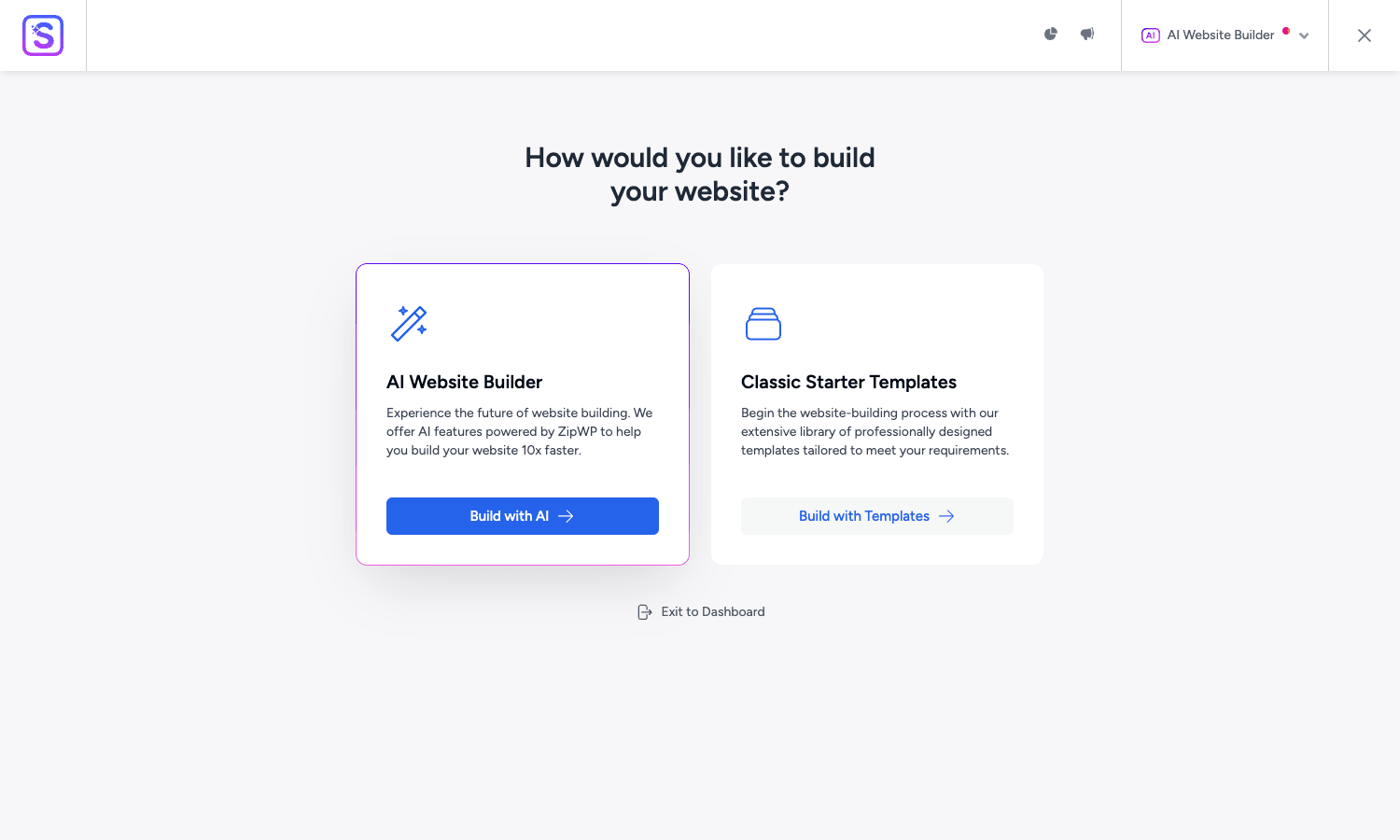
The entry screen above is what you see when you open Starter Templates: pick between AI Website Builder (generate a custom site from a description) or Classic Starter Templates (browse the pre-designed library).
Free vs Premium
Free Starter Templates (WordPress.org) includes:
- ~100 free templates.
- Gutenberg, Elementor, Beaver Builder imports.
- Basic Pixabay image search.
- AI Website Builder (limited usage).
- Single page imports.
Premium adds:
- ~280 additional templates (full library access).
- Premium Pixabay images (commercial-use clearance).
- Premium Pexels images.
- Premium block patterns library.
- Premium Spectra block patterns.
- AI Website Builder with extended quota.
- Onboarding wizard branding (for agencies).
- Custom block patterns.
- Priority support.
For one-off use (a single site), the free version may be enough. For agencies, freelancers, or anyone building more than 2-3 sites, Premium unlocks the polished designs and removes per-import friction.
Installation and the entry screen
Installation is two parts: install the free Starter Templates plugin from WordPress.org, then add the Premium add-on.
Plugins -> Add New -> Search "Starter Templates" -> Install -> Activate. Then upload the Premium plugin: Plugins -> Add New -> Upload Plugin -> astra-pro-sites.zip -> Install -> Activate.
The Starter Templates menu appears under Appearance -> Starter Templates (or Themes -> Starter Templates depending on WP version). On first launch, you get the entry screen with two paths:
- AI Website Builder. Generate a custom site from a prompt ("a yoga studio in Brooklyn", "a freelance web developer’s portfolio"). Uses ZipWP under the hood.
- Classic Starter Templates. Browse the pre-designed library and pick one to import.
Most teams use Classic Starter Templates for the first launch (the library has battle-tested designs) and AI Builder for iterations or one-off pages.
AI Website Builder vs Classic Starter Templates
The AI Website Builder is the newer feature, integrated via ZipWP (a separate Brainstorm Force product). Workflow:
- Type a description of your business ("a vegan bakery in San Francisco specializing in wedding cakes").
- AI generates a site outline (pages, structure, copy).
- AI fills in content for each page, picks images, picks a color palette.
- You review and refine.
- Import the AI-generated site into WordPress.
The AI Builder is best for:
- Quickly scaffolding a brand-new project where you don’t have any content yet.
- Getting an "ok-ish" starting point that you’ll edit heavily.
- Generating multiple variants to pick between.
The Classic Starter Templates is best for:
- Sites where you know what you want (the template library has the design figured out).
- Teams that prefer polishing a known-good design over reviewing AI output.
- Specific niches where a tailored template exists.
Both produce a working WordPress site you’ll edit before launch. The AI route has more initial content; the Classic route has more polished design.
Picking your page builder
After choosing Classic Starter Templates, the next screen asks which page builder you use:
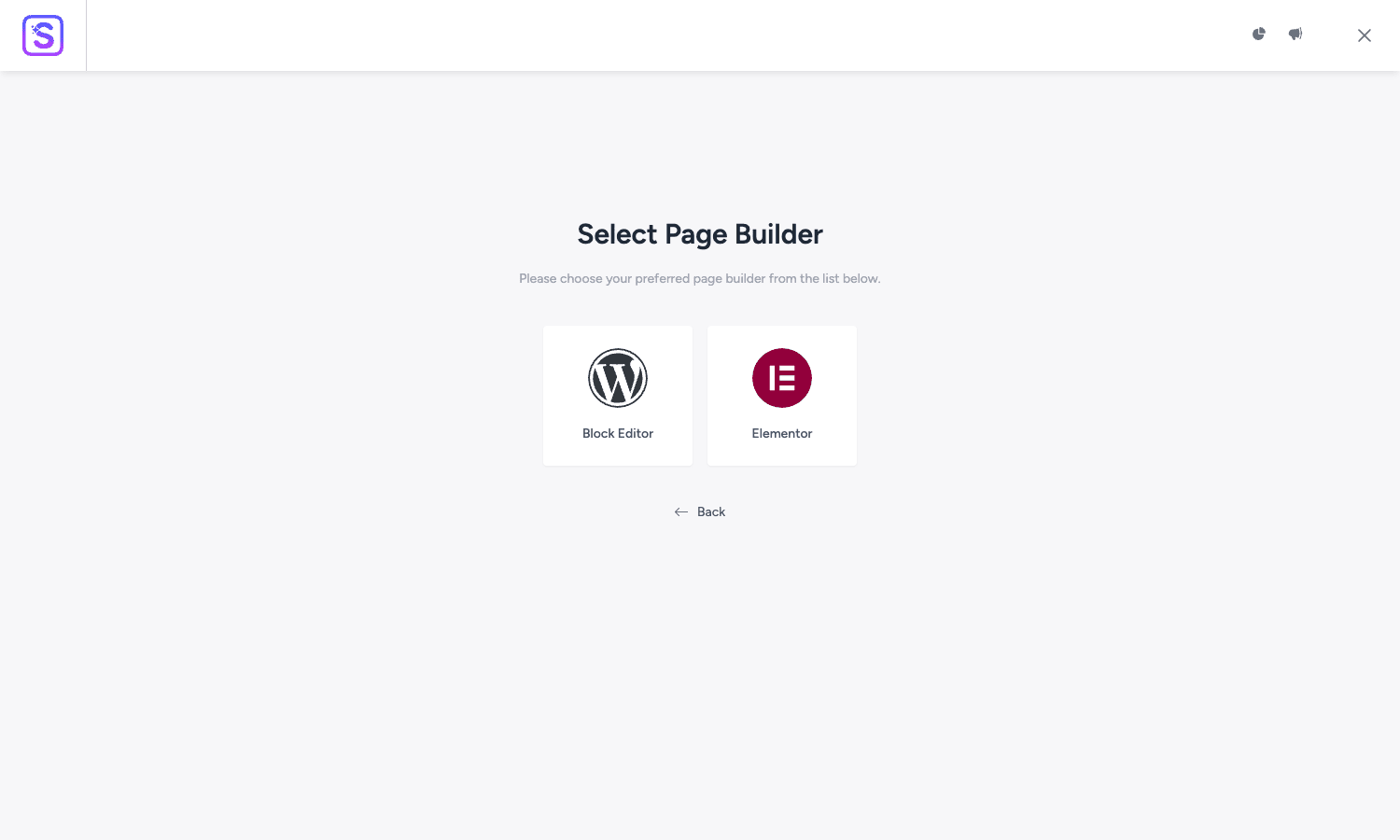
The supported builders:
- Block Editor (Gutenberg). Native WordPress block-based templates. Future-proof; works with the WP Site Editor for block themes.
- Elementor. Largest install base; Elementor-built templates have the most variety in the library.
- Beaver Builder. Older choice; smaller selection but still maintained.
Pick the builder you already use on the rest of your site. Switching between builders later is essentially a rebuild, pages built in one don’t render in another.
For new projects in 2026, Block Editor (Gutenberg) is the safe choice. It’s free, future-aligned with WordPress core, and the template selection is competitive. For agencies and sites already on Elementor, Elementor templates work smooth.
Browsing the template library
After picking the builder, you land in the template library: a grid of preview thumbnails for every available template, with category filters at the top.
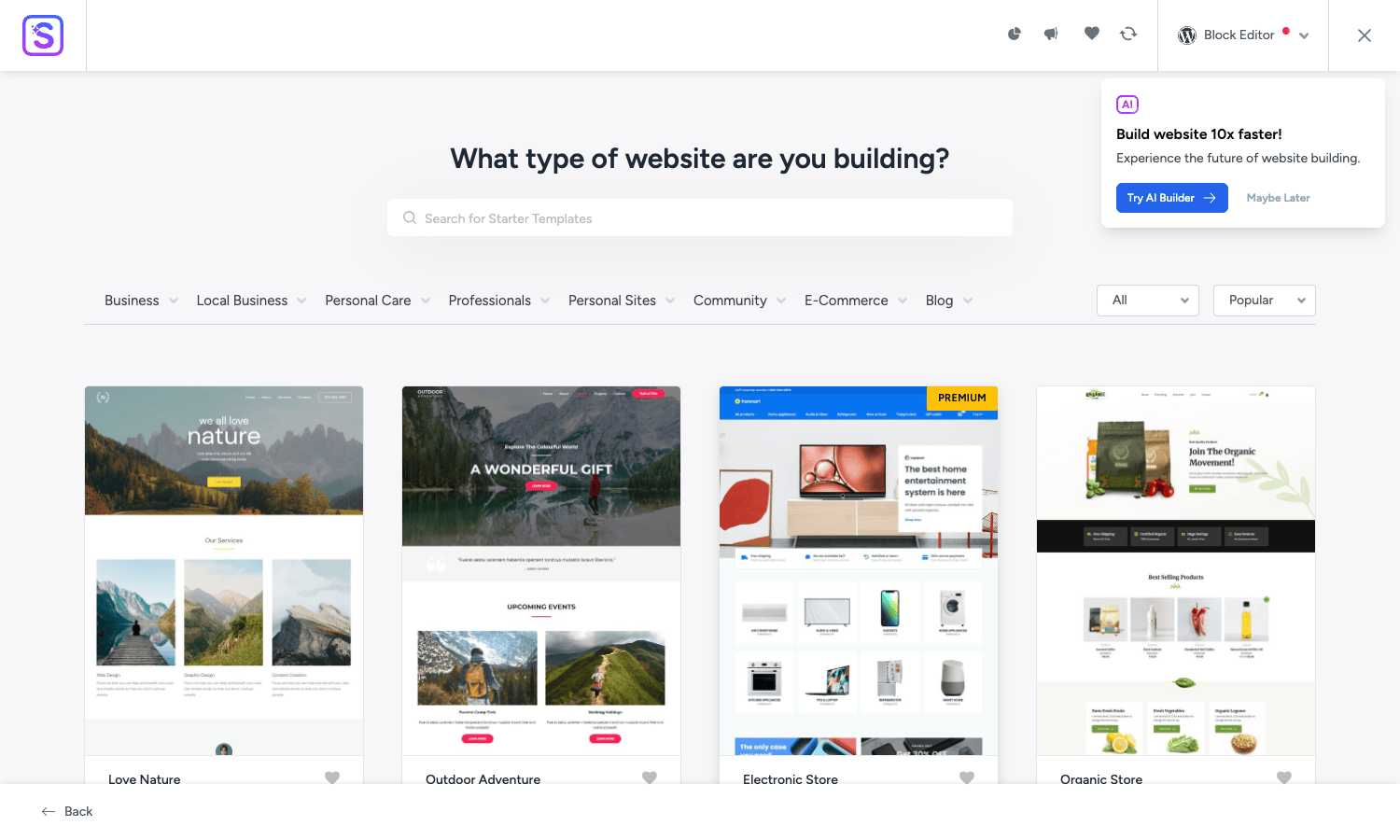
Categories include:
- Business (general business sites, agencies, consulting).
- Local Business (restaurants, hotels, salons, automotive, real estate).
- Personal Care (gyms, spas, wellness, beauty).
- Professionals (doctors, lawyers, accountants, architects).
- Personal Sites (resumes, portfolios, photographers, bloggers).
- Community (non-profits, churches, schools, events).
- eCommerce (WooCommerce-driven stores).
- Blog (magazines, news sites, content publications).
Filter by category, search by keyword, or scroll the full library. Each template has:
- Preview thumbnail.
- Full preview (live demo in a popup).
- Pages included (Home, About, Services, Contact, etc).
- Builder it uses.
- Premium badge (if part of premium library).
- Import button.
The thumbnails are accurate previews of what gets imported. What you see in the library is what you get on your site after import, minus your own content overrides.
Importing a template
Click Import on a template. The plugin walks through:
- What to import. Full site (pages, posts, menus, theme settings, customizer) or specific pages only.
- Plugin dependencies. The template may require certain plugins (the matching page builder, Spectra, WPForms, WooCommerce, etc). The wizard installs and activates missing dependencies.
- Theme. If you’re not on the Astra theme already, the wizard offers to install it. You can decline if you want to use your existing theme; the template imports anyway but the styling may need adjustment.
- Background import. The plugin downloads template content from Brainstorm Force’s CDN, processes images, creates pages and posts, configures the menu, sets customizer options. Takes 2-5 minutes for a typical full site.
- Done. The plugin shows the imported site URL. Click View Site to see the result.
The import is non-destructive in the sense that existing content stays. If you import multiple templates, the imported pages append (your existing site doesn’t get wiped). If you’re starting from a fresh WordPress install, the imported template is essentially your whole site.
For testing, always import on a fresh staging install. Imported pages, demo content, and demo plugin configurations are hard to fully undo on a production site.
What gets imported
A full-site import brings in:
- Pages. Home, About, Services, Contact, plus template-specific pages. Each page is built with the chosen page builder, with the template’s design intact.
- Posts. Sample blog posts (lorem ipsum content with placeholder images).
- Menus. Primary navigation menu reflecting the template’s site structure.
- Customizer settings. Header layout, footer layout, color palette, typography, blog layout, all configured to match the template.
- Widgets. Sidebar widgets if the template uses them.
- Images. All template images downloaded to your media library.
- Reusable blocks / global blocks. Reusable design elements referenced across pages.
- Plugin configuration. If the template uses WPForms, the forms are pre-built. If it uses Spectra blocks, their settings are configured.
What doesn’t get imported:
- Your existing content (no overwrite).
- Your existing plugins’ configurations (your settings stay).
- Existing posts/pages (no merge or replacement).
After import, you have a fully-functional WordPress site that you can customize, populate with real content, and launch.
Customizing the imported site
The import is meant to be a starting point. Almost every site needs customization:
- Replace placeholder text. Every imported page has lorem ipsum + template-specific demo text. Walk through each page, replace text with your actual content.
- Swap images. The template images are placeholders (often from Pixabay/Unsplash). Replace with your actual photos, screenshots, brand images.
- Adjust colors. Customizer -> Colors. Pick your brand palette.
- Update fonts. Customizer -> Typography. Pick brand fonts.
- Configure menus. Add or remove menu items to match your actual site structure.
- Set up forms. WPForms or whatever form plugin the template uses, change the recipient email, customize fields.
- Configure SEO. Install Yoast SEO Premium or Rank Math, set up meta titles and descriptions for each page.
- Add analytics. Install MonsterInsights or similar.
- Performance check. Install WP Rocket for caching.
A typical "afternoon" launch covers steps 1-4 and gets you 70% of the way to a launched site. The remaining customization (forms, SEO, analytics, performance) is the next afternoon. Total time-to-launched: 1-2 work days for a simple business site.
Single page templates vs full sites
Beyond full-site templates, the library includes single-page templates: standalone designs for landing pages, sales pages, hero sections, pricing pages, contact pages. Import a single page into an existing site instead of starting fresh.
Use cases:
- You have an existing site and want to add a new product landing page.
- You’re running paid ads and need a campaign-specific landing page that doesn’t fit your main site design.
- You want a focused sales page separate from your regular site.
The single-page import drops a new page into your existing WordPress site without touching anything else. The page uses the template’s design but lives alongside your other content.
Premium block patterns and images
Premium also unlocks two libraries that aren’t full sites:
Premium Block Patterns. Pre-built block layouts (hero, pricing tables, team grids, testimonials, CTAs) you can insert anywhere in any page. Similar to Stackable’s design library, sections, not whole pages. ~200+ patterns in the premium library.
Premium Image Library. Pixabay + Pexels integration with commercial-use clearance. Inside any page editor, you can search the library and insert images directly without leaving WordPress. The free Starter Templates has limited search; Premium has the full library.
These two libraries are useful even after you’ve imported a full site. They give you on-demand design resources as you build out new pages.
Astra Premium Sites vs the matching theme
The Astra theme is technically separate from Starter Templates, but they’re designed to pair. Most templates assume you’re on Astra:
- Astra theme. Free, lightweight WordPress theme. Header, footer, blog layout, customizer integration.
- Astra Pro. Paid theme addon. Adds advanced layout controls, sticky headers, page-specific layouts, color palettes, etc.
- Starter Templates. The library that imports designs.
- Spectra. Brainstorm Force’s Gutenberg block plugin. Many templates use Spectra blocks.
For best results, use the full Brainstorm Force stack: Astra theme + Astra Pro + Starter Templates Premium + Spectra Pro. Bundled together as the "Essential" pack.
For sites already on another theme (GeneratePress, Kadence, OceanWP), you can still import Astra templates, they’ll work but the styling may not match perfectly (the matching theme handles things like custom typography presets and header design that other themes do differently).
Developer reference: hooks and filters
The plugin exposes filters for the patterns developers customize most.
Filtering the API endpoint
// Point at a custom template server (white-label, internal templates).
add_filter( 'astra_sites_api_url', function( $url ) {
 return 'https://templates.youragency.com/wp-json/';
} );
Disabling specific post types from import
// Skip Elementor templates during batch processing.
add_filter( 'astra_sites_elementor_batch_process_post_types', function( $post_types ) {
 return array_diff( $post_types, array( 'elementor_library' ) );
} );
Customizing the user capability check
// Allow editors (not just admins) to use Starter Templates.
add_filter( 'astra_notices_user_cap_check', function( $cap ) {
 return 'edit_posts';
} );
Hooking into the import lifecycle
add_action( 'astra_sites_after_plugin_activation', function() {
 // Custom logic when Starter Templates activates plugins as part of an import.
 do_action( 'mycustom_log_plugin_activation' );
} );

add_action( 'astra_sites_batch_process_complete', function() {
 // Fires when a template import finishes.
 do_action( 'mycustom_post_import_actions' );
} );
Custom import file paths
add_filter( 'astra_sites_api_request_', function( $args, $api ) {
 // Modify the API request before it goes to Brainstorm Force.
 $args['headers']['X-Internal-Tag'] = 'staging';
 return $args;
}, 10, 2 );
The hook surface is documented in the Brainstorm Force developer docs. For agency white-label use, the API URL filter is the most important, point it at your own template server and you can ship custom template libraries to clients.
Real-world use cases
A few patterns Starter Templates is uniquely good for:
-
Agency client onboarding. A new client signs the contract Friday; you need a working site by Wednesday. Pick a template that matches their industry, import, swap their content. Total agency time: 2-3 days instead of 1-2 weeks.
-
MVP for early-stage startups. Build the marketing site fast so the team can focus on product. Pick a SaaS template, drop in your product copy and screenshots, ship.
-
Personal portfolio launches. Freelancers and creators don’t want to spend a week on their site. Starter Templates -> portfolio category -> pick one -> done in an afternoon.
-
Landing page campaigns. Running paid traffic and need a campaign-specific landing page. Single-page import -> customize copy -> launch URL.
-
Restaurant/local business sites. The local-business templates cover the common patterns (menu, hours, contact, reviews). Drop in actual content, launch.
-
Multilingual site bootstrap. Import the template, then translate with WPML. The template’s structure makes the translation flow predictable.
-
Internal documentation sites. Pick a docs-style template, swap in your team’s docs, launch internally.
Astra Starter Templates vs Elementor Kits vs Divi Layouts
The three major starter-template ecosystems on WordPress.
Astra Premium Starter Templates has the broadest builder support (Gutenberg + Elementor + Beaver Builder), the largest premium template library (280+), and the AI Builder option. Best for agencies and freelancers serving varied clients.
Elementor Kits is Elementor-exclusive. Tightly integrated, polished designs, smaller library. Best if you’re firmly on Elementor and don’t need cross-builder flexibility.
Divi Layouts is Divi-exclusive. Largest community of designer-contributed layouts. Best if you’re already on Divi and want maximum customization options.
The honest take:
- Agency serving diverse clients: Astra Starter Templates Premium. Cross-builder flexibility matters.
- Solo Elementor user: Elementor Kits (or Astra with Elementor templates).
- Solo Divi user: Divi Layouts.
- Gutenberg purist: Astra Starter Templates with Block Editor selected.
You can use multiple in theory but they don’t cross-pollinate. Pick one for your primary workflow.
How Astra Premium Starter Templates fits in a build workflow
The way most teams use Starter Templates effectively is not "import once, done", it’s as one stage in a larger build pipeline. A typical agency workflow looks like:
Stage 1: Discovery (Day 1). Talk to the client. Identify the business type, target audience, content categories, brand colors, and a handful of competitor sites for visual reference. End the day with a clear answer to "what kind of site is this?".
Stage 2: Template selection (Day 1, end). Open Starter Templates Premium, filter to the relevant category, browse 8-12 templates that fit. Show 3 finalists to the client (or pick one if you have authority). Lock in a choice.
Stage 3: Foundation import (Day 2 morning). On a fresh staging install, import the chosen template with the appropriate page builder. The result is a working WordPress site with the template’s structure and demo content. ~30 minutes of admin work.
Stage 4: Content swap (Day 2 afternoon and Day 3). Walk through every page, swap placeholder copy for real client content, swap demo images for real brand images, adjust headings to match the client’s voice. This is where most of the actual project hours land. ~6-12 hours depending on site size.
Stage 5: Brand customization (Day 4 morning). Customizer settings: colors, typography, header layout, footer layout, blog page settings. Get the site visually consistent with the brand. ~2-4 hours.
Stage 6: Plugin configuration (Day 4 afternoon). SEO (Yoast SEO Premium or Rank Math), analytics, caching (WP Rocket), security (Solid Security Pro), forms, anything else the project requires. ~2-3 hours.
Stage 7: QA and launch (Day 5). Test on mobile, run PageSpeed, check forms, check email delivery, check 301 redirects from any old site. Push to production. ~3-5 hours.
Total: roughly a week for a serious 5-10 page client site. Compare to building from scratch (3-4 weeks for the same scope) and the math is clear. The template handles the "design problem" and you spend your time on the "content problem", which is what the client actually paid you for anyway.
For agencies running this workflow on every new client, the per-project savings compound fast. Five client sites a year at 2-3 weeks saved per site is 10-15 weeks of billable time recovered. That alone justifies the Brainstorm Force Essential bundle several times over.
Performance, compatibility, gotchas
- Theme switching post-import. Templates assume Astra theme for the best look. Switching to a different theme after import works but loses the polished header/footer customization.
- Plugin bloat. Template imports often pull in dependent plugins (WPForms, Spectra, sometimes WooCommerce). Audit which plugins you actually need post-import; deactivate and delete the rest.
- Image library size. A full-site import downloads dozens of demo images. Audit the media library and delete unused images after your real content replaces the placeholders.
- Customizer overrides. Imported templates set customizer options. If you customize before importing, your settings get overwritten. Import first, customize second.
- Block-version compatibility. Some Spectra/Gutenberg templates require specific Spectra plugin versions. Update Spectra before importing if the template specifies a minimum version.
- AI Builder quota. The AI Builder uses external API calls (ZipWP). Free tier has limited generations; Premium increases the quota but isn’t unlimited.
- Demo content cleanup. Imported posts have lorem ipsum content. Configure WordPress to display only real posts (filter by category, by date) until you’ve replaced demo content with real.
- Multilingual import order. Always import the primary language template first, then layer WPML/Polylang on top. The reverse order causes meta-data mismatches.
- SEO post-import. Imported templates have generic SEO settings (placeholder meta descriptions). Re-configure SEO for every page before launch.
These are the kind of things you find on your first agency-volume use. Address them in your team’s template-import checklist.
Pricing and licensing
Starter Templates Premium is sold as part of Brainstorm Force bundles:
- Astra Pro alone: $59/year (1 site).
- Essential Bundle: $228/year. Includes Astra Pro + Starter Templates Premium + Spectra Pro + Convert Pro + Schema Pro + a few others.
- Growth Bundle: $499/year. Includes everything Brainstorm Force makes (CartFlows, etc).
For agencies doing 5+ client sites per year, the Essential or Growth Bundle.
The plugin is GPL-licensed. Reasonable if you want Premium Starter Templates without committing to the full Brainstorm Force Essential bundle.
FAQ
Do I need the free Starter Templates plus the Premium plugin?
Yes. The Premium plugin extends the free Starter Templates. Install both, activate both.
Does it work with themes other than Astra?
Yes, but with caveats. The page-builder content imports correctly into any theme; the theme-level customization (header, footer, typography presets) is most polished on Astra and degrades on other themes. For best results, use Astra. For other themes, expect to redo the customizer settings manually.
Can I import templates without WPForms / Spectra / other dependencies?
The templates flag their dependencies; the wizard offers to install missing ones. You can decline, but the template may have missing functionality (forms that don’t work, blocks that don’t render). The recommendation is to accept the dependencies on first import; you can deactivate unused plugins after.
Will it overwrite my existing content?
No. Imported pages append. Your existing pages, posts, and settings stay. Some customizer settings (header, footer, colors) get overwritten, back up the customizer before importing or import on a fresh staging site.
Can I export my own templates?
The plugin itself doesn’t have a public template-creation flow, but the underlying export mechanism is documented. Agencies serving multiple similar clients sometimes maintain internal template libraries by configuring the API endpoint to point at their own server.
Does the AI Builder write the entire site for me?
It generates a starting point: site structure, sample copy, color palette, suggested images. The output needs human editing to align with your actual brand and product. Treat it as a polished scaffold, not a finished site.
Will the imported site be SEO-ready?
It has generic SEO setup. You’ll want to configure your SEO plugin per-page with actual titles, meta descriptions, and structured data. Don’t ship without doing this.
Can I use templates for WooCommerce stores?
Yes. The eCommerce category has WooCommerce-driven templates. Imports include WooCommerce setup, sample products, shop layout. Replace sample products with your real catalog, configure payment methods, ship.
Final thoughts
The biggest mental shift Astra Premium Starter Templates demands is "I don’t have to design from scratch every time". For most WordPress projects, the design problem is solved, there’s already a template in the library that fits the use case. Your job becomes editing the template to fit your specific brand, not building the design from a blank canvas.
This is a controversial position in some design circles. Designers argue (correctly) that custom design produces better results than template starts. They’re right in absolute terms. But in practice, the math doesn’t favor custom design for 90% of WordPress projects: the time to do custom design is days-to-weeks; the time to start from a template and customize is hours. For client work where the alternative is "I can’t afford a $5,000 custom design" or "I need to ship before launch day", a polished template beat a custom design that never gets built.
The plugin’s strongest feature is the breadth of the library. With 280+ premium templates plus ~100 free templates plus the AI Builder option, the chance that "there’s no template that fits" is low. Even niche businesses (chiropractor, real estate, dog walking, accounting firm) have multiple template options.
If you build WordPress sites at any volume, agency, freelance, internal team, and you don’t have Astra Premium Starter Templates in your toolkit, you’re losing hours per project that could be billed elsewhere. Install on staging, browse the library, import one template that matches a real upcoming project, and time the build. The result is usually faster than your previous from-scratch baseline by a meaningful factor.