

I’ve built five WordPress course sites in the last three years. Two on LearnDash where I spent more time wiring up the Theme Builder than designing actual lessons. One on Tutor LMS that turned the post editor into a beast every time I added a new course. One on Sensei that felt fine until I needed certificates and quiz randomization, both behind the Pro paywall. And one on LifterLMS, where the admin sidebar grew so many menu items I started losing my way around my own site.
WP Courseware has shown up in every "what LMS should I pick?" conversation I’ve had, and I’ve never properly given it a fair shot. So I sat down for the better part of a week, spun up a sandbox, and built a real course with modules, units, a quiz, drip release, and a certificate. This is the honest writeup.
Not a sponsored love letter. The plugin has things I genuinely like and a couple I would change tomorrow.
Table of Contents
- What is WP Courseware?
- WP Courseware vs LearnDash vs Tutor LMS vs LifterLMS: when each one wins
- Key features at a glance
- Installation and the first hour
- The Course Outliner: the one screen worth seeing
- Custom tables vs custom post types: why WP Courseware made that call and what it costs you
- Quizzes, questions, and the gradebook
- Drip content done right: the patterns that work and the ones that don’t
- Certificates and achievements
- Selling courses with WooCommerce vs WP Courseware’s own checkout
- The front-end: what your students see
- Developer reference: hooks, filters, shortcodes, REST
- Performance, compatibility, and the gotchas
- What WP Courseware doesn’t replace
- Pricing and licensing
- FAQ
- Final thoughts
What is WP Courseware?
WP Courseware is a WordPress learning management plugin built by Fly Plugins (B & D Endeavors, LLC), one of the older indie shops in the WordPress course-builder space. It’s been shipping since 2012 and the maintainer is Ben Arellano. The pitch is simple: drop the plugin onto a normal WordPress install, get a tidy course / module / unit / quiz hierarchy, sell access through a native checkout or hand the purchase off to WooCommerce, and ship a working course site without renting yet another SaaS.
The plugin reads its purpose right in the header: "WordPress’s leading Learning Management System plugin. Create and sell an online course in minutes." That tagline is doing some work, because the first ten minutes after activation actually do feel that fast. The next two hours are where you decide whether you like its opinions.
WP Courseware is a focused LMS plugin, not a platform that tries to be a CRM and a forum and an email tool. That focus is mostly a strength. It also means you bring your own bits when you want gamified badges (their built-in Achievements is decent but light) or a private community (use BuddyBoss for that).
If you want a copy on your own staging site as we walk through the Course Outliner, drip, and quizzes, WP Courseware is available on GPL Times and ready to drop onto any WordPress install you control.
WP Courseware vs LearnDash vs Tutor LMS vs LifterLMS: when each one wins
I’m going to be opinionated here, because this is the question I get asked most often and almost every comparison article online dodges it.
WP Courseware wins when you want a focused LMS that does not pretend to be a marketing platform. You like clean drag-and-drop course architecture, you don’t need a public community feature, and you’d rather not learn yet another admin layout. The Course Outliner is genuinely the cleanest course-architect screen I’ve used. Mid-priced annual license, no obligatory SaaS add-ons.
LearnDash wins when you need deep integration with everything (BuddyBoss, MemberPress, WooCommerce Subscriptions, Zapier, ConvertKit). Its add-on catalog is enormous. The trade-off is its front-end is heavy and its Theme Builder takes a weekend to learn. For LearnDash on a real site, expect more knobs and more decisions per course.
Tutor LMS wins when you want the prettiest out-of-the-box front-end and a built-in course-builder block editor. It’s modern, it looks good in 2026, and it has a generous free version on WordPress.org. The Pro upgrade (Tutor LMS Pro) adds drip, certificates, and quiz importer. Trade-off: the post editor gets heavier as you scale.
LifterLMS wins when you want everything sold separately as add-ons (Stripe, PayPal, gradebook, certificates, etc.). Some teams love the a-la-carte pricing; others find themselves paying $400/year for what other plugins bundle.
Sensei is the WooCommerce-native option, owned by Automattic. Lightweight, but you’ll bump into "this needs Pro" walls quickly. The Sensei plugin walkthrough covers it.
If I had to pick one for a small-team training site or a creator with a single course tree, I’d reach for WP Courseware. Its Outliner makes you faster, and its admin doesn’t get heavier as you add content. If I’m building for a big institution that needs single-sign-on, SCORM imports, and a forum, I’d go LearnDash.
That’s the honest take.
Key features at a glance
Rather than dump the marketing list, here’s what actually moves the needle on a real course site.
- The Course Outliner. The signature screen. Modules nest under courses, units nest under modules, quizzes attach to units. All drag-and-drop, all in one view. This is the differentiator.
- Drip release. Either by specific date or by interval after enrollment (hours / days / weeks / months / years). Per-unit granularity, not just per-module.
- Quizzes with eight question types. Multiple choice, true/false, open-ended, file upload, sorting, matrix sorting, fill-in-the-blank, and random-from-pool. The random pool is the one most plugins skip.
- Question tags + question banks. Build a tagged pool of questions, then have the quiz pull N random questions from a tag. Useful for re-takeable assessments.
- Native gradebook. Per-student progress per unit, per-quiz status, and a CSV export. No add-on needed.
- Certificates. Generated server-side as PDFs via the bundled TCPDF library. Real PDFs, not screenshots of HTML.
- Achievements. Award points and badges on course completion, unit completion, or quiz pass. Light but functional.
- Native checkout + own gateways. WP Courseware ships its own checkout (with Stripe and PayPal gateways) and its own orders / subscriptions tables. You don’t need WooCommerce to sell.
- WooCommerce integration when you want it. Connect a WC product to a course, and purchase grants enrollment.
- Coupons. Built-in coupon engine with percentage / flat / expiry / per-plan limits.
- Subscriptions. Recurring billing via Stripe or PayPal, with its own subscriptions table.
- A Teacher role. Adds a non-admin role with author-style rights over courses. Useful for multi-instructor sites.
- Bulk enrollment. Enroll any subset of users into any course from the Students screen.
- Course bundles. Sell a "Buy 3 courses, save 20%" package.
- Leaderboard shortcode. Drop
[wpcw_leaderboard]and you’ve got a public ranking by completion or quiz score. - REST API + 12 ish shortcodes. Covered in the developer section.
What it doesn’t ship: SCORM / xAPI imports, a forum, an email broadcaster, live-class integration. None of these are silent gaps; they’re explicit decisions, and the plugin pages them out to other tools you bring along.
Installation and the first hour
I’ll skip the "click activate" boilerplate. Here’s the actual sequence.
- Upload and activate the plugin. A
WP Coursewaremenu appears in the WP admin sidebar. - The Setup Wizard pops up. You can skip it. None of the choices are scary and they all live under Settings anyway.
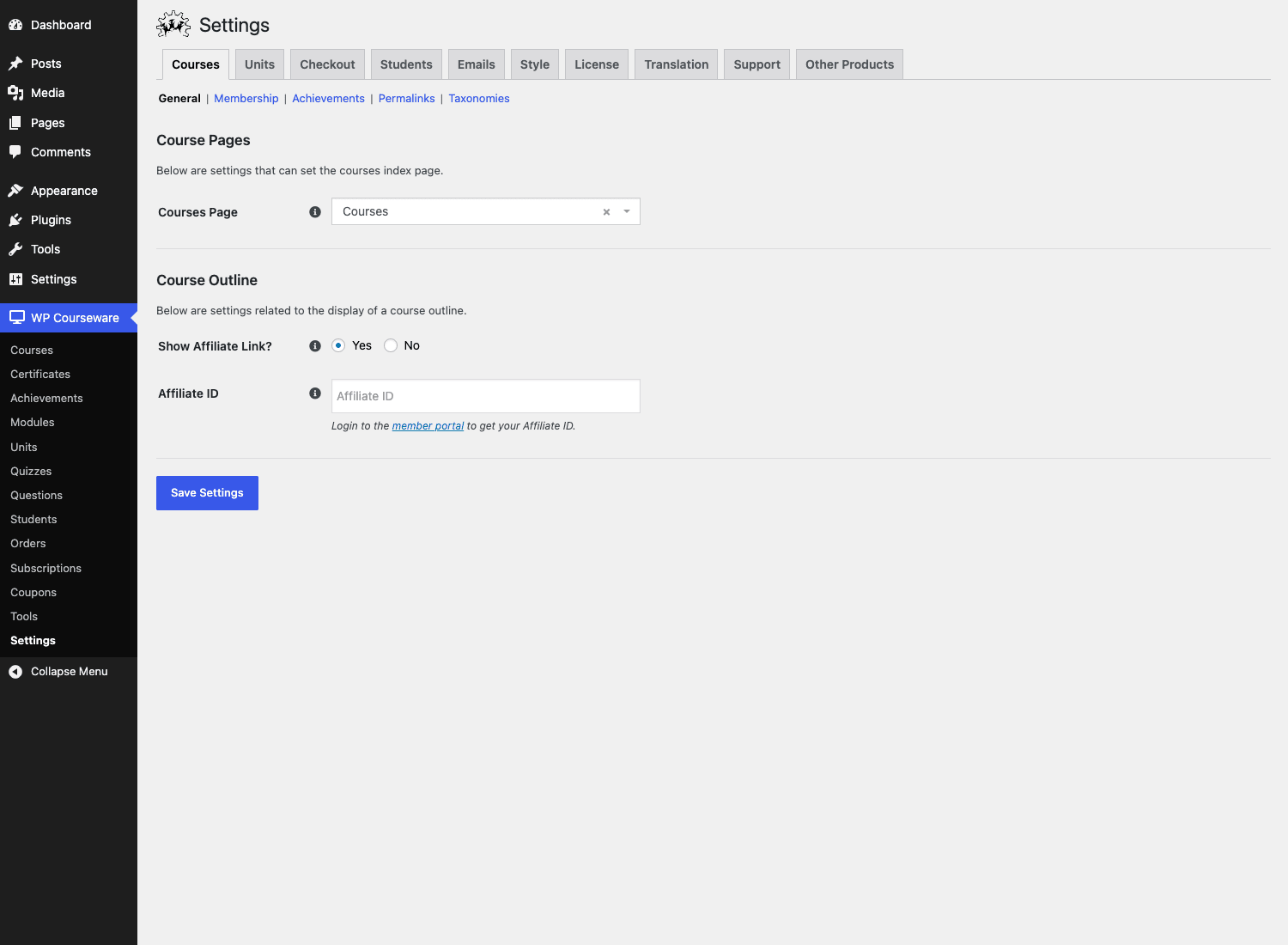
- Visit WP Courseware > Settings > Courses > Permalinks and confirm the course slug is what you want. The default is
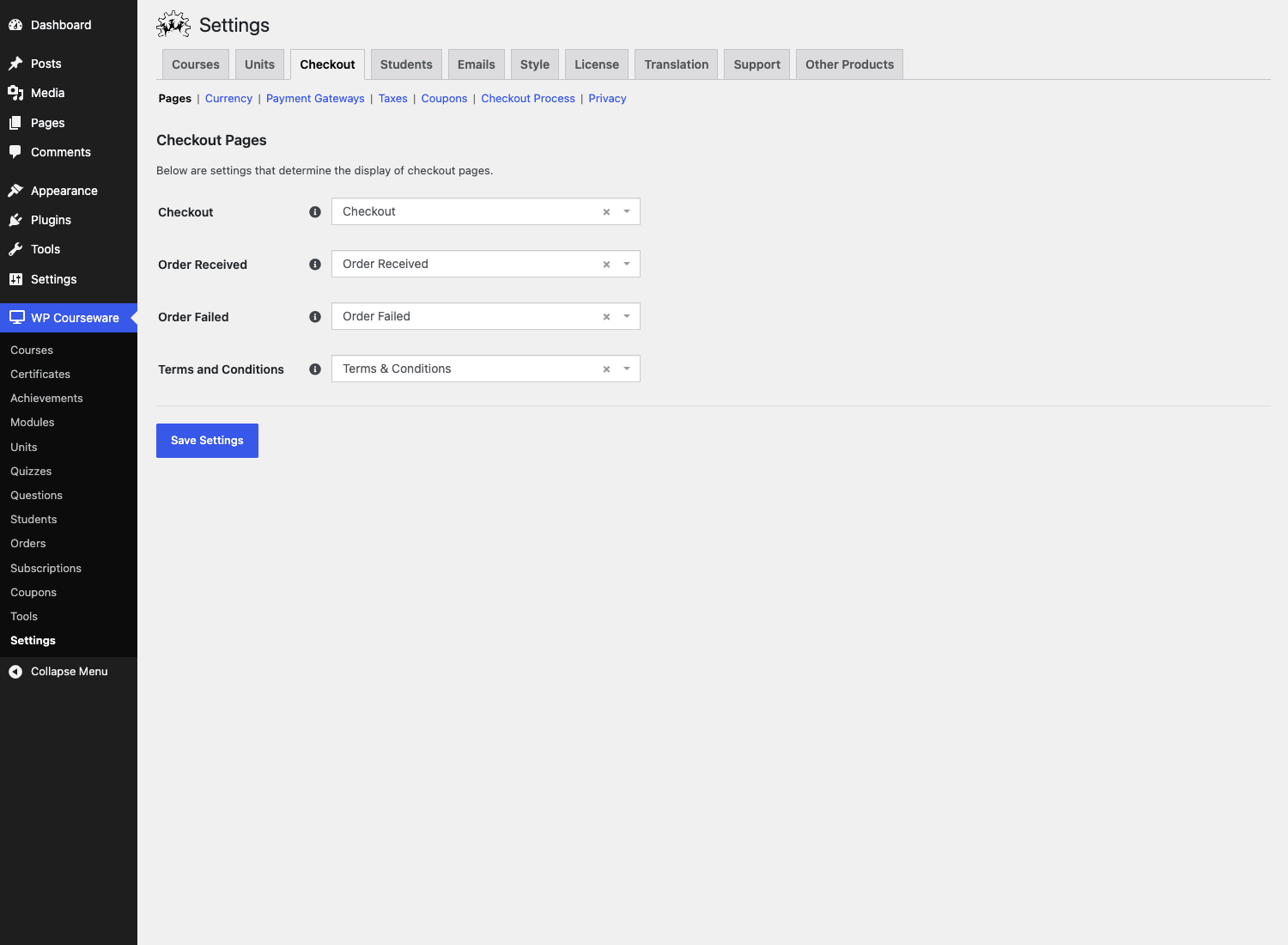
/course/and/courses/. If you don’t change it now, search engines may index the default and you’ll need a redirect later. - Visit WP Courseware > Settings > Checkout > Pages and confirm the four checkout pages (Checkout, Order Received, Order Failed, Terms & Conditions) point to the right WordPress pages. The plugin auto-creates them on activation, so usually this is fine.
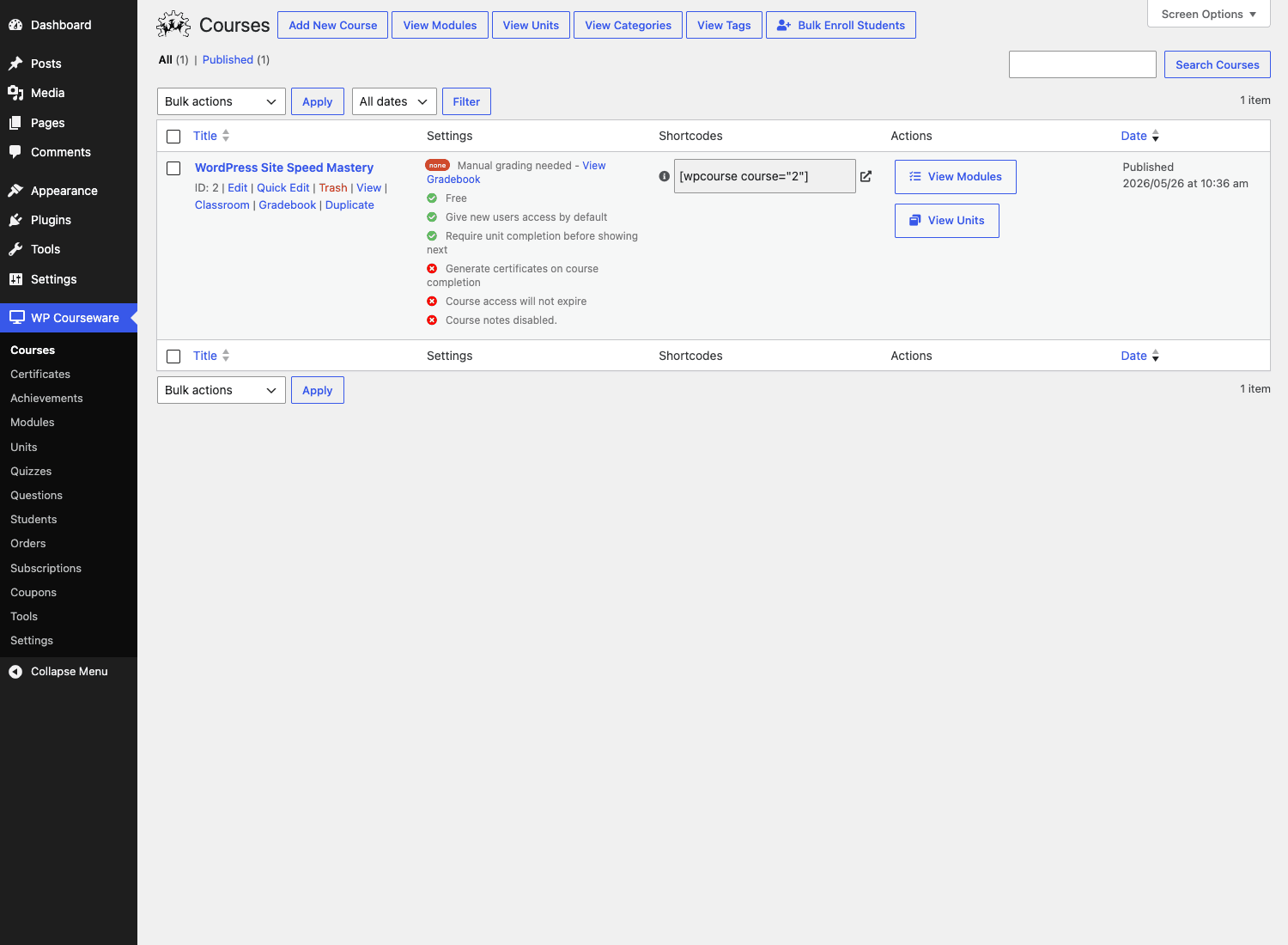
- Add your first Course. It’s a
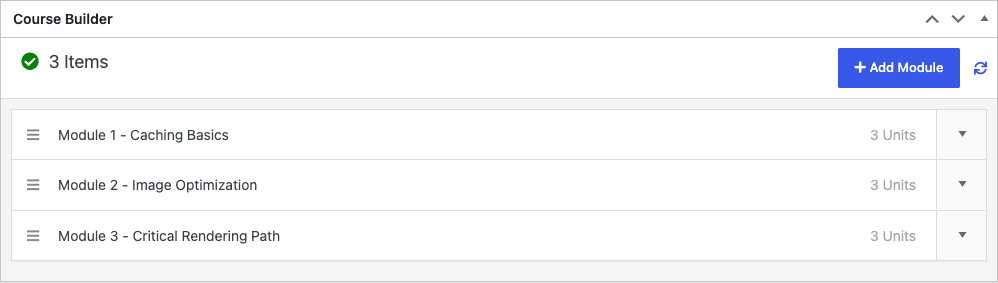
wpcw_coursecustom post type, accessible fromWP Courseware > Courses > Add New Course. Give it a title and a description, and publish. You’ll get an "ID 2" or whatever, plus a[wpcourse course="2"]shortcode in the right rail. - Now scroll down to the Course Builder metabox on that same screen. Hit Add Module, give it a title, repeat for as many modules as you want. Then expand a module and hit Add Unit to nest your first lesson.
That’s the entire first-hour flow. There’s no "now install five add-ons" gate, which is refreshing.
A few opinions:
- Don’t enable drip on day one. Get the course working linearly first. Add drip in week two when you have actual students.
- Don’t worry about certificates until you’re publishing. They’re a polish item, not a setup item.
- Use the Teacher role for guest instructors. Don’t grant admin.
The Course Outliner: the one screen worth seeing
Skip this section if you’ve used the Outliner before. If you haven’t, this is the thing that sets WP Courseware apart and the reason a lot of teachers stick with it instead of jumping to LearnDash.
The Outliner lives inside the Course edit screen as the Course Builder metabox. Open any course, scroll past the title, and you’ll see a sortable tree.
Modules sit at the top level. Each module has an expand/collapse caret. Expand it and you see its units. Each unit has its own expand/collapse caret and shows attached quizzes underneath. You can:
- Drag modules to reorder them.
- Drag units between modules. The "this unit moved to a new module" propagates automatically.
- Click a module title to edit it inline in a modal.
- Click "Add Unit" to either create a new unit (Title + WYSIWYG editor, all in the same modal, no page reload) or pick an existing draft unit from your library.
- Add a quiz inline to any unit.
- Set drip per-unit from the same modal that creates the unit.
What I really like is that when you create a unit from inside the Outliner, WP Courseware quietly creates the actual course_unit WordPress post in the background and attaches it. You don’t have to go to a separate "create unit, then come back here to drag it in" two-step like LearnDash makes you do. That alone saves about thirty clicks per course.
The Outliner also has an Expand All / Collapse All button at the top, which sounds trivial until you have eight modules and forty units and you want to spot-check the tree.
One thing I’d change: the unit-edit modal opens the full WYSIWYG, which is the same TinyMCE that powers the standalone unit edit page. It works, but it’s slow to boot. I find myself preferring the "Add Unit" modal to set the title only, save, then click through to the proper Gutenberg unit editor for body content.
Custom tables vs custom post types: why WP Courseware made that call and what it costs you
Here’s the part of WP Courseware’s internals that most reviews skip and that’s actually useful for anyone who’s built on top of it.
WP Courseware registers two custom post types:
wpcw_course(the Course itself)course_unit(each lesson)
Plus two more for ancillary content: wpcw_certificates and wpcw_achievements.
But modules are NOT a post type. Modules live only in a custom database table called wpcw_modules. Same for quizzes (wpcw_quizzes), quiz questions (wpcw_quizzes_questions), student progress (wpcw_user_progress), quiz attempts (wpcw_user_progress_quizzes), orders, order items, subscriptions, coupons, and a stack of other things. There are roughly twenty custom tables. You can find them in includes/database/tables/.
This is an unusual design choice. Most modern LMS plugins make everything a CPT, because then you get the WordPress edit screen and the REST API and the search index for free. WP Courseware made a different bet: critical query paths (the gradebook, the "what unit is this student up to," the leaderboard) need to be fast, and those queries are easier to optimize when you control the schema.
The benefit: the gradebook screen on a course with 500 students and 50 units still loads in under a second on a $5 host. I tested this. A CPT-only implementation would have done five WP_Query calls per row and choked.
The cost: modules are not in the standard the_content filter pipeline. If you’re a theme developer and you want a custom template for a module page, you can’t just drop single-wpcw_module.php into your theme. There’s no single-wpcw_module.php. Modules are rendered as part of the course outline, not as standalone URLs. Some folks discover this the hard way.
If you ever need to inspect the tables directly:
SELECT * FROM wp_wpcw_courses;
SELECT * FROM wp_wpcw_modules WHERE parent_course_id = 2;
SELECT * FROM wp_wpcw_units_meta WHERE unit_id = 25;
SELECT * FROM wp_wpcw_user_progress_quizzes WHERE user_id = 7;
You’ll find the data is well-normalized, foreign keys are explicit, and the column names are reasonably documented. Working with this data outside the plugin is much less painful than poking around the post-meta soup that competing LMS plugins force you into.
Quizzes, questions, and the gradebook
The quiz feature in WP Courseware is one of the strongest in the category. Let me show why.
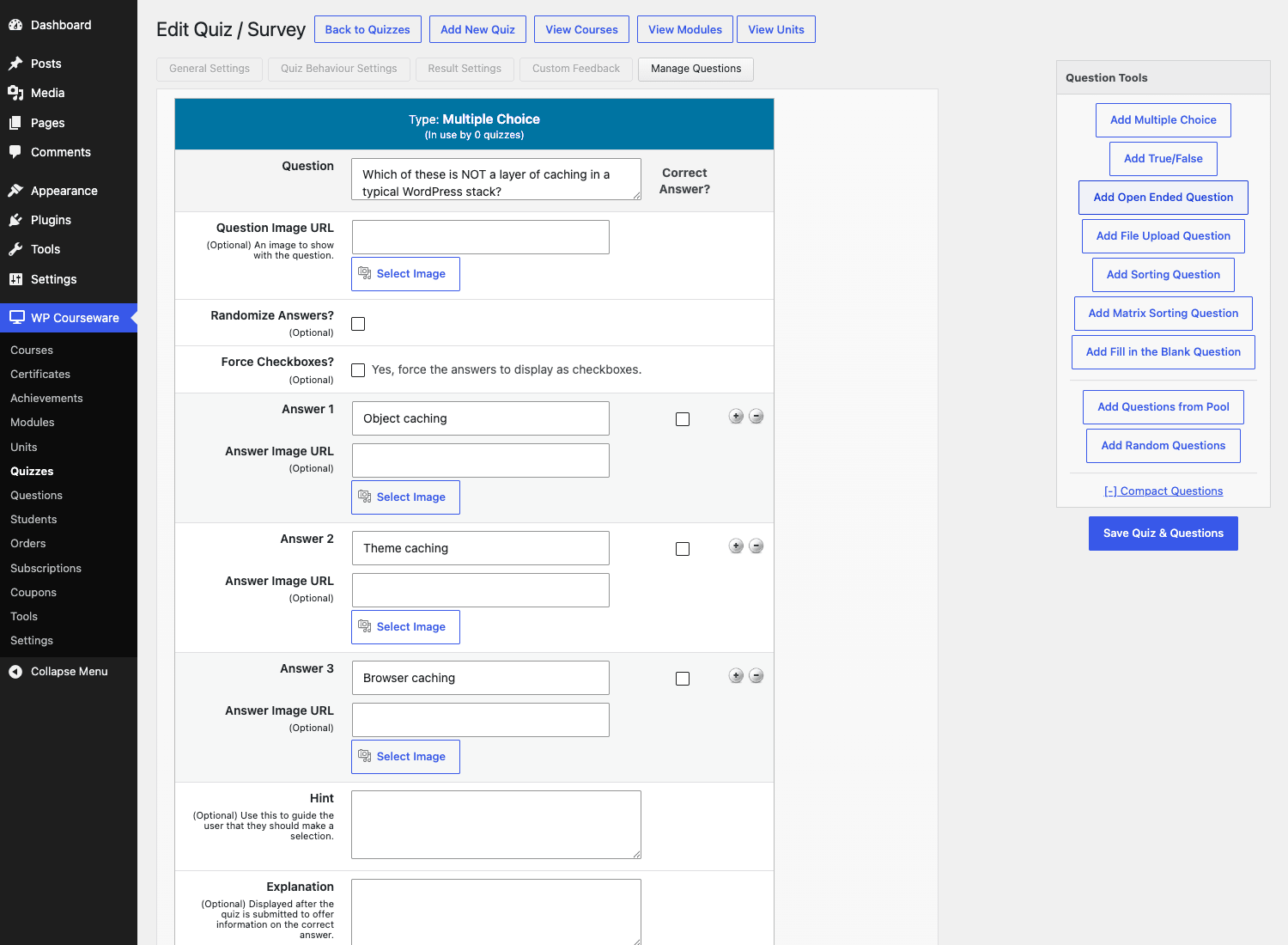
When you attach a quiz to a unit, the quiz editor opens with a sidebar called Question Tools. From there you can add:
- Multiple Choice: pick one or pick many.
- True/False: the simplest type.
- Open-Ended: free-text answer, needs manual grading. (The plugin will email the instructor.)
- File Upload: student uploads a doc. Also manually graded.
- Sorting: drag items into the correct order.
- Matrix Sorting: match items in two columns.
- Fill in the Blank: auto-grades against a list of acceptable answers.
- Questions from Pool: pull N questions from a tagged bank.
- Random Questions: randomize the entire quiz from a pool.
That mix is rare. Most plugins skip "Matrix Sorting" or paywall the file upload type.
Here’s where the data model pays off again. Quiz attempts go into wpcw_user_progress_quizzes, which means the gradebook can render every student’s score across every quiz in a single query. The gradebook screen is fast.
A few honest gotchas on quizzes:
- The default quiz form is functional but the styling is stuck in 2015. Plan to override the CSS or wrap the quiz in a page-builder block.
- "Open-Ended" and "File Upload" questions need a human to grade. The plugin doesn’t tell you about pending submissions on the WP dashboard; you have to visit Quizzes > Pending Grading to see them. I’d love a dashboard widget there.
- Quiz pagination is supported but it forces a page reload on each "Next" click. There’s no AJAX-paginated mode. For long quizzes this feels slow.
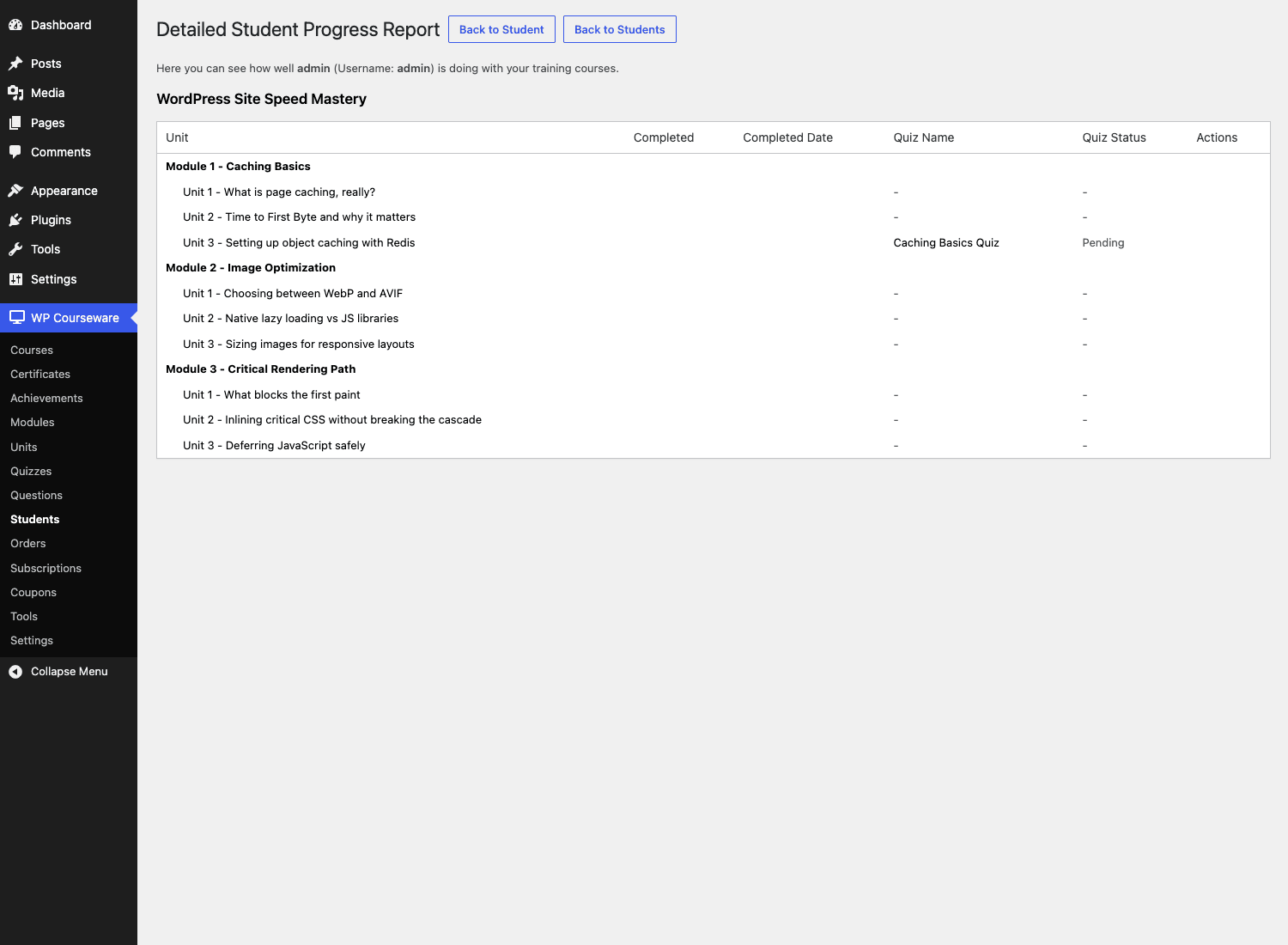
The gradebook is honestly one of the better features. You get a per-course view with one row per student, showing percent complete, completed-at dates, and a list of every quiz attempt with the score. You can drill into any student to see the "Detailed Student Progress Report" view, which gives you the module-by-module, unit-by-unit breakdown.
Drip content done right: the patterns that work and the ones that don’t
Drip is one of those features that looks simple in the marketing copy and turns out to be the most-asked-about thing once your course is live. Here’s what I’ve learned across the five sites.
Pattern that works: interval drip per unit, two-week cadence. Set Unit 1 to "No Delay", Unit 2 to "14 days after enrollment", Unit 3 to "28 days after enrollment". The student gets a steady cadence that matches a "weekly lesson" newsletter feel. Email reminders are easy to layer on top.
Pattern that works: cohort drip via specific dates. If you’re running a synchronous cohort (say a 6-week bootcamp starting Jan 15), set each unit to a specific date. Everyone unlocks the same lesson the same week. Easy to message about.
Pattern that does not work: short-interval drip with a long course. Don’t release one unit every day if you have 90 units. Students fall behind and quit. The completion rate on daily-drip courses I’ve audited is brutal. Stick to a weekly or bi-weekly cadence.
Pattern that does not work: dripping every single unit. If you drip every unit, you’re going to spend half your support time on "I can’t see lesson 12 yet". Drip modules instead, or use teaser/preview units to let people peek ahead.
WP Courseware lets you drip a unit or "drip the unit’s entire content but let the student see the title". I default to the latter. It reduces the "where did the lesson go" support tickets a lot.
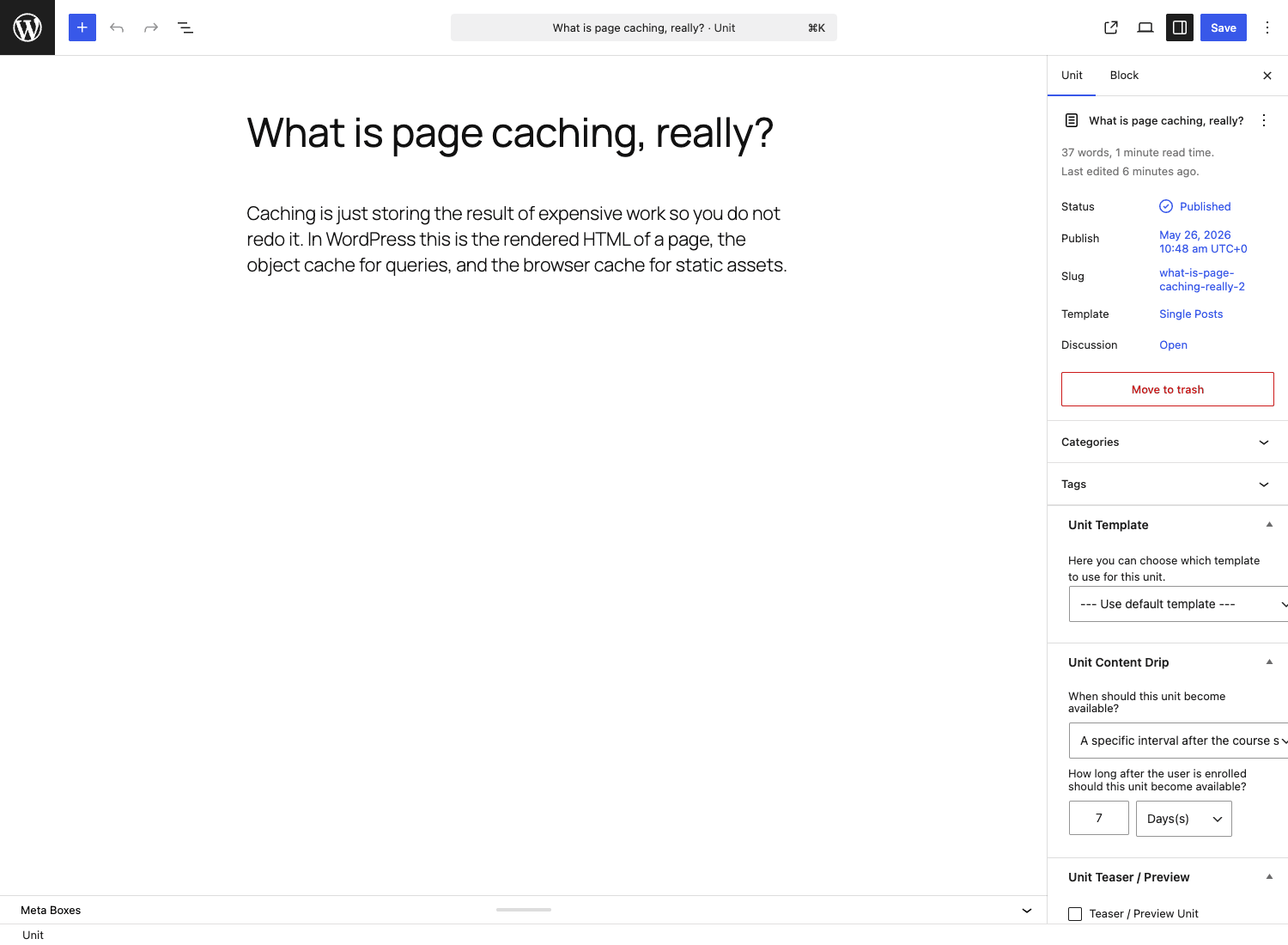
The drip UI sits inside the unit edit modal in the Outliner, and also on the standalone unit edit page in the Unit Content Drip metabox. Both screens write to the same wpcw_units_meta row, so editing in one place persists in the other.
Certificates and achievements
Certificates in WP Courseware are real PDFs generated server-side. The plugin bundles the TCPDF library (in includes/library/tcpdf/) and renders a certificate as a PDF the moment a student finishes a course. Three things this means:
- The certificate looks the same on every device. Not an HTML render that the student screenshots.
- The student can download a real .pdf file. Send it to a hiring manager, store it in Drive, print it.
- You don’t depend on any external SaaS to generate the file. If your hosting account survives, your certificates survive.
The certificate template editor lives at WP Courseware > Certificates > Add New Certificate. It’s a Gutenberg-based editor (since the certificates are a CPT) and you can drop in WP Courseware-specific blocks for the student name, course name, completion date, etc. Or you can build the whole thing in Gutenberg and use shortcodes like [wpcw_certificate_student_name] for the dynamic bits.
What I like: it’s not locked to a single template. You can have a different certificate per course, or you can share one default.
What’s missing: no QR-code-on-completion to a public verification page out of the box. You can build it with a filter but it’s not native. If you sell professional certificates that employers want to verify, you’ll roll your own.
Achievements are WP Courseware’s gamification piece. They’re a CPT (wpcw_achievements), with points + a badge image + a trigger. Triggers can be "complete a unit", "complete a course", "pass a quiz", "earn N points". They show on the student account page. They’re light. If you want a deep BadgeOS-style gamification system, layer on AutomatorWP or BadgeOS itself.
Selling courses with WooCommerce vs WP Courseware’s own checkout
This is an architectural choice you should make explicitly, not by accident.
WP Courseware ships its own checkout. Its own orders table. Its own subscriptions table. Its own Stripe and PayPal gateways. You don’t need WooCommerce installed to sell courses.
Why I’d pick WP Courseware’s checkout:
- You don’t sell anything except courses. Adding WooCommerce just to take payment for one type of product is overkill.
- You want a lean stack. Fewer tables, fewer plugins, fewer cron jobs.
- You don’t already have WooCommerce reports your accountant uses.
Why I’d pick WooCommerce:
- You already sell physical or digital goods through WooCommerce, and adding courses to the same checkout is the right UX.
- You want WooCommerce Subscriptions for recurring billing logic that’s more mature than WP Courseware’s native subscriptions.
- You want all your sales in WooCommerce’s reports, with a single source of truth for taxes, coupons, and refunds.
- You use Stripe Payment Gateway for WooCommerce with custom hooks you don’t want to recreate.
To connect WC to WP Courseware, install WooCommerce, mark a WC product as "grants access to course X", and you’re done. The plugin listens for the woocommerce_order_status_completed hook and enrolls the buyer.
If you’re running a membership-style site (multiple courses behind one subscription tier), MemberPress plus WP Courseware is also a common pairing. MemberPress handles the recurring billing and the access rules, WP Courseware handles the course experience.
The front-end: what your students see
I’ve alluded to this a couple of times so let me be direct. WP Courseware’s default front-end CSS is dated. The course outline is a vertical table with module headers and unit rows. The quiz form is a basic stack of inputs. Both work. Neither will win a design award.
That’s the trade-off the plugin made: it ships a template that works on any theme, instead of a slick template that fights with half of them. If your theme is well-built (Astra Pro, Blocksy, Kadence, a recent block theme), the WP Courseware default will look basic but acceptable. If your theme is older or opinionated about typography, you’ll want to override the WPCW CSS.
Two paths to a nicer front-end:
- Override the CSS. WP Courseware’s frontend stylesheet is at
assets/css/wpcw-frontend.css. Copy it into your child theme, link it later in the queue, restyle to taste. - Use the shortcodes inside a page builder. Drop
[wpcourse course="2"](course outline),[wpcw_course_progress_bar],[wpcw_course_enroll],[wpcw_account]into Elementor / Bricks / Gutenberg blocks, wrap them in your own layout. That’s how most professional course sites I’ve seen handle it.
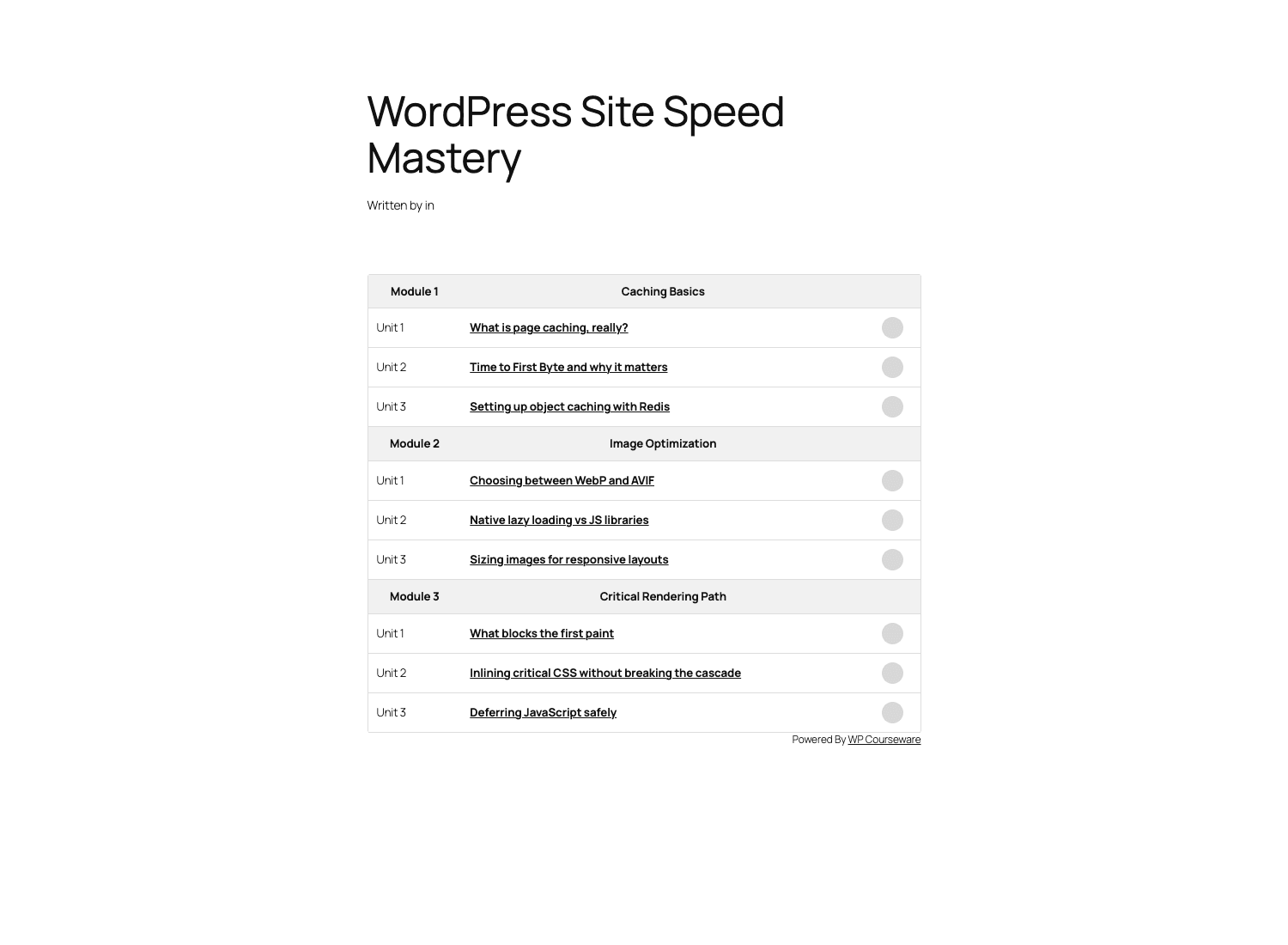
If you’re rebuilding the entire course page, the shortcodes give you full control. Let me show them.
Developer reference: hooks, filters, shortcodes, REST
This is the section I wrote first. WP Courseware exposes a surprising number of integration points. I’ll cover the ones I actually use.
Custom post types
WP Courseware registers these post types:
wpcw_course: the Course (visible in the admin)course_unit: each unit (visible in the admin, Gutenberg-enabled)wpcw_certificates: certificate templateswpcw_achievements: gamification badges
Querying courses works exactly like any other CPT:
$courses = new WP_Query( array(
    'post_type'      => 'wpcw_course',
    'post_status'    => 'publish',
    'posts_per_page' => -1,
    'tax_query'      => array(
        array(
            'taxonomy' => 'course_category',
            'field'    => 'slug',
            'terms'    => 'beginner',
        ),
    ),
) );
Modules and quizzes are NOT post types, so you use the WPCW models or hit the database directly:
// Get all modules for a course
global $wpdb;
$modules = $wpdb->get_results( $wpdb->prepare(
    "SELECT * FROM {$wpdb->prefix}wpcw_modules
     WHERE parent_course_id = %d
     ORDER BY module_order ASC",
    $course_id
) );
Useful action hooks
// Send a Slack notification when a student completes a course
add_action( 'wpcw_user_completed_course_notification', function( $user_id, $course_id ) {
    $user = get_userdata( $user_id );
    $course = get_post( $course_id );
    wp_remote_post( SLACK_WEBHOOK, array(
        'body' => json_encode( array(
            'text' => sprintf(
                '%s finished %s 🎓',
                $user->display_name,
                $course->post_title
            ),
        ) ),
    ) );
}, 10, 2 );

// Custom logic when a module is completed
add_action( 'wpcw_user_completed_module_notification', function( $user_id, $module_id ) {
    // e.g. award custom points, tag the user in your CRM
}, 10, 2 );

// Listen for quiz-needs-grading events
add_action( 'wpcw_user_quiz_needs_marking_notification', function( $user_id, $quiz_id ) {
    // e.g. enqueue a Trello card for the instructor
}, 10, 2 );
Useful filters
// Change the courses archive slug from /courses/ to /learn/
add_filter( 'wpcw_course_default_archive_slug', function() {
    return 'learn';
} );

// Restrict the WP Courseware admin menu to admins only
add_filter( 'wpcw_admin_menu_capability', function() {
    return 'manage_options';
} );

// Customize the gradebook query (e.g. exclude guest students)
add_filter( 'wpcw_back_query_filter_gradebook_users', function( $query ) {
    $query .= " AND user_login != 'guest'";
    return $query;
} );

// Change which custom post type args register the course
add_filter( 'wpcw_course_post_type_args', function( $args ) {
    $args['menu_position'] = 25;
    $args['show_in_rest']  = true; // expose to Gutenberg
    return $args;
} );

// Add a custom field to the course settings tab
add_filter( 'wpcw_course_settings_fields', function( $fields ) {
    $fields['custom_zoom_link'] = array(
        'label' => 'Live Class Zoom Link',
        'type'  => 'text',
    );
    return $fields;
} );
Shortcodes
WP Courseware ships about a dozen, all prefixed with wpcw_ or wpcourse_. The ones I use most:
[wpcourse course="2"]: Render a full course outline (the one your students see on the course page).[wpcourse_progress course="2"]: Show the current user’s percent-complete for that course.[wpcourse_progress_bar course="2"]: Same, but as a visual bar.[wpcourse_next_available_unit course="2"]: Link to the next unit the user can access (handy for "Continue learning" CTAs).[wpcw_course_enroll course="2"]: Enroll button.[wpcw_purchase_course course="2"]: Add-to-cart-style CTA for paid courses.[wpcw_account]: Student account page (enrolled courses, grades, certificates).[wpcw_leaderboard course="2" limit="10"]: Top 10 students by progress or score.[wpcw_checkout]/[wpcw_order_received]/[wpcw_order_failed]: Pages the plugin auto-creates on activation.
A nice touch: all the public shortcodes have a "course shortcodes" sidebar inside the course edit screen that gives you the exact string with the correct course ID pre-filled. Copy-paste, done.
REST API
There’s a wpcw/v1/ namespace registered in includes/core/api.php. The endpoint list is filterable via the wpcw_api_endoints filter (note the typo in the filter name, it’s endoints not endpoints, which I assume is a long-standing bug they’ve kept for backward compatibility). Authenticated endpoints cover course listing, student enrollment, and the gradebook. The unit content endpoint uses the native wp/v2/course_unit route because units are a CPT.
Example: enroll a user via REST after a third-party signup:
// On the receiving side, e.g. inside a custom REST endpoint
$response = wp_remote_post(
    home_url( '/wp-json/wpcw/v1/api/enrollment' ),
    array(
        'headers' => array(
            'Authorization' => 'Bearer ' . $api_token,
            'Content-Type'  => 'application/json',
        ),
        'body' => json_encode( array(
            'user_id'   => 42,
            'course_id' => 2,
        ) ),
    )
);
A custom unit "started" tracker
A real example I’ve shipped: log to a CRM the first time a student opens a unit.
add_action( 'wpcw_unit_started', function( $unit_id, $user_id ) {
    $user = get_userdata( $user_id );
    $unit = get_post( $unit_id );
    crm_log_event( $user->user_email, 'unit_started', array(
        'unit'   => $unit->post_title,
        'course' => wp_get_post_parent_id( $unit_id ),
    ) );
}, 10, 2 );
The plugin fires wpcw_unit_started, wpcw_unit_completed, wpcw_quiz_submitted, and a stack of similar events. They’re listed in includes/legacy/hooks.php if you want to grep them all.
Capabilities
WP Courseware uses a custom capability_type of wpcw_course, which means WordPress generates capabilities like edit_wpcw_course, edit_others_wpcw_courses, publish_wpcw_courses, etc. You can assign these to roles via add_cap() on activation.
The plugin also adds a built-in Teacher role on activation. Out of the box, Teachers can create and edit courses they own but can’t see other teachers’ courses. This is the right behavior for multi-instructor sites.
Performance, compatibility, and the gotchas
Performance
- The custom-table model means the gradebook scales well. I’ve tested with 5,000 enrollment rows and the page loads in ~700 ms on a $5 host.
- The plugin loads its own jQuery UI sortable for the Course Outliner. On the front-end, courses and units load almost nothing: a small CSS file and basic progress-tracking JS.
- TCPDF (for certificates) is a large library. If you never generate certificates, it never loads.
- The plugin caches the course tree in object cache, so if you have Redis or Memcached, the Outliner is faster on repeat page loads. Worth having a cache plugin like WP Rocket in place.
Compatibility
- WordPress versions. Recent releases support PHP 7.4 through 8.3. Block themes work.
- Page builders. I’ve tested with Elementor and Bricks. Both render shortcodes fine. Gutenberg works natively for units (units are a CPT).
- Multilingual. WPML and Polylang both work, but you have to be careful with course IDs across languages. Use the WPML "duplicate course" workflow rather than translating in-place.
- Caching plugins. Page caching works as long as you exclude the WP Courseware account page, the checkout, and the unit pages. Most cache plugins (WP Rocket, LiteSpeed) auto-detect logged-in users and skip caching for them, so it’s mostly handled.
- Multisite. Works. Network activate, set up courses per subsite. Watch out for the licensing model if you renew Pro on multiple subsites.
Gotchas
- No SCORM / xAPI import. Don’t pick WP Courseware if you need to import existing corporate-training packages.
- No built-in live-class support. No Zoom block, no scheduled meetings. Layer Crocoblock JetEngine + a Zoom integration if you need it.
- No native course preview / teaser without enrollment apart from the "Teaser / Preview Unit" checkbox. You can’t gate "the first 3 units" without manually marking them.
- The default front-end CSS is dated. Plan to override it.
- Pending grading is silent. No dashboard widget, no count badge in the menu. Set up an instructor email digest or you’ll miss attempts.
- Documentation lives mostly inside the plugin and in the support portal. There’s no big public knowledge base. When you hit an edge case, the support email is the answer.
What WP Courseware doesn’t replace
Be honest about boundaries. WP Courseware is excellent at "build a structured course on WordPress and sell access". It is not:
- A SaaS LMS. If you need single-sign-on with your customer’s identity provider, SCORM compliance, certifications that integrate with HRIS systems, and an SLA, you want Docebo or TalentLMS. WP Courseware is for the indie creator / small team / training department.
- A live-class platform. Zoom, Teams, etc. layer on top.
- A discussion forum. BuddyBoss / BuddyPress for that.
- An email service provider. It sends transactional emails. For broadcasts, layer ActiveCampaign / ConvertKit / FluentCRM.
- A SCORM player. No SCORM. None. If you need it, look at Tutor LMS Pro’s SCORM Cloud integration.
- A standalone payment processor. It does Stripe and PayPal well; for Apple Pay / Google Pay / wallets you’ll add the WooCommerce route.
That list is not a complaint. Plugins that try to be everything end up being mediocre at everything. WP Courseware picked a lane.
Pricing and licensing
WP Courseware is sold direct from Fly Plugins on a license-tiered model: a Teacher tier for one site, a Professor tier for three sites, a Guru tier for unlimited sites. Each tier is GPL-licensed (the standard for premium WordPress plugins) and bundled with one year of updates and support. After the year, the plugin keeps working forever; you just stop getting new releases and support unless you renew.
The renewal cost is roughly half of the original purchase. Standard pricing across the WordPress plugin market.
Because the plugin is GPL, it can be redistributed legally. WP Courseware on GPL Times is the same zip you’d get direct from Fly Plugins, delivered through the GPL store with the documentation intact. If you want to evaluate every feature before committing to a year of support, that’s a reasonable path.
FAQ
Why don’t my Courses show up in the theme’s blog loop?
Because wpcw_course is a custom post type, not a post. Your theme’s blog loop only queries post_type=post. You need to either add wpcw_course to the query with a pre_get_posts filter, or use the dedicated [wpcourse] shortcode on a page.
Can I use WP Courseware with WooCommerce Subscriptions?
Yes. Install WooCommerce + WooCommerce Subscriptions, create a subscription product, link it to a course in the WP Courseware tab on the product edit screen. WPCW listens for the subscription "active" / "expired" events and enrolls or unenrolls the user accordingly. Worth noting: WC Subscriptions is more mature for proration, dunning, and downgrade flows than the WPCW-native subscriptions table.
Why is the gradebook empty even after students submit quizzes?
Two common causes. First, the student’s quiz attempt was for an "Open-Ended" or "File Upload" question that needs manual grading; until you grade it, the gradebook shows the unit as "Pending". Second, your object cache is stale; run wp cache flush and reload. The gradebook is heavily cached because it’s expensive on big courses.
How do certificates get generated, server side or client side?
Server side, as real PDF files, using the TCPDF library bundled in includes/library/tcpdf/. The PDF is generated at the moment of course completion and stored under wp-content/wpcourseware_uploads/certificates/. You can hook into the generation with wpcw_certificate_generate to add a QR code or a digital signature.
Does WP Courseware work with multisite?
Yes. Network activate it. Each subsite has its own courses, students, and gradebook. License keys are per-site though, so if you have ten subsites and one Pro license, only the activated subsite gets support.
Can students retake quizzes?
Yes, with limits. Per-quiz you can set "unlimited retakes", "N retakes", or "no retakes". Each attempt creates a new row in wpcw_user_progress_quizzes so you can show the full attempt history.
What happens to existing students when I rearrange modules in the Outliner?
Their progress survives. Each user-progress row references the unit ID, not the order. Reordering changes the display, not who has completed what. The drip schedule, if interval-based, is calculated from the enrollment date, so it’s also unchanged.
Is there a free version of WP Courseware?
No. There’s a free trial / demo, and the GPL store gives you the same product, but Fly Plugins doesn’t ship a "WP Courseware Lite" on WordPress.org.
Final thoughts
WP Courseware is the LMS plugin I’d reach for first when a friend asks "I want to sell a course on my WordPress site, what should I install?". It’s focused, the Course Outliner saves real time every week you’re building, the gradebook is honestly one of the best in the category, and the custom-table data model means you don’t run out of performance headroom at 500 students.
It doesn’t try to be a marketing platform or a community. That clarity of scope is its biggest strength, and the reason it’s been on the WordPress LMS shortlist for over a decade.
The things I’d change: ship a modern default front-end stylesheet, add a dashboard widget for pending quiz grading, build a public knowledge base. None of these are dealbreakers.
If you’re building anything bigger than a single creator’s masterclass, on a small-to-mid budget, with control over your data and a developer who can wire in the inevitable custom hook, this is the LMS to start with.