

I’ve shipped review systems on five different WordPress sites in the last three years. A software comparison directory where every entry needed scoring on four axes. A recipe blog where readers rate dishes. A SaaS pricing-comparison page where the team writes the editor verdict and visitors leave their own ratings. A small hotel listing site. And one WooCommerce store where the owner wrote curated mini-reviews on each product alongside customer feedback.
I have tried most of the options. The native WooCommerce product reviews are flat: one rating, one comment, no breakdown by criteria, no separate "site owner" voice. The Site Reviews plugin by Geminilabs is solid but it doesn’t slot into an Elementor build the way I needed. I once spent a weekend gluing together ACF Pro, a custom Gutenberg block, and a hand-rolled JSON-LD output to get typed criteria working. It functioned. I would not do it again.
JetReviews is Crocoblock’s answer to this exact problem. It is an Elementor widget that handles per-criteria scoring, owner-side and user-side review streams, schema markup, comments on reviews, media uploads, role-based moderation, and a REST API for everything. This is a long, honest walk through what it does, where it shines, where it pinches, and what every hook and filter does for the developer audience.
Table of contents
- What is JetReviews?
- Typed criteria vs flat star ratings: when the breakdown matters
- Owner reviews vs user reviews: a content-strategy question, not a config question
- Key features at a glance
- Installation and the first hour
- A guided tour of the admin
- Building a comparison-site review block end to end
- JSON-LD schema: what JetReviews emits and what Google reads
- JetReviews vs Site Reviews vs WooCommerce Product Reviews Pro
- The Crocoblock pricing question: just JetReviews vs the whole subscription
- Don’t ship JetReviews without the email-notification hook configured
- Developer reference: hooks, filters, REST endpoints, DB schema
- Performance, compatibility, and the gotchas
- What JetReviews doesn’t do
- Pricing and licensing
- FAQ
- Final thoughts
What is JetReviews?
JetReviews is a WordPress plugin from Crocoblock, the same team that builds JetEngine and JetSmartFilters. The official Crocoblock JetReviews overview is the canonical vendor reference if you want the marketing-pitch version. What you are about to read is the practitioner version. It adds two main Elementor widgets, Reviews and Reviews Listing, plus an admin module under JetReviews in the WordPress sidebar where you manage review types, configure rating criteria, moderate user submissions, and tune email notifications.
The plugin has been around for years and has become one of the go-to choices when an Elementor site needs more than a star rating block. The current build sits at the 3.x line, which split the codebase into modular components (one folder per feature: reviews, comments, user, integrations, blocks, settings, elementor) and added a typed REST API at jet-reviews-api/v1. That refactor matters for developers because each surface is now extendable in isolation.
JetReviews on GPL Times ships the same Pro zip with the source intact, so you can read the hooks and filters in the same way I did for this article.
Two things make JetReviews different from "yet another reviews plugin". The first is that it stores every user submission as a row in a custom jet_reviews table, not as a WordPress comment. The second is that it ships a real JSON-LD schema output by default, no add-on needed. I will come back to both decisions later in this post.
Typed criteria vs flat star ratings: when the breakdown matters
Most review widgets ask the user for one number. Five stars total. Then they aggregate the average across all submissions and show it next to the listing.
That is fine for a recipe blog where the only question is "did this dish work for you". It falls apart the moment you are reviewing products with more than one dimension. Headphones have sound quality, comfort, build quality, value. A SaaS tool has ease of use, features, support, pricing. A hotel has location, cleanliness, service, breakfast. If your review widget collapses all of those into one star average, your visitors are forced to mentally combine criteria they actually want to score separately. You lose information at the moment of capture.
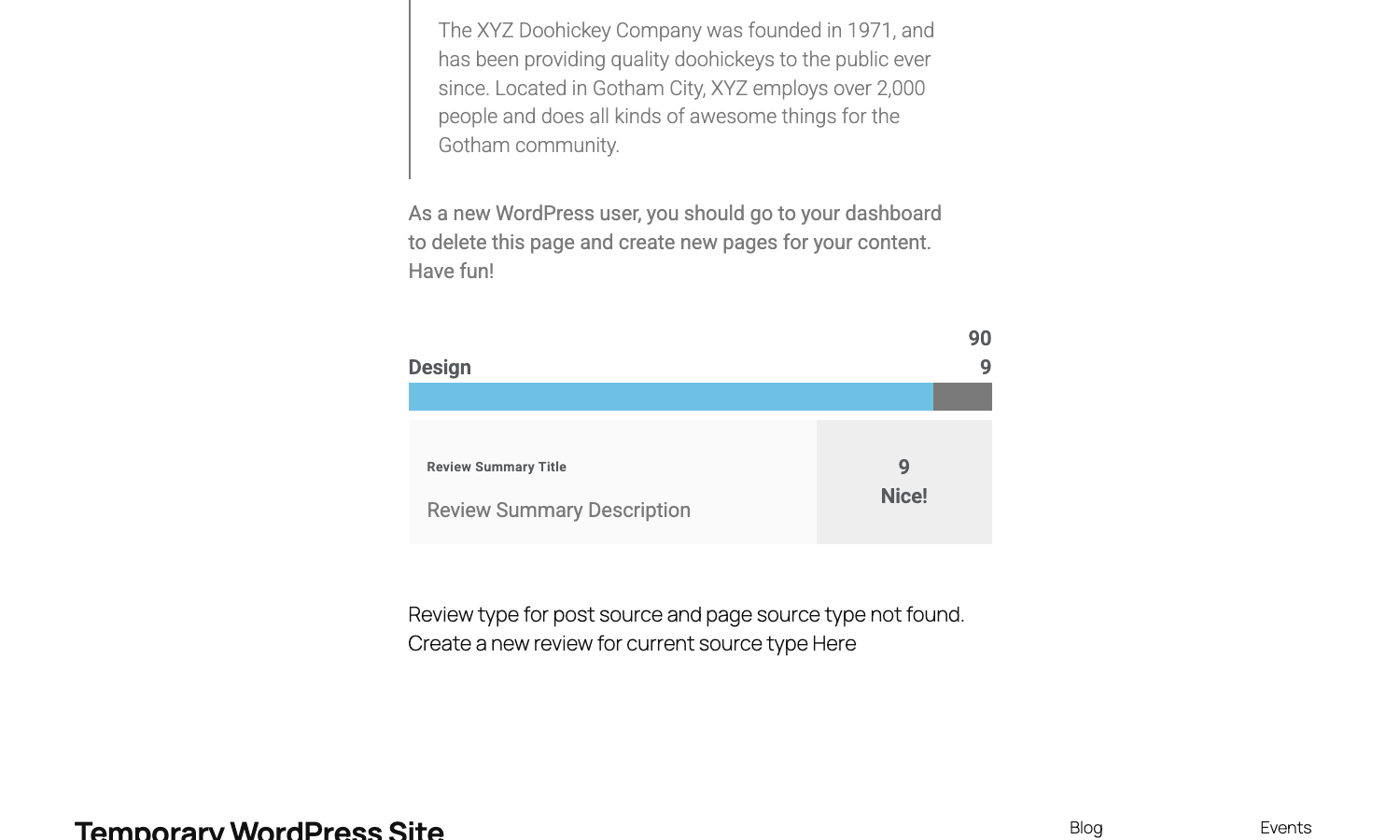
Typed criteria fix this. Each review type in JetReviews has a set of fields you define, and each submitter scores every field independently. The widget then renders a per-criterion bar chart in the review card and computes a weighted overall.
In a real comparison directory this changes user behavior in two visible ways. Time-on-page goes up because the breakdown is genuinely more useful than a single average. And bounce rate drops on the comparison index because users follow the per-criterion strengths to the page that scores best on the criterion they care about.
A small UX point that is easy to miss: JetReviews lets you set the step (decimal or integer) and the max value per field. You can do a 0-to-10 scale on "Sound quality" and a thumbs-up boolean on "Worth the money" if that is the user behavior you actually want to capture. Most plugins lock you into five stars.
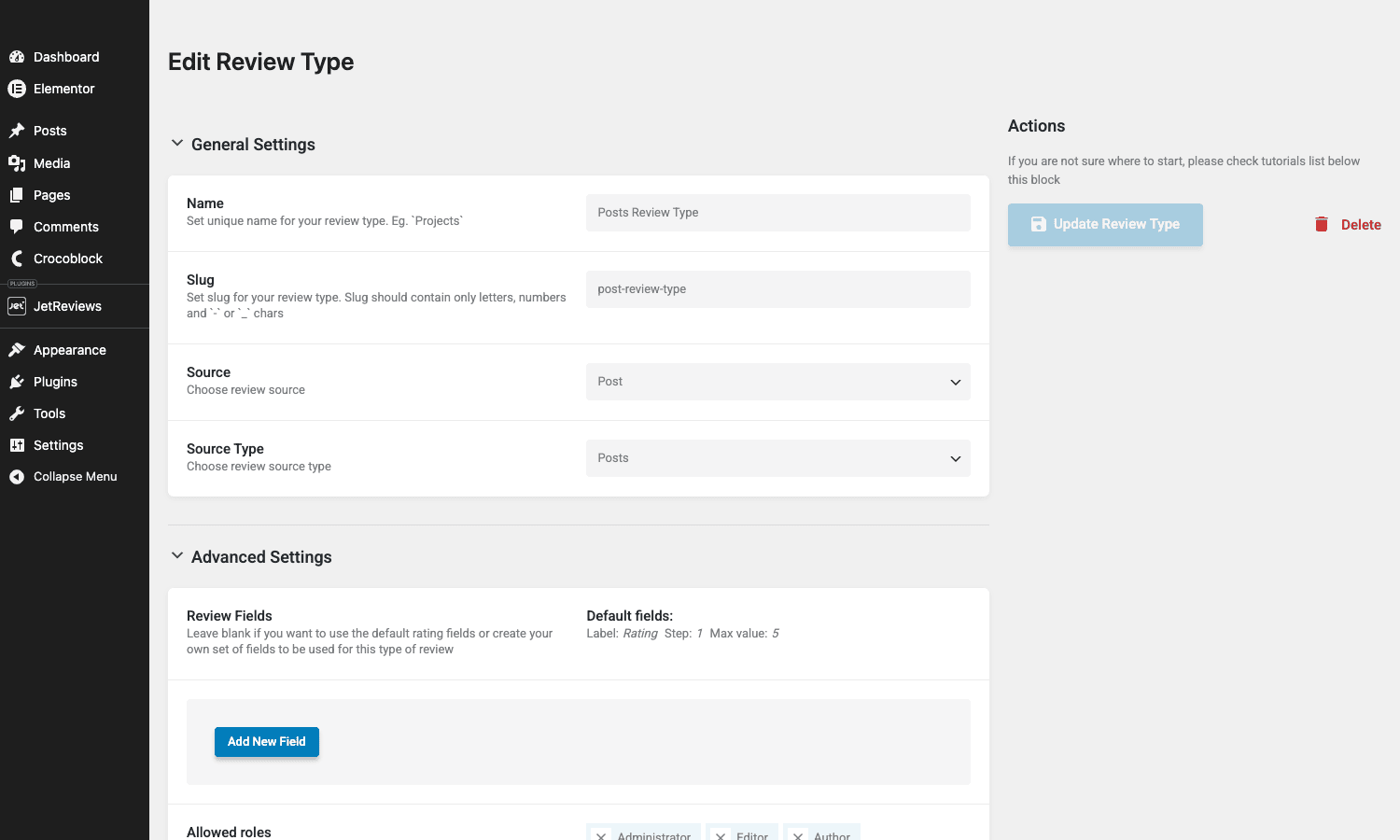
The catch: configuring criteria takes thirty minutes the first time. The fields editor is fiddly. You add a label, a slug, a step, a max value, and you do this for every criterion per review type. If you have two review types (say, a "Headphones" type and a "Speakers" type), you configure each one independently because there is no shared template. I would trade a little verbosity here for a "duplicate this type" button.
Owner reviews vs user reviews: a content-strategy question, not a config question
Here is the architectural decision that makes JetReviews different from almost every other review plugin I have used. It distinguishes between two kinds of reviews on the same item.
An owner review is the editor verdict. On a comparison site, this is the staff member who tested the product, scored it, wrote the summary. There is one owner review per item, written by an admin or editor user. It usually carries more weight visually (bigger summary card, prominent placement).
A user review is a visitor submission. There are many of these per item. They live in a list under the owner review, each one with author info, the per-criterion scores, the text body, and optionally comments.
Most review plugins handle only one of these. Either you ship "site reviews" (visitors only, no editor voice) or "site owner verdict" with no visitor input. JetReviews ships both on the same widget set. The Reviews widget renders the owner verdict. The Reviews Listing widget renders the user-submitted reviews. You drop both into an Elementor section and you have the full content surface that an editorial review site needs.
This is not a config switch. It is a content-strategy question that the plugin lets you answer either way. If you want only visitor reviews, do not add the Reviews widget. If you want only editorial verdicts, do not add Reviews Listing. If you want both, use both. The plugin gets out of the way.
There is one wart. The owner review for a given post is stored as post meta on the post itself (jet-reviews-data). User reviews are stored as rows in wp_jet_reviews. Two different storage models in one plugin. As a developer you have to remember which surface you are pulling from when you query directly. As a user you never notice.
Key features at a glance
Not the full marketing list. The things that move the needle on a real site.
- Typed rating criteria per review type. Define your own fields with custom labels, step, and max value. Renders per-criterion bars in the review card.
- Owner review + user review on the same widget set. Editor verdict and visitor submissions coexist without you writing custom code.
- JSON-LD schema output by default. No add-on needed. Validates in Google’s Rich Results test.
- Comments on reviews. A visitor can reply to a user review. Threaded. Admin moderation.
- Media uploads. Visitors can attach images to their reviews. MIME-type allow-list is filterable.
- Role-based moderation. Which roles can leave a review, which roles need approval before publish, which roles can moderate. All configurable per review type.
- Email notification on new review and on new comment. Subject, message, and headers are filterable.
- REST API at
jet-reviews-api/v1. Every action (submit review, approve, delete, comment, toggle like) is an endpoint, used by the front-end widget and available to anything else that wants to write to JetReviews data. - Export and import as CSV. Move reviews between sites.
- JetEngine compatibility module. If you are already in the Crocoblock stack, JetReviews integrates with the JetEngine listing builder so a listing grid can show review averages per item.
- WooCommerce verification helpers. Two built-in verifications mark a reviewer as "verified customer" or "verified shop manager" when used on product pages.
That last point is small but matters. If you are using JetReviews on a WooCommerce store, the plugin knows about the customer-product relationship and can show a green check on reviews from people who actually bought the product. That is the kind of trust signal most third-party review plugins make you bolt on with a custom snippet.
Installation and the first hour
The installation itself is the standard Crocoblock flow. Upload the JetReviews zip via Plugins / Add New / Upload Plugin, activate it, then activate Elementor if it is not already there (free Elementor is fine; you do not need Elementor Pro for the JetReviews widgets to work).
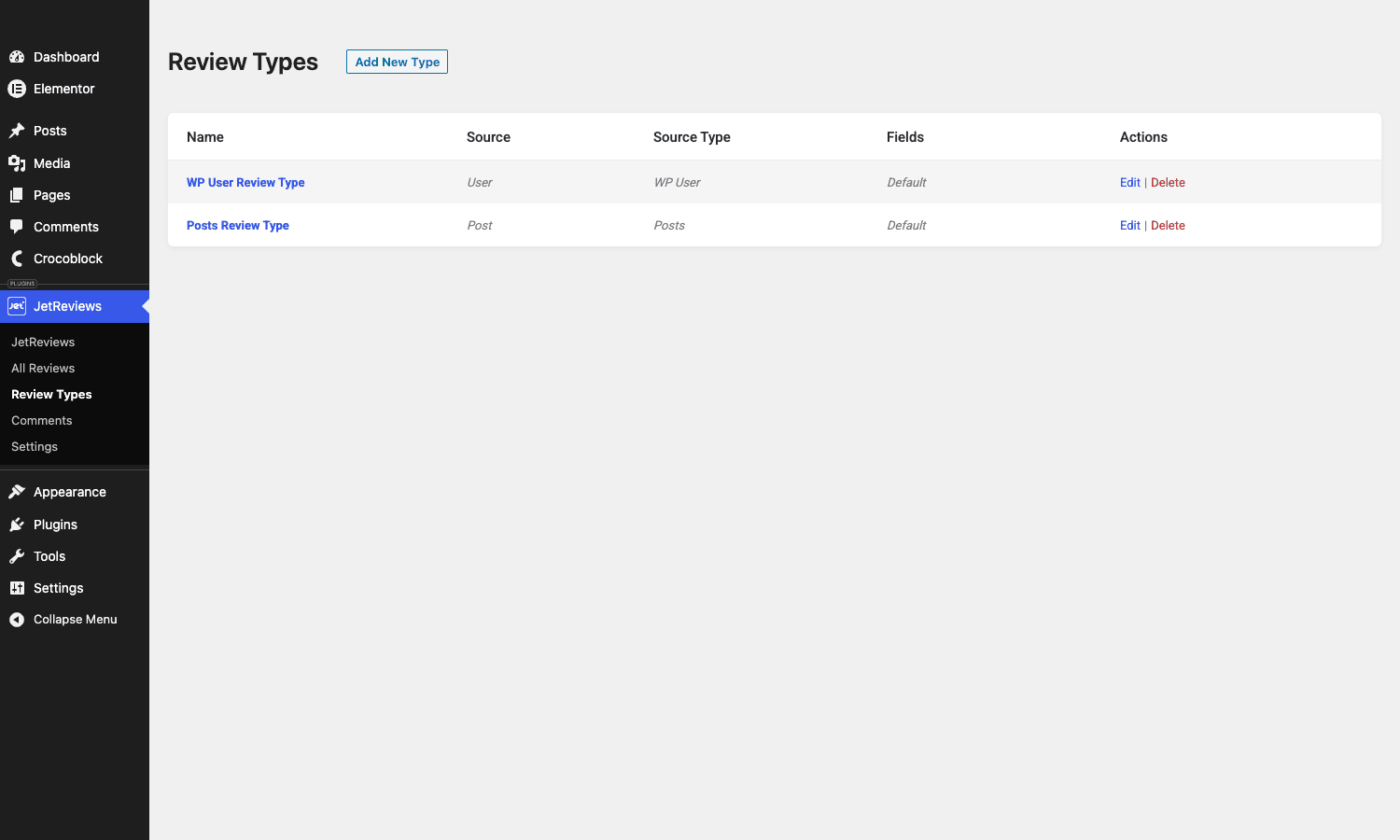
After activation a JetReviews menu appears in the WordPress sidebar with five children: JetReviews (dashboard with stats), All Reviews (moderation list), Review Types (the schema for what fields exist on which kind of review), Comments (moderation list for review comments), and Settings (which actually lives under JetPlugins / Settings / JetReviews subpages now).
The first hour breakdown:
- Open Review Types. The plugin ships two defaults: "WP User Review Type" (reviews about a user, source type = WP User) and "Posts Review Type" (reviews about a post, source type = Post). For most use cases you delete these and create your own.
- Click Add New Type. Give it a clear name (e.g. "Software Review"). Pick a source (Post). Pick a source type (Posts, Pages, or a custom post type if you have one).
- Configure the criteria. Add a field for each thing the reviewer should score. Set label, slug, step, max value.
- Set allowed roles. Default is everyone-but-subscribers. If you want anonymous reviews, you need the Guest user verification (covered later).
- Decide on the approval flow. New review approval = required by default. Leave that on while you are testing.
- Save the type.
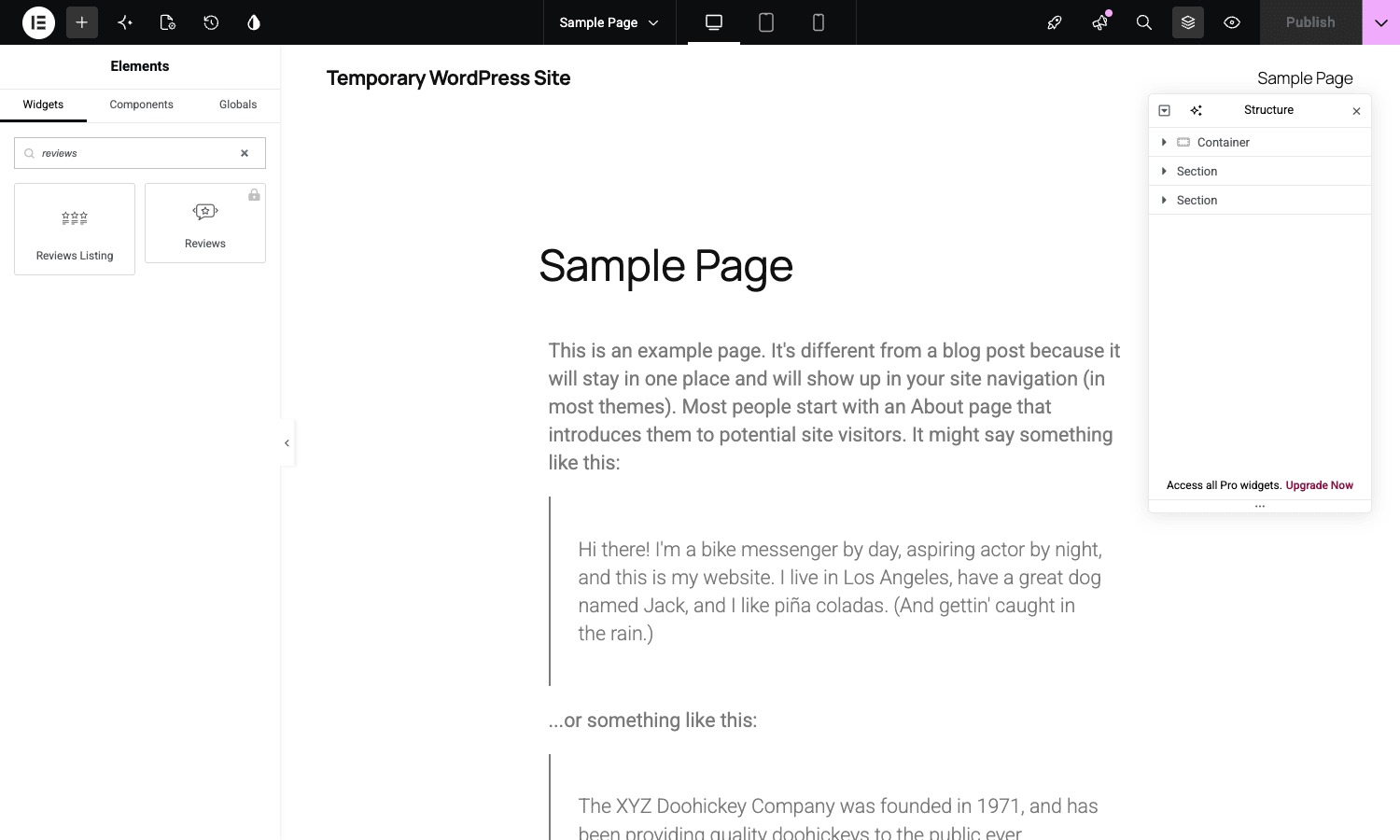
- Edit a page or post that matches the source type, drop into Elementor, search for "Reviews", drag the Reviews Listing widget into a section.
- Open the front-end. The widget renders, and if your role can submit reviews, the submission form appears at the bottom.
That is it. About forty minutes if you read every tooltip. Twenty minutes if you do not.
A guided tour of the admin
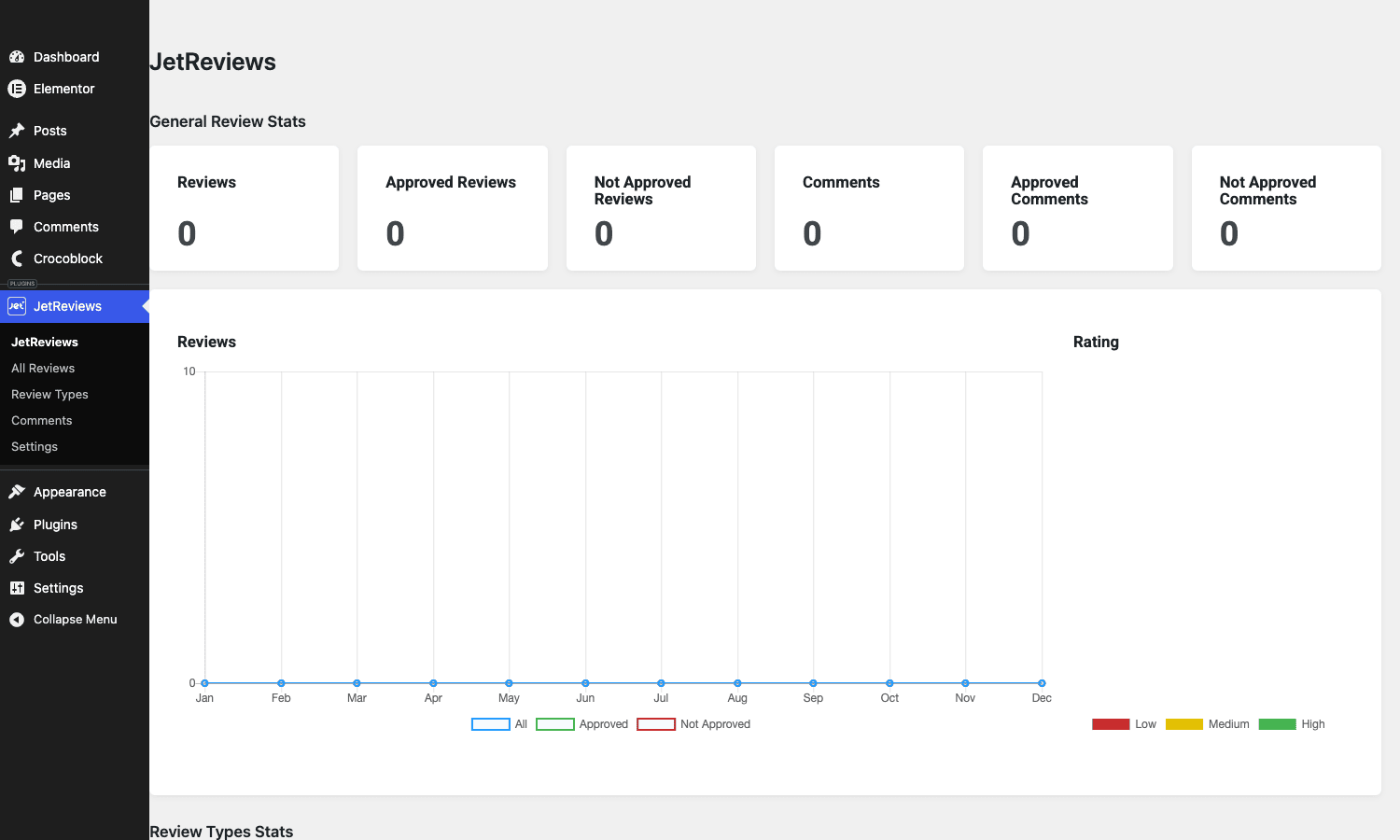
The JetReviews dashboard is a chart-heavy overview. Six metric cards across the top (total reviews, approved, not approved, total comments, approved comments, not approved comments), then a Chart.js line chart showing reviews per month plus a horizontal bar of rating distribution. Below those, a Review Types Stats table breaks the same numbers down per type.
I rarely live in this dashboard. It is fine for a quarterly content audit. For day-to-day moderation work, the All Reviews page is the real surface.
The All Reviews page is a sortable table with bulk actions: approve, unapprove, delete. Six columns: Author, Content, Rating, Source, Date, Actions. You can search the content text. You can filter by source type. You can export to CSV. This is fine. It is also bare-bones. There is no per-review "reply" surface from this page (you have to go to the page itself and reply inline in the comment thread under the review). There is no flagging system for users to report a review as spam or abuse. If you are running a high-volume review site, you will want a third-party moderation queue tool layered on top.
The Settings page actually lives at JetPlugins / Settings / JetReviews and is split into three sub-tabs: Post & User Source (per-post-type settings), Integrations (reCAPTCHA), and Advanced (forbidden-word checking, new review notify, new comment notify).
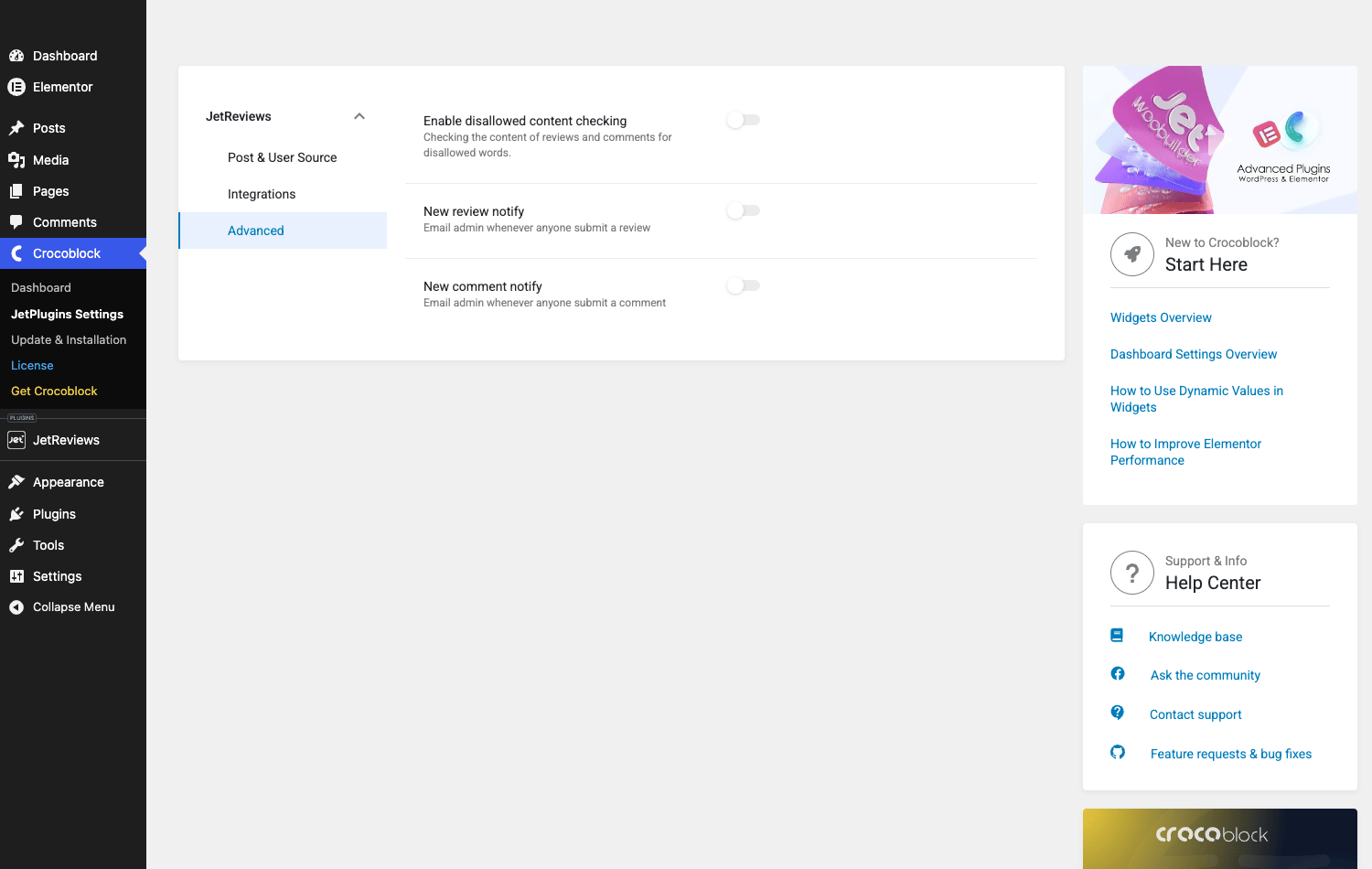
The Advanced tab is where you turn on the email-on-new-review notification. By default this is off. I will dedicate a whole section to why that default has burned me twice on real sites. Skip ahead to "Don’t ship JetReviews without the email-notification hook configured" if you want the short version.
Building a comparison-site review block end to end
Let me walk through a concrete build. Imagine we are setting up the page template for a software comparison directory. Each entry is a WordPress page with a custom post type called software_item. We want every entry page to show: an editor verdict at the top (one owner review, scored on Ease of use, Features, Value, Support), and below it a stream of user-submitted reviews scored on the same four criteria.
Step 1. Create a new Review Type called "Software Review". Source = Post, Source Type = software_item. Add four fields: ease-of-use, features, value, support. Label each one in title case, set step = 0.5, max = 5. Set allowed roles to subscriber and above (so visitors can register and review, but anonymous traffic cannot). New review approval = on.
Step 2. Set up a single-page template for software_item in Elementor (or in your theme builder of choice). Drop a Reviews widget into a section near the top, configured for source = post, source type = software_item. Drop a Reviews Listing widget below it, same source settings.
Step 3. Set the owner review for one item. Open the post in the WP admin. There is a JetReviews meta box on the post editor where the admin scores each criterion, writes a summary title, writes a summary description. Save. That data becomes the owner-review card visible at the top of the page.
Step 4. Configure email notifications. JetPlugins / Settings / JetReviews / Advanced. Turn on "New review notify". Pick the admin email as recipient. If you want the email to also CC the editorial team, use the jet-reviews/notify/review/headers filter (covered in the developer section).
Step 5. Configure schema. On the Review Type edit screen, scroll to Structure Data. Set "Use Structure Data" to on. Pick the @type (Product for software). JetReviews will output a JSON-LD Review schema with the per-criterion ratings collapsed into an aggregate Rating.ratingValue per submission.
Step 6. Test with the Google Rich Results test on a published item that has at least one review. The page should validate as a "Review" rich result. If you also want star ratings to appear in search snippets, your single-page template needs the AggregateRating field populated, which JetReviews does automatically when there are two or more user reviews per item.
That is the whole flow. Two widgets, one Review Type, one meta box, six settings.
JSON-LD schema: what JetReviews emits and what Google reads
JetReviews emits a Review JSON-LD block per item with this rough shape:
{
 "@context": "https://schema.org",
 "@type": "Review",
 "itemReviewed": {
 "@type": "Product",
 "name": "Item Title"
 },
 "reviewRating": {
 "@type": "Rating",
 "ratingValue": "4.5",
 "bestRating": "5"
 },
 "author": {
 "@type": "Person",
 "name": "Reviewer Name"
 },
 "datePublished": "2026-05-26",
 "reviewBody": "Review text"
}
The @type of the itemReviewed is controlled by the Review Type’s structuredata_type setting (Product, Book, Service, Movie, and a few others). The bestRating is taken from the max value on the rating field (or the average max across all fields if you use multiple criteria). The aggregate across all user reviews for an item is rendered as a separate AggregateRating block on the same page when there are two or more reviews.
A note on what Google actually does with this. Rich Results requires the item being reviewed to be one of the supported schema types and the page to be focused on that single item. A comparison page with ten products will not get rich result stars because Google does not show stars for list pages. A single product page with reviews will. This is a Google constraint, not a JetReviews limitation, and I see people get tripped up by it weekly.
The other surprise: the schema is rendered inline as part of the widget output, not via wp_head. If you have aggressive HTML caching with a cache-busting fragment cache, you need to make sure the schema script tag is inside the cached fragment for the widget. Page caches (WP Rocket, LiteSpeed) handle this fine because they cache the whole rendered page. Object caches that operate on partials do not.
If you need to ship richer structured data than JetReviews provides out of the box (e.g. nested Offer blocks for ecommerce, Place for hotels), use the jet-reviews/structure-data/types filter to extend the type list, then layer custom output on top using wp_footer. The reference for what fields each type accepts is the schema.org Review type docs plus Google’s own Review snippet structured data guide.
JetReviews vs Site Reviews vs WooCommerce Product Reviews Pro
Three plugins solve adjacent problems. Picking the right one matters because switching costs are real. Let me sort them by where each one wins.
JetReviews wins when: you are already on Elementor, you need typed criteria, you want owner-vs-user split, you want a custom post type as the review target (not just WC products), or you are already paying for Crocoblock and want one vendor for the whole stack.
Site Reviews (by Geminilabs) wins when: you are on a non-Elementor build (Gutenberg, classic theme, Bricks, hand-rolled), you want a shortcode-first plugin without page builder dependency, you need a strong honeypot anti-spam baseline, or you want the schema output and a permissive license without paying for a Crocoblock subscription.
WooCommerce Product Reviews Pro wins when: you are running a WooCommerce store, your reviews are tied 1:1 to WC products, you want question/answer threads on top of reviews, you want photo uploads in reviews, and you want the email-on-new-review baked into the WC notification system that your store already uses.
If your build is "WooCommerce store with curated owner mini-reviews per product alongside customer reviews" the comparison is harder. WC Product Reviews Pro is the right pick if customer trust is your priority and product-level Q&A matters. JetReviews is the right pick if you want richer per-criterion scoring and a real editor verdict on top of customer reviews.
I have built both. They feel different to maintain. WC Product Reviews Pro feels like a WooCommerce native extension that you can mostly forget about. JetReviews feels like a flexible Elementor widget that you have to configure carefully to look good.
The Crocoblock pricing question: just JetReviews vs the whole subscription
This trips up everyone who comes to Crocoblock for the first time.
JetReviews is a single plugin. You can buy it standalone from Crocoblock for a one-time license, or you can buy the Crocoblock subscription that bundles JetReviews with JetEngine, JetSmartFilters, JetMenu, JetTabs, JetBlocks, and about a dozen other Jet plugins. The subscription is a yearly renewal; the standalone licenses are one-time fees with optional renewals for support and updates.
The decision tree is short. If JetReviews is the only Jet plugin you need, buy it standalone. If you already use JetEngine for custom post types and dynamic content (covered in our JetEngine walkthrough), or JetSmartFilters for AJAX filtering on your listings (which I wrote about in the JetSmartFilters guide), or JetMenu for the mega menu, the subscription is cheaper than buying each one separately.
The GPL alternative is what we do at GPL Times: ship the same Crocoblock-built zips under the GPL license, with no per-site activation, no renewal, no nag screens about updates. The trade-off is that you do not get vendor support tickets, so you should be comfortable reading the plugin source yourself when something breaks. For an Elementor agency that builds dozens of sites, that math usually works out. For a single-site owner who wants Crocoblock to hold their hand, the vendor subscription is the answer.
Don’t ship JetReviews without the email-notification hook configured
I am going to spend a few hundred words on this because it is the single most common JetReviews mistake I see, and it has cost me real time on two client builds.
The plugin ships with "New review notify" toggled off in Settings / Advanced. Meaning, if a visitor submits a review on your site, the admin gets no email. Nothing. The review sits in the moderation queue under JetReviews / All Reviews, waiting for someone to manually visit the page.
Here is how this fails. Client A launches their site. They submit a test review themselves to confirm the widget works. It appears in the moderation queue. They approve it. The widget works. Site goes live. Three weeks pass. They open the All Reviews page on a Thursday to check stats. There are forty-seven pending reviews from real users, the oldest from three weeks ago, sitting unapproved.
Every one of those visitors saw a "Your review must be approved by the moderator" message when they submitted. None of them know that nobody at the company ever looked. From the visitor’s perspective, the site silently swallowed their feedback. Trust damage. Sometimes irrecoverable.
The fix is two clicks. JetPlugins / Settings / JetReviews / Advanced. Toggle "New review notify" on. Done. The admin now gets an email per new review, with the title, content, and a link to the approval page.
If you want to do more than the default, the jet-reviews/notify/review/headers filter lets you add CC recipients. The jet-reviews/notify/review/subject and jet-reviews/notify/review/message filters let you customise the email body. You should also turn on "New comment notify" in the same panel if you are using review comments. Same failure mode, different surface.
Don’t ship JetReviews without this. Moderation in arrears is the most common silent failure on review sites I have audited.
Developer reference: hooks, filters, REST endpoints, DB schema
The developer side of JetReviews is where. Almost every surface is hooked or filtered, and the REST API exposes the same actions the front-end uses, so you can integrate with anything.
Database schema
Two custom tables are created on activation:
{$prefix}jet_reviews– one row per user-submitted review. Columns:id,post_id,post_type,author,date,title,content,rating,rating_data(serialized criteria),type_slug,approved,pinned, plus a few timestamps.{$prefix}jet_reviews_comments– one row per review comment. Columns:id,review_id,author,date,content,approved.
Owner reviews are NOT in this table. They are stored as post meta under the jet-reviews-data key on the source post.
Core action hooks
Drop a snippet on functions.php (or better, a small mu-plugin) to log a custom event every time a review is submitted:
add_action( 'jet-reviews/endpoints/reviews/submit-review', function( $args, $insert_data ) {
 do_action( 'my_site/track_review_submitted', [
 'post_id' => $args['source_id']?? 0,
 'author' => $args['author_name']?? '',
 'rating' => $insert_data['rating']?? 0,
 'approved' => $insert_data['approved']?? 0,
 ] );
}, 10, 2 );
Every JetReviews REST endpoint fires a matching action hook after it writes to the DB. The hook reference for WordPress actions and filters more broadly is at developer.wordpress.org if you are new to the pattern. The full list of JetReviews-specific hooks:
jet-reviews/init– main plugin loader. Use this for very early integrations.jet-reviews/reviews-module/init– reviews component is ready.jet-reviews/endpoints/reviews/submit-review– a user submitted a review. Receives( $args, $insert_data ).jet-reviews/endpoints/reviews/update-review– review was edited.jet-reviews/endpoints/reviews/delete-review– review was deleted.jet-reviews/endpoints/reviews/update-review-approval– moderator approved or unapproved.jet-reviews/endpoints/reviews/toggle-review-approve– same, but the toggle action.jet-reviews/endpoints/reviews/add-review-type– a new review type was created.jet-reviews/endpoints/reviews/update-review-type– review type was edited.jet-reviews/endpoints/reviews/delete-review-media– a media attachment on a review was removed.jet-reviews/endpoints/review-comments/submit-review-comment– visitor commented on a review.jet-reviews/endpoints/review-comments/update-comment– comment was edited.jet-reviews/endpoints/review-comments/delete-comment– comment was deleted.jet-reviews/endpoints/review-comments/toggle-comment-approve– moderator approved a comment.jet-reviews/user/conditions/register– register custom user-eligibility conditions (e.g. "must have logged in within the last 30 days").jet-reviews/user/verifications/register– register custom verification badges (e.g. "verified customer", "verified speaker").jet-reviews/rest/init-endpoints– register your own REST endpoints underjet-reviews-api/v1.jet-reviews/dashboard/before-assets,jet-reviews/dashboard/after-assets– for injecting admin scripts.jet-reviews/frontend/before_register_scripts,jet-reviews/frontend/after_register_scripts– front-end script registration.
Core filters
The filters worth knowing:
// Add a CC and a custom subject to the new-review email.
add_filter( 'jet-reviews/notify/review/subject', function( $subject, $review_data ) {
 return sprintf( '[Reviews] New %s review on "%s"', $review_data['rating'], get_the_title( $review_data['source_id'] ) );
}, 10, 2 );

add_filter( 'jet-reviews/notify/review/headers', function( $headers, $review_data ) {
 $headers[] = 'Cc: editorial@example.com';
 return $headers;
}, 10, 2 );

// Override the default rating fields when no Review Type matches.
add_filter( 'jet-reviews/default-rating-fields', function( $fields ) {
 return [
 [ 'label' => 'Quality', 'slug' => 'quality', 'step' => 1, 'max' => 5 ],
 [ 'label' => 'Value', 'slug' => 'value', 'step' => 1, 'max' => 5 ],
 ];
} );

// Restrict what HTML is allowed in review bodies (defaults to a permissive set).
add_filter( 'jet-reviews/content-allowed-html', function( $allowed ) {
 // Strip all anchor tags from reviews.
 unset( $allowed['a'] );
 return $allowed;
} );

// Extend the schema.org @type options for the structure-data dropdown.
add_filter( 'jet-reviews/structure-data/types', function( $types ) {
 $types[] = 'Hotel';
 $types[] = 'Restaurant';
 return $types;
} );

// Override the MIME types allowed for review media uploads.
add_filter( 'jet-reviews/allowed-media', function( $allowed ) {
 return [ 'image/jpeg', 'image/png', 'image/webp' ];
} );

// Override the template directory used by JetReviews (theme override pattern).
add_filter( 'jet-reviews/template-path', function() {
 return 'partials/jet-reviews/';
} );
The notification filters are the ones I use on every build. The content-allowed-html filter is the second-most-used: by default JetReviews allows <a>, <strong>, <em>, <br>, <p> in review bodies, which is fine for a logged-in user base but too permissive if you accept anonymous reviews and want to prevent comment-spam links.
REST endpoints
The REST namespace is jet-reviews-api/v1. The endpoints:
POST /submit-review– visitor submits a review.POST /update-review– moderator edits a review.POST /delete-review– moderator deletes a review.POST /update-review-approval– moderator approves or unapproves.POST /toggle-review-approve– toggle approval.POST /add-review-type– admin creates a new Review Type.POST /update-review-type– admin edits a Review Type.POST /delete-review-media– remove a media attachment from a review.POST /submit-review-comment– visitor comments on a review.POST /update-comment– moderator edits a comment.POST /delete-comment– moderator deletes a comment.POST /toggle-comment-approve– moderator approves a comment.GET /get-public-reviews-list– front-end pulls the public review list (used by the widget).
Every write endpoint requires either a logged-in user with the right role or an explicit guest verification (depending on your Review Type config). All endpoints respect the permission_callback defined on the endpoint class, which delegates to User_Manager::get_raw_user_data() and checks the user’s roles against the allowed roles for the source.
A practical example: pushing reviews from a separate front-end (a React widget on a different subdomain) is just a POST to /submit-review with the review type’s allowed-roles in mind. The endpoint accepts a guest_<id> author identifier for unauthenticated submissions if the Review Type’s verifications include the Guest user condition.
Compatibility integrations
JetReviews ships with two compatibility modules out of the box:
- JetEngine. The plugin exposes
jet-reviews/compatibility/listing/post/current-idto integrate with the JetEngine listing builder, so a listing grid can show review averages per item natively. - WooCommerce. Two verification badges (
Product_CustomerandShop_Manager) auto-mark reviewers as "verified buyer" or "verified shop manager" on product pages.
You can register your own compatibility modules with jet-reviews/compatibility-manager/registered-plugins.
Performance, compatibility, and the gotchas
Front-end assets are reasonable. JetReviews loads its own JS bundle (~30 KB minified) and a small CSS file on any page where the widget renders. It does not load on pages without the widget, which is the right default.
The plugin lazy-loads the schema markup as part of the widget render, so if you cache pages aggressively (WP Rocket, LiteSpeed), the JSON-LD is cached with the rest of the HTML and there is no per-request overhead.
WordPress 6.x and 7.x are both supported. PHP 7.4 minimum, PHP 8.x tested. Elementor free is sufficient; you do not need Elementor Pro.
The gotchas I have hit:
- Elementor lock-in. JetReviews renders only through its Elementor widgets. There is no native Gutenberg block on the front end and no
[jet_reviews]shortcode. If you switch away from Elementor, you lose the front-end UI but the data stays in thejet_reviewstable. - Multilingual sites. WPML works in the strings sense (review type names, labels). For the actual review content, you submit reviews in whatever language the user used; there is no per-language translation system, which is correct behavior but worth knowing.
- Custom post types as review targets. You CAN review custom post types but you have to whitelist them on the Review Type’s source-type dropdown via the [
jet-reviews/post-types] internal config or by using a Review Type with source type = post and filtering downstream. - Caching layers. Fragment caches that operate inside the page body and exclude widget output can stale the user-review list. Object cache (Redis/Memcached) is fine. Page caches are fine. Cloudflare APO has caused stale review lists for me; setting the JetReviews REST endpoints to bypass cache fixes it.
- The admin All Reviews list does not paginate well past a few hundred reviews. It loads the full list into a Vue table on the front-end. Fine for editorial sites with curated review streams. If you are at thousands of reviews, you will want to query the DB directly for moderation or build a custom queue.
What JetReviews doesn’t do
This list is short but worth being honest about. JetReviews is not a third-party SaaS review aggregator. It does not pull in Google reviews, Trustpilot reviews, or Yelp reviews automatically. If you need that, you need a different category of tool (Reviews.io, Birdeye, NiceJob, or one of the WP plugins that wraps those APIs).
It does not natively handle a global "reviews across all of my products in one feed" view on the front-end without you building a custom Elementor listing with JetEngine. There is no built-in "recent reviews" widget that spans review types.
It does not support nested replies on review comments. You can comment on a review, but you cannot reply to a comment. One level of depth, period.
It does not have a built-in spam filter beyond a "forbidden words" content checker and an optional reCAPTCHA integration. If you are seeing serious spam, you need Akismet or a separate moderation layer on the REST endpoints.
And, as covered above, it is Elementor-only for the front-end render. There is no shortcode fallback. There is no Gutenberg block.
If any of those are dealbreakers for you, JetReviews is not the pick. If you can live with them, the typed-criteria + owner-vs-user split + schema-out-of-the-box combo is genuinely useful and hard to find anywhere else in one plugin.
Pricing and licensing
JetReviews is sold by Crocoblock as a standalone single-plugin license or as part of the Crocoblock subscription that includes the rest of the Jet family. Standalone is a one-time fee with optional yearly support and updates. The subscription is a yearly fee covering everything.
JetReviews is GPL-licensed source, which is what allows GPL Times to redistribute the build. You get the same plugin zip you would buy from Crocoblock, no per-site activation, no nag for vendor support tickets.
FAQ
Why don’t my JetReviews ratings appear in Google rich results?
Either the page is not the right schema type for Google rich result eligibility (Google only shows star ratings on single-item pages, not comparison or category pages), or the page has fewer than the minimum reviews Google requires for AggregateRating to surface, or the schema validation in Google’s Rich Results test is failing on a related schema block elsewhere in the page. Test the URL directly in Google’s Rich Results test and read the error messages; the schema JetReviews emits is correct, but a single broken schema block elsewhere on the page can disqualify the whole page.
Can I import existing WooCommerce native reviews into JetReviews?
Not natively, no. JetReviews stores reviews in a custom table; WC reviews are WordPress comments. There is no migration tool in either direction. If you want to move WC reviews to JetReviews you need a custom script: query wp_comments for comment_type='review', transform each row to the JetReviews schema, insert into wp_jet_reviews. Plan on a parity audit afterwards so you do not silently drop reviews with edge-case data.
Does JetReviews work without Elementor?
The data layer (the custom table, the REST API, the admin UI for moderation) works without Elementor. The widgets that render reviews on the front end do not. If you uninstall Elementor, your existing reviews stay in the database but they no longer render anywhere on your site. Effectively, no.
Why doesn’t the email-on-new-review trigger fire?
Most common cause: "New review notify" is toggled off in JetPlugins / Settings / JetReviews / Advanced (default is off). Second most common: WordPress mail is not configured on your host and wp_mail() is silently failing. Test by sending a test email from a known-working plugin (e.g. WP Mail SMTP) and only debug JetReviews after you confirm the mail layer works.
Can I use JetReviews on a non-WooCommerce comparison site?
Yes. JetReviews has no WooCommerce dependency. It is a general-purpose review widget that happens to ship a WooCommerce compatibility module if WC is active. For a comparison directory built on plain custom post types (with or without JetEngine for the CPT definition), JetReviews is a strong fit.
Does JetReviews support guest reviews from anonymous visitors?
Yes, with a configuration step. By default the Posts Review Type has allowed roles set to subscriber-and-above, which blocks anonymous submissions. To allow guests, edit the Review Type, add the "Guest user" verification, and adjust the allowed roles. Anonymous submissions then go through the guest_<id> author flow and get stored with a guest-author identifier instead of a WP user ID.
Can I render the per-criterion breakdown on a single page that shows reviews for multiple items?
You can, if you build the layout in JetEngine with a Listing Grid and pull a Reviews widget per item via the listing source. Otherwise, no, the widget is bound to a single post context at render time.
Will JetReviews slow down my site?
Front-end overhead is minimal: one ~30 KB JS bundle and a small CSS file, both loaded only on pages where the widget renders. Schema markup is inline with the widget output, no extra request. The admin Vue panel is a bit heavy on the moderation page when you have a lot of pending reviews, but it does not affect front-end users.
Final thoughts
JetReviews solved a real problem for me on three of the five review-system builds I have done. The other two were a recipe blog (where flat star ratings were genuinely the right choice and JetReviews was overkill) and a WooCommerce store with photo-heavy customer reviews (where WC Product Reviews Pro was the better pick because of its native WC integration and photo-upload-first UI).
The plugin is at its best when typed criteria genuinely add information (comparison directories, software reviews, hotel reviews, product reviews with multiple dimensions), when an editor verdict matters as much as user voice (curated review sites), and when you are already in the Elementor universe. It is at its worst when you are not on Elementor (which is most of the WordPress world post-2024) or when you need third-party review aggregation (Google, Trustpilot, Yelp).
The Crocoblock licensing is confusing for first-timers. The admin UI for moderation is bare-bones. The default-off email notification has burned me twice and should be on by default. Those are real complaints. None of them are dealbreakers.
If you are building a comparison site, an editorial review site, or any WordPress build that needs more than a flat star rating, JetReviews is the widget I reach for first. The GPL Times distribution is the path I take on every agency build that does not need a vendor support contract, because it lets me spin up a working install on staging in under five minutes and read every hook and filter in the source without waiting for vendor docs. Skip this if you have shipped reviews on a comparison site before and have your own opinions; everyone else, this is a good twenty minutes of clicking through the demo before you commit.