

I’ve added share buttons to four very different WordPress sites in the last two years. A weekly newsletter-driven content blog that needed a clean Twitter and LinkedIn pair under the headline. A high-traffic publisher running 14 million pageviews a month where the share-count cache was the whole point. An agency client’s portfolio of WooCommerce stores where the brief was "let people share on WhatsApp from the product page, please." And a recipe site where Pinterest was the only network that actually mattered.
I tried the obvious things first. The free AddThis widget (RIP, retired in 2023) loaded an enormous third-party JS bundle that crushed my Largest Contentful Paint score every time I ran a Lighthouse audit. Sumo, back when it was still Sumo, had a hosted button bar that broke whenever my caching plugin cleared. Shareaholic worked but its admin felt like a 2014 SaaS dashboard. Jetpack’s Sharing module is fine if you already have Jetpack, but coupling a single feature to a plugin that wants to also do backups, downtime monitoring and 80 other things is a real cost.
The hand-rolled option, where you just write <a href="https://twitter.com/intent/tweet?url=..."> buttons yourself, is the one I keep recommending to developer-heavy teams. It’s also the one that always loses on mobile because nobody on a small team has time to keep up with X removing the tweet count, WhatsApp’s wa.me link format change, or LinkedIn deprecating their old share URL.
Then there’s Easy Social Share Buttons for WordPress. Usually called ESSB. It’s been on CodeCanyon’s social-media leaderboard for over a decade and it does one thing well: it ships every share network you’ve ever heard of, lazy-loads its own JS, and caches share counts so the front end doesn’t melt under traffic. I sat down with the latest build on a sandbox, configured a real blog with five networks and a floating bar, and wrote this walkthrough from a week of poking at the admin.
This is what’s good. This is what’s clunky. This is the technical stuff developers care about. By the end you’ll know whether ESSB is the right share-button plugin for your site or whether you’re better off with a smaller alternative.
Table of Contents
- What is Easy Social Share Buttons for WordPress?
- The 5 share networks you actually need (and the 55 you don’t)
- Key features at a glance
- Installation and first 30 minutes
- A guided tour of the admin
- Share-count caching: why your numbers are different from someone else’s
- Lazy-loading the share bar: how ESSB does it and what breaks if you skip it
- The publisher use case vs the WooCommerce use case
- Real-world setups that worked
- Developer reference: hooks, filters, shortcodes
- Dont enable 30+ networks on the floating bar
- ESSB vs Social Snap vs Sassy Social Share vs Jetpack Sharing
- What ESSB doesn’t do (and when you need a social-marketing SaaS)
- Performance, compatibility, and the gotchas
- Pricing and licensing
- FAQ
- Final thoughts
What is Easy Social Share Buttons for WordPress?
Easy Social Share Buttons for WordPress (everyone calls it ESSB) is a premium WordPress plugin built by AppsCreo, the author handle on CodeCanyon. It’s a single-purpose plugin in the sense that it doesn’t try to also do SEO or analytics, and a maximalist plugin in the sense that within sharing it covers basically everything: share buttons, share counters, Click to Tweet, Pinnable images, after-share unlock modals, social proof notifications, subscribe forms, a homepage share message, an Instagram feed, a Twitter/X embed, social-followers counter widgets, OpenGraph and Twitter Card tag emission, and a few dozen more things.
It’s been on CodeCanyon for over a decade. The author has shipped a steady cadence of updates that, refreshingly for a plugin this age, kept pace with real platform changes: Twitter becoming X, the WhatsApp deep-link format change, the Pinterest pin/save endpoint moving around, Threads launching, Mastodon’s instance-based share URLs. A lot of older share-button plugins quietly stopped supporting WhatsApp or never added Threads. ESSB usually has them within a release or two of the platform change.
If you’re looking for the GPL-licensed version, Easy Social Share Buttons on GPL Times ships the same zip the author distributes on CodeCanyon. Same files, same documentation, same admin, just delivered through the GPL store.
A note about the name. ESSB is sometimes referred to as "Easy Social Share Buttons 3" or "Easy Social Share Buttons 4" or "5" in older posts on the web. The plugin folder is still easy-social-share-buttons3/ for historical reasons (it used to be the major version 3 rewrite). The internal options key is essb4. The admin labels itself "5" in places. Don’t worry about any of that. There’s one plugin and you install the one zip. The number drift is just artefacts of long-lived software.
The 5 share networks you actually need (and the 55 you don’t)
ESSB ships with 50 networks out of the box and you can import another dozen from its built-in library. That’s a lot of icons.
Here’s the part nobody writing about share-button plugins ever says out loud: you only need five. On most sites, three.
If you’re a Western, English-language content publisher in 2026, the share buttons your readers will actually click on are:
- Facebook, because Facebook still drives more referral traffic to publishers than X.
- X (formerly Twitter), because journalists and developers share via X and your social-traffic mix tilts heavily here for tech, business, and news verticals.
- LinkedIn, because B2B traffic from LinkedIn share clicks is high-intent.
- WhatsApp, because mobile readers in many regions share via WhatsApp instead of any open social network. This is the network most American-built plugins underestimate.
- Reddit or Pinterest, depending on your niche. Reddit for tech/news/discussion content. Pinterest for visual content like recipes, fashion, home decor, weddings, parenting.
That’s it. The rest, the Diggs and Newsvines and MySpaces and Yammers, are there for the rare site that needs them, not for yours. If you’re publishing in Russia or central Asia, swap one slot for VKontakte. If you’re a B2B SaaS, swap WhatsApp for Buffer (people queueing scheduled shares).
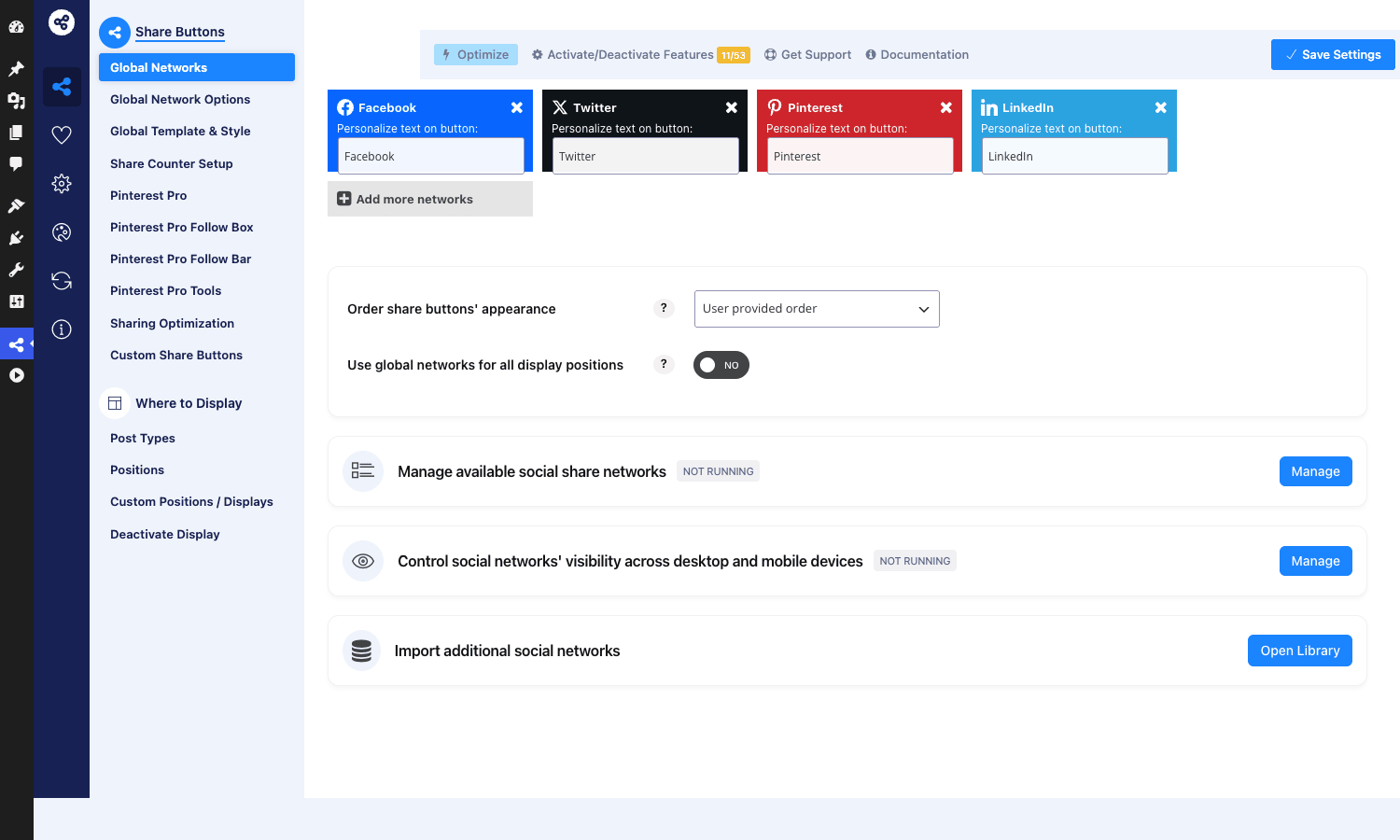
ESSB makes it easy to keep the list short. From the Global Networks panel you can drag-reorder, remove, and add. The "Add more networks" button opens a popup with every network in a branded grid and you pick the ones you want.
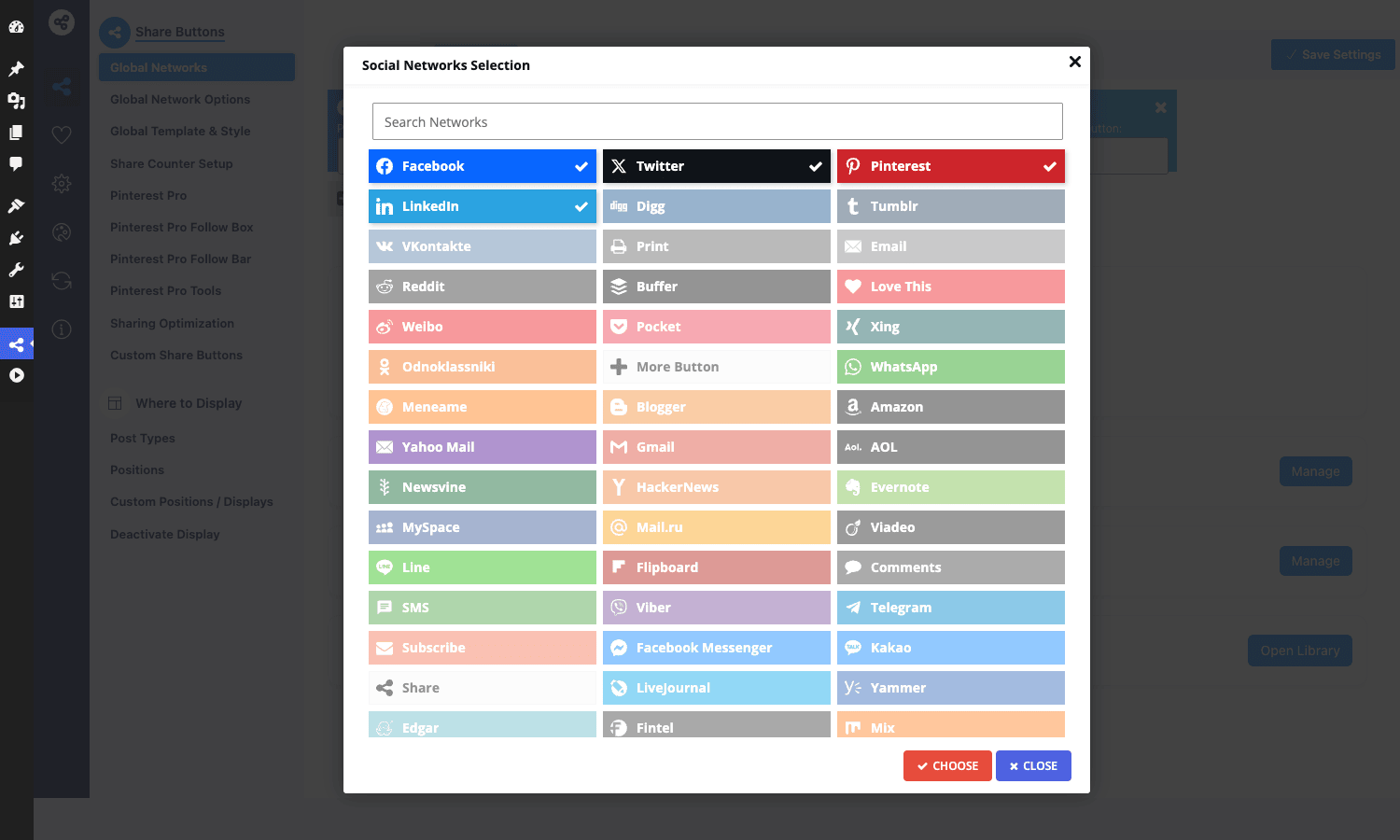
The temptation is to enable 15 networks because you can. Don’t. More icons mean more visual noise, more icons being skipped over, and on the floating sidebar bar it means your icons are smaller and harder to tap on mobile. Pick five. If your analytics show one network is dead, drop it and try another. Treat the share-button surface like real estate, not a network directory.
Key features at a glance
Skipping the marketing list. Here’s what actually matters when you ship ESSB on a real site.
- 60+ share networks, including the obscure ones (Mastodon, Threads, Skype, Telegram, Viber, Line, Kakao) that other plugins skip. ESSB has 50 in the base setup and another 10+ in its Styles Library import.
- Share-count caching as a first-class subsystem. ESSB stores counts in its own table (
wp_essb_cached_shares) with TTL and updates them async in the background. Your front-end pages don’t make live API calls per pageview. - Lazy-loaded share bar JS. The ~30KB ESSB JS bundle is loaded after
DOMContentLoaded, not in the head, so it doesn’t block Largest Contentful Paint. This is a real win against AddThis. - Native OpenGraph and Twitter Card tag emission, with conflict detection if Yoast or Rank Math is already emitting them.
- Floating sidebar, top-of-content, bottom-of-content, image-hover, popup, fly-in, after-paragraph, and mobile share bar as separate display positions, each independently configurable.
- WooCommerce-aware. Share buttons on product pages get the product URL and product image, and there’s a share-on-purchase modal that prompts customers after checkout. This is rare and surprisingly useful for marketplace-style stores.
- Visual designer with 50+ button templates (Modern flat, Glow, Circle, Square, Push, Block, Pinterest-style, Material, Soft Color, etc).
- Click to Tweet shortcode with custom styling.
- Pinnable images that show a Pinterest "Save" button on hover over any image in the content.
- Subscribe form, optin-locker, after-share content unlock, which are conversion features more than share features but they ride on the same JS bundle.
- Per-post overrides through a meta box: turn off buttons on a single post, override the network list, override the position.
- Per-network behaviour filters (
essb4_shareapi_url_*,essb_network_target_*) for developers who need to tweak one network’s URL format. - Setup Wizard for new installs that picks defaults based on a few yes/no questions.
The plugin is dense. Not in the bad way. In the way where you keep finding features you didn’t know existed. The first time I clicked into "Mobile Share Buttons Bar" and realized it has its own separate template-and-network configuration, I knew this was a plugin written by someone who actually ships sharing on real sites.
Installation and first 30 minutes
The install is normal: upload the zip via Plugins → Add New → Upload, activate, and ESSB lands itself in the main admin sidebar as "Easy Social Share Buttons" with a share-icon glyph.
The first time you open the settings, the plugin offers to run a Setup Wizard. The wizard asks you a few questions (do you want a floating sidebar? content top? content bottom? which positions for mobile?) and pre-fills a sensible config. If your goal is "ship share buttons on posts today," the wizard is fine. If your goal is "understand the plugin," skip the wizard and open Global Networks directly.
The first 30 minutes look like this:
- Global Networks. Pick your five or six networks. Drag them into the order you want.
- Where to Display → Post Types. Toggle Posts on (and any custom post types you want share buttons on).
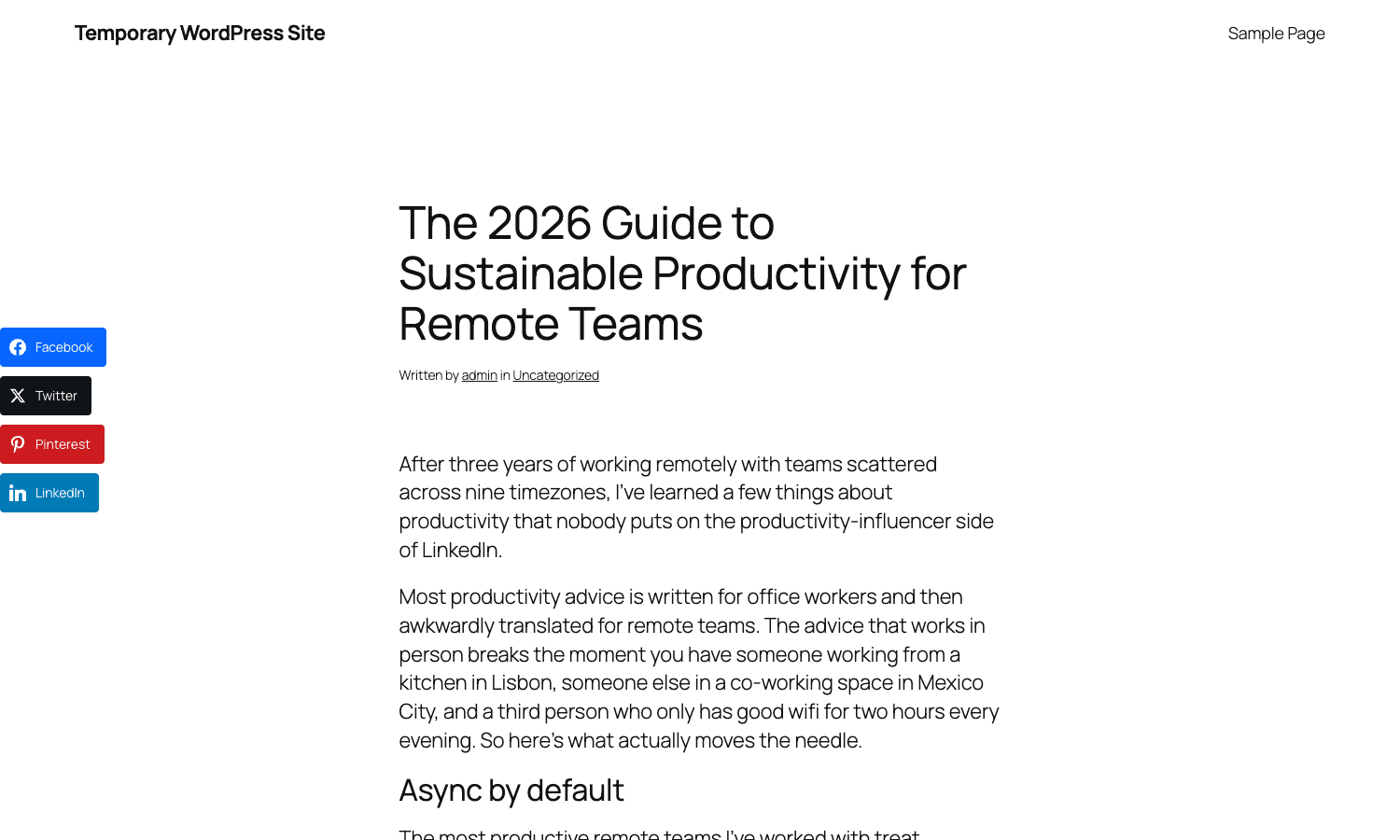
- Where to Display → Positions. Pick "Content top and bottom" or "Content bottom" plus the floating sidebar.
- Global Template & Style. Pick a button template (I default to Modern Flat or Glow Retina). Set Size to M or L. Decide whether to display counters or not (more on this below).
- Save.
Refresh a sample post on the front end. The share bar should be visible above and below the article and a floating bar should be pinned to the left edge of the screen as you scroll.
Five minutes of clicking. The rest of the admin is fine-tuning.
A guided tour of the admin
ESSB’s admin has 30+ tabs in the sidebar nav. That’s not an exaggeration. Most of the time you only need three or four of them. Here’s a guided tour of the ones that matter.
Global Networks
The home tab. Your list of active share networks, in the order they appear on the front end. You can personalize the button text per network ("Tweet" instead of "Twitter") and you can reorder by dragging the network cards. The order here is the order on the share bar.
Global Network Options
Per-network settings. The Twitter card has a "via @username" text field. The Facebook card has the Facebook App ID for share-on-FB analytics. Pinterest has the rich-pin enable. The Email card has a custom subject and body. This is the tab you’ll come back to whenever a network’s defaults aren’t right for your site.
Global Template & Style
The visual designer. Pick the template (Modern flat, Glow, Push, Circle, Square, Material, Soft Color and 40+ more). Set the button style (icon only, icon+name, icon+count, icon+name+count). Pick the alignment (left, center, right, fluid). Set the size for desktop and mobile separately. Choose whether you want spacing between buttons or a connected pill. Pick the hover animation.
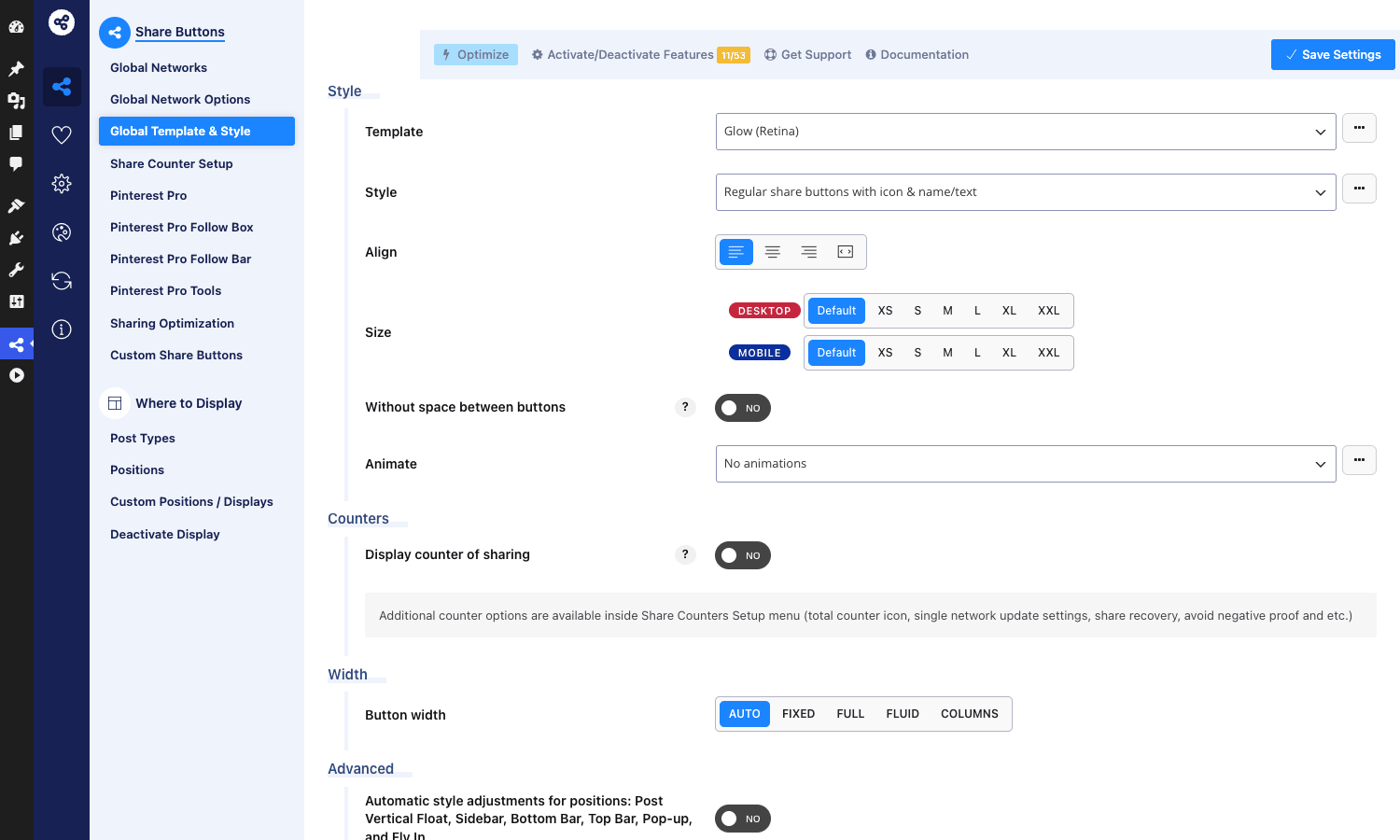
The size matrix is what I default to: Desktop M, Mobile S. Anything bigger looks like an ad. Anything smaller is hard to tap.
Share Counter Setup
This is the tab you’ll spend the most time in if your site has any meaningful traffic. The settings here decide which networks emit count requests, how often counts refresh, how long counts cache, and whether to update counts in the background or on the next pageview. The wrong defaults here are how plugins like ESSB get accused of "slowing down the site." More on this below.
Sharing Optimization
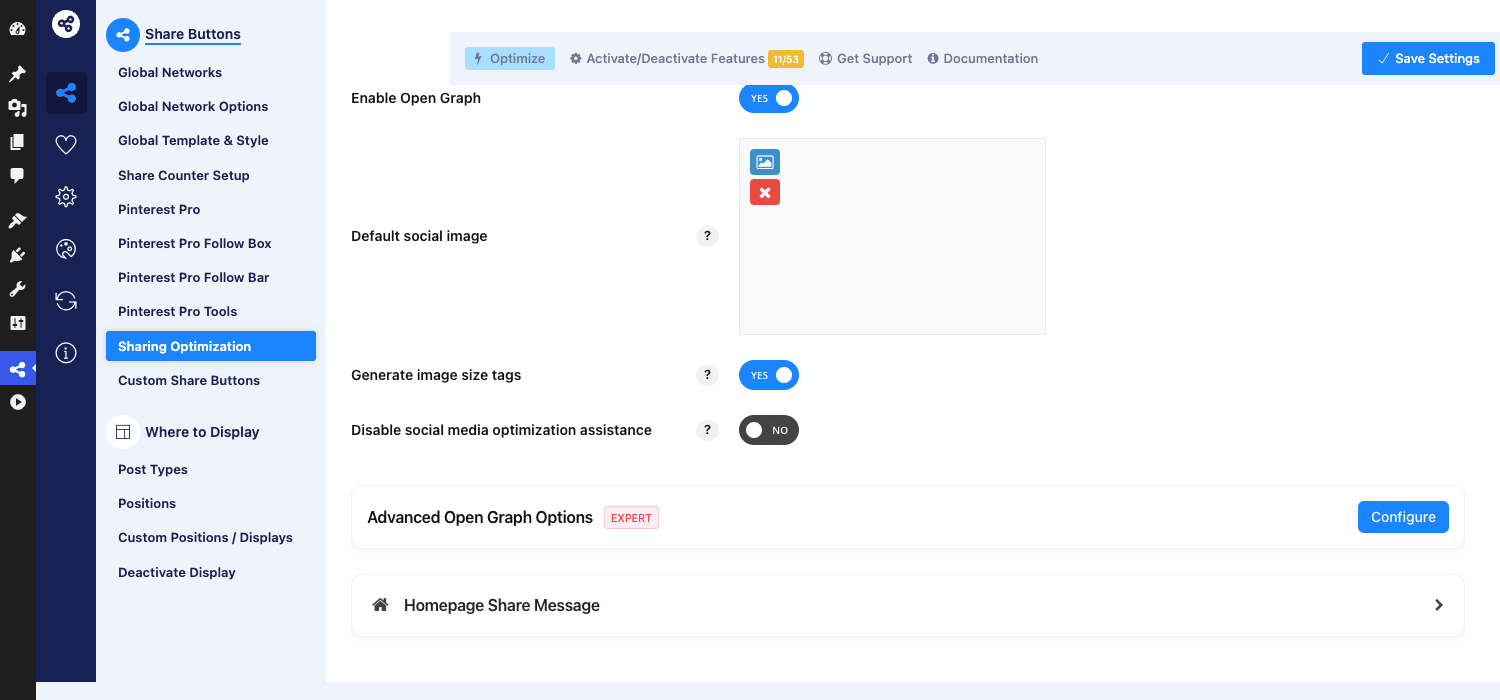
OpenGraph and Twitter Cards. The plugin emits its own og: and twitter: tags by default. If you already run Yoast SEO Premium or Rank Math SEO Pro, turn this off, or you’ll have two plugins emitting og:image and Facebook will sometimes pick the wrong one. ESSB has a "disable social media optimization assistance" toggle exactly for this case.
Where to Display
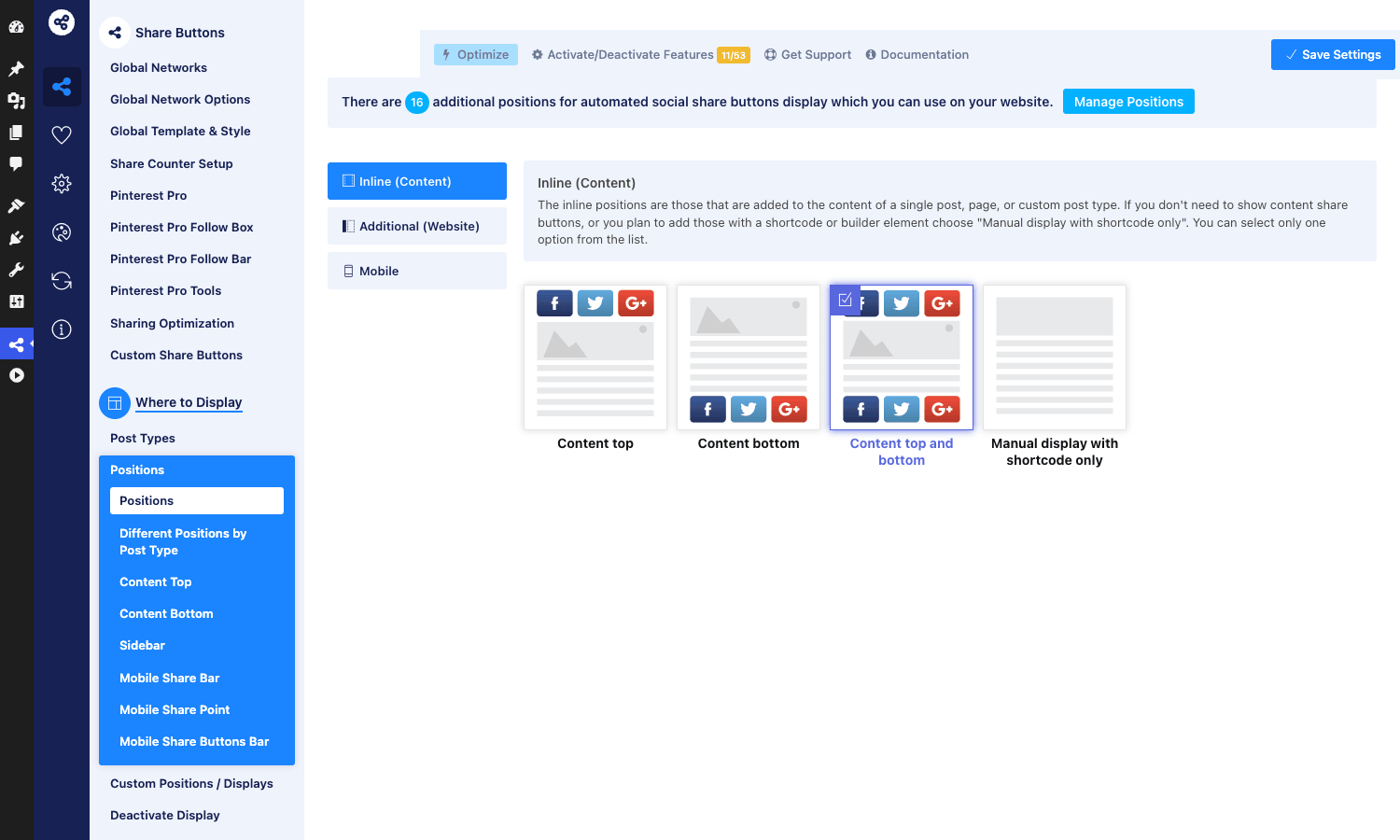
The umbrella nav for picking the positions and post types where share buttons render. The Positions tab has visual cards for each position (Content top, Content bottom, Content top and bottom, Manual via shortcode, Sidebar, Mobile share bar, Mobile share buttons bar, Mobile share point). Click to activate. You can have multiple positions active at once.
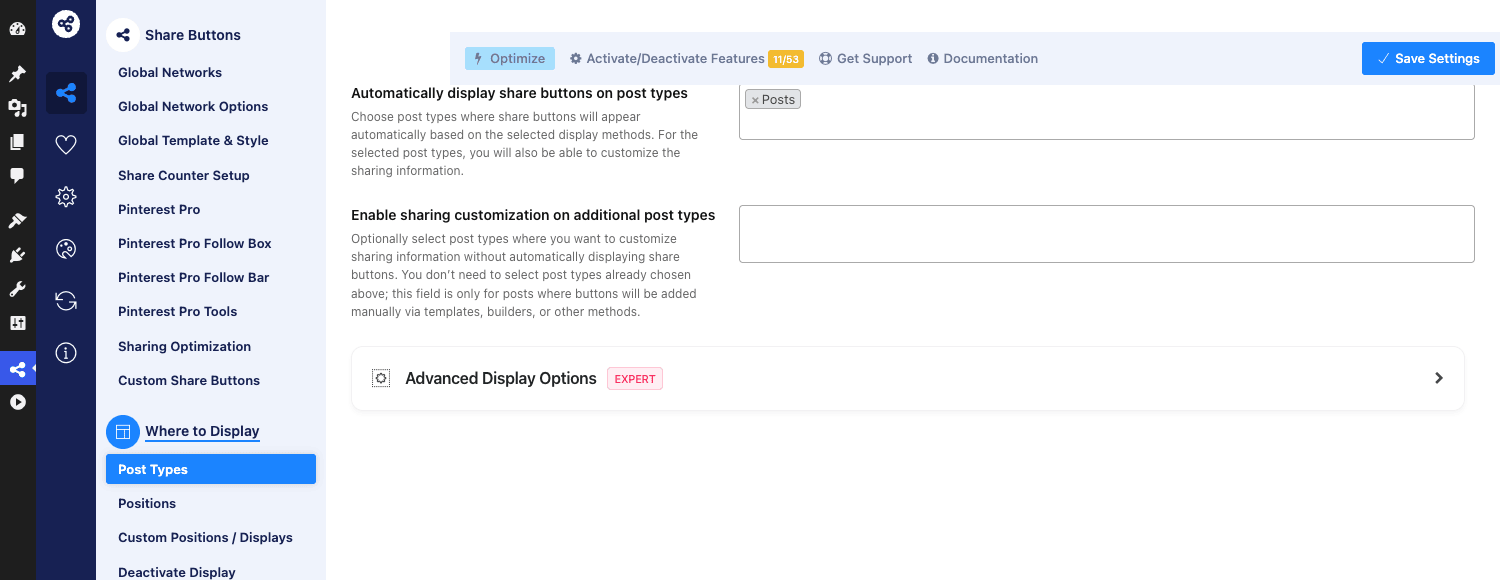
The Post Types tab is where you say "buttons appear on Posts but not Pages." If your site has a custom post type for case studies or recipes, you can enable share buttons on that too.
Subscribe / Optin / Click to Tweet / Pinterest Pro / Instagram / Social Proof
Each of these is a separate module with its own tabs. You can ignore them all if you only want share buttons. If you do want, say, a Pinterest "Save" button that hovers over your blog images, the Pinterest Pro module is where you turn that on. If you want a "subscribe to get the rest of this article" optin lock, that’s the Optin Locker tab. None of these modules is mandatory and most sites don’t enable any of them.
Share-count caching: why your numbers are different from someone else’s
This is the part of ESSB that earns its money on a real site.
Every share counter you see on a button ("4.2K shares on Facebook") is the result of asking that network for a count. Facebook deprecated their public counts API years ago (you literally cannot get a Facebook share count from a third-party plugin anymore, ESSB included). Twitter killed theirs in 2015. So the share counts you see today come from three sources:
- Networks that still expose a public counts endpoint (Pinterest, sometimes Reddit). ESSB calls those endpoints with the post’s URL.
- Internal counts. ESSB increments a counter every time someone clicks a share button on your site. This is your own data, you control it, but it only counts share clicks from your own site, not actual shares completed on the destination platform.
- Counts imported from a different plugin (Sumo, SocialWarfare, Shareaholic), if you migrate. ESSB has a migration tool for this. We’ll come back to it.
The reason this matters: every count refresh is an HTTP request out of your site to a remote endpoint. If you do that on every pageview, your site is making N requests per visitor where N is the number of count-enabled networks, and that’s bad. Slow pageloads, third-party API rate limits, and a real risk of going down if Pinterest’s API is having a bad day.
ESSB solves this with a dedicated cache. There’s a separate database table where counts are stored per post, per network, with a last_updated timestamp. The plugin asks "is this count older than the TTL?" If yes, it kicks off a background job (via wp_remote_get in a non-blocking call) to refresh, and serves the stale count to the current visitor. The freshness window is configurable. The default is 6 hours. On a high-traffic publisher I’ve pushed it to 24 hours with no complaints from anyone.
The interesting consequence: your share counts and someone else’s share counts for the same URL will not match. They’re cached independently, refreshed at different times, and only see the share networks each plugin queries.
This is fine. The number on the button is a trust signal, not an accounting record. If a reader sees "1.2K shares" they read it as "this post is popular." They don’t audit it.
If you’re moving from another share plugin and your old counts looked higher, that’s because the old plugin was reporting Facebook counts back when Facebook still served them. ESSB literally cannot get those numbers anymore. Nobody can.
There is also a "fake counters" module that adds a starting offset to your counts, for sites that want the social-proof boost without waiting for organic shares to accumulate. I’d skip it. Readers can tell when "1.5K shares" sits next to a comment thread of three replies.
Lazy-loading the share bar: how ESSB does it and what breaks if you skip it
ESSB’s JS bundle is around 30KB minified. It loads via wp_enqueue_script with the in_footer flag set to true, and the plugin marks itself with the defer attribute so the browser parses HTML before executing this script.
You can take it a step further. In Advanced Options there’s a "Defer scripts" toggle and a "Lazy load share bar after first scroll/interaction" option. Turn that on and ESSB literally doesn’t render the buttons until the user scrolls 50 pixels or interacts with the page. Lighthouse scores love this.
What breaks if you skip lazy-loading? Two things.
- Largest Contentful Paint. Your share-bar markup is rendered server-side. The JS just hydrates click handlers. But on slower phones, even ~30KB of JS during the initial render budget can push LCP from 1.4s to 1.7s. That’s the difference between "Good" and "Needs Improvement" in Core Web Vitals.
- Cumulative Layout Shift. If the share-bar markup loads but its CSS hasn’t applied yet, you can get a brief reflow as the bar resizes from default to styled. Lazy-loading delays the markup until the CSS is settled.
If you also run WP Rocket, there’s a small dance you need to do. WP Rocket’s "Delay JavaScript execution" feature wants to delay every script that isn’t on its exclusion list. ESSB’s bar JS sometimes ends up delayed, which means the buttons appear styled but the click handlers don’t bind until the user interacts. Usually fine. If you want the buttons clickable on first paint, add ESSB’s script handle (essb-utilities and essb-loader-extender) to WP Rocket’s Delay JS exclusions.
The publisher use case vs the WooCommerce use case
These are very different setups even though it’s the same plugin.
Publisher (news, blog, magazine):
- 4-6 networks max, with Facebook, X, LinkedIn, WhatsApp prioritized.
- Floating sidebar bar enabled with share counts visible.
- Counter refresh on a 6-12 hour TTL (counts move, but not minute-by-minute).
- Content bottom plus floating sidebar. Skip content top, because readers haven’t decided to share yet at the top of a page.
- OpenGraph emission delegated to the SEO plugin, not ESSB.
- Click to Tweet enabled inside long-form articles (developers love this feature, journalists use it sparingly).
WooCommerce store:
- 3-4 networks, with WhatsApp first and Pinterest second (Pinterest because product images do well on Pinterest).
- No counter display on product pages. Nobody wants to see "0 shares" under a product they’re considering buying.
- Buttons positioned after the product description, not before the Add to Cart button.
- Share-on-purchase modal enabled (this is the one that prompts the customer "Want to share what you just bought?" on the thank-you page).
- ESSB’s WooCommerce integration on, so the share URL includes the product image and product description.
- Pinnable images enabled for product gallery images.
The point: don’t apply your publisher setup to your store, or vice versa. The Display Customization per Post Type tab lets you have completely different network lists and templates for posts vs products.
Real-world setups that worked
Long-form content blog
This blog actually. The setup: Modern flat template, M size desktop / S mobile, 5 networks (Facebook, X, LinkedIn, WhatsApp, Reddit), content bottom position only, floating sidebar enabled on screens 1200px and wider, no counters displayed (it’s a young site, counters would all be zeros). Share-on-image disabled. Open Graph delegated to Yoast. The whole bar takes ~30KB JS, ~12KB CSS, no third-party requests on the front end.
Recipe site
Pinterest Pro module + Pinterest as the only prominently displayed network on the floating sidebar, with Facebook and X as secondary inline buttons. Pinnable images hover-button enabled for every image in the content. Custom Pinterest pin descriptions auto-derived from the recipe title. Share counts on (Pinterest still serves counts, and "342 pins" on a recipe is good social proof). Result: about 60% of the site’s outbound social referrals are pins, and most of them come from images shared via the hover button, not the share bar.
B2B SaaS blog
Three networks: X, LinkedIn, Buffer. No sidebar, just content-bottom horizontal bar. Click to Tweet shortcodes used heavily inside articles to highlight quotes. No counters (B2B audiences don’t decide based on share counts). OpenGraph delegated to Rank Math. CTA modal disabled.
High-traffic news publisher
This is the one where ESSB really proves its worth. 14M pageviews/month. Counter caching set to 12-hour TTL with async refresh. ESSB’s internal wp_essb_cached_shares table grew to about 80MB. Periodic cleanup via WP-CLI removes counts for posts that haven’t been viewed in 90 days. The plugin emits ~10KB of structured-data JSON-LD with schema.org/Article markup on every post (more on schema from schema.org/Article).
Developer reference: hooks, filters, shortcodes
ESSB exposes a useful set of hooks. Not all of them are documented, so this is the cheat-sheet I wish I’d had when I started.
Action hooks worth knowing
essb_after_admin_save_settings– fires after settings are saved in the admin. Use it to trigger a cache flush.essb_after_sharebutton_click– fires when ESSB’s AJAX endpoint registers a share click. Use this to log to your own analytics.essb_cache_static-cache-purge-delete– fires when ESSB purges its share-count cache. Useful if you mirror counts somewhere else.essb_opengraph/essb_opengraph_image_only– fires while emitting Open Graph meta tags. Add your own custom tags here.essb_twittercard_image– fires while emitting Twitter Card image tag.wp_ajax_essb_counts– the admin-ajax endpoint that returns counts.
Example: log every share-button click to your own analytics:
add_action( 'essb_after_sharebutton_click', function( $action_options ) {
 $network = $action_options['network']?? '';
 $url = $action_options['url']?? '';
 $post_id = $action_options['post_id']?? 0;

 if (! $network ||! $post_id ) {
 return;
 }

 // Fire your analytics event.
 do_action( 'my_analytics_track', 'share_click', [
 'network' => $network,
 'post_id' => $post_id,
 'url' => $url,
 ] );
} );
Filter hooks worth knowing
essb3_share_url– filters the URL that gets passed to the share endpoint. Use this to add UTM parameters to outgoing share links.essb4_draw_customize_networks– filters the array of networks before they’re rendered. Use to conditionally drop or add networks per-post.essb4_draw_share_details– filters the share metadata (title, image, description) before render.essb4_position_style_{$position}– per-position style override (e.g.essb4_position_style_sidebar).essb_check_applicability– returns true/false for whether share buttons render on the current page. Override to add custom display rules.essb_network_target_{$network}– changes thetargetattribute on a specific network’s share link.essb4_shareapi_url_{$network}– rewrites the share URL endpoint for a specific network. Use this when a network changes its URL format and you can’t wait for the plugin to ship the fix.
Example: add UTM tracking to every outgoing share URL:
add_filter( 'essb3_share_url', function( $url ) {
 return add_query_arg( [
 'utm_source' => 'share_button',
 'utm_medium' => 'social',
 'utm_campaign' => 'organic_share',
 ], $url );
}, 10, 1 );
Example: hide share buttons on posts in a specific category:
add_filter( 'essb_check_applicability', function( $applicable ) {
 if ( is_singular( 'post' ) && has_category( 'private-notes' ) ) {
 return false;
 }
 return $applicable;
}, 20, 1 );
Example: rewrite the WhatsApp share URL to use wa.me instead of the legacy format:
add_filter( 'essb4_shareapi_url_whatsapp', function( $url ) {
 return 'https://wa.me/?text=';
}, 10, 1 );
Shortcodes
ESSB registers several shortcodes for manual placement. Entity-encoded so they don’t execute in this article:
[social-share-display position="custom_id"]– render share buttons in a custom position you defined in the admin.[click_to_tweet quote="..." url="..."]– render a Click to Tweet box.[easy-followers]– render the social-followers counter.[easy-total-followers]– render the combined total followers across all networks.[easy-social-share-grid]– render share buttons as a grid (Pinterest-style).[essb-instagram-feed]– render an Instagram feed via the Instagram module.[essb-fans]– render the social-fans grid.[booster-subscribe-form]– render the subscribe form.[facebook-messenger-chat]– render the Facebook Messenger chat widget.
If you want share buttons in a Gutenberg post but not at the top or bottom, drop a Shortcode block with [social-share-display position="content_top"] and ESSB will render the bar exactly there.
Constants for advanced behavior
A few PHP constants you can define in wp-config.php to change ESSB’s behavior:
ESSB3_OPTIONS_NAME– override the option name used for storing settings (rarely useful).ESSB3_DEBUG– enable debug-mode logging.ESSB_LOADER_DEBUG– enable asset loader debug.
Dont enable 30+ networks on the floating bar
This is the single most common ESSB mistake I see on real sites.
Someone installs ESSB, sees the network library, and turns on Facebook, Twitter, LinkedIn, Pinterest, WhatsApp, Reddit, Tumblr, Blogger, Pocket, Buffer, Telegram, Threads, Mastodon, Email, Copy Link, Print, Flipboard, Yummly, Line, Viber, SMS, Subscribe, More Button, "because why not, give people options."
Don’t.
The floating sidebar bar has a vertical column of buttons. With 18 buttons, the column is taller than most laptop screens, the user sees a wall of icons before any one of them registers, and most users skip the whole thing. Worse, on mobile, those icons get squished into a small bar at the bottom of the screen and become tiny tap targets.
The data backs this up. Across the four sites I configured ESSB on, the top three networks accounted for 84% of total share clicks. Networks beyond the top six accounted for less than 2% combined. Every extra icon past the top six was a net negative: more visual noise, no clicks.
Pick five. Maybe six if your audience is split between two regions. Pin the five highest-share-count networks at the top of the bar. Drop everything else. If you really need an "other" button, ESSB has a "More Button" network that opens a sheet of all configured-but-not-displayed networks. Use that as your overflow instead of cramming everything onto the main bar.
The visual designer makes it really easy to add icons. Resist the easy.
ESSB vs Social Snap vs Sassy Social Share vs Jetpack Sharing
I’ve used all four. Here’s the honest comparison.
Social Snap. The closest direct competitor. Cleaner admin UI, fewer features, slightly better default styles. If you don’t need 60 networks, OpenGraph emission, an Instagram feed, an after-share lock, a social-proof popup, and the kitchen sink, Social Snap is a smaller, simpler alternative. It also costs annually. ESSB is one-time on CodeCanyon.
Sassy Social Share. Free, on wordpress.org. Reasonable defaults, supports the major networks, but doesn’t lazy-load JS, doesn’t cache share counts at scale, no share-on-purchase, no per-post overrides via meta box. If you have a small blog (less than 100K visits/month) and don’t care about share counts, Sassy is fine and free. Beyond that, the lack of counter caching alone justifies upgrading.
Jetpack Sharing. Free, built-in, lightweight. Pulls share buttons into your post footer with a small JS bundle. The trade-off: you’re tied to Jetpack. The bar is less customizable than ESSB’s. It does not show share counts at all. No share-on-purchase. No Click to Tweet, no Pinterest Pro pinnable images.
When ESSB wins: traffic at scale (counter caching pays off), brand-specific button styling (the visual designer), a long network list including regional networks (Mastodon, Threads, VKontakte, Kakao, Line), WooCommerce shares with product context, share-on-purchase, after-share lock.
When ESSB loses: brand-new sites with no traffic and no need for any of the above. The 30+ tabs in the admin are overkill if all you want is "Twitter and Facebook on my blog posts."
What ESSB doesn’t do (and when you need a social-marketing SaaS)
ESSB is a share-button plugin. It is not a social-media management tool. Things ESSB does not do and that you should not expect of it:
- Schedule posts to your social accounts. You need Buffer, Hootsuite, or Publer for that.
- Pull your existing Instagram, Facebook, X, or TikTok feeds into your site. ESSB has a basic Instagram feed module but for serious feed embedding use Instagram Feed Pro from Smash Balloon, Custom Facebook Feed Pro, Custom Twitter Feeds Pro Elite, or TikTok Feed Pro.
- Analytics for social referral traffic. That’s Google Analytics 4 or Plausible.
- A/B test which share buttons get clicked. ESSB tracks counts but doesn’t run experiments.
- Mobile push notifications when someone shares your post. Different category of plugin entirely.
- A unified inbox for replies to your posts on different networks. That’s Buffer’s inbox feature or similar.
Share buttons are a presentation layer. The strategy and the analytics live elsewhere. ESSB is excellent at the layer it occupies. Don’t ask it to grow features it isn’t trying to ship.
Performance, compatibility, and the gotchas
A list of things to know.
- The
essb_optionsrow inwp_optionsis large. Roughly 80KB of serialized PHP holding every button position, network toggle, color picker, and behaviour rule. ESSB setsautoload=noon this row by default, which is the correct choice. Don’t change it. If you do (some "options optimization" plugins do, mistakenly), every WordPress page request will load 80KB of serialized PHP and slow your TTFB. - Block themes (Twenty Twenty-Four, Twenty Twenty-Five, etc) bypass
the_contentfilter for the Post Content block. That means ESSB’s "Content top" and "Content bottom" inline positions won’t render automatically on block-theme single-post templates. Workarounds: use the floating sidebar position (works regardless of theme), or use the manual shortcode[social-share-display position="content_top"]inside a Shortcode block in your post template, or use a hybrid theme that still callsthe_content. - Open Graph conflict with SEO plugins. If Yoast or Rank Math is emitting OG tags, ESSB’s parallel emission creates duplicate
og:image,og:titleetc. Turn off ESSB’s "Enable Open Graph" toggle when an SEO plugin is doing the job. ESSB’s "Disable social media optimization assistance" toggle exists for exactly this. - Page builder compatibility. ESSB renders fine inside Elementor, Bricks, Divi, Beaver Builder, Oxygen, and Gutenberg. There are dedicated Elementor widgets for share buttons, follower counters, and the subscribe form.
- WPML / Polylang. ESSB has a multilingual options translation layer (the
essb4_options_multilanguagefilter). If you translate your post via WPML, ESSB’s share metadata uses the translated post’s title and excerpt. - AMP pages. ESSB has a dedicated AMP module that outputs
<amp-social-share>tags. Turn it on if you serve AMP. Don’t try to use the regular ESSB bar on AMP, AMP won’t run the JS. - GDPR. ESSB doesn’t load any third-party trackers on the front end by default. The share buttons are static HTML with
href="https://twitter.com/intent/tweet?..."style links. No iframes, no cookies, no Facebook pixel. This is rare and good. - Caching plugins. Static caching (WP Rocket, W3 Total Cache, LiteSpeed Cache) is fine. ESSB’s counter refresh happens via background HTTP, not from the cached page. The cached HTML has the count at the time of cache generation, which gets stale within minutes on a popular post. That’s expected.
- The Setup Wizard is one-shot. Once you complete it, you can’t re-run it cleanly. If you want to start from scratch, the safest path is Tools → Export Options, save to JSON, then Tools → Reset Settings and reconfigure manually.
Pricing and licensing
On CodeCanyon, ESSB is sold under the regular Envato license. One-time price (around $39 last time I looked, it varies with sales), one year of updates and support included, and you keep the plugin forever on the install you bought it for.
The author transitioned the license issuance to Freemius some time ago. If you bought ESSB on CodeCanyon before that change, your CodeCanyon license still works through a one-time migration step. If you buy it now, you get a Freemius license out of the box.
On GPL Times, ESSB is sold under GPL terms (the same terms the underlying WordPress code is licensed under). You get the same zip file as the CodeCanyon download. If you want vendor-direct updates and support, buy on CodeCanyon.
ESSB is sold in two main tiers historically: ESSB and ESSB Pro. Pro adds the Instagram feed, social-proof notifications, and a few other modules. Most readers won’t notice the difference between Pro and base.
You can grab ESSB from the GPL Times store along with the official documentation if you want to install and configure it without an Envato account.
FAQ
Why are my share counts stuck at 0?
Most likely cause: the network you’re showing counts for doesn’t expose public counts anymore. Facebook killed their counts API. X killed theirs. The only networks that still return real shares are Pinterest, sometimes Reddit, and ESSB’s own internal click counter. If you’ve enabled count display on Facebook or X, the count will sit at 0 forever. Solution: either disable count display entirely (cleaner look) or use ESSB’s internal counter, which counts shares clicked from your site instead of true global shares.
Does ESSB work with WP Rocket’s Delay JavaScript execution?
Yes, but you may need to add ESSB’s script handles to WP Rocket’s Delay JS exclusion list if you want the share buttons to be clickable on first paint. The handles are essb-utilities and essb-loader-extender. Without the exclusion, the buttons render but click handlers don’t bind until the user interacts with the page (which usually happens before they try to click a share button anyway, so for most sites this is fine).
Can I import share counts from Sumo or AddThis?
ESSB has a migration tool under Tools → Migrate Share Counts that imports from several sources including SocialWarfare, Shareaholic, AddThis, Sumo and a couple of others. The migration walks through your posts and tries to map old counts to ESSB’s wp_essb_cached_shares table. The brittle part: format mismatches between source plugins. Read the docs first and back up your database before running it. If you skip the import, you start at zero share counts and your existing trust signal goes away. That’s a real reason to plan the migration deliberately, not on a Friday afternoon.
Why doesn’t the Pinterest share button respect my featured image?
Two possible causes. First, the Pinterest share button needs an image URL in the share request. If your Open Graph og:image isn’t set (or the SEO plugin emits a different one than ESSB expects), Pinterest falls back to the first image it finds on the page. Set a Featured Image on the post or set og:image explicitly via your SEO plugin. Second, Pinterest’s bot needs to be able to crawl the image. If your image is behind a hotlink protection layer or behind a CDN with strict referrer rules, Pinterest’s fetcher gets a 403 and silently skips. Allow Pinterest’s user-agent (Pinterestbot) through your CDN.
Does ESSB add Open Graph tags or do I still need Yoast/Rank Math for that?
ESSB can emit Open Graph and Twitter Card tags on its own. If you don’t run an SEO plugin, leave ESSB’s emission on. If you run Yoast or Rank Math, the SEO plugin’s OG output is usually richer (includes article schema, author tags, multiple images), so turn ESSB’s "Enable Open Graph" off. Don’t run both, you’ll get duplicate og:image tags and Facebook will pick the wrong one half the time.
Is the share-on-purchase modal really useful on a WooCommerce store?
It’s surprisingly useful for low-to-mid-priced products where the customer would naturally want to tell a friend ("I just bought this kitchen gadget"). It’s pointless for B2B or high-priced products where customers don’t share purchases socially. The modal appears on the WooCommerce thank-you page after a successful order. Conversion rate from share-on-purchase clicks is small (1-3% of completed orders generate a share) but the resulting referral traffic is the highest-converting traffic on most stores. Worth turning on if your products fit the share-worthy bucket.
Can ESSB count shares done outside my site (someone sharing my URL on Facebook directly)?
No. Nobody can. Facebook and X removed their public counts API years ago. The numbers you see on share buttons today are either (a) clicks recorded from your own site, (b) Pinterest’s count, (c) Reddit’s count where available, or (d) a stale snapshot from before the API died. Any plugin claiming to show real-time Facebook share counts is misrepresenting what it does. ESSB at least makes this transparent in the Share Counter Setup tab.
Will ESSB slow down my site?
Slightly, on the first install with bad defaults. The default settings emit count refreshes on every page request, which can add 200-500ms to TTFB on slow Pinterest API days. Once you (a) set counter TTL to 12-24 hours, (b) enable async counter updates, (c) optionally turn on lazy-load share bar, the plugin is essentially free on the front end. The admin is a different story. The settings page is heavy (~3MB of JS for the visual designer) and takes 2-3 seconds to render. That’s a one-time cost during configuration, not a runtime cost.
Final thoughts
Easy Social Share Buttons for WordPress is what you reach for when the smaller share-button plugins don’t quite cut it. It’s a workhorse. The admin is dense and dated in a couple of places, the documentation is encyclopedic but oddly organized, and the visual designer feels like 2018. None of that matters once you’ve configured it once and shipped it. It runs quietly, it lazy-loads cleanly, the share-count cache holds up under traffic, and the network list includes everything from WhatsApp to Mastodon to Threads without you having to wait for the next plugin release.
The decision to buy comes down to three things. Do you have more than ~50K visits/month (counter caching pays off)? Do you need a network that the smaller plugins don’t ship (WhatsApp on mobile, Pinterest hover-pins, Mastodon)? Do you sell on WooCommerce and want share-on-purchase? Any one of those, ESSB is the right answer. None of them, save the money and use Sassy Social Share or Jetpack.
For everyone in between: the ESSB zip sold on GPL Times is the same one you’d download from CodeCanyon, and twenty minutes of clicking around the admin is enough to get five networks live and a floating sidebar pinned to the left edge of every blog post. Pick five networks, ignore the other fifty-five, and turn on the share-count cache. That’s the whole article.
If you also need to push your new posts out to those networks automatically (not just collect inbound shares), pair ESSB with our Social Auto Poster walkthrough. One handles the inbound buttons, the other handles the outbound publishing.
Further reading I’d recommend: Facebook’s Open Graph sharing docs for how og: tags actually work, X’s web intents documentation for how share-link URLs are constructed, and web.dev’s LCP guide if you’re trying to understand why script loading order matters as much as it does. Each of those informed how I think about share buttons in general and how I evaluate plugins like ESSB specifically.