

It’s December 22nd. A shopper has been on your store for ten minutes. They want to buy something for their sister, they have her budget but not her size, not her taste, not the slightest idea which of your three coat styles she’d actually wear. So they do what every undecided gift-buyer does when there’s no other option. They close the tab and go buy a gift card from somewhere else.
That sale was yours. You lost it because you had nothing to sell to a person who doesn’t know what to buy. WooCommerce Gift Cards is the official Automattic extension that closes exactly that gap. It lets you sell digital gift cards your customers can email to a recipient, schedule for a date, and redeem at checkout, with the balance and the activity tracked natively inside WooCommerce.
I’ve set up gift cards on a handful of WooCommerce stores now, with this plugin and with two of its competitors, and I want to walk you through the real thing. What it does well, where the setup is fiddlier than it should be, and the legal and accounting traps that nobody mentions until you’re already in them.
Table of Contents
- What is WooCommerce Gift Cards?
- How a gift card moves through your store, end to end
- Key features
- Creating a gift-card product
- The customer gifting and delivery flow
- Redemption: cart, checkout, and balance
- Installation and setup
- The gift-cards dashboard, import, and export
- Refunding to a gift card (store credit)
- Who gift cards pay off for (and the breakage math)
- WooCommerce Gift Cards vs YITH vs Smart Coupons
- Don’t sell gift cards without these four guardrails
- Developer reference: hooks, filters, REST, classes
- FAQ
- Final thoughts
What is WooCommerce Gift Cards?
WooCommerce Gift Cards is the first-party gift-card extension from WooCommerce (the Automattic team that maintains WooCommerce core). The header description is blunt about the job: "Create and sell digital gift cards that customers can redeem at your store." That’s the whole pitch, and the focused scope is part of why it’s worth a look.
Here’s the part that surprised me the first time. A gift card isn’t a new product type you have to learn. It’s a checkbox. You take a normal WooCommerce product, tick a "Gift Card" box in the Product data panel, and that product now issues a redeemable code instead of shipping a thing. Everything else you already know about WooCommerce products still applies: categories, images, the price field, simple or variable.
The codes that get issued, and every top-up, redemption, and refund that touches them, are stored in custom database tables rather than as posts. That detail matters more than it sounds, and I’ll come back to it in the comparison section, because it’s the single biggest architectural difference between this plugin and the alternatives.
You can grab WooCommerce Gift Cards from GPL Times and install it on a real store to click through every panel as we go. It’s the same official extension, delivered through the GPL store.
If you want the vendor’s own feature page for cross-reference, it lives at woocommerce.com/products/gift-cards.
How a gift card moves through your store, end to end
Before we touch a single setting, let me trace the whole lifecycle. Once you see the four stages, every screen in the plugin makes sense, because each screen owns one stage.
Stage one, you sell it. You mark a product as a gift card, set its amount (or amounts), and optionally an expiration and a recipient-email image. A customer adds it to the cart like anything else.
Stage two, the customer gifts it. On the product page they fill in who it’s for, who it’s from, an optional message, and when to deliver it. That last field is the quiet star: a customer can buy a gift card on the 1st and have it land in someone’s inbox on a birthday two weeks out.
Stage three, it gets delivered. On the delivery date, a branded email goes to the recipient carrying the code. The whole email is designed to be re-styled with your colors and imagery, which is the part most store owners underestimate.
Stage four, the recipient redeems it. They enter the code at checkout (and optionally on the cart page). The balance is deducted, the order completes, and any remainder stays on the card for next time. Partial redemption is the default, not an add-on, which is exactly how a gift card should behave.
That’s the loop: sell, gift, deliver, redeem. Money you’ve collected sits as balance until someone spends it. Hold that thought for the breakage-math section, because that "money sitting as balance" is both the appeal and the liability.
Key features
Rather than dump the marketing list, here’s what actually moves the needle on a real store.
- Gift card as a checkbox, not a product type. Any simple or variable product becomes a gift card by ticking one box in Product data. You don’t learn a new product workflow.
- The send-to-recipient gifting form. To, From, Message, and a Delivery Date that can be "Now" or scheduled. This is the signature customer-facing feature and the reason gift cards convert as actual gifts.
- Scheduled delivery. The recipient email fires on the chosen date, not at purchase. Buy now, deliver on the birthday.
- Partial redemption and remaining balance. A code worth fifty currency units against a thirty-unit order leaves twenty on the card. Customers come back to spend the rest.
- Branded, filterable emails. The gift-card email’s background, text colors, and message styling are all adjustable, so the code arrives looking like your brand and not a generic receipt.
- My Account integration. With account features on, logged-in customers see their gift cards and balances in My Account, and can pay using that balance.
- Cart-page application. Beyond checkout, you can let shoppers apply a gift card right on the cart page so they see the adjusted total before committing.
- A management dashboard with activity logging. Marketing » Gift Cards lists every issued card with its code, balance, recipient, expiration, and a running activity log.
- Bulk import and export. Migrate existing card balances in, or pull the whole set out, via CSV.
- Refund to a gift card. Issue a refund as store credit on a gift card instead of (or alongside) a payment reversal, keeping the money inside your store.
- Native WooCommerce Analytics reports. Issued and Expired gift-card data plugs into WooCommerce’s own Analytics, so reporting lives where the rest of your store numbers live.
- Expiration with reminders. Optional "Days to expire" plus expiration-reminder emails, with a configurable lead time. The default is Never, and that default exists for a legal reason we’ll get to.
- A v2 gift-cards REST API. Gift cards are readable and manageable over REST for headless stores and external tooling.
Notice how much of that list is about what happens after the sale. That’s the right emphasis. Selling the card is easy; the value is in delivery, redemption, and keeping the books honest.
Creating a gift-card product
Let’s build one. The flow is fast once you know where the box is, and genuinely confusing the first time because nothing on the "Add product" screen shouts "gift card."
Step 1, add a product. Go to Products » Add New, give it a name like "Store Gift Card," and add an image. Treat it like any other product so it sits naturally in your catalog.
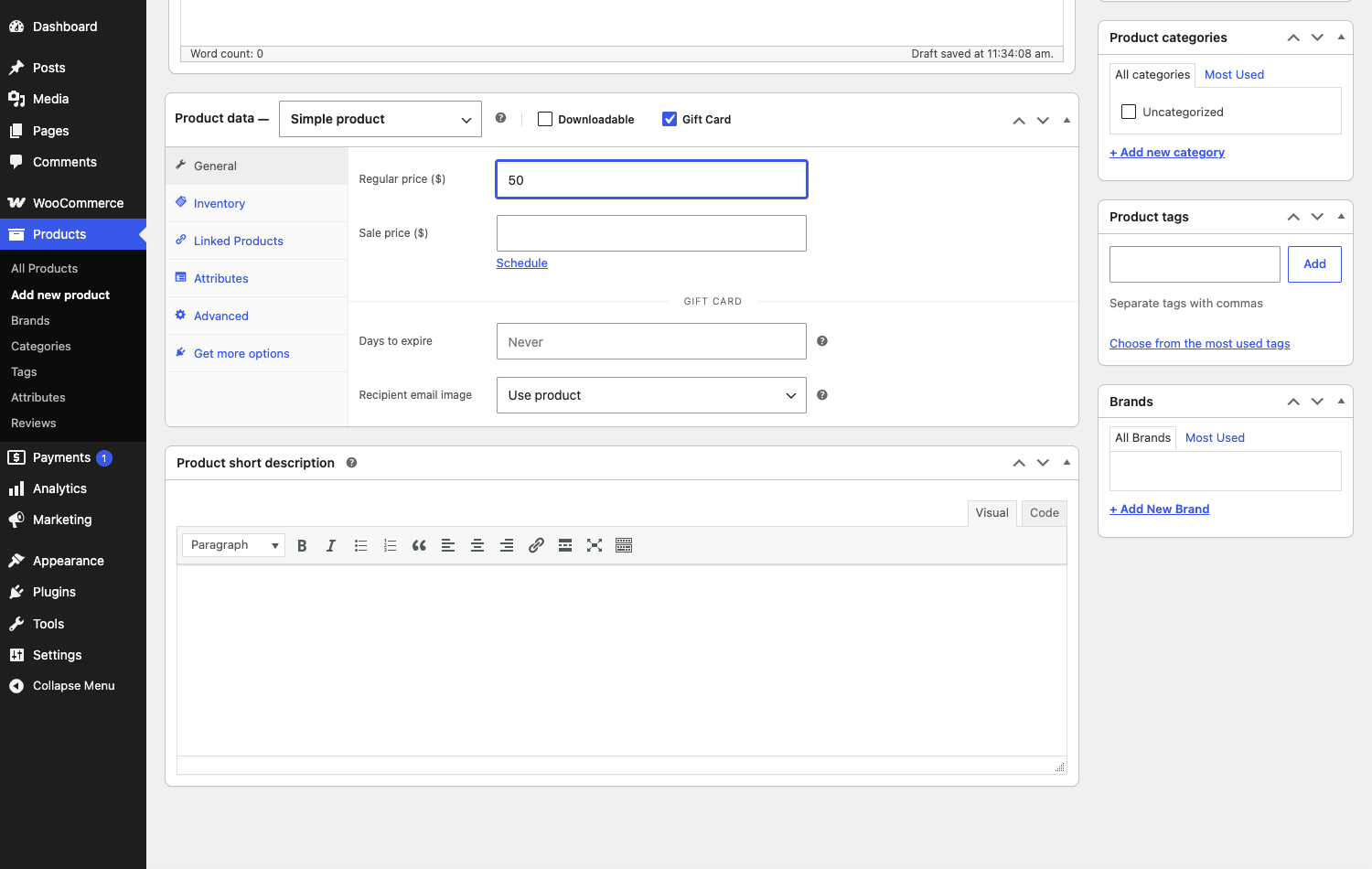
Step 2, tick the Gift Card box. In the Product data panel, next to the familiar Virtual and Downloadable checkboxes, you’ll find a Gift Card checkbox. Tick it. This is the moment the product stops being merchandise and becomes a code-issuing gift card.
Step 3, set the amount. On the General tab, set the Regular price. That price is the value the card carries. For a single fixed denomination, a simple product is all you need.
Step 4, set expiration and the email image. Ticking the box reveals a Gift Card section with Days to expire (default: Never) and a Recipient email image option (use the product image, or upload a custom one for the email).
Tip: the "Recipient email image" is your brand’s first impression in the recipient’s inbox. Upload a clean, gift-appropriate graphic rather than defaulting to a product photo of, say, a single coat. The card should feel like a gift, not a shipping confirmation.
Now, the honest gripe. Where this gets less obvious than it should: offering multiple denominations or a customer-entered amount. The single-denomination path is dead simple, set one price, done. For several preset amounts (25 / 50 / 100), you reach for WooCommerce’s normal variable-product machinery and apply the Gift Card behavior across variations. It works, but the plugin doesn’t hold your hand through it, and if you’ve never built a variable product you’ll spend a few minutes hunting. Confirm the exact amount-options UI on your own install before you promise a client "customers can type any amount," because the experience depends on how you’ve structured the product. I’d love a clearer "Add denominations" widget right under the checkbox. It isn’t there.
Heads-up: a gift card is digital. Leave it as a non-shipped product so WooCommerce doesn’t try to collect a shipping address for a code that arrives by email.
The customer gifting and delivery flow
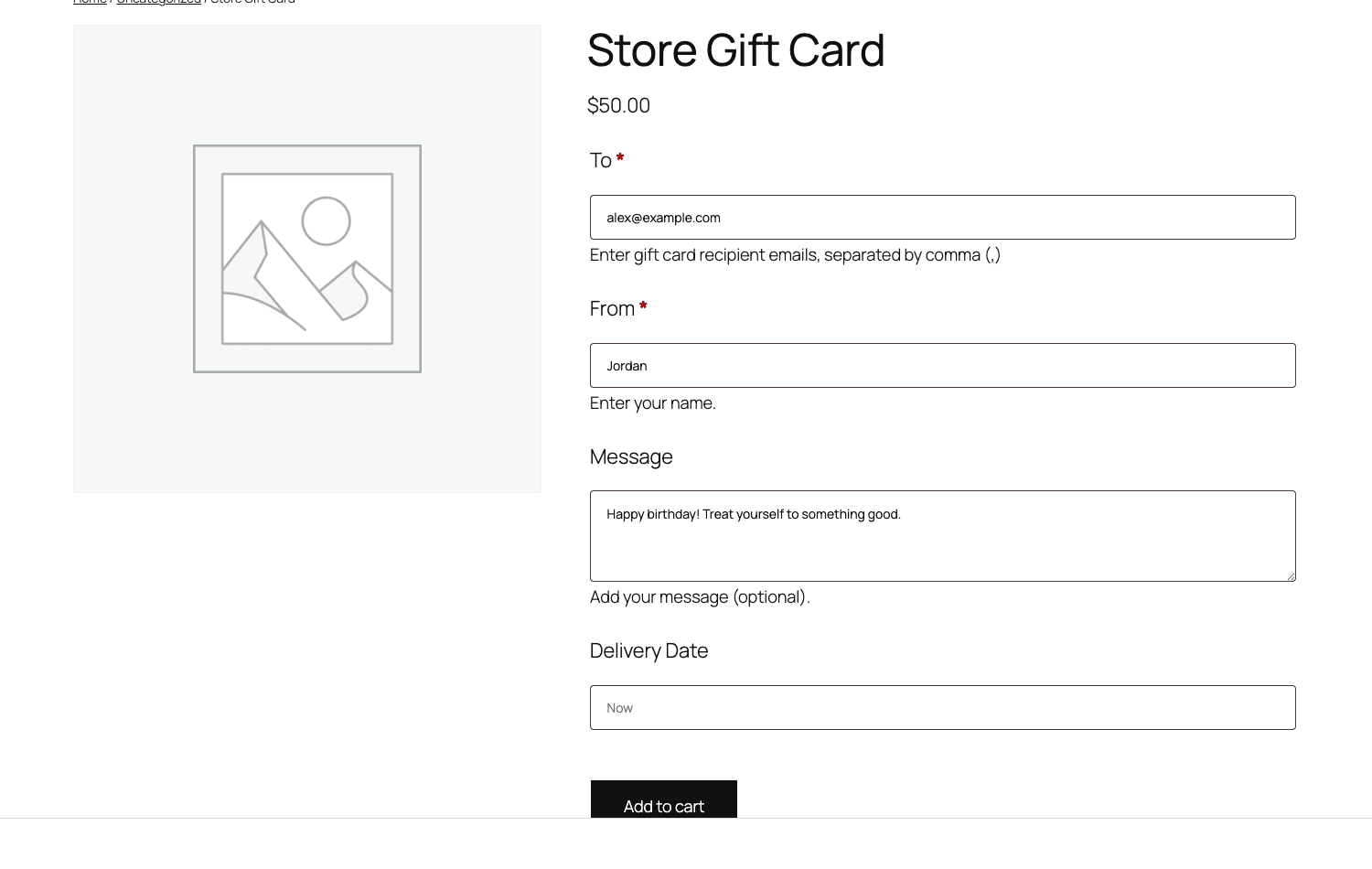
This is the screen your customers actually touch, and it’s the best part of the plugin. When a shopper opens a gift-card product on the front end, they don’t just see "Add to cart." They see a small form that turns a purchase into a gift.
The fields, as they appear on the product page:
- To (required): the recipient’s email. You can enter several addresses separated by commas to send a separate card to each person.
- From (required): the sender’s name, so the recipient knows who it’s from.
- Message (optional): a personal note that rides along in the email.
- Delivery Date: send Now, or schedule it for a future date.
- Quantity and Add to cart, as usual.
You might be wondering whether the buyer ever sees the code, or whether it only goes to the recipient. The recipient is the one who receives the redeemable code by email on the delivery date. That separation is deliberate, the gift card behaves like an actual gift handed to someone else, not a coupon the buyer pockets.
Where this shines: the Delivery Date field. I cannot overstate how much friction this removes for holiday and occasion buying. A customer shopping for a birthday three weeks out doesn’t have to set a phone reminder to "send the gift card on the day." They schedule it once and forget it. For a store, that means you capture the sale the moment the customer is motivated, not on the deadline day when they might forget you exist.
A quick reassurance, because the multi-recipient "comma-separated emails" thing sounds fiddly: it isn’t. You type two addresses, both people get their own card. That’s the whole trick. Teachers’ end-of-year thank-yous, a manager gifting a small team, a couple splitting a present, all handled from one product page.
Redemption: cart, checkout, and balance
A gift card nobody can spend is just a screenshot. Redemption is where the plugin proves it’s wired into WooCommerce properly rather than bolted on.
The recipient enters their code at checkout. The card’s balance is applied to the order total, and here’s the behavior that matters: it’s a balance deduction, not a discount line. Spend less than the card holds and the remainder stays on the card for the next order. Spend more and the card covers part, with the rest due on a normal payment method. Partial redemption, both directions, out of the box.
You can also enable cart-page application so shoppers apply a card before they reach checkout and watch the total drop earlier. Whether that helps or clutters depends on your funnel. On a store with a long checkout, showing the adjusted total in the cart reduces "wait, did my code work?" anxiety. On a one-page checkout it’s redundant. You decide, in settings.
Note: there’s a "Block gift card discounts" setting that stops coupons from stacking on gift-card purchases. Turn it on if you don’t want someone buying a hundred-unit card for eighty units using a 20%-off coupon, then redeeming the full hundred. That’s a margin leak that’s easy to miss until you see it in the numbers.
For logged-in customers with account features enabled, balances live in My Account, where they can see what’s left and pay with it. That’s the closest this plugin gets to behaving like store credit, and for many stores it’s enough that you don’t need a separate store-credit plugin at all.
You may be asking whether redemption works on the new block-based checkout or only the classic shortcode one. Good news: the plugin ships a first-party block checkout integration that hooks into WooCommerce’s Store API, so gift-card redemption works on the block-based Checkout out of the box, not just the classic shortcode flow. As with anything checkout-related, a quick test order on your actual theme before launch is sensible, but this is supported, not an open question.
Installation and setup
Installation is ordinary. Upload the extension under Plugins » Add New » Upload Plugin, activate it, and you’ll find a new WooCommerce » Settings » Gift Cards tab plus a Marketing » Gift Cards menu item. It needs PHP 7.4 or newer, which any maintained host comfortably clears.
The settings tab is where you set the rules of the game. Walk through it once before you sell a single card.
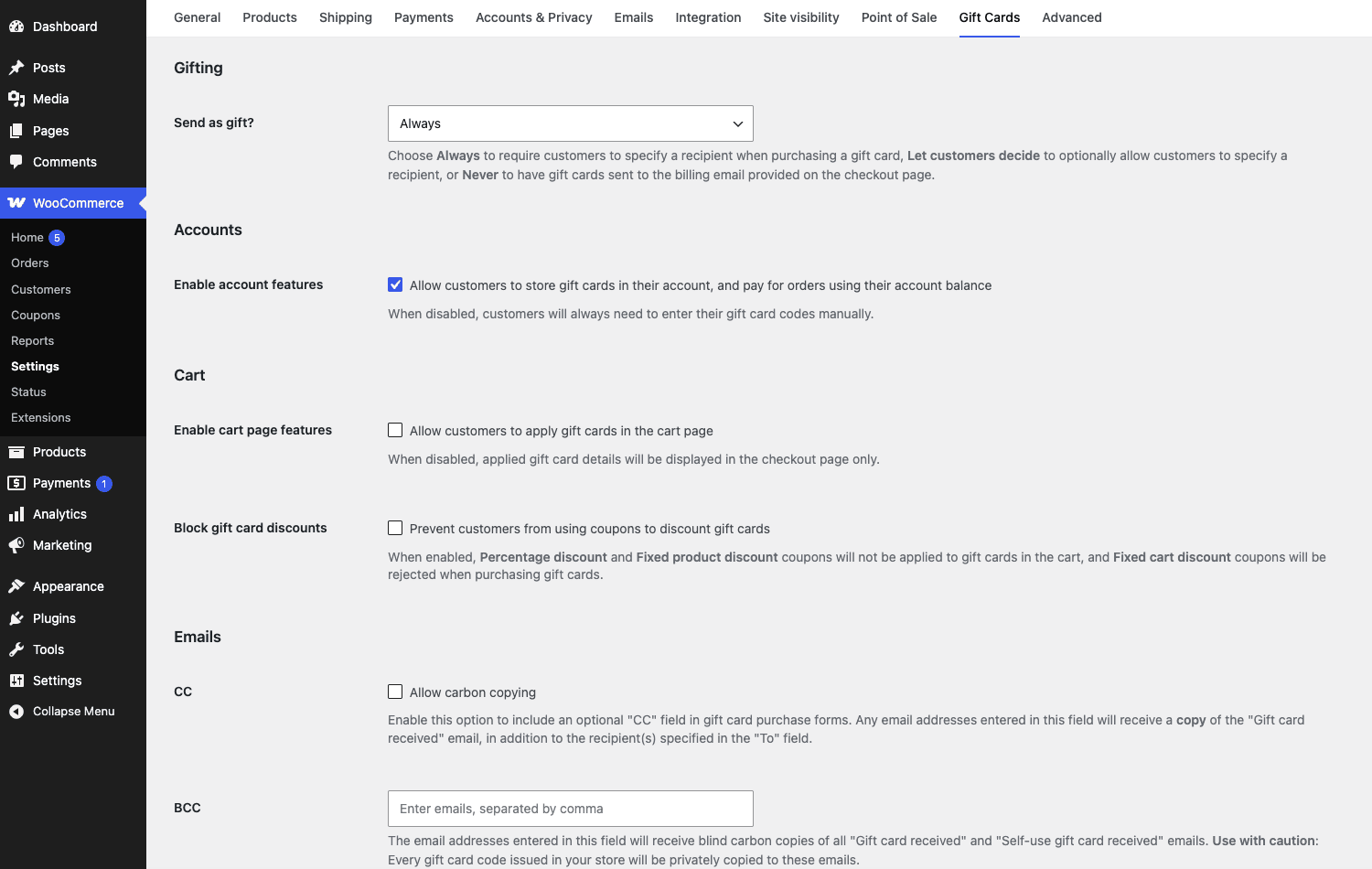
Here’s every section and what I’d actually do with it:
- Gifting, "Send as gift?" Choose whether the To/From/Message gifting fields are always shown or optional. If gift cards are your main reason for the plugin, keep gifting prominent. If you mostly want self-redeemable store credit, make it optional.
- Accounts, "Enable account features." Stores gift cards on the customer’s account and lets them pay using the balance from My Account. Turn this on for any store with registered customers. It’s the difference between a gift card and a forgotten code in an old email.
- Cart, "Enable cart page features." Lets shoppers apply gift cards on the cart page, not just at checkout. Covered above, on or off by funnel.
- Block gift card discounts. Stops coupons stacking on gift cards. I’d enable this on most stores to protect margin.
- Emails, CC and BCC. Add an address to silently copy on gift-card emails. Handy for keeping a record, or for a store owner who wants visibility into what’s being sent.
- Grant admin privileges to Shop Managers (code visibility). By default the Shop Manager role can see gift cards but only the last few characters of each code. Enable this to reveal the full codes to managers who genuinely need them, and leave it off if you’d rather keep complete codes admin-only, since a code is spendable money.
- Expiration reminders and Days before expiration. Optional reminder emails before a card expires, with a configurable lead time. Only relevant if you set an expiration at all, which, again, you should think hard about legally first.
Tip: set up your gifting and account behavior before you announce gift cards. Changing "Send as gift?" from optional to always after customers have already learned your flow is a small but real source of support tickets.
The gift-cards dashboard, import, and export
Every gift card you issue is tracked under Marketing » Gift Cards. This is your back office for the program: a list of issued cards alongside an Activity view, with Import and Export tools.
Let me be straight about what you see on day one. The dashboard only comes alive after real sales. On a fresh store it greets you with a cheerful empty state: "Hooray! You are now selling gift cards. Every time a gift card is purchased, it will appear here." Which is friendly, and also means you can’t really evaluate the management UI until money has moved. Once cards exist, the table lists each one with its code, balance, recipient, expiration, and activity, and the Activity log records issuance, redemptions, top-ups, and refunds against each card.
That activity log is the part I’d lean on hardest. Because a gift-card code is effectively cash (more on that in the anti-pattern section), an auditable record of every balance change is not a nice-to-have, it’s your defense when a customer says "my card had more on it than that." You can point to the log.
Import matters most when you’re migrating. If you’re moving from another gift-card plugin, or from a point-of-sale system that issued physical cards, you can bring existing balances in by CSV rather than reissuing everything and confusing your customers. The importer’s parsed rows are even filterable for developers, so a slightly-off export from your old system can be massaged into shape before it lands.
Export is your backup and your accountant’s friend. Pull the full set of outstanding cards and balances to CSV whenever you need a snapshot of your liability (yes, liability, hold that thought).
Heads-up: there’s no obvious "manually add a gift card" button in the way you might expect. Cards come into existence through orders (or through import). If your plan is "I’ll just hand-create a card for a VIP," the cleaner path is to place a comped order for a gift-card product or import a row, not to look for a "new card" form that isn’t the star of this UI.
Refunding to a gift card (store credit)
This is a feature I wish more stores understood before they need it. When you process a refund in WooCommerce, this plugin gives you the option to refund to a gift card rather than back to the original payment method. The customer gets store credit they can spend with you again, instead of money that leaves your business for good.
For returns, that’s gold. A customer who returns a coat and walks away with a gift-card balance is far more likely to rebuy than one who got their card refunded and moved on. You keep the revenue inside the store.
But, and this is the honest caveat, refund direction confuses people. There are two completely different operations that both use the word "refund," and conflating them causes support headaches:
- Refunding a gift-card purchase, the buyer changes their mind about buying the gift card and wants their money back.
- Refunding a return to a gift card, you’re issuing store credit for a returned physical product.
Those are not the same transaction, and if your support team treats them as interchangeable you’ll either hand back cash you meant to keep as credit, or issue credit when the customer expected their card refunded. Set the policy in writing, and if you default returns to store credit, say so at the point of return so "refund" doesn’t surprise someone as a gift-card balance.
If store credit and loyalty are central to your model rather than occasional, it’s worth comparing this against a dedicated loyalty tool like WooCommerce Points and Rewards, which approaches "money in your store" from the earn-and-spend-points angle instead.
Who gift cards pay off for (and the breakage math)
Gift cards aren’t a fit for every store, and I’d rather you know that before you launch a program you don’t need. Here’s where they genuinely pay off, with the persona attached so you can see yourself in one of them.
If you run a salon or spa, gift cards are arguably your single best product. Treatments are personal and hard to gift directly (you can’t wrap a haircut), but a balance toward "whatever you want here" is the perfect present. Occasion buying (Mother’s Day, birthdays) becomes a real revenue line.
For a holiday-heavy gift shop, scheduled delivery is the whole point. Shoppers buy in the panic window and you deliver on the day. You convert the undecided buyer who would otherwise abandon, which is the exact shopper from the opening scene.
If you run a clothing or shoe store, sizing and taste kill direct gifting. A gift card sidesteps both. The recipient picks their own size and style, returns drop, and you’ve still booked the sale.
For a course or membership site, a gift card lets one person fund another’s access without sharing a login or fronting a subscription. And because gift cards can partially pay subscription renewals (the plugin exposes a developer toggle for partial renewal payment, see the dev section), you can let customers chip a card balance against an ongoing plan. If recurring billing is your core, pair this with WooCommerce Subscriptions and decide how gift balances interact with renewals.
Now the part that makes gift cards a real business decision, not just a feature toggle: breakage.
Breakage is the value of gift cards that never gets redeemed. Industry estimates have long put it somewhere in the low-to-mid single-digit percentages of issued value, depending on the category and how you account for it. On the surface that looks like free money. A customer paid you a hundred and only spent ninety; you keep ten. But here’s the trap, and it’s why I keep saying "hold that thought."
That unredeemed balance is not revenue the day the card is sold. It’s a liability, money you owe in goods. You only get to recognize breakage as income under specific accounting and legal conditions, and often only after a card legally expires (where expiration is even allowed). Treating gift-card sales as instant top-line revenue is how stores end up with books that look great and a tax surprise that doesn’t. The breakage math can be a quiet profit center, but only if you account for it correctly. Get this wrong and the "profit" is borrowed against your own future obligations.
WooCommerce Gift Cards vs YITH vs Smart Coupons
This is the comparison I get asked about most, because all three can technically "do gift cards." They’re built on genuinely different foundations, though, and the differences are architectural, not cosmetic. Pricing on all three moves (they’re annual licenses and figures change), so I’m deliberately not quoting hard dollar amounts. Compare current prices yourself at checkout. The differences below are about how each one is built, which doesn’t change with a sale.
| Axis | WooCommerce Gift Cards | YITH WooCommerce Gift Cards | Smart Coupons |
|---|---|---|---|
| Storage model | Custom database tables for cards + activity (no CPT) | Each gift card stored as a gift_card custom post type |
Store credit / gift certificates as part of a broader coupon engine |
| Native WooCommerce Analytics | Yes, Issued and Expired gift-card reports plug into WooCommerce Analytics | Not a native WooCommerce Analytics integration | Reporting tied to its coupon/credit suite, not WooCommerce Analytics gift-card reports |
| REST API | A v2 gift-cards REST API for headless/external tooling | No equivalent dedicated gift-card v2 REST controller | Coupon-suite oriented, not a dedicated gift-card REST controller |
| Scope | One focused, official gift-card extension | Part of YITH’s broad plugin range | All-in-one coupon suite (BOGO, credit, certificates, scheduling) |
| Gifting flow | Built-in To/From/Message + scheduled Delivery Date | Has gifting + scheduling features too | Gifting via certificates, less of a signature "card to a recipient" flow |
| Maintainer | WooCommerce / Automattic (core team) | YITH | StoreApps |
Three measurable, architectural points carry the decision:
One, storage. This plugin keeps cards and their activity in purpose-built custom tables, while YITH WooCommerce Gift Cards stores each card as a gift_card custom post type. That’s not pedantry. Custom tables mean balance lookups and activity queries don’t fight your wp_posts table, which on a store carrying tens of thousands of cards plus all your products, orders, and revisions is a real difference. Picture a card with 30 activity rows: in a custom table that’s a tight indexed read, while a CPT-per-card model spreads those reads across the same wp_posts/wp_postmeta your whole site already hammers. On a busy store that gap can be the difference between a balance check that returns in under 5 ms and one that drags out past 30 ms under load.
Two, native analytics. Because this is the first-party extension, Issued and Expired gift-card reports plug straight into WooCommerce Analytics. That’s 2 native gift-card report types in the same Analytics screens as the rest of your store, no separate dashboard, no CSV gymnastics. Neither alternative wires gift-card reporting into WooCommerce’s native Analytics the same way.
Three, the REST API. Count the dedicated gift-card REST controllers and it’s 1 here versus 0 on the alternatives: this plugin ships a v2 gift-cards REST controller (confirm the exact namespace in your install before you build against it), which makes cards readable and manageable from a headless front end or an external system. If you’re running a decoupled store or syncing balances to a POS, that’s a deciding factor.
On the one axis everyone asks about, breakage, the architecture is what lets you measure it honestly. Unredeemed value typically runs in the low single digits, often quoted around 1% to 5% of issued value depending on category, and only the native Issued/Expired reports here surface that number inside WooCommerce without an export-and-spreadsheet step.
So where does each land? Pick this plugin when you want a focused, native, analytics-integrated gift-card program from the WooCommerce team. Pick YITH when you’re already living in YITH’s range and want gift cards alongside it. Pick Smart Coupons when gift certificates are one slice of a much bigger coupon-and-credit strategy (BOGO, URL coupons, store credit, scheduling) and you’d rather buy the whole suite than a single-purpose tool. They’re different answers to different questions, and "official + native + analytics" is the lane this one owns.
Don’t sell gift cards without these four guardrails
Don’t launch a gift-card program without a plan for expiration law, breakage accounting, and code security. I’ve watched each of these bite a store, and none is cosmetic. They touch money, the law, and trust directly.
Expiration is legally regulated, and the default protects you. In the US, the CARD Act bars store gift cards from expiring sooner than five years and restricts dormancy fees. Many other jurisdictions ban expiration outright. This plugin’s "Days to expire" defaults to Never for exactly that reason. Setting an aggressive expiry to juice breakage can be flatly illegal where you operate, so check the law for every region you sell into before you touch that field. A short expiry is not a growth hack, it’s a compliance exposure.
Unredeemed balances are a liability, not revenue. When someone buys a hundred-unit gift card, that’s a hundred units of goods you owe, not income. Book gift-card sales straight to revenue and you overstate your numbers and set up a tax mess. Track outstanding balances as deferred revenue and recognize income only on redemption (or legal expiry, where it’s permitted). The export tool exists partly so you can hand your accountant a clean snapshot of that liability.
Codes are cash. A gift-card code is a bearer instrument, whoever holds it can spend it. If codes leak, get screenshotted, or are guessable, that’s real money walking out the door. Watch the activity log and never expose codes in plaintext logs.
Refund direction matters. Refunding a gift-card purchase is not the same as refunding a return to a gift card. The feature keeps money in your store, but only if customers know "refund" might mean store credit. Set that expectation up front, or it reads as a bait-and-switch, and trust is the one thing you can’t CSV-export back.
Developer reference: hooks, filters, REST, classes
Now the part developers actually came for. Everything below is confirmed in the plugin source. I’m listing the real, correctly-spelled identifiers, the data is in custom tables (not a custom post type), and there’s a v2 REST controller plus a WooCommerce Analytics integration.
A note on a source quirk: a couple of email image-size filters are misspelled in the codebase with three o’s (wooocommerce_gc_...). If you ever target those, you must match the literal misspelled string, "correcting" them to the two-o spelling means you’re hooking a filter that doesn’t exist. Everything I list below is the correctly-spelled woocommerce_gc_ form, which is what you’ll use the vast majority of the time.
Filters
The behavior filters worth knowing:
woocommerce_gc_auto_redeem, control whether a gift card is auto-applied.woocommerce_gc_gift_card_amount, adjust a gift card’s amount programmatically.woocommerce_gc_disable_quantity_selector, hide the quantity selector on gift-card products.woocommerce_gc_checkout_show_balance_checkbox, toggle the "use my balance" checkbox at checkout.woocommerce_gc_checkout_show_codes_usedandwoocommerce_gc_checkout_show_remaining_balance_per_gift_card, control what redemption detail surfaces at checkout.woocommerce_gc_force_send_gift_card_hook, force the gift-card send action.woocommerce_gc_giftcards_importer_parsed_data, massage parsed rows during CSV import.woocommerce_gc_wcs_renewals_allow_partial_payment, allow a gift card to partially pay a WooCommerce Subscriptions renewal.
And the email-design filters, which is how you brand the gift-card email:
woocommerce_gc_email_card_background_colorwoocommerce_gc_email_code_text_colorwoocommerce_gc_email_message_text_colorwoocommerce_gc_email_amount_text_colorwoocommerce_gc_email_base_text_color
Here’s a realistic example. Auto-redeem is off by default and only ever considered for logged-in customers, so say you want to opt those logged-in customers in automatically, and you want the email background to match your brand blue:
add_filter( 'woocommerce_gc_auto_redeem', function( $auto_redeem ) {
    // Opt logged-in customers into auto-applying their gift-card balance (off by default).
    return is_user_logged_in() ? true : $auto_redeem;
} );

add_filter( 'woocommerce_gc_email_card_background_color', function( $color ) {
    return '#1a8fc4';
} );
A second one. To let a gift card cover part of a subscription renewal instead of being rejected when it can’t cover the whole thing:
add_filter( 'woocommerce_gc_wcs_renewals_allow_partial_payment', '__return_true' );
Actions
Hook these to inject markup or run logic at the right moment:
woocommerce_gc_before_apply_gift_card_form/woocommerce_gc_after_apply_gift_card_form, around the apply-a-code form at checkout.woocommerce_gc_before_account_giftcards/woocommerce_gc_after_account_giftcards, around the gift-cards list in My Account.woocommerce_email_gift_card_html, the gift-card email body, the hook to target if you’re rendering custom email content.woocommerce_gc_before_delete_gift_card, fires before a card is deleted (good place to log or block).woocommerce_gc_before_add_pending_balance_tracking, around pending-balance tracking.woocommerce_gc_after_process_post_data, after the plugin processes posted gift-card data.manage_gc_giftcards_custom_column, render a custom column in the gift-cards dashboard list.
A short example, add a note above the My Account gift-cards list:
add_action( 'woocommerce_gc_before_account_giftcards', function() {
    echo '<p class="gc-note">Gift card balances never expire on this store.</p>';
} );
Classes
The source is organized into clear class responsibilities, useful when you’re tracing behavior:
WC_GC_Account, the My Account gift-cards and balance integration.WC_GC_Activity_DB,WC_GC_Activity_Data,WC_GC_Activity_List_Table, the custom-table storage and the dashboard list. This is your proof that storage is table-based, not CPT-based.WC_GC_Admin_Refunds, the refund-to-a-gift-card logic.WC_GC_Admin_ImportersandWC_GC_Admin_Exporters, bulk CSV import and export.WC_GC_Admin_Reports, admin reporting.WC_GC_Analytics_Issued_Data_Storeand theWC_GC_Analytics_Expired_*set (including a REST controller), the WooCommerce Admin Analytics integration that surfaces Issued and Expired gift-card reports.
REST API
The plugin registers REST routes through a dedicated v2 gift-cards controller (class-wc-gc-rest-api-gift-cards-v2-controller.php) plus separate analytics REST controllers. The gift-cards routes register under the wc/v2 namespace with a gift-cards base, so you can read and manage cards over REST, with the Issued and Expired data exposed through their own analytics controllers. As always, confirm the registered routes on your install before you hardcode against them, but the gift-cards endpoints are genuinely there rather than bolted on.
For the broader WooCommerce REST and extension conventions these build on, the official developer docs at developer.woocommerce.com are the canonical reference, and WordPress’s own REST API handbook covers the underlying mechanics.
FAQ
Do I need a special product type to sell a gift card?
No. You take any normal simple or variable product and tick the Gift Card checkbox in the Product data panel. There’s no separate "gift card" product type to learn. The checkbox is what turns a regular product into a code-issuing gift card, which is genuinely the fastest part of the whole setup.
Can customers choose their own gift-card amount?
For a single fixed value, you set one Regular price and you’re done. For several preset denominations or a customer-entered amount, you build it with WooCommerce’s variable-product machinery applied to a gift-card product. It works, but it’s not a one-click "add denominations" widget, and the exact UI depends on how you structure the product. Build a test product and confirm the amount options behave the way you expect before you promise a client "any amount."
Can I let people redeem a gift card on the cart page, or only at checkout?
Both. Redemption at checkout is on by default, and there’s a Cart setting to also let shoppers apply a card on the cart page so they see the adjusted total earlier. On a long multi-step checkout, enabling cart-page application reduces "did my code work?" anxiety. On a one-page checkout it can be redundant, so it’s your call by funnel.
Does it support the new block-based checkout?
Yes. The plugin ships a first-party block checkout integration built on WooCommerce’s Store API, so gift-card redemption works on the block-based Checkout, not only the classic shortcode one. It’s still smart to place a test order on your exact theme before launch, the same prudence you’d apply to any checkout customization, but block redemption is supported out of the box.
Should I set my gift cards to expire?
Usually no, and the plugin defaults to Never for a legal reason. In the US the CARD Act prevents store gift cards from expiring sooner than five years, and many other regions ban expiration entirely. A short expiry to boost breakage can be illegal where you operate. If you do set one, check the law for every region you sell into and consider turning on expiration-reminder emails so customers aren’t blindsided.
Is unredeemed gift-card money just free revenue?
Not on the day you sell the card. A sold gift card is a liability, goods you owe, not income. You generally only recognize the unredeemed portion (breakage) as revenue under specific accounting rules, often after legal expiry where it’s permitted. Use the export tool to hand your accountant a clean snapshot of outstanding balances, and book gift-card sales as deferred revenue, not top line.
What’s the difference between refunding a gift-card purchase and refunding to a gift card?
They’re two different transactions that share the word "refund." Refunding a purchase gives the buyer their money back for buying the card. Refunding to a gift card issues store credit (usually for a returned product) onto a card the customer can spend later. Decide your policy, and tell customers up front if returns default to store credit, otherwise "refund" can feel like a bait-and-switch.
How is this different from YITH WooCommerce Gift Cards or Smart Coupons?
This is the official WooCommerce extension and it stores cards in custom database tables, plugs Issued/Expired reports into WooCommerce Analytics natively, and ships a v2 gift-cards REST API. YITH stores each card as a gift_card custom post type. Smart Coupons is an all-in-one coupon suite where gift certificates and store credit are one slice of a much bigger toolset. Pick based on whether you want a focused native extension, a YITH-range fit, or a full coupon suite.
Can a gift card pay for a subscription renewal?
Partially, yes, with a developer toggle. The plugin exposes woocommerce_gc_wcs_renewals_allow_partial_payment, which lets a gift-card balance cover part of a WooCommerce Subscriptions renewal rather than being rejected for not covering the whole amount. If recurring billing is central to your store, decide deliberately how gift balances should interact with renewals before enabling it.
How much does WooCommerce Gift Cards cost, and is the GPL version legitimate?
It’s a paid official WooCommerce extension sold as an annual license; check the current figure at the source since pricing changes. WooCommerce extensions are GPL-licensed, which is what makes redistribution like WooCommerce Gift Cards on GPL Times legitimate, it’s the same official extension and documentation, delivered through the GPL store.
Final thoughts
After clicking through the whole thing on real stores, my read is simple. WooCommerce Gift Cards does the one job it sets out to do, and it does it the way the rest of WooCommerce works: a checkbox on a product, balances in proper tables, reports inside Analytics, and a REST API for when you outgrow the admin. The gifting form with scheduled delivery is the feature that actually moves revenue, because it captures the undecided shopper at the exact moment they’re ready to spend.
It isn’t flawless. The multi-denomination path leans on variable products instead of a dedicated control, the dashboard stays empty until you’ve made sales, and getting the amount options right takes a test product. None of those are dealbreakers; they’re the rough edges of a tool that chose focus over a sprawling feature list.
What I’d actually tell you: if you sell anything where taste, size, or occasion makes direct gifting hard, a salon, a clothing shop, a gift store, a course, this is the cleanest native way to turn "I don’t know what to get them" into a sale you keep. Just go in with an expiration policy that respects the law and an accountant who knows those balances are a liability, not a windfall. Get those two things right and a gift-card program quietly compounds: every card you sell is a future visit you’ve already been paid for.
The undecided shopper from the top of this article? With a gift card on the shelf, they don’t close the tab. They check out.