

A good multipurpose theme can build almost anything. That is exactly the problem.
Hand a general-purpose theme to someone building an electronics store and you get a shop that works but never quite feels like a shop for gadgets. The departments menu is faked with a plugin. The deals row is a widget someone bolted on. The compare button is missing until you install three more plugins and pray they match your styling. It looks like a store. It behaves like a brochure with a cart.
The Electro theme takes the opposite bet. It is a WooCommerce theme built for one job, running an electronics store, and it ships with the pieces that job needs already in the box: a departments mega menu, product compare, wishlists, deal carousels, brand strips, and twelve prebuilt homepages you import in a couple of clicks.
I spent a good while inside Electro, poking at the admin, reading the theme’s actual PHP, and mapping what it gives a developer versus a store owner. This is the honest walkthrough: where it shines, where it drags, and the parts I would tell a friend before they start clicking around.
Table of Contents
- What the Electro theme actually is
- Installing Electro and its companion plugins
- Twelve prebuilt homepages and the demo importer
- Setting the store up in the Theme Options panel
- The storefront features that make it an electronics store
- Running a marketplace: Dokan multivendor and WPML
- Who the Electro theme is for (and who should skip it)
- Don’t turn your homepage into a carousel graveyard
- Speed, the builder, and the honest gotchas
- Electro vs a multipurpose theme
- Customizing Electro (for developers)
- FAQ
- Final thoughts
What the Electro theme actually is
Electro is a WooCommerce theme from MadrasThemes, built specifically for electronics stores, vendor marketplaces, and affiliate sites. The design language is borrowed openly from the big-box retailers you already shop at: the departments sidebar of Amazon, the dense product grids of Flipkart, the deal rows of AliExpress. If you have ever bought a phone charger online, you have shopped on a layout that looks a lot like an Electro homepage.
Here is the part that surprised me. Under the hood, Electro is based on Underscores, the bare-bones starter theme Automattic put out for developers to build on. That matters more than the marketing copy lets on. A lot of commerce themes are proprietary frameworks that hide everything behind a settings panel, so the day you need to change something the panel does not cover, you are stuck. Electro is not that. It is a proper, standards-based theme with a real hook and filter API, standard WooCommerce template overrides, and child-theme support. A developer can actually get in there.
What it is aiming at: three kinds of sites, really.
- A single-brand electronics store selling phones, laptops, audio, cameras, accessories, the usual gadget catalog.
- A multivendor marketplace where many sellers list products under one branded storefront, powered by Dokan.
- An affiliate or price-comparison site that leans on dense listings and a product compare table to push buyers toward offers.
The theme handles the storefront chrome (header, menus, cart, footer, product pages) and registers the WooCommerce widgets, while a companion plugin called Electro Extensions adds the page-builder elements and store integrations. You pick a page builder, WPBakery or Elementor, to arrange those widgets on the front page. WooCommerce does the actual selling. Electro is the thing that makes all of it look like a coherent electronics superstore instead of a pile of plugins.
You can grab the Electro theme on GPL Times and install it on a real WordPress site to test the demo importer and every option panel we walk through below.
Installing Electro and its companion plugins
Installing the theme itself is the boring part. Upload the zip under Appearance » Themes » Add New, activate it, done. The interesting part starts right after activation, when Electro tells you it needs some friends.
Electro leans on the TGM Plugin Activation library, so the moment you activate it you get a yellow notice at the top of the admin: This theme requires the following plugins. Click through to Appearance » Install Plugins and you will see the full list. Here is what each one does and why it is there:
- Electro Extensions (required). This is the companion that plugs the theme into your page builder, adding the WPBakery and Elementor elements you use to arrange a homepage, plus extra store integrations. The WooCommerce widgets themselves ship inside the theme, but several homepage features assume Electro Extensions is active, so treat it as essential. It installs from the theme author’s own servers rather than the WordPress.org repo.
- A page builder. You choose WPBakery Page Builder or Elementor. This is what lays out the homepage. The demo library ships homepage sets for both, so pick the builder you actually like working in.
- Redux Framework. Powers the Theme Options panel. Deep, and we will spend a whole section in it.
- One Click Demo Import. The importer that pulls in a full prebuilt homepage with placeholder products and menus.
- MAS Brands for WooCommerce. Adds a brands taxonomy so you can attach a manufacturer to each product and show brand logos.
- MAS Static Content. Reusable static blocks used for the shop jumbotrons and banner areas.
- YITH WooCommerce Wishlist and YITH WooCommerce Compare. The wishlist heart and the compare table, both from YITH.
- Plus supporting pieces like Advanced Custom Fields, Revolution Slider, and a forms plugin for the contact page.
Heads-up: install these in order and let each finish before starting the next. TGM installs plugins one at a time, and Electro Extensions is the one that must succeed, because several other features assume it is active. If your host has a strict memory limit, activate the builder and Electro Extensions first, then add the rest.
Once the required plugins are green, you move on to importing a demo. That is where Electro stops looking like a blank WordPress install and starts looking like a store.
Tip: on a brand-new site, import your chosen demo before you add any real products or pages. The demo importer creates menus, widgets, and sample content, and it is far tidier to start from a full layout and swap your products in than to reconcile a demo import against pages you already made.
Twelve prebuilt homepages and the demo importer
This is Electro’s headline feature, and it is a genuinely good one. The theme ships twelve prebuilt homepage layouts, labelled Home v1 through Home v12, and most of them come in both a WPBakery version and an Elementor version. That is a real library, not two skins with a color swap.
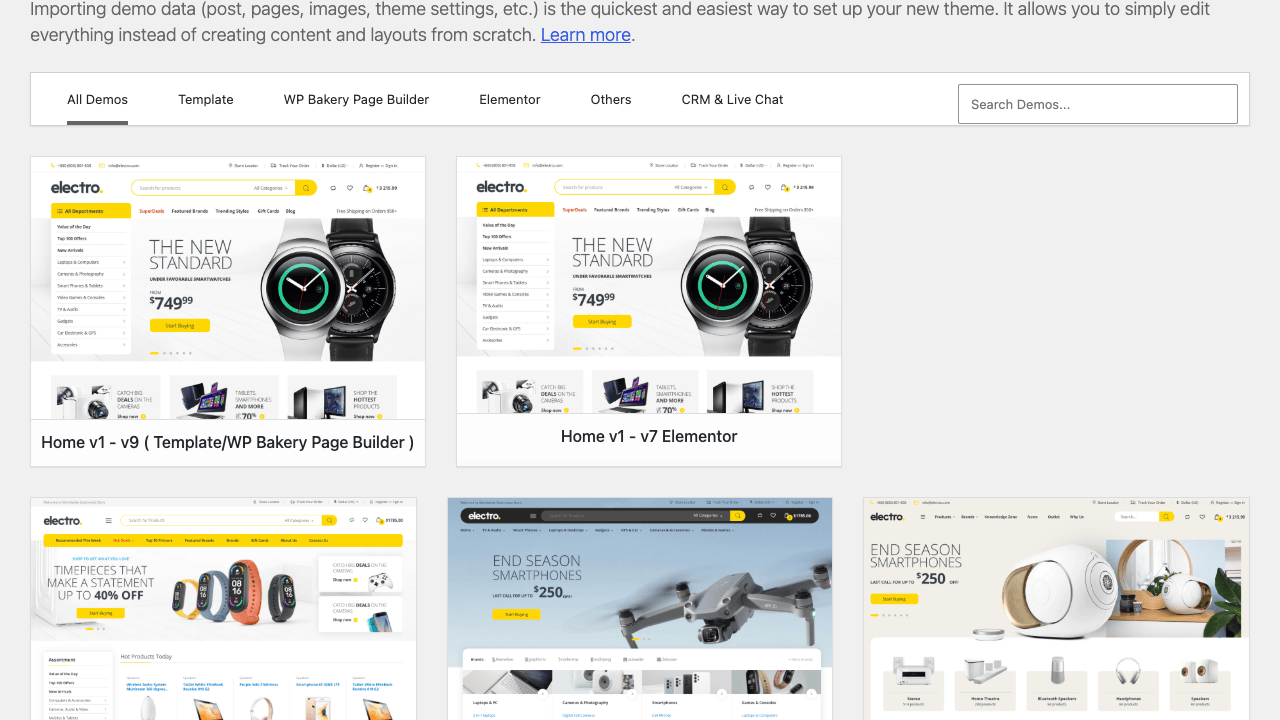
You reach them through Appearance » Import Demo Data (One Click Demo Import). The library renders as a grid of homepage thumbnails, and across the top you get filter tabs: All Demos, WP Bakery Page Builder, Elementor, Others, and CRM & Live Chat. Click a filter and the grid narrows to just those layouts, so if you have already committed to Elementor you are not scrolling past nine WPBakery designs to find yours.
The designs themselves lean into specific electronics niches. There is a general gadget superstore, a smartphone-forward layout heavy on hero deals, an audio and speaker store with a darker treatment, a smartwatch and wearables design, and several dense multi-department fronts that look like a full retailer landing page. You are not choosing between "blue" and "green." You are choosing between store archetypes, and each one arranges the widgets differently: some lead with a big deal countdown, some lead with a departments-and-featured split, some stack category tiles first.
The workflow is refreshingly simple:
- Open the demo library and filter to your builder.
- Pick the homepage that is closest to the store you want.
- Click import. The importer pulls in the page layout, sample products, menus, and widget config.
- Swap the sample products for your real catalog and edit the homepage blocks in your builder.
That last step is the honest bit. The catch: the importer gives you a fully dressed showroom, but it is a sample showroom. You still replace demo products with yours, point menus at your real categories, and drop in your own logo and brand images. Think of the import as a professionally arranged starting point, not a finished store. It saves you the days of layout work; it does not save you the hours of putting your actual products in.
You might be wondering whether importing a demo will wipe content you already have. It will not overwrite existing posts, but it does add a pile of sample products and pages. On a fresh site that is exactly what you want. On a site that already has real products, be selective, and consider importing only the homepage rather than the full demo content.
Setting the store up in the Theme Options panel
After the demo is in, everything else lives in the Electro menu in the admin sidebar. This is a Redux-powered options panel, and it is deep. I mean that as both praise and a mild warning.
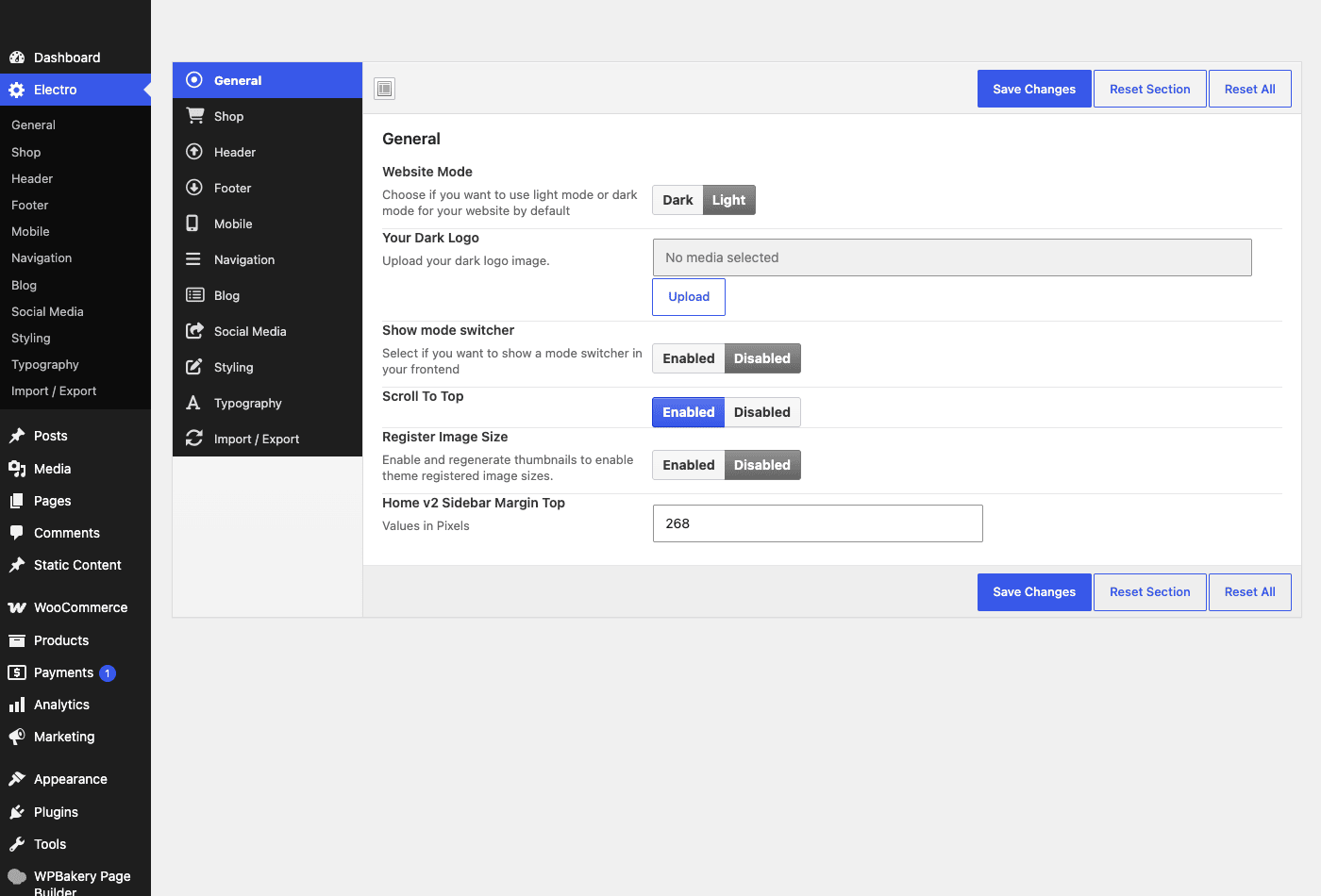
The left side of the panel is a stack of tabs: General, Shop, Header, Footer, Mobile, Navigation, Blog, Social Media, Styling, Typography, and Import / Export. You will not touch all of them on day one, but it is worth knowing what each holds.
General is where you set the site-wide behavior. The one that will catch your eye is Website Mode, a genuine dark or light toggle for the whole storefront. Electro ships a built-in dark mode, and you can also turn on a mode switcher so visitors flip it themselves on the front end. There is a Dark Logo slot for when the light logo disappears against a dark header, a Scroll To Top button toggle, and a register-image-size option for regenerating thumbnails. If you have ever wanted a dark electronics store without hacking CSS, this is a two-click setting.
Shop is the tab you will actually live in, because it controls how WooCommerce behaves inside the theme.
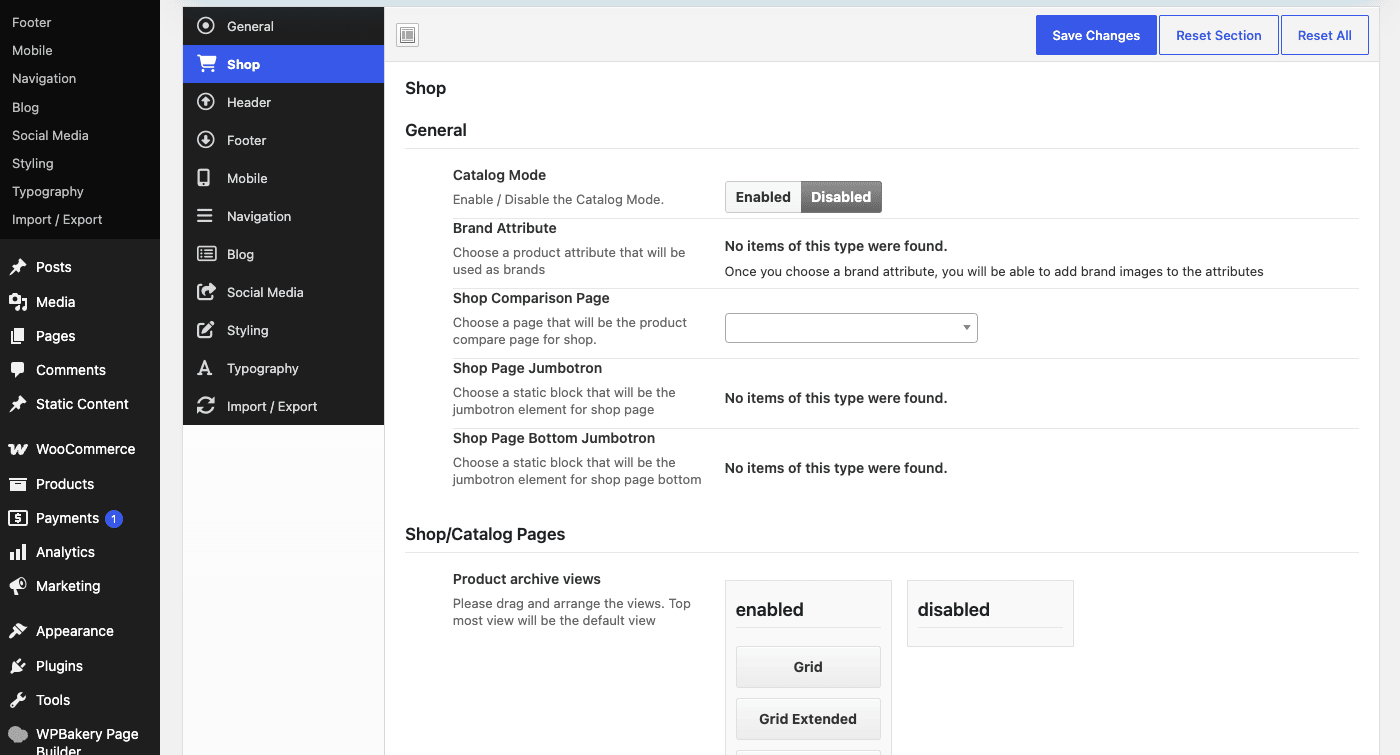
A few settings here are worth calling out:
- Catalog Mode. Turn the whole store into a browse-only catalog: prices and add-to-cart buttons disappear. This is the exact switch an affiliate site or a "call for pricing" B2B electronics supplier needs, and it is one checkbox.
- Brand Attribute. You tell Electro which product attribute represents the brand (say, a "Manufacturer" attribute), and the theme wires that into brand images and the brand carousel. This is how Samsung, Sony, and Bose logos end up on your homepage.
- Shop Comparison Page. Sets the page that hosts the product compare table.
- Shop Page Jumbotron and Bottom Jumbotron. Static content blocks (from MAS Static Content) that sit above and below the shop grid. Good for a category banner or a promo strip.
- Product archive views. You drag to arrange which layouts shoppers can switch between, Grid, Grid Extended, and List, and whichever sits on top becomes the default. Grid Extended is the roomier card with more spec detail, which suits electronics where the specs sell the product.
- Plus a shop page layout selector and a control for how many sub-category columns show.
The rest of the tabs do what their names say. Header configures the top bar, the mega menu, and the sticky behavior. Footer handles the widget columns and the copyright row. Mobile has separate settings because the mobile header is a different beast. Navigation, Blog, Social Media, Styling, and Typography cover the remaining chrome, colors, and fonts. And Import / Export lets you save your entire options config to a string and paste it into another site, which is how agencies keep a house style across client builds.
Note: the Redux panel is powerful but it is a lot. Do not try to touch every setting before launch. Get General and Shop right, pick your header style, set your colors, and leave the rest at defaults until a real need shows up. Death by options is a real risk here.
The storefront features that make it an electronics store
Strip away the demos and the options panel, and what actually makes Electro feel like an electronics store is a specific set of front-end features. A generic theme fakes these with plugins. Electro ships them as first-class parts of the design.
The departments mega menu. This is the vertical, category-first menu that sits on the left of the header, the one every big electronics retailer uses. It expands into a mega panel with sub-categories and featured items. For a store with dozens of categories (Phones » Accessories » Cases, Audio » Headphones » Wireless, and so on), this is the single most important navigation pattern you can have, and Electro treats it as core furniture rather than an add-on.
The top bar. A slim strip above the header for a call-us number, support hours, or account links. Electro exposes the phone number and its label as filters, so it is trivial to set or change. Small touch, but it is the kind of trust signal an electronics buyer looks for before dropping real money on a laptop.
The off-canvas slide-out cart. Click the cart icon and a mini-cart slides in from the side instead of dumping you on a separate page. It keeps shoppers on the product they were looking at, which is exactly what you want mid-browse. It is on by default, and if you would rather send people to a full cart page, one filter turns it off (we will get to that in the developer section).
Product compare and wishlist. Both ship through the YITH plugins Electro bundles. Compare is the feature that makes Electro genuinely suited to electronics: shoppers can line up three phones side by side and read the spec differences in a table. Wishlist adds the little heart so buyers can save a camera for payday. For gadgets, where people research before they buy, these are not nice-to-haves, they are the reason someone stays on your site instead of bouncing to a comparison blog.
Deals and on-sale carousels. Electro includes dedicated deal widgets, on-sale product rows, and carousels that surface discounts. Electronics runs on deals (flash sales, bundle offers, clearance), and having deal blocks as ready widgets means you are not rebuilding a "today’s offers" strip by hand.
Brands. Through the MAS Brands taxonomy and the brand carousel widget, you get a scrolling strip of manufacturer logos. Shoppers filter by brand constantly in electronics ("show me only Sony"), so surfacing brands prominently matches how people actually shop.
The WooCommerce product gallery. Electro turns on the modern WooCommerce gallery features, zoom, lightbox, and slider, so product images behave the way buyers expect: hover to zoom in on the ports, click to open a full lightbox, swipe through the gallery. You get this without a separate gallery plugin because the theme declares support for it directly.
Behind all of that sit the homepage building blocks. Electro itself ships roughly eighteen custom WooCommerce widgets, registered by the theme whenever WooCommerce is active, and they are the Lego bricks the prebuilt homepages are made of. The set includes Products Carousel, Products Carousel Tabs, Products 6+1, Products 2+1+2, Products Tabs, Products Cards Carousel, On Sale Product, On Sale Products Carousel, Product Filter, Product List Categories, Product Categories, Brands Carousel, Posts Carousel, Recent Posts, Banner Ad, Ads Block, Features Block, and a catalog order-by control. The "6+1" and "2+1+2" ones are worth understanding: they are grid layouts that mix one large featured product with a cluster of smaller ones, the kind of asymmetric block that makes a homepage feel designed rather than tiled. You drop these into your builder to assemble a homepage, or you import a demo and they come pre-arranged.
Running a marketplace: Dokan multivendor and WPML
Here is where Electro stops being "a store theme" and becomes something bigger. It has Dokan integration built directly into the theme.
Dokan is the most popular multivendor plugin for WooCommerce. It turns a single store into a marketplace where independent sellers each get their own vendor dashboard, list their own products, and manage their own orders, while you take a commission and own the storefront. Amazon and AliExpress are marketplaces. Electro plus Dokan is how you build one that sells electronics.
The integration is not a coat of paint. Electro carries dedicated Dokan template handling in its code, so vendor store pages inherit the theme’s styling instead of Dokan’s default look. There is even a specific hook, electro_dokan_store_before_header, that fires on the vendor storefront so you can inject content above a seller’s header. In practice that means a vendor’s shop page looks like part of your branded store, not a plugin bolted on with mismatched fonts.
Where this shines: an operator who wants many sellers under one electronics brand. Think a local marketplace for phone accessories, or a curated store where several small audio brands sell alongside each other. You style it once with Electro, run Dokan for the vendor mechanics, and every seller’s page stays on-brand. If you want the full vendor toolkit (commissions, withdrawals, vendor staff, product-level controls), pair it with Dokan Pro, which adds the features a real marketplace needs beyond the free core.
One honest caveat: Electro styles Dokan, it does not include Dokan. You install and configure Dokan separately. The theme makes the vendor pages look right; the marketplace logic is all Dokan’s job. Do not expect to flip a switch in the Electro options and have a marketplace appear.
On the multilingual side, Electro ships WPML integration on top of the base translation-ready setup. It carries a dedicated WPML class in its code, which means the theme’s own strings and template areas are wired to work with WPML’s translation management. If you are selling electronics across, say, an English and a Spanish market, the theme is not going to fight you when you translate menus, widgets, and the storefront chrome. You still need the WPML plugin itself, but the groundwork is done.
Who the Electro theme is for (and who should skip it)
Let me be direct about fit, because Electro is a specialist and specialists are wrong for a lot of people.
If you run a gadgets or electronics store, this is squarely for you. You get the Amazon-style departments menu, the dense grids, the deal rows, and the compare table without designing any of it. A phone-accessories shop, a camera store, a computer-parts retailer: Electro was drawn for exactly your catalog. You will spend your time adding products, not fighting the layout.
If you are a marketplace operator, the built-in Dokan styling saves you a genuinely annoying amount of work. Vendor pages that match your brand out of the box are worth a lot when you are onboarding sellers who each expect their storefront to look professional.
If you run an affiliate or price-comparison site, the compare table and catalog mode are the two features you actually need, and Electro has both. Turn on catalog mode, wire up compare, and you have a spec-comparison site that sends buyers off to offers.
If you are a developer building for a client, Electro is a pleasant surprise. Because it is Underscores-based with a real hook and filter API and standard child-theme overrides, you are not trapped in a proprietary panel. You can extend it the way you extend any well-behaved WordPress theme. More on that below.
Now the other side.
Skip Electro if you want the absolute lightest possible theme. Electro plus a page builder plus a homepage full of carousels is not featherweight. If raw speed with minimal features is your top priority, a lean block theme will start faster.
Skip it if you sell five products. A small shop does not need a departments mega menu and eight homepage widgets. You would spend more time turning features off than a simpler theme would ever cost you. Electro pulls its weight on a real, product-dense catalog, not a boutique with a handful of SKUs.
Skip it if you refuse to use WPBakery or Elementor. The homepages are built in one of those two builders. If you are a "block editor only" purist, this theme will annoy you daily.
Fit matters more than features. Electro is a great electronics theme and a poor choice for a five-item candle shop, and no amount of options changes that.
Don’t turn your homepage into a carousel graveyard
Electro hands you a dozen gorgeous homepage widgets: product carousels, tabbed grids, deal countdowns, brand strips, ad banners. So you stack all of them on the front page, because you can. Now your homepage loads eight product carousels, each one querying the database and pulling a row of images, plus a slider and three ad blocks. On a phone over mobile data it takes six, seven, eight seconds to become usable.
Here is the part that costs you: on a store, speed is not vanity, it is revenue. Shoppers abandon a page that hangs. Google’s Core Web Vitals punish a layout that jerks around as carousels pop in. And every extra second of delay measurably drops conversions. You spent the afternoon making the homepage look like a superstore and quietly made it sell like a broken one. Money and trust, both leaking, and the theme did exactly what you told it to.
The fix is discipline, not a different theme. Pick the three or four homepage blocks that actually drive clicks (a hero deal, one featured carousel, category tiles, maybe brands) and cut the rest. Lazy-load anything below the fold. Run a caching plugin so the homepage serves as static HTML instead of rebuilding every query on every visit. Test the real page on a real phone, watch the Largest Contentful Paint and the layout shift, and pull a block the moment the numbers sag.
A fast four-block homepage outsells a beautiful twelve-block one every single day. The widgets are a menu, not a checklist. Choose from them.
Speed, the builder, and the honest gotchas
Every theme review that only lists strengths is selling you something. So here are the real trade-offs with Electro, the ones you will meet after launch.
WPBakery is heavier than the block editor. If you choose the WPBakery homepages, you are loading WPBakery’s shortcode engine and its CSS and JS on the front end. It works, and it is a mature builder, but it is not lightweight, and it adds weight to every page it touches. Elementor is a lighter-feeling option for many people, but it is not free of overhead either. Whichever you pick, a builder-driven homepage is heavier than a hand-coded one, full stop.
A carousel-dense homepage needs caching. This follows straight from the anti-pattern above. Electro can render a rich, query-heavy front page, and without a page cache your server rebuilds all of it on every visit. Put a caching plugin in front of it. WP Rocket is the one I reach for, because its page cache, lazy loading, and script-delay settings map almost perfectly onto Electro’s failure modes: it serves the homepage as static HTML, defers the below-the-fold carousels, and holds non-critical scripts until interaction. On a store this is not optional, it is table stakes.
Builder lock-in is real. Your homepage layout lives as WPBakery or Elementor shortcodes and elements. If you ever migrate to a different theme, that layout does not come with you cleanly. The content (products, categories) is safe because it lives in WooCommerce, but the arrangement, the carousels, the deal blocks, has to be rebuilt. This is true of any builder-based theme, and it is the price of the twelve-homepage convenience. Go in with eyes open.
The Redux options run deep. I said it above and I will say it again because it bites people: the Theme Options panel has eleven tabs and hundreds of settings. That is power, but it is also a way to spend a day tweaking things nobody will notice. Set the essentials, launch, and refine later.
Be careful importing demos on a live store. One Click Demo Import adds sample products and pages. On a fresh install, wonderful. On a store that already has real inventory and a real homepage, a full demo import will clutter your catalog with placeholder gear you then have to delete. Import selectively, or do it on a fresh install and migrate.
Companion-plugin dependency. Electro Extensions is doing a lot of the work. If it is deactivated or fails to update, the page-builder elements it provides can drop out of your homepage layout. Keep it active and current, and treat it as part of the theme rather than an optional extra.
If you want the framework behind why speed matters so much for a store, Google’s own Core Web Vitals guidance is the plain-English source, and it is worth ten minutes before you finalize your homepage.
Electro vs a multipurpose theme
The real decision most people face is not "Electro or another electronics theme." It is "Electro, or a big flexible multipurpose theme that can build anything?" So let me put honest numbers on it.
A multipurpose theme (the WoodMart, Porto, BeTheme class of product) is a generalist. It can build a store, a portfolio, a magazine, a corporate site, whatever you point it at. Electro is a specialist that only wants to build an electronics store. That difference cuts both ways.
| Feature | Electro | Generic multipurpose theme |
|---|---|---|
| Prebuilt homepages | 12 electronics-focused layouts | Dozens of demos across every niche, few store-specific |
| Store-specific widgets | ~18 WooCommerce widgets (carousels, deals, brands, compare) | General widgets; store features often need add-ons |
| Page builders supported | 2 (WPBakery + Elementor) | Usually 1-2, similar |
| Departments mega menu | Built in, core to the design | Rebuild it yourself or use a plugin |
| Product compare + wishlist | Bundled (YITH) | Add separately |
| Multivendor styling | Dokan integration built in | Rarely included |
| Recurring cost | $0/month (one-time GPL on GPL Times) | ~$59/year typical license |
| Flexibility for non-store sites | Low, it is a store theme | High, that is the point |
Where Electro wins: if you are building an electronics store, it hands you departments, deals, compare, brands, and twelve tuned homepages that a multipurpose theme makes you assemble by hand. You start at "80 percent done" instead of "here is a blank canvas that could become anything." For a store, a specialist that already knows what a store needs beats a generalist that needs teaching.
Where the multipurpose theme wins, honestly: it is more flexible for anything that is not a store, and it is often lighter if you disable its builder and run lean (a builder-driven homepage can carry an extra 100 KB or so of CSS and JavaScript on every page load, whichever builder you pick). If there is any chance your project grows beyond commerce (a blog network, a services arm, a landing-page factory), the generalist bends where Electro does not. A theme like WoodMart is a strong WooCommerce generalist, and Martfury is a close marketplace-storefront peer if you want to compare the specialist look against Electro directly.
The catch that applies to both: Electro’s homepages are built in WPBakery or Elementor, so if you ever leave, that layout does not port cleanly. A multipurpose theme has the exact same lock-in with its own builder. Neither one lets you walk away with your homepage intact. Choose based on what you are building now, not on some imagined future migration, because the migration hurts either way.
My take: for a real electronics store, the specialist is the right call. The head start on store-specific UX is worth more than the flexibility you probably will not use.
Customizing Electro (for developers)
This is the section I did not expect to enjoy writing, because a lot of commerce themes give developers nothing but a settings panel and a shrug. Electro is different, and it is worth spelling out why.
Electro is based on Underscores, the Automattic starter theme. That single fact tells you most of what you need to know: it is standards-based, it uses normal WordPress template structure, and it exposes a real hook and filter API instead of hiding behavior inside a proprietary framework. If you know how to extend a well-built WordPress theme, you already know how to extend Electro.
Action hooks. Electro fires named action hooks at the useful injection points across the layout. The ones I confirmed in the theme’s own code include:
electro_before_headerandelectro_after_headerelectro_before_content,electro_content_top,electro_content_bottomelectro_sidebarelectro_single_product_actionelectro_shop_control_barelectro_dokan_store_before_header
These let you drop content into the header area, the shop control bar, the single-product page, and the Dokan vendor storefront without touching a template file. Here is a promo bar injected right after the header:
add_action( 'electro_after_header', function () {
    echo '<div class="site-promo">Free shipping on orders over $99 this week.</div>';
} );
And a small note added to the shop control bar (the strip above the product grid with the sorting and view toggles):
add_action( 'electro_shop_control_bar', function () {
    echo '<span class="shop-note">All prices include tax.</span>';
} );
Filters. This is where Electro is genuinely nice to work with. Instead of forcing you into the options panel, it lets code override behavior. Confirmed filters include electro_enable_top_bar, electro_hide_top_bar_in_mobile, electro_header_cart_icon (default ec ec-shopping-bag, since Electro ships its own "ec" icon font), electro_off_canvas_cart (default true), electro_wishlist_icon, electro_call_us_number, electro_call_us_text, and electro_use_predefined_colors.
Turn the top bar off in code:
add_filter( 'electro_enable_top_bar', '__return_false' );
Disable the slide-out mini cart and send shoppers to the full cart page instead:
add_filter( 'electro_off_canvas_cart', '__return_false' );
Swap the header cart icon (the default is the theme’s own ec ec-shopping-bag class):
add_filter( 'electro_header_cart_icon', function ( $icon ) {
    return 'your-custom-icon-class';
} );
Set the call-us number and its label from code, handy when you manage several client sites and want the contact details in a config file rather than clicked into a panel:
add_filter( 'electro_call_us_number', function () {
    return '+1 800 555 0142';
} );

add_filter( 'electro_call_us_text', function () {
    return 'Mon to Fri, 9 to 6';
} );
Child themes and WooCommerce overrides. Electro follows the standard model. Make a child theme, and override any WooCommerce template by copying it into your child theme’s woocommerce/ folder, exactly as WooCommerce’s own documentation describes. Nothing exotic. If you have themed WooCommerce before, this is muscle memory. The theme also integrates Advanced Custom Fields for some of its page and product options, so if you spot ACF fields controlling a layout, that is expected.
Now the honest scope, so you do not over-plan. The theme itself registers no custom post types and no shortcodes. The theme registers the WooCommerce widgets, while the page-builder elements come from the Electro Extensions plugin and your builder, and the brands taxonomy comes from MAS Brands. There is no WP-CLI command and no documented public REST API shipped by the theme. So if your plan involves scripting the store through a theme-provided CLI or REST layer, that layer is not here. What is here is a clean, hookable, child-themeable WordPress theme, which for most customization work is exactly what you want.
Note for developers evaluating it: the fact that Electro is Underscores-based is the strongest argument for choosing it over a proprietary commerce framework. When a client asks for a change the options panel does not cover, you have real hooks and real templates to reach for, instead of a support ticket and a wait.
FAQ
Is the Electro theme good for a small store with only a few products?
Honestly, probably not. Electro is designed around a product-dense catalog with departments, deals, and brand strips. If you sell a handful of items, most of that goes unused, and you will spend more time switching features off than a simpler theme would ever cost you. For a five-product shop, a lean block theme or a simple WooCommerce theme is less overhead. Electro shows its value when you have a real catalog to fill those grids.
Do I have to use a page builder with Electro?
For the prebuilt homepages, yes. The twelve homepage layouts are built in WPBakery or Elementor, and editing them means working in that builder. You can absolutely run standard WooCommerce shop, category, and product pages without touching a builder, since those are normal theme templates. But the flagship homepage designs assume a builder. If you refuse to use one, Electro loses a big part of what makes it Electro.
Does Electro slow down my site?
It can, if you let it. A homepage stacked with eight carousels, a slider, and multiple ad blocks will be heavy, and a page builder adds its own weight. That is not unique to Electro, it is true of any feature-rich store theme. The fix is caching plus restraint: serve the homepage as static HTML with a caching plugin, lazy-load below-the-fold carousels, and only use the widgets that earn their place. Do that and Electro performs fine. Ignore it and any rich theme will crawl.
What is the difference between Electro and a multipurpose theme like WoodMart?
Electro is a specialist built only for electronics stores, so it ships store-specific pieces (departments menu, compare, deals, brands) ready to go. A multipurpose theme is a generalist that can build any kind of site but often makes you assemble those store features yourself. If you are building an electronics store, the specialist gets you further faster. If your project might become something other than a store, the generalist bends where Electro will not.
Can I build a multivendor marketplace with Electro?
Yes, through Dokan. Electro has Dokan integration built into the theme, so vendor storefronts inherit your branding instead of Dokan’s default styling. You still install and configure Dokan separately, since Electro styles the marketplace but does not include the marketplace engine. Add Dokan Pro if you need commissions, withdrawals, and the fuller vendor toolkit. The theme handles the look; Dokan handles the seller mechanics.
Does the Electro theme support dark mode?
It does, natively. In the Theme Options General tab there is a Website Mode setting with a dark or light choice for the whole storefront, plus an optional front-end switcher so visitors can flip it themselves. There is also a Dark Logo slot so your logo stays visible against a dark header. It is a real built-in dark mode, not a CSS hack you bolt on afterward.
Can I turn Electro into a catalog without prices or a cart?
Yes. The Shop tab in Theme Options has a Catalog Mode switch that hides prices and add-to-cart buttons across the store. It is one checkbox. This is exactly what an affiliate site, a "request a quote" B2B supplier, or a browse-only showcase needs, and you do not need a separate plugin to do it.
Is Electro friendly for developers, or is everything locked in a panel?
It is genuinely developer-friendly, which is not something I say about most commerce themes. Electro is based on Underscores, so it exposes a real hook and filter API (things like electro_after_header and electro_off_canvas_cart) and supports standard child themes and WooCommerce template overrides. You are not stuck with only what the options panel exposes. The one honest limit: the theme itself ships no custom post types, no shortcodes, no WP-CLI, and no public REST API, so plan customization around hooks, filters, and templates.
Will my homepage move with me if I switch themes later?
Not cleanly. Your homepage is built with WPBakery or Elementor, and that layout is tied to the builder and the theme. Your products and categories are safe because they live in WooCommerce, but the homepage arrangement (the carousels, deal blocks, brand strips) would need rebuilding on a new theme. This builder lock-in is true of nearly every builder-based commerce theme, so it is a trade-off to accept, not a reason to single Electro out.
Does Electro work for multilingual stores?
Yes. On top of being translation-ready, Electro ships dedicated WPML integration, so the theme’s strings and template areas are wired to work with WPML’s translation management. You install WPML separately, but the groundwork for a two-or-more-language electronics store is in place. If you sell across regions, the theme is not going to fight your translations.
Final thoughts
Electro is one of the few WooCommerce themes that knows exactly what it is. It is not trying to build your portfolio or your restaurant site. It builds an electronics store, and it does that better than a generalist that treats commerce as one mode among many. The departments menu, the compare table, the deal carousels, the twelve tuned homepages, and the Dokan styling all point at the same goal, and that focus is the whole appeal.
The honest reservations stand. It leans on a page builder, so it carries that weight and that lock-in. The options panel is deep enough to lose an afternoon in. And a homepage full of carousels needs caching and discipline or it will drag. None of those are dealbreakers for the store owner Electro is actually for. They are the cost of a theme that hands you a working superstore instead of a blank canvas.
What genuinely won me over is the developer story. Because Electro sits on Underscores with real hooks, real filters, and normal child-theme overrides, it stays flexible in the exact places proprietary themes turn rigid. A store owner gets a fast start; a developer gets a theme they can actually bend to a client’s needs. That combination is rarer than it should be.
If you are ready to try it on a real install, Electro by MadrasThemes is available as a one-time GPL download on GPL Times, the same theme MadrasThemes sells, with the demo importer and every option panel intact, so you can import a homepage and stress-test the compare table before you commit a single product to it. Set up a couple of demos, load them with your gear, and see whether the specialist fit clicks. For an electronics store, I think it will.