

A shopper is two clicks from buying. The price is right, the photos look good, but there’s one nagging doubt: "Does this fit a 13-inch model, or only the 15-inch?" There’s no answer anywhere on the page. So they do what most people do. They close the tab and they don’t come back.
That single unanswered question costs you the sale. And the worst part is, you’ve probably already answered it five times by email this week. YITH WooCommerce Questions and Answers fixes exactly that problem: it puts an Amazon-style "Customer questions & answers" section right on your WooCommerce product page, where the answer lives in public for the next buyer to read. Ask once, answer once, sell forever.
I’ve run a WooCommerce store with a busy support inbox, and I can tell you the math is brutal. The same five product questions come in over and over. A product-page Q&A turns those repeat emails into a public knowledge base that does sales work for you while you sleep. This is a long, honest walk through what the plugin does, every setting worth touching, how moderation and spam control actually behave, the one feature that genuinely sets it apart, and a modest-but-real developer reference. By the end you’ll know whether it belongs on your store.
Table of Contents
- What is YITH WooCommerce Questions and Answers?
- How a question goes from asked to answered
- Every setting that matters
- Ask your past customers to answer
- Moderation, spam, and abuse control
- Managing it all from the dashboard
- Don’t run product Q&A like this
- Q&A vs reviews vs a static FAQ
- Where the Q&A text helps your SEO
- Developer reference
- Performance, compatibility, and gotchas
- Pricing and licensing
- FAQ
- Final thoughts
What is YITH WooCommerce Questions and Answers?
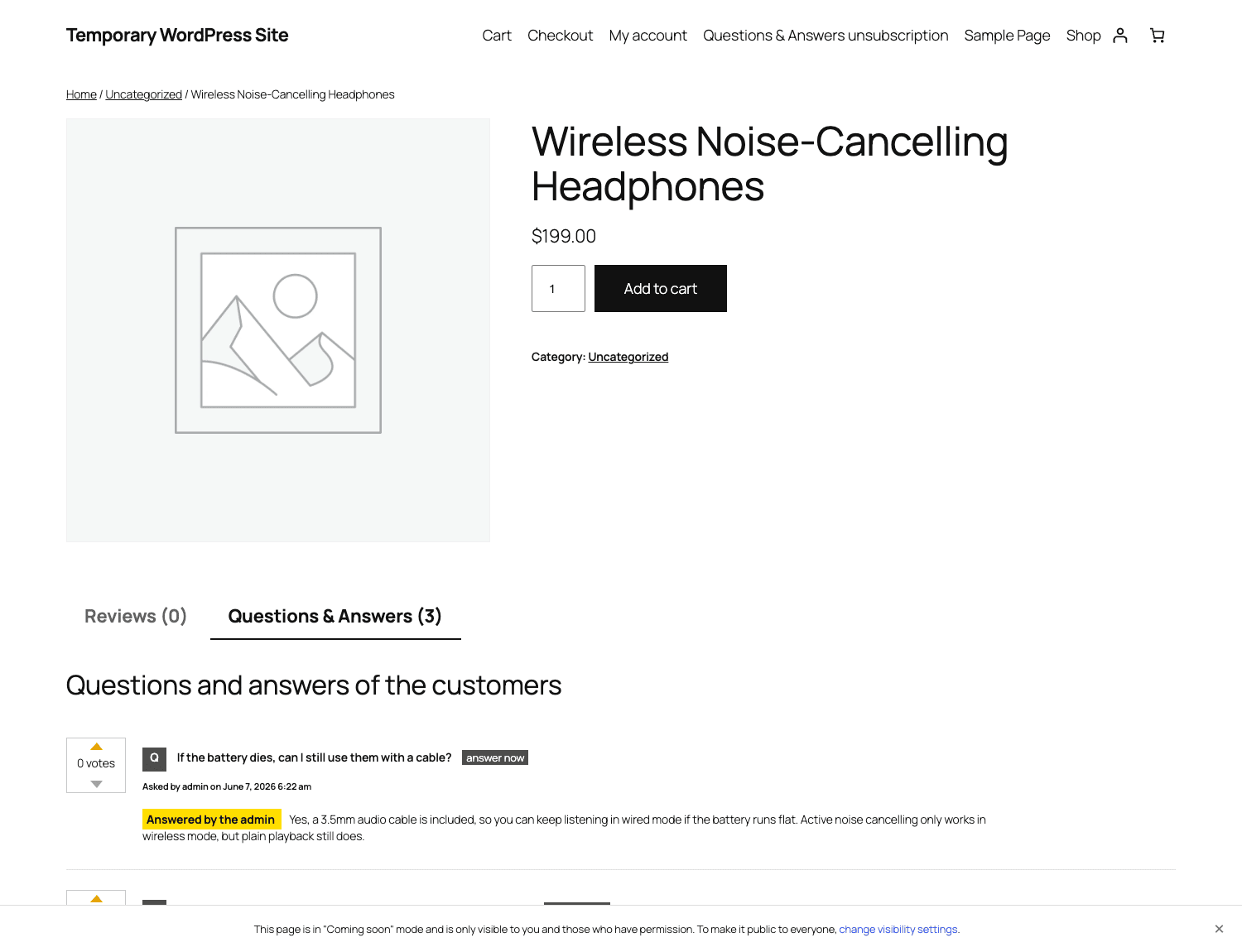
YITH WooCommerce Questions and Answers is a WooCommerce add-on, made by YITH, that adds a customer Q&A section to your product pages. Think of the "Customer questions & answers" block you see on Amazon: a shopper types a question, you (or another customer) type an answer, and that exchange shows publicly on the product, complete with up and down voting.
It needs WooCommerce to run, and it sits alongside the Reviews tab on the single-product page. The plugin is self-contained otherwise. There’s no second free plugin you have to install first, no external service it phones home to for the core feature.
Here’s the distinction that matters, and it’s the one a lot of store owners miss. Reviews are post-purchase. Q&A is pre-purchase. A review is someone who already bought, telling you how it went. A question is someone who hasn’t bought yet, telling you exactly what’s standing between them and the checkout button. That’s gold. Every question is a documented objection, and once you answer it, the objection is gone for the next hundred shoppers too.
Where this fits: any store where the product needs explaining before someone buys. Tech with spec questions ("will this work with X?"), apparel with sizing doubts, supplements with ingredient questions, software with compatibility worries. If your support inbox keeps repeating the same handful of pre-sale questions, the product Q&A plugin from YITH is built to move those answers out of your inbox and onto the page.
Under the hood, both questions and answers are stored as a single WordPress custom post type called question_answer. Answers are linked to their parent question, and both link to the product. Votes, abuse counts, and flags ride along as post meta. There are no extra database tables to worry about, which is a small but real point in its favor: nothing exotic to back up, nothing custom for a migration tool to choke on.
How a question goes from asked to answered
Before the settings, it helps to see the whole lifecycle. A question moves through a handful of stages, and understanding them is what lets you decide which settings to flip later.
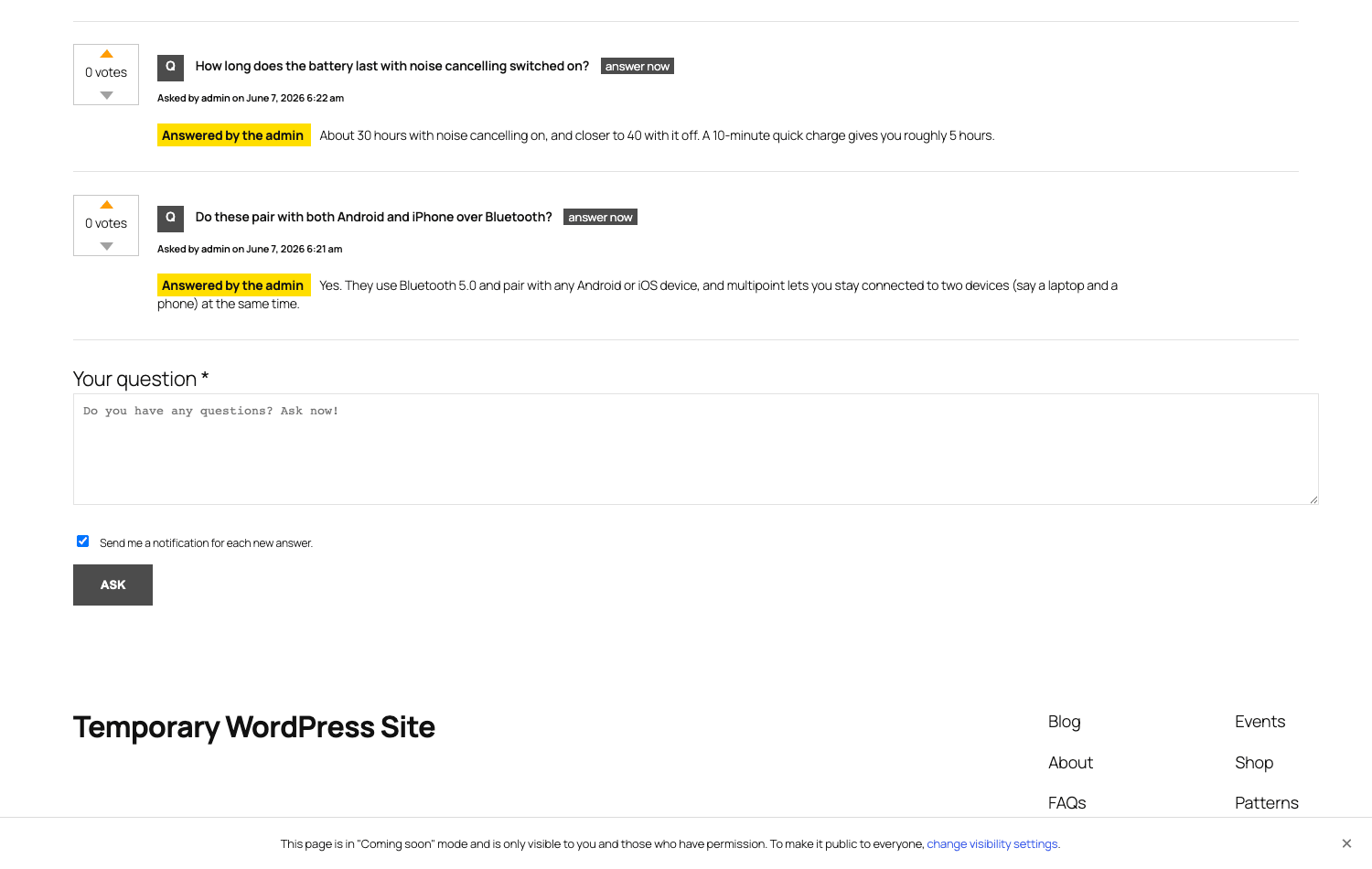
1. The shopper asks. On the product page, below any existing questions, there’s an ask form: a "Your question" text area, a checkbox to get notified of new answers, and an Ask button. If you’ve allowed guest users, even a logged-out visitor can ask. The submission happens over AJAX, so the page doesn’t reload.
2. It hits the queue (optional). If question approval is on, the new question lands in a moderation queue and stays hidden until you approve it. If approval is off (the default), it posts live immediately. We’ll come back to why that default deserves a hard look.
3. Someone answers. That someone can be you from the admin, or it can be another customer right there on the page using the "answer now" button under each question. An answer posted by the store gets visibly flagged as "Answered by the admin" so shoppers know it’s authoritative.
4. It shows publicly, with voting. Once live, each question and each answer carries up and down vote arrows. Useful answers float up through votes, junk sinks. The shopper who asked gets an email if they ticked the notify box.
That’s the loop. Question in, answer out, voting sorts the signal from the noise.
The brief install, folded in here so you’re not hunting for it: upload the plugin zip under Plugins » Add New » Upload Plugin, activate it, and a new Questions & Answers menu appears. The Q&A section attaches itself to your product pages automatically through WooCommerce’s product tabs, so on most themes you don’t touch a template. If your theme uses a custom product layout that ignores the standard tabs, you drop the [ywqa_questions] shortcode wherever you want the section to render. That’s the whole setup. The real work is in the settings, which is where we go next.
Every setting that matters
The plugin keeps its options in a YITH panel under YITH » Questions & Answers, split into a General tab and an Advanced tab (plus a Help tab). I’ll walk both, top to bottom, and tell you what each control does, when to change it, and what the default is, because the defaults here are not all the ones I’d ship with.
General tab
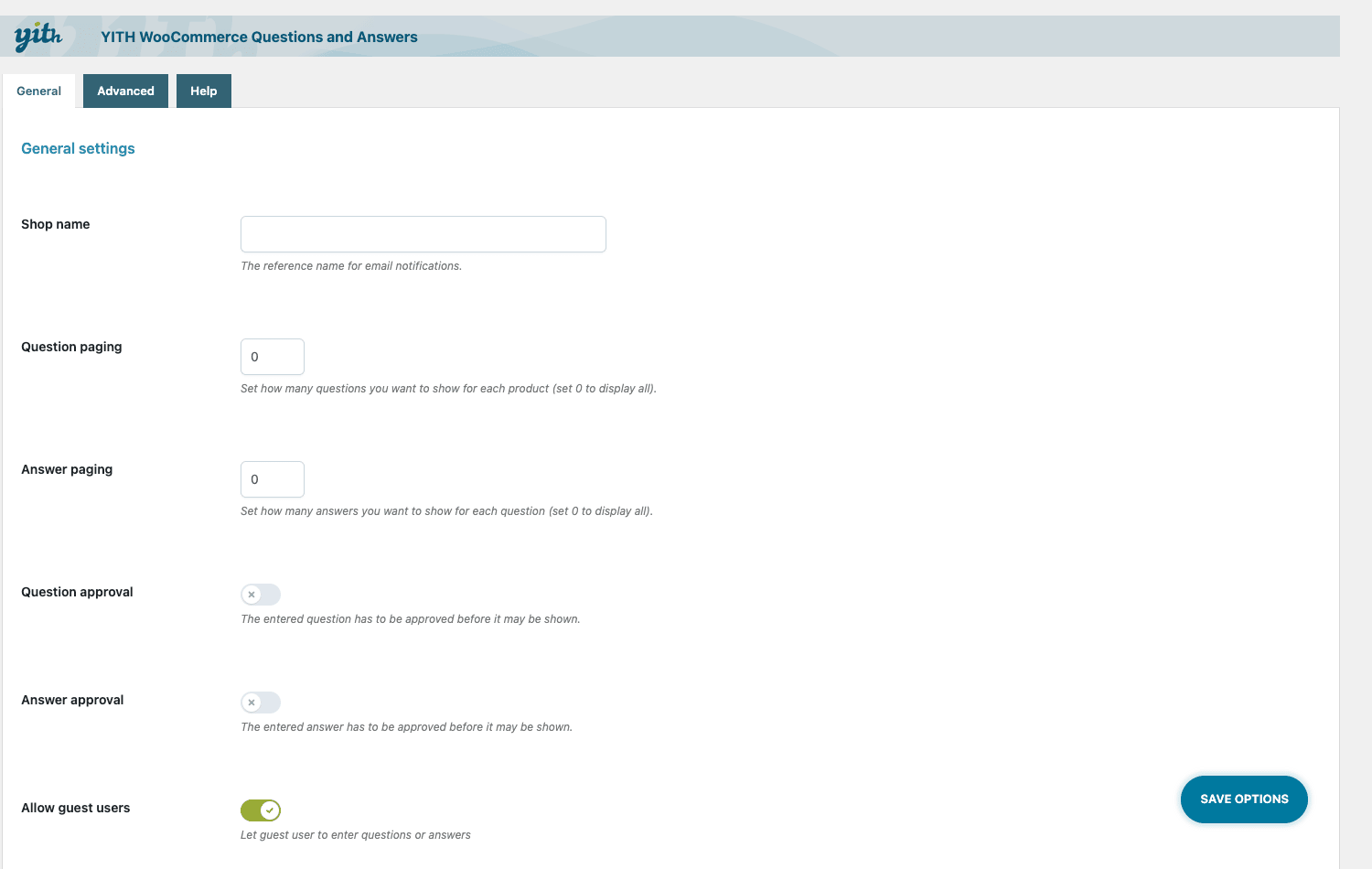
Shop name. The name used in email notifications. Set it to your store’s name so the "you have a new answer" emails don’t look like spam from a stranger.
Question paging. How many questions show per product before pagination kicks in. Set it to 0 to show all of them. On a product with dozens of questions, I’d page these (say, ten at a time) so the tab doesn’t become a wall of text that pushes the buy button into next week.
Answer paging. Same idea, but for the answers under a single question. Popular questions on a busy product can collect a lot of answers; paging keeps the thread readable.
Question approval. The moderation toggle for incoming questions. Default: off. With it off, anything a visitor types goes live the instant they hit Ask. On any store with real traffic, this is the single setting I’d reconsider first. More on that in the anti-pattern section, because it has bitten people.
Answer approval. The same moderation gate, but for answers. Default: off. If you let customers answer each other (and you should, it’s half the value), this decides whether their answers go live instantly or wait for your nod.
Allow guest users. Lets logged-out visitors ask and answer. Default: on. Guests are most of your pre-sale traffic, so leaving this on captures the questions of people who haven’t made an account. The trade-off is more spam surface, which is why guests + approval-off is a combination to avoid.
Advanced tab
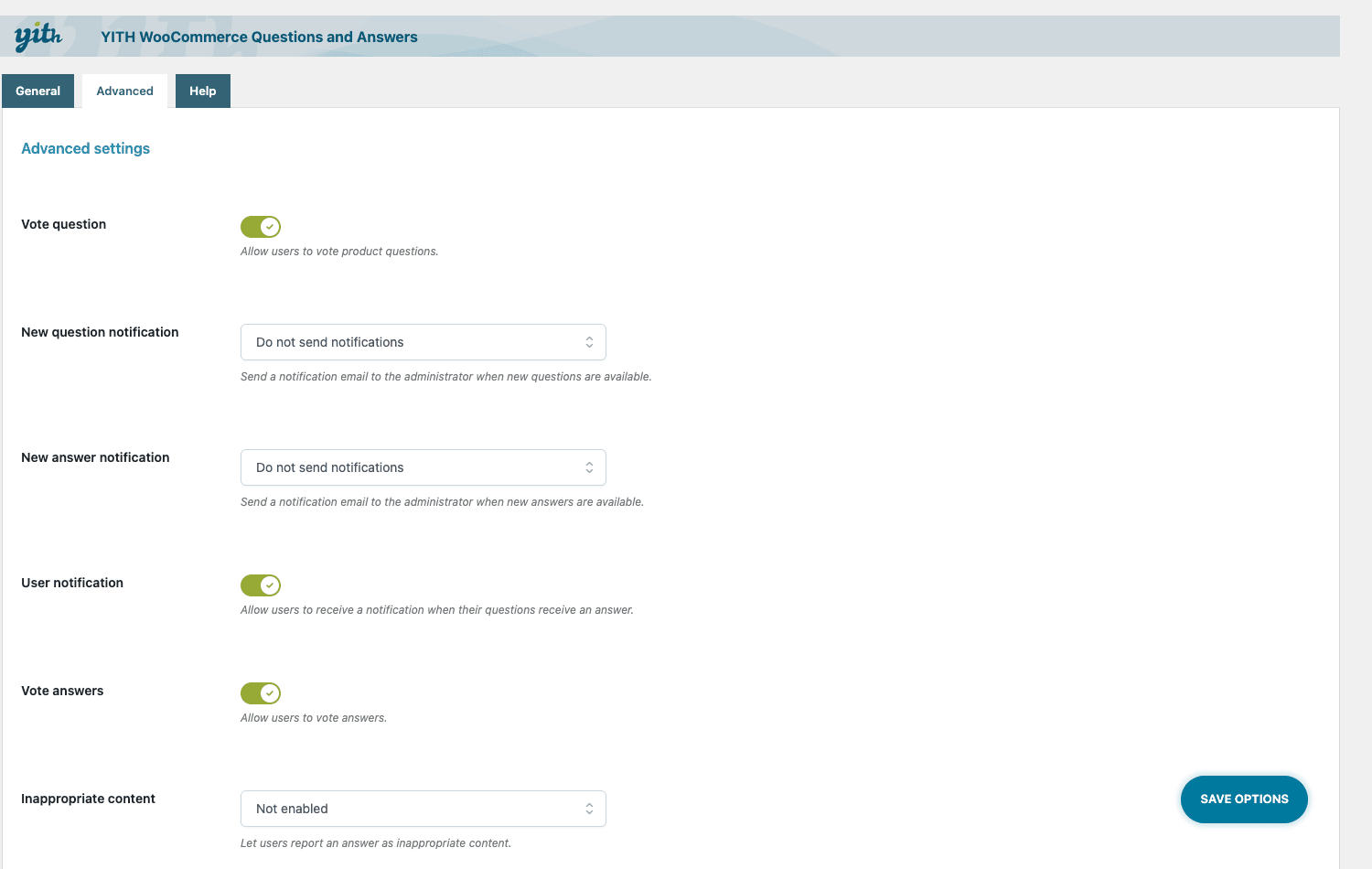
This is where the plugin gets interesting.
Vote question / Vote answers. Two separate toggles that turn up and down voting on for questions and for answers. I leave both on. Voting is what lets the genuinely helpful answer rise above a one-word "yes" and gives you a quick read on which questions matter most to buyers.
New question notification / New answer notification. Email alerts to the store when a question or answer comes in. Turn these on so a question never sits unseen. A question you didn’t notice is a question you can’t answer, and an unanswered question is a quiet sale-killer.
User notification. The email to the customer who asked, telling them their question got an answer. This is what pulls people back to the page (and the product) after they’ve wandered off.
Inappropriate content. Switches on the front-end "report" link that lets shoppers flag abusive or spammy content.
Hiding threshold. The number of abuse reports after which the plugin auto-hides the offending question or answer. Set this to something sane like three. It’s a community spam-net that works while you’re asleep.
Answer excerpt. Trims long answers to an excerpt with a "read more" expander, so a verbose answer doesn’t blow out the layout.
Anonymous mode / Anonymous date mode. Anonymous mode hides the asker’s name; anonymous date mode hides the date. Handy for sensitive product categories (health, personal care) where a buyer might not want their name attached to a question about, well, anything personal.
Ask customers for an answer / Survey sample size. The standout feature. This emails a sample of past buyers to crowdsource an answer to an unanswered question. It’s distinctive enough that it gets its own section below.
reCaptcha. Pick the reCAPTCHA version and paste your site and secret keys. On a store with guest questions turned on, this is non-negotiable. It’s the difference between a Q&A tab and a spambot’s playground.
Tip: the two highest-impact flips on this tab are reCaptcha (paste your keys) and the abuse hiding threshold (set it low). Together they let you keep guest questions on without babysitting the queue every hour.
Ask your past customers to answer
This is the feature I’d actually pay for, and it’s the one most plain Q&A boxes don’t have.
Picture a new question on a product nobody on your team can answer well. Maybe it’s a fit question only someone who owns the thing can speak to. Maybe it’s a "how does this hold up after six months?" question. You could answer it with marketing fluff, or you could ask the people who genuinely know: the customers who already bought it.
That’s exactly what Ask customers for an answer does. When a question has no answer, the plugin can email a percentage of the customers who previously purchased that specific product, asking them to chime in. Survey sample size controls how many of those past buyers get the email. The answers come back from real owners, in real language, which is far more convincing to a shopper than anything you’d write yourself.
Why this is clever: it turns your existing customer base into an unpaid, credible answer-engine. The next buyer reads "I’ve had mine for a year, still going strong" from a verified owner, not a sales pitch. That kind of peer answer closes sales that a store-written answer never could.
Now the honest part, because I’d want to know this before I switched it on. This feature lives or dies on your email deliverability. If your store’s transactional email already lands in spam (a depressingly common WooCommerce problem on cheap hosting), these survey emails go to spam too, and nobody answers. Before you lean on this, get your mail right: use a proper SMTP service, set up SPF and DKIM, and send a test to a Gmail and an Outlook address to confirm it reaches the inbox. Also keep the sample size reasonable. Blasting every past buyer of a popular product is a fast way to annoy people and rack up unsubscribes. Ask a slice, not the whole list.
Used well, this is the thing that keeps your Q&A tab from going stale. Used carelessly, it’s a spam complaint waiting to happen. The plugin gives you the dial; you have to turn it sensibly.
Moderation, spam, and abuse control
A public, user-generated section on your storefront is a target. Spammers want your backlinks, competitors want to plant doubt, and trolls want to be trolls. The plugin gives you a layered defense, and the layers stack.
Approval queues. Two of them, one for questions and one for answers, each toggled independently. Turning question approval on means nothing posts to a product page until you’ve seen it. On a high-traffic store, this is the cleanest protection. The cost is your time: you become the bottleneck, and if you fall behind, legitimate questions sit in limbo. That trade-off (safety vs speed) is the central moderation decision you’ll make.
reCaptcha. Your front line against bots. Add your keys on the Advanced tab and most automated spam never reaches the queue in the first place. If you run guest questions, treat reCAPTCHA as mandatory, not optional.
Inappropriate-content reporting plus the hiding threshold. This is the community layer. Every question and answer gets a "report" link. When a piece of content collects more reports than your hiding threshold, the plugin hides it automatically. So even content that slipped past you gets pulled down by your own shoppers before it does damage. Set the threshold low enough to act fast (two or three reports) but not so low that one grumpy competitor can nuke a legitimate answer.
Note: these layers are meant to be combined, not picked from. The strongest setup for a busy store is reCAPTCHA on, abuse reporting on with a low threshold, and approval on for questions while you trust your regulars to self-police answers. Pick the mix that matches your traffic and how much moderation time you actually have.
For developers, the abuse flow is hookable. The ywqa_inappropriate_content_reporting action fires when content gets flagged, so you can wire your own auto-moderation, ping a Slack channel, or escalate to a human. I’ll show that in the developer section.
Managing it all from the dashboard
Everything lives under one admin screen: Questions & Answers in the WordPress menu, which is the question_answer post type’s list table. YITH calls it the "All discussion" view, and it’s where you actually run the feature day to day.
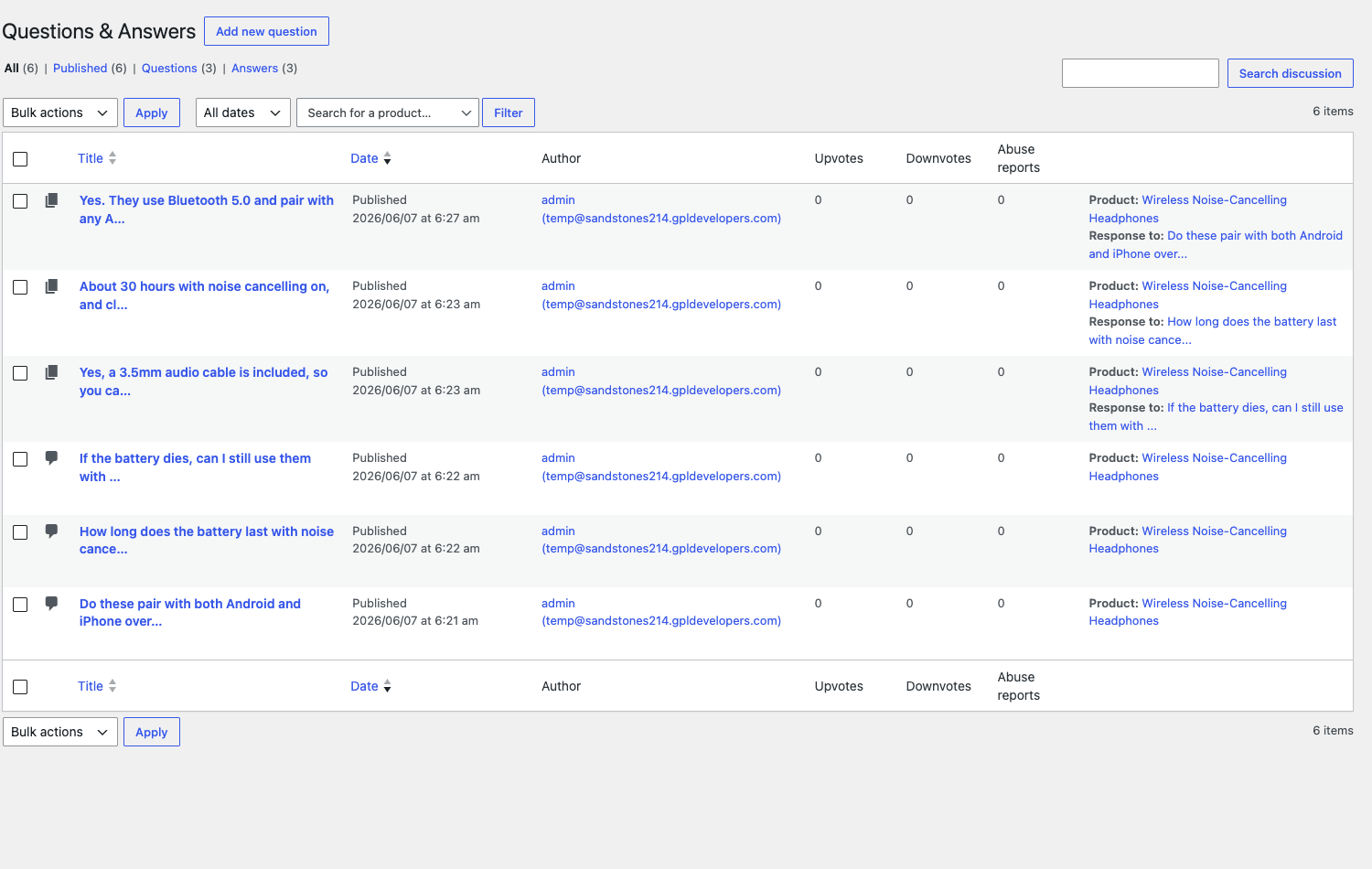
The list shows every question and answer together, with columns that tell you what needs attention at a glance:
- Title of the question or answer, with the text.
- Date it was posted.
- Author, whether a registered user or a guest.
- Upvotes and Downvotes, so you can spot the helpful entries and the disputed ones.
- Abuse reports, so flagged content jumps out.
- Product the entry belongs to, linked straight to the product.
- Response to, which ties an answer back to its parent question.
You can filter the list by product, or narrow it to just Questions or just Answers. That filtering is what makes this usable on a store with hundreds of entries. Need to clean up the Q&A on one product before a promo? Filter to that product and work through it. Want to find unanswered questions? Filter to Questions and scan for the ones with no child answers.
From here you approve content held in the queue, post your own answers (they get the "Answered by the admin" badge on the front end), hide or delete spam, and watch the abuse column for anything the community has flagged. It’s not a flashy dashboard, but it’s a practical one. Honestly, for a feature like this, practical beats flashy. You want to clear the queue and get out, not admire a chart.
Don’t run product Q&A like this
Don’t turn the feature on, leave question approval off, and walk away. That’s the mistake I see most, and it’s baked in by the defaults. With approval off and guest questions on, anything anyone types posts to your product page instantly, including spam links, competitor potshots, and the occasional unhinged rant. On a store that gets real traffic, that’s not a maybe, it’s a when. Before you rely on guest questions, turn question approval on, or at minimum wire up reCAPTCHA and the abuse-report hiding threshold so the obvious junk gets caught.
Don’t let questions sit unanswered for weeks. An unanswered question on a product page is worse than having no Q&A at all. It broadcasts "nobody’s home" to the exact shopper you were trying to convince. Use the new-question notification emails so you hear about questions fast, and lean on the ask-customers survey when you can’t answer something yourself. A dead Q&A tab costs you the very sale it was added to win.
Don’t treat the Q&A tab as your support desk. It’s public and permanent. "Where’s my refund," "my package is late," and "I need to change my address" do not belong in a product Q&A where every future shopper will read them for years. Route order-specific problems to real support channels. Keep the Q&A for product questions that help the next buyer decide.
And don’t dump the same canned answer on twenty different questions. Buyers can smell a copy-pasted "Thanks for asking, please contact support" from a mile away, and it quietly destroys the trust the feature exists to build. Answer the actual question, link the spec sheet, and let the genuinely useful answers do the selling. One real answer beats twenty templated ones.
Q&A vs reviews vs a static FAQ
These three get lumped together, but they solve different problems. Here’s how I think about which does what.
| Tool | When it works | What you get |
|---|---|---|
| YITH Q&A | Pre-purchase, while the shopper is deciding | Buyer questions plus answers from you or other customers, voting on both, 3 shortcodes, 2 approval queues, a survey that emails a % of past buyers, guest + anonymous modes, reCAPTCHA |
| Product reviews | Post-purchase, after the shopper has used it | Star ratings and written feedback from verified buyers; great for proof, useless for the question still blocking a purchase |
| Static FAQ / accordion | Known objections you can predict in advance | Author-written, fixed answers; clean, but it never grows and never surprises you with the question you didn’t think to ask |
The clearest split is timing. Q&A is pre-purchase; reviews are post-purchase. A review tells the next buyer how it went for someone who already committed. A question tells you what’s stopping the buyer who hasn’t, which is information you can act on today. They complement each other, which is why plenty of stores run both. If reviews are the gap you’re filling, a dedicated reviews plugin like ReviewX handles photo and video reviews far better than the native WooCommerce review box, which captures roughly 0% of pre-sale questions because it only opens after purchase. Run that for post-purchase proof and YITH Q&A for pre-purchase doubts, and you’ve covered both halves of the trust equation. Put plainly: a Q&A answers 100% of its value before the sale, a review delivers 100% of its value after.
Against a static FAQ, the difference is growth. A hand-written FAQ answers the objections you thought of. It’s three paragraphs you wrote once and never touched again. The Q&A grows from real buyer questions, so it captures the objections you didn’t think of, and because every answer is indexable on-page text, it keeps catching long-tail "does X work with Y" searches month after month. Voting on both questions and answers means the most useful entries rise to the top without you sorting them by hand. A FAQ is a snapshot; a Q&A is a living document.
The numbers tell the same story. The plugin ships 3 shortcodes, up and down voting on both questions and answers, 2 moderation queues, an abuse-report hiding threshold, and a survey you can aim at, say, 20% of past buyers to crowdsource answers. A static accordion ships exactly zero of those, and the native WooCommerce review box covers 0 of the pre-purchase questions because reviews only exist after a sale. Pricing-wise, YITH sells it on a per-year license while a static FAQ is often a free shortcode; the difference in what you get is the dynamic, self-growing, moderated layer, which is why a yearly renewal on a Q&A makes sense where it wouldn’t on a fixed accordion.
Where the Q&A text helps your SEO
Let me be straight about this, because it’s the area where Q&A plugins get oversold.
This plugin does not add Google Q&A rich snippets. There is no QAPage structured data, no acceptedAnswer schema, none of the markup that produces those expandable Q&A results in Google. I checked the source. If a vendor or a blog tells you a product-page Q&A will get you rich results in the search listings, treat that claim with suspicion, because this plugin doesn’t generate that markup.
So what’s the real SEO win? It’s the text itself. Every question and every answer is plain, crawlable on-page content that becomes part of your product page. Shoppers ask questions in the exact long-tail phrasing real people type into Google: "does the X model fit a Y case," "is this compatible with Z," "how long does the battery last." Those phrases are search queries you’d never think to write into your own product copy, and now they live on the page, with answers, for free.
That does two useful things. It expands the set of long-tail searches your product page can rank for, because the page now contains language no marketer would have written. And it gives the page more substance, which tends to help dwell time, because a shopper who lands and finds their question already answered sticks around instead of bouncing.
So the honest framing is this: the SEO benefit is real, but it comes from indexable content and engagement, not from schema rich results. Don’t switch this on expecting Google to render a fancy Q&A box in your listing. Switch it on because your page accumulates genuine, keyword-rich answers over time, and that’s the kind of content that quietly earns rankings.
Developer reference
The developer surface here is modest, and I’d rather be honest about that than dress it up. This isn’t a plugin with a sprawling API. It’s a focused feature with a handful of well-placed hooks, an AJAX engine, a custom post type you can query, and a couple of builder integrations. Here’s the real list.
The main extension point
ywqa_after_discussion_save fires after a question or an answer is saved. This is the hook to reach for when you want to sync new Q&A activity somewhere else, like pushing a new question into a helpdesk so your support team sees it where they already work.
add_action( 'ywqa_after_discussion_save', function ( $discussion_id ) {
    $post = get_post( $discussion_id );
    // Forward a new question or answer to your helpdesk.
    wp_remote_post( 'https://helpdesk.example.com/api/tickets', array(
        'body' => array(
            'subject' => get_the_title( $discussion_id ),
            'body'    => $post->post_content,
            'product' => get_post_meta( $discussion_id, 'product_id', true ),
        ),
    ) );
}, 10, 1 );
Limit who can answer
yith_wcqa_allow_user_to_reply controls, per question, whether the current user is allowed to reply. Filter it to restrict answers to verified buyers, which keeps the answer pool honest on stores where peer answers carry weight.
add_filter( 'yith_wcqa_allow_user_to_reply', function ( $allowed, $question ) {
    $product_id = get_post_meta( $question->ID, 'product_id', true );
    // Only let people who actually bought the product answer it.
    return wc_customer_bought_product( '', get_current_user_id(), $product_id );
}, 10, 2 );
There’s a sibling filter, ywqa_allow_guest_to_answer, that toggles whether guests specifically are allowed to answer, if you want to permit guest questions but require a login to answer.
Auto-moderate on abuse reports
ywqa_inappropriate_content_reporting fires when a piece of content gets flagged, passing the discussion id and the current report count. Hook it to escalate, alert, or pull content before it hits the built-in hiding threshold.
add_action( 'ywqa_inappropriate_content_reporting', function ( $discussion_id, $count ) {
    if ( $count >= 2 ) {
        // Ping the team the moment something gets flagged twice.
        wp_mail( 'mods@example.com', 'Q&A flagged', "Discussion {$discussion_id} hit {$count} reports." );
    }
}, 10, 2 );
Sorting and excerpt control
ywqa_get_questions_order_by filters the question sort order (it defaults to newest-first), and ywqa_single_question_excerpt filters the question excerpt length.
add_filter( 'ywqa_get_questions_order_by', function () {
    return 'ASC'; // Show oldest questions first instead.
} );

add_filter( 'ywqa_single_question_excerpt', function () {
    return 160; // Longer question previews before the "read more".
} );
There are a few more narrow filters in the source (ywqa_email_content_trimmed_length, ywqa_general_options, ywqa_unsubscribe_from_ask_customer); grep the plugin before relying on any of them, because their signatures are specific.
Shortcodes
Three shortcodes ship with the plugin:
[ywqa_questions]renders the full Q&A list and ask form. Use it to place the section outside the default product tab, or on a custom product template.[ywqa_show_counter]outputs a question-count badge, handy near the top of a product page ("3 questions").[ywqa_unsubscribe]renders the unsubscribe-from-notifications page, which the notification emails link to.
Querying the data
Because everything is the question_answer custom post type, you can query it with plain WP_Query. No custom-table SQL, no special API to learn.
$questions = new WP_Query( array(
    'post_type'      => 'question_answer',
    'posts_per_page' => 5,
    'meta_query'     => array(
        array( 'key' => 'product_id', 'value' => $product_id ),
    ),
) );
The rest of the surface, honestly
The front end runs on AJAX. Submitting a question or answer, voting, reporting abuse, loading more questions, and the admin’s respond-and-approve actions all go through AJAX handlers, each with a guest (nopriv) variant where guest access is allowed. There’s exactly one internal REST route registered; it’s a minimal internal helper, not a public API, so don’t plan an integration around a REST surface that isn’t there. There is no WP-CLI support either; there are no custom WP-CLI commands.
On the builder side, there’s an Elementor "Show Questions" widget and a Gutenberg block, both of which drop the Q&A section into a page without you touching a shortcode. And the plugin integrates with WordPress’s privacy tooling: it registers a personal-data exporter, so customer questions and answers flow into WordPress’s built-in privacy export and erasure tools (under Tools » Export Personal Data and Erase Personal Data), which is the correct, documented way to handle plugin privacy and keeps you on the right side of GDPR data-subject requests.
Performance, compatibility, and gotchas
AJAX keeps it light. The Q&A section loads and updates over AJAX, so asking a question, voting, and paging through answers don’t trigger full page reloads. On a product page that’s already heavy, that’s the right call. It does mean the questions render after the initial page paint, so on a very slow connection there’s a brief moment before the tab populates. For most stores that’s invisible; on a struggling shared host with a lot of other plugins fighting for the main thread, keep an eye on it.
It works with any WooCommerce theme’s product tabs. Because the section hooks into WooCommerce’s standard product-tabs system, it shows up correctly on the vast majority of themes without template edits. The exception is a theme with a heavily custom single-product layout that bypasses the default tabs. There, you place the [ywqa_questions] shortcode manually where you want the section, and you’re back in business.
Guest vs registered behavior. With guest users allowed, logged-out shoppers can ask and answer, which captures your pre-sale traffic but widens the spam surface. Logged-in users get their questions tied to their account and their notification preferences. Decide per store: a B2B store where everyone has an account can safely require login; a consumer store probably wants guests on, with reCAPTCHA as the guardrail.
reCaptcha keys are the gotcha everyone hits. The reCAPTCHA option does nothing until you generate keys at Google and paste both the site key and secret key into the Advanced tab, matched to the right reCAPTCHA version. Mismatch the version and the widget silently fails. If guests can ask and you skip this step, expect spam. This is the one bit of setup I’d never skip on a public store.
Privacy and GDPR. Because it registers a personal-data exporter, customer Q&A content is included when you run WordPress’s data export or erasure for a user. That’s one less thing to handle by hand when a customer files a data request, and it’s worth confirming works on your install before you need it in a hurry.
Multisite and translations. It behaves like a normal WooCommerce extension across these setups. The text domain is fully translatable, so it plays nicely with translation plugins and the usual WPML-style workflows for multilingual stores.
Pricing and licensing
YITH sells this on its standard yearly license model: you pay annually, and the price covers updates and support for the term. That’s the official route, straight from yithemes.com, and if you want vendor support tickets and the official update channel, it’s the clean choice.
It’s also available as GPL here on GPL Times. Because the plugin is licensed under the GPL, you’re free to install and use the same code; what the official license adds is the vendor’s support desk and automatic update feed. If you’d rather try the full feature set first, the YITH WooCommerce Questions and Answers download on GPL Times lets you wire up the ask form, the voting, and the past-customer survey on a real store before committing to a yearly renewal. Once you’ve seen the Q&A tab actually converting hesitant shoppers, the renewal decision makes itself.
If you’re already running YITH plugins, this slots in next to them cleanly. Plenty of stores pair it with other cart-and-conversion tools from the same family, like YITH WooCommerce Recover Abandoned Cart for the shoppers who leave anyway, or YITH WooCommerce Request a Quote for the ones whose question is really "what’s your bulk price?".
FAQ
Does the Q&A section slow down my product pages?
Not in a way most shoppers will notice. The section loads and updates over AJAX rather than blocking the initial page render, so the product page paints first and the questions fill in. The honest caveat: on an already-overloaded shared host with a stack of other plugins, anything extra adds some weight, so test on your own setup rather than assuming. A caching plugin and decent hosting keep it comfortable.
Can guests ask questions without an account?
Yes, as long as "Allow guest users" is on, which it is by default. That’s deliberate, because most pre-sale traffic is logged out, and those are exactly the people whose questions you want to capture. The trade-off is more spam exposure, so if you allow guests, add reCAPTCHA and consider turning on question approval. Guests are great for volume and risky without guardrails.
How do I stop spam in the Q&A?
Three layers, and you’ll want all of them on a public store: paste reCAPTCHA keys on the Advanced tab to block bots, turn on inappropriate-content reporting with a low hiding threshold so the community auto-hides junk, and switch question approval on if you’d rather review everything before it posts. Approval is the safest but it makes you the bottleneck, so balance it against how fast you can clear the queue.
Can customers answer each other’s questions?
Yes, and it’s one of the best parts. Any visitor (or registered user, depending on your settings) can use the "answer now" button to answer a question, and you can require approval on those answers before they go live. Peer answers from real owners are more convincing than store-written ones, which is the whole point of community Q&A. The yith_wcqa_allow_user_to_reply filter lets developers restrict answering to verified buyers if you want only proven owners chiming in.
Will this give me Google Q&A rich snippets in search results?
No, and don’t let anyone tell you otherwise. The plugin does not output QAPage structured data, so you won’t get the expandable Q&A boxes in Google’s listings. The real SEO benefit is different and still worth having: the questions and answers are indexable on-page text that captures long-tail searches and adds substance to your product page. That helps rankings and dwell time, just not through schema rich results.
Should I use this instead of product reviews?
Use both, because they do different jobs. Reviews are post-purchase proof from people who already bought; Q&A is pre-purchase, answering the doubts of people who haven’t. One sells with "here’s how it went," the other sells with "here’s the answer to the thing stopping you." If you want stronger reviews specifically, pair this with a dedicated reviews plugin and let each handle its own half.
What happens to a question while I’m asleep?
If approval is off, it posts live immediately, which is why guest questions need reCAPTCHA and abuse reporting as a safety net. If approval is on, it waits in the queue until you review it. Either way, turn on the new-question notification email so you actually hear about it, and use the ask-customers survey so unanswered questions can get a peer answer without you lifting a finger.
Is it GDPR-compliant for storing customer questions?
It registers a personal-data exporter, so customer questions and answers are included when you run WordPress’s built-in export or erasure tools for a user. That means a data-subject request is handled through the standard WordPress flow rather than by hand. As always, confirm it works on your install before you actually need it, and pair it with your store’s broader privacy policy.
Does it work with multilingual and multisite stores?
Yes. The plugin is fully translatable through its text domain, so it works with the usual translation workflows, and it behaves like a standard WooCommerce extension on multisite. If you run a multilingual store, the questions and answers themselves are user-generated in whatever language the shopper writes, which is normal for Q&A; the plugin’s own interface strings are what get translated.
Final thoughts
A product-page Q&A is one of those features that sounds minor and turns out to matter a lot. Every unanswered question is a shopper at the edge of buying who needed one small reassurance and didn’t get it. YITH WooCommerce Questions and Answers puts that reassurance where it belongs: in public, on the product page, answered once and working for every buyer after.
I like that it’s focused. It does product Q&A, it does it properly, and it doesn’t try to be a forum or a help desk. The ask-customers survey is the feature I’d actually miss if I switched to something cheaper, because it turns your existing buyers into a credible answer-engine. The voting keeps the good answers on top. The privacy integration is a thoughtful touch most plugins skip.
The things I’d warn you about are the defaults, not the plugin. Question approval ships off and guest users ship on, which is a fine combination for a low-traffic shop and a spam magnet for a busy one. Spend ten minutes on reCAPTCHA keys and the abuse threshold before you rely on it, and answer questions fast, and you’ll get the upside without the headaches.
If your support inbox keeps echoing the same five product questions, this is how you make them stop, by answering each one in the one place where the next buyer will actually read it.