

Picture a normal Tuesday on your WooCommerce store. Forty people add things to their cart. Twelve reach the checkout page. By the end of the day, four orders come through. Nobody crashed, nothing broke, your products were priced fine. The other thirty-six shoppers just left, mid-thought, with full carts. And here’s the part that should bother you: most stores do absolutely nothing about it.
That gap is exactly what YITH WooCommerce Recover Abandoned Cart exists to close. It watches the carts people leave behind, then emails those shoppers a scheduled nudge (or three) to come back and finish. Across e-commerce, roughly 70% of carts get abandoned, so even quietly recovering a slice of them is real revenue you were already leaving on the floor.
I’ve run cart-recovery on a couple of WooCommerce stores, both the homegrown "send a coupon and hope" approach and proper drip sequences. This is an honest walk through what YITH’s plugin does, how I’d set it up, the recovery strategy that actually matters more than the plugin itself, and a full developer reference for the hooks it exposes. By the end you’ll know whether this is the right tool for your store, and how to run it so it earns instead of annoying people.
Table of Contents
- What is YITH WooCommerce Recover Abandoned Cart?
- Why cart recovery matters (the psychology)
- Key features
- How a cart gets flagged as abandoned
- Every setting, explained
- Building the recovery email sequence
- Coupons and merge tags in recovery emails
- Reading the recovery dashboard
- Email deliverability (the part everyone skips)
- Real-world use cases
- YITH Recover Abandoned Cart vs AutomateWoo
- Don’t make these cart-recovery mistakes
- Developer reference: filters, the email CPT, and storage
- Performance, compatibility, and gotchas
- Pricing and licensing
- FAQ
- Final thoughts
What is YITH WooCommerce Recover Abandoned Cart?
YITH WooCommerce Recover Abandoned Cart is a WooCommerce extension built by YITH, a long-running shop that maintains a large catalog of WooCommerce add-ons. Its single job is abandoned-cart recovery: it tracks carts that customers fill and then leave without buying, plus orders that get stuck as pending or failed, and it sends a scheduled sequence of recovery emails to bring those shoppers back.
It is not a marketing suite. It is not a page builder. It plugs into WooCommerce and does one thing, and the focus shows in how little setup it needs.
Here’s the loop in plain terms. A shopper adds products and gives you their email (either by being logged in or by typing it at checkout). They wander off. After a threshold you set, the plugin marks that cart as abandoned. WordPress cron then fires off the recovery emails you’ve written, each one carrying a link straight back to the populated cart, optional merge tags with the shopper’s name, and an optional coupon. If they return and buy, the plugin marks the cart recovered and logs the revenue.
That last part is what separates a real recovery tool from a coupon blast. You get a dashboard that tells you how many carts you recovered, your conversion rate, and the actual money attributed to the emails. You’re not guessing.
If you want to put it on a real store and click through every panel as you read, the YITH WooCommerce Recover Abandoned Cart plugin on GPL Times is the same premium plugin delivered under GPL, with the documentation intact.
Why cart recovery matters (the psychology)
Skip this section if you already run recovery campaigns. If you don’t, the next few hundred words explain why the threshold and timing settings matter more than the plugin’s feature list.
People don’t abandon carts because they hate your store. They abandon for boring, human reasons. A phone rings. A toddler needs something. They wanted to compare shipping on another tab. They got to the payment step on mobile, couldn’t find their card, and figured they’d do it later on the laptop. "Later" never comes, because nothing reminds them.
The reminder is the whole game. A cart with items already in it is the warmest lead you will ever have. This person already wanted the product, already added it, already started checkout. You’re not selling them on the product anymore. You’re removing one tiny bit of friction: "here’s the link back, your stuff is still here."
That’s why recovery converts so much better than a cold campaign. A broadcast newsletter to your whole list might convert at a percent or two. A well-timed recovery email to someone who abandoned an hour ago routinely does far better, because the intent is fresh and the offer is specific to them.
Now the uncomfortable math. If cart abandonment runs around 70%, your "real" conversion rate is hiding a huge pile of near-misses. Recover even 5 to 10% of those abandoned carts and you’ve added a meaningful chunk to monthly revenue without buying a single new visitor. The traffic already came. The intent was already there. You just have to ask them back.
That’s the case for doing this at all. The case for doing it well is the rest of this article, because a clumsy recovery sequence can train customers to abandon on purpose, which I’ll get to in the anti-pattern section.
Key features
Rather than dump the marketing list, here’s what actually moves the needle.
- Cart and order tracking. The plugin logs abandoned carts (filled but not bought) and, optionally, pending or failed orders. Both feed the same recovery engine, so a shopper who got stuck at payment is chased the same way as one who never reached checkout.
- A configurable abandonment threshold. You decide how long a cart sits idle before it counts as abandoned. The default is 60 minutes, which is a sane starting point (more on why below).
- A multi-step email sequence. Recovery isn’t one email. You create multiple email templates, each with its own "send after" delay, so you can build a drip: a gentle reminder first, a stronger nudge later, a coupon last.
- Merge tags. Personalize each email with the shopper’s first name, last name, the recover-cart link, and a coupon, using simple
{{ywrac.firstname}}-style tags in the editor. - Optional per-email coupons. Attach a discount to any template in the sequence, so you can hold the incentive back until the shopper has ignored a plain reminder or two.
- Guest cart recovery. If a guest typed an email at checkout before leaving, you can recover them too, with controls for exactly when that’s allowed.
- A recovery dashboard. Recovered carts, conversion rate, total amount recovered, and emails sent, all on one analytics screen. This is the part that proves the plugin is working.
- An email log. Every recovery email is logged to a custom table, so you can confirm mail actually went out before you trust the numbers.
- Elementor and Gutenberg support. Helpful when you build the recovery/unsubscribe landing pages inside your normal page editor.
Notice what’s not here: there’s no broad workflow engine, no SMS, no review requests, no win-back-after-90-days automation. This is a focused cart-recovery tool. For some stores that focus is exactly the appeal. For others it’s a reason to look at a heavier suite, which I compare later.
How a cart gets flagged as abandoned
This is the mechanic everything else depends on, so it’s worth getting right in your head.
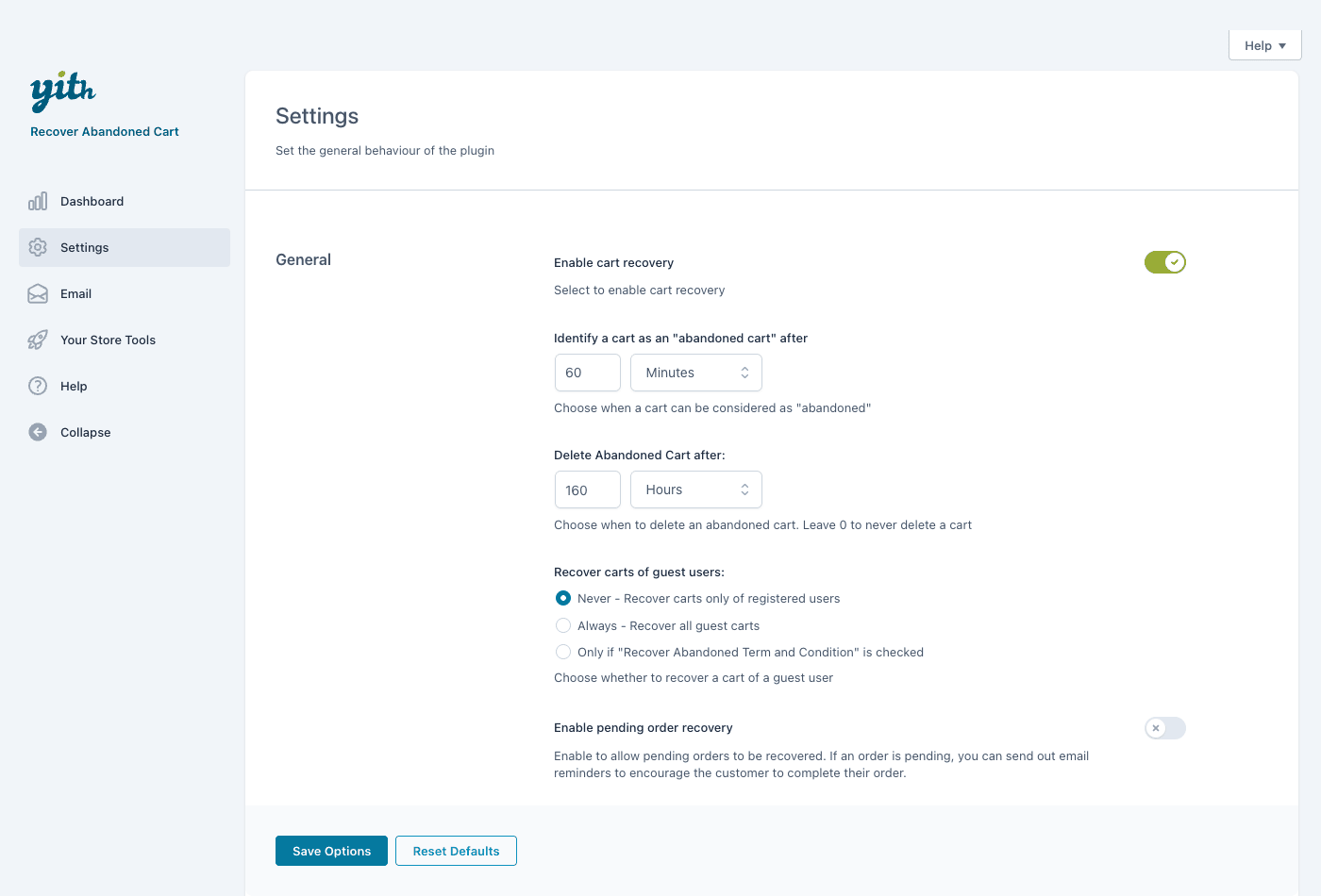
When a logged-in user or an identified guest has items in their cart and stops interacting, a timer starts. Once the gap passes your "identify a cart as abandoned cart after" threshold (default 60 minutes), the cart moves into the abandoned list. From that point, it’s eligible for the recovery sequence.
The catch: the plugin can only chase a cart it has an address for. For a logged-in customer that’s automatic, you already have their email. For a guest, the plugin needs them to have entered an email on the checkout page before bailing. No captured email, no recovery. This is not a flaw in the plugin, it’s how email works, but it’s the single thing people misunderstand most. You don’t recover "every" abandoned cart. You recover the ones you have an address for.
There’s also a retention setting. "Delete abandoned cart after" (default 160 hours, with 0 meaning never) controls how long an abandoned cart record sticks around before the plugin cleans it up. Past that window, the record is gone and won’t be emailed. That’s mostly a housekeeping choice, but it does cap how long-tail your recovery can be.
Pending order recovery is a separate toggle. A pending or failed order is a different beast from an abandoned cart: the shopper actually clicked "place order" but the payment didn’t complete (a declined card, an off-site gateway they never finished, a bank redirect they abandoned). Turning this on lets the plugin chase those too, which is often the highest-intent group of all because they got the furthest.
Tip: before you write a single email, click around your own store as a guest and a logged-in user, abandon a cart on purpose, and watch it appear in the abandoned list. Seeing the mechanic with your own cart removes a lot of "is this even working" anxiety later.
Every setting, explained
The settings panel is short, which I appreciate. Here’s every option and how I’d actually set it.
Enable cart recovery. The master switch, and a detail worth knowing: it ships on by default. The moment the plugin is active with an enabled template, it can start tracking carts and sending. Heads-up: if your sequence isn’t written yet, turn this off (or hold off activating the plugin) until your templates are ready, so you don’t email customers from a half-built sequence.
Identify a cart as "abandoned cart" after. A number plus a unit (Minutes, Hours, or Days), default 60 minutes. This is your grace period. It should be long enough that people who genuinely intended to come back get to do so on their own (you don’t want to email someone who’s mid-checkout), and short enough that the cart is still fresh in their mind. For most stores, 60 minutes is a fine starting threshold.
Delete abandoned cart after. Default 160 hours, 0 = never. How long a stale cart record lives before cleanup. If you run a long recovery sequence (say, a final email at 72 hours), make sure this window is comfortably longer than your last "send after" delay, or the record could be deleted before the last email fires.
Recover carts of guest users. Three behaviors:
- Never recovers only registered (logged-in) users.
- Always recovers all guests who left an email.
- Only if a consent term is checked recovers guests who actively agreed to be contacted, via a "Recover Abandoned Term and Condition" checkbox.
For GDPR-adjacent peace of mind, the consent-checkbox option is the safest, and I’d lean that way for any EU traffic. It costs you a few recoveries but buys you a clear record of consent.
Enable pending order recovery. Turn this on to chase pending and failed orders alongside abandoned carts. I’d almost always enable it, because a failed payment is the closest a shopper can get to buying without actually buying.
That’s the whole settings surface. The depth of this plugin isn’t in the settings, it’s in the email templates, which is where you’ll spend your time.
Building the recovery email sequence
Here’s the mental shift that makes this plugin click: the recovery sequence is a list of email templates, not one email. Each template is its own record with its own timing, so the sequence is built by stacking templates with increasing "send after" delays.
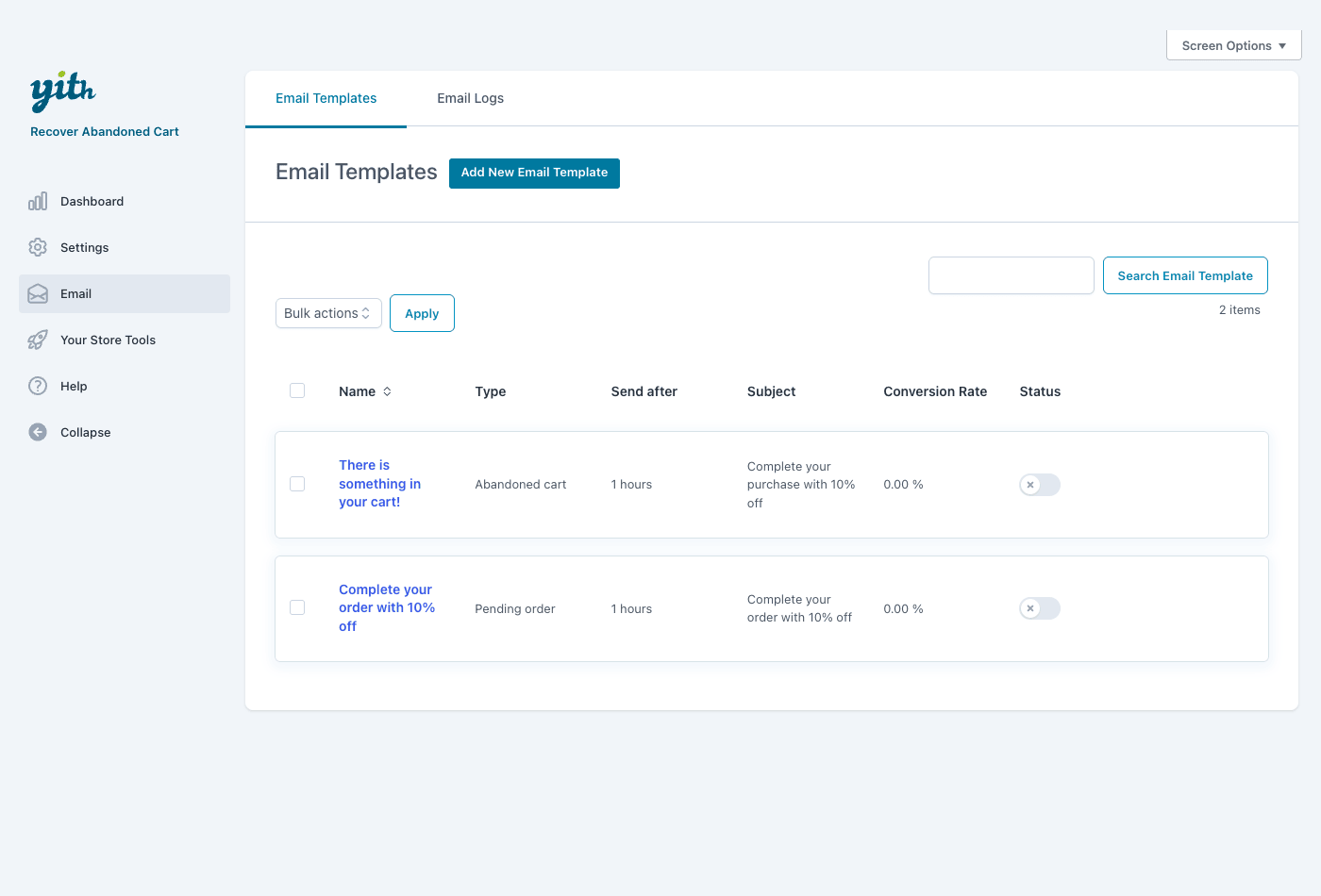
Go to the plugin’s Email tab. You’ll find an Email Templates list table with columns for Name, Type (Abandoned cart or Pending order), Send after, Subject, Conversion Rate, and Status. The plugin ships with a couple of starter templates so you can see the shape: an abandoned-cart email ("There is something in your cart!") that sends after about an hour and offers 10% off, plus a pending-order template.
To build a proper drip, you create several templates of the same type with staggered delays. A sequence I’d reach for on a typical store:
| Send after | Tone | Coupon? | |
|---|---|---|---|
| 1. Reminder | 1 hour | "Did you forget something?" plain, friendly | No |
| 2. Nudge | 24 hours | "Still thinking it over?" address an objection | No |
| 3. Incentive | 72 hours | "Here’s 10% off to finish up" final push | Yes |
The "send after" on each template is measured from when the cart was flagged abandoned, so you’re scheduling each step independently. Add a new template, set its type, write the subject and body, set the delay, and set its status to active. Repeat for each step.
Heads-up: keep your sequence to three emails, maybe four. Past that you’re not recovering carts, you’re harassing people, and your unsubscribe rate climbs. The first email does most of the work anyway.
You toggle each template’s status independently, so you can draft a fourth email and leave it inactive until you’ve measured whether you need it. The Conversion Rate column on the list table is gold here, it tells you per-template which email is actually pulling its weight, so you can kill the dead ones.
A quick note on install, since I promised not to make a whole section of it: install the plugin like any WooCommerce extension (upload the zip under Plugins » Add New » Upload Plugin, activate, and the YITH menu appears). WooCommerce must be active first. That’s genuinely the entire setup before you reach the panels above.
Coupons and merge tags in recovery emails
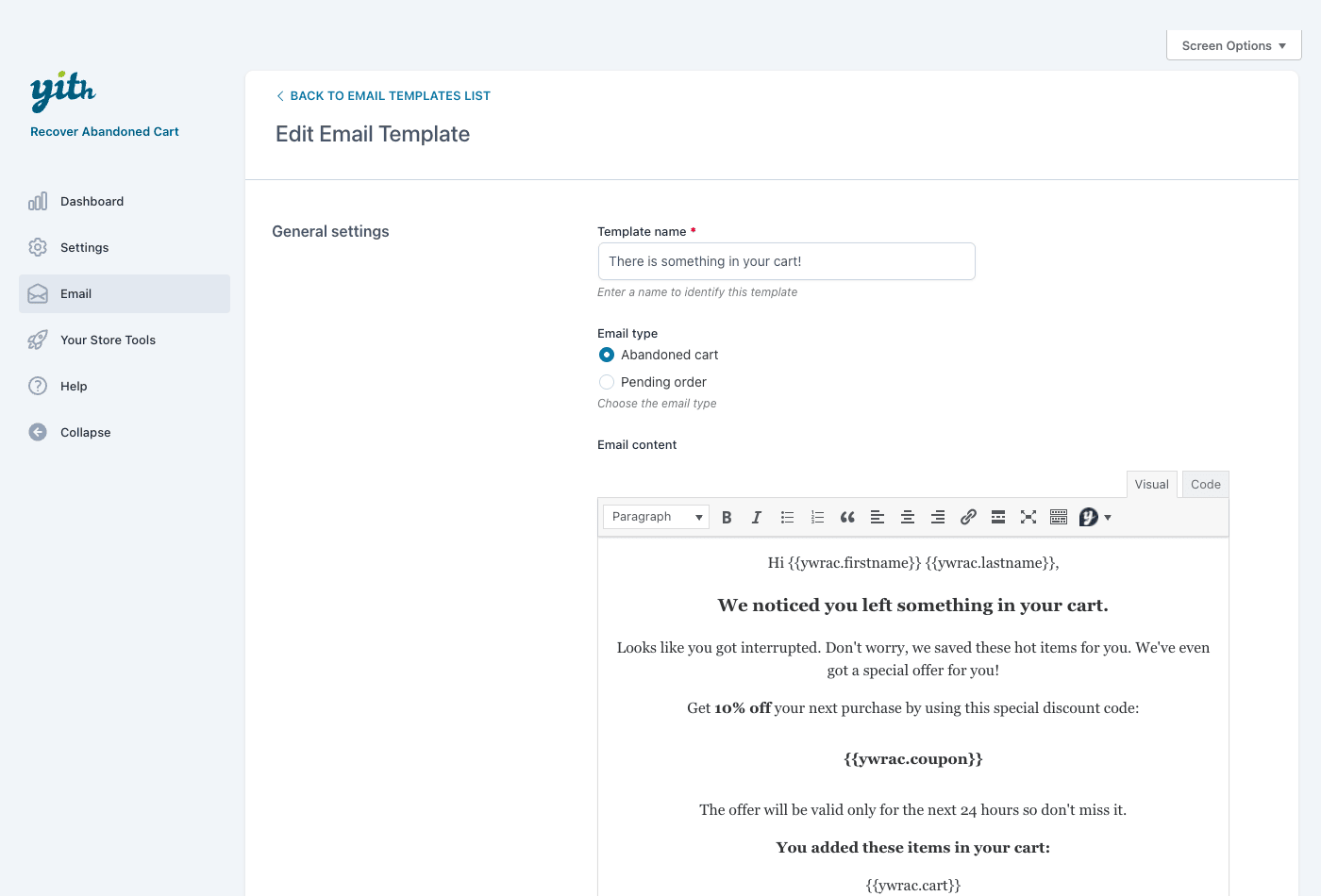
Open any template and you get a focused editor: a template name, the email type (Abandoned cart or Pending order), the email content as a WYSIWYG, the send-after timing, sender and reply-to fields, and the coupon settings.
The merge tags are what make the email feel like it was written for one person instead of blasted to a list. Drop these into the content:
{{ywrac.firstname}}and{{ywrac.lastname}}insert the shopper’s name.{{ywrac.cart}}renders the actual cart contents, so they see the exact products they left.{{ywrac.coupon}}outputs the coupon attached to that template.
A simple, effective body reads something like: "Hi {{ywrac.firstname}}, you left these in your cart: {{ywrac.cart}}. Want to finish up? Here’s {{ywrac.coupon}} to make it easier." The recover button drops the shopper straight back into their populated cart, no re-adding required.
The coupon is the lever you should pull last, not first. The editor lets you attach a discount to a template, and the default starter email uses 10% off. That’s fine as a final step. It’s a mistake as a first step, and I’ll explain exactly why in the mistakes section, because it’s the most expensive error stores make with this plugin.
If your discounting needs go beyond a flat percentage (BOGO, store credit, scheduled coupons, usage limits per customer), you’d pair this with a dedicated coupon engine like WooCommerce Smart Coupons and reference the coupon you create there. YITH’s built-in coupon attachment covers the common "here’s X% off" case well enough on its own.
Set the sender and reply-to addresses thoughtfully too. A recovery email that comes from noreply@ feels like a robot; one that comes from a real, monitored address (and invites a reply) occasionally surfaces the actual reason someone abandoned, which is worth more than the recovered sale.
Reading the recovery dashboard
This is the screen that justifies the plugin, and the reason I’d pick a dedicated recovery tool over a manual coupon email in the first place.
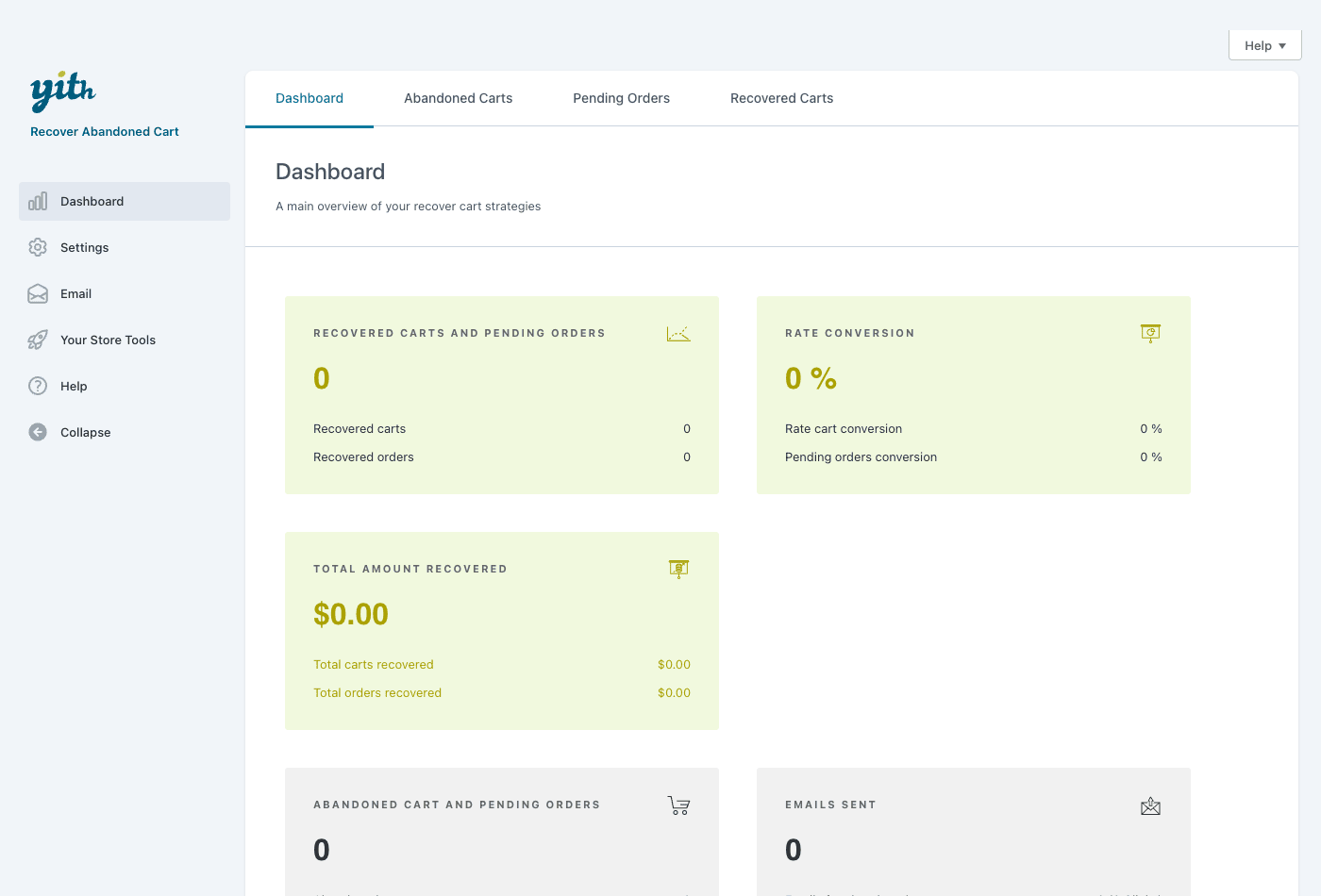
The Dashboard gives you an at-a-glance view:
- Recovered carts and pending orders. How many were brought back to a completed purchase.
- Rate conversion. Your cart conversion rate and your pending-order conversion rate, split out so you can see which group responds.
- Total amount recovered. The actual money attributed to recovery, carts plus orders. This is the number you take to whoever signs off on plugins.
- Abandoned cart and pending orders. The count of what’s currently being chased.
- Emails sent. Volume, so you can sanity-check that mail is actually going out.
Across the top, separate tabs list the Abandoned Carts, Pending Orders, and Recovered Carts themselves, so you can drill from the summary numbers into the individual carts.
You might be wondering whether you can trust these numbers. Mostly yes, with one caveat: the dashboard attributes a recovery when a chased shopper completes their purchase, so it’s measuring the carts the plugin emailed and that then converted. It’s not claiming credit for sales that would have happened anyway with perfect certainty, but like all attribution it’s directional. Watch the trend over weeks, not the absolute figure on day one. On a fresh install the dashboard will show zeros until carts are tracked and the cron has had time to send, so don’t panic at an empty screen the first afternoon.
The per-template Conversion Rate column (over on the Email tab) pairs with this dashboard nicely. The dashboard tells you the program is working overall; the column tells you which specific email is doing the work.
Email deliverability (the part everyone skips)
I’ll say this plainly because it’s the failure mode that quietly kills more recovery campaigns than any setting: recovery emails are only as good as your ability to actually deliver them.
The plugin schedules and sends emails through WordPress mail on WP cron. On a default, un-configured host, wp_mail() hands off to PHP’s mail(), which a lot of inboxes treat with suspicion. Your beautifully written sequence lands in spam, or the host silently throttles it, and your dashboard shows "emails sent" while the customer never sees a thing.
Three things fix this:
- Send through real SMTP. Use a transactional mail service (a dedicated sending provider) wired up via an SMTP plugin. This single change does more for your recovery rate than any copy tweak.
- Authenticate your domain. Set up SPF, DKIM, and DMARC records so mailbox providers trust that the email really came from your store. WordPress’s own guidance on email and the developer docs at developer.wordpress.org are a decent starting point for understanding how the mail hooks fit together.
- Watch the Email Logs. The plugin writes a log of recovery emails to its own table. Before you trust any dashboard number, confirm the log shows mail going out, and spot-check that a test recovery actually arrives in a real inbox (not just yours, which is whitelisted).
Note: WP cron only runs when your site gets traffic. On a low-traffic store, recovery emails can fire late because cron didn’t tick on schedule. If timing matters to you, switch to a real server cron job calling wp-cron.php on a fixed interval. This is a WordPress thing, not a YITH thing, but it bites recovery campaigns specifically because the whole point is timely email.
Real-world use cases
A few concrete scenarios, because the right sequence depends a lot on what you sell.
If you run a fashion store with lots of impulse buys and mid-range price points, speed wins. People abandon fashion carts because they got distracted, not because of price. A single one-hour reminder with the cart contents and no coupon recovers a surprising amount on its own. Save the discount for a second email only if the first goes cold, because your margins probably can’t absorb a discount on every recovered order.
For a high-ticket electronics shop, the buyer is deliberating, not distracted. A 72-hour cart isn’t a forgotten cart, it’s a considered decision in progress. Here a slower, reassurance-led sequence works better: email one addresses a common objection (warranty, returns, stock), email two offers help or a comparison, and only a final email touches price. A 10% discount on a high-ticket item is a lot of money, so reserve it.
For a subscription box or consumables store, pending-order recovery is the quiet winner. Recurring billing fails constantly (expired cards, insufficient funds), and those failed orders are customers who already decided to buy. Turn on pending order recovery and a polite "your payment didn’t go through, here’s the link to retry" email recovers revenue that has nothing to do with cold marketing.
If you sell digital products or services, guest carts dominate, so the guest-recovery setting matters most. Make sure you’re capturing email early in checkout and use the consent option if you have any EU traffic. Your recovery emails can lean into urgency less and into reassurance more, since there’s no shipping anxiety.
If checkout friction is your real problem (a long, multi-field, distracting checkout), recovery emails treat the symptom. Pair them with a tighter, lower-friction funnel using something like CartFlows so fewer carts get abandoned in the first place. Recovery is a safety net, not a substitute for a checkout that converts.
YITH Recover Abandoned Cart vs AutomateWoo
This is the comparison I get asked about most, so let’s be specific with numbers instead of hand-waving.
YITH WooCommerce Recover Abandoned Cart is a focused cart-recovery tool. It handles exactly 2 email types (abandoned cart and pending order), each built as a multi-step drip with per-template "send after" delays, a default 60-minute abandonment threshold, a 160-hour cart retention window, and a dashboard that tracks conversion rate and revenue recovered. You can have a working recovery sequence live in an afternoon. The scope is small on purpose, and the setup time reflects that.
AutomateWoo is a broader WooCommerce automation engine where cart recovery is just one workflow among many. It also does review requests, win-back campaigns, wishlist reminders, subscription dunning, SMS, and arbitrary triggered actions. That power costs you setup: you’re building workflows with triggers, rules, and actions rather than filling in two or three email templates. If you only need cart recovery, AutomateWoo is a lot of engine to learn for one job.
A plain coupon blast is the third option, and it’s the weakest. A one-off "here’s 10% off everything" email to your whole list has no per-cart targeting, no recover-cart link, no sequence, and no recovery tracking. It can’t tell you which carts it brought back because it doesn’t know about carts at all. With abandonment around 70% and a realistic recovery of 5 to 10% per campaign, the difference between targeted recovery and a blanket coupon is the difference between attributable revenue and a margin hit you can’t measure.
| YITH Recover Abandoned Cart | AutomateWoo | One-off coupon blast | |
|---|---|---|---|
| Scope | Cart + pending-order recovery only | Full automation suite | None (manual) |
| Email types | 2 (cart, pending order) | Many workflow types | 1 (broadcast) |
| Setup time | An afternoon | Days to learn well | Minutes (but blunt) |
| Per-cart targeting | Yes | Yes | No |
| Recovery tracking | Built-in dashboard | Built-in reporting | None |
| Best for | Stores that want recovery, fast | Stores automating everything | Quick promo, not recovery |
On pricing, YITH sells this as a yearly premium license, and AutomateWoo likewise carries an annual cost (the suite’s breadth makes it the pricier of the two over time). On GPL Times both are available as GPL, which is the easiest way to put either on a staging store and decide which scope fits before you commit to a yearly renewal.
My take: if cart recovery is the only automation you need, YITH is the cleaner choice and you’ll have it running before lunch. If you can already see yourself wanting review emails and win-backs and subscription dunning next quarter, start with AutomateWoo so you’re not running two automation systems side by side.
Don’t make these cart-recovery mistakes
These are the failure modes I’ve watched cost real money, and every one of them is avoidable.
Don’t send the first recovery email five minutes after abandonment. People step away mid-checkout constantly. A call comes in, they switch tabs, they go find their card. Fire too fast and you nag someone who was already coming back, which feels creepy and pushes them away. Let the abandonment threshold (default 60 minutes) give them room to return on their own, then start a sane sequence: roughly 1 hour, then 24 hours, then 72 hours.
Don’t lead with a coupon. This is the expensive one. If your very first email hands out 10% off, you train repeat customers to abandon on purpose, because they learn the discount always shows up an hour later. You’ve converted full-price buyers into discount-hunters and eaten your own margin to do it. Open with a plain reminder. Escalate to an incentive only in a later email, and only when the cart value justifies the margin hit.
Don’t ignore email deliverability. Recovery emails go out through WordPress mail on WP cron. On a default host they land in spam or silently fail, and the whole strategy quietly earns nothing while the dashboard insists emails were "sent." Configure SMTP, authenticate your domain, and watch the Email Logs before you trust a single number.
Don’t assume you recover guest carts you never captured. You can only email a guest whose address you actually captured at checkout, plus the guest-recovery setting has to allow it. "Recover all abandoned carts" is a fantasy that wrecks your expectations and, with EU traffic, risks contacting people who never consented. Capture email early, use the consent option, and treat your recoverable carts as the ones you have both an address and permission for.
Developer reference: filters, the email CPT, and storage
Here’s the part developers actually want. This plugin is filter-heavy, with very few action hooks, so most customization happens by filtering values rather than hooking into events. I’ll only document hooks I’ve confirmed in the source, with their real argument counts. Don’t go looking for do_action event hooks here; the surface is deliberately filters plus the email-template post type.
Filters worth knowing
ywrac_recover_button_label (2 args) changes the recover-cart button text in the email.
add_filter( 'ywrac_recover_button_label', 'mystore_recover_label', 10, 2 );
function mystore_recover_label( $label, $email ) {
    return 'Take me back to my cart';
}
ywrac_skip_user_from_mail (4 args) lets you exclude a specific user or cart from recovery emails. Useful for suppressing wholesale accounts or addresses you know are dead.
add_filter( 'ywrac_skip_user_from_mail', 'mystore_skip_recovery', 10, 4 );
function mystore_skip_recovery( $skip, $user_email, $cart_id, $type ) {
    if ( str_ends_with( $user_email, '@wholesale.example.com' ) ) {
        return true; // never chase wholesale carts
    }
    return $skip;
}
ywrac_skip_register_cart (1 arg) returns true to stop the current cart from being registered as abandoned at all. Handy if a certain page or session should never count.
add_filter( 'ywrac_skip_register_cart', function( $skip ) {
    if ( is_user_logged_in() && current_user_can( 'manage_options' ) ) {
        return true; // don't track admins testing the store
    }
    return $skip;
} );
ywrac_wait_before_create_new_abandoned_cart (2 args) sets the cooldown before a new abandoned-cart record is logged for the same user, so a serial abandoner doesn’t spawn a record every hour.
add_filter( 'ywrac_wait_before_create_new_abandoned_cart', 'mystore_abandon_cooldown', 10, 2 );
function mystore_abandon_cooldown( $seconds, $user_id ) {
    return 6 * HOUR_IN_SECONDS; // one record per 6 hours per user
}
ywrac_template_content (3 args) filters the rendered email body before it’s sent, which is your hook for injecting dynamic content the merge tags don’t cover.
add_filter( 'ywrac_template_content', 'mystore_email_body', 10, 3 );
function mystore_email_body( $template_content, $email, $cart_id ) {
    $banner = '<p style="text-align:center">Free shipping over $50.</p>';
    return $banner . $template_content;
}
ywrac_email_template_sent_counter (2 args) filters the per-template sent counter, and ywrac_rate_conversion (1 arg) filters the computed conversion-rate percentage, both handy if you’re piping stats into your own reporting.
add_filter( 'ywrac_rate_conversion', function( $rate ) {
    return round( $rate, 1 );
} );
ywrac_recurrence (1 arg) filters the cron recurrence the sender runs on, if you need the engine to tick more or less often than the default.
Beyond these, the plugin exposes a set of single-argument stats filters such as ywrac_total_recovered_carts, ywrac_total_amount, and ywrac_total_abandoned_carts for adjusting the headline numbers. Grep the source for ywrac_ before relying on any specific one in production, since the stats set is broad and you’ll want the exact name for your version.
The email-template CPT and shortcodes
Email templates are stored as a custom post type, ywrac_email. That’s a nice design choice for developers: you can query templates with standard WP_Query, attach your own meta, or build templates programmatically if you’re provisioning stores at scale.
The shortcode surface is small, fitting an email-engine plugin. The one you’ll use is [ywrac_unsubscribe] (with a legacy [ywrr_unsubscribe] alias), which renders the unsubscribe link/page for recovery emails. Drop it on a dedicated page so recipients always have a clean opt-out, which keeps you compliant and your sender reputation healthy.
[ywrac_unsubscribe]
Storage and what’s not here
Two things to know about storage. Email templates are a CPT, as noted. Separately, the plugin maintains a custom database table ({prefix}yith_ywrac_email_log) for the email log, plus an abandoned-carts list and counter. So this is not a "zero custom tables" plugin; there’s a real log table you can inspect if you’re debugging deliverability.
What the plugin does not have, so you don’t waste time looking: there’s no REST API (zero registered REST routes) and no WP-CLI command. Automation against the plugin is done through the filters above and the WooCommerce/WordPress hooks the plugin sits on top of, not through a dedicated API. The plugin also ships Elementor and Gutenberg integration classes, which is mainly useful for building the unsubscribe and recovery-related landing pages inside your normal editor.
Performance, compatibility, and gotchas
Performance-wise this is a light plugin. The real work is email scheduling on cron, not front-end work, so it doesn’t slow your store pages. The one front-end touch is cart tracking, which is minimal. If you obsess over Core Web Vitals, this isn’t a plugin that’ll hurt your scores.
Compatibility starts with the obvious: it requires WooCommerce and won’t do anything without it. It works on standard WordPress hosting, and because the sending runs on WP cron, the biggest "gotcha" is the cron-and-deliverability combo I covered above, not a code conflict.
A few real-world gotchas:
- Cron timing on low-traffic stores. WP cron only fires on page loads. A quiet store can send recovery emails late. Switch to a server cron if precise timing matters.
- Caching plugins and the cart. Aggressive full-page caching can interfere with cart-state detection. If carts aren’t being tracked, check that your cache excludes cart/checkout pages (most good cache plugins do this by default).
- Guest email capture. If you’ve heavily customized checkout (or use a one-page checkout that collects email late), confirm the email field is captured before the abandonment point, or guest recovery silently does nothing.
- Translation and merge tags. If you run a multilingual store, make sure each template’s language matches the audience; merge tags render fine, but the surrounding copy is whatever you wrote.
None of these are dealbreakers. They’re the ordinary realities of running scheduled email on WordPress, and a couple of hours of setup handles all of them.
Pricing and licensing
YITH sells this as a premium plugin on a yearly license, the standard model across their WooCommerce catalog: you pay annually, and the license covers updates and support for that period. The exact figure shifts with their promotions, so check the vendor for the current number rather than trusting a stale price in a blog post.
On GPL Times, YITH WooCommerce Recover Abandoned Cart is available under GPL, which is the practical way to put it on a real store and test a full sequence end-to-end before deciding whether a yearly renewal makes sense for your volume. It’s the same premium plugin, delivered through the GPL store.
One honest framing for the buy decision: this plugin pays back fast or not at all, and you’ll know which within a month. If your store has meaningful cart volume, recovering even a single-digit percentage of abandoned carts covers the cost many times over, and the dashboard tells you the exact figure. If your traffic is tiny, the math is thinner, and a free reminder you hand-send might be enough until you grow. The dashboard makes that an evidence-based call rather than a guess.
If you already run other YITH extensions, this slots into the same panel and licensing flow you know. (Their catalog is deep; a sibling like YITH Donations for WooCommerce shares the same admin conventions, so there’s no new mental model to learn.)
FAQ
How long should I wait before sending the first recovery email?
Long enough that you’re not interrupting someone mid-checkout, short enough that the cart is still fresh. The 60-minute default threshold is a solid starting point, and a first email around the one-hour mark works for most stores. High-consideration products (expensive electronics, furniture) can wait longer, since those carts are deliberations, not distractions.
Will this recover guest carts?
Only if you captured the guest’s email at checkout and your guest-recovery setting allows it. There’s no way to email someone whose address you never collected. Set checkout to capture email early, and use the consent-checkbox option if you have EU traffic. Recovering "every" abandoned cart isn’t possible for anyone; you recover the ones you have an address for.
Do I have to offer a discount?
No, and you often shouldn’t. A plain reminder with the cart link recovers a lot of carts on its own, especially for impulse purchases. Reserve coupons for a later email in the sequence and only when the cart value justifies the margin hit. Leading with a discount trains customers to abandon on purpose, which is the most expensive mistake you can make with this plugin.
Why aren’t my recovery emails sending?
Almost always deliverability or cron. WordPress mail on a default host frequently lands in spam or fails silently, and WP cron only runs on traffic, so a quiet store sends late. Configure real SMTP, authenticate your domain (SPF/DKIM/DMARC), switch to a server cron if timing matters, and check the Email Logs to confirm mail is actually leaving.
Can it chase failed and pending orders, not just abandoned carts?
Yes. Enable pending order recovery and the plugin chases pending or failed orders alongside abandoned carts. This group is often the highest-converting, because the shopper got all the way to placing the order and only the payment failed. A "your payment didn’t go through, here’s the link to retry" email recovers a lot of those.
Is there a REST API or WP-CLI command for automation?
No. The plugin has no REST routes and no WP-CLI commands. Developer customization happens through its filters (documented above) and the WordPress/WooCommerce hooks it builds on, plus the email-template custom post type if you want to manage templates programmatically.
How accurate is the "revenue recovered" number?
It attributes a recovery when a chased shopper completes their purchase, so it reflects carts the plugin emailed that then converted. Like all attribution it’s directional rather than absolute, so watch the trend over weeks rather than reading too much into a single day. It’s far more honest than a coupon blast, which can’t attribute anything to specific carts at all.
Does it slow down my store?
No meaningfully. The work happens on cron in the background, not on your front-end pages. Cart tracking is lightweight. This isn’t a plugin that’ll dent your Core Web Vitals.
Can I personalize the emails?
Yes, via merge tags. {{ywrac.firstname}} and {{ywrac.lastname}} insert the name, {{ywrac.cart}} renders the actual cart contents, and {{ywrac.coupon}} outputs an attached coupon. Developers can go further with the ywrac_template_content filter to inject dynamic blocks the tags don’t cover.
How is this different from a marketing suite like AutomateWoo?
This is focused on cart and pending-order recovery only, and you can have it running in an afternoon. AutomateWoo is a broader automation engine where recovery is one of many workflows (reviews, win-backs, dunning, SMS). If recovery is all you need, YITH is the simpler tool; if you’ll want a dozen automations, start with the suite.
Final thoughts
I came into this expecting another "you left something in your cart" plugin, and that’s roughly what it is, but the focus is the point. YITH WooCommerce Recover Abandoned Cart does one job, it does it without a weekend of configuration, and the dashboard tells you in plain numbers whether it’s working. That combination is rarer than it should be.
What I’d push back on: the plugin can’t save you from a bad recovery strategy. Lead with a coupon, send too fast, ignore deliverability, and you’ll get a clean dashboard reporting a failed campaign. The settings are easy. The judgment (timing, when to discount, getting email actually delivered) is on you. That’s true of every recovery tool, and at least this one shows you the scoreboard.
If your WooCommerce store has carts going cold and nothing chasing them, this is the most direct way to turn a chunk of those near-misses back into orders. Put YITH WooCommerce Recover Abandoned Cart on a staging store, write a three-email sequence, abandon a test cart, and watch the recovery flow fire end to end. Once you see your first recovered order land on the dashboard with a dollar figure attached, the case makes itself.