

You probably don’t need five Elementor addon plugins. I’ve opened plenty of WordPress installs where someone stacked Essential Addons, PowerPack, a slider plugin, a popup plugin, a forms plugin, and a header-footer builder, all to dress up one page builder. Six plugins, six stylesheets, six update cycles, and a front end that loads scripts nobody asked for.
That’s the case for Royal Elementor Addons Pro. It is not another widget tray you bolt onto the side of Elementor. It is a full site builder that lives inside Elementor: a Theme Builder for headers, footers, single posts, archives, and WooCommerce templates, a 12-type display conditions engine, a popup builder, a form builder, a mega menu, importable Templates Kits, a Premade Blocks library, and a per-widget on/off switch so you only ship the elements you actually use.
So the question this article tries to answer is simple. If you give one addon the whole job, does it hold up? I spent real time in the admin and the editor to find out, and this is the honest version: where Royal earns the "all-in-one" label, and where it doesn’t.
Table of Contents
- What is Royal Elementor Addons Pro?
- What you actually get beyond widgets
- The widget library
- Building a header and footer in the Theme Builder
- Display conditions: where each template shows
- Templates Kits and Premade Blocks
- The Pro form builder and where submissions go
- Popups, mega menus, and WooCommerce
- Don’t run your Elementor stack like this
- Royal Elementor Addons Pro vs Essential Addons vs Elementor Pro
- Developer reference
- Performance, compatibility, and gotchas
- Pricing and licensing
- FAQ
- Final thoughts
What is Royal Elementor Addons Pro?
Royal Elementor Addons Pro is an all-in-one Elementor extension suite by WP Royal. It comes in two parts. There’s a free base plugin, Royal Elementor Addons, that you’ll find on the WordPress.org repo, and then the Pro extension that adds the bulk of the site-building tools on top of it. You need Elementor and the free Royal base installed first; the Pro layer plugs into both.
The vendor’s own pitch is blunt: "the only plugin you need for Elementor." That’s a big claim, and I’m wary of any plugin that says it does everything. But Royal backs it up with a feature list that goes well past the usual widget-pack territory.
Here’s the distinction that matters. Most Elementor addons are widget libraries. You install them, you get more elements to drag into the canvas (fancy headings, flip boxes, counters, sliders), and that’s the deal. Useful, but narrow. Royal does ship that widget library, and a big one. The difference is everything wrapped around it.
With Royal you build the actual structure of your site inside Elementor. The header that appears on every page. The footer. The layout of a single blog post. The archive grid. The WooCommerce shop page and product page. The popups. The navigation menus. The lead-capture forms. All of it lives in one plugin, with one settings screen and one update.
That’s the line between a widget pack and a site builder, and Royal is firmly on the site-builder side. The rest of this review walks through each piece so you can decide whether one addon really replaces the stack you’re running now.
What you actually get beyond widgets
This is the section that separates Royal Elementor Addons Pro from the crowd, so let me lay out the toolkit before we touch a single widget. When people compare Elementor addons they tend to count elements. The element count is the least interesting number here.
The Theme Builder. This is the headline. You design site-wide templates (header, footer, single post, archive, plus WooCommerce product archive and product single) visually in Elementor, then assign each one to the parts of the site it should control. No theme-specific PHP, no template-part editing. We’ll spend a whole section on it.
Display Conditions. A targeting engine that decides where each template, popup, or block appears. Twelve condition types, from "show on this page type" all the way down to "show only to logged-in users from a specific country during a date range." This is genuinely powerful and most widget packs don’t have anything close.
The WooCommerce builder. Through the Theme Builder you get Product Archive and Product Single template types, plus a dedicated WooCommerce display condition and a woo-grid widget. You can rebuild your shop and product pages without touching the WooCommerce template hierarchy.
The Popup Builder. Design popups in Elementor, set triggers and conditions, and Royal handles the display logic. Exit intent, scroll, click, time on page, the usual triggers, all built in.
The Form Builder. A drag-and-drop form widget with real actions behind it: send an email, push to Mailchimp, redirect on submit, or fire a webhook. Submissions get stored in WordPress so you have a record.
The Mega Menu. A proper multi-column dropdown menu builder, plus nav menu, circle menu, off-canvas, and one-page navigation widgets for everything from a simple header to a single-page scroll site.
Templates Kits. Full-site design kits you import in one click. Think of a kit as a coordinated set of pages (home, about, services, contact) that share a look, ready to edit.
Premade Blocks. A library of pre-designed sections (hero blocks, pricing rows, testimonial strips) sorted by category. You drop a block into a page instead of building the layout from scratch.
The Widget Builder. A tool to build your own reusable custom widgets, so a layout you’ve perfected once becomes a draggable element you reuse everywhere.
That’s nine distinct site-building tools, none of which is "a fancier heading." Put together, they’re why Royal calls itself a suite and not an addon. Now the widgets.
The widget library
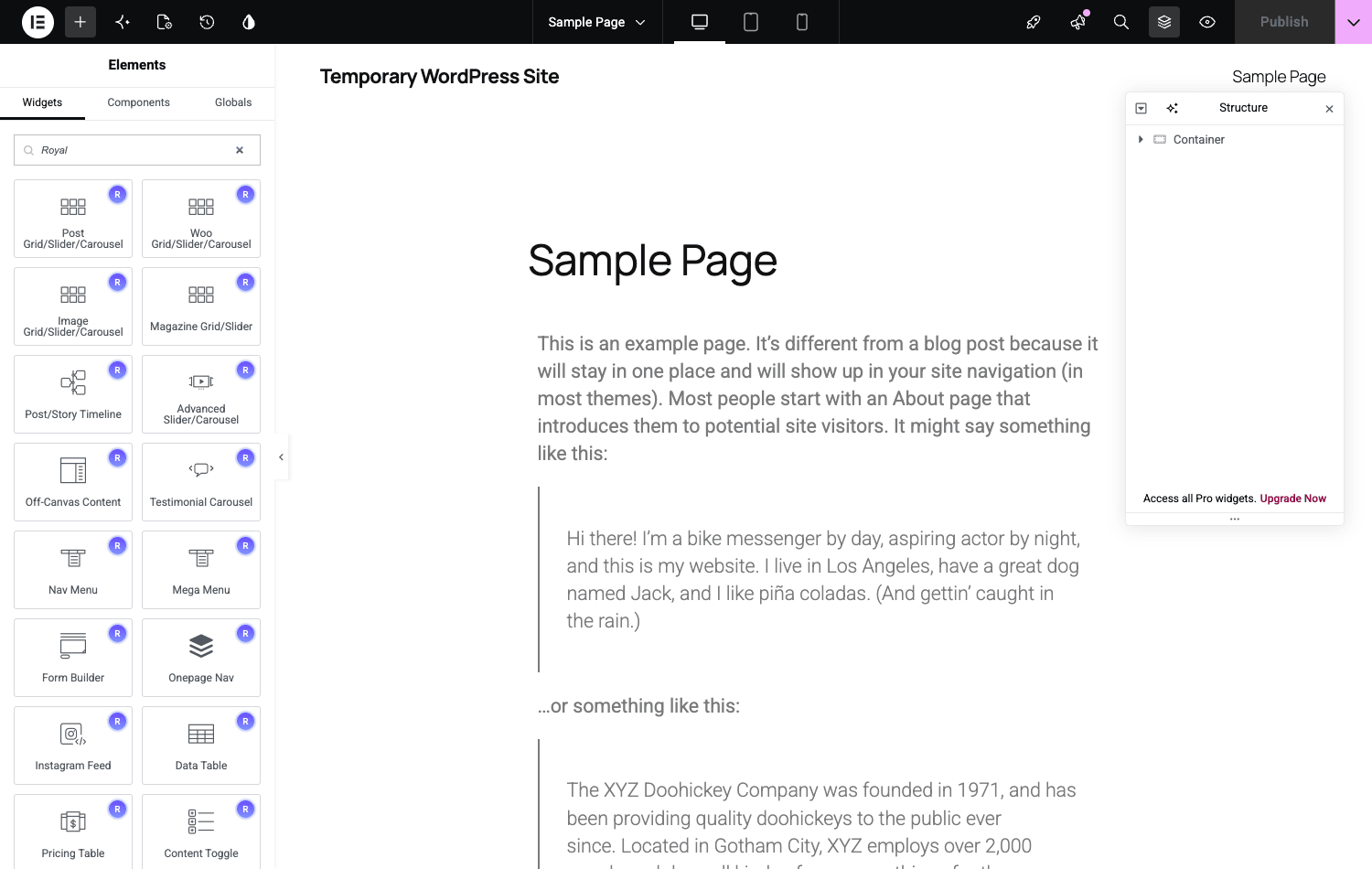
Royal does ship a deep widget library, and the breadth is the first thing you notice in the admin. Pro adds 52 modules on top of the free base’s roughly 40 widgets, which puts the combined library well past 60 elements once both plugins are active.
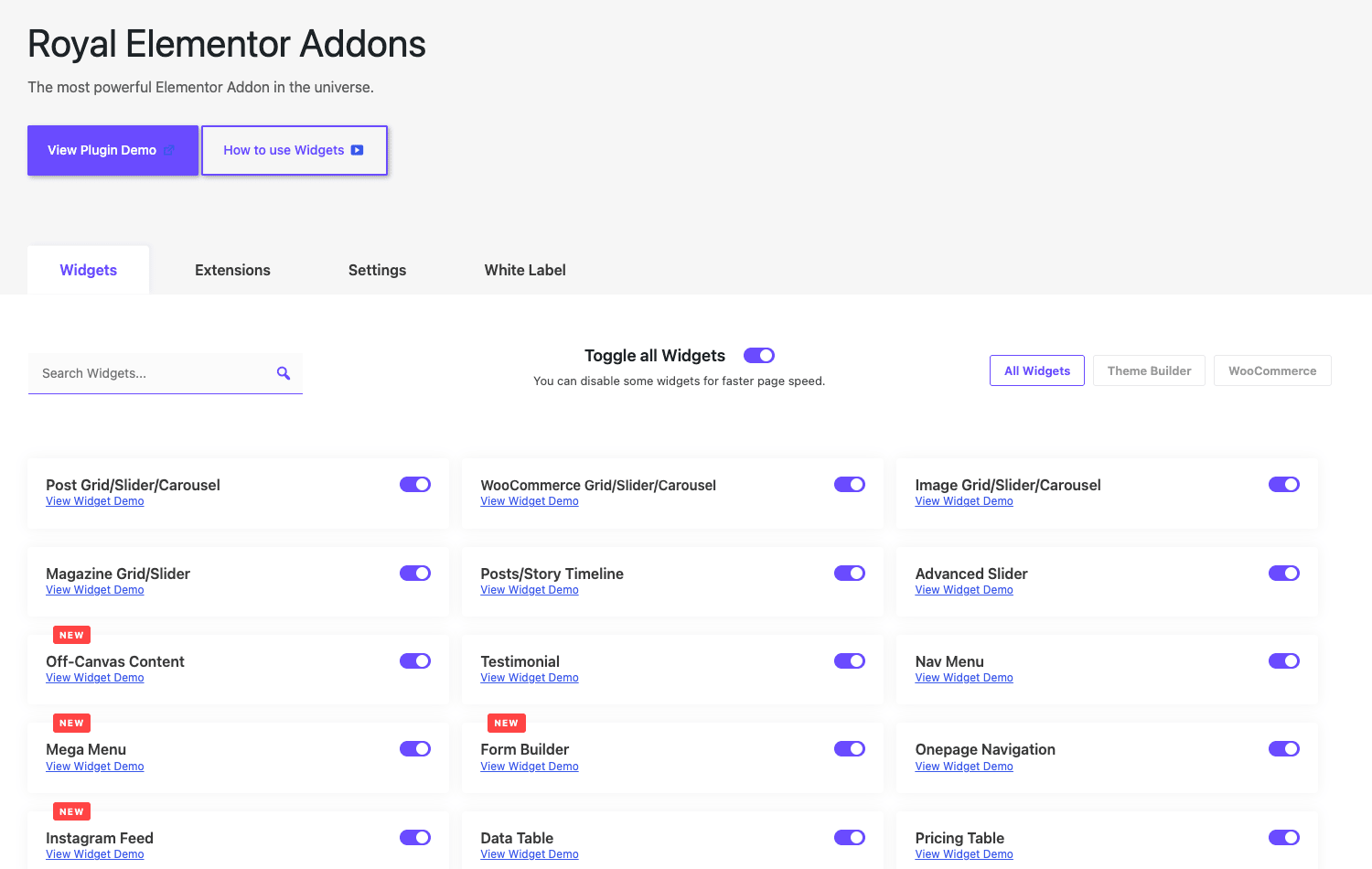
A quick tour of what’s actually in there, because the names tell you the range. On the content side you’ve got Advanced Accordion, Advanced Text, Content Ticker, Content Toggle, Tabs, Data Table, Price List, Pricing Table, and Posts Timeline. On the media side there’s Advanced Slider, Flip Carousel, Media Grid, Image Accordion, Image Hotspots, Before/After, Video Playlist, and Instagram Feed. For layout and listings you get Grid (the post grid), Magazine Grid, Category Grid, Taxonomy List, and Page List. There are interactive bits like Flip Box, Promo Box, Countdown, Progress Bar, Charts, and Team Member, plus utilities like Breadcrumbs, Business Hours, Weather, Search, Sharing Buttons, and Password Protected Content.
That’s not the full list, but it’s enough to make the point: Royal covers the categories most sites actually need without you reaching for a second pack.
Here’s the part I respect, though, and it’s the bit most widget packs get wrong. Every one of those widgets has an on/off toggle, sitting right on the Royal Addons » Widgets admin screen. Royal’s own copy frames it as a way to "disable some widgets for faster page speed," and that framing is correct. A registered widget can pull in its own CSS and JS when Elementor decides it needs them. If you only use eight widgets on a site, there’s no reason to leave the other fifty registered.
Tip: The widget screen has filter tabs for All, Theme Builder, and WooCommerce. After you’ve finished a site, sort to All, switch off everything you didn’t end up using, and re-test your pages. It’s a two-minute job that genuinely shrinks what the front end loads.
The toggle is the answer to the most common complaint about big addon packs, which is bloat. Most packs make you take all of it or none of it. Royal lets you trim the library down to the handful of widgets a given site actually touches, and that’s a real design decision, not a marketing line.
Building a header and footer in the Theme Builder
Let’s build the most-asked-for thing first: a custom header that shows on every page. This is where the free addon packs usually tap out, and where Royal starts looking like a theme replacement.
You’ll find the Theme Builder under Royal Addons » Theme Builder in the admin. The screen is organized into template-type tabs, and there are six of them: Header, Footer, Archive, Single, Product Archive, and Product Single. There’s also a Saved Templates area for reusable pieces. Those six types cover the full template hierarchy a normal site needs, blog and shop included.
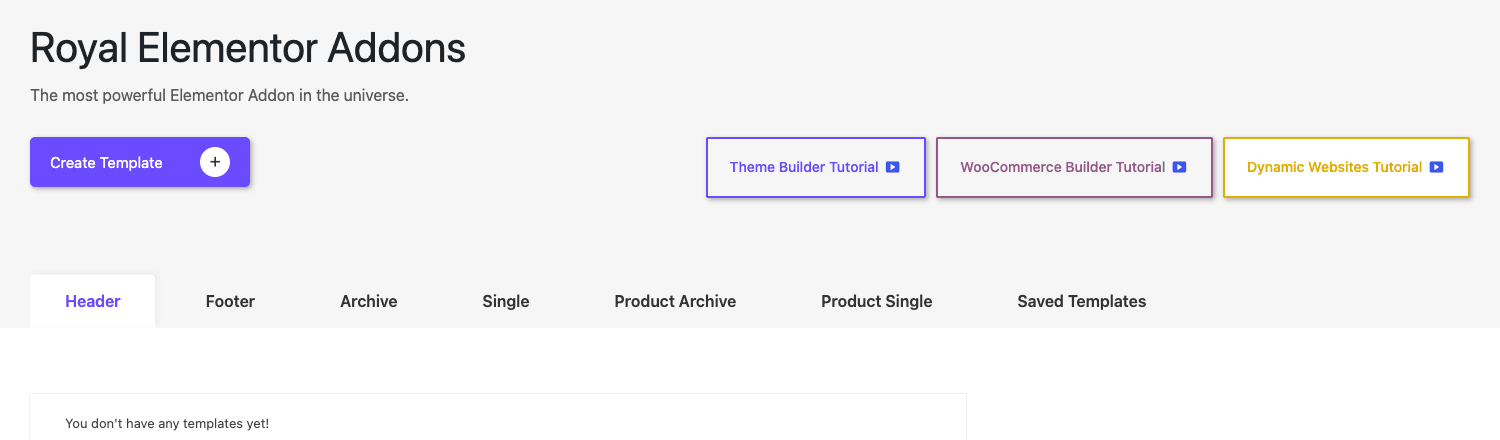
The flow goes like this:
- Pick the type. Click the Header tab, then Create Template. You’re naming a header template, so Royal knows what kind of layout to scaffold and what dynamic data to make available.
- Design it in Elementor. The template opens in the normal Elementor editor. You drop in a logo, a Nav Menu or Mega Menu widget, maybe a search and a button. This is just Elementor, so anything you already know carries over.
- Set where it shows. Before you publish, Royal asks for the display conditions. This is the step people skip and regret, so we’re giving it its own section next. For a site-wide header you’d set "Entire Site." For a header that’s different on the shop, you’d add a WooCommerce condition.
- Publish. The template goes live on the pages its conditions match. Your old theme header is replaced on those pages.
A footer follows the exact same pattern on the Footer tab. The Single and Archive tabs let you redesign how every blog post and every blog listing renders, so you’re no longer stuck with whatever your theme decided a post should look like.
Note: Because Royal builds the template, the theme you’re running matters less than it used to. You can run a lightweight, mostly-empty theme and let Royal draw the visible structure. That’s the whole point of a theme builder, and it’s why a fast base theme plus Royal is a common, sensible pairing.
Since I promised to fold install into the build flow: getting here takes about five minutes. Install Elementor, install the free Royal Elementor Addons base, then install Royal Elementor Addons Pro and activate it. The Pro plugin won’t do much until the first two are present, which is by design, it’s an extension, not a standalone. Once all three are active you’ll see the Royal Addons menu in the WordPress sidebar, and the Theme Builder lives inside it.
Display conditions: where each template shows
This is the feature I’d point to if someone asked what makes Royal Elementor Addons Pro worth more than a widget pack. A template is only useful if it shows up in the right places, and Royal’s display conditions engine is unusually granular about that.
There are twelve condition types you can stack on any template, popup, or block:
- Custom fields. Show a template based on the value of a custom field on the current page. Handy for ACF-driven layouts.
- Date / time. Show between two dates, or on certain days, or in a time window. Good for a holiday banner that disappears on its own.
- Dynamic tags. Match against Elementor dynamic values rather than static settings.
- Fallback content. Define what shows when nothing else matches, so you never get a blank region.
- Interaction. Show based on a user action on the page.
- Language. Target by site language, useful on multilingual setups.
- Page content. Match against what’s actually on the page (a specific post type, page, or term).
- Random / limits. Show randomly or cap how often something appears, which is mostly a popup tool.
- URL parameters. Show only when the URL carries a given query string. This is how you’d gate a popup to traffic from one campaign.
- User profile. Target by role or login state. Logged-in members see one header, guests another.
- Visitor location. Target by the visitor’s country or region.
- WooCommerce. Conditions specific to the store: cart state, product category, and so on.
Put a couple of these together and you get behavior that normally needs a separate plugin. "Show this popup to logged-out visitors from Germany who arrived with utm_campaign=spring, but only in March, and no more than once" is a single rule here, not a stack of three add-ons.
Heads-up: Display conditions are also where you can shoot yourself in the foot. A header template with no condition, or the wrong "Entire Site" condition, will quietly take over pages you didn’t mean it to. We cover that exact mistake in the anti-pattern section, because it’s the number one Theme Builder support question.
The honest take: this engine is one of the strongest reasons to pick Royal over a widget-only pack. Essential Addons and PowerPack will hand you nice elements. They won’t hand you twelve ways to decide exactly which visitor sees which template.
Templates Kits and Premade Blocks
Not every project starts from a blank canvas, and Royal gives you two different running starts. They sound similar but solve different problems, so here’s the split.
Templates Kits are full-site designs. A kit is a coordinated set of pages (a homepage, an about page, a services page, a contact page) that share fonts, colors, and styling. You import the whole kit in one click and you’ve got a working site skeleton to edit. This is the "I need a site by Friday" tool.
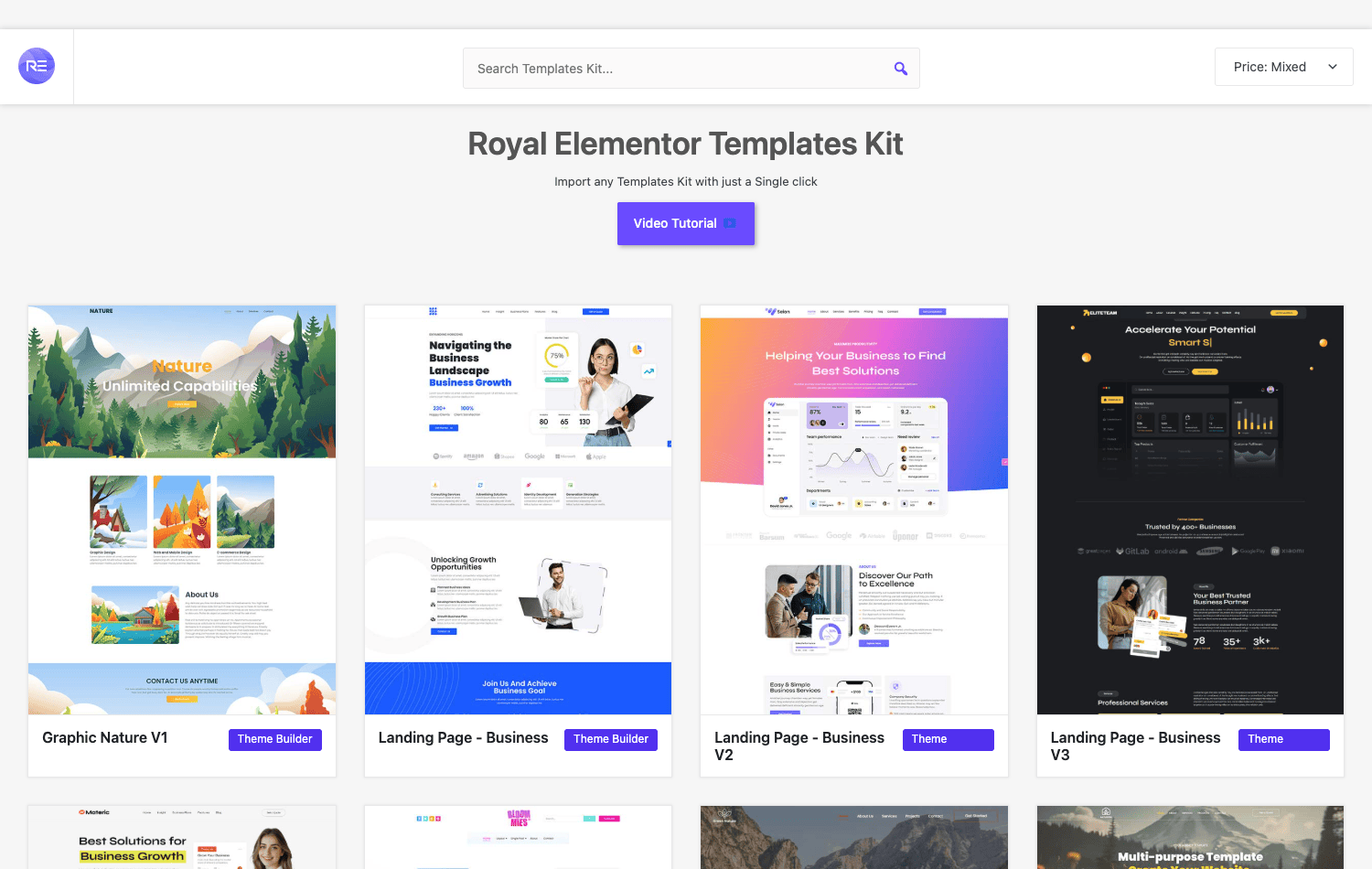
Premade Blocks are individual sections. A block is one piece of a page: a hero, a pricing table row, a testimonial strip, a CTA band. They’re sorted by category in the library, and you drop a single block into a page you’re already building. This is the "I just need a good pricing section, fast" tool.
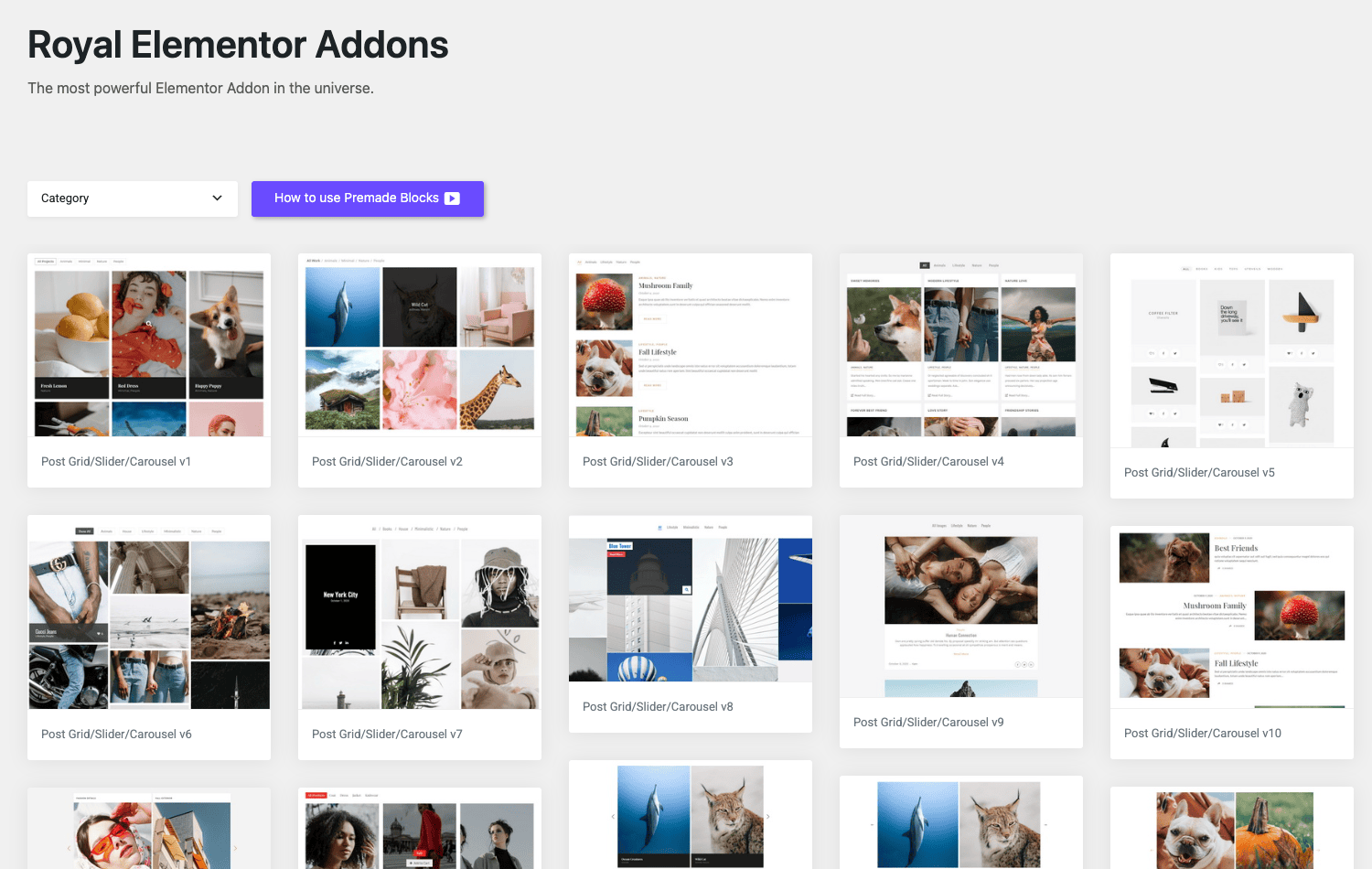
Here’s how I think about which to use:
| You need | Reach for | What you get |
|---|---|---|
| A whole site to start from | Templates Kit | Multiple matched pages, one import |
| One section on an existing page | Premade Block | A single, drop-in design block |
| A layout you’ll reuse a lot | Widget Builder | A custom widget you build once |
The kits are the bigger time-saver if you’re starting cold. The blocks are what you’ll actually use day to day once a site exists, because most real work is adding one more section to a page that’s already there. Both beat building from an empty container, and both are fully editable after import, so you’re not locked into the stock design.
A small honest note: imported kits and blocks are a starting point, not a finished site. You’ll still rewrite the copy, swap the images, and adjust the brand colors. They save you the layout grind, not the content work.
The Pro form builder and where submissions go
A contact form that just emails you is fine until you actually need the data later. Royal’s Form Builder is a step up from that, and it’s worth knowing exactly what it does and doesn’t do before you wire it into a real site.
You build the form as an Elementor widget, dragging in fields the same way you’d build any other layout. The Pro layer is where the useful actions live. On submit, a form can run any of four actions:
- Email. The classic. Send the submission to one or more addresses.
- Mailchimp. Push the submitter straight onto a Mailchimp list, so a newsletter signup actually lands in your email tool.
- Redirect. Send the user to a thank-you page or anywhere else after they submit.
- Webhook. POST the submission data to any URL. This is the developer escape hatch, and it’s how you route entries to a CRM, a Zapier/Make webhook, or your own endpoint.
On top of the actions, every submission gets stored in WordPress. Royal registers a wpr_submissions custom post type and saves entries there, viewable from a Submissions admin screen. So even if an email gets lost or a webhook fails, you’ve got the raw record sitting in your database.
The catch, and I want to be clear about it: this is a form builder, not a CRM and not a payment system. It collects, it notifies, it stores, and it can hand data off. It does not run subscriptions, it does not take card payments, and the WordPress entries table is not a contact-management tool. If you need real lead routing or sales pipeline stages, the webhook action is your friend; fire it at your actual CRM and treat Royal as the capture layer, not the system of record.
For the common jobs (a contact form that emails the team and stores a copy, a newsletter signup that feeds Mailchimp, a campaign form that webhooks into your stack), it’s exactly the right amount of plugin. For anything that touches money or a sales pipeline, it’s the front door, not the whole house.
Popups, mega menus, and WooCommerce
Three more big pieces, because "all-in-one" has to mean something. These are the tools that usually justify three separate plugins, and Royal folds all of them into the suite.
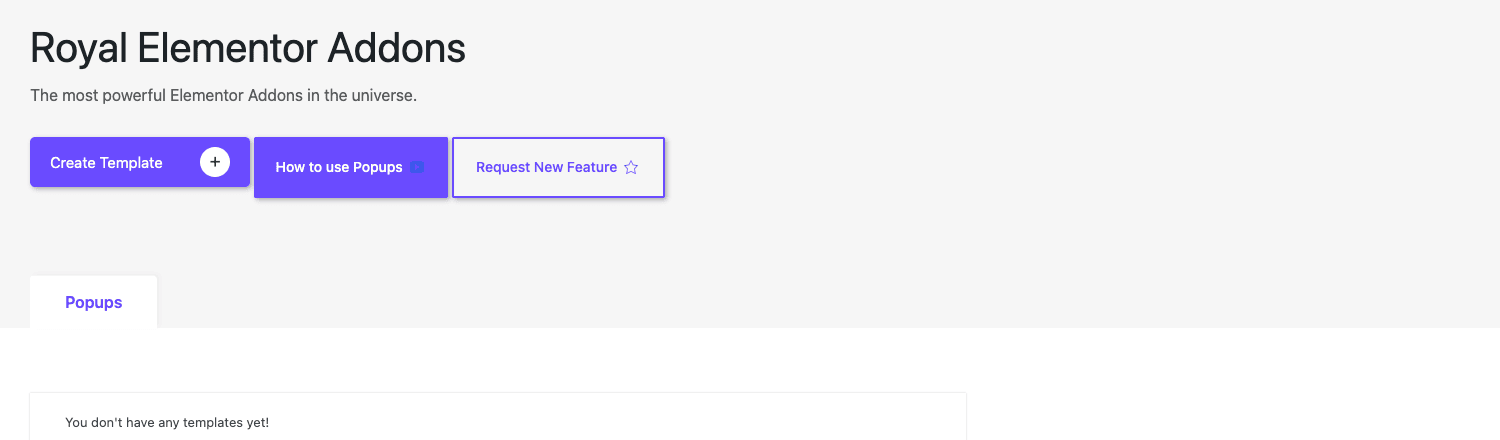
The Popup Builder. You design popups in Elementor under Royal Addons » Popups, exactly like you’d design a page. Then you attach triggers and the same display conditions engine from earlier. The popup and popup-trigger modules handle the timing: on page load, after a scroll, on a click, after a delay, or on exit intent. Because popups share the display conditions, you get the granular targeting for free. A popup that shows once per visitor, only on the pricing page, only to logged-out users, is a normal setup here, not a hack.
The navigation widgets. Royal ships a real Mega Menu, plus Nav Menu, Circle Menu, Off-Canvas, and One-Page Navigation. The Mega Menu is the one people want: multi-column dropdowns with images and widgets inside them, built visually instead of fought with CSS. The Off-Canvas widget gives you a slide-in mobile menu, and the One-Page Navigation handles smooth-scroll anchor menus for single-page sites. Between them you can build almost any header navigation pattern without a dedicated menu plugin.
WooCommerce. This is where Royal quietly does a lot. The Theme Builder’s Product Archive and Product Single template types let you redesign your shop grid and your product page in Elementor, and the WooCommerce display condition lets you target store pages precisely (a category, the cart, the checkout). The woo-grid widget gives you a flexible product grid you can drop anywhere, not just on the shop page. If you’re running a store and you want it to match the rest of your Elementor site instead of looking like default WooCommerce, this is the path.
The pattern across all three is the same one we keep hitting: Royal doesn’t bolt these on as separate islands. They all share the Theme Builder and the display conditions, so once you learn one, you mostly know the rest.
Don’t run your Elementor stack like this
Don’t enable all sixty-plus widgets and leave them on. Every registered widget can load its own CSS and JS when Elementor decides a page needs it, so a site that uses eight widgets but ships the whole library is heavier for zero benefit. Royal hands you a per-widget toggle for exactly this reason; finish the site, then switch off everything you didn’t use and re-test. Leaving it all on is choosing to be slower on purpose.
Don’t stack Royal on top of three other addon packs. Running Royal plus Essential Addons plus PowerPack at once means duplicate widgets, competing stylesheets, and CSS selector collisions that produce bugs nobody can trace. The whole point of an all-in-one suite is that it replaces the stack. Keep the stack and you get the bloat without the payoff. Pick one suite and remove the others.
Don’t build a Theme Builder template without setting display conditions. A header with no condition (or a careless "Entire Site" when you meant one section) silently overrides pages you never intended, including your popups or a checkout. Set a condition on every template, then load the exact page type it targets and confirm it shows where it should and nowhere else. Two minutes of testing saves a day of "why is my header on the cart page."
Don’t treat the form builder as a CRM or a payment system. It emails, pushes to Mailchimp, redirects, webhooks, and stores entries in wpr_submissions. That is capture and notification, not money and not pipeline management. Route the webhook to your real CRM and let that own the customer data. Relying on the WordPress entries table as your system of record is how lead data quietly goes missing.
Royal Elementor Addons Pro vs Essential Addons vs Elementor Pro
This is where the comparison gets useful, because the three products solve overlapping but different problems. Let me put real numbers on the difference.
Royal ships 52 Pro modules on top of its free base, for a combined library past 60 elements. More importantly, it carries a Theme Builder with 6 template types (header, footer, archive, single, product archive, product single), a 12-type display conditions engine, a Popup Builder, a Form Builder with 4 actions (email, Mailchimp, redirect, webhook), Templates Kits, Premade Blocks, and a custom Widget Builder. That’s a site-building feature set, not just a widget tray.
Essential Addons for Elementor and the other widget-focused packs play a narrower game. Essential Addons, PowerPack for Elementor, and Premium Addons Pro are excellent at what they do, which is hand you a large, polished set of widgets. Their theme-building, popup, and form capabilities are partial or bolt-on by comparison. If all you want is more elements to drag onto pages your theme already controls, any of them is a fine pick, and you might not need a full suite at all.
Elementor Pro is the closer rival, because it’s the platform Royal extends and it has its own Theme Builder, popups, and forms. The trade-off is shape and cost. Elementor Pro’s native widget set is smaller than Royal’s combined library, and Elementor Pro is a recurring yearly subscription: it starts somewhere around $59 per year for a single site, climbs to roughly $99 per year for three sites, and about $199 per year once you need twenty-five. Royal bundles a comparable site-builder feature set, a bigger widget count, and the granular 12-condition targeting engine into one addon, and the per-widget toggle gives you a concrete performance lever Elementor Pro doesn’t expose as cleanly.
Here’s the honest framing. If you already pay for Elementor Pro and you’re happy, Royal’s free base plus a few widgets might be all you’d add. If you’re choosing fresh and you want the full site-building toolkit (theme templates, deep display conditions, popups, forms, kits) under one roof, Royal Elementor Addons Pro covers more ground per plugin than the widget packs and gives Elementor Pro a real run for the same job.
| Capability | Royal Pro | Widget packs (EA/PowerPack) | Elementor Pro |
|---|---|---|---|
| Pro modules / widgets | 52 (60+ combined) | Large library | Smaller native set |
| Theme Builder template types | 6 incl. WooCommerce | Partial / bolt-on | Yes |
| Display conditions | 12 types | Limited | Standard |
| Popup builder | Yes | Partial | Yes |
| Form actions | 4 (email/Mailchimp/redirect/webhook) | Varies | Yes |
| Per-widget on/off toggle | Yes | Rare | No |
Developer reference
I’ll be straight with you, because the notes on this plugin were too: Royal Elementor Addons Pro is a no-code tool, and its custom hook surface is deliberately light. It does not ship a sprawling library of wpr_ actions and filters, and that’s fine, that isn’t what it’s for. If you’re a developer, you extend Royal mostly through Elementor’s own APIs and the WordPress template system, not through a Royal-specific framework.
So let me tell you exactly what’s real, and skip the temptation to invent hooks that don’t exist.
There is one genuinely useful filter. When Royal renders a dynamic or custom field value (the kind of thing you bind to an ACF field), it runs the value through wpr_update_custom_field_value. It passes three arguments: the value, the post ID, and the settings field. That gives you a clean spot to transform a field’s output before it hits the page.
add_filter( 'wpr_update_custom_field_value', function ( $value, $post_id, $settings_field ) {
    // Format a stored price field as currency wherever Royal outputs it.
    if ( 'price' === $settings_field && is_numeric( $value ) ) {
        return '$' . number_format( (float) $value, 2 );
    }
    return $value;
}, 10, 3 );
The [acf] shortcode. On the top Pro tier, Royal bundles Advanced Custom Fields PRO and wires it in, so ACF’s own [acf] shortcode is available to drop a field value into any content area, not just an Elementor widget. The shortcode belongs to ACF (Royal just ships and activates it for you), but the practical result is the same: dynamic field output anywhere shortcodes run.
// ACF PRO (bundled by Royal on the top tier) registers this shortcode.
echo do_shortcode( '[acf field="subtitle"]' );
Elementor dynamic tags. On that same top tier, Royal registers dynamic tags through Elementor’s register_tag API, which is how its widgets (and Elementor’s) pull dynamic data into a layout. If you live in Elementor’s dynamic-tags world already, Royal’s tags slot in alongside the rest.
The wpr_submissions CPT. Form entries are stored as a wpr_submissions custom post type. That means you can query them with a plain WP_Query like any other post type, which is the supported way to pull form data programmatically.
$entries = new WP_Query( array(
    'post_type'      => 'wpr_submissions',
    'posts_per_page' => 20,
    'orderby'        => 'date',
    'order'          => 'DESC',
) );
The Widget Builder. If you want your own reusable element, the Widget Builder (under the custom-widget post type) lets you craft a layout once and register it as a draggable widget. For deeper custom work, you’d write a standard Elementor widget class, the same as you would for any Elementor extension.
Now the part most reviews won’t tell you plainly. There is no REST API in the Pro plugin. There is no WP-CLI command set. If you were hoping to script bulk operations against Royal from the command line or hit it from a headless front end, that’s not how this plugin is built. You extend it through Elementor, not through a Royal endpoint library. For a no-code site builder that’s a reasonable trade, but you should know it going in rather than discover it mid-project.
Performance, compatibility, and gotchas
Let’s talk about the things that bite people after launch, because a plugin this broad has a few sharp edges.
Performance comes down to that widget toggle. A big addon suite has a reputation for slowing sites, and it’s earned when you leave everything switched on. Royal’s per-widget on/off control is the single most important performance setting in the plugin. Disable the widgets you don’t use, and the front end stops registering their assets. I’d treat trimming the widget list as a standard launch step, the same way you’d minify CSS. Don’t skip it and then complain the suite is heavy; it’s heavy because you told it to be.
It needs two other plugins to run. Royal Elementor Addons Pro requires Elementor and the free Royal Elementor Addons base. The Pro plugin is an extension, so on its own it won’t render its tools. That’s three plugins to keep updated, which is still fewer than the stack it replaces, but it’s not a single install. Update them together, and update Elementor first when a major Elementor release lands, since the addons follow the platform.
Don’t stack it with other addon packs. I said it in the anti-pattern section and I’ll repeat it here because it’s the most common real-world conflict. Two Elementor addon suites loaded at once means duplicate widget registrations and competing stylesheets, and the bugs that produces are miserable to debug. If you’re moving to Royal, move fully and remove the others.
Theme compatibility is generally good, with a caveat. Because Royal can take over the header, footer, and templates through the Theme Builder, it plays best with a lightweight theme that gets out of the way. Heavy multipurpose themes that draw their own header and footer can fight Royal’s templates, and then you’re chasing which one wins on a given page. A clean base theme plus Royal’s Theme Builder is the pairing that gives the fewest surprises.
The free versus Pro split. The free Royal base gives you a solid widget set and the basics. Pro is where the Theme Builder’s full template types, the deeper display conditions, the form builder’s Mailchimp and webhook actions, the popup builder, and the bulk of the modules live. If you try a feature and it nudges you toward upgrading, that’s the line between the two plugins. Worth knowing so you’re not surprised by which side a feature sits on.
WooCommerce templates need testing on real products. A Product Single template that looks perfect on one product can break on a product with variations, a long gallery, or a different stock state. Build the template, then preview it against your messiest product, not your cleanest one.
Pricing and licensing
WP Royal sells Royal Elementor Addons Pro as a yearly license, with tiers that scale by the number of sites you can activate it on. A single-site license sits at the bottom and the multi-site and unlimited tiers climb from there, all on the usual annual renewal model that gets you updates and support for the year. The free base plugin stays free on WordPress.org, so you can try the widget library before you ever pay for the Pro tools.
On GPL Times, Royal Elementor Addons Pro is available as a GPL download, which is the practical route if you want the full Theme Builder, display conditions, and form actions without committing to a recurring vendor subscription first. Because Royal’s whole value is in the site-building tools that sit behind the Pro tier, getting the complete suite in one download is what lets you actually try the Theme Builder and the 12-condition engine on a real install instead of guessing from a feature list. You can grab Royal Elementor Addons Pro from GPL Times and have the whole toolkit on your site in a few minutes.
Note: Whichever route you take, you still need Elementor and the free Royal base installed alongside it. Budget for the fact that Royal extends Elementor rather than replacing it.
FAQ
Do I still need Elementor Pro if I use Royal Elementor Addons Pro?
Often, no. Royal includes its own Theme Builder, popup builder, form builder, and display conditions, which are the main reasons people buy Elementor Pro. You do need the free Elementor plugin, but the Pro Elementor subscription becomes optional rather than required. The honest caveat is that some Elementor Pro widgets and integrations have no Royal equivalent, so if you depend on a specific Elementor Pro feature, check that Royal covers it before you drop the subscription.
What’s the difference between the free Royal Elementor Addons and Pro?
The free base gives you a good chunk of the widget library and the basics. Pro adds the full Theme Builder template types, the complete 12-type display conditions engine, the popup builder, the form builder’s Mailchimp and webhook actions, and most of the 52 Pro modules. The free version is genuinely usable for adding widgets to pages; Pro is what turns it into a full site builder.
Will Royal slow down my site?
It can if you leave every widget enabled, and it won’t if you don’t. The per-widget on/off toggle exists specifically to control this. Disable the widgets you don’t use and the front end stops loading their assets. A trimmed Royal install is no heavier than a comparable single-purpose plugin, and it’s lighter than running several addon packs at once.
Can Royal replace my theme?
Mostly, for the visible parts. The Theme Builder lets you control the header, footer, single-post layout, archives, and WooCommerce templates, which is most of what you see on screen. You still need an active WordPress theme underneath (Royal isn’t a theme), but you can run a lightweight one and let Royal draw the structure. That base-theme-plus-Royal pairing is a common, sensible setup.
Does it support WooCommerce?
Yes, and more deeply than a widget pack. You get Product Archive and Product Single template types in the Theme Builder, a dedicated WooCommerce display condition, and a woo-grid widget for product listings. You can rebuild your shop and product pages in Elementor instead of living with default WooCommerce styling. Test your templates against products with variations, since those are where layouts tend to break.
Will Royal’s widgets conflict with other Elementor addons?
They can, and you should avoid finding out the hard way. Running two full addon suites together causes duplicate widget registrations and stylesheet collisions. If you’re committing to Royal, remove the other suites rather than stacking them. A single widget plugin alongside Royal for one specific widget is usually fine; a second full suite is asking for trouble.
Can I build a whole site with just Royal and Elementor?
Yes, that’s the design intent. Between the Templates Kits for a fast start, the Theme Builder for site structure, the Premade Blocks for sections, the form and popup builders for interaction, and the WooCommerce templates for a store, you can build the entire visible site without other layout plugins. You’ll still want a caching plugin and security and the usual non-design tools, but for the design layer, Royal plus Elementor covers it.
Does the form builder handle spam, and is it a CRM?
It captures and stores submissions and can email, push to Mailchimp, redirect, or fire a webhook, but it is not a CRM and not a payment system. For spam, pair it with a standard anti-spam measure rather than expecting the form to filter on its own. For lead management, send the webhook to your actual CRM and treat Royal as the capture layer. Don’t make the WordPress entries table your system of record for important leads.
Is there a REST API or WP-CLI support for developers?
No on both. Royal Elementor Addons Pro doesn’t register REST routes or WP-CLI commands. It’s a no-code tool, and developers extend it through Elementor’s APIs (custom widgets, dynamic tags), the wpr_update_custom_field_value filter, the bundled ACF PRO [acf] shortcode on the top tier, and the wpr_submissions custom post type for querying form data. If your project needs to script Royal from the command line or hit it headlessly, that’s not supported.
Final thoughts
I started this skeptical of any plugin that calls itself the only one you need. Royal Elementor Addons Pro doesn’t fully earn that slogan, because you still need Elementor and the free base underneath it, and a developer looking for a deep hook library won’t find one. But it gets closer than I expected.
The reason is the toolkit, not the widget count. The Theme Builder with its six template types, the 12-condition targeting engine, the popup and form builders, the WooCommerce templates, the kits and blocks: that’s a real site-building suite, and it’s the part that lets you delete three or four other plugins. The per-widget toggle is the detail that wins me over, because it answers the one fair criticism of every big addon pack.
If you’re running a tower of Elementor addons right now, Royal is a genuine consolidation play. One plugin, one settings screen, one update, and a front end you can actually trim. If you only need a few extra widgets on pages your theme already controls, a single widget pack is the lighter choice and you don’t need all this. But if you want to build the whole site inside Elementor with one addon doing the work, Royal Elementor Addons Pro is one of the few that can actually back the claim. Read the official Royal Elementor Addons site for the current feature matrix, check the Elementor docs for the platform side, and if you write your own extensions, the WordPress plugin handbook is still the reference that matters.