


If you run a food blog on WordPress, sooner or later you stop typing recipes into the body of a post and look for an actual recipe plugin. There’s a reason: a paragraph that says "1 cup flour, 2 eggs…" gives Google nothing to work with, and it gives the reader no print button, no ratings, no jump-to-recipe link, and no way to save it. Tasty Recipes is one of the most popular tools for closing that gap, and this article is a long, honest walkthrough of what it actually does, how the UI flows, and what the developer surface looks like under the hood.
Table of Contents
- What Tasty Recipes is
- Core features at a glance
- How a recipe goes from idea to post
- Installation and first run
- The Settings tab in detail
- The Design tab and recipe card templates
- Migrating from another recipe plugin
- Schema.org Recipe markup and Google rich results
- Real-world use cases
- Developer reference: hooks, filters, and the data model
- Performance, compatibility, and gotchas
- Pricing and licensing
- How it stacks up against other recipe plugins
- Frequently asked questions
- Final thoughts
What Tasty Recipes is
Tasty Recipes is a recipe-card plugin for WordPress made by WP Tasty, a small studio that builds tools specifically for food and lifestyle bloggers. Their tagline for the product, taken straight from the plugin header in the source, is "the easiest way to publish recipes on your WordPress blog." That’s a fair summary. The plugin’s job is to turn a structured recipe (title, prep/cook/total time, servings, ingredients, instructions, notes, nutrition) into a styled card embedded in your post, with all the metadata Google needs to show that recipe as a rich result in search.
It’s the same kind of plugin as WP Recipe Maker, WP Ultimate Recipe, Cooked, and a few others. Where Tasty Recipes tends to win is on the polish of the default card design and the day-to-day editor workflow. The visual templates look modern out of the box, the recipe editor is a focused modal instead of a sprawling settings page, and the toolbar buttons inside the card (Print, Save, Pin, Get Ingredients) look like they were designed by someone who reads food blogs, not by someone who reads spec sheets.
The vendor confirmation: the main tasty-recipes.php plugin file lists Author: WP Tasty and Plugin URI: https://www.wptasty.com/tasty-recipes, and the bootstrap code namespaces everything under Tasty_Recipes_Pro\. The Pro download bundles a "lite" core (under inc/libs/tasty-recipes-lite/) plus the licensed Pro layer that adds the recipe explorer, distribution metadata, Instacart integration, advanced ratings, and the Pro shortcodes. You only ever install one plugin, but internally it’s two.
If you want to see the recipe-card output, Tasty Recipes on the GPL Times store ships Pro with a Try-It-Now sandbox, which is how the screenshots in this walkthrough were captured.
Core features at a glance
Before going deeper, here’s the short list of what the plugin gives you. Most of these you’d expect from any modern recipe plugin, but a few are specific to Tasty Recipes.
- Structured recipe editor. A modal with fields for title, author, image, description, ingredients, instructions, notes, prep/cook/additional/total time, yield, category, method, cuisine, diet, calories, and full nutrition breakdown.
- Recipe-card output via block, shortcode, or page-builder widget. Use the
wp-tasty/tasty-recipeGutenberg block, the[tasty-recipe id="x"]shortcode, the Elementor widget, or the Divi module. The same recipe renders the same card no matter which embed you use. - Schema.org Recipe JSON-LD. Auto-generated on every post that contains a recipe, formatted exactly the way Google’s Recipe rich result documentation describes. No extra plugin needed.
- "Jump to Recipe" anchor link. Optionally injected at the top of every post that contains a recipe, so a reader who clicked through from Pinterest can skip your "I made these almond butter cups when…" intro.
- Print-friendly view. A separately styled print page, opened in a new tab, with its own template that excludes ads, comments, and your sidebar.
- Save to Recipe Box. Logged-in readers (or anonymous readers tracked by cookie) can save recipes to a personal list and come back to them later.
- Ratings with star widget. Visitors rate the recipe with comments; the average rating feeds back into the Schema.org markup so the gold stars show up in Google results.
- Nutrition labels. Optional integration with NutriFox (a paid third-party nutrition service) for a per-recipe nutrition-label image. Manual entry works too.
- Unit conversion. A toggle that lets visitors flip ingredients between US Customary and Metric.
- Recipe scaling. A 1x/2x/3x button on the card scales every ingredient amount in place.
- Cook Mode. A toggle that asks the device to keep the screen awake so the reader’s phone doesn’t dim while their hands are covered in flour.
- Bulk importers. Eleven converters built in: WP Recipe Maker, WP Ultimate Recipe, EasyRecipe, ZipList, Mediavine Create, Cookbook, Meal Planner Pro, Simple Recipe Pro, Yummly, YumPrint, and WordPress.com recipes.
- AI scraper prevention. A recent setting that adds compliant AI bots (GPTBot, CCBot, Claude-Web, etc.) to a robots-aware no-scrape list for your recipe content.
- Custom post type for recipes. Every recipe is a
tasty_recipeCPT row with its own taxonomies (tasty_recipe_category,tasty_recipe_method,tasty_recipe_cuisine,tasty_recipe_diet), so recipes are queryable, indexable, and reusable across multiple posts. - Instacart "Get Ingredients" affiliate button. US-only, opt-in, paid affiliate ID. Optional.
- Family integrations. First-party hooks for Tasty Pins (Pinterest image overrides), Tasty Roundups (related-recipes block), and Tasty Links (auto-affiliate-link replacement).
Plenty of plugin to cover.
How a recipe goes from idea to post
The mental model is worth getting right early, because Tasty Recipes is slightly different from the "everything in one shortcode" approach some other plugins use.
A recipe in Tasty Recipes is a separate entity. When you save it, it gets a row in the wp_posts table with post_type = tasty_recipe. That row has its own taxonomies, its own meta, its own attachment for the recipe image. The blog post that the reader actually visits is a regular post row, and it embeds the recipe via a block or shortcode that references the recipe ID.
Why does that matter? Two reasons. First, you can reference the same recipe from multiple posts (a roundup, a seasonal index page, a newsletter archive) without duplicating the data or fragmenting your Schema markup. Second, you can list and filter all your recipes in one admin screen, separate from your regular posts. That’s where the Recipe Explorer lives.
So the workflow looks like this:
- You’re writing a new post in Gutenberg, classic editor, Elementor, or Divi.
- At the point in the body where the recipe should appear, you insert a Tasty Recipe block (or shortcode).
- A modal pops up offering "Create new recipe" or "Embed existing recipe."
- You either fill in the modal or pick from your saved recipes.
- The block in the editor renders a small placeholder; the published post renders the full styled card.
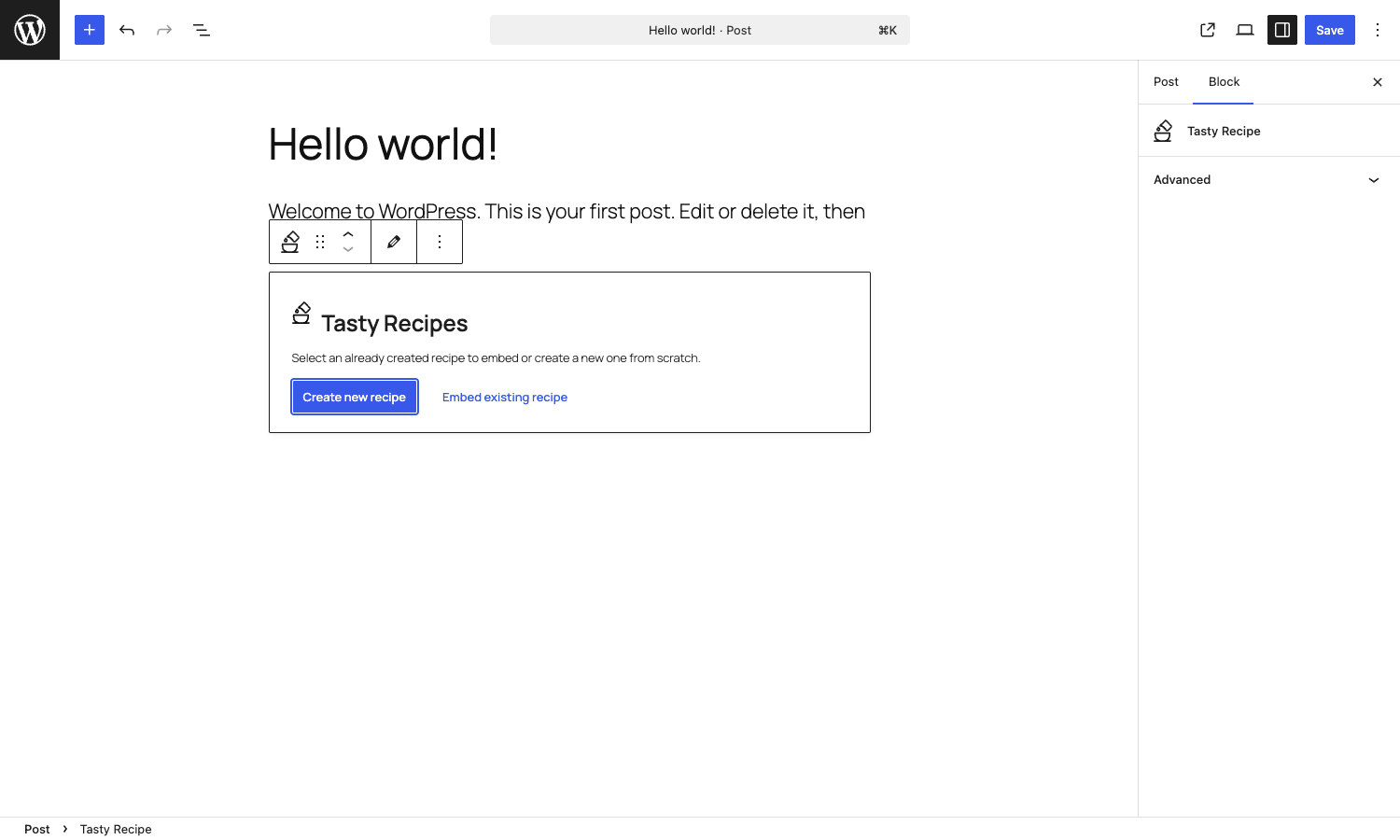
You don’t have to think about the CPT layer day-to-day, but it’s there, and it’s a big part of why the plugin scales well to blogs with hundreds of recipes.
Installation and first run
Standard plugin install. From the WordPress admin, go to Plugins, Add New, upload the zip, activate. Tasty Recipes adds a "WP Tasty" item to the admin sidebar; under it you’ll find Dashboard, Tasty Recipes, and (if you also own them) Tasty Links, Tasty Pins, and Tasty Roundups.
The first thing you see is the "Get Started" tab, which is what the plugin calls the welcome screen. It’s also the closest thing to a setup wizard. There’s no forced multi-step onboarding, just a short list of "here’s how this works" sections and a Visit Settings button.
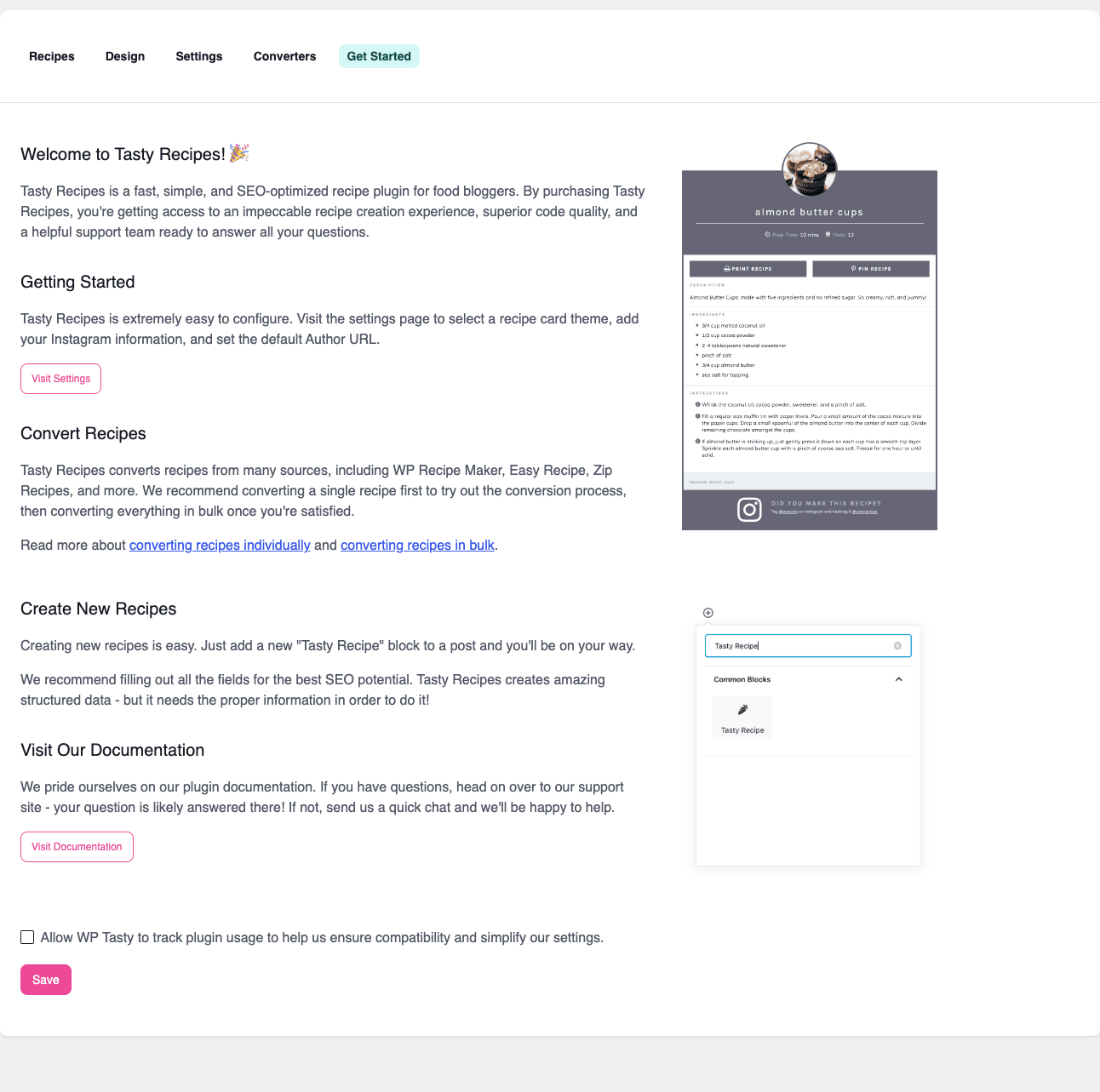
The first run you actually care about is in two places: Settings, where you decide what behavior the plugin has, and Design, where you decide what the card looks like. Both are tabs on the same admin page (admin.php?page=tasty-recipes).
If you imported from an old recipe plugin, do that first. Converters is also a tab on the same screen. It’s safer to import while you still have the old plugin active so the conversion can read the old data; the importer doesn’t delete the old recipes, so you can run it, spot-check a few converted recipes, then deactivate the old plugin when you’re happy.
The Settings tab in detail
This is the screen you’ll touch most often. The defaults are reasonable, but a couple of toggles are worth thinking about before you publish your first recipe.
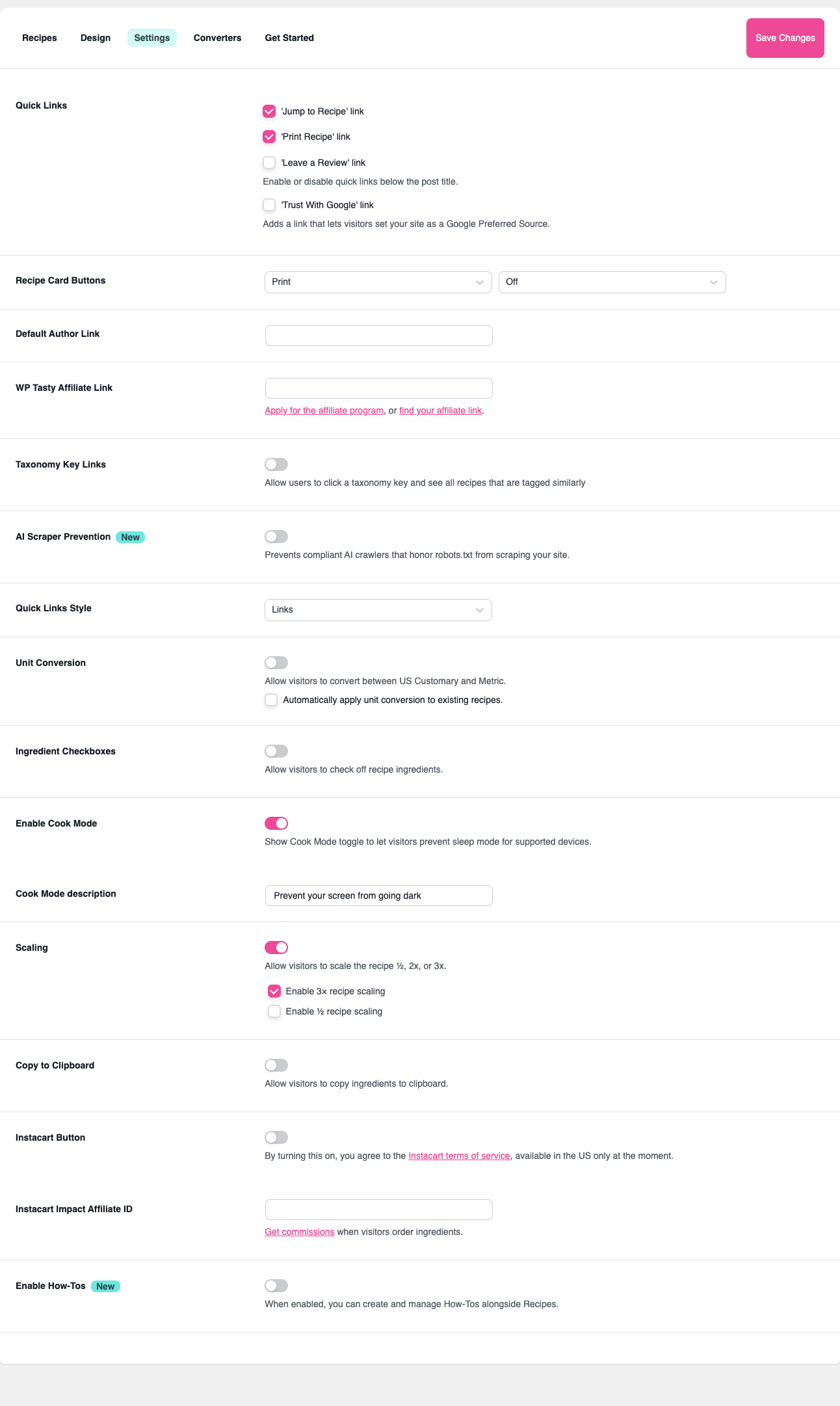
A walkthrough, top to bottom:
- Quick Links. Toggle the "Jump to Recipe" and "Print Recipe" anchor links at the top of every post. If you’re targeting Pinterest traffic, leave Jump to Recipe on; readers expect it.
- Recipe Card Buttons. Two dropdowns control which buttons render in the card header. Print is on by default; the second slot can be Save, Pin, or Off.
- Default Author Link. Lets every recipe link the author name to a fixed URL (typically your About page).
- WP Tasty Affiliate Link. Replaces the "Recipe by Tasty Recipes" credit at the bottom of the card with your affiliate ID. Optional but mildly profitable for high-traffic blogs.
- Taxonomy Key Links. Decide whether the category/method/cuisine/diet labels inside the card are clickable links to taxonomy archives. If your theme doesn’t style those archives well, turn this off.
- AI Scraper Prevention. Recent addition. Adds compliant AI bots to the disallow list so they don’t slurp your recipes into model training data. Worth turning on.
- Quick Links Style. Dropdown for the jump-to-recipe styling: plain text links, buttons, or icons.
- Unit Conversion. Lets visitors toggle between US Customary and Metric. The plugin reads your ingredient amounts and tries to convert in place. There’s also a sub-option to retroactively apply conversion to existing recipes.
- Ingredient Checkboxes. Lets readers click off ingredients as they shop or cook. Tiny feature, very useful in practice.
- Cook Mode. Adds a "Cook Mode" toggle to the recipe card that calls the Screen Wake Lock API on supported devices. The reader’s phone won’t dim while they’re elbow-deep in dough.
- Scaling. Visitor-facing 1x/2x/3x (and optional 1/2x) buttons on the recipe. Click 2x and every ingredient amount doubles.
- Copy to Clipboard. A button that copies the full ingredient list to clipboard, useful for grocery apps.
- Instacart Button. Toggle the "Get Ingredients" Instacart button. Requires an Instacart Impact affiliate ID; US-only.
- Enable How-Tos. Turns on the secondary How-To block type (
wp-tasty/tasty-howto) for non-recipe instructional content like "how to fold croissants" or "how to clean a cast iron pan."
A reasonable starting config for a new blog: Jump to Recipe on, Print on, AI Scraper Prevention on, Cook Mode on, Scaling on, Copy to Clipboard on. Leave Unit Conversion off until you’ve decided whether your ingredient style is US- or Metric-first; flipping it on midway through years of content can produce some weird conversions.
The Design tab and recipe card templates
The Design tab is where most plugins lose me, because the typical "skin chooser" gives you a wall of half-dozen radio buttons and a screenshot. Tasty Recipes does it differently: it shows a live preview of an example recipe card on the right and a column of design controls (colors, fonts, borders, button styles) on the left, and every change updates the preview without a full page reload.
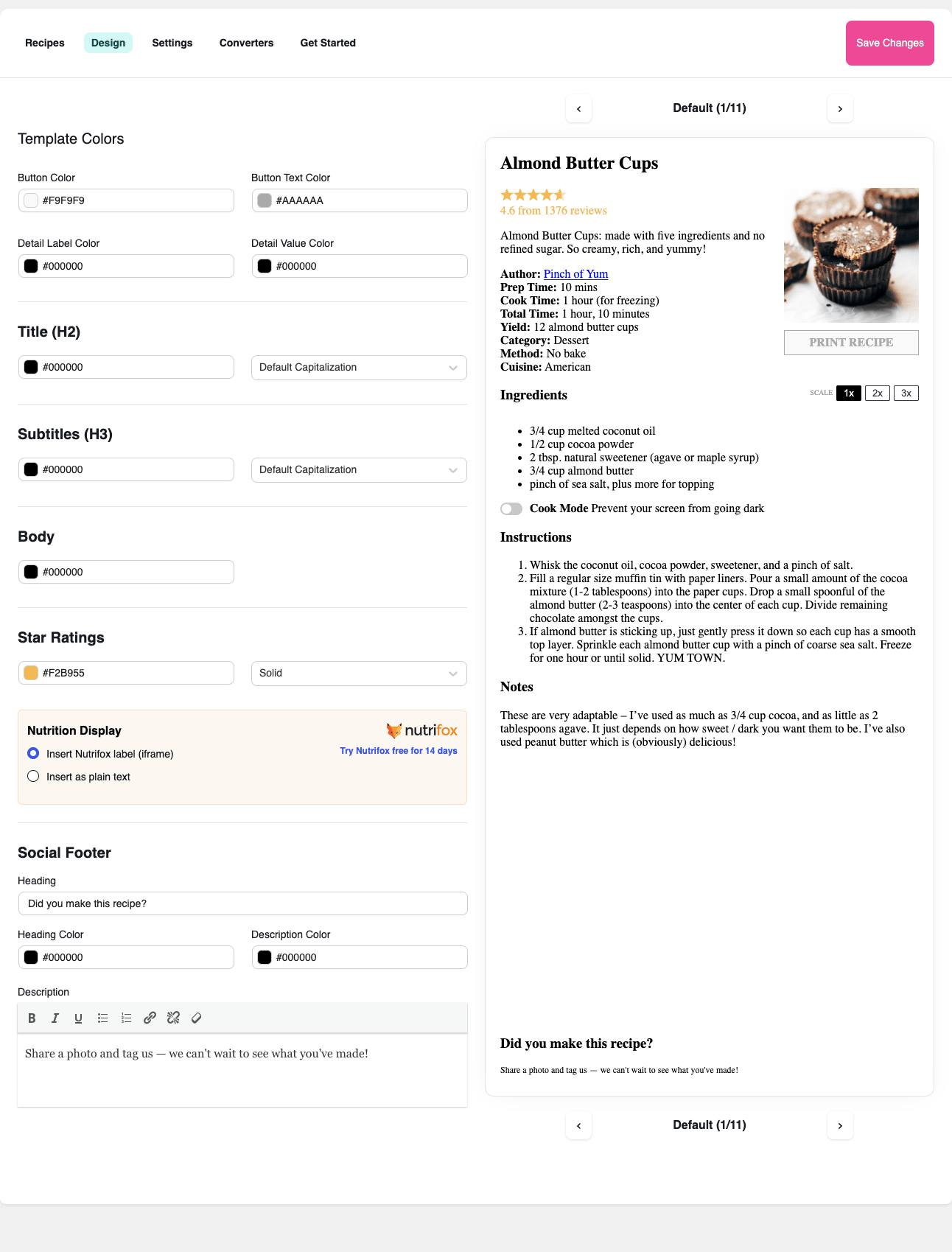
The controls cover button colors (background, text), heading colors (H2 and H3), body color, star-rating color, the nutrition-display module (NutriFox vs the plugin’s built-in static label vs hidden), social-footer styling, and a free-form custom CSS box at the bottom for anything the UI doesn’t expose.
There’s a Default / V1 / V2 / V3 selector at the top of the preview that switches between the visual template styles the plugin ships with. The differences are mostly layout (image on top vs side, divider styles, button placement). All of them respect the colors you set.
One small thing that’s easy to miss: the preview also doubles as a documentation tool. The example recipe (Almond Butter Cups) has every field populated, including nutrition, video, ratings, and source. If you can’t remember what the "Notes" section looks like, scroll the preview.
Migrating from another recipe plugin
If you’re moving from WP Recipe Maker, WP Ultimate Recipe, EasyRecipe, ZipList, or any of the other supported plugins, the Converters tab is the right place to start.
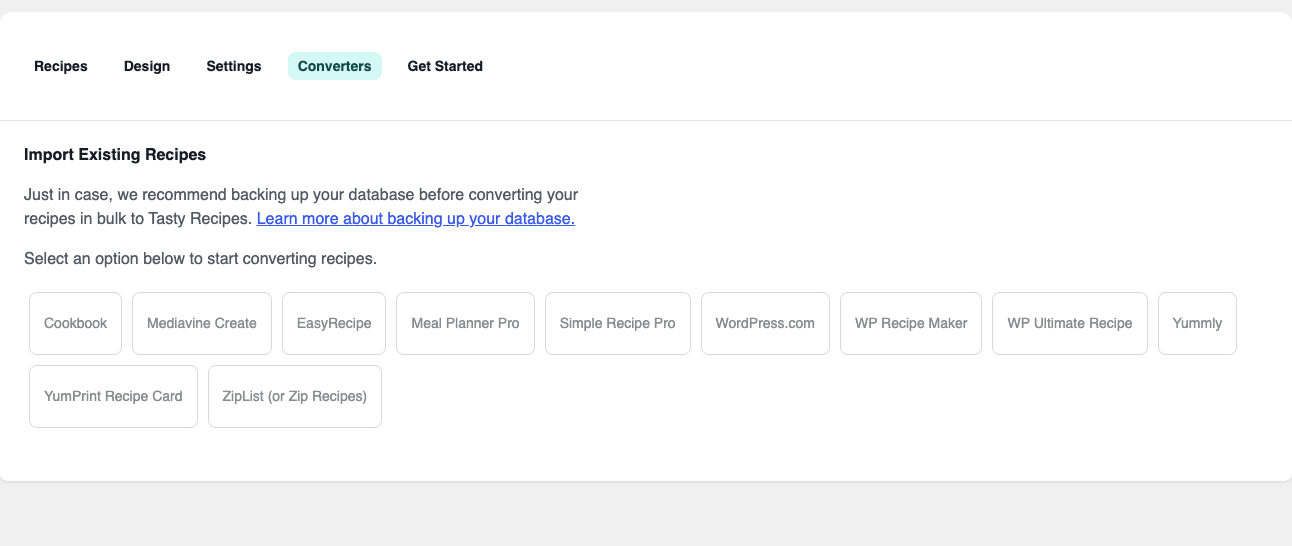
The flow is the same for each: pick the source plugin, the converter detects recipes in your existing posts, you preview the mapping, and you bulk-convert. Recipes get a fresh Tasty Recipes CPT row, and the old recipe block/shortcode inside the post body gets replaced with the new Tasty Recipes block.
Two things to know before you click Convert:
- Back up first. The Converters page tells you this and links to a backup guide. Listen to it. Recipe conversion edits live post content and inserts new rows. If something goes wrong with image attachments or taxonomy mapping, an old backup will save you an hour.
- Keep the old plugin active during the import. The converter reads the old plugin’s data structure to do the mapping. If you deactivate the old plugin first, the importer can’t find anything to import.
After a successful import, do a manual pass on five or ten random posts to confirm the recipes look right, then deactivate the old plugin.
Schema.org Recipe markup and Google rich results
This is the SEO part. A recipe in Google’s search results can show with a photo, a star rating, the total time, the calories, and "save" / review counts. To get any of that, Google needs the recipe in Schema.org Recipe JSON-LD on the page. Tasty Recipes generates it for you, automatically, on every post that contains a recipe.
The JSON-LD blob the plugin outputs is structured like this (simplified):
{
 "@context": "https://schema.org",
 "@type": "Recipe",
 "name": "Almond Butter Cups",
 "author": { "@type": "Person", "name": "admin" },
 "datePublished": "2026-05-24",
 "image": ["https://example.com/.../almond-butter-cups.jpg"],
 "description": "...",
 "prepTime": "PT10M",
 "cookTime": "PT15M",
 "totalTime": "PT25M",
 "recipeYield": "12 cups",
 "recipeCategory": "Dessert",
 "recipeCuisine": "American",
 "recipeIngredient": ["1/4 cup melted coconut oil", "..."],
 "recipeInstructions": [
 { "@type": "HowToStep", "text": "Whisk together coconut oil..." }
 ],
 "nutrition": { "@type": "NutritionInformation", "calories": "180 calories" },
 "aggregateRating": { "@type": "AggregateRating", "ratingValue": "5", "ratingCount": "11" }
}
That’s exactly the shape Google’s Recipe rich result documentation describes. If you also run an SEO plugin like Yoast SEO Premium, Rank Math SEO PRO, or WP Schema Pro, Tasty Recipes detects them and (depending on the filter tasty_recipes_use_yoast_schema / tasty_recipes_use_custom_schema) can either let those plugins own the schema, contribute to a shared @graph, or stay out of the way. By default it just outputs its own JSON-LD and trusts the SEO plugins to handle the other types of markup.
After publishing, validate one of your recipes in Google’s Rich Results Test. You should see a single Recipe item, all required fields green, and zero warnings about missing image, prep time, or recipeIngredient.
If you’ve also installed WP Schema Pro, our WP Schema Pro setup guide explains the broader picture of structured data on WordPress and how recipe markup fits next to your other schema types.
Real-world use cases
Tasty Recipes is built for food bloggers, but it shows up in a few more places than that:
- A food blog driven by Pinterest. Almost every recipe-blog visitor lands from a Pin and wants the recipe in three seconds. Turn on Jump to Recipe, enable scaling, configure print view to be ad-free, and ratings open. The card itself does most of the conversion work.
- A meal-planning service or membership site. The CPT model means you can list every recipe through
WP_Query(or a Gutenberg query block) and build a member-only "recipe library" page that filters bytasty_recipe_diet=vegetarian&tasty_recipe_cuisine=italian. Combine that with a membership plugin and you have a closed recipe library. - A cookbook companion site. Authors publishing a print cookbook often want a digital companion: every recipe in the book gets a tasty_recipe row, the print template is styled to match the book, and the SEO comes from the long-form post around each recipe.
- A small restaurant or catering site. Not the obvious use, but the structured recipe card is a perfectly fine way to show off house dishes with ingredients, photos, and Schema.org markup, even if the visitor isn’t going to cook them.
- A YouTube food channel companion blog. Every video gets a post; every post gets a recipe card with the ingredients, the video embedded inside the card via the editor’s video URL field, and the link to the channel.
If your audience is going to print, save, or scale your recipes, this plugin pays attention to that audience. If your audience is going to skim and screenshot, the rich-snippet output and the Pin-friendly card design do more of the work.
Developer reference: hooks, filters, and the data model
Tasty Recipes exposes a generous developer surface. Below are the hooks and filters worth knowing about, grouped by what they let you do, with short PHP examples for each.
The data model
Every recipe is a row in wp_posts with post_type = 'tasty_recipe'. Custom data (ingredients, instructions, nutrition, times, yield) is stored in post meta on that recipe row, not on the parent blog post. The four taxonomies attached to the CPT are:
tasty_recipe_category(Course: dessert, dinner, breakfast,…)tasty_recipe_method(Bake, fry, grill, no-bake,…)tasty_recipe_cuisine(American, Italian, Indian,…)tasty_recipe_diet(Vegetarian, vegan, gluten-free,…)
You can add a fifth taxonomy or modify the registration args with tasty_recipes_taxonomy_definitions:
add_filter( 'tasty_recipes_taxonomy_definitions', function ( $defs ) {
 $defs['tasty_recipe_season'] = [
 'args' => [
 'label' => 'Season',
 'public' => true,
 'show_admin_column' => true,
 'rewrite' => [ 'slug' => 'recipe-season' ],
 ],
 ];
 return $defs;
} );
And you can kill the front-end archive page for any taxonomy that you don’t want indexed:
add_filter( 'tasty_recipes_taxonomy_has_archive', function ( $has_archive, $taxonomy ) {
 if ( 'tasty_recipe_diet' === $taxonomy ) {
 return false;
 }
 return $has_archive;
}, 10, 2 );
Modify the recipe card output
The single most useful filter is tasty_recipes_recipe_card_output. It runs once per recipe card render and gives you the full HTML before it’s printed. Use it to add a banner, inject a custom microdata attribute, or swap a phrase site-wide.
add_filter( 'tasty_recipes_recipe_card_output', function ( $html, $recipe ) {
 $banner = '<div class="seasonal-banner">Seasonal recipe! Best made between June and August.</div>';
 return $banner. $html;
}, 10, 2 );
If the change is big enough to want a real template file instead of a string append, swap the template path with tasty_recipes_recipe_template:
add_filter( 'tasty_recipes_recipe_template', function ( $template, $recipe_id ) {
 $custom = get_stylesheet_directory(). '/tasty-recipes/recipe-card.php';
 if ( file_exists( $custom ) ) {
 return $custom;
 }
 return $template;
}, 10, 2 );
The data passed into your template is filtered through tasty_recipes_recipe_template_vars, so you can inject extra variables without forking the template at all.
Hook into the card render lifecycle
A handful of actions let you inject content at exact positions inside the card. They’re great when you want a "Free printable shopping list" button under the ingredients without forking the template.
add_action( 'tasty_recipes_card_after_ingredients', function ( $recipe ) {
 printf(
 '<a class="shopping-list-btn" href="%s">Get the printable shopping list</a>',
 esc_url( get_post_meta( $recipe->get_id(), '_shopping_list_url', true ) )
 );
} );
Other useful position hooks: tasty_recipes_card_after_title, tasty_recipes_card_before_ingredients, tasty_recipes_card_before_nutrition, tasty_recipes_card_footer.
Modify the Schema.org JSON-LD
The most SEO-critical filter is tasty_recipes_google_schema, which gives you the assembled JSON-LD array before it’s encoded and printed.
add_filter( 'tasty_recipes_google_schema', function ( $schema, $recipe ) {
 $schema['publisher'] = [
 '@type' => 'Organization',
 'name' => get_bloginfo( 'name' ),
 'logo' => [
 '@type' => 'ImageObject',
 'url' => 'https://example.com/logo.png',
 ],
 ];
 if (! isset( $schema['suitableForDiet'] ) && has_term( 'vegan', 'tasty_recipe_diet', $recipe->get_id() ) ) {
 $schema['suitableForDiet'] = 'https://schema.org/VeganDiet';
 }
 return $schema;
}, 10, 2 );
If you’re delegating schema generation to Yoast or another plugin and Tasty Recipes is double-outputting, use the delegation filters:
add_filter( 'tasty_recipes_use_yoast_schema', '__return_true' );
There’s also tasty_recipes_use_custom_schema (a generic kill-switch for any other schema plugin you’re using) and tasty_recipes_enriched_google_schema (a final pass after enrichment).
Control the print view
The print page has its own URL, template, and button set. Override the print URL pattern via tasty_recipes_print_url, or change which buttons appear at the bottom of the print page via tasty_recipes_print_view_buttons.
add_filter( 'tasty_recipes_print_view_buttons', function ( $buttons, $recipe ) {
 $buttons[] = [
 'label' => 'Email this recipe',
 'href' => sprintf( 'mailto:?subject=%s&body=%s', rawurlencode( $recipe->get_title() ), rawurlencode( get_permalink( $recipe->get_id() ) ) ),
 'class' => 'tasty-print-email',
 ];
 return $buttons;
}, 10, 2 );
You can also intercept the print render itself with the action pair tasty_recipes_before_render_print / tasty_recipes_after_render_print, useful for adding a custom page header or stripping a block of print-specific CSS.
Scaling and ratings
Recipe scaling lets visitors multiply ingredient amounts. The set of "scalable" amounts is filterable, so you can add a half-scale option (0.5x) or remove the 3x option:
add_filter( 'tasty_recipes_scalable_amounts', function ( $amounts ) {
 return [ 0.5, 1, 2, 3, 4 ];
} );
To require a comment when readers leave a low rating (a smart anti-troll measure), set the minimum:
add_filter( 'tasty_recipes_min_rating_without_comment', function () {
 return 3;
} );
Now any 1 or 2-star rating must include a written comment before it’s accepted.
Quiet UI tweaks
If your card needs slightly different button labels (e.g. you’re not in English), every visitor-facing button label has a filter:
add_filter( 'tasty_recipes_print_button_label', fn() => 'Imprimir' );
add_filter( 'tasty_recipes_save_button_label', fn() => 'Guardar' );
add_filter( 'tasty_recipes_saved_button_label', fn() => 'Guardado' );
add_filter( 'tasty_recipes_pin_button_label', fn() => 'Pinear' );
add_filter( 'tasty_recipes_quick_links_label', fn() => 'Saltar a la receta' );
There are also tasty_recipes_css_vars, tasty_recipes_custom_css, and tasty_recipes_styles for design tweaks that need to be in code (e.g. served from a child theme) rather than typed into the Design tab’s CSS box.
Disable specific surfaces site-wide
If your blog doesn’t want ratings, doesn’t want cook mode, or doesn’t want auto-prepended jump-to-recipe links, kill them globally:
add_filter( 'tasty_recipes_enable_ratings', '__return_false' );
add_filter( 'tasty_recipes_enable_cook_mode', '__return_false' );
add_filter( 'tasty_recipes_should_prepend_jump_to', '__return_false' );
tasty_recipes_should_prepend_jump_to is also useful as a per-post filter: return false on category=news posts but true on category=recipe posts.
Bulk converters and AI bot controls
The Converters layer is filterable too. Override how a specific source plugin’s recipes are mapped via tasty_recipes_convert_recipe, which gives you the partially-built Tasty Recipes recipe array and the original source row. The AI scraper list is filterable via tasty_recipes_ai_scraper_bots if you want to add or remove bots from the disallow list:
add_filter( 'tasty_recipes_ai_scraper_bots', function ( $bots ) {
 $bots[] = 'YourCorpAIBot/1.0';
 return $bots;
} );
Block, shortcode, and editor data
If you’re building a custom Gutenberg block that needs the recipe data, the editor data is exposed via tasty_recipes_recipe_editor_data and tasty_recipes_block_editor_data. The render output of the block itself is filterable through tasty_recipes_recipe_block, and the shortcode render through tasty_recipes_recipe_shortcode.
Combine those with WordPress’s register_post_type docs if you want to build a fully custom recipe-archive block that queries tasty_recipe directly.
Save-side hooks
When a recipe is saved (either from the editor modal or from the bulk importer), three hooks fire:
add_action( 'tasty_recipes_after_save_editor_data', function ( $recipe_id, $data ) {
 // sync to MailPoet, push to webhook, regenerate cache,...
}, 10, 2 );

add_filter( 'tasty_recipes_pre_save_editor_data', function ( $data ) {
 // sanitize, normalize fractions, lowercase ingredients,...
 return $data;
} );

add_action( 'tasty_recipes_after_saving_rating', function ( $recipe_id, $rating ) {
 // bust object cache, fire analytics,...
}, 10, 2 );
A common pattern: hook tasty_recipes_after_save_editor_data to push a new recipe to a newsletter campaign in MailPoet Premium, so your subscribers get notified the moment a recipe goes live.
Performance, compatibility, and gotchas
Tasty Recipes is reasonably well-behaved on the frontend, but there are a few things worth knowing.
Asset loading. The recipe card CSS and JS only enqueue on posts that contain a recipe block or shortcode. The plugin uses has_block( 'wp-tasty/tasty-recipe', $post ) and a shortcode-presence check before loading anything. Your home page, archives, and non-recipe posts stay lean. If you’re using a caching plugin like WP-Optimize Premium or WP Rocket (see our WP Rocket walkthrough for setup details), the recipe CSS minifies and combines cleanly.
Image sizing. The card image is rendered at a size controlled by the tasty_recipes_card_image_size filter (default is large or a comparable WordPress image size). If your card looks blurry, check that the registered image size is at least as wide as the card displays.
Print CSS specificity. The print view template is intentionally minimal, but if your theme injects high-specificity print CSS, you can end up with a print page that shows your sidebar or your sticky header. The fix is usually to add a @media print rule in your theme’s print stylesheet that hides theme chrome inside the print template body class.
Schema double-output. If you also installed an SEO plugin that outputs Recipe schema (some do this automatically when they detect a recipe pattern), you can end up with two Recipe items on the page. Use tasty_recipes_use_yoast_schema or tasty_recipes_use_custom_schema to delegate, or disable the other plugin’s recipe schema. Two Recipe items don’t break anything, but Google may pick the less complete one.
Translation. Tasty Recipes is internationalized (tasty-recipes text domain) and ships with a .pot file under languages/. Most visitor-facing strings also have a per-label filter (see the Quiet UI tweaks section above) so you can override individual labels without translating the whole plugin.
Pinterest images. If you’re using Tasty Pins for Pinterest-specific image overrides, Tasty Recipes integrates via tasty_recipes_force_pin_image_url and tasty_recipes_pin_button_label. If you’re not using Tasty Pins, you can still override the Pin image URL with the same filter.
Block validation after plugin updates. Like every Gutenberg block, the Tasty Recipe block stores its serialized markup in post_content. When the plugin updates and changes the block’s saved attributes, Gutenberg sometimes shows a "block contains unexpected or invalid content" warning the next time you edit that post. Click "Attempt block recovery" and re-save. This is normal for plugin upgrades and not a Tasty Recipes-specific bug.
Custom card templates and PHP errors. If you override the recipe template via tasty_recipes_recipe_template, make sure your custom template handles missing fields (e.g. a recipe with no nutrition data, no video, no notes). The stock template guards against this; a forked template needs the same if (! empty( $recipe->get_nutrition() ) ) checks.
Pricing and licensing
Tasty Recipes is sold by WP Tasty as a per-site annual license. They also bundle it with Tasty Pins, Tasty Roundups, and Tasty Links into a "Tasty Plus" pack for a discount. The pricing tiers are typical: single-site, 5-site, and unlimited-site, with the annual fee paying for updates and support.
The GPL Times catalog carries the WP Tasty family under a single category. Tasty Recipes sits alongside Tasty Pins (Pinterest image manager), Tasty Roundups (related-recipes feature article tool), and Tasty Links (auto-affiliate-link replacement, similar in concept to Pretty Links Pro but optimized for food blogs). Each is a separate plugin; pick one or all four.
How it stacks up against other recipe plugins
The recipe-plugin market on WordPress is small and very competitive. Five names show up most often:
- WP Recipe Maker. Probably the most direct competitor. WPRM is more developer-flexible, more configurable, and has more advanced features at the high end (recipe roundup blocks, meal planning, advanced ratings). It’s also visually less polished by default and the admin UI is denser. If you’re a tinkerer, WPRM is great. If you want the card to look good with zero work, Tasty Recipes is closer to that out of the box.
- WP Ultimate Recipe. Mature plugin with a strong free version. Less aggressive on the visual side, more focused on the recipe-as-content-type angle. Fine choice if you want a no-frills option.
- Cooked. Beautiful design, premium-focused. Smaller community than the above. Strong if you want a "recipes as the main content type" setup with full archives, filters, and front-end submission.
- Mediavine Create. Free, made by the Mediavine ad network. Solid Schema output, fairly basic visual design, optimized for Mediavine-monetized sites. Free is the headline.
- Recipe Card Block (WPZOOM). Free Gutenberg-only option, very basic but covers the essentials. Good starting point for a brand new blog that’s not sure it wants to commit to a paid plugin.
The pattern that holds across the category: the free plugins handle the basic structured-data output, and the paid plugins differentiate on UI polish, importer count, and ecosystem (cook mode, ratings, video integration, family add-ons). Tasty Recipes is in the polished-paid bucket along with Cooked and WPRM Pro.
If your decision is between Tasty Recipes and WP Recipe Maker specifically, the practical answer is: install both on a staging copy of your site, import the same five recipes into each, publish a test post with each, and decide based on how the card looks and how the editor flow feels to you. That’s a half-hour of work that saves you a year of "I should have picked the other one."
Frequently asked questions
Does Tasty Recipes work with the classic editor?
Yes. The plugin ships with a TinyMCE button that opens the same recipe-create modal as the Gutenberg block, and the [tasty-recipe] shortcode renders the same card in classic-editor posts. You don’t have to use Gutenberg.
Do I need to install the WP Tasty lite plugin separately?
No. The Pro download includes the lite plugin under inc/libs/tasty-recipes-lite/ and loads it automatically if it’s not already active. You install one plugin and you get both layers.
Is there a free version?
WP Tasty doesn’t publish a standalone free version on the WordPress.org plugin directory. The plugin is sold as a paid annual license direct from WP Tasty or as part of the WP Tasty bundle.
Can I export my recipes if I switch plugins later?
Recipes are stored as a regular custom post type (tasty_recipe), so a standard WordPress export tool (Tools, Export) captures them. Other recipe plugins typically need to write an importer for the Tasty Recipes data structure to take them in directly. WP Recipe Maker has one, for example.
Does it support multiple recipes per post?
Yes. You can drop multiple Tasty Recipe blocks into a single post, each referencing a different tasty_recipe row. The Schema.org output will include multiple Recipe items in the page’s structured data.
Does it work with multilingual plugins like WPML or Polylang?
The custom post type and taxonomies are standard WordPress objects, so multilingual plugins that translate posts, terms, and meta will translate them. The only fiddly part is making sure the per-language Schema markup points to the per-language permalinks.
Will the ratings show up as gold stars in Google?
Yes, eventually. Star ratings flow into the Schema.org aggregateRating field. Google’s Recipe rich result documentation says ratings appear "when our quality systems determine the recipe is suitable" – in practice, that usually takes time and traffic, but the markup is in place from day one.
Can I scale the recipe card image with Pinterest’s preferred aspect ratio?
Yes. The Tasty Pins integration adds per-recipe Pin image overrides, and if you’re not using Tasty Pins, you can hook tasty_recipes_force_pin_image_url to return whatever URL you want at Pinterest-preferred 2:3 aspect ratio.
Will print mode work without the recipe author allowing print?
Print is enabled by default. The button can be turned off per-site in the Settings tab, but there’s no per-recipe disable. If you want some recipes excluded, you can filter tasty_recipes_quick_links_label and conditionally suppress print.
Final thoughts
Tasty Recipes is the kind of plugin that’s narrow and deep. It does one thing – structured recipes on WordPress – and it does the things around that one thing very carefully: the editor modal feels designed, not built; the card looks good without three hours of CSS work; the Schema output passes Google’s validator on day one; and the developer surface is wide enough that a custom theme can plug in without forking templates.
The places it might not be right for you: if you want a free option, look at Mediavine Create or Recipe Card Block. If you want maximum flexibility and you’re willing to spend time configuring, WP Recipe Maker Pro is the alternative. If you’re building a recipe-driven membership site with paywall-style content gating, Cooked has more features in that direction.
For the typical food blog publishing a few recipes a week, wanting print, ratings, schema, Pin support, and a card that looks like 2025 instead of 2014, Tasty Recipes hits the target with very little fuss. Pair it with a fast cache, an SEO plugin you already trust, and a Pinterest-image plugin if Pinterest is your traffic source, and you have a recipe-blog stack you can stop thinking about.