

If you run a WooCommerce store and you want to charge customers on a schedule, you basically have three options. You can pay Automattic for the official WooCommerce Subscriptions extension. You can pick up YITH’s take on the same idea. Or you can buy SUMO Subscriptions once on CodeCanyon and stop paying renewal fees forever. This article walks through what SUMO Subscriptions actually does, where it shines, and where the official Automattic plugin still has the edge.
I’ve spent a few hours inside a fresh demo of the plugin and a few more reading the source. The short version: SUMO Subscriptions packs more features into one zip than any other WooCommerce subscription plugin I’ve seen, and most of the rough edges are cosmetic, not functional. The longer version is below.
Table of contents
- What SUMO Subscriptions does
- Core features at a glance
- How a customer signs up: the front-end flow
- Setting up your first subscription product
- Settings tour: the seven tabs that matter
- Payment gateways and auto-renewal
- The customer self-service dashboard
- Upgrade, downgrade, and switching plans
- Handling failed payments and dunning
- Real-world use cases
- Developer reference: hooks, filters, REST
- SUMO Subscriptions vs WooCommerce Subscriptions vs YITH
- Performance and compatibility
- Pricing and licensing
- Frequently asked questions
- Final thoughts
What SUMO Subscriptions does
SUMO Subscriptions is a WooCommerce extension built by Fantastic Plugins. It takes any existing WooCommerce product (simple, variable, virtual, downloadable, or grouped) and gives you a checkbox to turn it into a recurring plan. Once that checkbox is on, every customer who buys the product is billed again automatically at whatever interval you choose: every day, every week, every two weeks, every month, every six months, every year, or any custom multiple of those.
That’s the headline. Underneath, the plugin handles all the messy parts of running a recurring-billing business:
- It stores each customer’s signup as a
sumosubscriptionsrecord so you can look up status, renewal dates, payment history, and upgrade/downgrade events in one place. - It schedules the next charge via Action Scheduler, so renewals fire even if nobody is sitting in
wp-adminwatching. - It talks to the payment gateway to either auto-charge the saved card (Stripe, PayPal Reference Transactions) or email the customer an invoice (for "pay by check" or any standard WooCommerce gateway).
- It gives the customer a self-service page where they can pause, cancel, change card, or switch plans without bothering you.
- It sends 19 different email templates for events like overdue payments, expired subscriptions, paused renewals, and successful auto-charges.
If you’ve used the official WooCommerce Subscriptions plugin, the feature set will feel familiar. The big difference is licensing: SUMO Subscriptions is a one-time purchase on CodeCanyon, while WooCommerce Subscriptions is an annual renewal. We’ll get to that comparison later in the article.
Core features at a glance
- Any Woo product becomes a subscription. Simple, variable, virtual, downloadable, and grouped products all work. You don’t create a separate "subscription product type" the way some plugins force you to. You toggle a setting on the products you already have.
- Per-product billing schedule. Each product picks its own interval. One plan can renew every month, another every 28 days, another every year. No global rule for the whole store.
- Sign-up fees, trials, and discounts. Charge an up-front fee on the first order. Offer a free trial or a paid trial (e.g. "$1 for the first 7 days"). Each is configurable per product, and you can make them optional (customer ticks a box) or forced (always charged).
- Limited or indefinite cycles. Bill 6 monthly installments and stop, or run forever until the customer cancels.
- Synchronization to a fixed day. Charge everyone on the first of the month, or on a specific date. SUMO prorates the first charge based on how much of the cycle is left.
- Customer self-service. A shortcode-driven dashboard on the My Account page where customers see every active and past subscription and act on them.
- Upgrade, downgrade, switch. Customers can move between variations of a variable product (monthly to yearly, basic to pro) with proration, and admins can move them manually.
- Manual and automatic renewals. Stripe and the SUMO PayPal Reference Transactions gateway charge cards automatically. Every other Woo gateway runs as manual renewal where the customer pays the next invoice when they get the email.
- Failed-payment retry pipeline. Configurable overdue period, suspend period, and reminder emails when a charge fails.
- Coupons on renewals. First-payment coupons are the default, but you can flag a coupon to apply to every renewal too.
- CSV export of subscriptions for accounting and CRM imports.
How a customer signs up: the front-end flow
This is what a subscription product looks like to a customer once you’ve set it up. The product is a "Monthly Coffee Plan" priced at $15/day with a $10 sign-up fee and a 1-day free trial.
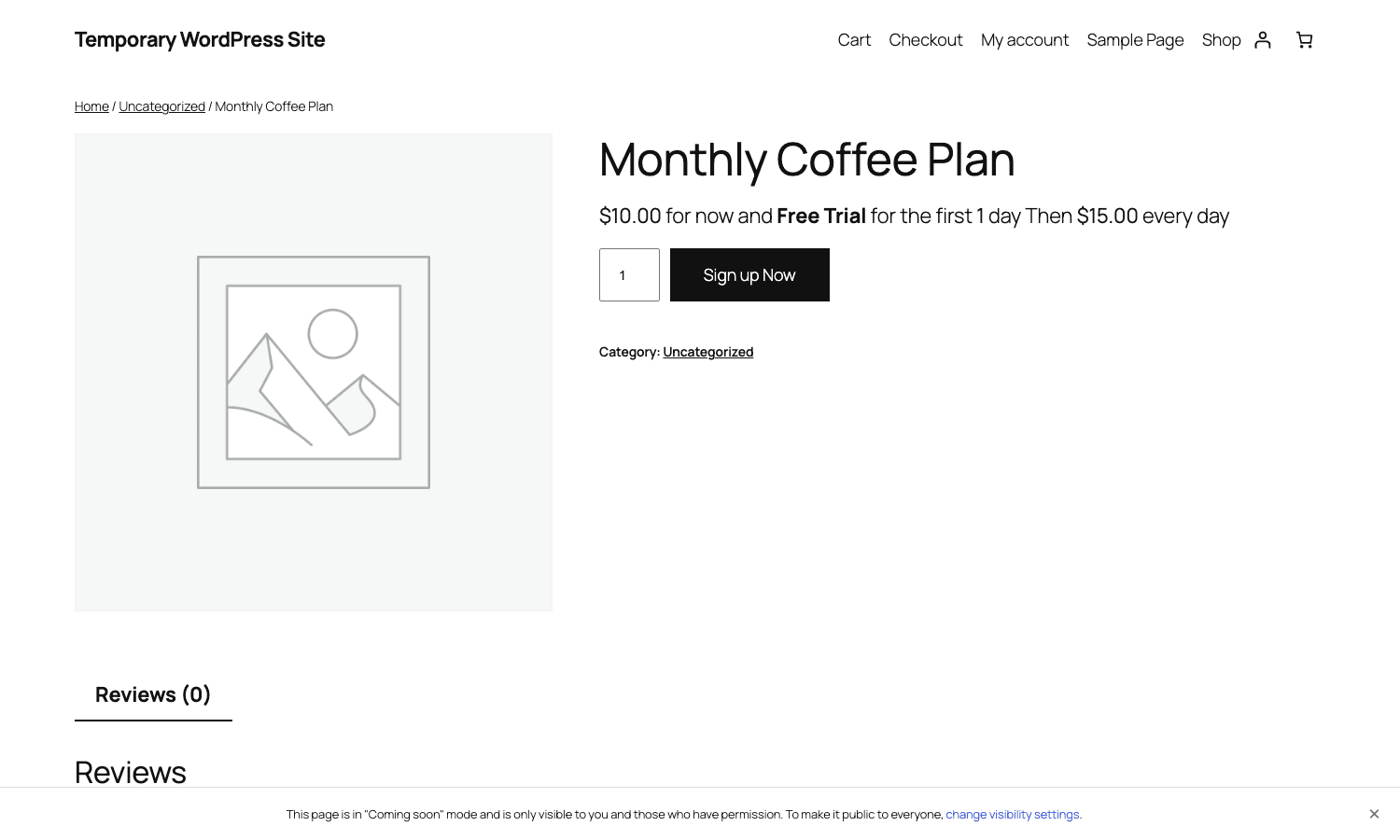
Notice how the price line writes out the whole structure in plain English: "$10.00 for now and Free Trial for the first 1 day Then $15.00 every day". That auto-generated message comes from the plugin’s pricing engine, which knows about every fee and trial you’ve configured and assembles a sentence customers can actually parse. The button text changes too: instead of "Add to cart" you get "Sign up Now" by default (configurable).
When the customer clicks the button and checks out, SUMO creates a parent order in WooCommerce, plus a sumosubscriptions record that becomes the source of truth for that subscription. Future renewal orders will be linked back to the same sumosubscriptions record so you can see every payment that customer has made under that plan.
Setting up your first subscription product
This is the panel you get when you edit a product and turn SUMO Subscriptions on. It lives in the standard WooCommerce Product Data box, in the General tab, right under the price field.
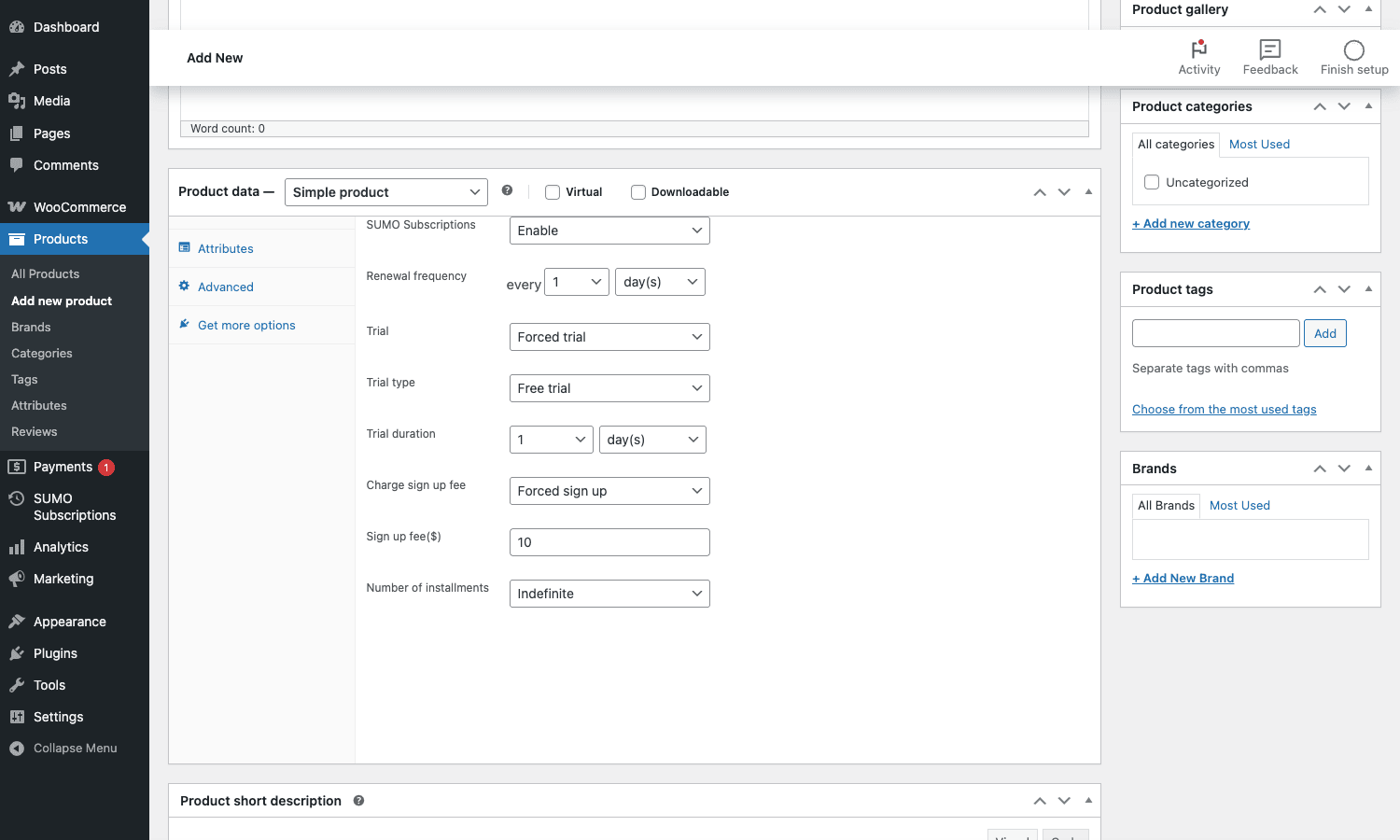
The fields, in the order they appear:
- SUMO Subscriptions. Enable or Disable. Flip it on to turn this product into a recurring plan. Everything below appears only when this is on.
- Renewal frequency. Two inputs: a number and a unit. "Every 1 day", "every 2 weeks", "every 1 month", "every 6 months", "every 1 year". You can compose any interval that’s a whole number of days, weeks, months, or years.
- Trial. Disabled, Optional, or Forced. Optional means the customer sees a "Try it free" checkbox at checkout. Forced means everyone gets the trial automatically.
- Trial type. Free trial or Paid trial. Paid lets you charge $1 for 7 days (or whatever fee + duration combo).
- Trial fee and Trial duration. The price and length of the trial. Trial duration uses the same number + unit pair as Renewal frequency.
- Charge sign up fee. Disabled, Optional, or Forced. Same idea: forced means every customer pays it on the first order.
- Sign up fee. The amount.
- Number of installments. Indefinite (renew forever until cancelled) or a fixed count (e.g. "renew 12 times then stop and mark Expired").
Save the product. That’s the whole setup. There’s no separate "subscription product type" to manage, no second admin screen, no shadow product. The original Woo product is now a subscription and the rest of your store (cart, checkout, emails, REST API, reports) continues to know it as a regular product with a few extra fields.
Variable subscriptions
If you set the product type to Variable, each variation gets its own SUMO Subscriptions panel. So a "Coffee Subscription" can have a "$15/month" variation and a "$150/year" variation, each with their own trial and sign-up fee. The customer picks one at the dropdown. They can later switch from monthly to yearly through the self-service dashboard.
Synchronization
If "Enable Synchronization" is turned on globally (Settings, Synchronization tab), you get a "Synchronize Renewal On" field on each subscription product. You pick a specific day of the week, or a specific day of the month, or a specific date. The first renewal is prorated to land on that date, and every renewal after lines up too. This is how you get "everyone on the first of the month" billing for a publication or membership.
Settings tour: the seven tabs that matter
Settings live at wp-admin/admin.php?page=sumosubs-settings. There are nine tabs in total but most stores only touch six or seven of them.
General
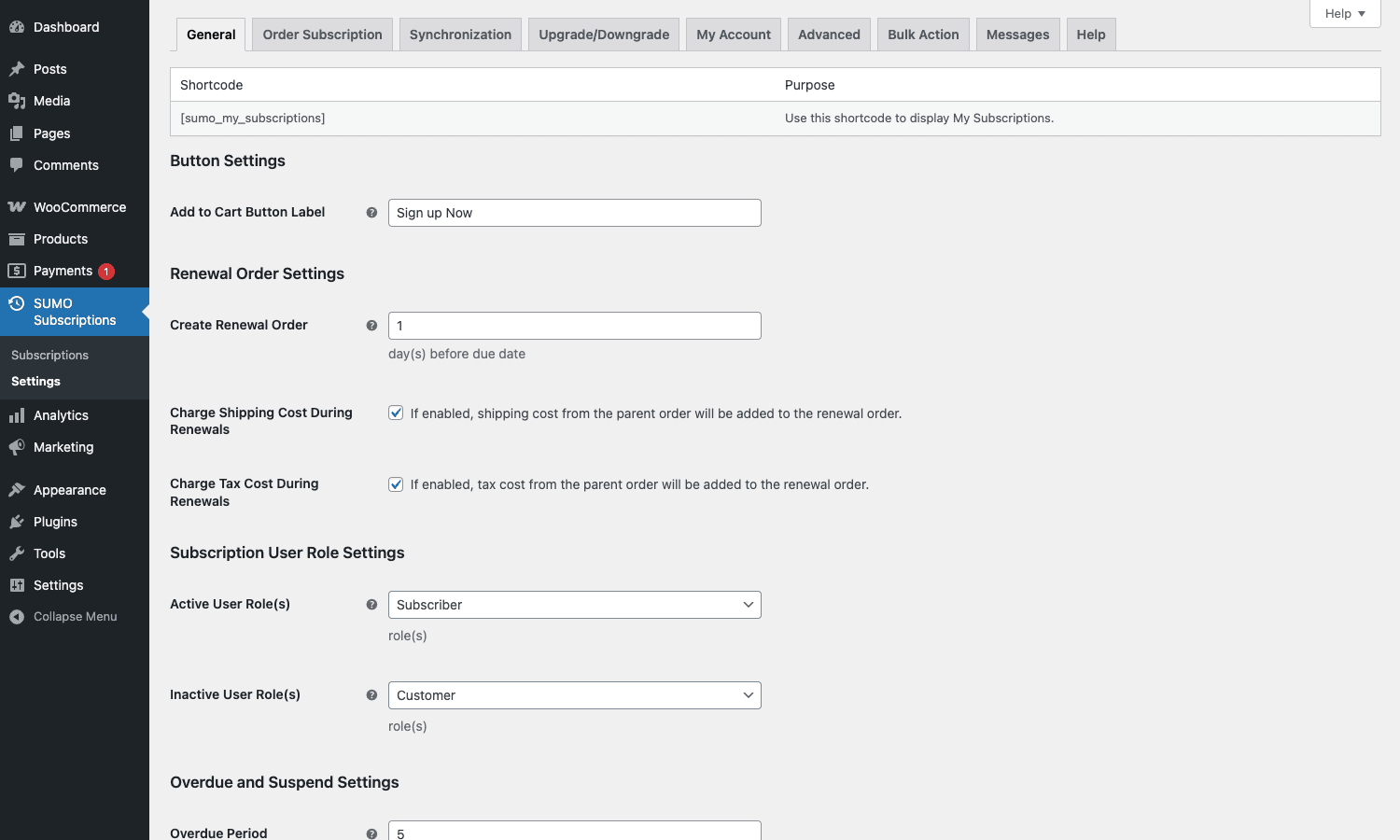
This is the panel you’ll spend the most time in. It has:
- The
[sumo_my_subscriptions]shortcode reference at the top, so you can drop it into any page where you want customers to see their subscriptions. - Button settings: change the "Sign up Now" text to whatever fits your brand ("Subscribe", "Join now", "Start my plan").
- Renewal order settings: how many days before the next due date to create the renewal order, plus toggles for whether shipping and tax from the parent order get charged again. Most stores want both on.
- Subscription user role settings: assign a role automatically when a subscription becomes Active, and revert it to a different role when the subscription expires or cancels. Pairs nicely with content-restriction plugins.
- Overdue and suspend settings: how long to wait after a failed payment before marking a subscription overdue, then suspended, then cancelled.
Order Subscription
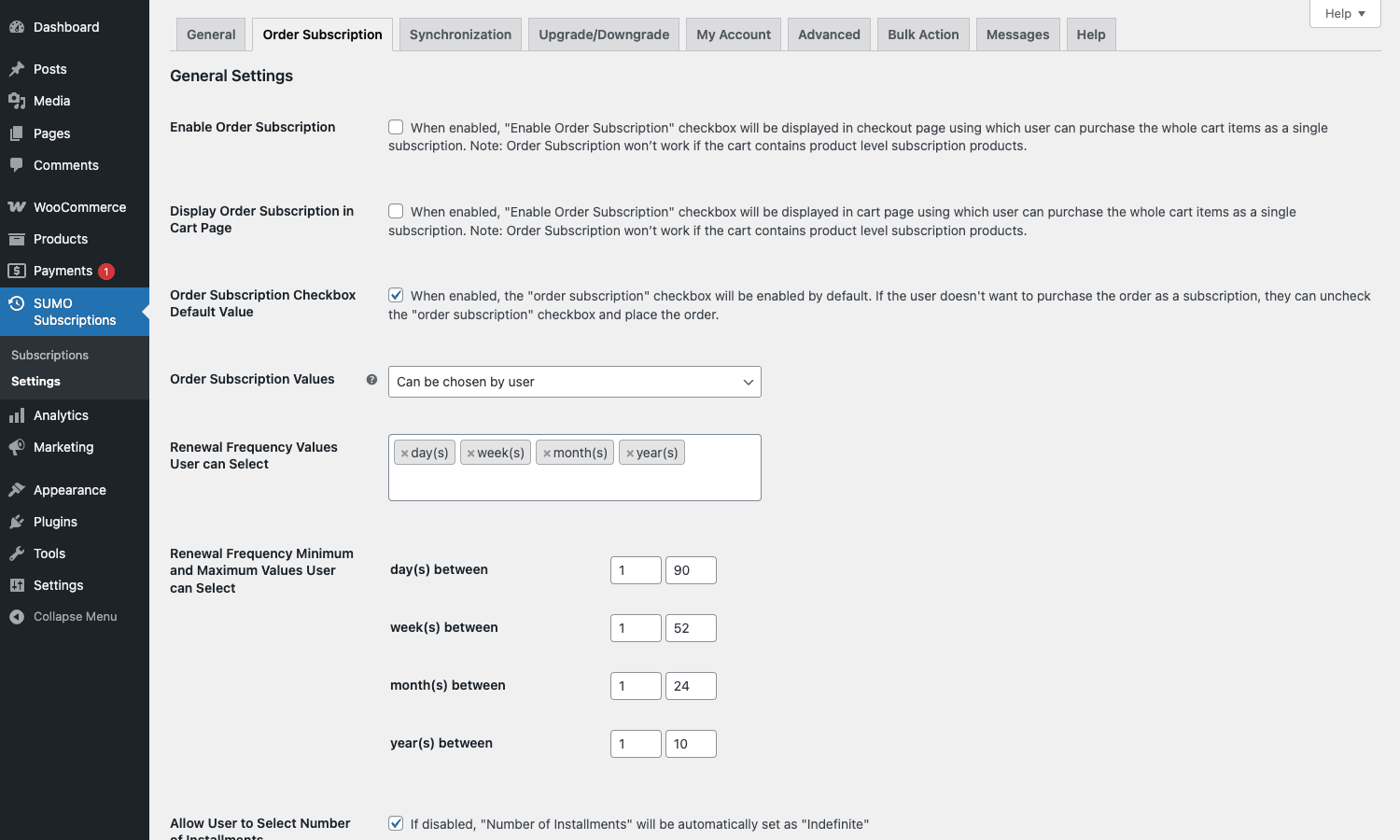
"Order Subscription" sounds confusing at first, but it refers to a customer-facing feature: letting buyers turn a regular one-off order into a recurring one. So if you sell a $50 case of dog food as a normal product, and you enable "Order Subscription" globally, the customer sees a checkbox on the cart that reads "Subscribe to this product". They tick it, pick a frequency from a dropdown you’ve defined, and the order becomes recurring. The product doesn’t have to be configured as a subscription at all.
This tab lets you control whether that checkbox shows, what frequencies the customer can pick (e.g. "every 2 weeks, every 4 weeks, every 8 weeks"), and whether it’s default-on or default-off.
Synchronization
A single switch. Toggle it on and every subscription product gets a "Synchronize Renewal On" field as described above. Off by default because most stores don’t need it.
Upgrade/Downgrade
Decide how plan switches behave. Options include: prorate the new plan’s price by the unused portion of the current cycle, charge the difference immediately, or treat the switch as a fresh subscription. You also pick which user roles can switch, and whether a customer can switch back to the same plan they just left (some stores want a cooldown).
My Account
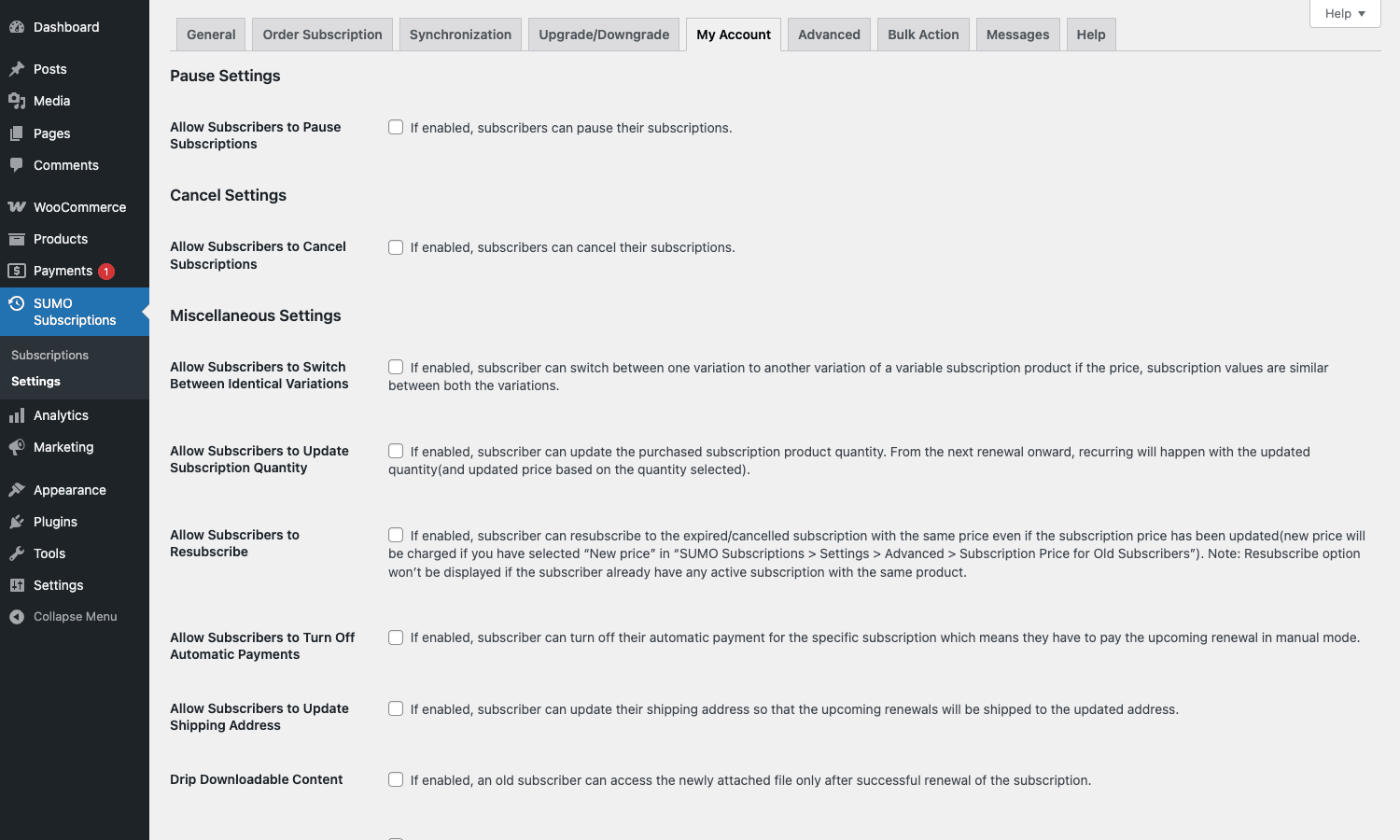
Controls what the customer can do from their self-service dashboard. There’s a toggle for each action: pause, cancel, switch payment method, update subscription quantity, update shipping address, turn off auto-payments, pay for a cancelled subscription, view downloadable content. Untick the ones you don’t want exposed. The cancel and pause toggles are the most commonly disabled: stores selling annual courses sometimes want customers to call support to cancel, not click a button.
Advanced
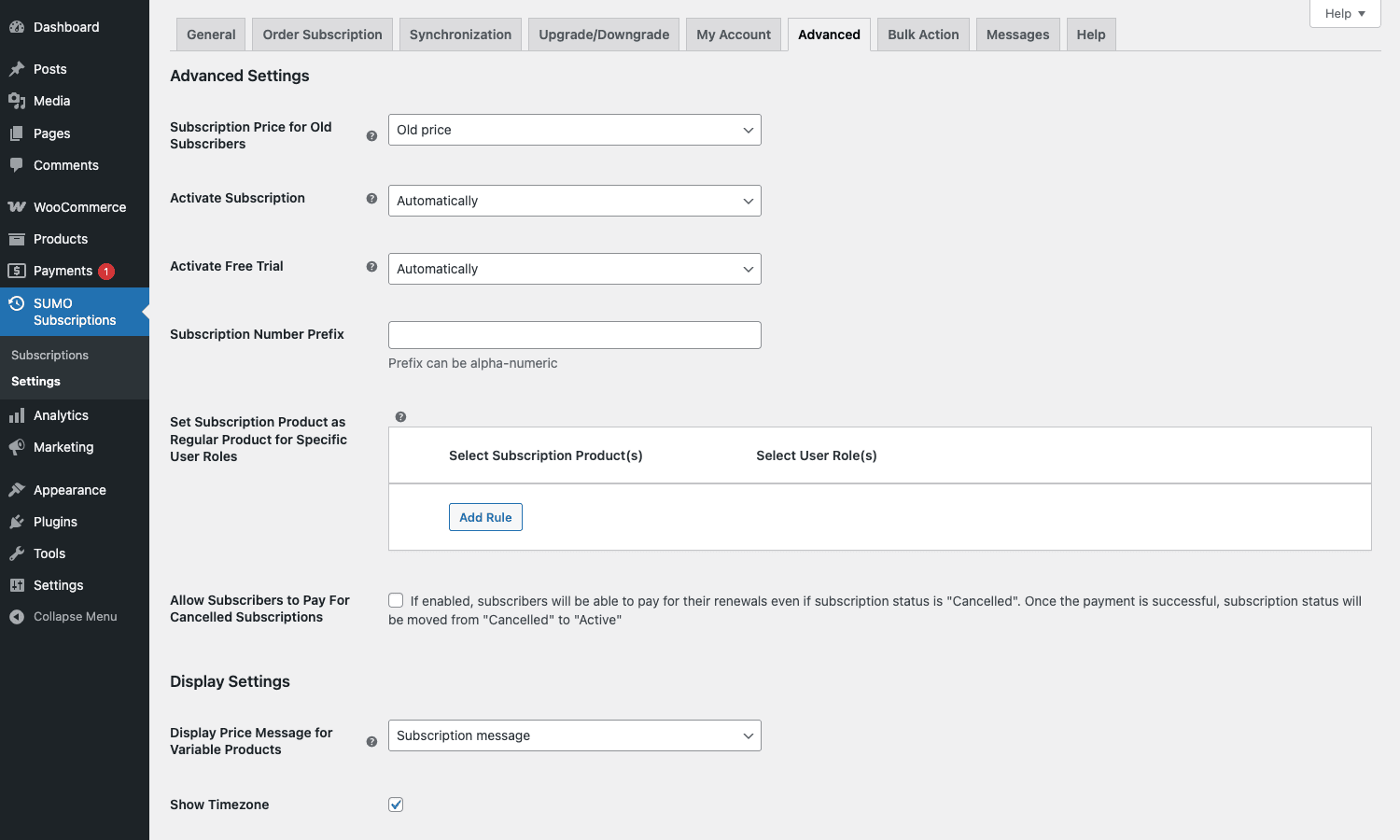
A grab-bag of useful one-off options:
- Subscription Price for Old Subscribers. When you raise the price of a subscription product, do existing subscribers keep the old price or move to the new one? Most stores keep the old price for legacy customers and only charge new price to new signups. This is the toggle for that.
- Activate Subscription / Activate Free Trial. Automatic vs Manual. Automatic is what 99% of stores want. Manual is for cases where someone in support has to approve every signup (rare).
- Subscription Number Prefix. Add a prefix like
SUB-so subscription numbers readSUB-1023,SUB-1024instead of1023,1024. Helps when you’re scanning a CRM or accounting export. - Set Subscription Product as Regular Product for Specific User Roles. Tell wholesale customers their normally-subscription product is now a one-time purchase. Or staff. Or VIPs. You add a rule pairing a product with a role.
- Allow Subscribers to Pay For Cancelled Subscriptions. A cancelled-by-mistake subscription can be revived if the customer pays the next invoice. Quiet but useful.
- Display Settings. Whether to show the "every day" / "every month" message on variable products, whether to display the timezone next to dates, whether to expose product addon fees in the subscription price line.
Bulk Action
Run admin operations on multiple subscriptions at once: pause all, resume all, cancel all, change payment date for selected. You can filter by status, by product, or by date range first. Useful for the rare "switch all monthly subscribers to a new product" migration.
Messages
Customize the strings the customer sees. The "Sign up Now" button, the renewal price message, the trial message, the cart-page notice, the my-account messages. Every customer-facing string the plugin generates has an override here so you don’t have to dive into translation files.
Payment gateways and auto-renewal
This is the part that trips up new SUMO users the most, so let me spell it out.
Automatic renewals mean the customer’s card is charged without them lifting a finger. To get automatic renewals you need a gateway that supports card tokenization for off-session payments. SUMO ships with two of those out of the box:
- SUMO Stripe. Uses Stripe PaymentIntents and saves the card as a payment method. Renewals are charged off-session. Strong Customer Authentication (SCA) is built in: if a renewal triggers a 3D Secure challenge, the customer gets an email with a one-click "authenticate now" link.
- SUMO PayPal Reference Transactions. PayPal’s billing-agreement API. The customer authorizes once at checkout, and the store charges that reference on every renewal.
If you want automatic renewals through any other gateway (Authorize.Net, Mollie, Square, Razorpay), you need to either install a third-party SUMO add-on or, more often, configure that gateway as a manual-renewal gateway and accept that customers click a link in their email to pay each renewal.
Manual renewals work with every standard WooCommerce gateway. SUMO creates a renewal order in pending payment status and emails the customer a "Pay now" link. The customer clicks, lands on the checkout, and pays. Most stores running offline gateways (bank transfer, check, COD) use this pattern.
A hybrid worth knowing about: the WooCommerce PayPal Payments plugin (the modern PayPal extension that most Woo stores already have) can also handle SUMO subscriptions in vault-and-charge mode if you turn on the right setting. SUMO’s sumosubscriptions_enable_woocommerce_paypal_payments_gateway filter exposes that integration.
A note on SCA: any modern store taking European cards needs PaymentIntents-based gateways, and Stripe is the obvious choice. SUMO’s Stripe gateway implements SCA-compliant authentication for both first-payment and renewal flows. If you’re moving to SUMO from an older subscription plugin built before SCA, this alone is reason enough to upgrade. For Stripe-specific configuration tips, the Stripe Billing docs are the best reference, as the concepts (PaymentIntents, off-session, payment method updates) all map directly to SUMO’s internals.
If you’d rather lean on the official Automattic-built WooCommerce Stripe Payment Gateway for one-off orders and keep SUMO Stripe for subscriptions, the two coexist cleanly. SUMO doesn’t replace your existing Stripe setup, it adds a parallel gateway specifically wired for off-session renewals.
The customer self-service dashboard
This is the page customers land on at /my-account/sumo-my-subscriptions/, or anywhere you drop the [sumo_my_subscriptions] shortcode. They see a table of every subscription they have with the store, current status, next payment date, last payment date, plan name, and the actions you’ve enabled in the My Account settings tab.
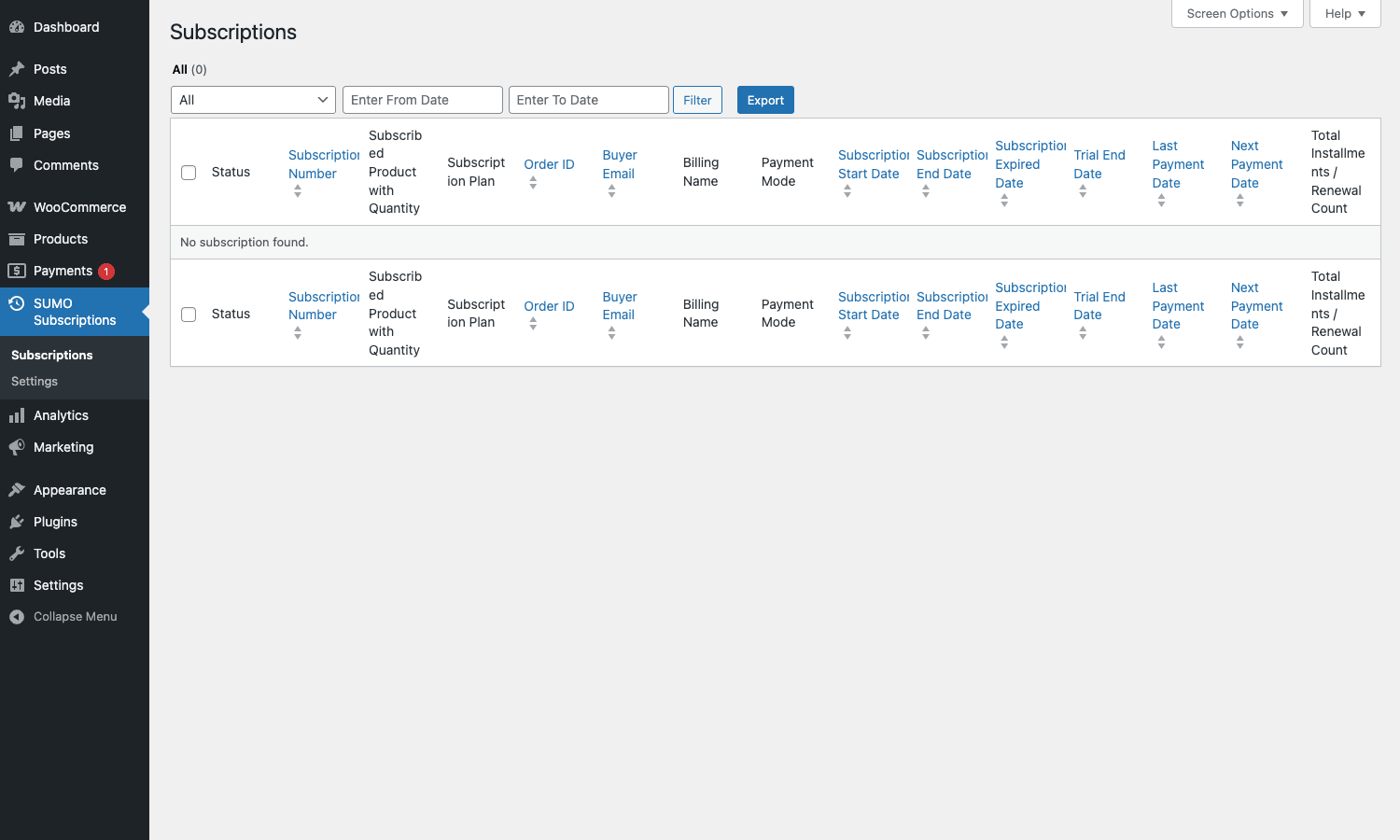
(That screenshot is from the admin side. The customer-side table shows fewer columns, but the structure is the same.)
From here the customer can:
- Pause a subscription. The next renewal is skipped, and the subscription stays paused until they click resume. If your business model is "skip a month", this is the button.
- Cancel. Either an immediate cancel (subscription stops, no more renewals, access revoked) or "cancel at end of period" (renewals stop but access continues until the current cycle ends). The setting is global.
- Change payment method. Customer clicks, gets sent to a Stripe/PayPal page to enter new card details, and the next renewal is charged to the new method.
- Switch plan. If the product is variable, the customer picks a different variation. SUMO handles proration.
- Turn off auto-payments. Switch from automatic to manual renewal without cancelling the subscription. Useful when a customer’s card is being replaced and they don’t want to update it immediately.
- Update shipping address. For physical-product subscriptions (subscription boxes).
- View downloadable content. For digital subscriptions, the files the customer is entitled to right now.
- Pay for a cancelled subscription. If you enable the "revive cancelled" setting, a customer with a recently cancelled subscription gets a "pay now" button that revives the subscription on successful payment.
You can disable any of these in the My Account settings tab. Most stores leave Pause, Cancel, and Change Payment Method on; the rest are situational.
Upgrade, downgrade, and switching plans
Plan switching is the feature that separates serious subscription plugins from toys, and SUMO handles it well.
The mechanism is variable products. You create one product called "Coffee Subscription" and three variations: Bronze ($10/mo), Silver ($20/mo), Gold ($40/mo). A customer signed up for Bronze can hit "Switch" in their dashboard and pick Silver or Gold. SUMO then:
- Calculates the unused portion of the current Bronze cycle as a credit.
- Calculates the prorated cost of the rest of the cycle at the Silver/Gold price.
- Charges the difference (for upgrades) or credits it (for downgrades, depending on your config).
- Schedules the next renewal at the new plan’s price.
The proration math is governed by the Upgrade/Downgrade settings tab: you pick whether to credit unused time, ignore it, or hold the switch until the end of the current cycle. The sumosubscriptions_can_upgrade_or_downgrade filter lets you gate switching by user role or any other condition.
Switching between completely different products (not just variations of the same one) requires a manual admin action or the Bulk Action panel. Most stores don’t need that.
Handling failed payments and dunning
When a renewal payment fails, SUMO walks the subscription through this pipeline:
- Overdue. The subscription enters "Overdue" status. An "overdue automatic" email goes out telling the customer their last charge failed and they need to update their card. The customer keeps access during this window.
- Suspend. After the configured overdue period, the subscription moves to "Suspended". Access is revoked, but the subscription record is still there. A "suspended automatic" email goes out.
- Cancel. After the configured suspend period, if still no payment, the subscription is cancelled. A cancellation email is sent and access stays revoked.
Each duration is configurable in the General settings tab. Most stores run an overdue period of 3 to 7 days, then a suspend period of another 7 to 14 days, then cancel.
A nice touch: during overdue and suspended status, SUMO retries the payment automatically on a schedule. The retry intervals are filterable so you can build your own dunning ladder (try after 1 day, then 3, then 7, then cancel).
If you want a smarter dunning experience (custom retry curves, A/B tested emails, SMS reminders), pair SUMO with a CRM like FluentCRM Pro and trigger automations off the SUMO email hooks. We’ll get to those hooks shortly.
Real-world use cases
The plugin is generic enough that the "what can I sell with this?" answer is "almost anything that recurs". A few concrete patterns I’ve seen:
Subscription boxes. Physical products shipped on a schedule (snacks, coffee, dog treats, makeup samples). The product is a simple subscription with a monthly renewal, shipping is charged on every renewal, and customers can pause when they’re going on vacation. SUMO’s per-renewal shipping toggle and pause feature are exactly what this model needs.
Membership sites. A subscription product grants access via a user role change. Pair with a content-restriction plugin like Paid Memberships Pro or MemberPress for the access-control side, and let SUMO handle just the billing. Or use the built-in "Activate User Role / Inactive User Role" settings if your access rules are simple.
Digital downloads on subscription. A monthly fee unlocks a library of files. The "View downloadable content" action in the customer dashboard shows the customer exactly what’s available right now. If you’d rather use a purpose-built digital store, Easy Digital Downloads Pro has its own subscription extension, but for a Woo-native shop SUMO works.
SaaS-style services with metered tiers. Variable product, three or four tiers. Customers move between them as their usage grows. The proration on plan switch keeps the math fair.
Donations on a schedule. Set up a "Monthly donation" product, let donors pick the amount via a product addon, mark it virtual so there’s no shipping. Sign-up fees disabled, trial disabled, indefinite installments.
Online courses with cohort billing. Synchronization on the first of the month means every cohort renews together. Combine with "max number of installments" set to the course length (say 6 months) and the subscription auto-expires at the end.
Service retainers. A monthly retainer for design or development work. Variable product with tiers (4 hours, 8 hours, 16 hours), customers move between them as needed. Use the WooCommerce Smart Coupons plugin to issue store credit when a client refers a friend, and let that credit apply to renewals.
Developer reference: hooks, filters, REST
The plugin exposes around 60 actions and 80 filters. Names are consistently prefixed with sumosubscriptions_ (a few older ones use sumosubs_). Most useful ones below.
Action: do something when a subscription becomes active
sumosubscriptions_initial_payment_complete fires the first time a subscription is paid. sumosubscriptions_renewal_payment_complete fires on every subsequent successful renewal. Use one or both depending on whether you want a welcome flow vs an ongoing engagement flow.
add_action( 'sumosubscriptions_initial_payment_complete', function( $subscription_id, $order_id ) {
 // Add the customer to your CRM, fire a tracking pixel, send a welcome email,
 // ping a Slack channel. Whatever your business needs on day one.
 $subscription = sumo_get_subscription( $subscription_id );
 $user_id = $subscription->get_user_id();
 do_action( 'my_app/new_subscriber', $user_id, $subscription_id );
}, 10, 2 );

add_action( 'sumosubscriptions_renewal_payment_complete', function( $subscription_id, $renewal_order_id ) {
 // Bump retention counters, send a "thanks for sticking around" email at month 12,
 // unlock a loyalty perk after N renewals, etc.
}, 10, 2 );
If you’re tracking conversions in analytics, the Pixel Manager for WooCommerce Premium plugin can listen on these hooks too, so you fire purchase events to Meta or Google Ads only on actual paid renewals, not on the pending invoice.
Action: gate access when a subscription pauses or cancels
Pair these two actions to revoke and restore access to gated content:
add_action( 'sumosubscriptions_pause_subscription', function( $subscription_id ) {
 $user_id = sumo_get_subscription( $subscription_id )->get_user_id();
 revoke_access_for_user( $user_id );
} );

add_action( 'sumosubscriptions_before_resume_subscription', function( $subscription_id ) {
 $user_id = sumo_get_subscription( $subscription_id )->get_user_id();
 grant_access_for_user( $user_id );
} );
The plugin already handles the built-in WordPress role assignment via the "Active User Role" and "Inactive User Role" settings, but if your access rules live in a third-party system (a learning management platform, an external API, a feature flag service), these hooks are how you keep state in sync.
Filter: change the next payment date
Use sumosubscriptions_get_next_payment_date when you need to override the default schedule for a specific subscription. Common reason: a customer requested a 30-day extension because they were on vacation.
add_filter( 'sumosubscriptions_get_next_payment_date', function( $next_payment, $subscription_id ) {
 if ( get_post_meta( $subscription_id, '_my_extension_granted', true ) ) {
 // Push the next payment 30 days into the future, one time.
 $next_payment = strtotime( '+30 days', $next_payment );
 delete_post_meta( $subscription_id, '_my_extension_granted' );
 }
 return $next_payment;
}, 10, 2 );
Filter: control who can upgrade/downgrade
sumosubscriptions_can_upgrade_or_downgrade returns a boolean. Hook in to gate switching by role, by minimum subscription age, or any other rule.
add_filter( 'sumosubscriptions_can_upgrade_or_downgrade', function( $allowed, $subscription_id ) {
 $subscription = sumo_get_subscription( $subscription_id );
 $created = $subscription->get_date_created();
 // Don't allow switching in the first 14 days, to prevent gaming a free trial.
 if ( ( time() - $created ) < 14 * DAY_IN_SECONDS ) {
 return false;
 }
 return $allowed;
}, 10, 2 );
Filter: pick which gateways are valid for subscriptions
sumosubscriptions_available_payment_gateways lets you whitelist or blacklist gateways at the cart for subscription products. Useful when you want subscriptions on Stripe only, even if checkout also offers PayPal and bank transfer.
add_filter( 'sumosubscriptions_available_payment_gateways', function( $gateways ) {
 $allowed = array( 'sumo_stripe' );
 foreach ( $gateways as $key => $gateway ) {
 if ( ! in_array( $key, $allowed, true ) ) {
 unset( $gateways[ $key ] );
 }
 }
 return $gateways;
} );
Filter: add columns to the CSV export
The export pipeline has four filters: sumosubscriptions_export_csv_headings, sumosubscriptions_export_csv_field_datas, sumosubscriptions_export_csv_data, sumosubscriptions_export_csv_delimiter. Add a column without forking the plugin:
add_filter( 'sumosubscriptions_export_csv_headings', function( $headings ) {
 $headings[] = 'Custom Plan Code';
 return $headings;
} );

add_filter( 'sumosubscriptions_export_csv_field_datas', function( $row, $subscription_id ) {
 $row[] = get_post_meta( $subscription_id, '_my_plan_code', true );
 return $row;
}, 10, 2 );
REST API
The plugin registers a wc-sumosubs/v1 namespace with a subscriptions collection. Endpoints:
GET /wp-json/wc-sumosubs/v1/subscriptions
GET /wp-json/wc-sumosubs/v1/subscriptions/<id>
POST /wp-json/wc-sumosubs/v1/subscriptions
PUT /wp-json/wc-sumosubs/v1/subscriptions/<id>
DELETE /wp-json/wc-sumosubs/v1/subscriptions/<id>
Authentication uses standard WooCommerce REST keys (consumer key + consumer secret). Use this when you need to pull subscription data into an external dashboard, sync to a billing CRM, or build a mobile app.
A short fetch example using curl:
curl -u CK_xxx:CS_yyy \
 "https://example.com/wp-json/wc-sumosubs/v1/subscriptions?status=active&per_page=50"
The response shape mirrors WooCommerce’s order endpoints: each subscription is a JSON object with status, customer, product, billing schedule, and a payments array.
Shortcode
The one and only shortcode is [sumo_my_subscriptions]. Drop it on a page, link it from your menu, and you’ve got a customer self-service portal that doesn’t have to be on the WooCommerce My Account screen.
Scheduled events
SUMO uses Action Scheduler for renewals, not WP-Cron. That matters: Action Scheduler doesn’t depend on someone visiting your site to fire. If your traffic is low, WP-Cron can miss events for hours; Action Scheduler stores its queue in the database and processes it on the next page load, every five minutes. Most subscription plugins have moved to this model and SUMO is on board.
You can inspect the queue at wp-admin/tools.php?page=action-scheduler and filter by group sumosubscriptions to see exactly what’s scheduled.
SUMO Subscriptions vs WooCommerce Subscriptions vs YITH
These three are the only serious WooCommerce subscription plugins on the market. Picking between them is mostly a question of price model and ecosystem.
WooCommerce Subscriptions by Automattic is the official one. It’s the de-facto standard, the one third-party plugins integrate with by default, and the one Stripe’s own docs reference when they say "WooCommerce Subscriptions". It’s a $239/year subscription on woocommerce.com. The official WooCommerce Subscriptions documentation is excellent and the third-party gateway add-on ecosystem (Authorize.Net, Mollie, Square, regional gateways) is the biggest of any subscription plugin. Downsides: it’s the most expensive, the renewal fee is annual forever, and the feature set has been stable rather than expanding fast.
If you want a deeper look at the official option, our WooCommerce Subscriptions review walks through its installation, hook surface, and Stripe configuration in detail.
YITH WooCommerce Subscription Premium is the lighter alternative. Annual license, cleaner admin UI than SUMO, fewer settings tabs. It handles the basics (recurring billing, trials, sign-up fees, pause/resume, prorated switches) and lets you skip the more advanced bits. For a complete look at how it handles renewals and the customer experience, see our YITH WooCommerce Subscription Premium walkthrough. The trade-off: the gateway list is shorter, and you don’t get features like CSV export, bulk actions, or sync-to-fixed-date out of the box.
SUMO Subscriptions is the most feature-packed of the three at the lowest price. CodeCanyon sells it as a one-time purchase, so you pay once and use it forever (no annual renewal). The UI is the most cluttered of the three, and the gateway list relies on SUMO’s own Stripe and PayPal implementations rather than the official Automattic ones, so if your developer is already deep in WooCommerce Payments or a niche regional gateway, SUMO might be a tighter fit than the alternatives. The license bundle on CodeCanyon ships with hundreds of features under one zip: synchronization, upgrade/downgrade with proration, paid trials, sign-up fees, CSV export, bulk actions, REST API, frontend self-service, dunning. If you want all of that without paying $239/year, SUMO is the answer.
A quick decision matrix:
- Need an enterprise-blessed plugin and a long list of certified gateway add-ons? Pick WooCommerce Subscriptions.
- Want the minimum viable subscription engine with a clean UI? Pick YITH.
- Want the kitchen-sink subscription engine at a one-time price? Pick SUMO Subscriptions.
Performance and compatibility
SUMO is heavier than YITH and lighter than WooCommerce Subscriptions, but the differences are in the noise on any modern host. Renewal processing is batched by Action Scheduler so even stores with thousands of active subscriptions don’t see a hot path during checkout.
A few specific notes from poking through the source:
- HPOS (High-Performance Order Storage) compatibility. SUMO declares compatibility with WooCommerce’s custom-order-tables. You can flip HPOS on in WooCommerce Settings, Advanced, Features.
- WPML. Compatible. Subscription product translations work, the emails respect the customer’s locale.
- WooCommerce Blocks (the cart and checkout blocks). SUMO ships a
class-sumosubs-blocks-integration.phpthat hooks into the block-based cart and checkout. The signup messaging displays correctly in the new checkout, and trial/fee fields surface as block extensions. Older stores still using the shortcode-based[woocommerce_checkout]page are also fully supported. - Tax. Tax from the parent order carries to renewals if the "Charge Tax Cost During Renewals" setting is on. Geolocation-based tax recalculates if you’ve configured WooCommerce to do so on the renewal order.
- Multi-currency. Works with WooCommerce’s core currency setting. Cross-currency subscriptions (charging the same customer in different currencies for different products) require a multi-currency plugin and a bit of testing.
- Gutenberg blocks. SUMO ships its own admin-side React blocks for subscription pages (the customer dashboard renders via blocks-integration). Frontend display falls back to PHP templates on classic themes.
- Page builders. No special integration, but the
[sumo_my_subscriptions]shortcode drops cleanly into any page builder (Elementor, Bricks, Divi, Gutenberg).
The plugin uses sumosubs_screen_ids to scope its admin scripts, so unrelated admin pages don’t load SUMO’s JavaScript. That’s a small detail but it matters on stores with a lot of admin plugins.
Pricing and licensing
SUMO Subscriptions sells on CodeCanyon as a one-time license. Single-end-product use, six months of author support included, extendable to twelve months for an upcharge. Updates continue beyond the support window because CodeCanyon licenses tie updates to the product, not the support window.
The plugin is GPLv3-licensed, which is what makes the GPL Times distribution legal. We host the same SUMO Subscriptions zip you’d get from CodeCanyon, distributed under the GPL terms, with no use restriction on the number of sites.
Frequently asked questions
Can I migrate from WooCommerce Subscriptions to SUMO Subscriptions?
There’s no official one-click importer. The data shapes are different (Subscriptions uses a shop_subscription post type, SUMO uses sumosubscriptions). A migration is doable with a custom script that reads each shop_subscription, creates a matching sumosubscriptions record, and updates the gateway token mapping. Plan a day of dev work and a staging run before pulling the trigger on production.
Does SUMO work with WooCommerce Smart Coupons?
Yes. WooCommerce Smart Coupons is a coupon-functionality plugin and SUMO is a billing plugin; they operate on different layers. SUMO honors the coupon at first checkout, and the "apply to renewals" coupon flag controls whether the discount continues. If you want to issue store credit on every successful renewal as a loyalty perk, that’s a custom hook on sumosubscriptions_renewal_payment_complete.
What happens if a customer’s card expires?
The next renewal fails. SUMO marks the subscription Overdue, sends the overdue email with a "Update card" link, and retries automatically over the configured retry schedule. If the customer never updates the card, the subscription eventually moves to Suspended and then Cancelled.
Can customers buy multiple subscriptions at once?
Yes. SUMO supports multiple subscriptions per checkout and per customer. Each one becomes its own sumosubscriptions record with its own renewal schedule and lifecycle.
Does it support free trials without asking for a card?
Yes, if you configure the trial as "Forced, Free trial" and there’s no other paid item in the cart. SUMO skips the payment step at checkout, creates the subscription in "Active Free Trial" status, and only asks for a card when the trial ends. Be careful with this combination, because it does make abuse easier (no card means no friction).
How does SUMO handle taxes?
It carries the parent order’s tax setup to each renewal by default. If your tax rates change between renewals (e.g. the customer moves to a different VAT region), you can recalculate on the renewal order via the sumosubscriptions_before_creating_renewal_order action.
Is there a way to pause renewals during the holidays?
Yes. Customer-initiated pauses are available on the self-service dashboard (if enabled). For store-wide pauses (e.g. "we’re closed in August, push everyone’s next renewal to September"), use the Bulk Action tab to push the next payment date by N days on a selected status group.
Can I sell physical subscription boxes?
Yes, that’s one of the headline use cases. The product type is "Simple" (not virtual), shipping is enabled, and the "Charge Shipping Cost During Renewals" toggle in General settings is on. Each renewal recalculates shipping based on the customer’s address, so address changes are picked up automatically.
Final thoughts
SUMO Subscriptions is the WooCommerce subscription plugin I’d reach for if I were starting a store today and didn’t already have a strong opinion. It does almost everything Automattic’s plugin does, plus a long list of extras (CSV export, bulk actions, subscription number prefixes, sync-to-fixed-date, paid trials, sign-up fee proration), at a one-time price instead of an annual renewal. The UI is busy and the documentation lives in a help tab that not everyone will find first try, but the underlying engine is solid: Action Scheduler for renewals, SCA-ready Stripe support, HPOS compatibility, a properly versioned REST namespace, and a hook surface deep enough that any custom workflow you can imagine has a place to plug in.
The cases where I’d reach for something else: if you need a specific certified gateway add-on that only Automattic publishes, pick WooCommerce Subscriptions; if you want the simplest possible UI and don’t care about the long tail of features, pick YITH. Otherwise, SUMO Subscriptions is the one that gives you the most billing engine per dollar.
The hardest part is choosing whether to charge weekly, monthly, or yearly.