


On a wine-shop client I helped last year, the marketing team was paying for Facebook ads, Google Ads, and Pinterest ads in parallel. Each platform’s dashboard reported a different number of conversions. Facebook said 142 purchases for the week. Google said 118. Pinterest said 47. The actual order count in WooCommerce was 97. Roughly 11% of the Facebook conversions were duplicated because the theme had an AJAX add-to-cart that fired the pixel twice, and there was no server-side event ID to deduplicate against. We were paying for ads against numbers nobody trusted.
That is the kind of mess Pixel Manager for WooCommerce (PMW for short) is built to clean up. Instead of plugging in five separate "official" tracking extensions that each do half the job, you get one plugin that handles Google Ads, GA4, Microsoft Ads, Meta, TikTok, Pinterest, Snapchat, X, LinkedIn, plus Hotjar and HubSpot, all with WooCommerce-aware events, order deduplication, and (on the Premium tier) server-side Conversions API support so your Facebook event match quality stops looking like a coin flip.
Table of contents
- What Pixel Manager actually does
- Why one plugin for ten pixels makes sense
- Inside the admin UI
- The events PMW fires, and where they come from
- Server-side tracking: the real Premium feature
- Consent Mode v2 and the explicit consent option
- The Opportunities engine
- Installation and first-run setup
- A wine shop that was double-counting Pinterest conversions
- Developer reference: hooks, filters, and how to use them
- Compatibility notes, gotchas, and limits
- Pricing, licensing, and where it makes sense
- Final thoughts
What Pixel Manager actually does
Pixel Manager for WooCommerce is built by SweetCode, a small German team that has been working on conversion tracking for WooCommerce since the original "WooCommerce Google Ads Conversion Tracking" plugin in 2018. The free version has around 30,000 active installs on WordPress.org. The Premium tier is sold via Freemius.
Its job is narrow and well-defined: when something interesting happens on a WooCommerce store (someone views a product, adds to cart, starts checkout, completes a purchase, gets a refund), fire the right event to every ad network and analytics tool you have configured, with the right product IDs, the right currency, the right value, and the right deduplication ID so your numbers add up.
That sounds simple. It is not. WooCommerce events fire from a mix of full page loads, AJAX requests (mini-cart, quick-view), block-based checkout, classic checkout, and the thank-you page. Each pixel network wants the data in a slightly different shape. Each one supports server-side ingestion under a different name (Conversions API for Meta, Events API for TikTok, Measurement Protocol for GA4, Conversions API for Pinterest). And each one wants a stable event ID so client-side and server-side events can be merged without double-counting.
If you’ve ever tried to wire this up by hand with Google Tag Manager and a custom data layer, you know how many evenings that takes. PMW is what you install when you would rather not.
Why one plugin for ten pixels makes sense
There is a real argument for using each ad platform’s official WooCommerce extension. The Google for WooCommerce extension does Google Ads, Google Analytics, and Merchant Center reasonably well. The official Facebook for WooCommerce extension handles the Meta side. TikTok has its own.
The problem starts when you run more than two ad channels. Now you have three or four plugins each writing its own tracking code into the page head and footer, each maintaining its own event-firing logic, each handling order completion in a slightly different way. There is no single place to audit what is firing. There is no shared event ID for deduplication. When something breaks (and pixels break constantly because ad platforms keep changing their APIs), you have to debug four different plugins.
PMW solves that by being the single source of truth. Every pixel goes through the same event pipeline. Every order gets the same order_id written as transaction_id to all platforms. When you turn on Facebook Conversions API alongside the client-side pixel, PMW automatically generates a matching event ID so Meta can deduplicate. When you refund an order in WooCommerce, every pixel that supports refund events gets the refund.
The trade-off is honest: if you only run Google Ads, the WooCommerce native Google extension does the job and costs nothing. If you have the engineering depth to build a Google Tag Manager setup with a custom data layer, GTM is more flexible. PMW makes sense in the middle: you run two or more ad networks, you have real ad spend, and you do not want to write JavaScript every time the Facebook API changes.
Inside the admin UI
The plugin sits under WooCommerce in the WordPress sidebar as its own item called "Pixel Manager", with a small notification badge when there are opportunities to review. The settings page is its own thing, not a sub-tab of WooCommerce Settings, which is the right call given how many fields it has.
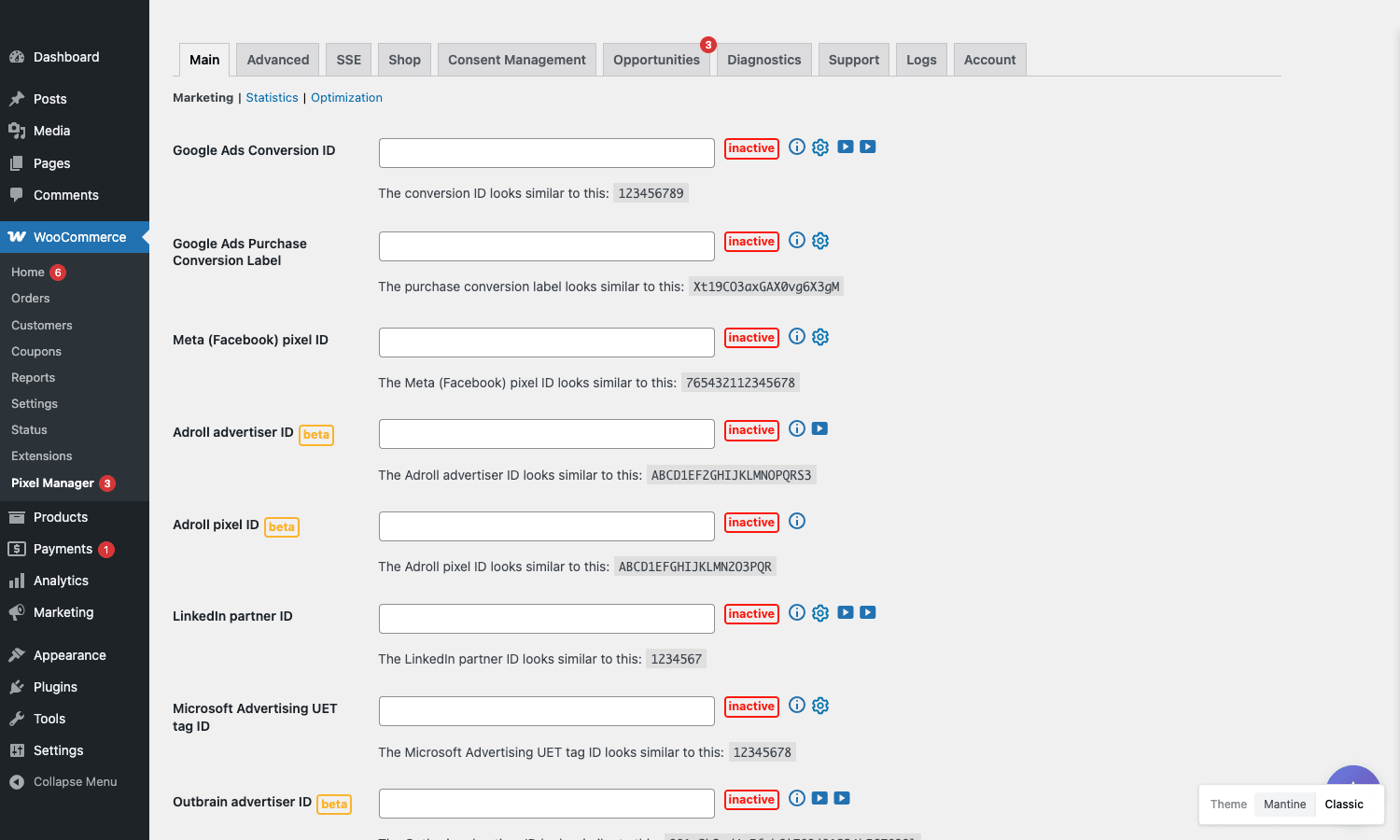
The top row of tabs is the entry point: Main, Advanced, SSE, Shop, Consent Management, Opportunities (with a red badge counting suggestions), Diagnostics, Support, Logs, and Account. The Main tab has three sub-tabs of its own: Marketing, Statistics, Optimization. Marketing is where you wire up the conversion-tracking pixels: Google Ads Conversion ID and Purchase Conversion Label, Meta (Facebook) pixel ID, AdRoll advertiser and pixel IDs (marked beta), LinkedIn partner ID, Microsoft Advertising UET tag ID, Outbrain advertiser ID. Each field has an inline info icon, a small cog for advanced settings, and (where one exists) a play-button that opens a short tutorial video. Until you enter a valid ID, the field shows a red "inactive" pill.
Statistics is where you would put GA4, Matomo, and similar analytics IDs. Optimization is for VWO, Optimizely, AB Tasty (all Premium). Splitting the marketing-pixel fields from the analytics fields visually is a small thing but it stops the page becoming a wall of forty inputs. The bottom-right corner has a theme switcher between "Mantine" and "Classic" UI styles. Mantine is the modern look, Classic is the older WooCommerce-style admin.
Two design choices in the UI are worth calling out. First, every pixel has an inline "inactive" badge until configured, which is a small but useful nudge: you can see at a glance which networks are live and which are not. Second, the Account tab uses Freemius licensing, which means the same install can run free or Premium without re-uploading the plugin, and you can rotate licenses between staging and production without ceremony.
A small downside: the UI is engineering-heavy. There are a lot of toggles, sub-tabs, and "advanced" cogs. Compared to a typical WooCommerce extension where you flip three switches and you are done, PMW expects you to know what a UET tag is and where to find your Google Ads Conversion Label. It is not friendlier than it needs to be. If you have never set up a Facebook pixel before, you will spend time in the documentation.
The events PMW fires, and where they come from
Out of the box, on a WooCommerce store, Pixel Manager fires the following events:
view_itemwhen a product page loads.view_item_listwhen product cards render on a category page, search results, or homepage.add_to_cartboth on the standard form submit and on the AJAX add-to-cart (selectors are configurable).remove_from_cartfrom the cart and mini-cart.begin_checkoutwhen the checkout page loads (both block checkout and classic).add_payment_infowhen a payment method is selected.purchaseon the thank-you page, with the order ID, value, currency, and line items.refundwhen an order is refunded in WooCommerce admin.
Each event gets translated into the right format for each enabled network. Meta’s Pixel calls them ViewContent, AddToCart, InitiateCheckout, AddPaymentInfo, Purchase. Google Ads and GA4 use the GA4 enhanced-ecommerce naming directly. TikTok uses its own names like ViewContent, AddToCart, CompletePayment. PMW maps them all from one event registry so you do not need to think about it.
The interesting case is the purchase event on the thank-you page. PMW marks orders processed so the pixel never fires twice if a customer refreshes the page or comes back via the order-received URL. The filter that controls which order statuses count as a real purchase, pmw_active_order_statuses, defaults to processing and completed but you can extend it to include on-hold or a custom status if your store treats orders differently.
For WooCommerce Subscriptions stores, the renewal-order question gets complicated fast. By default PMW fires the purchase event on renewals. If you want to count only the initial subscription signup as a conversion (which is usually what ad platforms want, since attribution is anchored to the acquisition), you can flip the pmw_subscription_renewal_tracking filter to false. The behaviour is documented but easy to miss.
Server-side tracking: the real Premium feature
If you only need client-side pixels, the free version of PMW is genuinely enough. The reason to pay for Premium is server-side tracking.
Here is the short version of why server-side matters in 2026. Browsers have eaten third-party cookies. iOS has eaten Facebook’s tracking. Ad blockers eat ~25% of pixel fires on European traffic. The client-side pixel is no longer reliable. The fix is to also send the same conversion event from your server, where no ad blocker can intercept it, and let the ad platform deduplicate the two events using an event ID.
PMW Premium implements this for:
- Meta Conversions API. The plugin sends a
Purchaseevent server-side to Meta’s/eventsendpoint, with the same event ID as the client-side pixel fire, plus user data (hashed email, phone, name, address) so Meta can match the conversion back to an ad click. This is the single biggest win in the Premium tier. - Pinterest Conversions API. Same pattern, server-side
checkoutevents to Pinterest with event IDs. - TikTok Events API. Server-side events for TikTok’s pixel.
- Google Measurement Protocol for GA4. Server-side hits to GA4 for any event that needs a guaranteed delivery (typically
purchase), bypassing ad blockers.
The configuration lives in the SSE (Server-Side Events) tab. You provide an access token (Meta calls it a Conversions API token, Pinterest calls it a token, etc.), and PMW handles the rest: hashing PII, sending the event, deduplication ID, retry on failure. If you have ever tried to write this against the Meta Conversions API directly, you know there is real work in handling the access token rotation, the hashing of user data, and the retry logic. Having it done for you is the part that justifies the licence.
The match-quality lift on a real store is the thing to measure. On the wine shop, going from client-side-only to client + server moved Meta’s event match quality from "Poor" (around 4 out of 10) to "Great" (8.5+ out of 10) within a week. The ad-set CPA on the same campaigns dropped roughly 18% over the next two weeks, mostly because Meta’s optimization had cleaner signal.
Consent Mode v2 and the explicit consent option
Google’s Consent Mode v2 became effectively mandatory for ads serving the EEA in March 2024. If your tags do not transmit consent signals, your remarketing audiences shrink and modeled conversions stop being available to you.
PMW handles Consent Mode v2 in the Consent Management tab. You can:
- Enable Google Consent Mode v2 with standard settings (one toggle).
- Enable Microsoft Ads Consent Mode (one toggle).
- Enable Explicit Consent Mode, where pixels do not fire at all until the user has interacted with a cookie banner.
- Define Explicit Consent Regions (a multiselect of countries) so consent is only required where you choose.
- Enable Google TCF (Transparency and Consent Framework) support for IAB-compliant CMPs.
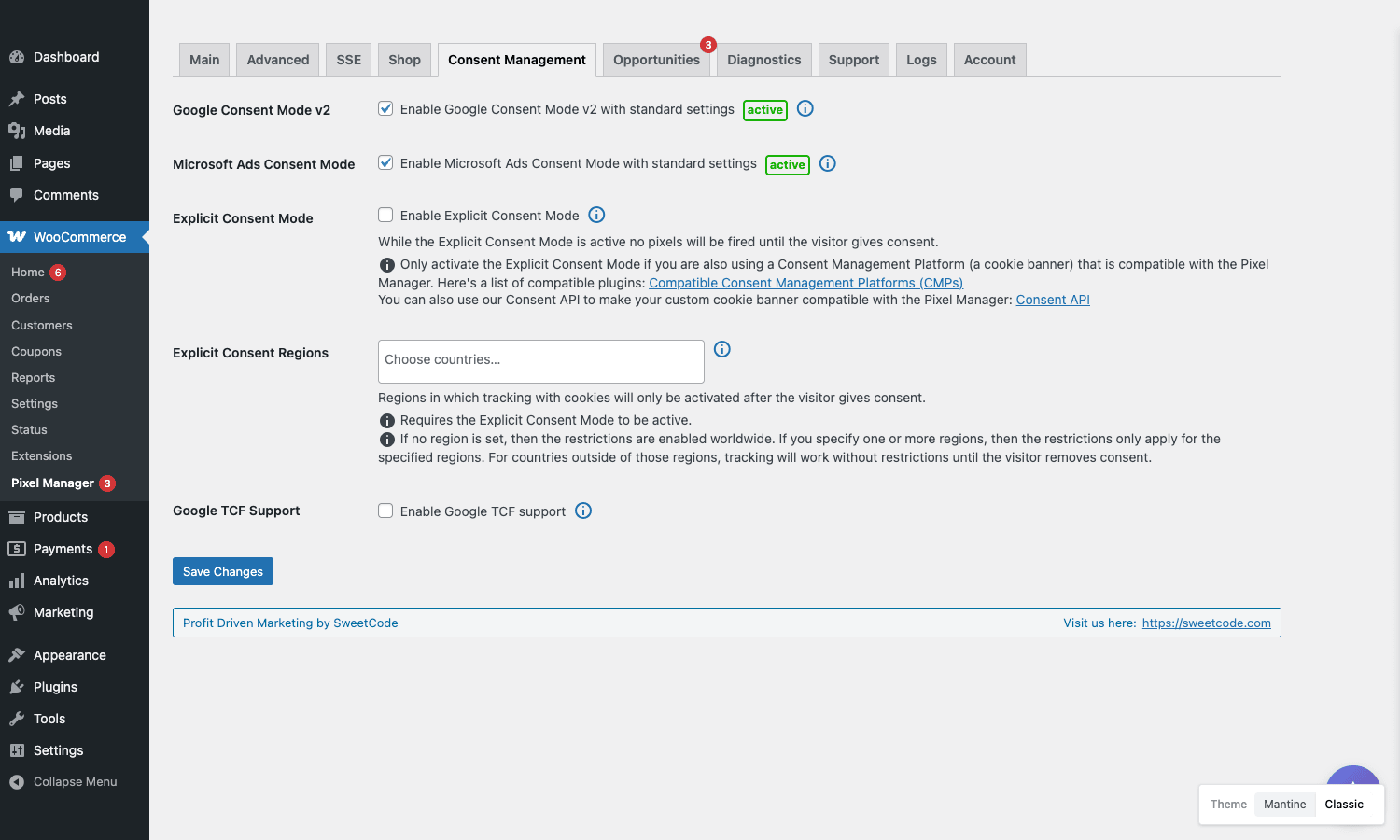
The Explicit Consent Mode option is for stores that take a stricter line: no pixel fires at all from EEA traffic until the user clicks Accept on the cookie banner. That is the safer reading of GDPR. The flip side is that you lose all data from users who decline, which is why most stores run Consent Mode v2 with default-denied signals instead, so you still get modeled conversions.
PMW integrates natively with Borlabs Cookie, Complianz, Cookiebot, Real Cookie Banner, and a few others. If you use a custom CMP, the pmw_consent_management_is_explicit_consent_active filter lets you wire up your own logic.
The Opportunities engine
This is one of the genuinely useful Premium features and one that does not get talked about much. The Opportunities tab audits your store and your PMW settings and surfaces concrete suggestions.
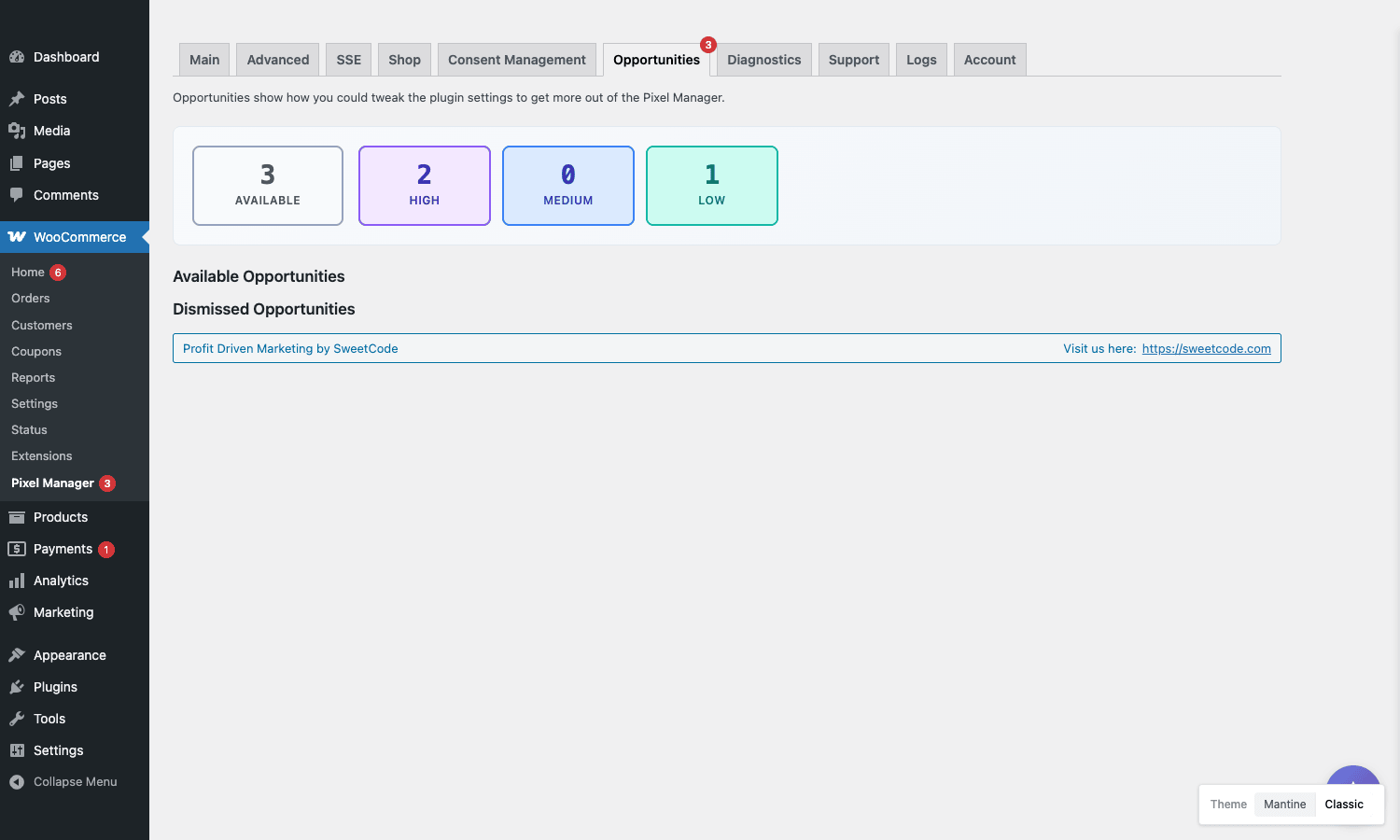
The dashboard shows four status pills: how many opportunities are available, how many are High priority, Medium, and Low. Below, two sections: Available Opportunities (the things you should look at) and Dismissed Opportunities (things you have already chosen to ignore).
Typical opportunities the engine raises:
- "You have the Meta pixel configured but Conversions API is off. Enable it to recover server-side conversions."
- "You have Google Ads configured but no Enhanced Conversions. Enable Enhanced Conversions for better match rate."
- "Your
view_item_listevent has fired zero times in the last 7 days. Your selector may not match your theme." - "Refund events are not firing. Check the refund webhook."
Each one comes with a one-click fix, a "Dismiss" option if it does not apply to you, and a link to the relevant docs. It is the kind of "what would a consultant tell you to fix" surface that an in-house marketing person would never get to on their own.
Installation and first-run setup
The install path is the standard WooCommerce plugin flow.
- Upload the plugin zip via
wp-admin/plugin-install.php?tab=uploadand activate. - Find "Pixel Manager" in the WordPress sidebar (under WooCommerce).
- If you have a Premium licence, the Account tab will ask for the licence key.
- Go to Main > Marketing. Enter your Google Ads Conversion ID, Purchase Conversion Label, and any pixel IDs for networks you advertise on.
- Go to Main > Statistics. Enter your GA4 measurement ID.
- Go to SSE (Premium) if you want server-side tracking. Add the Meta Conversions API token, Pinterest token, etc.
- Go to Consent Management. Pick the mode that matches your CMP and region.
- Visit Diagnostics. PMW runs through every configured pixel and reports its current state.
The Diagnostics tab is the one I would visit any time something looks off. It tells you, per pixel, whether the script tag is being injected, whether events have fired in the last hour, whether the server-side endpoint is reachable, and (for Meta) what the current event match quality looks like.
Pixel testing in production is risky. PMW supports a test/staging mode via the pmw_conversion_prevention filter, which lets you mark all orders as non-conversions while you are debugging, so you do not pollute your ad accounts with fake purchases.
A wine shop that was double-counting Pinterest conversions
Back to the wine shop. The theme they used was a custom-Storefront fork with an aggressive AJAX cart: clicking "Add to Cart" anywhere on the site fired the add event, then opened a side-drawer that re-fired the same event when the cart count updated. PMW’s default add-to-cart selector list caught both. Pinterest saw two AddToCart events per actual user click. Conversion rates looked great on paper. The ROAS dashboard was lying.
The fix took maybe twenty minutes once we figured out what was happening:
add_filter( 'pmw_add_selectors_add_to_cart', function ( $selectors ) {
    // Drop the second-fire selector our theme uses.
    return [
        '.single_add_to_cart_button',
        '.add_to_cart_button',
        // intentionally omit the drawer-update selector:
        // '.mini-cart .added-item'
    ];
} );
Reload, watch the network panel, confirm one fire per click. Then enable Pinterest Conversions API in the SSE tab and add the event ID dedup. Two days later the conversion count in Pinterest’s dashboard matched the order count in WooCommerce within rounding distance.
The other thing we did was tighten the refund event. The shop used a manual refund workflow where the bookkeeper marked some orders as refunded inside an external accounting tool, and PMW had no way to know. We added a small hook to mirror those refunds back:
add_filter( 'pmw_active_order_statuses', function ( $statuses ) {
    // Include our custom "refunded-external" status so PMW
    // counts the corresponding refund event.
    $statuses[] = 'refunded-external';
    return $statuses;
} );
Three months later, the ROAS reports across Meta, Google, and Pinterest were within 4% of WooCommerce’s own reports. They never were before.
Developer reference: hooks, filters, and how to use them
PMW exposes its hooks under the pmw_ prefix. A few are essential, a few are for edge cases, and a few are for plugin compatibility.
Filters that change which orders count as conversions
pmw_active_order_statuses is the gatekeeper. By default it returns ['processing', 'completed']. If your store fulfils orders manually and you want to count them when the bookkeeper sets a custom status, extend the list:
add_filter( 'pmw_active_order_statuses', function ( $statuses ) {
    $statuses[] = 'fulfilled';
    return $statuses;
} );
pmw_conversion_prevention is the inverse. Return true for any order you do NOT want to count. Useful for internal test orders:
add_filter( 'pmw_conversion_prevention', function ( $prevent, $order ) {
    // Skip orders from your office IP / staff email.
    $email = $order->get_billing_email();
    if ( str_ends_with( $email, '@example.test' ) ) {
        return true;
    }
    return $prevent;
}, 10, 2 );
pmw_subscription_renewal_tracking controls whether WooCommerce Subscriptions renewals fire the purchase event. Return false to count only initial signups:
add_filter( 'pmw_subscription_renewal_tracking', '__return_false' );
Filters that change the conversion value
pmw_marketing_conversion_value_filter rewrites the value sent to ad pixels. Common use case: send only the product subtotal (no shipping, no tax) so ROAS reports compare to gross merchandise, not order total:
add_filter( 'pmw_marketing_conversion_value_filter', function ( $total, $order ) {
    return (float) $order->get_subtotal();
}, 10, 2 );
pmw_output_product_prices_with_tax flips between tax-inclusive and tax-exclusive prices in events. Useful for B2B stores using something like WooCommerce Dynamic Pricing where wholesale customers see ex-tax prices:
add_filter( 'pmw_output_product_prices_with_tax', '__return_false' );
pmw_order_fees lets you adjust the fees component of the order value (gift wrapping, surcharges, etc.).
Filters that change which products PMW tracks
pmw_product_ids controls the product ID format sent in events. By default PMW sends WooCommerce product IDs. If your Meta catalog uses SKUs, you can switch:
add_filter( 'pmw_product_ids', function ( $ids, $product ) {
    return [ $product->get_sku() ];
}, 10, 2 );
pmw_product_id_type_for_<pixel_name> does the same on a per-pixel basis (so you can send IDs to Google and SKUs to Meta).
pmw_custom_brand_taxonomy tells PMW which taxonomy stores the product brand. Useful for WooCommerce Memberships stores or sites running Perfect Brands for WooCommerce.
Filters for AJAX selectors
pmw_add_selectors_add_to_cart and pmw_add_selectors_begin_checkout are the two you reach for when a theme’s custom AJAX cart fires events from the wrong DOM nodes. Pass an array of CSS selectors that PMW should listen to:
add_filter( 'pmw_add_selectors_add_to_cart', function ( $selectors ) {
    $selectors[] = '.my-theme .quick-add-button';
    return $selectors;
} );
This is the single most useful filter when fighting a theme. Without it, your only option would be to fork the theme.
Filters for consent management
pmw_consent_management_is_explicit_consent_active overrides PMW’s detection of explicit consent. If you use a custom CMP that PMW does not natively integrate with, you can wire it up:
add_filter( 'pmw_consent_management_is_explicit_consent_active', function () {
    // Our CMP sets this cookie when consent is granted.
    return isset( $_COOKIE['my_consent'] ) && $_COOKIE['my_consent'] === 'granted';
} );
pmw_borlabs_cookie_group_languages configures Borlabs Cookie integration when your store runs WPML/Polylang and consent groups vary by language.
Filters that customize the data layer
pmw_custom_order_parameters lets you inject extra parameters into the purchase event for every order. Useful for adding a customer_segment value derived from the customer’s user role:
add_filter( 'pmw_custom_order_parameters', function ( $params, $order ) {
    $user = $order->get_user();
    if ( $user && user_can( $user, 'wholesale_customer' ) ) {
        $params['customer_segment'] = 'wholesale';
    } else {
        $params['customer_segment'] = 'retail';
    }
    return $params;
}, 10, 2 );
pmw_custom_order_item_parameters does the same per line item.
pmw_geolocation_server_vars and pmw_geolocate_ip let you override the geolocation source. If you sit behind Cloudflare, the original IP arrives in HTTP_CF_CONNECTING_IP rather than REMOTE_ADDR, and you can correct PMW’s view of where the user is:
add_filter( 'pmw_geolocation_server_vars', function () {
    if ( ! empty( $_SERVER['HTTP_CF_CONNECTING_IP'] ) ) {
        return [ 'REMOTE_ADDR' => $_SERVER['HTTP_CF_CONNECTING_IP'] ];
    }
    return null;
} );
Action hooks
pmw_admin_settings_after_sections lets you inject extra UI into the settings page, useful if you build an add-on. pmw_register_pixel_descriptors is the entry point for registering a custom pixel type, though the documentation around custom pixel registration is thin and you should expect to read source.
Compatibility notes, gotchas, and limits
PMW is well-tested against the common stack: Storefront, Astra, Blocksy, GeneratePress, Kadence, Flatsome. Most page builders work (Elementor, Bricks, Oxygen) because PMW fires events from the WooCommerce hooks, not from the DOM. The cases where things go sideways:
- Themes with custom AJAX carts that bypass WooCommerce hooks. The fix is the
pmw_add_selectors_add_to_cartfilter, or, in extreme cases, a custom JS shim. Worth checking before assuming PMW is broken: open the network panel, click Add to Cart, see whether PMW’s event fires at all. - Block-based checkout. Supported, but if you have customised the block checkout heavily, watch for
begin_checkoutandadd_payment_infofiring at the right step. Diagnostics will tell you. - Cache plugins that strip inline scripts. PMW writes inline
<script>tags into the page for the data layer. Some aggressive cache-and-minify setups strip them. Make sure PMW’s script tag is in your minifier’s allowlist. - Multi-currency. PMW reads the active currency at the time the event fires, which means events show the currency the customer saw, not the base currency. If your accounting reports in base currency and your ads bid in customer currency, the two will not reconcile cleanly. You can rewrite the value with
pmw_marketing_conversion_value_filter. - Headless WooCommerce. PMW assumes a server-rendered storefront. If your frontend is a Next.js app talking to WooCommerce over REST, you need to send events yourself; PMW will not magically appear in the React tree.
- Logs can get large. The Logs tab keeps a rolling diagnostic log of every event PMW fires. On a busy store this fills up. There is a retention setting controlled by
pmw_backup_retention_settings; set it sensibly or the wp_options table grows.
A more honest limit: PMW does not do iOS app event tracking. It is a WooCommerce-on-the-web plugin. If you also run a native app, you need Meta’s mobile SDK and Google’s mobile SDK in the app itself.
Pricing, licensing, and where it makes sense
The plugin is sold via Freemius with a single yearly licence at roughly $239 for one site, tiered up for agency packs. The free tier on WordPress.org gives you all the client-side pixels. The paid tier unlocks server-side Conversions API for Meta, Pinterest, and TikTok, plus Measurement Protocol for GA4, the A/B testing integrations (VWO, Optimizely, AB Tasty), the Opportunities engine, and Facebook Microdata.
Does the price make sense? Math it out:
- If your monthly ad spend across Meta + Google + others is under $1,000, the free version is probably enough. Server-side tracking is overkill at that scale.
- If you spend between $1,000 and $10,000 a month on ads, $239/year for better match quality, deduplication, and the Opportunities engine is a few percentage points of optimization away from paying for itself. This is the sweet spot.
- If you spend over $10,000 a month, you should already be running this or its equivalent. Not running server-side tracking at that spend level is leaving real money on the table.
Compared to alternatives:
- The free WordPress.org build gives you ~80% of the value if you don’t need server-side.
- The Google for WooCommerce official extension is free and good if you only run Google Ads.
- The Facebook for WooCommerce official extension is free and good if you only run Meta.
- A custom GTM setup is the most flexible if you have a developer who lives in GTM, but expect 20-30 hours of build plus ongoing maintenance.
- MonsterInsights/ExactMetrics is GA-focused with weak multi-pixel support; not a real competitor for ad tracking.
The Premium build available through GPL Times unlocks every server-side feature for production use; the way most stores justify the cost is by measuring Meta event match quality before and after, then watching CPA shift on a constant ad budget.
Final thoughts
Conversion tracking on WooCommerce has gotten harder, not easier, since iOS 14, the slow death of third-party cookies, and the rise of ad blockers. The single-pixel "drop in the snippet and forget" era is over. What works now is sending the same event from both client and server, with a matching event ID, to every network that supports it.
That is exactly what Pixel Manager for WooCommerce does, with first-class support for ten networks, a Diagnostics tab that tells you when something is broken before you find out from your accountant, and a hook system that gives developers an exit hatch when the defaults do not fit. The UI is more engineering than polish. The Premium price is real money. Neither of those is a deal-breaker for a store with actual ad spend.
If you only need Google Ads tracking and you want zero plugin investment, use Google’s own extension. If you have one full-time developer per WooCommerce site and you want maximum control over the data layer, build it in Google Tag Manager. Everyone else (one or two marketers, two or three ad channels, between $1k and $30k a month in spend, no patience for debugging double-fires) lands on PMW. The Premium tier is one of the few WooCommerce licences I recommend without hedging when the store is actually spending on ads.