

For years I told clients the default WooCommerce order emails were fine. Plain, yes, but functional. Then one afternoon I placed a test order on a store I’d just built, opened the confirmation email on my phone, and set it next to the live website on my laptop. They looked like they came from two different companies. One was warm and polished. The other was a gray box with a thin purple bar and a table running off the screen.
That was the moment I stopped defending them, and YayMail is what changed my mind. It’s a drag-and-drop customizer that lets you redesign every transactional email WooCommerce sends, with a live preview and real order data, without opening a single template file.
This is a long, honest walk through what YayMail does, how the builder actually feels to use, which of its dynamic WooCommerce blocks are worth your time, the 80+ addons, a full developer reference, and the one gotcha that trips up almost everyone (it does not send your email, and that matters more than you’d think). Whether you run the store yourself or you build stores for clients, by the end you’ll know exactly where this plugin fits.
Table of Contents
- What YayMail actually is
- YayMail at a glance
- The builder: elements, a live preview, and real order data
- Every WooCommerce email in one place
- The WooCommerce elements that make it worth it
- 80+ addons: emails for the rest of your stack
- YayMail vs hand-editing vs newsletter tools
- Who should use this (and who shouldn’t)
- Don’t redesign your emails and forget they still have to arrive
- Deliverability, performance, and the gotchas
- Developer reference: hooks, filters, and the CPT
- FAQ
- Final thoughts
What YayMail actually is
YayMail is a WooCommerce email customizer built by YayCommerce, the same team behind YaySMTP and YayCurrency. Its one job is to replace the way you edit WooCommerce’s transactional emails. Instead of the plain, boxy defaults (New order, Processing, Completed, and the rest), you get a visual builder where you drag blocks onto a canvas, watch a live preview update on the right, and hit Save. No PHP. No copying template files into your theme.
Here’s the important distinction up front. WooCommerce already sends order emails out of the box. It even gives you a tiny settings panel to swap the header image and a couple of colors. YayMail is not a replacement for WooCommerce’s mailer. It’s a replacement for the design layer sitting on top of it. Your store still sends the mail; YayMail just decides what it looks like.
Setup is about as light as it gets. YayMail is a single plugin. There’s no free base you have to install first and no separate core add-on to hunt down. You install it, activate it, and it adds a YayCommerce » YayMail menu in the admin. The only hard dependency is WooCommerce itself, which makes sense, because the whole thing hangs off WooCommerce’s own WC_Email classes. If WooCommerce isn’t active, there’s nothing to customize.
A quick note on the two versions, because it confuses people. There’s a free YayMail on the WordPress.org plugin directory, and there’s YayMail Pro. The free one covers the basic emails and a handful of elements. The Pro version is the full plugin, with the complete element set, the dynamic WooCommerce blocks, the settings tools, and access to the addon catalog. Everything I walk through here is the Pro feature set. You can grab it as YayMail Pro on GPL Times, which is the same plugin you’d download from YayCommerce, delivered through the GPL store.
Who made it and why it matters: YayCommerce is a WooCommerce-focused shop, and it shows. YayMail doesn’t try to be a generic email designer that happens to work with WooCommerce. It’s built around WooCommerce order objects from the ground up, which is exactly why its live preview can pull a real order and render the actual product table, totals, and addresses. A generic tool can’t do that.
YayMail at a glance
Rather than paste the marketing bullet list, here’s what actually changes how you work once YayMail is running.
- A real drag-and-drop builder. The left panel holds your elements, the right shows a live preview of the email, and you move blocks between them. It feels like a page builder, scoped to email.
- A live preview with real order data. This is the headline. The preview isn’t a generic mockup. Pick a sample order and the New-order email renders that order’s product table, subtotal, shipping, payment method, and billing plus shipping addresses.
- Over 50 elements, split into Basic, General, WooCommerce, and Blocks categories. Headings, buttons, images, dividers, columns, social icons, countdown timers, and the dynamic WooCommerce blocks that make the whole thing worth buying.
- Every WooCommerce transactional email, in one list. New order, Cancelled, Failed, On-hold, Processing, Completed, Refunded, Customer invoice, Customer note, Reset password, New account. Each one is designable, with Admin and Customer recipients handled separately where WooCommerce splits them.
- A shared Global Header and Footer. Design your logo header and your footer once, and it applies across every email so branding stays consistent.
- Desktop and mobile preview toggle, plus undo and redo. You can check the narrow-screen layout before you send anything, which is where default WooCommerce emails fall apart.
- A test-send tab. Fire the current design to your own inbox so you can see it in a real email client, not just the builder.
- 80+ addons that extend YayMail to brand the emails from other plugins (Subscriptions, Bookings, Dokan, YITH plugins, and more), plus a Conditional Logic addon for per-product and rule-based emails.
- Settings tools for real workflows: synced patterns (reusable blocks kept in sync across emails), global variables, file attachments, import/export of templates, a migration tool, and backups.
- A developer surface with a dedicated custom post type, action and filter hooks, and a custom-element API, so agencies can package their own blocks.
The short version: YayMail turns email editing from a code job into a design job, and it keeps the design tied to live WooCommerce data instead of static placeholders.
The builder: elements, a live preview, and real order data
The builder is where you’ll spend your time, so let me describe it the way it actually looks when you open it.
The screen splits into two halves. On the left is a panel with two tabs, Elements and Patterns, a search box at the top, and your elements grouped into categories: Basic, General, WooCommerce, and Blocks. On the right is a live rendering of the email you’re editing. Along the top runs a bar with the email selector, a sample-order picker, undo and redo, a desktop/mobile toggle, a preview eye, and the Save button.
You build by dragging. Grab a Heading from the left, drop it onto the canvas, and it appears in the preview immediately. Click any placed block and its settings open so you can change text, colors, spacing, alignment, and so on. It’s the same mental model as a page builder like Elementor, just aimed at the constrained world of HTML email.
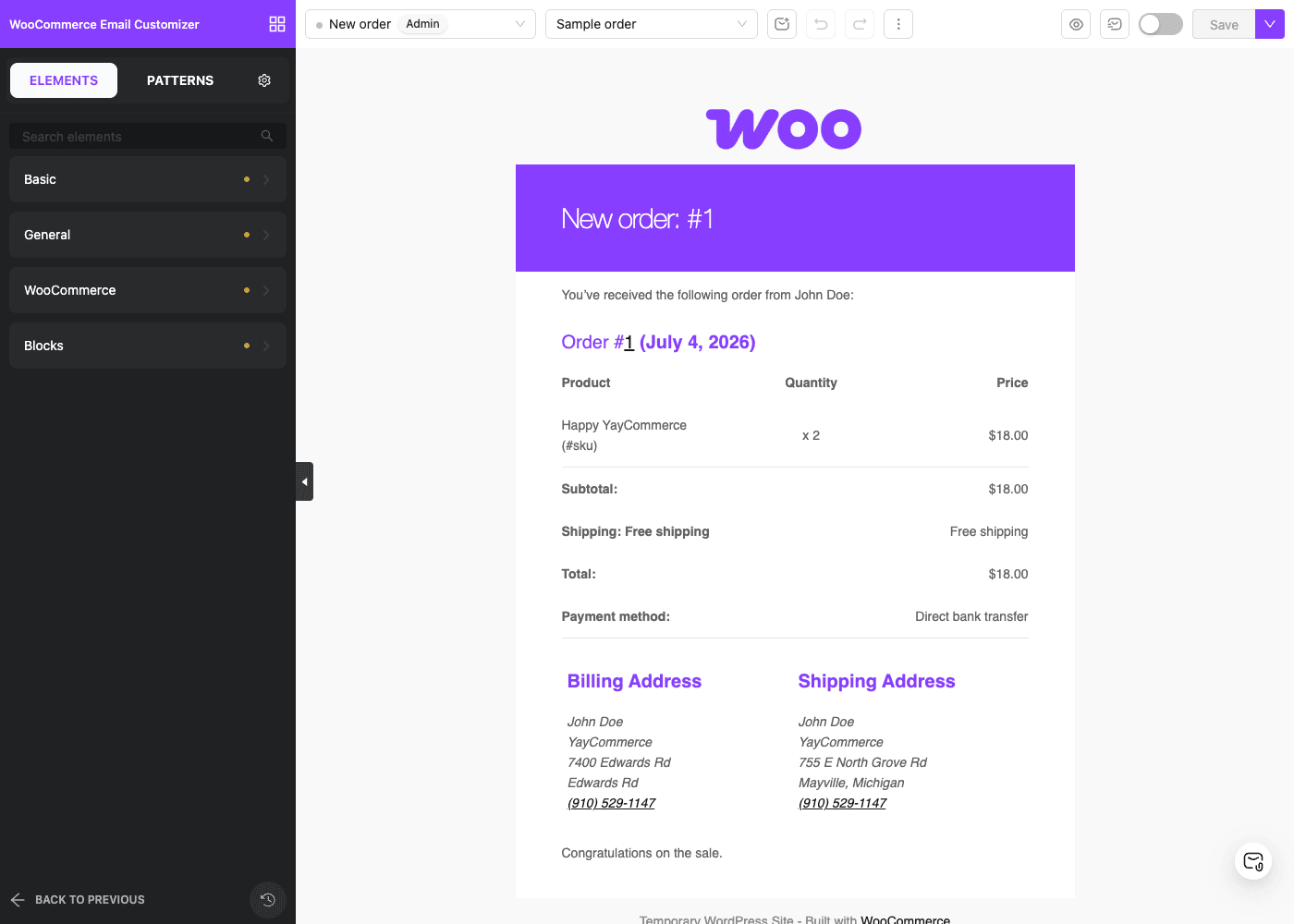
The live preview is the part that sells it. When I opened the New-order email in the demo, the right side didn’t show lorem ipsum. It showed a genuine order: a product called "Happy YayCommerce" ordered twice at $18.00, with a subtotal, shipping, and total, the payment method, and both the billing and shipping addresses laid out underneath. That’s because YayMail renders against an actual WooCommerce order object.
That top-bar Sample order picker is how you choose which order feeds the preview. Point it at a real order from your store and you get an honest picture of how a customer’s email will look, including edge cases like long product names, multiple line items, or a coupon line. You’re not guessing.
The desktop/mobile toggle matters more than it sounds. Most order emails break on phones, and most people read order emails on phones. Flip the preview to mobile and you can see whether your two-column layout stacks cleanly or your product table overflows before a single message goes out.
Now, one honest technical note. YayMail’s admin is a Vue single-page app, so the builder is a modern JavaScript interface rather than a stack of classic WordPress meta boxes. In day-to-day use that’s a good thing, the drag interactions are smooth, but it does mean the builder feels like its own environment inside wp-admin rather than a native WordPress screen. It screenshots fine and it loads quickly; it just has its own look.
Tip: Before you touch individual emails, open the Global Header & Footer tab and design those first. Every email inherits them, so getting your logo, header background, and footer (address, unsubscribe-style legal text, social links) right once saves you repeating the work eleven times.
Every WooCommerce email in one place
Open YayMail and the first thing you land on is the email templates list. This is the map of everything WooCommerce can send, and it’s genuinely useful just as an inventory, because a lot of store owners have never seen all their transactional emails listed in one place.
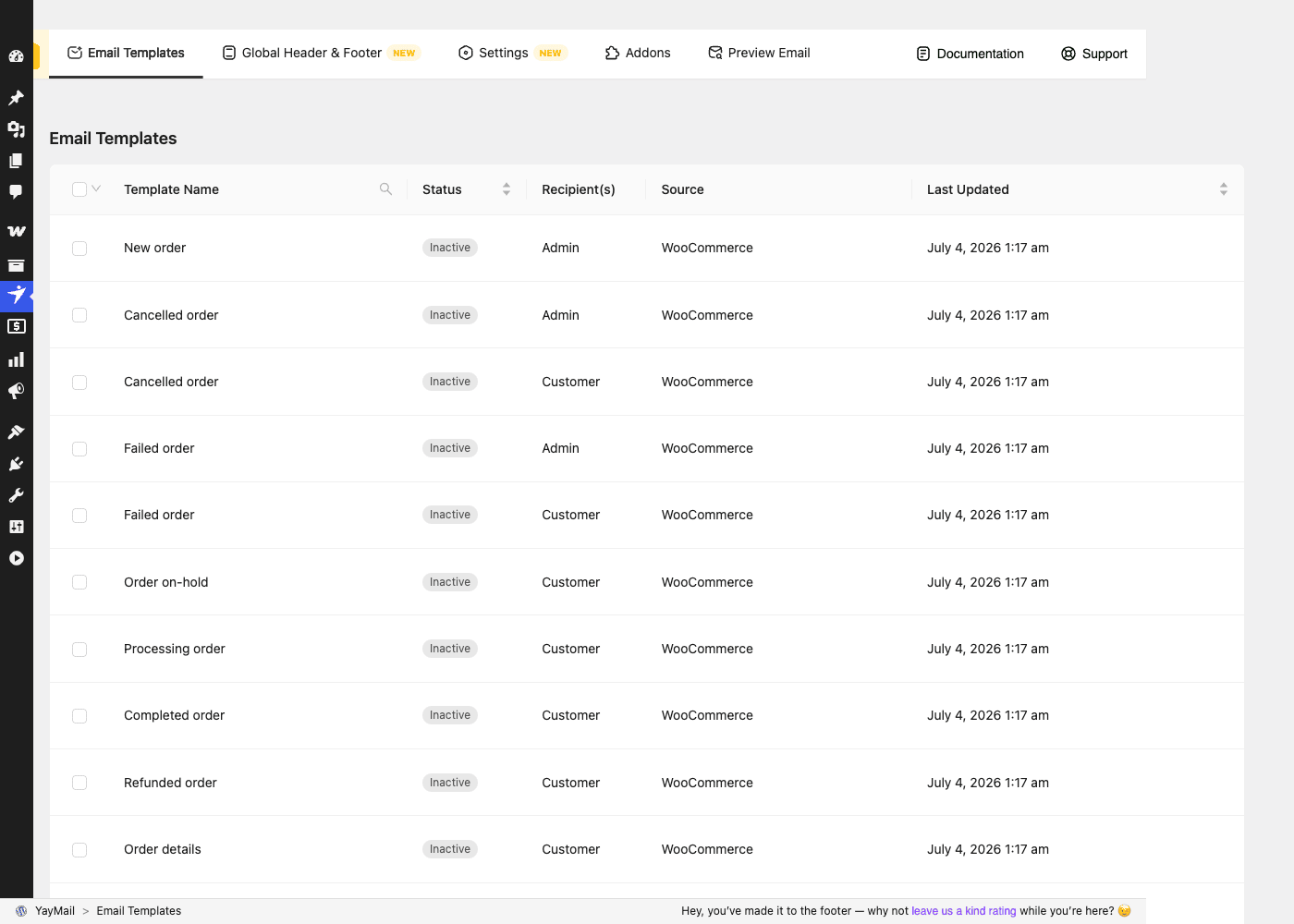
Each row shows the email name, its Status (Active or Inactive), the Recipient, the Source (WooCommerce, or one of your addons), and when it was last updated. The list covers the full set:
- New order (goes to the admin, so you know a sale happened)
- Cancelled order (admin and customer)
- Failed order (admin and customer)
- Order on-hold (customer)
- Processing order (customer, the "we got your order" email)
- Completed order (customer, the "it shipped / it’s done" email)
- Refunded order (customer)
- Customer invoice / order details (sent manually or on demand)
- Customer note (when you add a note to an order)
- Reset password and New account (the account lifecycle emails)
Here’s the key behavior to understand. By default, each template is inactive and WooCommerce sends its own plain version. When you switch a YayMail template to Active, YayMail takes over the rendering for that specific email and your design is what goes out. Leave one inactive and WooCommerce handles it as normal. That means you can redesign the three or four emails that matter most (New order, Processing, Completed) and leave the rest alone until you’re ready.
The Admin versus Customer split is worth calling out. Some emails, like New order, go to you the store owner. Others, like Processing and Completed, go to the buyer. A few, like Cancelled and Failed, go to both, and WooCommerce treats those as separate emails with separate recipients. YayMail respects that split, so you can make the customer-facing Completed email a branded, upsell-friendly design while keeping the admin New-order email a lean, information-dense layout that you can scan in two seconds. Different audiences, different jobs.
You might be wondering whether activating a YayMail template changes when the email fires or who gets it. It doesn’t. The trigger conditions and recipients are still WooCommerce’s. YayMail only changes the content and design of the message. That’s a deliberate line, and it’s the right one.
The WooCommerce elements that make it worth it
Plenty of tools can drop a logo and a button into an email. What separates YayMail from a generic HTML email editor is the set of dynamic WooCommerce elements that render live order data at send time. These are the blocks I actually reach for, and they’re the reason the plugin justifies its price.
Order Details is the workhorse. It’s the itemized table (products, quantities, prices, subtotal, shipping, tax, total) pulled straight from the order. You style it, but the data is real and current for each recipient.
Order Progress is a visual status bar that shows where the order sits in your fulfillment flow. Instead of a customer squinting at the word "processing," they see a progress indicator that reads at a glance. It’s a small thing that noticeably cuts down on "where’s my order?" support emails.
Billing Address, Shipping Address, and a combined Billing/Shipping block drop the customer’s real addresses into the layout, formatted the way WooCommerce stores them.
Order Details Download surfaces downloadable-product links for stores selling digital goods, so the customer gets their files right in the confirmation email.
Now the revenue blocks, which are the ones store owners tend to overlook.
Featured Products lets you show hand-picked products inside an email. Cross-sell / Upsell Products pulls the cross-sells and upsells configured on the ordered products. Products With Reviews shows products alongside their star ratings for social proof. Drop a Cross-sell block into your Completed order email and a happy customer, at the exact moment they’re feeling good about their purchase, sees "you might also like." That’s the highest-intent marketing moment you’ve got, and it’s free real estate you already own.
If you run a print shop or a merch store, the Completed-order email with a Featured Products block becomes a quiet second storefront. If you sell downloadable design assets, the Order Details Download block plus a Cross-sell block turns every delivery email into a soft pitch for the next pack.
There’s also a Shipment Tracking element and an Advanced Shipment Tracking (AST) integration block, so if you use a tracking plugin, the tracking number and carrier land in the email as live data rather than something you paste in by hand. And there’s an Advanced Local Pickup Instruction block and an Admin Custom Order Fields block for stores that need pickup details or custom order metadata in the message.
Note: Dynamic blocks only render meaningful data when the preview is pointed at an order that actually has that data. If your Cross-sell block looks empty in the preview, it’s usually because the sample order’s products have no cross-sells configured, not because the block is broken. Point the sample-order picker at an order you know has cross-sells set, and it fills in.
One more layout-level element deserves a mention for developers: the Hook element. You can drop a WordPress action hook right into the email body, which means a developer can render fully custom, code-generated content at a specific spot in the layout without building a whole custom element. It’s an escape hatch, and a smart one.
80+ addons: emails for the rest of your stack
WooCommerce is rarely alone. A real store runs Subscriptions, or Bookings, or a multivendor plugin, and every one of those sends its own emails. Out of the box, YayMail customizes WooCommerce’s core emails. The 80+ addons are how you bring those other plugins’ emails under the same branded roof.
Open the addons screen (it’s headed "Explore 80+ WooCommerce Email Customizer Addons") and you get a grid of integration cards, grouped by category: Marketing, Payments, Membership, Multivendor, Subscription, Order status, Booking. Each addon teaches YayMail about a specific plugin’s emails and data, adding the right elements and merge-tags so you can design them the same way you design the core ones.
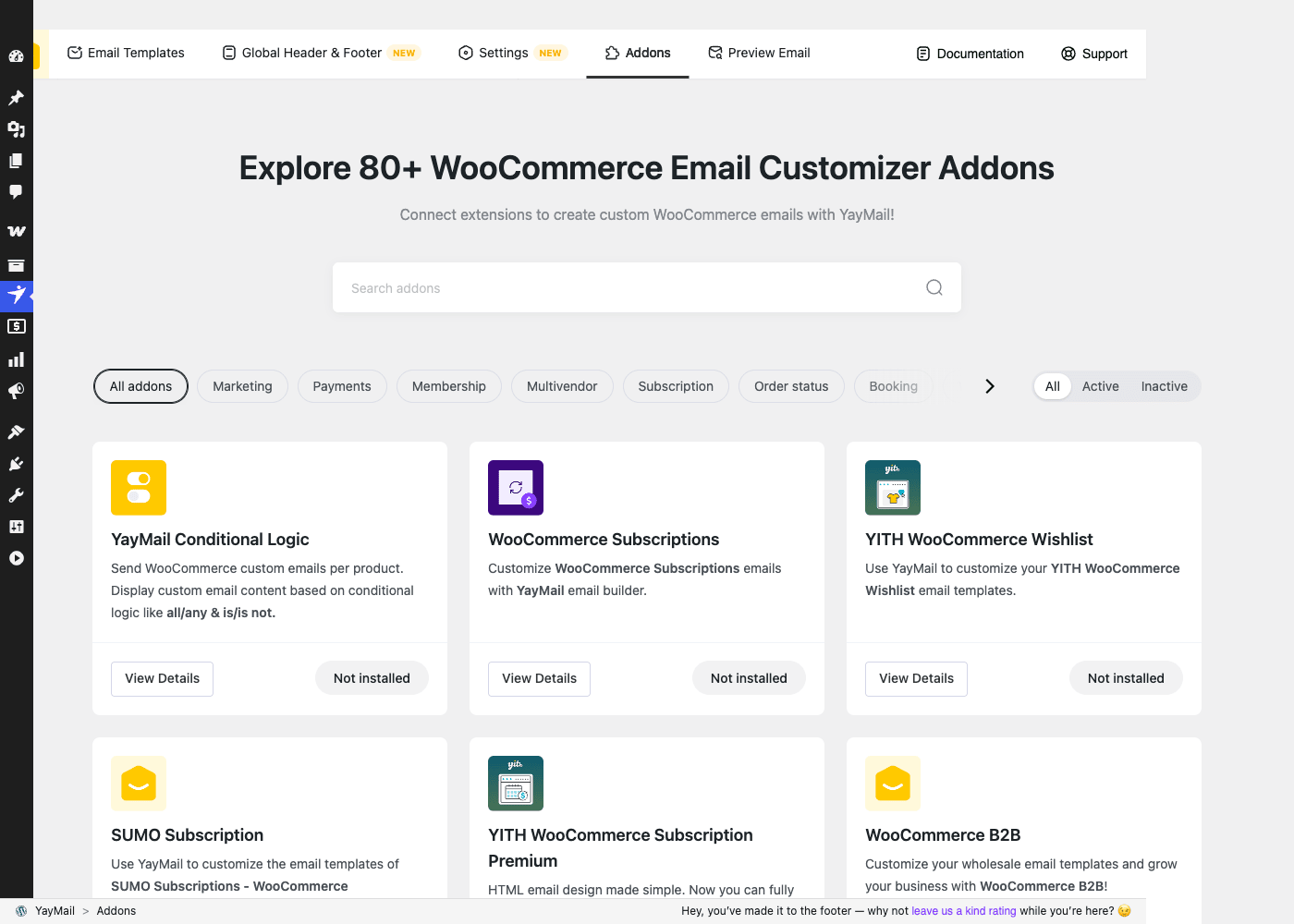
Be clear on what "80+ addons" means, because the marketing number is easy to misread. These are integrations, not 80 features that are all bundled and switched on. You install and activate the specific addons that match the plugins your store actually runs. If you don’t use Bookings, you never touch the Bookings addon. The count is a measure of how wide the coverage is, not how much is loaded by default.
Here are the integrations that matter most in practice:
- WooCommerce Subscriptions. If you sell recurring products, the renewal, cancellation, and subscription-switched emails are some of the most-read messages you send. The addon lets you brand them to match. If you’re weighing subscriptions in general, our WooCommerce Subscriptions walkthrough covers how the billing side works.
- Dokan and other multivendor plugins. On a marketplace, vendors get their own notification emails. The Dokan addon lets you brand those vendor emails so the whole marketplace feels like one platform instead of a patchwork.
- YITH plugins (Wishlist, Subscription, Pre-Order, Multi Vendor), SUMO Subscriptions, WooCommerce Bookings, WooCommerce Appointments, WooCommerce Waitlist, Quotes for WooCommerce, WooCommerce B2B, Germanized Pro, Smart Coupons, Order Delivery Date Pro, and more. The list reads like a census of the plugins WooCommerce stores actually run.
Then there’s the one addon that isn’t about a third-party plugin at all: YayMail Conditional Logic. This is the addon I’d argue most stores should look at. It lets you send different email content based on conditions, using all/any and is/is-not rules. Send a custom email for a specific product. Show one block only to customers in a certain country. Swap the upsell section based on order total. Hide the tracking block until the order actually ships. It turns YayMail from "one design per email" into "the right design for each situation," and that’s a meaningful jump in what you can do.
YayMail vs hand-editing vs newsletter tools
You have three real alternatives to YayMail, and it’s worth being honest about where each one wins.
| Approach | Setup effort | What you can change | Recurring cost |
|---|---|---|---|
| Default WooCommerce emails | None | Header image, 3 base colors, footer text | $0/mo |
Hand-editing WC_Email templates in PHP |
High (needs a developer) | Anything, if you can code it | $0/mo, plus dev hours |
| A newsletter tool (MailPoet, FluentCRM) | Medium | Marketing campaigns, not order emails | Monthly plan |
| YayMail | Low (drag and drop) | Every transactional email, with 50+ elements and 80+ addons | $0/mo (one-time on GPL Times) |
Versus the plain default WooCommerce emails. The defaults let you set a header image and roughly three colors, and that’s the ceiling. YayMail gives you 50+ elements, full layout control, dynamic upsell blocks, and a mobile preview. If all you want is a logo and a brand color, the defaults are genuinely fine and they’re free. If you want the email to look like your site, the defaults run out of road fast.
Versus hand-editing the WC_Email templates. This is the developer route: copy WooCommerce’s email templates into your theme and edit the PHP and inline styles by hand. It’s free and it’s infinitely flexible. It’s also slow, fragile, and a maintenance liability. Those templates change between WooCommerce releases, and an override you forget about can quietly break or drift out of date. I’ve spent hours debugging a store whose custom email template stopped rendering totals after an update. YayMail keeps the design in the database as a custom post type instead of in template files, so a WooCommerce update doesn’t silently gut your work. You trade some theoretical flexibility for a lot of durability.
Versus a newsletter or marketing tool. This is the comparison people get wrong most often, so let me be blunt. YayMail is for transactional email only. It designs the automatic messages WooCommerce fires in response to an order: confirmations, status changes, invoices. It does not send marketing newsletters, drip campaigns, or promotional broadcasts. If you want to email your list a Black Friday blast or a weekly digest, that’s MailPoet or FluentCRM territory, not YayMail. The two tools solve different problems and a healthy store often runs both: a marketing tool for campaigns, YayMail for the order emails.
The measurable summary: 50+ drag-and-drop elements, 80+ plugin integrations, one live preview, coverage of all 11 core WooCommerce transactional emails, and $0/month recurring when you get the GPL copy. The default emails can’t match the design range, hand-editing can’t match the speed or the update-safety, and a newsletter tool doesn’t touch order emails at all.
Who should use this (and who shouldn’t)
Let me put faces on this, because "customize your emails" is abstract until you see yourself in it.
The brand-conscious store owner. Your site is beautiful and your order emails look like a 2011 receipt. Every time a customer gets one, the brand experience you worked so hard on takes a hit at the exact moment they’re most engaged. This is the clearest case for YayMail. You make the emails match the site, and the whole purchase feels intentional.
The store chasing repeat sales. You already know acquiring a new customer costs more than keeping one. Drop a Cross-sell or Featured Products block into the Completed-order email and you’re marketing to a warm, paying customer for free, inside a message they’re guaranteed to open. Order emails have open rates that marketing emails can only dream about. Using that space for a gentle upsell is one of the highest-return, lowest-effort moves in ecommerce.
The multi-plugin store. You run Subscriptions, or Bookings, or Dokan, and those plugins send emails that look nothing like your WooCommerce ones. The addons pull all of it under one consistent design. For a marketplace or a subscription business, that consistency is the difference between feeling like a real company and feeling like three plugins in a trench coat.
The agency or freelancer. You build stores for clients and you do not want to hand-edit WC_Email templates for every one, then support them forever. YayMail gives you a repeatable, visual, client-safe way to brand emails, and the import/export tool means you can carry a base template from project to project. The custom-element API even lets you ship your own blocks.
And who should skip it? Two groups, honestly.
First, if all you want is your logo and a couple of brand colors on otherwise-default emails, WooCommerce’s built-in email settings already do that at no cost. Don’t buy a customizer to change three colors.
Second, and this is the big one, if what you actually want is to send marketing newsletters or promotional campaigns, YayMail is the wrong tool. It doesn’t send broadcasts or manage a subscriber list. That’s a job for a dedicated email marketing plugin. Buying YayMail expecting a newsletter builder is the most common way people end up disappointed, and it’s entirely avoidable if you know going in that this is transactional email only.
Don’t redesign your emails and forget they still have to arrive
Here’s a mistake smart people make, and it costs real money.
You spend an afternoon in YayMail building a gorgeous, on-brand Completed-order email. The preview looks perfect, you hit Save, and move on. But your WordPress site still sends mail through PHP’s default mail() function, unauthenticated, from a server Gmail and Outlook distrust. So a big chunk of that email lands in spam, and the customer never sees it.
They don’t think "nice design." They think you took their money and went silent, and they open a dispute. Money and trust gone, and the design had nothing to do with it.
This is the thing people miss: YayMail designs the email, it does not send it, and it cannot fix deliverability. Those are separate jobs. YayMail owns how the email looks and does it well; it has zero control over whether the message reaches an inbox. That depends on how your site sends mail.
The fix is straightforward, but you have to do it. Pair YayMail with a proper SMTP setup so mail goes out authenticated instead of through raw PHP. A tool like WP Mail SMTP routes your email through a real sending service, and our guide on fixing WordPress email deliverability walks through it. Authenticate your domain with SPF and DKIM so mailbox providers trust you.
Then test for real. Send a live test to a Gmail and an Outlook address, not just the YayMail preview, and check the spam folder in each. Open it on an actual phone, because an email that looks flawless on desktop can collapse on a narrow screen.
Only when a test lands in a real inbox, on desktop and mobile, looking the way it did in the builder, is the email finished. The preview is a promise. The inbox is the proof.
Deliverability, performance, and the gotchas
Building on that anti-pattern, here are the honest caveats and edge cases worth knowing before you commit.
YayMail is a design layer, not a mail server. I said it above and it’s worth repeating because it’s the single most common misunderstanding. If your emails aren’t arriving, YayMail is not the problem and reinstalling it won’t help. Fix sending first (SMTP, domain authentication), then design.
Front-end performance is basically a non-issue, and that surprises people. YayMail’s work happens in two places: the admin builder (a Vue app you load when you’re editing) and the email HTML it generates at send time. It doesn’t add scripts or styles to your storefront, so it has no effect on your site’s page speed or Core Web Vitals. If you’re carefully managing front-end performance with something like WP Rocket, YayMail sits entirely outside that picture. The only performance cost is a small amount of extra processing when an email renders, which is negligible for normal order volumes.
The Vue builder is modern, and that has a trade-off. The interface is smooth and fast, but because it’s a single-page app rather than classic WordPress screens, a very aggressive optimization plugin or a strict Content Security Policy on wp-admin can occasionally interfere with it loading. If the builder ever shows a blank canvas, that’s the first thing to check: is something blocking the admin JavaScript?
Email HTML is its own hostile world. This isn’t a YayMail flaw, it’s true of all email, but it catches people. Email clients render HTML inconsistently. Outlook in particular uses Word’s rendering engine and mangles modern CSS. YayMail’s elements are built with email-safe, table-based HTML for exactly this reason, but it means you’re constrained compared to web design. Don’t expect flexbox-grade layout control. Stick to the elements as designed and test in real clients.
Test-sending is not optional. The builder preview is a browser rendering, and no browser preview perfectly predicts Gmail, Outlook, and Apple Mail. Use the Preview Email tab to send yourself the real thing before you activate a template on a live store.
Compatibility notes. YayMail needs WooCommerce active and runs on modest PHP requirements, so hosting is rarely a barrier. It’s WPML-aware through a dedicated language filter, so multilingual stores can send emails in the customer’s language. On multisite, install it per-site like most WooCommerce plugins. The one conflict class to watch is other plugins that also try to override WooCommerce email rendering; running two email customizers at once is asking for trouble, so pick one.
Backups before big changes. YayMail includes a Backups tool in Settings, and I’d use it. Before you restructure the Global Header or overhaul a template you’ve already activated, take a backup. It’s a two-second habit that saves you from redoing an hour of work if you dislike a change.
Developer reference: hooks, filters, and the CPT
YayMail is friendlier to developers than most email tools, because it exposes a real extension surface rather than just a settings screen. Here’s what’s actually there. Everything below is confirmed against the plugin source; I’ve left out anything I couldn’t verify.
The custom post type. Email designs are stored as a custom post type, yaymail_template. Each designed email is a post of this type, which is why your designs survive WooCommerce updates (they live in the database, not in theme template files). Patterns have their own related post type. If you need to query or migrate designs programmatically, that’s your entry point.
$templates = get_posts( array(
    'post_type'   => 'yaymail_template',
    'post_status' => 'publish',
    'numberposts' => -1,
) );

foreach ( $templates as $template ) {
    // Each post is one YayMail email design.
    echo esc_html( $template->post_title );
}
The REST layer is internal. YayMail registers a REST namespace, yaymail/v1, that powers the Vue builder (attachment handling, the template library, and so on). It’s auth-gated and meant for the admin app. Treat it as a private, internal API, not a documented public endpoint to build integrations against. It can change without notice.
Registering a custom element. The yaymail_register_elements action passes you the elements loader so you can add your own drag-and-drop block to the builder palette. Agencies use this to ship branded blocks that aren’t part of the core set.
add_action( 'yaymail_register_elements', function ( $elements_loader ) {
    // $elements_loader is YayMail's element registry.
    // Register your own element class so it appears in the builder palette.
    $elements_loader->register( new My_Loyalty_Badge_Element() );
} );
Registering a custom email type. The yaymail_register_emails action gives you the emails collection, so you can make a custom email (one your own plugin fires) designable inside YayMail alongside the core WooCommerce emails.
add_action( 'yaymail_register_emails', function ( $yaymail_emails ) {
    // Add a custom email so it shows in YayMail's template list
    // and becomes editable in the builder.
    $yaymail_emails->register( new My_Renewal_Reminder_Email() );
} );
Reacting when a designed email is sent. The yaymail_trigger_email action fires with the email object and the order ID when YayMail sends one of its designed emails. Handy for logging, analytics, or syncing a "notified" flag back to another system.
add_action( 'yaymail_trigger_email', function ( $email, $order_id ) {
    // $email is the WC_Email-derived object; $order_id is the WooCommerce order.
    error_log( sprintf( 'YayMail sent %s for order #%d', $email->id, $order_id ) );
}, 10, 2 );
Adding a custom merge-tag. This is the filter most developers reach for. The yaymail_extra_shortcodes filter lets you register your own merge-tag so store staff can drop dynamic data into any email from the builder. Say you run a loyalty program and want a {loyalty_points} tag that prints the customer’s balance.
add_filter( 'yaymail_extra_shortcodes', function ( $shortcodes, $data ) {
    // Each entry is a list item with a 'name' key (not the array key),
    // matching the shape of YayMail's own merge-tags.
    $shortcodes[] = array(
        'name'        => 'loyalty_points',
        'description' => 'Loyalty points',
        'group'       => 'general',
        'callback'    => function ( $data, $atts ) {
            // YayMail passes its render data (the order lives at $data['order']),
            // not the WC_Order directly.
            $order = isset( $data['order'] ) ? $data['order'] : null;
            return $order ? (int) get_post_meta( $order->get_id(), '_loyalty_points', true ) : '';
        },
    );
    return $shortcodes;
}, 10, 2 );
Important terminology note: these "shortcodes" are email merge-tags, the order and customer data tokens you place inside an email design. They are not front-end WordPress [shortcode] tags and they don’t run on your pages. They only resolve when an email renders.
Filtering the data passed into the template. The yaymail_template_rendering_args filter lets you inject or adjust the data available while an email renders, which is useful when a custom element or the Hook element needs an extra value.
add_filter( 'yaymail_template_rendering_args', function ( $args ) {
    // $args holds the data passed into the email at render time.
    $args['store_hours'] = 'Mon to Fri, 9am to 5pm';
    return $args;
} );
Multilingual sending. The yaymail_order_for_language filter is YayMail’s WPML and multilingual hook. It lets you control the order context used to determine the customer’s language, so the email goes out translated to match the language they ordered in.
add_filter( 'yaymail_order_for_language', function ( $order ) {
    // Return the order used to resolve the customer's language for WPML.
    return $order;
} );
A few things that are deliberately not here. There is no WP-CLI command set in the plugin; email design is a visual job, so there’s no CLI surface to script it. And, again, there’s no free-base dependency to satisfy and no public REST API to integrate against. If you’re extending YayMail, the actions, filters, custom-element API, and the yaymail_template post type are your toolkit. For the underlying WooCommerce email classes these hooks build on, the WooCommerce and WordPress email developer docs are the reference to keep open.
FAQ
Does YayMail send my WooCommerce emails or fix deliverability?
No, and this is the most important thing to understand. YayMail designs your emails; WooCommerce and your server still send them. If your emails land in spam or don’t arrive, that’s a sending problem, not a design problem, and you fix it with an SMTP plugin and proper domain authentication (SPF and DKIM). Design and delivery are separate jobs, and YayMail only owns the first one.
Do I need WooCommerce to use YayMail?
Yes. YayMail is built directly on WooCommerce’s email system, so WooCommerce has to be installed and active. Without it there are no transactional emails to customize and the plugin has nothing to hook into. It is not a general-purpose WordPress email designer.
Is YayMail for marketing newsletters or campaigns?
No, and buying it expecting that is the classic mismatch. YayMail handles transactional emails only, the automatic messages tied to orders (confirmations, status changes, invoices, account emails). It doesn’t manage a subscriber list or send broadcasts. For newsletters and drip campaigns you want a marketing tool like MailPoet or FluentCRM. Plenty of stores run both, one for campaigns and YayMail for order emails.
Do I need the free version installed before YayMail Pro?
No. YayMail Pro is the complete plugin on its own. There’s no free base to install first and no separate core add-on. You install the one plugin, activate it, and everything works. The only requirement is WooCommerce.
Are all 80+ addons included and active out of the box?
No. The 80+ addons are integrations for specific third-party plugins (Subscriptions, Bookings, Dokan, YITH, and so on). You install and activate only the ones that match the plugins your store actually runs. The number reflects how broad the coverage is, not a pile of features loaded by default. Most stores use a handful.
Will a WooCommerce update break my email designs?
It shouldn’t, and that’s a real advantage over hand-editing templates. YayMail stores your designs as a custom post type in the database rather than as template overrides in your theme, so a WooCommerce update doesn’t silently overwrite or break your work. Hand-edited WC_Email template overrides are the ones that tend to drift and break across updates.
What’s the difference between the Admin and Customer versions of an email?
WooCommerce sends some emails to you (the store owner) and some to the buyer, and a couple to both. New order goes to the admin; Processing and Completed go to the customer. YayMail keeps these separate, so you can design a lean, scannable admin New-order email and a polished, upsell-friendly customer Completed email independently. They serve different readers, so they should look different.
Can I customize emails from other plugins like Subscriptions or Dokan?
Yes, through the addons. The core plugin customizes WooCommerce’s own emails; the relevant addon extends YayMail to the emails from Subscriptions, Dokan, Bookings, YITH plugins, and dozens more, adding the right elements and merge-tags for each. It’s how you get one consistent design across every email your store sends, not just the WooCommerce core ones.
Does the live preview show what customers actually receive?
It’s close, but treat it as a strong preview, not a guarantee. The builder renders in your browser, and real email clients (especially Outlook) render HTML differently. Always use the test-send feature to email yourself the real message and open it on both desktop and a phone before activating a template on a live store. The preview is for designing; the test-send is for confirming.
Is there a way to reuse a design across multiple emails or stores?
Yes. Synced patterns let you build a block once and keep it in sync everywhere it’s used, the Global Header and Footer apply across all emails automatically, and the import/export tool lets you carry templates between stores. For agencies building similar stores repeatedly, that export/import flow saves a lot of repeated setup.
Final thoughts
I came into WooCommerce email customizers a skeptic, convinced the default emails were good enough and that anything fancier was a solution looking for a problem. Placing one test order next to my own website cured me of that. The gap between a polished store and a gray-box order email is real, and customers feel it even if they can’t name it.
YayMail closes that gap without asking you to write code or babysit template overrides. The builder is genuinely pleasant, the live preview against real order data is the feature that makes it click, and the dynamic WooCommerce blocks (especially the cross-sell and featured-product blocks in the Completed-order email) turn your highest-open-rate messages into quiet revenue. The 80+ addons mean it grows with your stack instead of leaving your Subscriptions or Dokan emails looking orphaned. And the developer surface, the yaymail_template post type, the element and email registration hooks, and the merge-tag filters, is more thoughtful than I expected from an email plugin.
Just go in clear-eyed about the two boundaries. YayMail designs emails; it does not send them or fix deliverability, so pair it with a real SMTP setup and test in a live inbox. And it’s for transactional email, not marketing, so keep your newsletter tool for campaigns. Respect those two lines and it does its job cleanly.
On price, YayMail Pro is normally a recurring annual license from YayCommerce. Through GPL Times it’s a one-time download of the same official plugin at $0/month recurring, which is an easy call if you’re branding order emails across one store or fifty. If you want to try every element and dynamic block on a real install, YayMail Pro on GPL Times is the quickest way to get a working copy going. You can also read more about the plugin on the official YayCommerce product page or check the free version on WordPress.org to get a feel for the builder before committing to Pro.
Redesign the three emails that matter most first (New order, Processing, Completed), test them into a real inbox, and you’ll wonder why you left them looking like receipts for so long.