

Most WooCommerce stores hit a point where new-customer acquisition gets expensive and the obvious next move is to make the existing customers buy again. A WooCommerce loyalty program is the cleanest way to do that, and WPLoyalty is the plugin I keep coming back to when a store wants points, rewards, VIP tiers, and referrals without paying SaaS subscription fees forever.
This is a long one. We will plan the program, set it up, walk through earn rules and redemption, set up VIP levels, fire off a referral campaign, and then dig into the hooks, filters, shortcodes, and REST endpoints. Both first-time WooCommerce owners and developers building something custom on top of WPLoyalty should find what they need.
Table of Contents
- What is WPLoyalty
- Core features at a glance
- How a loyalty program actually works
- Installation and first-run setup
- Building your first earning campaign
- Setting up redemption rewards
- VIP levels and tier mechanics
- Running a referral program
- Email triggers and customer comms
- The customer-facing rewards page
- Real-world scenarios
- Developer reference
- Performance, compatibility, and gotchas
- Pricing and licensing
- How WPLoyalty compares to other plugins
- Frequently asked questions
- Final thoughts
What is WPLoyalty
WPLoyalty (full name: "WPLoyalty – WooCommerce Loyalty Points, Rewards and Referral Pro") is a WordPress plugin built by the team at wployalty.net. It plugs straight into WooCommerce and gives you the entire toolkit for a loyalty program: an earnings engine, redemption coupons, VIP tiers, referrals, email triggers, and a customer-facing rewards page that lives under My Account.
You install it, set how many points a dollar of spend is worth, pick a redemption value (say, 100 points = $5 off), and customers start earning and spending automatically. Under the hood it is doing a fair amount of work: it hooks into WooCommerce’s order lifecycle, generates discount coupons from points, tracks tier progression, fires the right email, and keeps a per-customer ledger of every transaction.
A loyalty program on WooCommerce sounds straightforward until you actually try to wire one up by hand. You quickly realise you need: a point-balance store per customer, a rules engine for "who earns what when", a coupon factory for redemption, tier evaluation logic, a referral attribution system, email triggers, and a place where customers can see all of this. WPLoyalty packages that into one plugin so you stop reinventing the wheel.
Core features at a glance
Here is what you get out of the box. This is a fairly long list, but skim it. If two or three of these match a problem you have, the rest probably will too.
-
Twelve earning actions. Customers can earn points for placing orders (the obvious one), for spending milestones, for signing up, for writing product reviews, for sharing on Facebook, Twitter, WhatsApp or email, for following you, for their birthday, for referring a friend, and for hitting achievement-style goals. Twelve distinct triggers cover most of what an e-commerce store needs to reward.
-
Five redemption types. Points can become a fixed-cart discount coupon ($5 off), a percentage discount, free shipping, a free product, or be converted to currency directly at checkout. That last one is the most flexible because it lets a customer redeem any partial amount of their balance against an order.
-
Per-rule conditions. Every earning campaign has its own conditional rules: which products, which categories, which user roles, what cart subtotal, what payment method, what shipping country. Same goes for rewards.
-
VIP levels. Define tiers (Silver, Gold, Platinum, whatever you want to call them) keyed off points collected. Each level gets a badge, a description, and can be tied to its own earning multiplier or exclusive rewards.
-
Referral program. Each customer gets a unique referral link or code. When their friend signs up and buys, both parties get rewarded according to your campaign settings. The friend reward can be claimed before signup if you install the Guest Referral add-on.
-
Points and reward expiry. Set "points expire after N days/months of inactivity" and "reward coupons expire N days after issue", and the plugin notifies customers before either fires.
-
My-account integration. Customers see their balance, earning opportunities, available rewards, transaction history, and referral link directly in WooCommerce My Account, on a tab called Points & Rewards.
-
Email triggers. Six built-in customer emails fire on key events (welcome to program, points earned, reward earned, points-about-to-expire, reward-about-to-expire, new level reached, birthday) and you can customise each with the standard WooCommerce email editor.
-
Renamable labels. Hate the word "points"? Call them coins, beans, stars, gems. Same for "rewards". The settings page lets you swap singular and plural labels and the whole UI follows.
-
WooCommerce Blocks support. The plugin integrates with the new block-based Cart and Checkout pages, not just classic shortcodes.
-
HPOS-compatible. It declares compatibility with High-Performance Order Storage, so it will work on shops that have switched to the new custom-tables layout.
-
Multi-currency. A bundled add-on handles automatic currency conversion across four popular multi-currency plugins for WooCommerce.
-
Multilingual. Works with WPML via a translate add-on, and the front-end strings go through
translate_object_idfilters where needed. -
Open developer API. Roughly 300 filters and 80 actions, plus two authenticated REST endpoints under
wc/v3/wployalty/customers/points/*for adding or subtracting points programmatically. There is a Gutenberg block too, registered via the standard block.json approach.
That’s a lot of surface. The next sections walk through the parts a store owner touches day-to-day, and then we go developer-deep.
How a loyalty program actually works
Before clicking buttons, it helps to picture what a loyalty program is actually doing. Skip this section if you have built one before.
A point is a unit of credit you give a customer in exchange for behaviour you want to encourage. Most commonly: spending money in your store, but also: writing reviews, sharing your products, referring friends, and so on.
Points have two interesting properties. First, they are denominated in something abstract ("points") rather than in dollars, which gives you pricing flexibility. You can quietly change the conversion rate from "100 points = $5 off" to "100 points = $4 off" without it feeling like a price hike. Second, they create a small psychological cost to leaving your store: a customer with 380 points in their account is more likely to come back and "use them up" than a customer with no balance at all. That’s the whole loyalty mechanic in one sentence.
A redemption is the moment when a customer trades their points for something tangible: a discount coupon, free shipping, a free product, or a direct cash-value-against-order. WPLoyalty creates this trade by minting a WooCommerce coupon under the hood and applying it to the cart. That means everything downstream (your reports, your tax handling, your accounting export) still treats it as a normal WooCommerce coupon transaction. Useful.
A tier is a status level a customer reaches after earning enough points. Tiers can do two things: (a) give the customer a sense of progression and prestige (Bronze, Silver, Gold), and (b) actually change the rules for that customer (Gold members earn 1.5x points on every purchase, for example).
A referral is a closed-loop attribution: customer A shares their link, customer B signs up via that link, customer B buys, and the system credits A with a reward. Both halves of the "give X get X" matter. The friend reward (B gets a coupon for signing up) drives sign-ups. The advocate reward (A gets points or a coupon when B buys) drives sharing.
Good. With that mental model, the rest of WPLoyalty falls into place.
Installation and first-run setup
You install WPLoyalty like any other WordPress plugin. WooCommerce must be active first; the plugin header declares Requires Plugins: woocommerce and it won’t run without it.
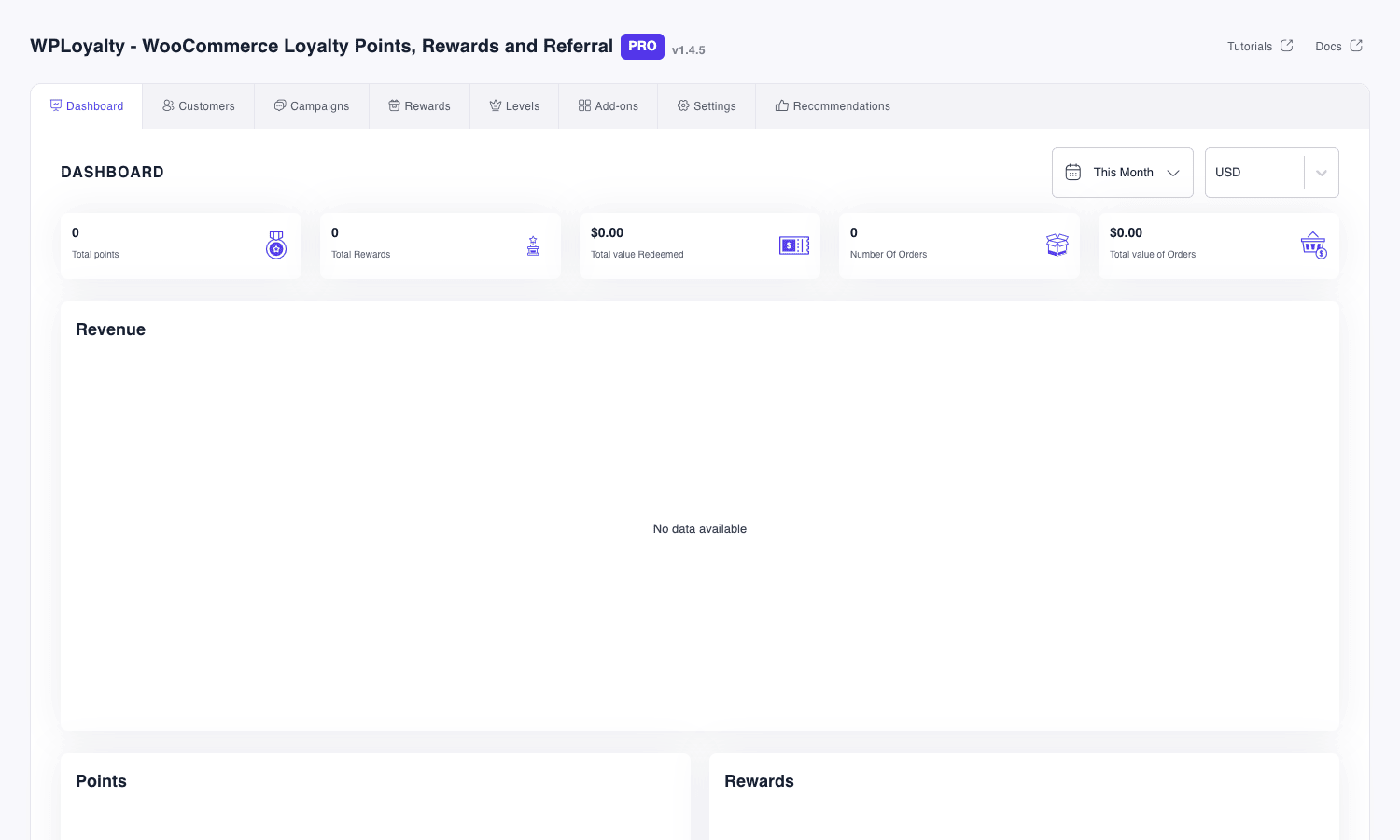
Once activated, a top-level menu item called WPLoyalty appears in your WordPress admin sidebar. The first time you click it you land on the Dashboard. There is a brief onboarding step that asks you to enter a license key (Settings > License). After that you can dive in.
A reasonable order of operations:
-
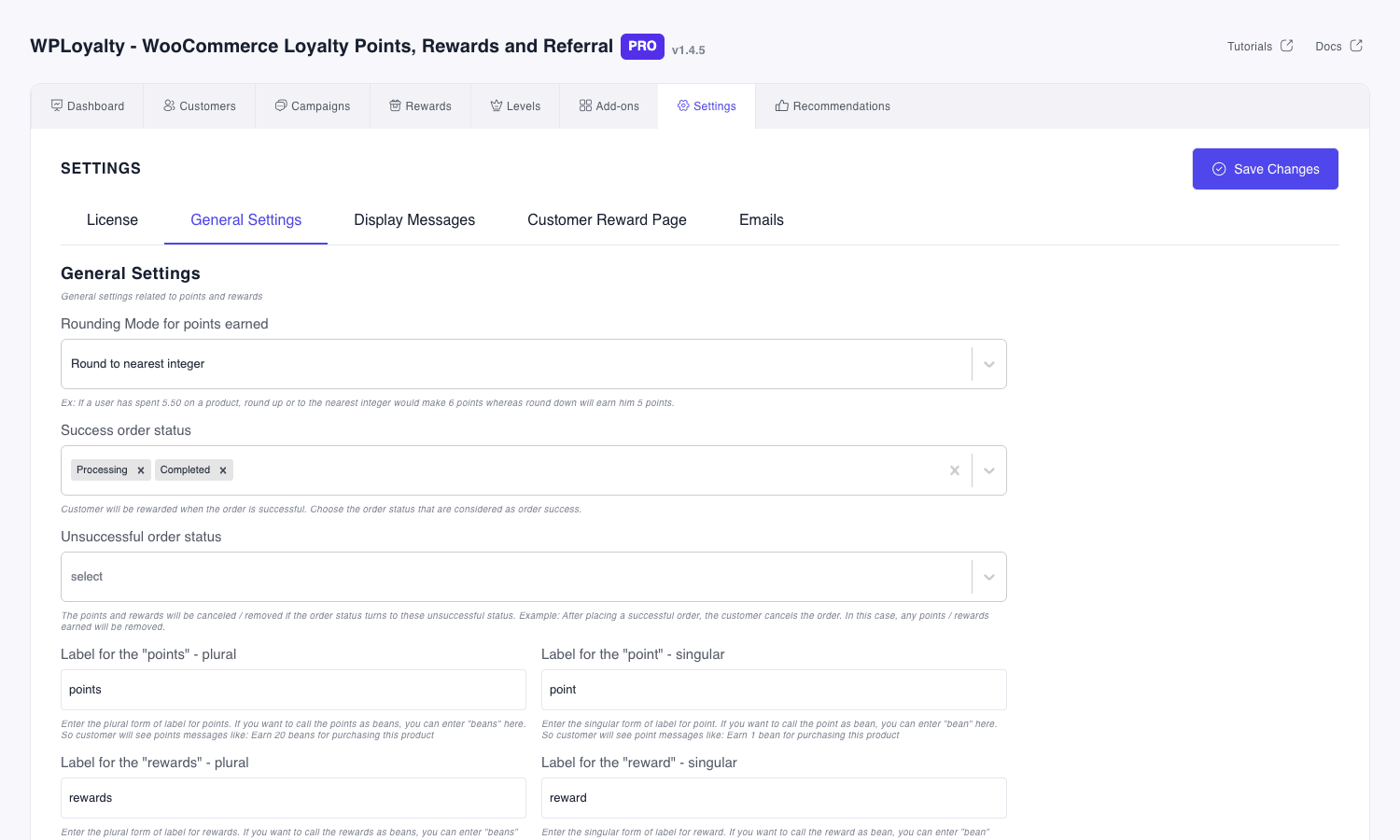
Go to WPLoyalty > Settings > General Settings first. Pick a rounding mode for points (round to nearest is fine for most stores), confirm which WooCommerce order statuses count as "successful" (Processing and Completed are pre-selected), and decide what happens to points if an order is refunded or cancelled (the default removes them). Rename the "points" and "rewards" labels here if you want.
-
Create your first earning campaign under WPLoyalty > Campaigns. Most stores start with "Points for Purchase" set to "1 point per $1 spent".
-
Set up at least one redemption reward under WPLoyalty > Rewards. Most start with "Points Conversion" where 100 points equal $5 off at checkout.
-
(Optional) Configure VIP levels under WPLoyalty > Levels if you want tiers.
-
(Optional) Create a Referral campaign under Campaigns, choosing "Referral" as the type.
-
Visit WPLoyalty > Settings > Customer Reward Page to control what sections the customer sees on their My Account loyalty tab.
-
Visit WPLoyalty > Settings > Display Messages to set the small earn/redeem prompts that appear on cart, product, and thank-you pages.
The plugin auto-creates the necessary database tables on activation through the wlr_create_required_table action, so you don’t need to install anything else. If you ever import customers from another loyalty plugin, the Migration add-on handles that and is bundled with the Pro download.
Building your first earning campaign
WPLoyalty calls every earning rule a "campaign", which makes sense once you have a few because they can be turned on/off, scheduled with start and end dates, and prioritised.
Click Campaigns > Create New Campaign and you get a chooser screen with twelve campaign types, one per earning trigger.
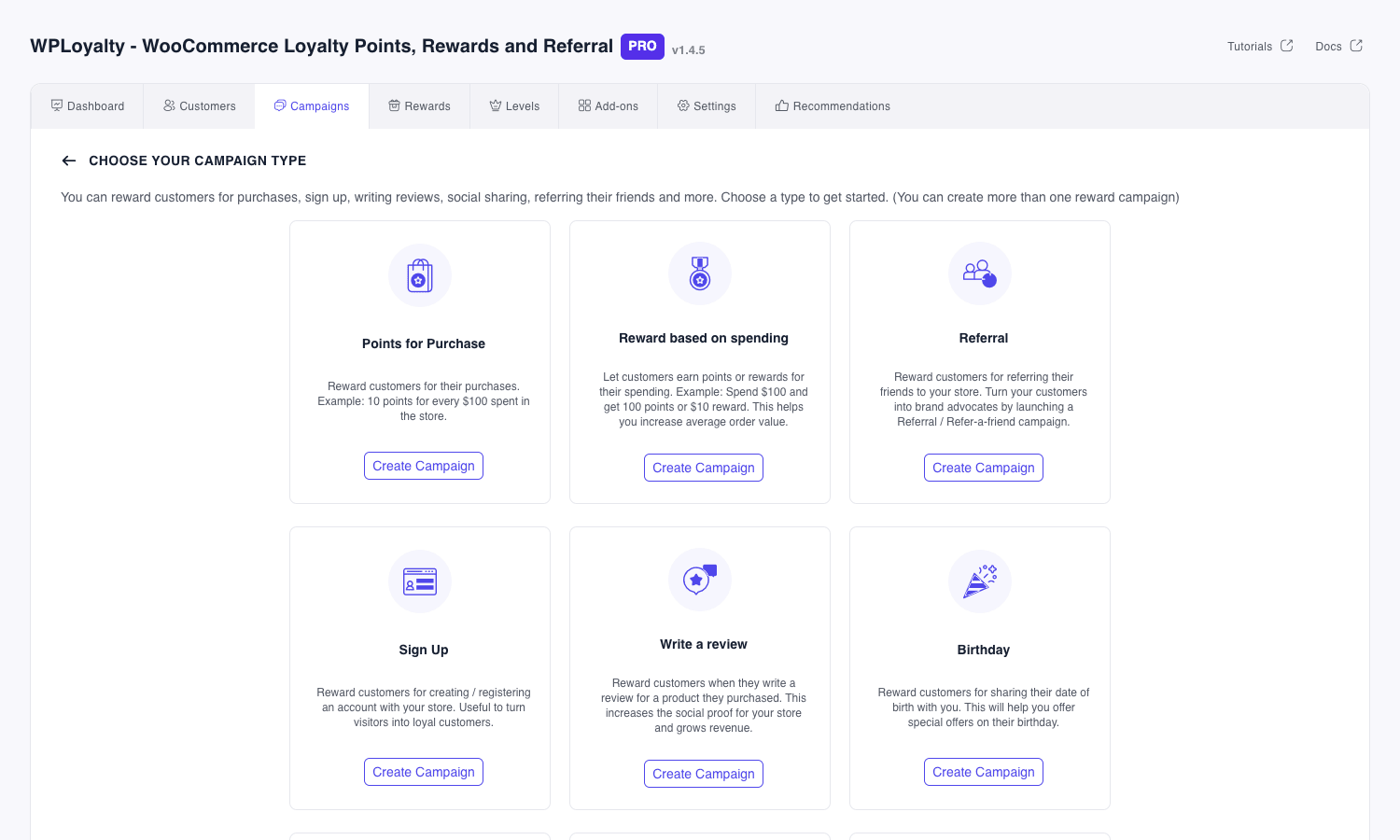
The twelve types correspond directly to the internal action types registered through the wlr_all_action_types filter:
- Points for Purchase. The bread-and-butter rule. "Customer earns X points for every Y currency spent". You can add min/max caps per order.
- Reward Based on Spending. A different mechanic: "spend $200 to unlock $20 off". Less common but useful for hitting a specific average order value goal.
- Order Goals. Reward N orders milestones. (This one is marked for removal in the source, may be deprecated.)
- Sign Up. A one-off bonus the moment a customer creates an account.
- Write a Review. Earn for posting a product review. With the Judge.Me add-on this also triggers from Judge.me reviews.
- Birthday. Customers who add their birthday earn an annual bonus on the day.
- Facebook Share / Twitter Share / WhatsApp Share / Email Share. Earn for clicking the share button on a product (one-off per network per product, by default).
- Follow. Reward for clicking the "follow us" button you can render on the rewards page.
- Referral. Special one. Two-sided: advocate reward and friend reward. See the referral section below.
- Achievement. Goal-style rule, tied to levels.
Click "Create Campaign" on Points for Purchase and you land in the rule editor.
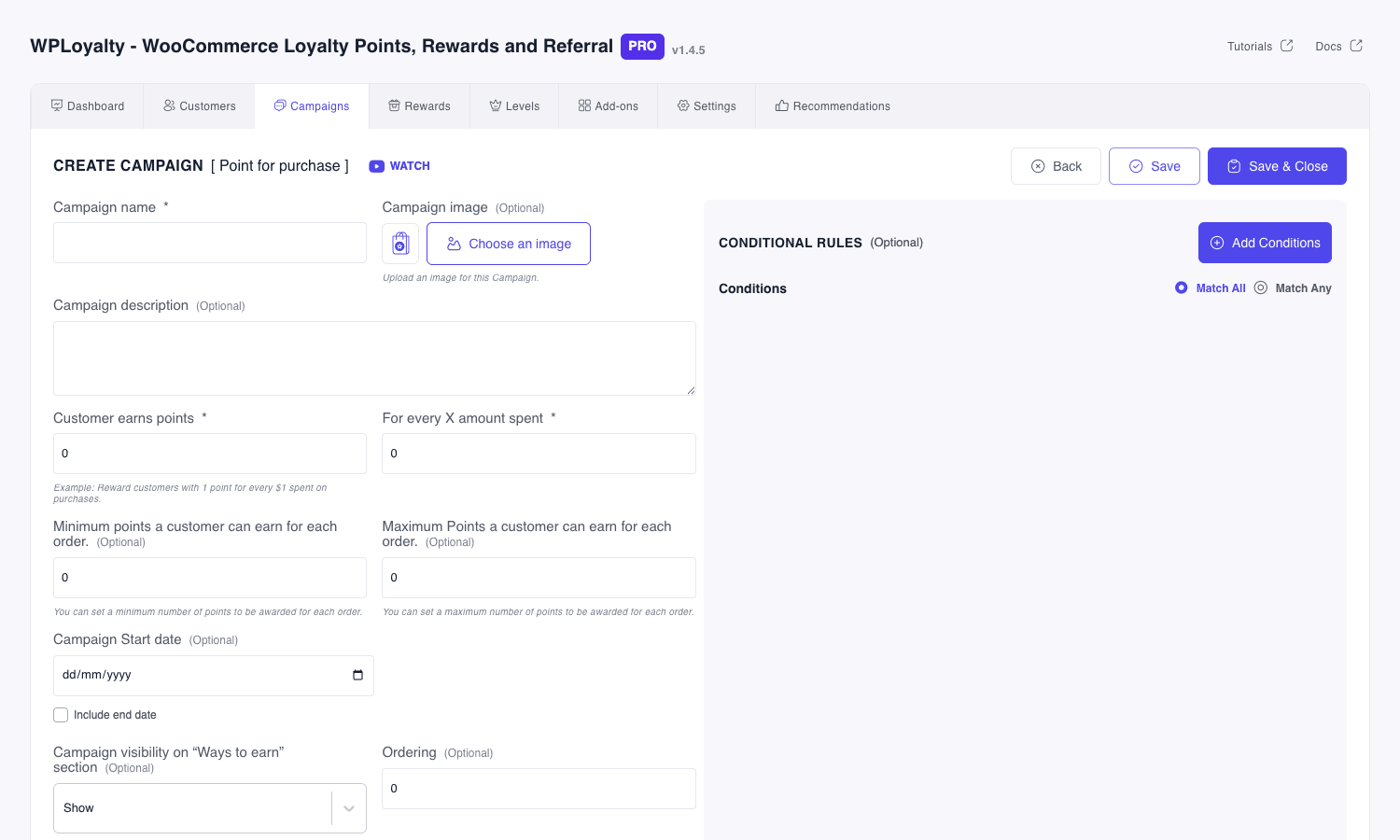
The fields that matter:
- Campaign name. Internal label and what appears in the customer’s "Ways to Earn" section if you allow it.
- Customer earns points / For every X amount spent. The core ratio.
- Min / Max points per order. A safety cap. Without a max, a single $5,000 order could mint 5,000 points (or whatever the rule dictates), which can be more than you intended.
- Campaign start/end date. Optional, for time-limited promos ("Double points week").
- Visibility on "Ways to Earn". Whether this campaign shows up on the customer’s My Account loyalty page as something they can do to earn more.
- Conditional Rules (sidebar). The most powerful part. You can scope a campaign to: specific products or categories, specific user roles, specific countries, specific payment methods, specific shipping zones, days of the week. You can stack conditions with Match All or Match Any logic. This is where a one-size-fits-all program turns into something more strategic.
Save and the campaign is live the moment its start date arrives. From then on every WooCommerce order whose status changes to Processing or Completed (or whatever you set as "success" in General Settings) gets evaluated against the campaign and points credited if it matches.
A subtle behavior worth knowing: if an order is later refunded or cancelled, WPLoyalty automatically pulls back the points it credited (provided you have those statuses listed under "Unsuccessful order status" in General Settings). So you don’t end up with phantom balances from refunded orders.
Setting up redemption rewards
Points are useless until customers can spend them. Head to WPLoyalty > Rewards > Create New Reward and you get a chooser screen with five reward types.
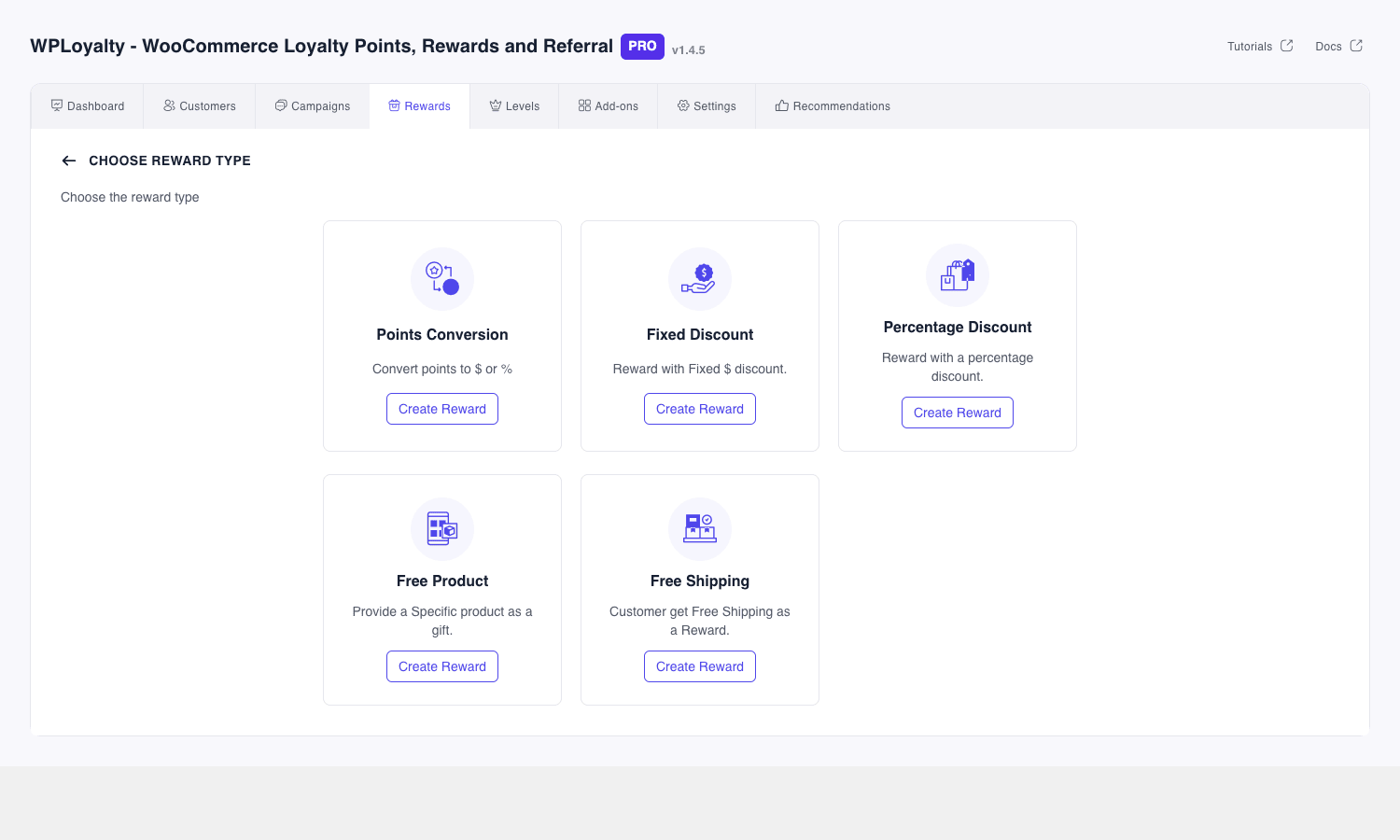
The five reward types again come from the wlr_reward_types filter on the back end:
- Points Conversion. The most flexible. "1 point = $0.05". A customer with 500 points sees a slider on the cart where they can redeem any amount up to their balance. The remaining points stay on their account. This is what most modern programs use.
- Fixed Discount. Stair-step rewards. "Redeem 100 points for $5 off; redeem 250 points for $15 off; redeem 500 points for $40 off". Customers see them as fixed-value coupons they can grab.
- Percentage Discount. "Redeem 200 points for 10% off your order". The percent value can scale with point cost if you create multiple rewards.
- Free Product. "Spend 1,000 points to get this T-shirt free with any order". Good for clearing slow-moving inventory.
- Free Shipping. "Redeem 50 points for free shipping". Cheap to fulfil and very popular as an entry-level reward.
Each reward has its own conditional rules (same engine as campaigns), an expiry window for the resulting coupon, and a visibility toggle. You can run multiple rewards at once: most stores publish a couple of fixed-discount tiers plus an always-on Points Conversion slider.
When a customer redeems, WPLoyalty silently creates a WooCommerce coupon with a unique code, applies it to the cart, and decrements the customer’s point balance. That coupon is just a regular shop_coupon post in your database, so your existing analytics tools will see it.
VIP levels and tier mechanics
Levels (the plugin’s name for VIP tiers) live under WPLoyalty > Levels. The structure is dead simple: each level has a name, a description, an optional badge image, and a points range (From/To).
The level editor itself is sparse on purpose: you name the tier (Silver, Gold), set its points window (0-500, 501-2000, 2001+), upload a badge, and save. The interesting power comes from combining levels with conditional rules elsewhere.
Once you have levels defined, every earning campaign and every reward in your store can add a condition like "Customer Level is Gold" or "Customer Level is not Silver". So you can:
- Run a "Gold members earn 2x points" by creating a parallel "Points for Purchase" campaign with the condition "level = Gold" and twice the point rate.
- Publish an exclusive reward (50% off, only available to Platinum) by filtering visibility.
- Run a one-time-only "promote to Gold" gift campaign by listening to the
wlr_after_user_level_changedaction.
Tiers reevaluate automatically. As soon as a customer crosses the points threshold for the next tier, their current_level updates and the wlr_after_user_level_changed action fires. That’s also when the New Level email goes out.
If you install the Level Options add-on (bundled in the Pro pack), you can choose what "points" means for tier progression: lifetime earned, current balance, points earned in the last 12 months, or another window. This matters because by default, redeeming points lowers a customer’s balance and could demote them from Gold to Silver, which is usually not what you want. Switching to lifetime-earned solves it.
Running a referral program
Referrals are a different campaign type but use the same editor. Click Campaigns > Create New Campaign > Referral > Create Campaign.
A referral campaign has two reward sides:
- Advocate reward (the existing customer who shares): usually points or a coupon they receive once their friend’s order completes.
- Friend reward (the new customer who clicks the link): usually a sign-up coupon, deliverable either before or after their first order.
Each customer gets a unique referral link generated automatically on their My Account loyalty page. The link is appended with a referral code that WPLoyalty stores in a cookie when clicked, so attribution still works even if the friend doesn’t sign up immediately. There is also a referral email-share UI on the customer’s loyalty page (so they can send to friends from inside your site).
By default, the friend reward only lands after they sign up and place an order. If you want them to get the coupon at sign-up, install the bundled WPLoyalty Guest Referral add-on. It lets referred friends claim and apply their reward on their very first purchase, no account creation required up-front.
Anti-fraud notes worth being aware of:
- The system flags self-referrals (same email, same IP) automatically, so a customer can’t refer themselves twice from a second account.
- You can cap referrals per customer with a condition in the campaign rule editor ("max 5 referral rewards per customer per year").
- The referral cookie expires (configurable in settings) so a stale link doesn’t accidentally credit an unrelated purchase a year later.
Email triggers and customer comms
WPLoyalty ships six WooCommerce email types, all extending WC_Email and customisable from WooCommerce > Settings > Emails like any native WC email:
- Earn Point Email (
WlrEarnPointEmail). Fires when a customer earns points on an event. - Earn Reward Email (
WlrEarnRewardEmail). Fires when a customer receives a reward coupon. - Birthday Email (
WlrBirthdayEmail). Fires on the customer’s birthday. - Point Expire Email (
WlrPointExpireEmail). Fires N days before points are about to expire. - Reward Coupon Expire Email (
WlrExpireEmail). Fires before issued coupons expire. - New Level Email (
WlrNewLevelEmail). Fires when a customer is promoted to a new tier.
All of these use the standard WooCommerce email template structure, so they inherit your store branding (header image, footer text, accent colours) from WooCommerce > Settings > Emails.
There is a wlr_before_send_email filter that lets you rewrite the recipient, subject, body, or skip the email entirely. That is the right hook to use if you want to route loyalty notifications through a transactional ESP (SendGrid, Postmark, Amazon SES) by setting them to skip WP’s wp_mail() and posting via API instead. If you are already running FluentCRM Pro or MailPoet Premium, you can pipe the same triggers into their automation flows by listening to the wlr_after_add_earn_point / wlr_after_user_level_changed actions and creating a contact event.
The customer-facing rewards page
This is the surface your customers actually interact with. WPLoyalty adds a "Points & Rewards" endpoint to the WooCommerce My Account menu. Customers see their balance, the ways they can earn, available rewards, transaction history, and their referral link.
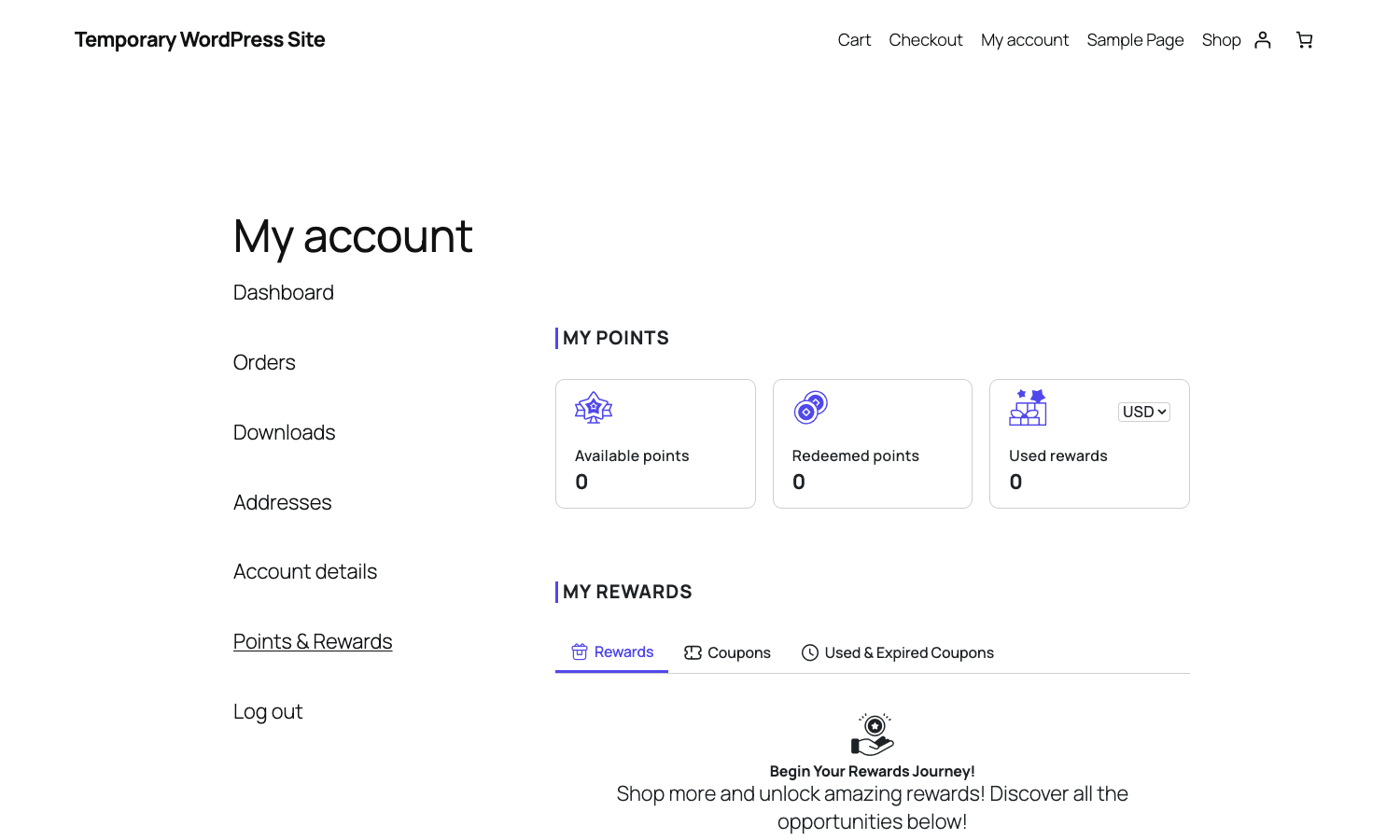
What appears on that page is controlled by Settings > Customer Reward Page, which is where you toggle every section the customer sees.
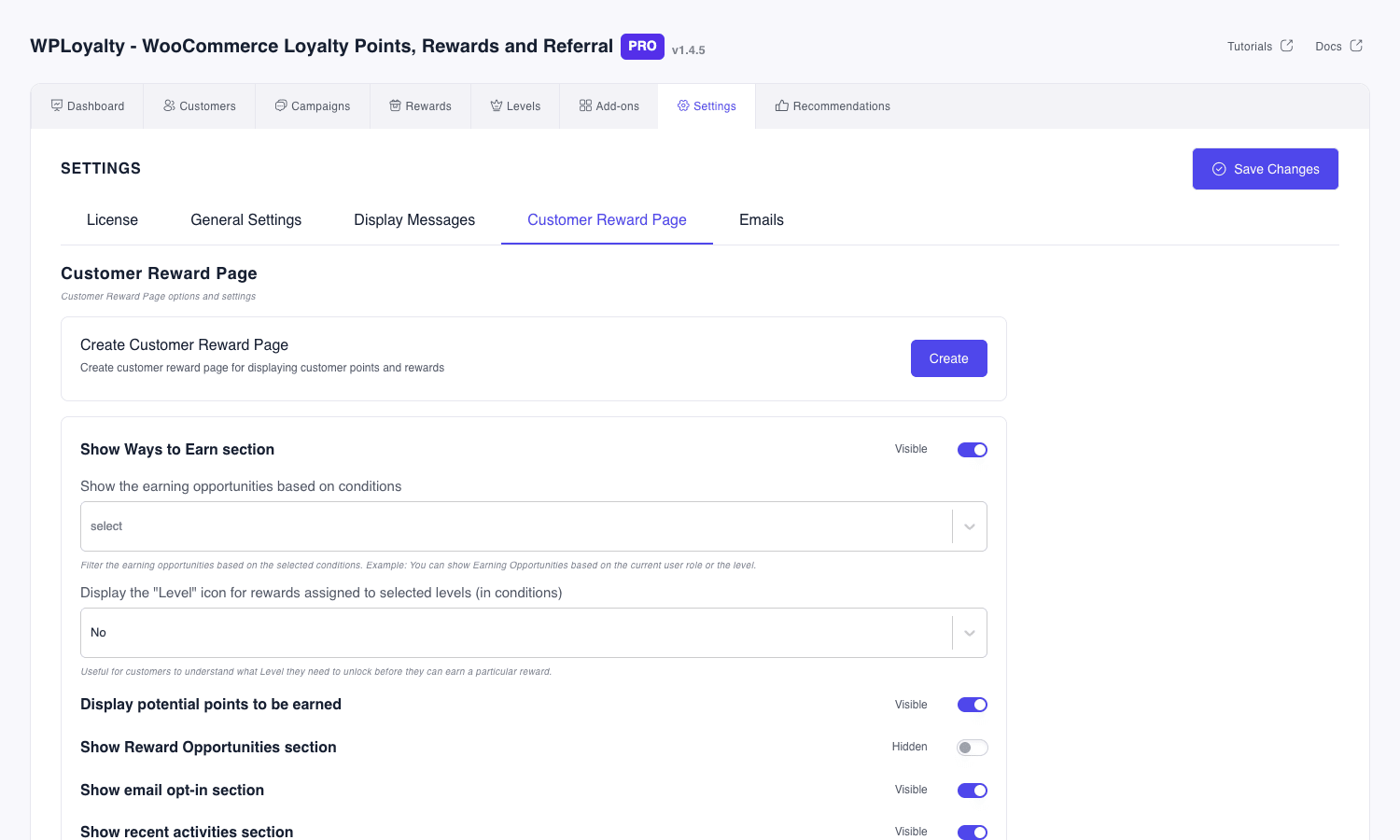
You can toggle each section independently:
- Ways to Earn (the list of active earning campaigns the customer is eligible for)
- Reward Opportunities (available redemption tiles)
- Available Coupons (already-earned reward coupons)
- Used & Expired Coupons (history)
- Transactions (full point ledger)
- Notification Preferences (customer can opt out of specific emails)
- Referral URL (the share link with copy-to-clipboard)
- Birthday opt-in field
- Email opt-in field
Each section has a visibility toggle plus, for some, sub-controls. The "Ways to Earn" section can be filtered to only show earning campaigns relevant to the customer’s current level, which is a nice UX touch.
If you want the loyalty content somewhere else on your site (a standalone "/rewards" page, or a footer block), drop the [wlr_page_content] shortcode wherever you want it. The plugin also exposes [wlr_my_point_balance] for inline "you have 350 points" snippets.
Real-world scenarios
A list of features is one thing. Here are five concrete configurations I have actually shipped or seen, to give you a feel for what you can do.
Coffee subscription store: tiered points with renewal bonuses
A small-batch coffee roaster running WooCommerce Subscriptions wanted to reward subscribers more than one-off buyers. Three campaigns:
- Base "Points for Purchase" rule: 1 point per $1, no conditions.
- Subscription bonus: 2 extra points per $1 spent on subscription-renewal orders only. Condition: product type = subscription. Hooked into the subscription renewal order being marked Completed.
- Birthday: 200 points one time per year.
Three VIP levels: Roaster (0-500), Curator (501-2000), Connoisseur (2001+). Connoisseurs get a fourth rule: free shipping reward at 100 points (versus 200 for everyone else).
Print-on-demand store: review incentive
A T-shirt store with a high return rate needed more product reviews to push social proof. They:
- Set up "Write a Review" campaign awarding 50 points per approved review.
- Limited it to one review per product per customer (built-in).
- Made the friend-reward of their referral campaign a $5 coupon valid on any first order.
Within six months they tripled their review count and got an unexpected lift in average order value as the referred customers turned out to be higher spenders.
Health supplements store: referral focus
A supplements brand with a 90-day reorder cycle leaned hard into referrals. Their config:
- Referral campaign with "Give $10, Get $10" mechanic (friend gets a $10 sign-up coupon they can claim before account creation using Guest Referral; advocate gets 200 points worth $10 after the friend’s first order completes).
- Stacked it with a "Spend $100 get 250 points" Reward Based on Spending campaign to encourage advocates to buy more themselves.
- Disabled all social-share campaigns to keep the focus tight.
Course platform with WooCommerce Memberships: early-bird tiers
A course site selling memberships wanted members to upgrade tiers. They wired up:
- Earn campaigns scoped by user role (paid members earn 2x, free members earn 1x). Done via the
customer_rolecondition on the campaign. - Reward campaigns that unlock exclusive course bundles. Condition: customer level = Gold.
- Tied the
wlr_after_user_level_changedaction to a webhook into their LMS so a tier promotion auto-enrolled the member into a bonus course.
Pet store: birthday-driven retention
A specialty pet store baked their loyalty program around birthdays (their customers love being asked about their pets). They:
- Showed the birthday opt-in field on the loyalty page.
- Created a "Pet Birthday" custom field on the user profile and used the
wlr_action_typesfilter to register a custom action type for that. Read about that pattern in Developer reference. - The pet-birthday email goes out with a 25%-off coupon that expires in 14 days. Conversion rate on those emails ran roughly 40%, well above their normal newsletter open-rate baseline.
Developer reference
WPLoyalty exposes roughly 300 filters and 80 actions, plus shortcodes, REST endpoints, and a Gutenberg block. I’m going to cover the ones you actually reach for. Read docs.wployalty.net for a fuller list and the plugin handbook on developer.wordpress.org for general WP plugin patterns.
Plugin slug and admin menu
The plugin uses wp-loyalty-rules as its folder slug and registers a top-level admin menu under the constant WLR_PLUGIN_SLUG. The capability is manage_woocommerce, so any role with that cap (Shop Manager and above by default) can administer it.
The whole admin UI is a single-page React app rendered at admin.php?page=wp-loyalty-rules, with hash-based routing for tabs. If you ever need to deep-link from a custom dashboard widget, the routes are: #/dashboard, #/earn_campaign, #/rewards, #/levels, #/point_users, #/settings, #/apps.
Shortcodes
Five public shortcodes, all safe to drop on any page or post:
[wlr_page_content]          // Full loyalty page (used on the My Account endpoint)
[wlr_my_point_balance]      // Inline "you have N points" snippet
[wlr_cart_earn_message]     // "Earn N points with this order" message
[wlr_cart_redeem_message]   // "Redeem N points for $X" prompt
[wlr_thank_you_message]     // Combined earn/redeem confirmation on the thankyou page
The first one ([wlr_page_content]) is the most useful: if you don’t want loyalty under My Account, create a normal /rewards/ page with that shortcode and link customers there instead.
REST endpoints
Two authenticated endpoints under the WooCommerce REST namespace wc/v3:
POST /wp-json/wc/v3/wployalty/customers/points/add
POST /wp-json/wc/v3/wployalty/customers/points/reduce
Both authenticate with standard WooCommerce consumer key/secret pairs. Add a payload like { "email": "customer@example.com", "points": 100, "note": "Compensation for damaged shipment" } and the points land (or come out). This is what you use to grant points from a headless front-end, an external order import, or a CSV bulk operation.
Here is a working example using wp_remote_post:
$response = wp_remote_post(
    'https://example.com/wp-json/wc/v3/wployalty/customers/points/add',
    array(
        'headers' => array(
            'Authorization' => 'Basic ' . base64_encode( 'ck_XXX:cs_XXX' ),
            'Content-Type'  => 'application/json',
        ),
        'body' => wp_json_encode( array(
            'email'  => 'customer@example.com',
            'points' => 250,
            'note'   => 'Damaged shipment compensation',
        ) ),
        'timeout' => 15,
    )
);
Hook: register a custom earning action type
By default WPLoyalty knows 12 action types. To add a custom one (say, "earn 50 points for completing a course"), you filter wlr_action_types:
add_filter( 'wlr_action_types', function( $types ) {
    $types['course_completed'] = __( 'Course completed', 'mytheme' );
    return $types;
} );
Then trigger the earn from your code when the event happens:
do_action( 'wlr_after_add_earn_point', $user_id, 50, array(
    'action_type' => 'course_completed',
    'note'        => 'Completed: ' . $course_title,
) );
The action you fire writes the point credit and decorates the customer’s transaction ledger with your custom action type.
Hook: tweak earned-point amount right before save
Useful for promotional doublings, capping by SKU, or applying region-specific multipliers without creating a separate campaign:
add_filter( 'wlr_before_earn_point_calculation', function( $points, $context ) {
    if ( ! empty( $context['order'] ) && $context['order']->get_billing_country() === 'CA' ) {
        $points = (int) round( $points * 1.5 );
    }
    return $points;
}, 10, 2 );
That gives every Canadian order a 1.5x point multiplier on top of whatever campaign rules already matched.
Hook: react to a tier promotion
Every time a customer crosses into a new tier, wlr_after_user_level_changed fires. Use it to grant a one-off gift, send a custom webhook, or update an external CRM:
add_action( 'wlr_after_user_level_changed', function( $user_id, $new_level, $old_level ) {
    if ( $new_level === 'Gold' ) {
        wp_remote_post(
            'https://hooks.example.com/loyalty-promotion',
            array(
                'body' => wp_json_encode( array(
                    'user_id'   => $user_id,
                    'new_tier'  => $new_level,
                    'old_tier'  => $old_level,
                ) ),
                'headers' => array( 'Content-Type' => 'application/json' ),
            )
        );
    }
}, 10, 3 );
Hook: customise the redemption coupon before it is created
When a customer redeems points, WPLoyalty mints a WooCommerce coupon. You can tweak its wp_insert_post-style args via wlr_before_create_coupon_data. Read the WP function reference for wp_insert_post for context.
add_filter( 'wlr_before_create_coupon_data', function( $data ) {
    $data['individual_use']     = 'yes';
    $data['exclude_sale_items'] = 'yes';
    $data['usage_limit']        = 1;
    return $data;
} );
That makes every loyalty redemption coupon one-use-only, non-stackable with other coupons, and disallowed on sale items.
Hook: customise the rewards-page React data
The customer’s My Account loyalty page is rendered by a React widget that hydrates from a localised data object. To inject extra data, filter wlr_app_view_data:
add_filter( 'wlr_app_view_data', function( $data ) {
    $data['custom_banner_text'] = __( 'Double points week ends Friday!', 'mytheme' );
    return $data;
} );
Then read it from the front-end via your own JS, or render it server-side by hooking wlr_before_customer_reward_page_content.
Action: log every balance change
WPLoyalty fires wlr_customer_points_balance_changed whenever a customer’s balance moves up or down. Plug into it for audit logs, fraud detection, or to push to an analytics pipeline:
add_action( 'wlr_customer_points_balance_changed', function( $user_id, $new_balance, $old_balance ) {
    if ( abs( $new_balance - $old_balance ) > 5000 ) {
        error_log( sprintf(
            '[WPLoyalty] Large balance change for user %d: %d -> %d',
            $user_id, $old_balance, $new_balance
        ) );
    }
}, 10, 3 );
Hook: rewrite the loyalty emails
If you want to redirect any WPLoyalty email through Postmark, SendGrid, or your own transactional service:
add_filter( 'wlr_before_send_email', function( $args, $email_id ) {
    if ( ! empty( $args['to'] ) ) {
        wp_remote_post(
            'https://api.postmarkapp.com/email',
            array(
                'headers' => array(
                    'X-Postmark-Server-Token' => 'YOUR_TOKEN',
                    'Content-Type'            => 'application/json',
                ),
                'body' => wp_json_encode( array(
                    'From'     => 'rewards@example.com',
                    'To'       => $args['to'],
                    'Subject'  => $args['subject'],
                    'HtmlBody' => $args['message'],
                ) ),
            )
        );
        return false; // Tell WPLoyalty to skip the default wp_mail() send.
    }
    return $args;
}, 10, 2 );
Gutenberg block
WPLoyalty registers one main block called the loyalty rewards block, built from blocks/build/index.js via the block.json approach. Drop it in any post or page from the block inserter to render the customer’s loyalty widget there. Useful for landing pages where you want logged-in customers to see "you have 350 points, redeem now" without leaving the page.
Performance, compatibility, and gotchas
A loyalty plugin sits on the order-processing hot path, so there are a few things to know.
Database footprint. WPLoyalty maintains its own tables for users, levels, campaigns, rewards, transactions, referrals, and a point ledger. On a store with a million orders the points ledger gets big. There is no built-in pruning, so plan for a periodic archive if you have that kind of volume. The ledger row is small (a few integers and a timestamp) so this is rarely a real problem until you are at six-figure customer counts.
Coupon table growth. Every redemption creates a shop_coupon post. A high-redemption store can amass tens of thousands of one-use loyalty coupons over a year. That’s a wp_posts row each, plus a handful of wp_postmeta rows. The Bulk Coupon Tools section in WPLoyalty Settings has a "delete used / expired coupons" cleaner; run it monthly on a cron if your redemption volume is high.
HPOS and block checkout. Both supported. The plugin declares HPOS compatibility through the standard WC compatibility-declare hook, and integrates with block checkout via wlr_block_checkout_script_data so the redemption slider appears in block-cart and block-checkout too.
Refunds and partial refunds. Points credited from an order get reversed if the order moves into a "failed" or "cancelled" status (whatever you list under "Unsuccessful order status"). Partial refunds in WooCommerce don’t reduce points proportionally by default; if you need that, hook into woocommerce_order_partially_refunded and adjust points yourself, or grab the dedicated Discount Rules for WooCommerce PRO integration add-on which handles some of this.
Caching. The loyalty My Account page is rendered server-side, but the React widget on it fetches live data via admin-ajax. If you have aggressive page caching, exclude /my-account/ and any URL with ?wc-ajax= from the cache. The plugin also adds dynamic earn/redeem prompts to the cart and checkout, which WC already exempts from caching by default.
Cron dependency. Point and reward expiry runs on WP-Cron. If you’ve disabled WP-Cron and replaced it with a system cron, make sure WPLoyalty’s scheduled events still fire. The schedule entries are visible in WP Crontrol if you have it installed.
Concurrent point updates. The plugin uses WC’s standard update_user_meta flow, which doesn’t take a lock. If you fire 50 simultaneous orders for the same customer from a stress test you may see one or two miss. Real-world this is rarely an issue, but if you’re integrating high-volume external systems use the REST endpoint with the note field and reconcile after.
Translation. Strings tagged with the wp-loyalty-rules text domain are translation-ready. The bundled Translate add-on hooks the React app into WPML’s dynamic-string registry too, so live customer-facing copy (level names, reward titles) translates correctly. If you run a non-WPML i18n setup, the standard __() strings still translate fine; only the user-edited content needs the add-on.
Edge case: same email, different roles. If a customer happens to also have a WordPress admin account on the same email, WPLoyalty treats them as one loyalty member. That’s almost always what you want. If it isn’t, the wlr_before_add_to_loyalty_customer filter lets you exclude users by role.
Edge case: deleted users. When you delete a WP user, their loyalty record sticks around (orphaned). If you care about GDPR cleanup, listen to the delete_user action and call WPLoyalty’s customer-deletion helper from your own code.
Pricing and licensing
WPLoyalty is sold as an annual subscription on the official wployalty.net site. There are several tiers (Starter, Plus, Professional, Agency) at different site-count limits. All paid tiers include the entire add-on suite (Launcher, Level Options, Brand Condition, Multi-Currency, Guest Referral, Judge.Me, Migration, Translate, Discount Rules integration).
There is also a free version on the WordPress.org plugin directory at wordpress.org/plugins/wp-loyalty-rules. The free build covers basic points-for-purchase and the my-account widget, but the Referral, VIP Levels, Birthday, Reviews, and Spending campaign types are Pro-only, as are the add-ons.
The Pro plugin is GPL-licensed, so the code is free to use, modify, and redistribute. The WPLoyalty product page carries the same add-on bundle. The trade-off versus a direct license is that automatic updates and vendor support are not included; you re-download the latest version when an update lands.
How WPLoyalty compares to other plugins
The WooCommerce loyalty space has a handful of serious contenders. Quick rundown.
YITH WooCommerce Points and Rewards Premium. Long-running competitor from a well-known WooCommerce extensions house. Strong on basics (points-for-purchase, redemption coupons, expiry) but historically thinner on referrals and VIP tiers. The UI is the classic YITH settings-page style, which works but feels older than WPLoyalty’s React app.
Advanced Coupons for WooCommerce Premium + Loyalty Program for WooCommerce. Advanced Coupons sells a Loyalty add-on that turns the same coupon engine into a points program. It works well if you are already using Advanced Coupons for BOGO and conditional discounts, since the rules engine is shared. But the loyalty piece is narrower in scope than WPLoyalty: less attention on referrals, no built-in achievement tiers.
WooCommerce Smart Coupons. Not a loyalty plugin per se, but the credit balance + gift cards feature is sometimes used to fake a loyalty program. Works for simple cases ("$50 store credit per $500 spent") but you give up rules, tiers, referrals, and the customer-facing widget.
WooCommerce Points and Rewards (Automattic). Automattic’s own offering. Recently overhauled. Solid and conservative. Lighter feature set than WPLoyalty: no tier badges, no built-in referrals at this point, simpler conditional rules. If you trust Automattic-built plugins and want the safest dependency, this is reasonable. If you want everything in one place, WPLoyalty is more complete.
MyCred. Free core plugin with paid add-ons. Very flexible (it’s a generic points system, not WC-specific), which means it can do things WPLoyalty can’t. But the trade-off is configuration time: you need to set up earning hooks, redemption logic, and the customer-facing UI yourself, often by buying and wiring multiple add-ons. Good for stores with truly unusual loyalty mechanics. Overkill for the standard "earn points, get coupons" case.
Smile.io, LoyaltyLion, Yotpo Loyalty. SaaS competitors. Mature, feature-rich, with hosted dashboards and the kind of advanced analytics you’d expect for paying $200-$800/month. The pitch is "we run it for you". The downside is that they own your customer data, integration with your store happens via API, and you pay monthly forever. WPLoyalty’s case against them is mostly the price difference and the data-ownership argument: everything lives in your WooCommerce database, you can query it, back it up, and export it like any other WC data.
For most WooCommerce stores I think WPLoyalty wins on the WordPress-native plus complete-feature axis. It’s not the only good choice. The fairest reason to pick a SaaS competitor is if you want zero ongoing devops or you’re already on Shopify.
Frequently asked questions
Does WPLoyalty work without WooCommerce?
No. The plugin declares Requires Plugins: woocommerce and will not run without it. All the earning triggers (order placed, review written, etc.) and redemption flow assume WC order objects and the WC coupon system.
Can a customer use multiple reward coupons in one order?
By default, no. Each redemption coupon is set to "individual use" so it can’t stack with other coupons. If you want stacking, the wlr_before_create_coupon_data filter lets you remove that restriction per-coupon. Be careful: stacking percentage discounts can quickly eat your margin.
How do points behave when an order is partially refunded?
By default, partial refunds don’t reduce the original point credit. Only a full refund (or moving the order to a status listed under "Unsuccessful order status") reverses the points. If you want proportional reduction, hook into woocommerce_order_partially_refunded and adjust manually.
Can guest customers earn points?
Not directly. Points are tied to a WordPress user account. A guest must register first. The Guest Referral add-on is the one exception: a friend referred via a referral link can claim their friend reward on the first purchase without registering, but the advocate still must be a registered customer.
Does it support multi-vendor stores (Dokan, WCFM)?
Loosely. WPLoyalty doesn’t have first-class multi-vendor awareness, so points go to the store as a whole, not split per vendor. If you need per-vendor loyalty (each vendor runs their own program), you’ll need custom code on top of wlr_before_process_order_earning to scope the earning to a specific vendor’s products.
Can I migrate from another loyalty plugin?
Yes, with the bundled Migration add-on. It imports customers and balances from Loyalty Points Legacy, WPSwings Points & Rewards, and Automattic’s WooCommerce Points and Rewards. The import is CSV-based; export from the old plugin, map columns in WPLoyalty Migration, run. Verify a small batch first.
Will points expire if I don’t configure expiry?
No. Without an expiry rule, points stay on a customer’s account forever. For some stores that’s fine. For most, a 12-month inactivity expiry is the sweet spot: it nudges quiet customers to come back, without feeling punitive.
Can I show a "Ways to Earn" widget on the home page?
Yes. Drop the [wlr_page_content] shortcode on the home page (or any page) and the entire loyalty widget renders there. Logged-out visitors see a "sign up to start earning" prompt. Logged-in customers see their balance and earning opportunities. There is also a Gutenberg block alternative.
Does it integrate with Pixel Manager for WooCommerce (Premium) or MonsterInsights Pro for analytics?
Not out of the box. But the actions and filters give you plenty to hook into. Listen to wlr_after_add_earn_point and wlr_create_coupon to fire your own analytics events into GA4, Meta Pixel, or whatever else. Pixel Manager and MonsterInsights handle the GA4 / pixel side; you just need to dispatch the event.
Final thoughts
A loyalty program isn’t free engineering, even when the plugin is. You’ll spend a couple of evenings thinking through the right earn rates, the right reward tiers, and the right point-to-dollar conversion. Then you’ll spend another evening on email copy because canned WooCommerce email defaults always sound robotic.
But the long-tail payoff is real. Customers who hit even one redemption have substantially higher reorder rates than ones who don’t, and a referral program is essentially free customer acquisition once the mechanics are working. WPLoyalty gets you to that point with a pleasant UI, a deep developer API, and none of the SaaS-tax that the hosted competitors charge year after year.
If you’re sizing it up against the alternatives: it covers more ground than Automattic’s own Points and Rewards, it has a much nicer admin UI than YITH’s offering, and it costs a fraction of what Smile or LoyaltyLion would over the lifetime of the program. The free WordPress.org build is plenty for testing the basic flow before committing. For a more feature-stuffed alternative built into a single plugin (with referrals, tiers, expiry and peer-to-peer transfers all bundled), see the SUMO Reward Points walkthrough.
Worth your time.