

Every Elementor addon pack ships you the same thing: a fixed box of widgets. You install it, you get a flip box, a pricing table, a fancy heading, maybe an animated counter. Useful, until the day a client asks for something the pack doesn’t include. Then you’re stuck. You either fake it with three nested columns and some custom CSS, or you go write an actual Elementor widget in PHP, register it, enqueue it, and maintain a one-off plugin forever.
I’ve been in that spot more times than I’d like to admit. And it’s exactly where Unlimited Elements does something none of the other packs do. Yes, it gives you a huge library of ready-made widgets like everyone else. But it also gives you a Widget Creator, a no-code tool that lets you make your own custom Elementor widget from HTML, CSS, and JavaScript, with real panel controls, without ever touching a plugin file.
So the question this review answers isn’t "is this another widget pack." It’s "what changes when your widget pack can also make widgets that don’t exist yet." That’s a more interesting question, and the answer is the reason I think this plugin deserves a closer look than the usual addon roundup gives it.
Table of Contents
- What is Unlimited Elements?
- The widget library, by the numbers
- The Widget Creator: build a widget without a plugin
- Background Widgets
- Dynamic listings and the Loop Builder
- Keeping Elementor lean: the per-widget toggle
- Templates and the import flow
- A tour of the settings
- Who it’s for: four scenarios
- Don’t stack three addon packs at once
- Unlimited Elements vs the other Elementor addon packs
- Performance, compatibility, and gotchas
- Pricing and licensing
- FAQ
- Final thoughts
What is Unlimited Elements?
Unlimited Elements is an Elementor addon pack made by the team at Unlimited Elements (unlimited-elements.com). Under the hood it runs on their own framework called Unite Creator, the same lineage behind Unite Gallery, so the codebase has been around a while and isn’t a first-week side project. It comes in two flavors: a free version on the WordPress.org repository and a Pro version that unlocks the rest of the library and the heavier features. The Pro version is a superset of the free one, so nothing you learn on free goes to waste when you upgrade.
The one hard requirement: it needs Elementor. This is an addon pack, so it plugs into the Elementor editor and adds its widgets to the same panel you already drag from. It works perfectly well with free Elementor, and I’ll come back to that point a few times because a lot of people assume any "Pro addon" demands Elementor Pro. It doesn’t.
Here’s the framing I’d use. Most packs are a widget catalog. The Unlimited Elements Premium package on GPL Times is a widget catalog plus a widget factory. The catalog gives you breadth on day one. The factory gives you an escape hatch the day the catalog runs out. That combination is genuinely unusual, and it’s the whole reason this plugin reads differently from Essential Addons, PowerPack, or Element Pack.
One thing worth saying up front, because I value your time: this is not a shortcode plugin. There are no shortcodes here, no REST API, and no WP-CLI commands. Everything happens through Elementor widgets and the Elementor editor. If you were hoping to drop a [shortcode] into a classic editor post, that’s not how this one works, and that’s fine, because the audience is Elementor users.
The widget library, by the numbers
Let’s start with the part everyone compares first: how much is in the box.
The Widgets catalog is organized into 18 categories down the left rail, and each one carries its own count. In the demo I poked at, the breakdown looked like this:
| Category | Widgets | Category | Widgets |
|---|---|---|---|
| Marketing Widgets | 55 | Content Boxes | 21 |
| Tools | 41 | Post Widgets | 20 |
| Creative Widgets | 35 | Form Builder | 19 |
| Button Widgets | 31 | Post Filters & Tools | 19 |
| Content Boxes | 21 | Media Widgets | 17 |
| Typography | 16 | Infographic Widgets | 14 |
| Hero Widgets | 12 | Menu Widgets | 11 |
| Separators and Dividers | 9 | Woo Widgets | 9 |
| Remote Control Widgets | 9 | Hover Effects | 8 |
| Loop Builder | 6 |
The official header markets it as "100+ widgets" on the free tier, with Pro unlocking the rest. I’m going to stay honest about the grand total because the in-admin count drifts as widgets get added and reorganized. What matters is the shape: more than a dozen categories, hundreds of widgets across them, and enough variety that "is there a widget for X" usually answers itself before you reach the Widget Creator.
A few named widgets give you the flavor better than a count does. There’s a Flip Box, a Scroll Marquee, a Before After slider, an Image Accordion, a Number Box, Scroll Text Animation, Video on Hover, Blob Shapes, and Timeline Bullets. Some of these are the bread-and-butter stuff every pack has. Others, like Video on Hover or the Blob Shapes, are the kind of thing you’d otherwise be hunting a single-purpose plugin for.
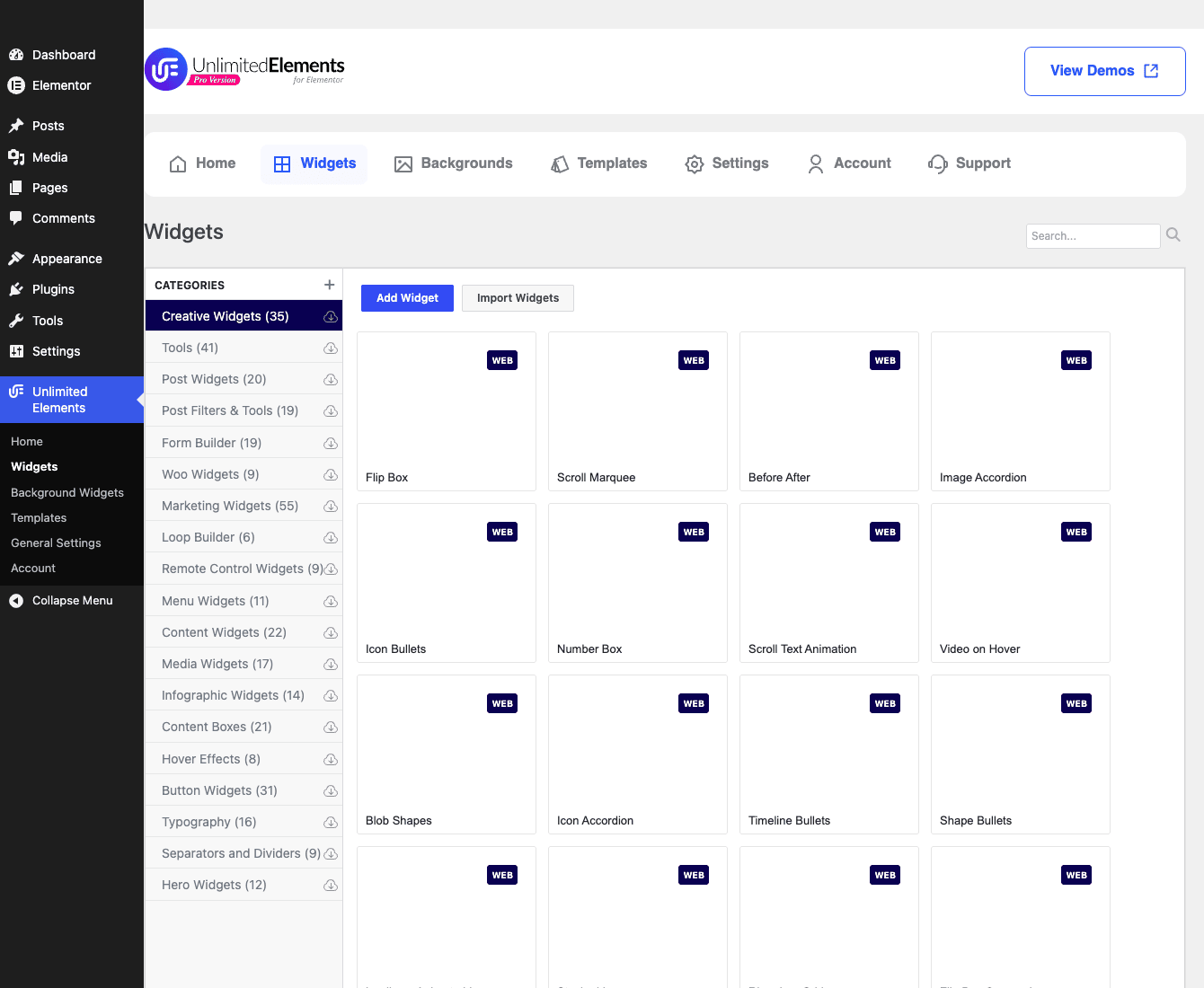
A quick note about that screenshot. The widget cards show names and a small "WEB" badge, but the preview thumbnails are blank. That’s not a bug in the plugin. The demo sandbox can’t reach the vendor’s image server, so the thumbnails (which load from unlimited-elements.com) didn’t render. On a normal install with outbound access, those cards fill in with little visual previews. What the screenshot does show clearly is the category rail with counts, which is the part that tells the real "how much is here" story.
The catalog has a global search at the top, which you’ll use more than you expect once the list gets this long. Next to it sit two buttons that matter: Add Widget, which opens the Widget Creator (more on that next), and Import Widgets, for pulling in widget definitions someone exported elsewhere. Every widget card also has its own enable toggle, and that toggle is doing more work than it looks like. I’ll dedicate a whole section to it because it’s central to keeping the plugin from bloating your site.
The Widget Creator: build a widget without a plugin
This is the section I actually wanted to write, because this is the feature that earns the plugin its spot.
Click Add Widget in the catalog and you don’t get a "request a feature" form. You get an editor. You give your new widget a name and pick a category for it, and then you’re handed a workspace where you write the widget yourself: HTML for the markup, CSS for the styling, and JavaScript for any behavior. If you’ve ever hand-coded a native widget against the Elementor developer docs, this is the same idea without the plugin boilerplate. So far that sounds like a code snippet plugin. The difference is what comes next.
You define your own controls. Not abstract config, real Elementor panel settings. You decide that your widget should expose a text field, a color picker, an image upload, a toggle, a number, whatever the widget needs, and those controls show up in the Elementor panel exactly like the controls on any native widget. Your HTML/CSS/JS then reads the values a user sets in those controls. That’s the leap. You’re not writing a static block. You’re writing a configurable widget that a non-technical editor can drag in and adjust from the normal Elementor sidebar.
Layer dynamic content on top and it gets more capable. The Widget Creator lets you pull in dynamic values rather than hardcoding text, so a widget can render content that changes per page or per post instead of being a fixed snippet. On Pro you also get repeater and loop logic, which is what turns a single-item widget into one that renders a list (think a custom card repeated for every item in a set). I’m being deliberately general about the exact placeholder syntax here, because I’d rather not hand you a token format I can’t verify from the source. The capability is real; describe it to a client as "this widget can show live content," not "memorize this template tag."
Once you save, your custom widget appears in the Elementor editor like any other widget in the panel. Drag it in, set its controls, done. To the person building the page it’s indistinguishable from a built-in widget, which is exactly the point.
And because a widget you make is just a definition, you can export it and import it elsewhere. Built a slick testimonial widget for one client? Export it, import it on the next project, tweak the controls, ship it. That portability is quietly one of the best parts. Your custom work becomes reusable inventory instead of a thing trapped in one site’s database.
Where this shines: the moment a design calls for something the library doesn’t have. A weird animated stat block, a bespoke product configurator front end, a one-off interactive element a designer mocked up in Figma. Instead of a custom plugin and a deploy pipeline, you make a widget in the editor and you’re done.
Now, the developer corner. Unlimited Elements is not a hook-heavy plugin, and I’m not going to pretend otherwise by padding a "Developer reference" section with filters that barely exist. The extensibility story here is the Widget Creator. That said, there are a handful of real WordPress filters if you need to reach in programmatically, and they’re all simple one-argument filters:
// Modify a widget definition as it's being imported.
add_filter( 'uc_modify_addon_data_before_import', function ( $arrImport ) {
    // Inspect or adjust $arrImport before the widget is registered.
    return $arrImport;
} );

// Adjust the template widgets list.
add_filter( 'ue_get_template_widgets', function ( $widgets ) {
    return $widgets;
} );

// Hook into the current widget's settings.
add_filter( 'ue_get_current_widget_settings', function ( $settings ) {
    return $settings;
} );

// Provide or alter the stored user data array.
add_filter( 'unlimited_elements_get_user_data', function ( $arrData ) {
    return $arrData;
} );
There’s also a custom front-end AJAX action, uc_custom_front_ajax_action, that widget JavaScript can call when a widget needs to talk back to the server, and WPML integration through the standard wpml_elementor_widgets_to_translate filter so your widget content is translatable. That’s the honest extent of it. If you came expecting a fat REST surface, it isn’t here, and for a no-code-first tool I don’t think it needs to be. The Widget Creator is where a developer spends their time, and for most teams that’s a better tradeoff than learning a bespoke hook API.
Tip: if you do build custom widgets, name your controls clearly and keep the JS small. A custom widget is yours to maintain. The cleaner you keep it, the less it hurts the day you (or a client) opens it again six months later.
Background Widgets
Separate from the regular catalog, Unlimited Elements ships a Background Widgets library, and it’s one of those features I didn’t expect to like as much as I did.
These are animated and decorative section backgrounds you attach to any Elementor section. The demo listed 32 of them. The names tell you what you get: Animated Mesh Gradient Background, Shape Divider Background, Animated Wave Divider Background, Animated Gradient Background, Clouds Background, Bubble Float Background, Masks & Patterns Background, Parallax Background, Animated Blob Background, Background Slider, and Huge Shapes Background, among others.
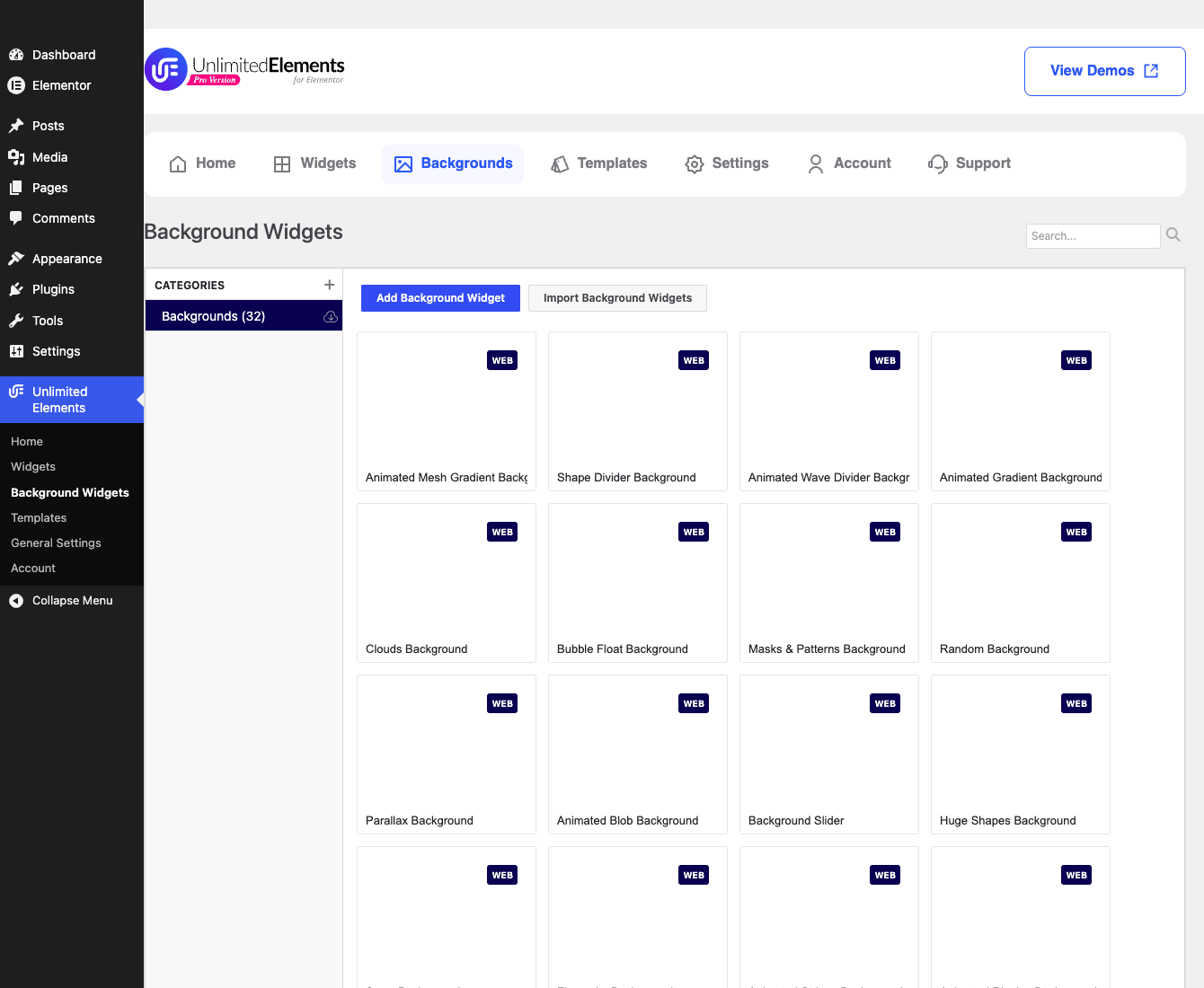
Same screenshot caveat as before: the preview thumbnails are blank in the sandbox because they load from the vendor’s server, so what you’re seeing is the catalog and the names, not the live animations. On a real install these animate.
What I like about this approach is that it sidesteps the usual hassle. Animated backgrounds are normally a fiddly mix of a background video (heavy), a CSS-only gradient animation (limited), or a separate particles plugin (yet another dependency). Here they’re first-class section backgrounds you pick from a list. A hero section with a slow animated mesh gradient behind the headline takes about a minute to set up.
To use them, you flip the Enable Background Widgets toggle in Settings first, because they’re off by default. That default is deliberate, and it’s the right call. Animated backgrounds are exactly the kind of thing you want opt-in rather than loading their assets on every site whether you use them or not.
Heads-up: animated backgrounds run on the visitor’s device. They look great on a designer’s machine and can chug on a budget phone. Use them on a hero or a single accent section, not on six sections of one page. More on the performance side later.
Dynamic listings and the Loop Builder
If your site has content that repeats (blog posts, products, a portfolio, team members), you don’t want to hand-place each card. You want a template that renders one item and then loops it over your query. That’s what the Loop Builder category is for, and it’s a Pro-tier capability.
There are 6 widgets in the Loop Builder category in the demo, and combined with the Post Widgets (20) and Post Filters & Tools (19) categories, you’ve got a decent toolkit for content-driven pages. The pattern is the familiar one: you design how a single item looks, then point it at your posts or a custom query, and the widget repeats your design for each result. Pair that with the Post Filters widgets and you can give readers a filterable, sortable grid without a separate "post grid" plugin.
This ties straight back to the Widget Creator. The repeater and loop logic available there is the same idea applied to your own custom widgets: build a single card the way you want it, then let it render across a set of items. So the loop story isn’t just "use our post grid widget," it’s "make your own looped widget when ours doesn’t fit." That’s a meaningfully bigger ceiling than most packs offer.
Where this fits: a blog that wants its archive to look nothing like the theme default, a portfolio that needs a custom hover-reveal card, or a small directory site. You get dynamic content without writing a template part in PHP.
Keeping Elementor lean: the per-widget toggle
Here’s the feature I’d put on the box if it were my plugin, because it fixes the single biggest complaint people have about addon packs.
The usual problem with a big pack is that it registers everything. Every widget, every script, every stylesheet gets loaded and offered whether you use three widgets or three hundred. Your Elementor panel turns into an endless scroll, the editor gets sluggish, and your front-end asset payload picks up weight from widgets that aren’t even on the page.
Unlimited Elements takes a different stance. Every widget in the catalog has its own enable toggle. You turn on only the widgets you actually use, and the rest stay dormant. So a site that uses a Flip Box, a Before After slider, and a custom widget you made yourself only carries those three, not the entire library.
That’s a real architectural decision, not a marketing line. It means the plugin can ship hundreds of widgets without forcing all of them onto every site. The Elementor panel stays scannable. The asset footprint tracks what you use, not what’s available.
My advice: be disciplined about it. The temptation when you install any pack is to enable everything "just in case." Resist that. Enable widgets as you reach for them. A clean panel of fifteen widgets you actually use beats a panel of three hundred you scroll past every time. The toggle only helps if you use it the way it’s meant to be used, which is sparingly.
Note: there’s also a setting to control whether Elementor panel widget previews show. Turning previews off makes the editor lighter if you’re working on a slow connection or a big project, at the cost of the little thumbnail in the panel.
Templates and the import flow
Templates are the one area where I’d temper expectations a little, and I’d rather tell you straight than let you find out later.
In the version I tested, the in-plugin Templates tab is a placeholder, a "new catalog coming" notice. The live template library currently lives on the Unlimited Elements website, and the workflow is copy-paste based: you browse templates on their site and bring them into your editor. It works, but it’s not the slick one-click in-editor import some competing packs have polished over years. If template insertion is the single feature you care most about, go in knowing this part is mid-rebuild.
The import flow that is well-supported is widget import/export. The catalog’s Import Widgets button and the Show Import and Export Buttons In Templates setting are about moving widget definitions around, which is the portability I praised in the Widget Creator section. That part is genuinely useful and works today. So the import story is strong for your widgets and weaker for their prebuilt templates, at least right now.
A tour of the settings
The admin lives under a top-level Unlimited Elements menu with a handful of pages: Home (a dashboard), Widgets (the catalog), Background Widgets, Templates (the placeholder above), General Settings, and Account. The in-page nav mirrors this with Widgets, Backgrounds, Templates, Settings, Account, and Support tabs.
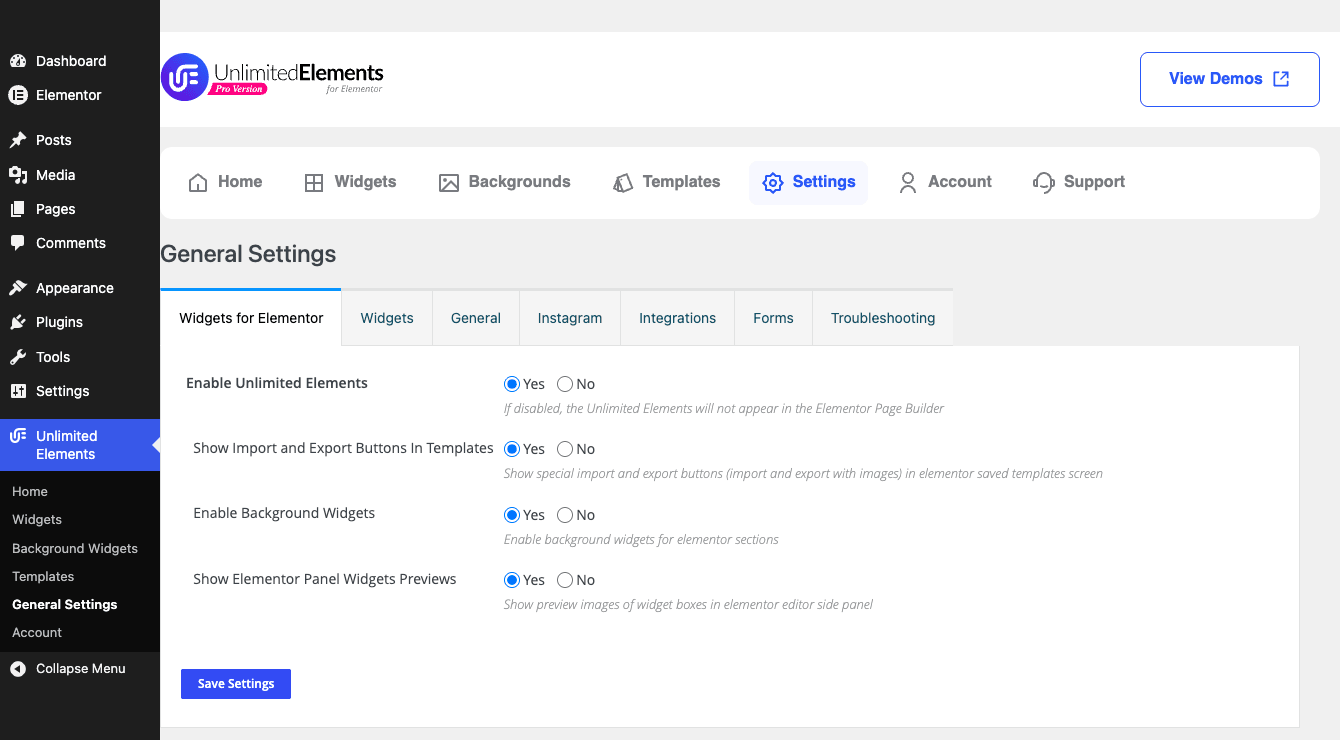
General Settings is where the toggles you’ll actually touch live. On the main Widgets-for-Elementor tab you’ll find:
- Enable Unlimited Elements. The master switch. Off and the whole pack stands down.
- Show Import and Export Buttons In Templates. Surfaces the import/export controls in the template area, for moving widget definitions between sites.
- Enable Background Widgets. Off by default. Flip it to unlock the 32 animated section backgrounds.
- Show Elementor Panel Widgets Previews. Controls whether widget thumbnails appear in the Elementor side panel. Turn it off for a lighter editor.
Beyond that main tab, Settings is split into further tabs: Widgets, General, Instagram, Integrations, Forms, and Troubleshooting. The Forms tab matters if you use the Form Builder widgets (there are 19 of them), since that’s where you wire up where submissions go. The Troubleshooting tab is the first place to look when something misbehaves, before you start disabling plugins one by one.
It’s a clean enough admin. Nothing here needs a manual. If you’ve used Elementor, you’ll find your way around in five minutes.
Who it’s for: four scenarios
Abstract feature lists are easy to skim past, so let me put four real situations to it.
If you run an agency and a client hands you a design with a custom interactive element nobody’s pack includes, this is the plugin I’d reach for. Instead of quoting "custom development" and spinning up a plugin, you make the widget in the Widget Creator, expose a few controls so the client can edit it themselves, and export it for the next project that needs something similar. The custom element becomes a reusable asset instead of a billable rabbit hole.
If you’re a blogger who’s tired of the theme’s default archive, the Post Widgets, Post Filters, and Loop Builder give you a custom, filterable post grid without touching a template file. You design how one post card looks, point it at your posts, and your archive finally looks like your site instead of the theme demo.
If you run a store, the Woo Widgets category (9 widgets) gives you product-focused elements to dress up shop and product pages inside Elementor. It’s a smaller category, so it’s a supplement to your WooCommerce setup rather than a full storefront builder, but for product highlights and custom Woo layouts on landing pages it pulls its weight.
If you’re a designer who cares about the feel of a page, the Background Widgets are the fun part. An animated mesh gradient or a slow shape divider behind a hero section adds the polish that usually takes a separate plugin or a video file. Just keep them to an accent section or two and watch the mobile performance.
Don’t stack three addon packs at once
Here’s the mistake I see constantly, and it’s worth 250 words because it quietly wrecks site performance and someone’s afternoon.
Don’t run Unlimited Elements alongside Essential Addons alongside PowerPack alongside Element Pack, all enabled, all at once. I understand the temptation. Each pack has one or two widgets you love, so you install all of them and cherry-pick. The cost is invisible until it isn’t.
Every addon pack registers its widgets, and most of them load their CSS and JavaScript broadly, often on every page, regardless of whether their widgets are on that page. Stack three or four packs and you’re shipping three or four sets of overlapping styles and scripts to every visitor. Two packs both define a flip box, both fight over similar class names, both add weight. Now your "fast" Elementor site is dragging a payload assembled from packs you use 5% of. Page weight climbs, the editor slows, and you’ve signed up to debug CSS conflicts between vendors who will each tell you it’s the other one’s fault.
There’s also a trust cost. A client whose site got slower after a "small design tweak" doesn’t care that it was four addon packs. They just know it’s slower, and that’s on you.
Pick one primary pack and commit. If that’s Unlimited Elements, use the per-widget enable toggle the way it’s designed: turn on the handful of widgets you need, leave the rest dormant, and let the asset footprint track real usage. One disciplined pack beats four cherry-picked ones every single time. And the day a fifth widget tempts you toward a second pack, ask whether the Widget Creator can just make it instead.
Unlimited Elements vs the other Elementor addon packs
So how does it stack up against the packs you’d actually compare it to? Let me be fair, because the others are good and more polished in spots.
The honest comparison comes down to one axis the marketing pages won’t frame for you: do you want a bigger box of fixed widgets, or do you want the ability to make widgets the box doesn’t have?
| Unlimited Elements | Essential Addons / PowerPack / Element Pack | |
|---|---|---|
| Widget library | 18 categories, 100+ on free | Fixed catalog, varies by pack |
| Make custom widgets, no code | Yes (Widget Creator) | No |
| Animated section backgrounds | 32 background widgets | Limited or none |
| Per-widget enable | Yes, load only what you use | Often registers everything |
| Template library polish | Mid-rebuild, copy-paste | More mature in places |
The numbers that matter: 18 widget categories, 100+ widgets on the free tier, 32 animated background widgets, and the per-widget enable toggle so you load only what you use rather than the whole catalog on every page. On license cost, expect a yearly Unlimited Elements subscription in the same ballpark as the others, typically a single-site plan around $39/yr and an unlimited-sites plan around $79/yr. And because of the per-widget toggle, a real site often ships well under 10% of the available widgets, which is asset weight the other packs would have loaded anyway (treat the dollar figures as rough, not a quote).
But the single line that decides it for me: Essential Addons, PowerPack, and Element Pack all give you a fixed set of widgets, and that set is the ceiling. Unlimited Elements gives you a comparable library plus a Widget Creator, so your ceiling is whatever you can write in HTML, CSS, and JavaScript. The other packs are often more mature on template insertion and a few of their flagship widgets are more refined. If you’ll never need a widget outside the standard kit, one of them might suit you fine. The moment you suspect you will, the calculus changes hard in Unlimited Elements’ favor.
It’s worth saying this plays nicely with whichever Elementor you run. It extends Elementor Pro happily, and it works just as well on free Elementor, since the addon pack itself doesn’t lean on Pro to function.
Performance, compatibility, and gotchas
Time for the unglamorous part, because this is where addon packs make or break a site.
Asset loading. The per-widget enable toggle is your main lever. Enable only what you use and the front-end payload stays proportional. The JavaScript is loaded in the footer, which is the right place for it (it doesn’t block rendering the page). But none of that saves you if you bulk-enable the whole catalog, so the discipline I keep harping on is the real performance feature.
Background widgets cost CPU. They animate on the client. On a fast machine they’re smooth; on a low-end phone a heavy animated background on multiple sections will drop frames and warm up the battery. Keep them to an accent section, test on a real phone, and you’re fine.
Custom widgets are your responsibility. A widget you write in the Widget Creator is code you own. If your JavaScript throws an error, that’s your error to fix. If a control isn’t escaped properly and someone pastes something odd into it, that’s your front-end bug. Treat custom widgets like the code they are: test them, test them on mobile, and don’t ship one you haven’t clicked through on a real page.
Compatibility. It needs Elementor, plays well with free or Pro, and integrates with WPML for translation. As with any pack, the usual conflict risk is stacking it with other addon packs (see the section above) or with aggressive optimization plugins that defer or combine the wrong scripts. If a widget breaks after you turn on JS deferral somewhere, that’s the first thing to undo and retest.
Updates and migration. Library widgets update with the plugin. Your custom Widget Creator widgets are definitions, so export the important ones. That export is your backup and your migration path in one, and it’s the thing I’d make a habit of before any big site move.
The Troubleshooting tab. When something’s off, start in Settings under Troubleshooting before you go disabling plugins blindly. It exists for exactly the "why did this widget stop rendering" moment.
Pricing and licensing
There’s a free version on the WordPress.org repository, and it’s a real free version, not a teaser. You get 100+ widgets, the Widget Creator, and the basic features. That alone is enough to evaluate whether the workflow suits you, and honestly enough to build a small site with.
Pro is what unlocks the rest: the full widget library including the premium widgets, the Background Widgets, the Loop Builder and dynamic listings, premium templates, and the advanced Widget Creator capabilities like repeater logic plus the import/export polish. It’s sold as a yearly Unlimited Elements license. I’m not going to invent exact tier prices because they move with sales and plan changes, so check the current numbers before you commit.
If you’d rather get the Pro version through the GPL route, the Unlimited Elements Premium download on GPL Times is the full Pro package with the library and the Widget Creator unlocked, ready to install on a real Elementor site and put through its paces. The easiest way to know whether the Widget Creator clicks for your workflow is to make one custom widget on a test page and see how it feels. That five-minute exercise told me more than any feature list could.
FAQ
Does Unlimited Elements slow down Elementor?
It can, but only if you let it. The per-widget enable toggle means you load just the widgets you actually use, so a disciplined install stays light. The slowdown people report usually comes from bulk-enabling the whole catalog or stacking it with other addon packs. Keep your enabled list short and the JavaScript loads in the footer, so the impact stays small.
Do I need Elementor Pro to use it?
No. It works with free Elementor. It happily extends Elementor Pro too, but the pack itself doesn’t require Pro to function. That’s a real point in its favor if you’re trying to avoid a second subscription.
Can I really build a custom widget with no code?
Mostly, with a caveat. You don’t write or maintain a plugin, and you don’t touch PHP registration. But the Widget Creator does have you write the widget’s HTML, CSS, and JavaScript, and define its controls. So "no plugin coding" is accurate; "no code at all" is not. If you can write basic front-end markup, you can make a widget. If you can’t, the ready-made library is where you’ll live.
What’s the difference between free and Pro?
Free gives you 100+ widgets, the Widget Creator, and basic features. Pro unlocks the full library including premium widgets, the 32 Background Widgets, the Loop Builder and dynamic listings, premium templates, and the advanced Widget Creator features plus import/export. The free version is genuinely usable on its own, which is rarer than it should be.
Will it conflict with other Elementor addon packs?
It can, and I’d avoid finding out. Running several packs at once loads overlapping widget registrations and CSS/JS, which is both a performance and a conflict risk. Pick one primary pack. If a widget you need lives in another pack, check whether the Widget Creator can make it before installing a second pack.
Do custom widgets survive plugin updates and site migrations?
Yes, and you should help them along. Your custom widgets are saved definitions, and you can export them. Export the important ones, treat that file as your backup, and you’ve got a clean migration path between sites. Library widgets update with the plugin as normal.
Are the widget preview thumbnails part of the plugin?
The preview thumbnails in the catalog and the Elementor panel load from the vendor’s server, which is why they showed blank in my sandbox screenshots (the demo couldn’t reach that server). On a normal install with outbound access, they render fine. You can also turn the Elementor panel previews off in Settings for a lighter editor.
Does it use shortcodes?
No. Everything works through Elementor widgets and the Elementor editor. There are no shortcodes, no REST API, and no WP-CLI commands. If you need shortcode output for the classic editor, this isn’t the tool, since its whole world is the Elementor canvas.
Can I move a widget I made to another site?
Yes. The Widget Creator supports export and import of widget definitions, and the catalog has an Import Widgets button. Build a widget once, export it, and import it on the next project. That portability turns custom work into reusable inventory.
Is the template library as good as the competitors’?
Not right now, and I’d rather you knew. The in-plugin Templates catalog is being rebuilt, and the live library currently lives on the vendor’s site with a copy-paste workflow. Some rival packs have more polished one-click template insertion. If templates are your top priority, weigh that.
Final thoughts
If you measure addon packs purely by widget count, Unlimited Elements is competitive but not in a category of its own. There are big, mature, well-polished packs out there, and a few of them beat it on template insertion and the refinement of their flagship widgets. I want to be fair about that.
But widget count is the wrong way to measure this one. The thing that makes Unlimited Elements worth choosing is the Widget Creator. It changes what happens on the worst day of any Elementor project, the day the design needs something the pack doesn’t have. With every other pack, that day means custom development or an ugly workaround. With this one, it means opening an editor and making the widget, with real controls, that a client can use like any native element, and exporting it for next time.
That single capability reframes the whole plugin. The library gets you moving fast on day one. The per-widget toggle keeps the site lean as you grow. The Background Widgets add polish you’d otherwise bolt on. And the Widget Creator means you never quite hit the wall the other packs eventually put in front of you. For agencies and anyone who builds a lot of Elementor sites, that’s the difference between a tool you outgrow and one you keep.
It’s not perfect. The template library is mid-rebuild, the developer hook surface is thin, and custom widgets are a maintenance commitment you take on yourself. Go in knowing those things. But the core bet, a solid library wrapped around a no-code widget factory, is a smart one, and it’s the reason this is the addon pack I’d hand to a team that hates being told "the plugin can’t do that."