

WordPress was designed around a one-post, one-author assumption. That worked fine in 2003. It does not work for any modern publication where a story has two reporters, an editor who wants credit, a freelancer without a login, or a podcast where both co-hosts deserve a name in the byline. PublishPress Authors is the plugin that fixes that gap. It lets you attach as many authors as you want to a single post, create guest authors who have full profile pages without a WordPress account, and render configurable author boxes that play nicely with Yoast, Rank Math, and AIOSEO author Schema.
This is a guide written for two readers. If you run a publication and you just want bylines to work properly, the first half will get you set up. If you are the developer maintaining the site, the second half covers the data model, the hooks, the shortcodes, and the gotchas you only find once you start customising the output.
Table of Contents
- What PublishPress Authors actually does
- Free vs Pro: what you get in each tier
- Key features at a glance
- How it works for writers and editors
- Installation and first-run setup
- Creating Guest Authors and Author Profiles
- Configuring the Author Box display
- Author Categories and group bylines
- Real-world use cases
- Developer reference: data model, hooks, and template tags
- Shortcodes, blocks, and the REST API
- SEO, Schema, and the integration modules
- Performance, compatibility, and gotchas
- Pricing and licensing
- Frequently asked questions
- Final thoughts
What PublishPress Authors actually does
PublishPress Authors is a multi-author plugin built by the team at PublishPress, the same company that makes PublishPress Planner Pro for editorial workflows. The plugin header in the codebase is candid about its origin: it lists "Based on Co-Authors Plus" by Mohammad Jangda, Daniel Bachhuber, and the Automattic crew. Co-Authors Plus is the historical Automattic plugin that publishers leaned on for over a decade. PublishPress took that foundation, rewrote the data model on a custom taxonomy called author, and built a modern admin UI, a layout builder, a custom-fields editor, and integrations around it.
In practical terms, after you activate the plugin you stop thinking about WordPress’s built-in post_author field. Every post can now have an unlimited list of "author" terms attached. Each author term is either bound to a WordPress user (so updating their profile updates the author) or stands alone as a Guest Author with its own bio, avatar, email, website, social links, and custom fields. The byline on the front end becomes "by Sarah, Mike, and Jenny" instead of "by Sarah", and the author box at the bottom of the post shows all three of them.
If you have ever tried to do this without a plugin, you know it is more work than it looks. The byline display has to change. The author archive has to query posts where any of the listed authors is the writer, not just the primary one. The Schema.org Person markup that Google reads has to include all of them. The RSS feed has to too. Custom themes that read $post->post_author need to be patched. PublishPress Authors handles all of that so you can stop hand-rolling solutions.
Free vs Pro: what you get in each tier
PublishPress Authors ships as a free plugin on the WordPress.org repository. The free version covers the data model, the author taxonomy, four fixed author box layouts (Boxed, Centered, Inline, Simple List), Guest Authors, the per-post author selector, the SEO and theme integration modules, and a basic shortcode system. For a personal blog or a small team that does not need custom branding, the free version is genuinely complete. You can run a multi-author site on it forever and never feel limited.
PublishPress Authors Pro layers a Pro module set on top of the free plugin. The Pro additions are:
- Author Boxes builder. A visual drag-and-drop editor for the author box layout (rather than picking from the four fixed layouts). You can place the avatar where you want, choose typography, add or remove fields, control button styles, and bind a box to a specific category of authors.
- Author Custom Fields. Add fields beyond the defaults (Twitter, LinkedIn, Job Title, Bio). Pro supports text, rich text (WYSIWYG editor), image upload, file upload, URL, email, and number field types.
[authors_list]shortcode. Render a filterable list of authors anywhere on the site, grouped by role or category, paginated, sortable. Useful for a/teamor/contributorspage.- Automap users to authors. When a new WordPress user is created, automatically create a matching author term and link them. Stops the "I added a writer, now I have to remember to create their author profile too" friction.
- BuddyPress integration. Pull author profile data through to BuddyPress profiles.
- Lifetime and agency licensing. The free plugin is, well, free. Pro is a paid tier with single-site, multi-site, and lifetime/agency plans.
If you are running a personal site, start with the free version. If you are a publication, an agency, or you need branded author boxes that match your theme, Pro is the upgrade path.
Key features at a glance
- Unlimited authors per post. Assign as many writers as a story needs. They all show in the byline and the author box.
- Guest Authors. Create author profiles for freelancers and contributors who don’t have a WordPress login. They get a full profile, an avatar, a bio, and they can be assigned to posts.
- Per-author profile pages. Every author gets a profile page at
/author/<slug>/showing their bio, avatar, social links, and a paginated list of every post they contributed to (not just posts where they are the primary author). - Author Boxes with the visual builder. A built-in drag-and-drop layout editor for the author box that appears under each post. Includes typography controls, background, padding, and field-by-field toggles.
- Author Custom Fields. Add bio, social, image, or file fields beyond the defaults. The Pro version supports rich text and media uploads.
- Author Categories. Tag authors into named groups like "Editors", "Senior Reporters", "Guest Columnists". You can render a different author box per category, or filter author lists by category.
- SEO integrations. Built-in adapters for Yoast SEO, Rank Math, All in One SEO, and The SEO Framework keep
article:author, Open Graph, and Schema.orgPersonmarkup in sync with your multi-author bylines. - Theme integrations. Specific hooks for Divi, Elementor, Genesis, and GeneratePress so the author box renders in the right slot in those frameworks.
- Co-Authors Plus migration. If you are moving from Co-Authors Plus, there is a one-click migration that imports your existing co-author assignments.
- REST API endpoints. Read endpoints at
/wp-json/publishpress-authors/v1/authorsso headless or decoupled sites can pull author data. - Gutenberg block + widget + shortcode. Three ways to embed an author box in your content, plus a fourth via template tags if you are writing PHP.
- Polylang, BuddyPress, Edit Flow, Ultimate Member, WP Engine. Integration modules ship for each of these so you don’t end up with two competing author models.
How it works for writers and editors
The story of using PublishPress Authors as a writer is short, which is the point.
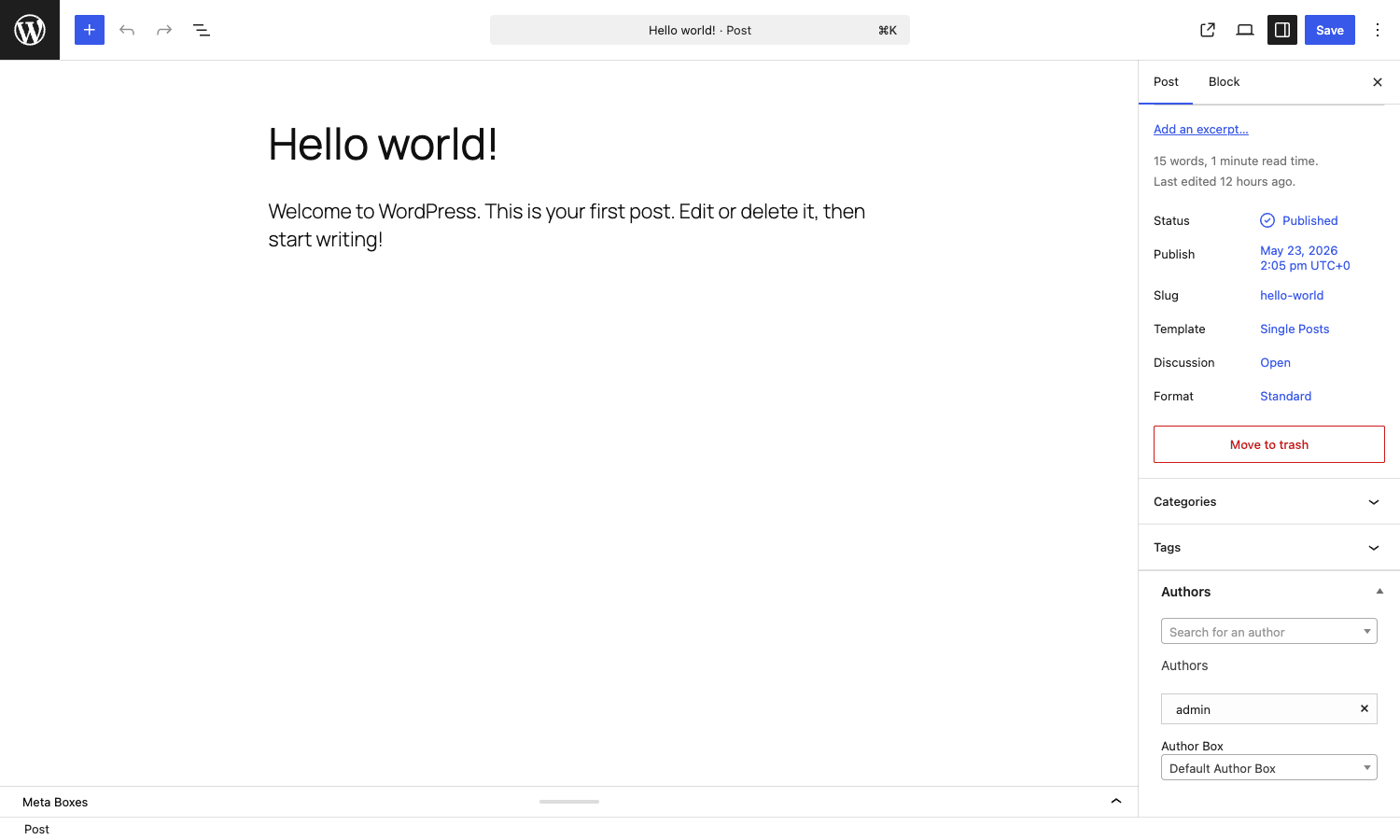
You open a post. In the post sidebar (Gutenberg) or in a metabox under the editor (classic), there is an Authors panel. You type a name. The plugin autocompletes against both your WordPress user list and your existing author terms. You pick one, and the byline updates. You type another name, pick another author, and you now have a co-byline. You publish. On the front end, the post displays "by Sarah and Mike" and the author box at the bottom shows both of their profiles side by side.
If you need to add a guest author who does not have a WordPress account, you go to Authors -> New and pick "Guest Author With User Account". You fill in their name, email, bio, social links, and avatar. Now they appear in the same autocomplete on the post editor, indistinguishable from a real user in the eyes of the byline.
The author box at the end of the post is what readers actually see. By default, all posts get the box you marked as "Default Author Box". If you want a different box for a specific post (say, a guest opinion piece deserves a simpler layout), the Authors panel in the post sidebar has an "Author Box" dropdown that overrides the default per post.
For editors managing the queue, the Authors menu in the WordPress admin sidebar is the home base. From there you can list every author, search by name, filter by author category, edit profiles, and see how many posts each author has contributed to.
Installation and first-run setup
Installing PublishPress Authors is the standard WordPress flow:
- Go to Plugins -> Add New, search for "PublishPress Authors", and install. For Pro, upload the zip from Plugins -> Add New -> Upload Plugin.
- Activate. If you have the free PublishPress Authors AND Pro installed at the same time, Pro will detect the conflict and ask you to deactivate the free version. The Pro bundle includes the matching free code internally, so you don’t lose anything.
- (Pro only) Authors -> Settings -> General -> paste your license key and click Activate. The Activated status confirms updates will work.
The first-run setup is also short. Go to Authors -> Settings -> General:
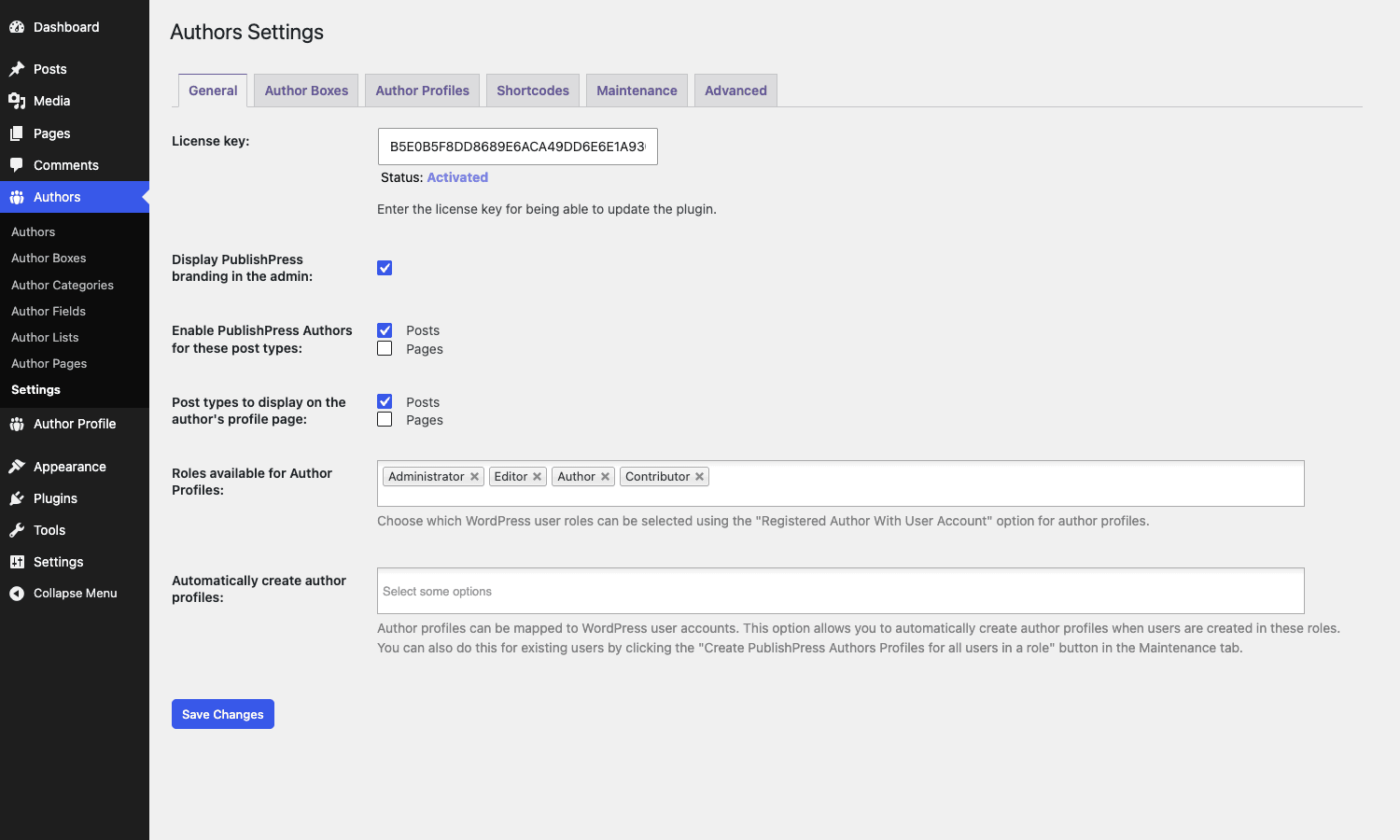
You will want to set:
- Enable PublishPress Authors for these post types. Posts is checked by default. Tick any custom post types (
product,event,case_study, etc.) where you want multi-author bylines. - Post types to display on the author’s profile page. Same list, but for what appears on the
/author/<slug>/page. Most sites keep Posts only here, but if you want a contributor’s product reviews to show up too, tickproduct. - Roles available for Author Profiles. Which WordPress user roles should be selectable as authors. Default is Administrator, Editor, Author, Contributor. Add Subscriber if you let your community write.
- Automatically create author profiles. Pick the roles for which an author term should be created the moment a new user signs up. Pro feature. Saves you having to do it manually for every new writer.
The other tabs at the top are worth a glance:
- Author Boxes. Sets the default author box layout and per-category overrides.
- Author Profiles. Configures which fields appear on the author edit screen (so you can hide fields you don’t use, like "Job Title" if your site doesn’t need it).
- Shortcodes. Help and examples for the available shortcodes.
- Integration. Toggles for Yoast SEO, Rank Math, AIOSEO, Elementor, Divi, Genesis, GeneratePress, Polylang, BuddyPress, Ultimate Member, Edit Flow, WP Engine, The SEO Framework.
- Maintenance. One-click jobs for: creating author profiles for all existing post authors, creating profiles for all users in a role, syncing author and user fields, migrating from Co-Authors Plus, deleting guest authors, etc. Run "Create PublishPress Authors Profiles for all post authors" on first install if your site already has content.
- Advanced. Cache TTL, cap mapping, and the rewrite-rules flush toggle.
Two minutes of clicking and you are ready to write.
Creating Guest Authors and Author Profiles
Go to Authors -> Authors. The left side of the page is an Add Author form, the right side is the term list.
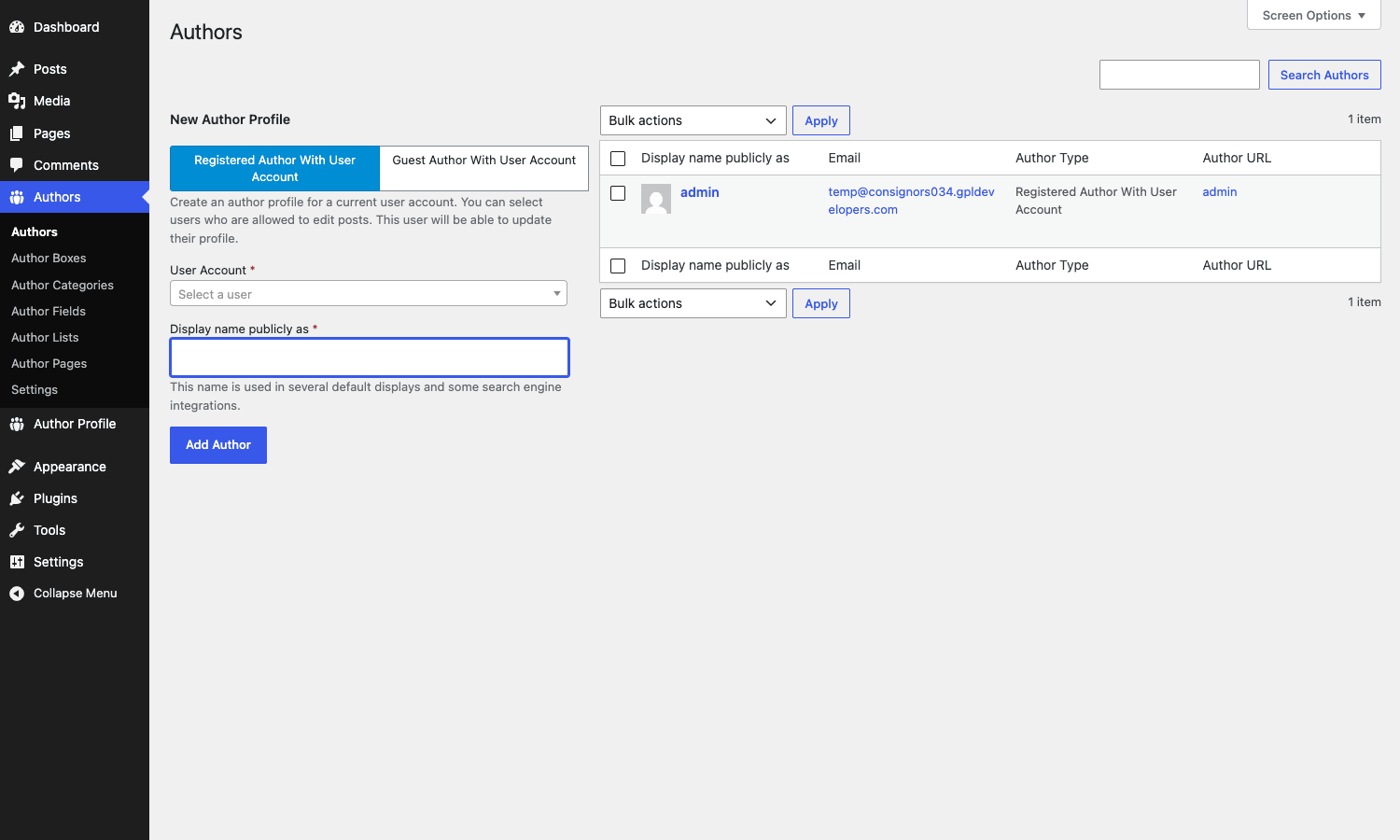
Two creation modes:
Registered Author With User Account. Pick this when the author already has a WordPress account on your site. Choose them from the User Account dropdown, type their display name, click Add Author. The plugin creates the matching author term and links it. From now on, changes to the WP user profile (display name, email, bio) sync over to the author term automatically. This is the recommended mode for in-house writers.
Guest Author With User Account. Pick this for freelancers, contributors, or external writers who should not have a WordPress login. You fill in the email and display name, and the plugin creates a "shadow" user account and an author term. The shadow user has no login (their password is randomised) but their profile is fully populated. To the byline, to the front-end, to your SEO plugin, a Guest Author looks identical to a real one.
After creation, click the author name to open the Edit Author Profile screen:
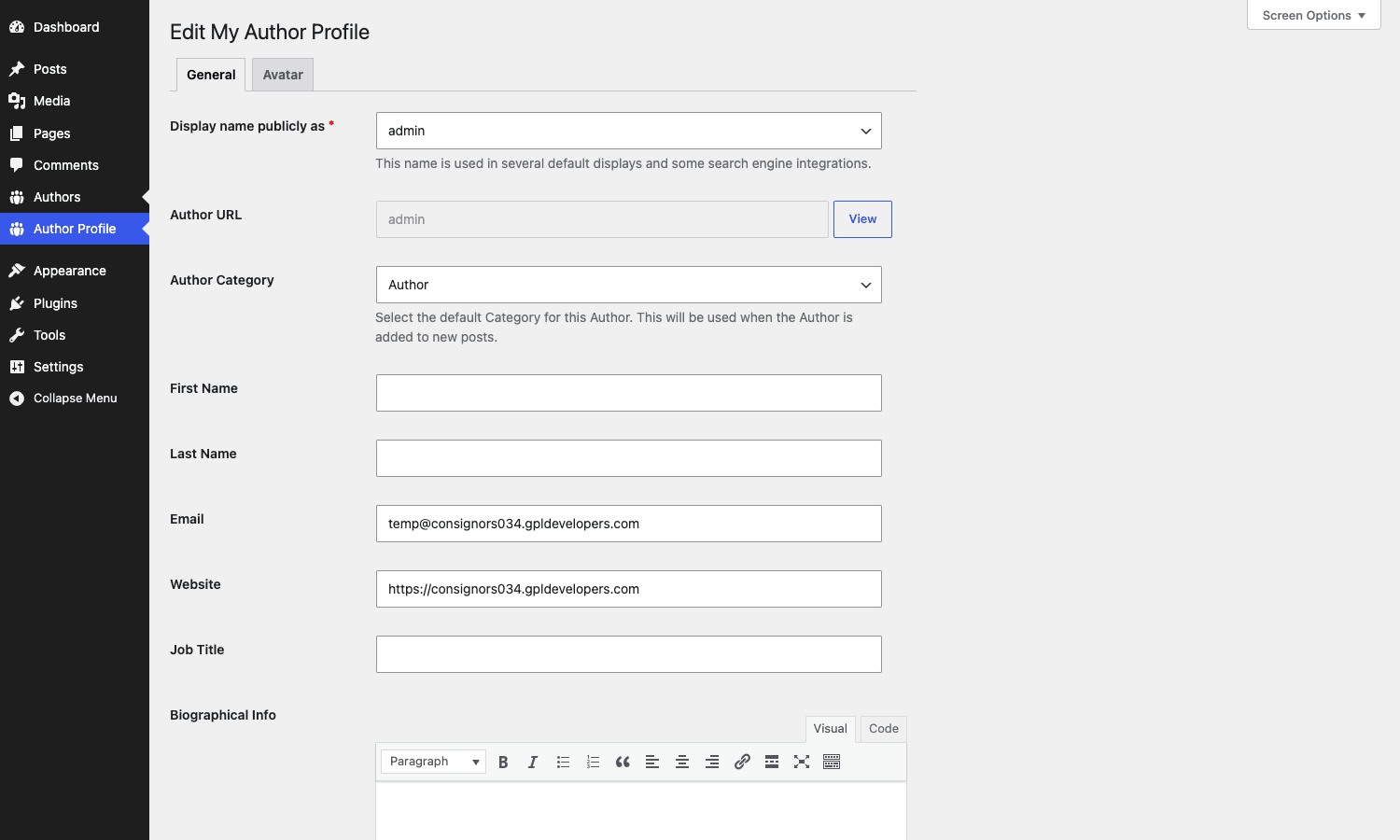
The standard fields are Display Name, Author URL (the slug), Author Category, First Name, Last Name, Email, Website, Job Title, and Biographical Info (a WYSIWYG editor). If you have enabled custom fields (Pro), they appear here too. The Avatar tab lets you upload a custom avatar that overrides the Gravatar for this author.
A small detail worth knowing: the "Author URL" field is the slug used in /author/<slug>/. WordPress’s normal user has a user_nicename that is also used for /author/. With PublishPress Authors, the term slug wins, because the author archive is now a taxonomy-term archive, not a user archive. If you have an old user john-smith and now an author term johnny-s, the live URL is /author/johnny-s/.
Configuring the Author Box display
The author box is the prominent rectangle at the bottom of a single post that introduces who wrote it. PublishPress Authors gives you several ways to control it.
Default layouts (free version): four ready-made layouts (Boxed, Centered, Inline, Simple List). Pick one in Authors -> Settings -> Author Boxes, and that becomes the box rendered after the content on every post.
Author Boxes manager (Pro): under Authors -> Author Boxes, you get a CPT-backed list of every box layout on your site. The free four ship as a starting point. You can duplicate any of them and customise, or build new ones from scratch.
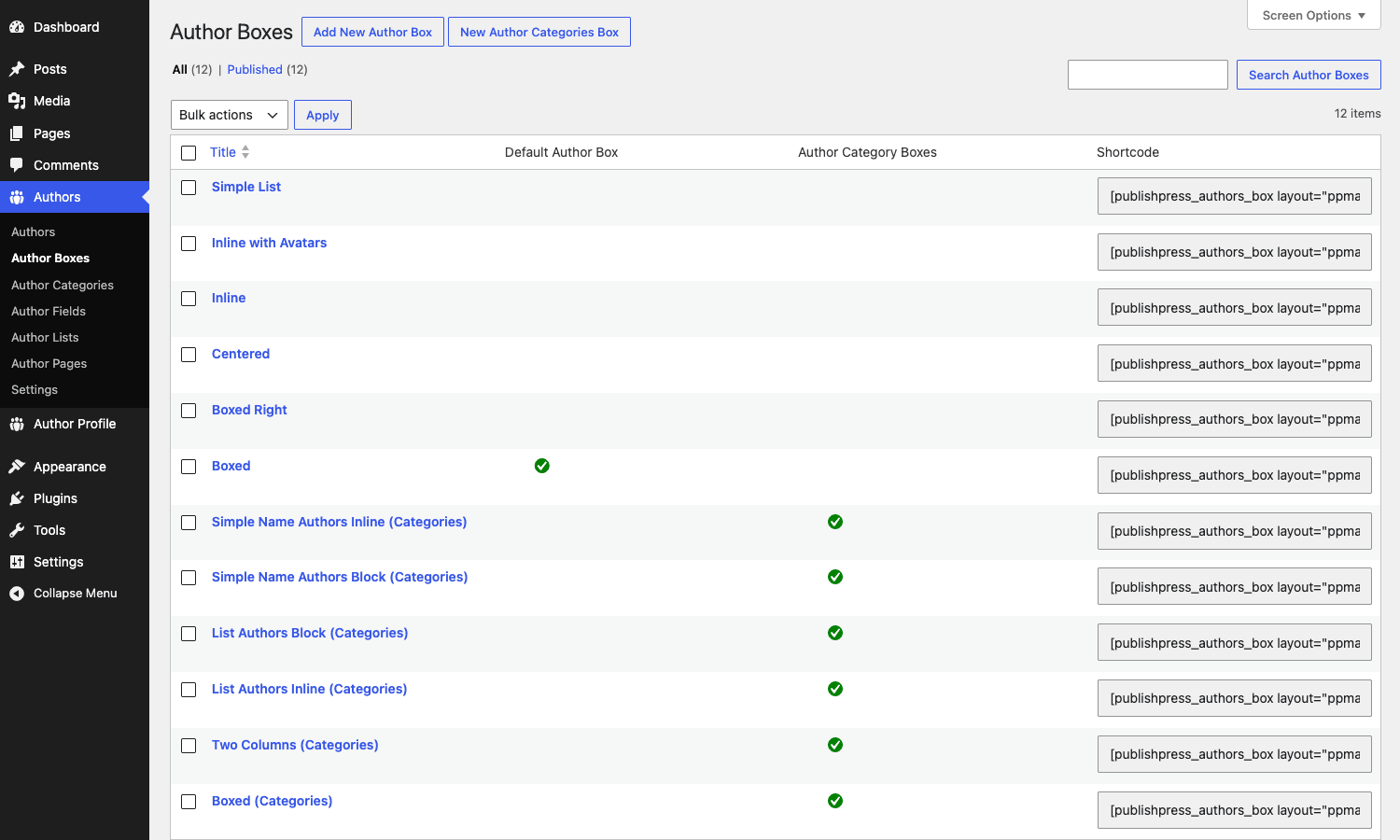
Notice the green checkmarks. The Default Author Box column marks the one that auto-renders on every post; the Author Category Boxes column marks layouts that are wired up for specific author categories. The right column gives you a copy-paste [publishpress_authors_box layout="..."] shortcode that drops that box anywhere.
Open one of the layouts to see the editor:
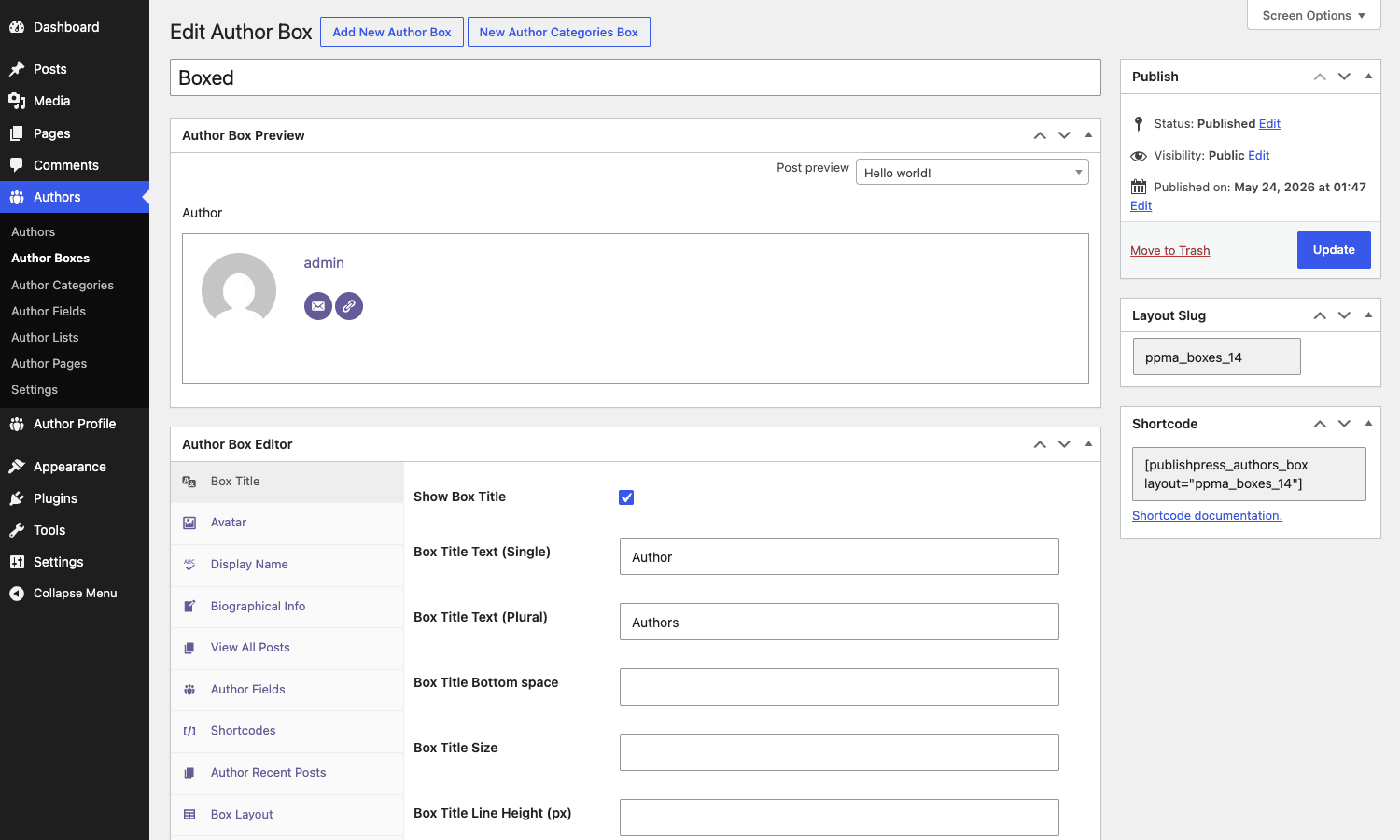
The editor splits into two panels. The top is a live preview, swappable to any existing post so you can see how the box looks in context. The bottom is the field editor. Tabs along the left side group settings into Box Title, Avatar, Display Name, Biographical Info, View All Posts, Author Fields, Shortcodes, Author Recent Posts, Box Layout, Box Style, Box Margin, Box Padding, Box Border, and so on. Each tab is a focused micro-form: change a single setting, see the preview update, save.
The result is a styled author box that matches your theme without you having to write CSS. If you do want to write CSS, the box exposes a stable set of classes (.pp-multiple-authors-boxes-wrapper, .pp-multiple-authors-box-instance, .ppma-author-name, .ppma-author-description, etc.) that you can target from your theme stylesheet.
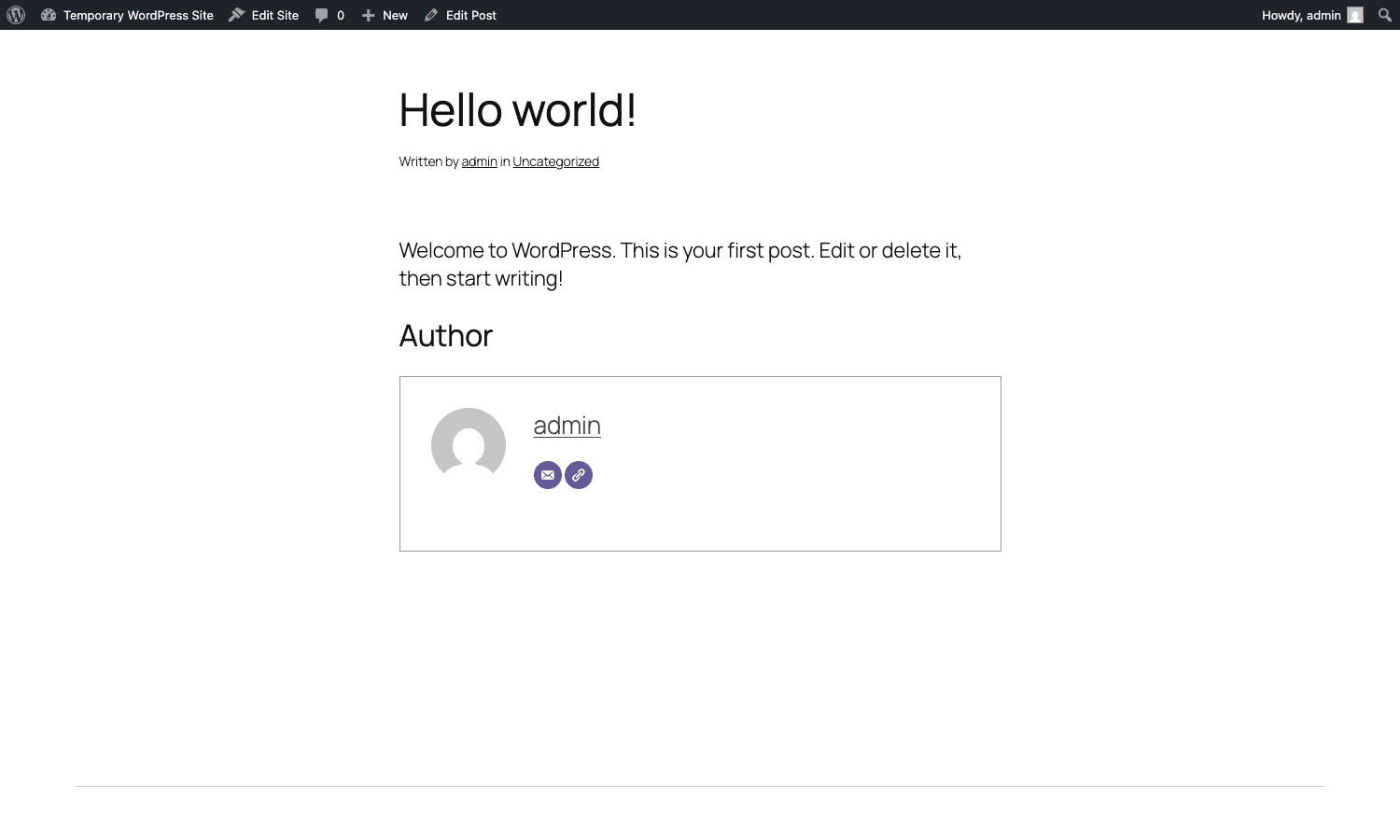
Here’s what a published post with the default box looks like on the front end:
Author Categories and group bylines
Author Categories let you tag authors into named groups: Editors, Senior Reporters, Guest Columnists, Photographers, Reviewers. The categories are managed under Authors -> Author Categories, and each author can belong to one or more.
Once you have categories defined, two things become possible:
- Per-category author boxes. Maybe your in-house editors get a polished branded box with a "Verified Editor" badge, while guest writers get a simpler one. Open the Author Boxes list, set the Boxed layout to apply to the "Editors" category, set a different layout for "Guest Columnists", and the plugin picks the right one based on who wrote the post.
- Grouped bylines. Instead of "by Sarah, Mike, and Tom", you can render "Editors: Sarah, Mike. Photographer: Tom". The author box layout supports grouping by category, so a post with three editors and a photographer renders the byline grouped.
This is something the original Co-Authors Plus does not do, and it is genuinely useful for newsrooms where the credit hierarchy matters.
Real-world use cases
Online magazines and digital newsrooms. The canonical fit. Articles routinely have a writer, a contributing reporter, and an editor. PublishPress Authors lets all three appear in the byline and the author box. The Author Categories feature splits "Senior Reporter" credit from "Photographer" credit, which is what print papers have done forever and what online publications have struggled to replicate.
Multi-writer marketing blogs. B2B SaaS blogs often have a roster of internal contributors plus a couple of regular freelancers. Setting up Guest Authors for the freelancers means they get real profile pages with their own social links and bios, which feeds back into the relationship (writers like getting credit) and gives Google a real Person entity for the byline. The agency credit improves trust signals on the page.
Podcasts with co-hosts. Each episode is a post with two or three host names. The author box at the bottom showing Sarah and Mike with their Twitter and LinkedIn icons is the kind of polish that makes a podcast feel like a real show rather than a side project. Each host also gets a profile page that aggregates every episode they appeared in.
Documentation sites and knowledge bases. Some KB articles are written collaboratively. A "Last updated by" line plus the original author makes the page feel maintained. If you use the Newsletter plugin to mail out new docs, the byline carries through into the email too.
Community sites and membership sites. If you run a community on BuddyBoss Platform, Ultimate Member, or MemberPress, member contributions need bylines that link back to community profiles. The plugin’s BuddyPress integration module connects the author term to the BuddyPress profile so the byline link goes to the community profile, not a stub WordPress author archive.
Sites being migrated from Co-Authors Plus. Big news sites that ran on Co-Authors Plus for years often want to move because Co-Authors Plus has not had a major update in a long time. PublishPress Authors ships a Maintenance tool that imports every Co-Authors Plus assignment in one click. You install the new plugin, run the migration, deactivate Co-Authors Plus, and your bylines keep working.
Developer reference: data model, hooks, and template tags
This section is for the developer who needs to extend or customise the plugin’s output. If you are setting it up, you can probably skip ahead.
The data model
The fundamental object is the author taxonomy. Defined in src/core/Plugin.php:
public static $coauthor_taxonomy = 'author';
Every author is a term in this taxonomy. The taxonomy is attached to whichever post types you enable in Settings -> General. Assigning authors to a post is therefore a normal wp_set_object_terms() call against the author taxonomy.
Each author term stores metadata in WordPress’s term meta table:
user_id– the linked WP user, if any. Empty for guest authors.first_name,last_name,user_email,user_url,description,job_title.avatar– attachment ID of a custom avatar.- Pro and custom fields are stored as additional term meta keys, prefixed with
ppmacf_.
To fetch the authors for a post:
$authors = get_the_terms( $post_id, 'author' );

if ( ! is_wp_error( $authors ) && ! empty( $authors ) ) {
    foreach ( $authors as $term ) {
        echo esc_html( $term->name );
    }
}
The plugin also ships an Author value object (MultipleAuthors\Classes\Objects\Author) that wraps a term with convenience methods. Most template work uses the value object via the template tags:
// In your single.php or template-parts/byline.php
if ( function_exists( 'get_multiple_authors' ) ) {
    $authors = get_multiple_authors( get_the_ID() );
    foreach ( $authors as $author ) {
        printf(
            '<a href="%s">%s</a>',
            esc_url( $author->link ),
            esc_html( $author->display_name )
        );
    }
}
Lifecycle hooks
do_action( 'publishpress_authors_pro_install', $currentVersion );
do_action( 'publishpress_authors_pro_upgrade', $previousVersion );
do_action( 'plublishpress_authors_pro_loaded' );  // note: typo preserved for back-compat
do_action( 'multiple_authors_init' );
do_action( 'multiple_authors_modules_loaded' );
A common pattern is to run a one-off bootstrap when Pro installs:
add_action( 'publishpress_authors_pro_install', function ( $version ) {
    update_option( 'mysite_publishpress_authors_first_install', current_time( 'mysql' ) );
}, 10, 1 );
Cache flush hooks
The plugin caches a lot. Post-to-author lookups, byline rendering, author archive queries. When any of those need to be invalidated, the plugin fires:
do_action( 'publishpress_authors_flush_cache' );
do_action( 'publishpress_authors_flush_cache_for_post', $post_id );
do_action( 'publishpress_authors_post_authors_metabox_action_saved', $post_id );
If you have your own caching layer (object cache fragments, full-page caching), hook these and purge the matching keys:
add_action( 'publishpress_authors_flush_cache_for_post', function ( $post_id ) {
    $url = get_permalink( $post_id );
    if ( $url && function_exists( 'wp_cache_post_change' ) ) {
        // WP Super Cache-style purge
        wp_cache_post_change( $post_id );
    }
} );
Author rendering filters
These are the hooks you reach for when you want to change what the author box shows or override the rendering wholesale.
// Skip the author box on a specific post type entirely.
add_filter( 'pp_multiple_authors_filter_should_display_author_box', function ( $display ) {
    if ( is_singular( 'product' ) ) {
        return false;
    }
    return $display;
} );

// Inject a custom argument into every box render (e.g. add a CSS class).
add_filter( 'pp_multiple_authors_author_box_args', function ( $args ) {
    $args['css_class'] = 'mysite-author-box ' . ( $args['css_class'] ?? '' );
    return $args;
} );

// Short-circuit the box and return your own HTML.
add_filter( 'pp_multiple_authors_author_box_html', function ( $html, $args ) {
    if ( ! is_singular( 'post' ) ) {
        return $html;
    }
    $authors = $args['authors'] ?? [];
    if ( empty( $authors ) ) {
        return $html;
    }
    ob_start();
    foreach ( $authors as $author ) {
        printf( '<div class="my-byline">By <a href="%s">%s</a></div>',
            esc_url( $author->link ), esc_html( $author->display_name ) );
    }
    return ob_get_clean();
}, 10, 2 );
Custom author fields
The multiple_authors_author_fields filter is the hook for adding new profile fields. The Pro Custom Fields module uses this internally; you can use it too:
add_filter( 'multiple_authors_author_fields', function ( $fields, $author ) {
    $fields['mastodon'] = [
        'name'        => 'mastodon',
        'label'       => __( 'Mastodon URL', 'mysite' ),
        'type'        => 'url',
        'description' => __( 'Full URL to the Mastodon profile.', 'mysite' ),
        'tab'         => 'general',
    ];
    return $fields;
}, 10, 2 );
After registering, the field appears on the Edit Author Profile screen and becomes available in the Author Boxes builder as a draggable element.
Capability filters
Three capabilities control who can do what:
add_filter( 'pp_multiple_authors_manage_authors_cap', function () {
    return 'edit_posts';  // let editors manage author profiles
} );

add_filter( 'pp_multiple_authors_manage_settings_cap', function () {
    return 'manage_options';  // only admins touch settings
} );

add_filter( 'pp_multiple_authors_edit_post_authors', function () {
    return 'edit_others_posts';  // only editors and above set bylines
} );
Byline separator filters (Co-Authors Plus compatible)
If you have built theme templates against Co-Authors Plus, the same filters work here:
add_filter( 'coauthors_default_before', function () { return 'Words by '; } );
add_filter( 'coauthors_default_between', function () { return ', '; } );
add_filter( 'coauthors_default_between_last', function () { return ' & '; } );
add_filter( 'coauthors_default_after', function () { return '.'; } );
That renders "Words by Sarah, Mike & Tom." in the byline.
Author archive query filter
Decide which post types appear on /author/<slug>/:
add_filter( 'publishpress_authors_posts_query_post_types', function () {
    return [ 'post', 'review', 'video' ];
} );
By default the archive shows posts only. This hook lets you add custom post types if writers also produce, say, video posts you want on their archive page.
Avatar control
If you want to source author avatars from somewhere other than the term meta (your own CDN, BuddyPress, a custom directory), short-circuit avatar resolution:
add_filter( 'multiple_authors_pre_get_avatar', function ( $avatar, $author, $size ) {
    $custom = get_term_meta( $author->term_id, 'cdn_avatar_url', true );
    if ( $custom ) {
        return sprintf( '<img src="%s" width="%d" height="%d" alt="" />',
            esc_url( $custom ), (int) $size, (int) $size );
    }
    return $avatar;
}, 10, 3 );
Shortcodes, blocks, and the REST API
Three flavours of embed, depending on where you want the author box to appear.
Shortcodes (free)
[publishpress_authors_box]
[publishpress_authors_box layout="centered"]
[publishpress_authors_box post_id="123"]
Drop the first form into any content area and the author box for the current post renders. The layout attribute picks a non-default box. The post_id argument is useful when embedding in a sidebar widget so you can render the author of a specific post.
[publishpress_authors_data field="display_name"]
[publishpress_authors_data field="description" separator=" | "]
[publishpress_authors_data field="user_url" link="true"]
publishpress_authors_data outputs a single author data field. Useful when you want to inline the bio or the website link without the full box decoration.
[publishpress_authors_list]
[publishpress_authors_list layout="centered" group_by="category"]
publishpress_authors_list renders a list of all authors on the site, optionally grouped by category. This is the shortcode behind a "Team" or "Contributors" page.
Pro shortcode: arbitrary author lists
The Pro shortcode-authors-list module adds the [authors_list] shortcode with extended filtering:
[authors_list role="editor" group_by="author_category" order_by="name" order="ASC"]
[authors_list category="senior-reporters" layout="boxed"]
Use this for a /team/editors/ or /team/freelancers/ landing page.
Gutenberg block
Search "Author Boxes" in the block inserter. The block renders server-side via ServerSideRender, so what you see in the editor is exactly what the front end will display. Pick the box layout from the block sidebar.
Widget
There’s a classic widget called "PublishPress Multiple Authors" you can drop in any sidebar. Configure title, layout, and whether to show on archive pages or only on singulars.
REST API
Two read endpoints:
GET /wp-json/publishpress-authors/v1/authors
GET /wp-json/publishpress-authors/v1/authors/{id}
The list endpoint accepts query args for pagination, search, and category filtering. The single-author endpoint returns the full profile including custom fields. Both are useful if you are building a headless or hybrid front end and need to pull bylines through to the React, Vue, or Next.js layer.
A typical fetch:
fetch( '/wp-json/publishpress-authors/v1/authors?per_page=20&search=mike' )
    .then( r => r.json() )
    .then( authors => console.log( authors ) );
SEO, Schema, and the integration modules
The trickiest part of multi-author bylines is keeping search engines on the same page. WordPress’s default article:author Open Graph tag and the Schema.org Person markup that SEO plugins emit are wired to $post->post_author. If you do nothing, the SEO plugin keeps showing one author even though three are credited.
PublishPress Authors ships per-plugin integration modules to fix this.
Yoast SEO Premium integration. When active, the Yoast Person schema and Open Graph author tags pick up the PublishPress author list. The first listed author becomes the primary Person entity (which matters for Google’s E-E-A-T signals), and additional authors appear as contributor Persons in the schema graph.
Rank Math SEO Pro integration. Same idea: Rank Math’s Article schema (author property) and OG article:author tags reflect the PublishPress authors.
All in One SEO integration. AIOSEO’s author schema and meta tags align with the multi-author byline.
The SEO Framework integration. Same alignment for that plugin’s schema output.
If you use Schema Pro instead of (or alongside) one of the SEO plugins, the author taxonomy is exposed in the same way for any Schema generator that reads taxonomy terms.
The reason this matters: Google rewards real author attribution. When a story has a named, profile-backed author rather than a "staff" byline, the page is more likely to surface in news SERPs and to benefit from the author’s overall web reputation. Multi-author posts with proper schema for each author push that benefit harder. For an in-depth look at how SEO plugins emit author data, Yoast publishes detailed documentation on the Person piece of their Schema graph.
The integration modules are off by default. Turn them on at Authors -> Settings -> Integration.
For the underlying spec, Google’s own guidance on author profile page best practices covers what each author entity should include and why per-author profile pages help. PublishPress Authors satisfies every point in that doc out of the box.
Performance, compatibility, and gotchas
Performance
The plugin caches aggressively. Author-to-post lookups, byline rendering, the author archive query are all cached in the WordPress object cache (so they benefit from Redis or Memcached if you have one). The cache is invalidated automatically when an author is assigned or removed.
Per-post overhead on a typical page render is a single taxonomy query joined to term meta. On a site with thousands of authors and millions of posts (yes, this scale runs the plugin in production at a few news sites), the bottleneck is the same one any high-volume WP site hits: the author archive page, which does a tax_query against the author taxonomy. If that page is slow, the fix is usually a custom index on wp_term_relationships.
Compatibility quirks
Co-Authors Plus. Do not run both at the same time. PublishPress Authors absorbs Co-Authors Plus functionality and provides a migration. Migrate, then deactivate Co-Authors Plus.
Bylines plugin. Same story. There is a migration module specifically for Bylines under Maintenance.
Molongui Authorship. Same again. Migration module ships under the same Maintenance tab.
WP Engine and managed hosts. The plugin works fine, but the integration module includes a small adjustment for WP Engine’s specific page-cache configuration. Turn it on at Settings -> Integration if you are on WP Engine.
Polylang. If you run a multilingual site, the Polylang integration syncs author terms across language copies so that the English version and the Spanish version of a post share the same author profile.
Page builders. Specific integration modules exist for Divi, Elementor, Genesis, and GeneratePress. The author box renders inside the right slot in each builder’s single-post template. If you use Bricks Builder or Oxygen, you can still use the shortcode or the Gutenberg block; the dedicated integration modules just save you a step.
Gotchas to know
The ?author=N URL stops mapping to a real user when you start using guest authors. WordPress’s default author archive at /?author=1 reads post_author from the posts table. Once you assign multi-authors via the taxonomy, posts have an author term in addition to post_author. The plugin reroutes /?author=N to the matching term archive, but custom code that hard-codes ?author= queries may need updating.
Existing posts need a maintenance run. When you install the plugin on a site with existing content, the existing posts don’t automatically get author terms attached. They still have post_author set, so the byline still works, but the term archive will look empty until you run Authors -> Settings -> Maintenance -> Create PublishPress Authors Profiles for all post authors. That one-click job iterates every post, looks at post_author, finds or creates the matching author term, and assigns it.
The Author Box shows once even when you call it twice. If your theme uses the_content() and also drops in [publishpress_authors_box] somewhere else in the template, the plugin de-duplicates so the box does not render twice. To force a second render, use [publishpress_authors_box force="true"] or different layout slugs.
Avatar overrides need the Avatar tab. Uploading a custom avatar is on the Avatar tab of the Edit Author Profile screen, not the General tab. Easy to miss if you don’t see the tabs initially.
The Gutenberg block uses ServerSideRender. That means the editor preview always reflects the live front-end output, which is good. But it also means the block needs an admin-ajax round trip per render, which can feel sluggish in the editor if you have a dozen blocks on one page.
Pro and free conflict guard. If both the free PublishPress Authors and the Pro variant are activated at the same time, Pro shows an admin notice telling you to deactivate the free one. This is correct behaviour; the Pro plugin ships the free code bundled internally so you don’t lose anything.
Pricing and licensing
PublishPress Authors free is on the WordPress.org plugin repository at no cost, with unlimited installs.
PublishPress Authors Pro is sold by PublishPress directly at three tiers (single site, multi-site bundle, agency lifetime) with annual subscriptions and a lifetime option at the top tier.
You can also get PublishPress Authors Pro on GPL Times as part of our PublishPress catalog. Licensed under GPLv2 or later as required, so you can install it on as many sites as you like. The bundled license key in the GPL Times download already shows as Activated in the screenshots above so updates work out of the box.
Frequently asked questions
Do I need PublishPress Authors Pro, or is the free version enough?
For a single blog with a handful of writers, free is enough. You get the multi-author byline, four author box layouts, Guest Authors, Schema integrations, the shortcodes, and the REST API. Move to Pro when you need: the visual Author Boxes builder, custom field types beyond text (image, file, rich text), the [authors_list] shortcode for team pages, automatic user-to-author mapping, or BuddyPress integration.
How is this different from WordPress’s built-in author?
WordPress’s built-in post_author is a single integer column on the posts table, pointing to one WP user. PublishPress Authors replaces that with a custom author taxonomy where each post can have unlimited author terms. The terms can be WP users or guest profiles. The byline, the archive page, and the SEO output all use the new model.
Does this work with Gutenberg?
Yes. The post sidebar has an Authors panel where you assign authors. There’s a Gutenberg block called "Author Boxes" you can embed anywhere in content. The block renders server-side so the editor preview is identical to the front-end render.
Can I import my existing Co-Authors Plus data?
Yes. Settings -> Maintenance -> Copy Co-Authors Plus Data. The job iterates every post, reads its Co-Authors Plus assignments, and creates matching PublishPress Author terms. Run it once, then deactivate Co-Authors Plus.
What happens to the author archive at /author/<slug>/?
It becomes a taxonomy-term archive driven by the author taxonomy. The plugin reroutes the default /?author=N user-archive request to the matching term archive, so existing links keep working. The archive lists every post the author contributed to, not just posts where they are the primary post_author.
How does this interact with Yoast SEO or Rank Math?
There are dedicated integration modules for both. Turn them on at Authors -> Settings -> Integration. With the integration on, the SEO plugin’s article:author Open Graph tag and Schema.org Person markup reflect the multi-author byline.
Can guest authors log in?
No, that’s the point. A Guest Author is a profile with a bio, an avatar, and a byline, but no usable login. If a guest writer later joins your team and gets a real account, you can link the existing author term to their new WP user via the Edit Author Profile screen.
Does the plugin slow down the site?
The plugin caches per-post author lookups in the object cache. On a typical page render, the overhead is one additional taxonomy query. On high-traffic sites, the author archive page is the part to monitor because it does a tax_query against the author taxonomy. For ordinary single-post and home-page loads, the overhead is not measurable.
Can I use this on a custom post type?
Yes. Authors -> Settings -> General has an "Enable PublishPress Authors for these post types" checklist. Tick the post types you want multi-author bylines on. The author taxonomy is then attached to those CPTs and the byline metabox appears on the editor.
How do I bulk-import authors?
If you are migrating from another platform, the Pro tier integrates with WP All Import Pro for bulk author profile creation from CSV or XML. You map the CSV columns to author fields and run the import. For a one-off small import, the Maintenance tab also has a "Create profiles for all users in a role" tool.
Final thoughts
WordPress’s built-in single-author model is one of those features that is fine until it isn’t. The day you need to credit two writers properly is the day you start hunting for a plugin. PublishPress Authors is a well-built, actively maintained answer to that need, with the depth to support a real news operation (per-category author boxes, custom fields, REST endpoints) and the simplicity to drop on a personal blog and forget about.
The Pro tier earns its upgrade with the Author Boxes builder alone. Designing a branded author box without writing CSS is genuinely useful, and the custom-fields editor extends what you can show without forcing you into theme template edits. Guest Authors and the integration modules for Yoast, Rank Math, and AIOSEO are what make it production-ready for publications that care about SEO.
If you publish anything with more than one byline, install it.