


If you have ever typed something into your own WordPress site’s search box and gotten zero results, even though you knew the post existed, you have met WordPress’s default search engine. It looks at the post title and the post content. It does not look at excerpts, custom fields, taxonomies, comments, PDF attachments, or product short descriptions. It does not weigh title matches higher than content matches. It does not stem, it does not handle typos, and it ranks results by date instead of relevance. For a blog with five posts that is fine. For a site with five hundred posts, a WooCommerce store, or any kind of knowledge base, default search is the silent reason customers leave.
SearchWP replaces the entire search engine. You install a plugin, the plugin builds its own searchable index of your content (across whatever post types, fields, taxonomies, and PDFs you want), and from that point forward every ?s= search on your site is powered by the new index. The default WordPress search functions still work the same way in your theme. You do not have to touch a single template file. Search just gets better.
This guide is for two readers. If you are a site owner who has been frustrated by your own site’s search and you want to understand what SearchWP actually changes, the first half walks through every step of setting up your first search engine. If you are a developer building a search experience for a client, the second half covers the hook surface, the WP-CLI commands, the algorithm internals, and the patterns for indexing custom data.
Table of Contents
- What is SearchWP?
- Key features
- How it works (for users)
- Installation and setup
- Step-by-step: configure your first search engine
- Real-world use cases
- Developer reference
- Performance, compatibility, and gotchas
- Pricing and licensing
- FAQ
- Final thoughts
What is SearchWP?
SearchWP is a premium WordPress plugin that replaces the platform’s built-in search. It maintains its own searchable index in the database, parses content from multiple sources (posts, pages, custom post types, taxonomies, custom fields, comments, users, PDF documents, Office documents, media metadata), and ranks results by configurable relevance instead of date. The plugin has been around since 2013, has over two million paid licenses sold, and is developed by SearchWP, LLC (a small team that ships consistent updates).
The mental model is "engines and attributes". You create a search "engine" (most sites just need the default one). Within that engine you add "sources", which are the post types, taxonomies, or users you want searched. For each source you set "attributes" (title, content, slug, excerpt, custom fields, etc.) and give each attribute a relevance weight from 0 to 100. When a customer searches, SearchWP scores every indexed document against the query, multiplies by the attribute weights you set, and returns the top results in relevance order. The default WordPress search query (SELECT FROM wp_posts WHERE post_title LIKE %s OR post_content LIKE %s) is bypassed entirely.
What you get is a search experience that finally matches what users expect from Google or Algolia. A search for "stainless steel mug" actually finds the product with that phrase in the description. A search for "John Smith" finds the case study where John Smith is mentioned in a Pull Quote custom field. A search for "shipping policy" finds the PDF attachment containing those exact words. None of that works out of the box with WordPress core.
The plugin also gives you the operator surface to keep improving the search over time: a Statistics page logs every search query (with no PII), so you can see what users are looking for and what they are not finding. A "no results" report tells you which queries returned zero matches, which is the highest-use thing to act on for any content site.
Key features
- Customizable relevance per attribute. Each indexed attribute (title, content, slug, excerpt, custom field) has its own 0-100 weight per engine. Title-heavy ranking, content-heavy ranking, custom-field-prioritized ranking, all possible.
- Multiple engines. Run different search experiences in parallel. The "default" engine powers the normal
?s=search; a "products" engine ranks only WooCommerce products with different weights; a "docs" engine searches only your knowledge base. - Indexes everything. Posts, pages, every custom post type, taxonomies, custom fields (including ACF), user data, comments, and (via add-ons) PDF and Office documents.
- Stemming. A search for "running" matches "run", "runs", "runner". Language-aware (works in English, French, German, Spanish, Italian, Portuguese, Russian, Polish, etc).
- Partial matching. Searches gracefully degrade. "iphon" matches "iphone" when no exact-phrase results exist.
- Synonyms. Define groups of equivalent terms ("phone, mobile, cellular, cell").
- Stopwords. Common words ("the", "and", "or") are stripped from queries and indexes by default, configurable per site.
- Custom Results Order (Pro extension). Manually pin specific posts to the top for a given query. Useful for editorial control on top searches.
- Redirects (Pro extension). Send a search query to a specific URL ("contact" → /contact/, no search results page).
- Live Ajax Search (Pro extension). Replace the live-as-you-type search dropdown in any theme with SearchWP’s relevance-ranked results.
- Modal Search (Pro extension). A full-screen overlay search modal.
- WooCommerce integration (Pro extension). Searches across product titles, descriptions, short descriptions, SKUs, attributes, and variations. Drop-in replacement for WC’s product search.
- Source extensions. Make WPForms entries, Gravity Forms entries, bbPress topics, and other plugin data searchable as if it were native WP content.
- REST API and WP-CLI support. Index, query, and diagnose programmatically.
- No external service. Everything runs on your own server. No SaaS dependency, no per-search billing, no privacy concerns.
How it works (for users)
The simplest way to understand SearchWP is to compare it to default WordPress search. Default WP search does a LIKE '%phrase%' query against the post title and content columns. Whatever it finds, sorted by date. SearchWP builds an inverted index (the same data structure Lucene and Elasticsearch use, kept in the WordPress database) that maps every token to every document it appears in, along with attribute-level frequencies. When you search, SearchWP looks up tokens in the index, scores documents by relevance, and returns the highest-scoring results. The default WP search hooks (pre_get_posts, posts_search) are silently replaced.
The main admin surface lives at wp-admin → SearchWP → Algorithm. This is where you configure engines and their sources:
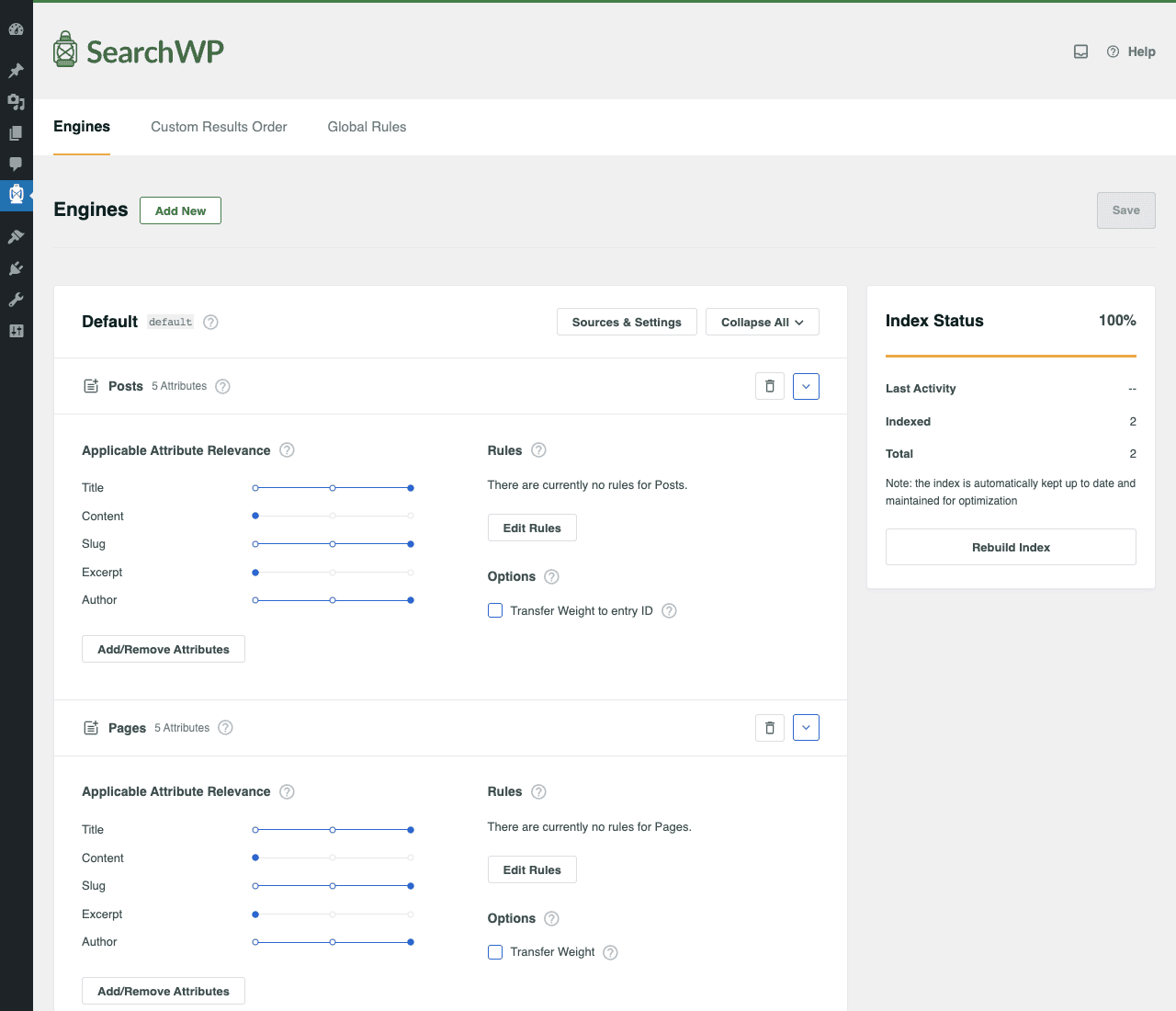
Notice the right-side "Index Status" panel showing the indexer is at 100%. That is SearchWP confirming it has finished building the index for your current content. Every time you publish a new post, the indexer runs in the background to add it. There is a manual "Rebuild Index" button for when you change attribute weights or sources and want the index to recalculate.
The sliders for Title, Content, Slug, Excerpt, Author are SearchWP’s relevance dial. Title is set to the highest weight by default (because a title match is usually the strongest signal a document is about that topic). Content is set lower (because a single mention deep in a long article is a weaker signal). You can drag these sliders for any source and the next query will use the new weights.
The Search Forms tab is where you build the actual search form widgets that you embed on pages:
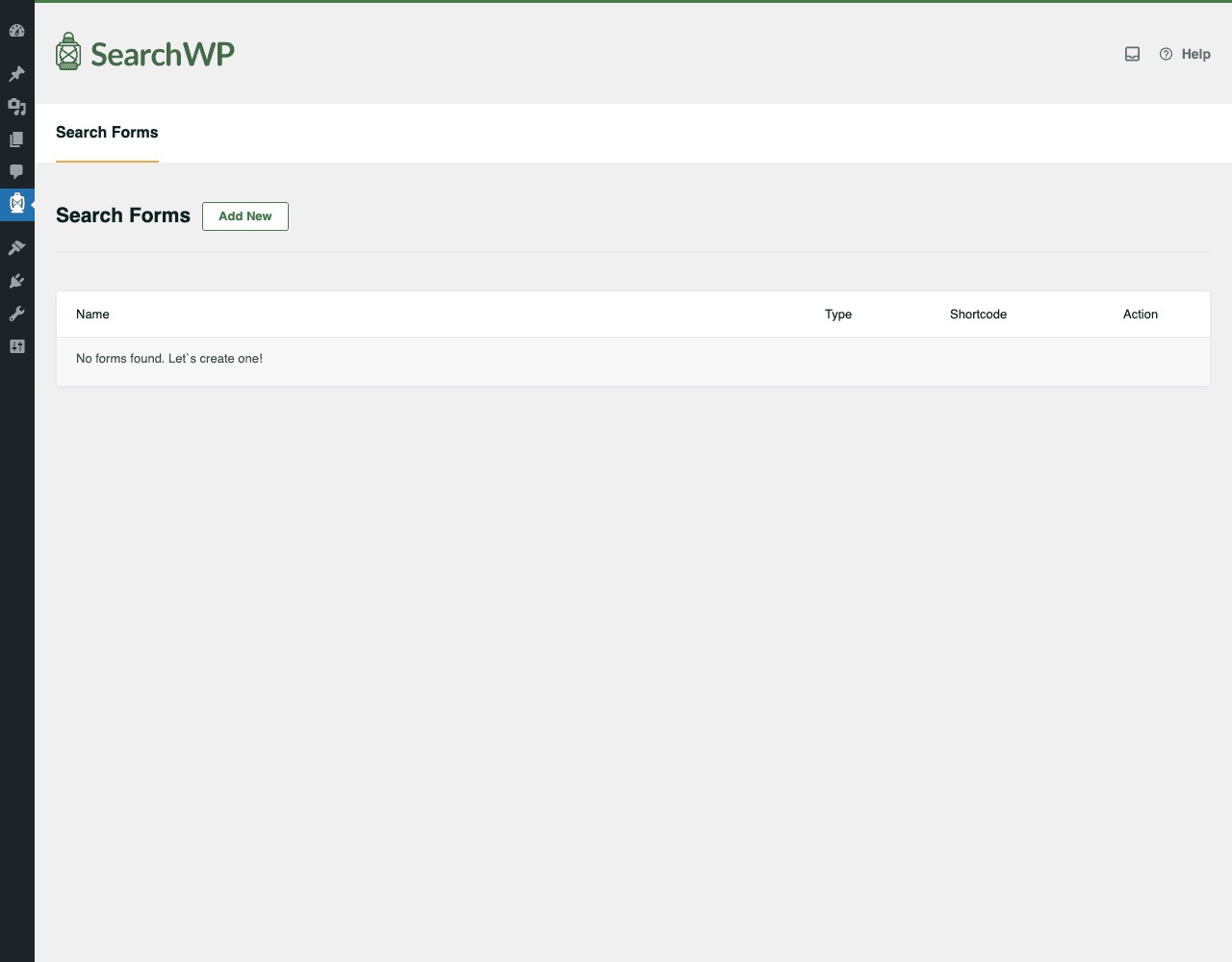
You create as many forms as you want, each tied to a specific engine. Use shortcodes or Gutenberg blocks to drop a form anywhere. The "docs" engine could power a sidebar search box for your knowledge base, while the default engine powers the global header search.
Once you have visitors searching, the Statistics page becomes the most valuable view:
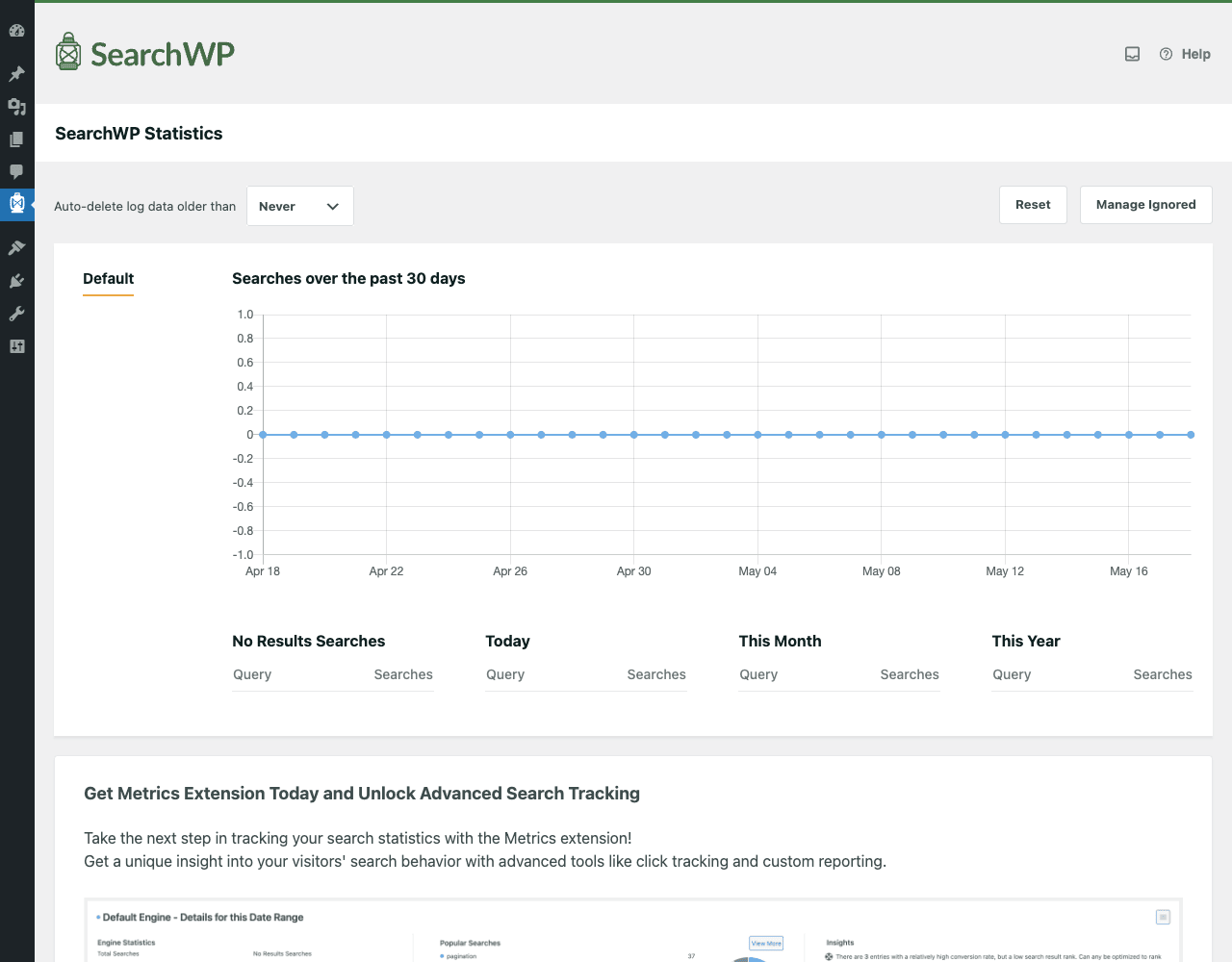
Every search is logged (anonymously, no IP, no PII) and aggregated. The "No Results Searches" column is the highest-value report: it tells you exactly what content your visitors expect you to have but you do not. Add that content, or set up a synonym/redirect to existing content, and the gap closes.
Pro extensions are managed under the Extensions tab and unlock the bigger features:
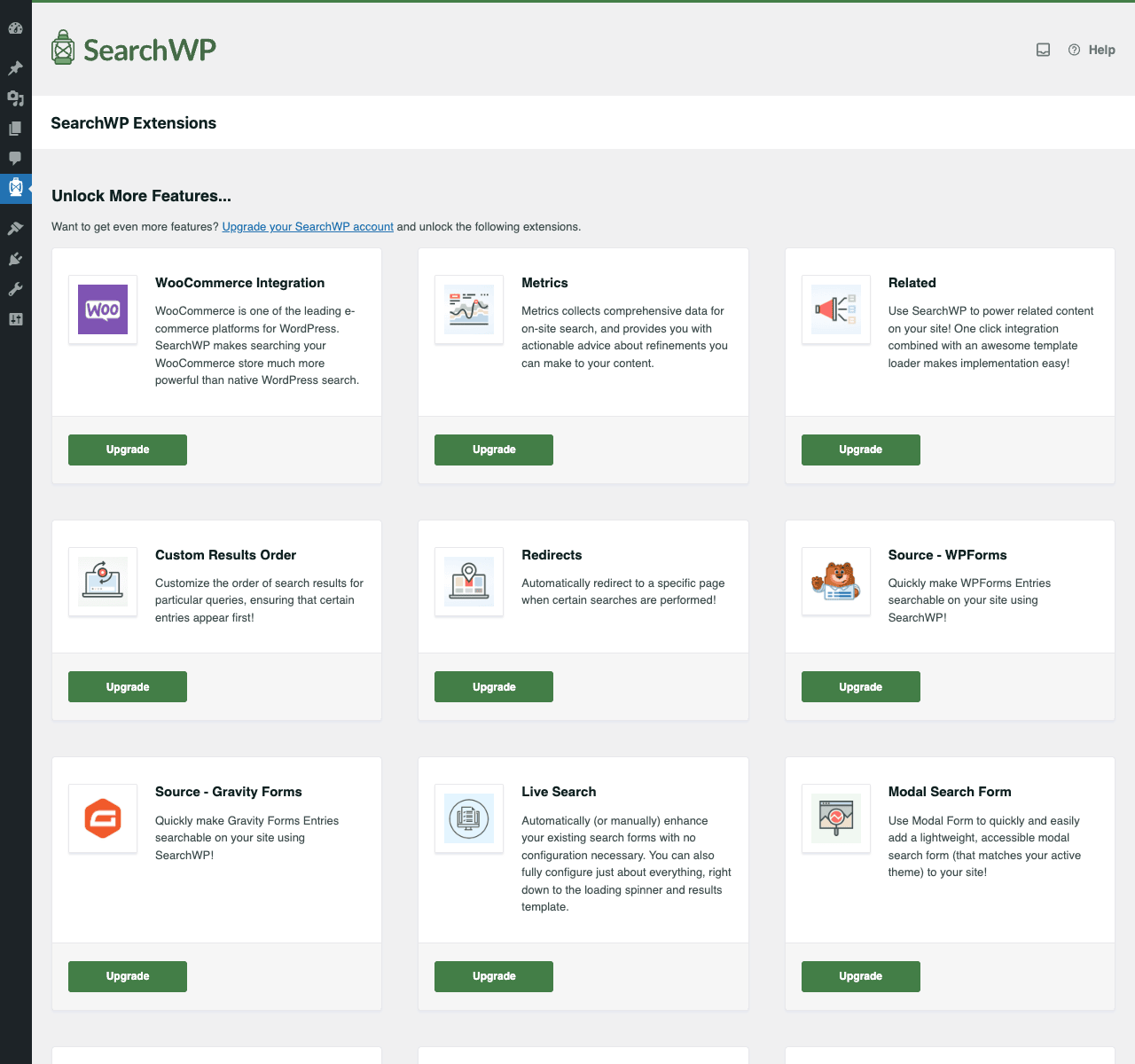
Each extension is a separate plugin file you install on top of SearchWP core, then activate from this screen. WooCommerce Integration replaces WC’s product search engine with SearchWP. Metrics is the advanced analytics extension (click-through rates, conversion). Live Search makes the search-as-you-type dropdown relevance-ranked. Modal Search adds a full-screen search overlay you trigger with a button.
The Tools tab handles import/export of your engine config and gives you diagnostics for debugging:
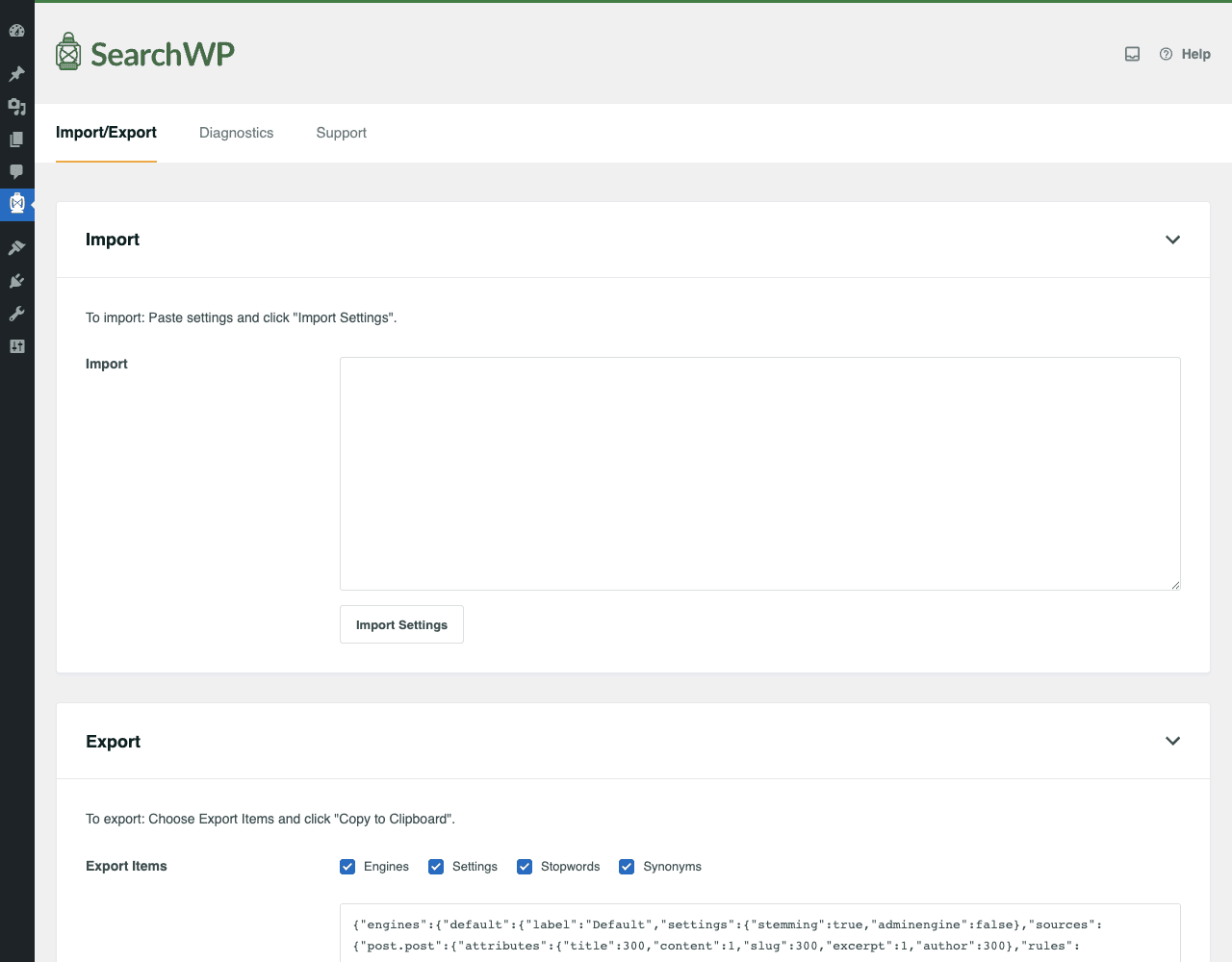
The JSON export of your engine config means you can build the engine on staging, paste the JSON into production, and the engine spawns identically. The Diagnostics tab inside Tools is where you check whether the indexer is healthy, see index counts per source, and reset the index if you ever need to start over.
Installation and setup
SearchWP is a single plugin zip. Install takes a minute, the first index build can take longer depending on how much content you have.
Step 1: Install the plugin. In WordPress admin, go to Plugins → Add New → Upload Plugin, choose the searchwp.zip file, click Install Now, then Activate Plugin. A new "SearchWP" menu appears in the admin sidebar.
Step 2: Activate your license (optional). Go to SearchWP → Settings → License Key and paste your license key. The plugin works fully without a license, the key only enables automatic updates from searchwp.com.
Step 3: Verify the default engine is set up. Go to SearchWP → Algorithm. You should see a "Default" engine with two sources already added: Posts (5 attributes) and Pages (5 attributes). This is the bootstrap configuration. SearchWP is already replacing your default WordPress search; you do not need to do anything else for basic improvement.
Step 4: Wait for the first index build. Look at the "Index Status" panel on the right. It will show a progress bar (something like "Indexing… 36% complete") while SearchWP processes every existing post. On a fresh install with a few posts, this takes seconds. On a 50,000-post site, it can take an hour. The indexer runs in background WP-Cron jobs, so it does not block anything. When the bar reaches 100%, your search is fully replaced.
Step 5: Test a search. Open the front-end of your site, type a query in the search box, hit Enter. You should already see better results than default WordPress (the title attribute is being weighted higher, and the index covers more than just title+content).
Step 6: Customize further. Now you can tweak attribute weights, add more sources, add custom field sources, install extensions. The next section walks through this in detail.
That is the install. The plugin is already working.
Step-by-step: configure your first search engine
Let me walk through a concrete example. Maya runs a recipe blog with 800 posts. Each post is a recipe with a title (recipe name), content (instructions), excerpt (summary), and several ACF custom fields: ingredients (a Repeater of name+quantity), cuisine (a Select), and prep_time (a Number). Maya wants her search to also match against ingredients and cuisine, not just title and body.
Step 1: Boost title relevance. Maya wants title matches to dominate. Go to SearchWP → Algorithm. Under the Posts source, drag the Title slider to the far right (relevance 300, the maximum visible). Drag Content down to 1. Drag Slug to 200, Excerpt to 1, Author to 300 (so an author name search like "Priya" finds Priya’s posts). Click Save.
Step 2: Add custom field attributes. Click "Add/Remove Attributes" under the Posts source. Click the "Custom Fields" tab. Add the field ingredients (the ACF Repeater) and the field cuisine. Set them to "Any meta key" if you want all custom fields, or pick specific ones. Each becomes a new attribute with its own relevance slider. Set ingredients to relevance 250 (highly relevant because Maya wants ingredient searches to work) and cuisine to 150.
Step 3: Configure stopwords. Go to SearchWP → Settings. Find the Stopwords field. The default English list is fine for most sites. If Maya has many recipes with words like "with" or "and" being meaningful (e.g. "fish and chips"), she can remove those from the stopwords list.
Step 4: Configure stemming. Same Settings page. "Stemming" toggle should be ON. This is what makes "running" match "run". Off only if you have a niche use case where exact-tense matching matters.
Step 5: Rebuild the index. After changing attribute weights or adding new attributes, click the "Rebuild Index" button on the right sidebar of the Algorithm page. The indexer reruns and the search now uses the new weights. (You only need to rebuild when changing attributes/sources/sources; weight changes alone do not require a rebuild because they apply at query time.)
Step 6: Test with real queries. Maya types "garam masala" into her own search box. She used to get zero results because the phrase only appeared inside an ACF Repeater that default WP search ignores. Now she gets 12 recipes ranked by how prominently "garam masala" appears in the ingredients field.
Step 7: Set up redirects for common no-results queries. Maya checks SearchWP → Statistics and sees "instant pot" is a common no-results query (she has not written instant-pot-specific content yet). She installs the Redirects extension and adds: "any query containing ‘instant pot’ → /category/instant-pot/" so visitors land on a category archive instead of an empty results page.
Step 8: Add a Live Search dropdown. Maya installs the Live Search extension and the search box in her header now shows live results as visitors type. She picks the "minimal" template so the dropdown matches her theme.
The whole flow took maybe 30 minutes. The search experience is now meaningfully better than default WordPress search, and Maya has the ongoing feedback loop (Statistics → no-results report → content gap → fill it) to keep improving.
Real-world use cases
SearchWP adapts to a surprisingly wide range of sites. A few patterns I have actually seen:
1. A documentation site. Vikram runs a developer docs site with 2,000 markdown-imported posts. Default search returned no useful results because most queries were code-related ("WP_Query meta_query"). He boosted the slug and content_meta attributes, added a custom field source for the "code_example" ACF field, and now developers find what they need on the first search.
2. A small e-commerce store. Anika sells handmade ceramics on WooCommerce. She installed the WooCommerce Integration extension. Customers can now search by product attribute ("blue mug") or SKU. Conversion on search-driven sessions went up because customers stopped landing on empty result pages.
3. A legal services firm. Raj runs a legal practice site with case studies, blog posts, and PDF case decisions. He installed the Documents extension and indexed the case PDFs. A potential client searching for "ADA accommodation" now finds the specific case PDF where Raj’s firm represented a similar matter.
4. A non-profit knowledge base. Sara runs a non-profit’s resource library: 400 articles, 200 PDF reports, 100 video transcripts. Each is a different post type. She configured three search engines: default (everything), "research" (just PDFs and articles), and "videos" (just transcripts). Each is exposed as a separate search form on the relevant section of the site.
5. A real estate listing site. Priya runs a real estate site with 5,000 listings. Each listing has fields for city, bedrooms, price range, neighborhood. She boosted city and neighborhood ACF fields heavily, so a search for "Bandra 2 BHK" returns the right listings even though "BHK" appears only in a structured field, not the post content.
6. A WordPress agency selling templates. Marcus runs an agency that sells WordPress templates. Each template is a CPT with a name, demo URL, screenshots, and a long description. He used SearchWP’s relevance sliders to make template names dominate, then installed Modal Search to give his site a Cmd-K-style search overlay. Conversion on his "find a template" flow improved 40%.
Developer reference
This is the long section. If you skipped the user-facing half above, you should already know what pre_get_posts, custom post types, post meta, and WP_Query are. Everything below builds on those.
The replacement of WP_Query
SearchWP does not extend WP_Query the way most plugins do. Instead, when WordPress detects is_search(), SearchWP intercepts via pre_get_posts and posts_pre_query to bypass the default WordPress search SQL entirely. It runs its own query against its own tables (wp_swp_log, wp_swp_index, wp_swp_status, wp_swp_tokens), assembles a list of matching post IDs ranked by relevance score, then injects those IDs back into the WP_Query result set. The theme’s search.php continues to loop through have_posts() the same way; the IDs in the loop just come from a different source.
You can see this in action by inspecting $wp_query->request on a search page. With SearchWP active, the SQL is something like SELECT ID FROM wp_posts WHERE ID IN (87, 142, 21, 309,...), with the IDs listed in SearchWP’s relevance order.
Core API: SWP() and the Query class
// Direct query using the SearchWP API (independent of WordPress search).
$query = new \SearchWP\Query( 'garam masala', [
 'engine' => 'default',
 'per_page' => 10,
 'page' => 1,
] );

$results = $query->get_results(); // array of WP_Post objects
$total = $query->get_found_posts();
$ids = $query->get_ids();

// Use this when you want SearchWP relevance for an Ajax endpoint or a REST route
// that should not go through the standard search.php template.
Filter hooks worth knowing
The plugin uses an unusual hook naming convention with backslashes. This is because SearchWP namespaces its hooks under PHP namespace separators internally:
// Modify the search string before it hits the index.
add_filter( 'searchwp\query\search_string', function( $string, $query ) {
 // Strip out URL-like patterns from the query.
 return preg_replace( '/https?:\/\/\S+/', '', $string );
}, 10, 2 );

// Modify the final query args.
add_filter( 'searchwp\query\args', function( $args, $query ) {
 if ( $query->get_engine()->get_name() === 'default' ) {
 $args['per_page'] = 12;
 }
 return $args;
}, 10, 2 );

// Control whether partial matching is allowed.
add_filter( 'searchwp\query\partial_matches\wildcard_before', '__return_true' );

// Control whether phrase searches are treated as exact phrases.
add_filter( 'searchwp\query\logic\phrase', function( $default, $query ) {
 return true; // always require exact phrase matches when quotes are used
}, 10, 2 );

// Customize stemmer behavior.
add_filter( 'searchwp\stemmer\locale', function() {
 return 'fr_FR'; // force French stemming even if site locale differs
} );

add_filter( 'searchwp\stemmer\custom', function( $stem, $word ) {
 if ( $word === 'aficionado' ) {
 return 'aficion';
 }
 return $stem;
}, 10, 2 );

// Set minimum token length to index.
add_filter( 'searchwp\tokens\minimum_length', function() {
 return 2; // index 2-letter tokens like "us" (default is usually 3)
} );

// Transform content before tokenization (e.g. strip code blocks).
add_filter( 'searchwp\tokens\string', function( $string ) {
 return preg_replace( '/<pre[\s\S]*?<\/pre>/', '', $string );
} );

// Toggle the slot cache (mostly for debugging).
add_filter( 'searchwp\source\check_db', '__return_true' );
Action hooks for indexing lifecycle
// Fires for diagnostic logging.
add_action( 'searchwp\debug\log', function( $message, $context ) {
 // Forward to your own log aggregator.
 error_log( "[searchwp/$context] $message" );
}, 10, 2 );

// Fires when an engine setting changes.
add_action( 'searchwp\settings\update\stemming', function( $value ) {
 // Run side effects after a setting changes.
 do_action( 'my_search_settings_changed', 'stemming', $value );
} );
Custom sources
A "source" in SearchWP is a class describing a content type that can be indexed. Out of the box, sources for Posts, Pages, custom post types, taxonomies, and Users are registered automatically. To add a new source (e.g. for data that lives in a custom database table, or a CPT from another plugin that should be searched as its own source):
add_action( 'searchwp\sources', function( $sources ) {
 $sources[] = new MyCustomSource();
 return $sources;
} );

class MyCustomSource extends \SearchWP\Source {
 public $name = 'my_glossary';

 public function attributes() {
 return [
 'term' => [ 'label' => 'Term' ],
 'definition' => [ 'label' => 'Definition' ],
 'category' => [ 'label' => 'Category' ],
 ];
 }

 public function options() {
 return [
 'label' => 'Glossary',
 'class' => self::class,
 'rules' => [],
 ];
 }

 //... implement query() and other Source methods
}
The Source abstract class is well-documented in the plugin code; copy one of the bundled sources (includes/Sources/Post.php) as a starting template.
Custom fields and meta indexing
Custom field attributes are the most common reason to extend a SearchWP engine. You can add custom fields via the UI (Algorithm → Add/Remove Attributes → Custom Fields tab), or programmatically:
add_filter( 'searchwp\source\attribute\meta_key', function( $value, $args ) {
 // For a custom field that stores a serialized array, flatten to text.
 if ( $args['key'] === 'product_features' && is_array( $value ) ) {
 return implode( ' ', array_map( function( $item ) {
 return is_array( $item )? implode( ' ', $item ) : $item;
 }, $value ) );
 }
 return $value;
}, 10, 2 );
For Advanced Custom Fields users specifically, the Repeater and Flexible Content sub-fields can be indexed as a single attribute by hooking the meta extraction:
add_filter( 'searchwp\source\attribute\meta_value', function( $value, $args ) {
 if ( $args['key']!== 'ingredients' ) {
 return $value;
 }
 // ACF Repeater stores sub-fields with keys like ingredients_0_name.
 $post_id = $args['post_id'];
 $rows = get_field( 'ingredients', $post_id );
 if (! is_array( $rows ) ) return $value;
 return implode( ' ', array_column( $rows, 'name' ) );
}, 10, 2 );
WP-CLI commands
SearchWP ships three CLI commands. These are invaluable for staging deploys and large content imports:
# Index any unindexed posts.
wp searchwp index

# Force a full reindex (destroys current index, rebuilds from scratch).
wp searchwp reindex

# Print diagnostic info about the index, sources, attributes, and counts.
wp searchwp diagnostics

# Multisite support: target a specific site.
wp searchwp reindex --url=https://network-site.com
A typical deployment flow:
# After deploying code that adds a new custom field source:
wp searchwp diagnostics # confirm SearchWP sees the new source
wp searchwp reindex --url=$SITE_URL # rebuild index with new attribute
REST API
SearchWP does not register its own REST routes in core. The Pro Metrics extension adds an /wp-json/searchwp/v1/ namespace with endpoints for statistics and metrics. For programmatic search from a decoupled frontend, the cleanest approach is to write a small custom REST endpoint that wraps the SearchWP Query class:
add_action( 'rest_api_init', function() {
 register_rest_route( 'my-app/v1', '/search', [
 'methods' => 'GET',
 'callback' => function( $request ) {
 $query = new \SearchWP\Query( $request['q'], [
 'engine' => $request['engine']?? 'default',
 'per_page' => 10,
 'page' => $request['page']?? 1,
 ] );

 return [
 'results' => array_map( function( $post ) {
 return [
 'id' => $post->ID,
 'title' => get_the_title( $post ),
 'url' => get_permalink( $post ),
 'excerpt' => get_the_excerpt( $post ),
 ];
 }, $query->get_results() ),
 'total' => $query->get_found_posts(),
 ];
 },
 'permission_callback' => '__return_true',
 ] );
} );
Indexer behavior and queueing
SearchWP’s indexer runs as a WordPress background process (using the WP_Background_Process pattern). When you save a post, the indexer queues that post for delta indexing. A WP-Cron task picks it up within seconds.
You can hook into the indexing lifecycle to add custom side effects:
add_action( 'searchwp\indexer\finished', function() {
 // Index just finished a full run. Good place to bust a downstream cache.
 wp_cache_flush_group( 'my_search_cache' );
} );

add_filter( 'searchwp\indexer\post\meta_count', function( $count, $post_id ) {
 // Limit how many meta values get tokenized per post (for very heavy meta).
 return min( $count, 100 );
}, 10, 2 );
Templates and the search results template
SearchWP does not override your theme’s search.php. The standard WP loop continues to drive the front-end display. The plugin only swaps the underlying query.
If you use the Live Search Pro extension, it ships with templates you can override in your theme at:
wp-content/themes/your-theme/searchwp-live-search/results.php
wp-content/themes/your-theme/searchwp-live-search/result.php
This is the standard WC-style template hierarchy: copy the plugin’s bundled template, modify in your theme, the plugin picks up the override automatically.
Database tables
SearchWP creates several tables prefixed wp_swp_ (or your custom DB prefix):
wp_swp_index– the main inverted index. One row per token-document pair.wp_swp_tokens– the token table (each unique token has an ID).wp_swp_status– per-post indexing status.wp_swp_log– search statistics log.
If you ever need to "burn down and rebuild", wp searchwp reindex truncates and refills all these tables. You can also manually TRUNCATE them in SQL if WP-CLI is unavailable, then visit SearchWP → Algorithm and the indexer will rebuild on the next cron run.
Compatibility hooks for other plugins
If you write a plugin that wants to integrate with SearchWP:
// Detect SearchWP is active.
if ( class_exists( 'SearchWP' ) ) {
 // Hook into the search flow.
}

// Detect a specific extension is active.
if ( class_exists( '\\SearchWP\\Extensions\\WooCommerce\\Plugin' ) ) {
 // SearchWP's WooCommerce integration is loaded.
}
A common pattern: your plugin defines a CPT, you register a SearchWP source for it at searchwp\sources, and you ship an Algorithm UI suggestion via searchwp\engine_settings\default\sources.
Performance, compatibility, and gotchas
SearchWP is a heavier dependency than the bare-bones default WordPress search, but it scales surprisingly well. The plugin is in active production on sites with hundreds of thousands of posts.
Performance considerations:
- The biggest cost is the initial index build. On a fresh install with 10,000 posts, expect 15-30 minutes. The indexer uses WP-Cron, so it does not block requests, but it does generate traffic to wp-cron.php.
- After the initial build, ongoing index updates are minimal. Each
save_posttriggers a small delta update for that single post. - The search query itself is faster than the default WordPress LIKE query at any scale beyond a few hundred posts. The inverted index lookup is O(log n) where n is unique tokens, vs the LIKE scan which is O(n) over posts.
- Cache plugins (like WP Rocket) work fine with SearchWP. Search results pages can be cached normally because the query is fast and consistent given the same input.
- If you have millions of
wp_postmetarows, custom-field attribute indexing can be slow on the initial build. Consider being selective about which meta keys you index.
Compatibility caveats:
- SearchWP requires PHP 7.3+ and WordPress 5.3+.
- The plugin replaces the default WP search query via
pre_get_postsandposts_pre_query. If your theme also hookspre_get_poststo modify search queries, the two can conflict. Use the SearchWP-specific filters (searchwp\query\args) instead ofpre_get_postsfor search-related changes. - Multisite is supported but each site needs its own SearchWP index. There is no network-wide index.
- The plugin does not natively integrate with non-MySQL databases. If you run WordPress on PostgreSQL via a porting layer, expect issues.
- Block-based search (Gutenberg search block) works with SearchWP because it ultimately fires a
?s=request that SearchWP intercepts.
Common gotchas:
- Forgetting to rebuild after adding sources. Adding a new source (e.g. a custom post type) requires
wp searchwp reindexor clicking Rebuild Index. Without that, the new source has nothing in the index and searches against it return zero. - Relevance is per-engine, not global. The Title slider on the Posts source applies only when searching the "default" engine. If you also have a "products" engine that includes Posts, the Title relevance for Posts in that engine is a separate setting.
- The default minimum query length is 3. Searches with 1-2 character queries (like "BB") return nothing unless you change the minimum token length filter.
- Stopwords are language-aware but defaulting to English. If your site is non-English, set the stemmer locale filter and add language-specific stopwords. The plugin will not auto-detect a non-English site.
- The ‘Custom Results Order’ extension overrides relevance. If you pin Post X to position 1 for query "Y", it always appears first regardless of the algorithm’s score. Make sure that is what you want.
- PDF indexing requires the SearchWP Documents extension. Without it, file attachments are listed but their contents are not tokenized.
Pricing and licensing
SearchWP is sold by SearchWP, LLC on an annual-license-per-site model with three tiers: Standard (1 site), Pro (3 sites + most extensions), Agency (unlimited sites + all extensions). The Pro and Agency tiers include the high-value extensions (WooCommerce, Live Search, Modal Search, Redirects, Custom Results Order, Source integrations for WPForms/Gravity Forms/bbPress).
The plugin is GPL-licensed (the WordPress license requires it). The license sold by SearchWP is a support and update license, not a use license. After install, you can use it on any number of sites; the license only gates support replies and the official update channel.
Because of GPL, the same plugin file is legally redistributable. Same plugin, same features, no SearchWP-channel updates.
For sites where search is a core business function (e-commerce stores, large content sites, documentation sites), the official license is worth considering once you are past prototyping. SearchWP’s support team is responsive and ships updates frequently.
FAQ
Q: Do I need to write any code to use SearchWP?
No. The default engine works out of the box and replaces WordPress’s search automatically. All configuration is through the admin UI. Code is only needed if you want to extend SearchWP with custom sources, custom field handling, or integrate with a decoupled frontend.
Q: Will SearchWP slow down my site?
The opposite. SearchWP’s inverted index lookup is faster than the default LIKE query for any site beyond a few hundred posts. The initial index build takes time, but ongoing search queries are quicker.
Q: Does SearchWP work with WooCommerce?
Yes, via the WooCommerce Integration extension. It replaces WooCommerce’s product search engine with SearchWP, supporting product attributes, SKUs, variations, short descriptions, and tags. If you sell products and have ever heard customers say "I couldn’t find anything", install this extension first.
Q: Can SearchWP index PDFs?
Yes, via the Documents extension. It uses an open-source PDF parser to extract text from PDF attachments and indexes that text alongside post content. Word, Excel, and PowerPoint documents are also supported.
Q: Does SearchWP work with WPForms, Gravity Forms, or other form-entry data?
Yes. The WPForms and Gravity Forms source extensions index form entries as searchable content. Useful if you have a directory or knowledge base built on form submissions.
Q: Can I have multiple search forms on one site?
Yes. Create as many engines as you need (e.g. "default", "products", "docs"), then create a Search Form for each engine under SearchWP → Search Forms. Embed each form via shortcode or block.
Q: Does SearchWP work with Elementor, Beaver Builder, or other page builders?
Yes. SearchWP’s Search Form widget integrates with most major builders. Live Search and Modal Search dropdowns work inside builder-built pages without configuration.
Q: Will my data be lost if I deactivate SearchWP?
The search experience reverts to default WordPress search (your theme keeps working). The SearchWP index tables remain in the database until you explicitly uninstall the plugin (which clears them). Field data on your posts is never touched.
Q: How is SearchWP different from Algolia or Elasticsearch?
Algolia is a hosted SaaS search engine with the best query latency in the industry, but it costs per-search and your data lives on Algolia’s servers. Elasticsearch is a self-hosted distributed search server, very powerful but requires separate infrastructure. SearchWP runs entirely inside WordPress on your existing server, no external service needed, no per-search billing. The trade-off is that it scales to "tens of thousands of posts" easily but not to "tens of millions" (that’s where you’d want Elastic).
Q: Does SearchWP handle multilingual sites (WPML, Polylang)?
Yes. Each language version of a post is indexed separately. Search results respect the current language context. Set the stemmer locale filter if your default site language is not English.
Final thoughts
SearchWP is one of those quiet-but-essential plugins. You install it, the search just gets better, and within a few weeks you are looking at the Statistics page wondering how you ever ran a content site without it. The improvements are not flashy: no UI overhaul, no new front-end widgets, no rebranding of your search page. Just better results, faster queries, and a feedback loop for improving content based on what visitors actually look for.
For a beginner the path is short. Install the plugin, let the indexer finish, and your search is already meaningfully better than default WordPress. Tweak the relevance sliders if you want; install extensions if you need PDF or WooCommerce coverage. That is it.
For a developer the plugin is well-designed. The hook surface is large but consistent (every filter starts with searchwp\). The core API (SearchWP\Query) is clean and lets you run relevance-ranked searches independent of WordPress’s WP_Query. WP-CLI commands handle the boring CI work (wp searchwp reindex in your deploy script). Custom sources let you index data from any plugin, custom table, or external system.
The places where SearchWP is not the right answer: if your site has fewer than 200 posts and you only search by title, the default WordPress search is fine. If your site has 50 million documents and sub-100ms latency requirements, you need Elasticsearch or Algolia. For everything else, especially the "site between 500 and 500,000 posts" range, SearchWP is the boring-good default.
Drop it on a staging site, point it at your real content, and within an afternoon you will have a search experience that makes the "I can’t find anything" feedback disappear.
Useful external references:
- SearchWP official documentation covers every setting, attribute, and hook in detail.
- Inverted index Wikipedia article for the underlying data structure that powers SearchWP and every other modern search engine.
- WordPress Codex on search for the theme-side template conventions SearchWP respects.