

The free version of Everest Forms gets you a contact form and a feedback form, and honestly that covers a lot of sites. But the moment a client asks for a file upload on a job application, a "how did you hear about us" dropdown that only shows when someone picks "Other", and a $25 application fee charged through Stripe, you hit the wall. You’re either writing custom validation code, gluing together three smaller plugins, or reaching for the Pro add-on.
This is a hands-on look at what Everest Forms Pro actually adds once you cross that line. I built a job application form in the builder, wired up conditional logic, poked at the payment fields, and read through the source for the hooks worth knowing. Some of it genuinely surprised me. A couple of things annoyed me. I’ll be honest about both.
Table of Contents
- What Everest Forms Pro is
- The 30+ Pro field types (and the six that matter)
- How the builder feels day to day
- Conditional logic: show, hide, and branch
- Payments: Stripe, Square, PayPal, and subscriptions
- Don’t collect raw card numbers when you have Stripe
- Entry management and exports
- Email marketing: syncing entries to your CRM
- Landing pages: forms without a theme around them
- Spam, security, and the things that quietly save you
- Everest Forms Pro vs WPForms vs Gravity Forms vs Fluent Forms
- Developer reference: hooks, filters, and REST
- FAQ
- Final thoughts
What Everest Forms Pro is
Everest Forms Pro is the premium add-on for Everest Forms, the form builder from WPEverest (the same studio behind the User Registration plugin and a stack of others). It is not a standalone plugin. The free Everest Forms base ships the actual builder shell, the entries table, and the core fields. Pro plugs into that and unlocks the heavy stuff: more than thirty premium field types, real payment processing, conditional logic, entry exports, CRM bridges, landing pages, and a REST surface for anyone building on top.
That base-plus-Pro split matters, and I’ll come back to it, because it trips people up. If you install only Everest Forms Pro and nothing else, you get a quiet failure. Pro expects the free plugin to already be running.
The pitch is simple enough. You start with a drag-and-drop builder, drop in fields, set up notifications, and embed the form with a shortcode or block. Where Everest Forms Pro tries to stand out is in two areas most form plugins charge extra for or split into a dozen separate add-ons: payments and the field library. We’ll dig into both.
Here is the builder after I dropped a few fields onto a blank "Job Application" form. The left rail is the field palette, the right side is the live canvas.

The 30+ Pro field types (and the six that matter)
Open the Add Fields tab and you get two groups: the standard fields you’d expect (name, email, dropdown, checkboxes, number, date/time) and an Advanced Fields group that is mostly Pro. The full Pro list is long: address, color picker, country, credit card, divider, file upload, hidden, custom HTML, image upload, lookup, password, phone, privacy policy, progress bar, range slider, rating, reset button, signature, section title, WYSIWYG, plus the entire payment field family (single item, subscription plan, quantity, subtotal, total, payment summary, coupon, payment checkbox, payment radio).
That’s a lot of fields. Most you’ll touch once a year. Here are the six that earn their place in real projects.
- File Upload. Drag-and-drop uploads with size limits, allowed-extension filters, and a per-field max file count. This is the single most common reason people upgrade. Job applications, design briefs, support tickets with screenshots, they all need it.
- Signature. A canvas-based draw-your-signature field. Saves as an image with the entry. Useful for consent forms, contracts, and waivers without bolting on a separate e-sign service.
- Phone. International phone with format validation and an optional country-flag dropdown. Sounds trivial until you’ve cleaned a database full of "call me maybe" in the phone column.
- Address. A grouped field (street, city, state, ZIP, country) that validates as one unit instead of five loose text boxes. The country sub-field is a real select, not free text.
- Repeater Fields. Let a user add multiple instances of a field group. Think "list every previous employer" or "add another attendee". Hard to fake with conditional logic, easy here.
- The payment family. Single item, quantity, subscription plan, coupon, and the total/subtotal/summary fields that do the math for you. This is what turns a form into a checkout.
One thing I appreciate: the field palette doesn’t hide the Pro fields behind a paywall nag once the license is active. They’re just there, ready to drag. Some competitors gray them out and make you click through an upsell. Everest Forms does not, which keeps the builder feeling like one tool instead of a demo with locked doors.
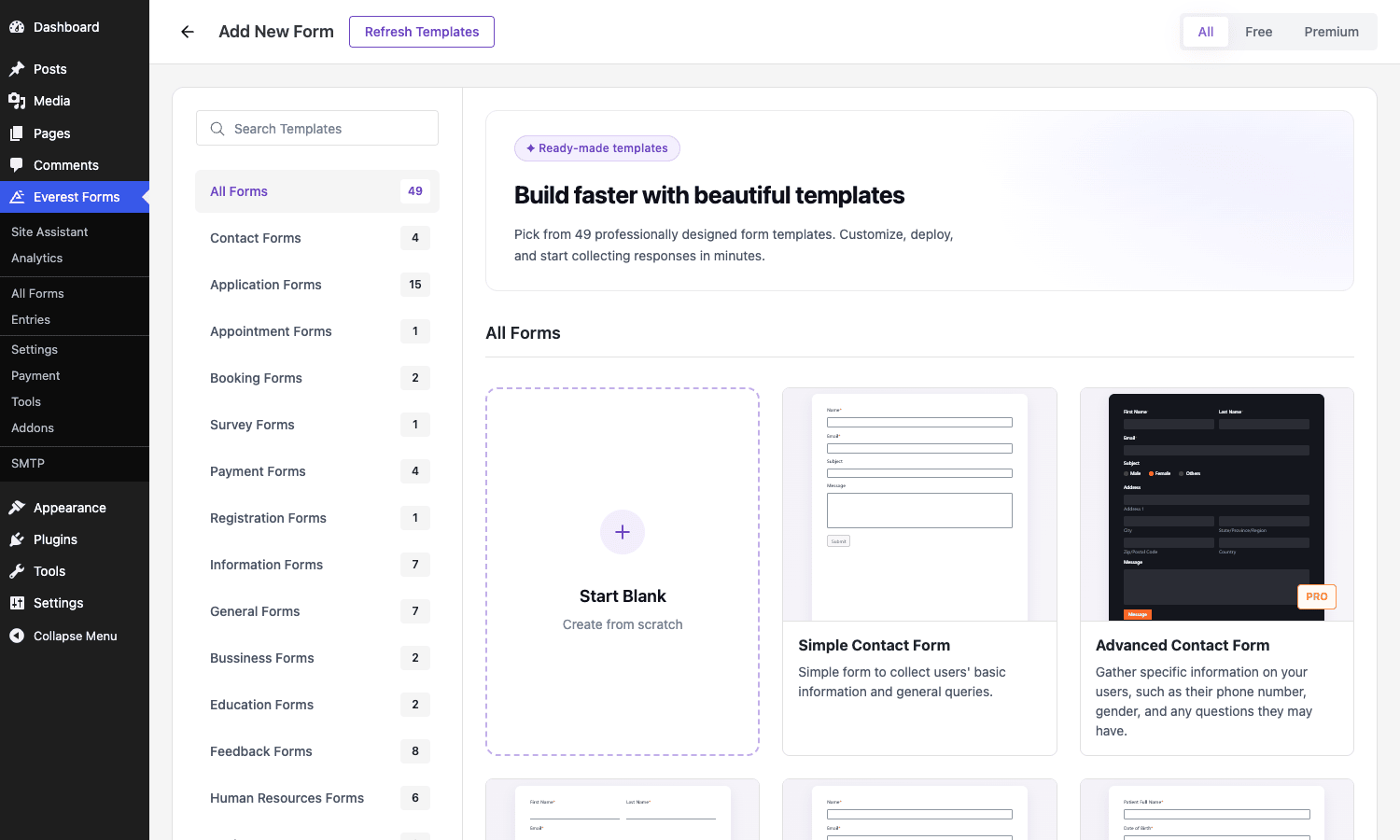
Here’s the template gallery you land on when you create a new form. Forty-nine starting points, sorted by category, plus a Start Blank option.
How the builder feels day to day
WPEverest rebuilt the builder around a React interface, and you can tell. Adding a field is a click or a drag. Reordering is smooth. Each field has three option groups: General Options (label, placeholder, required, default), Advanced Options (CSS classes, field size, sublabels, choice layouts), and Conditional Logic.
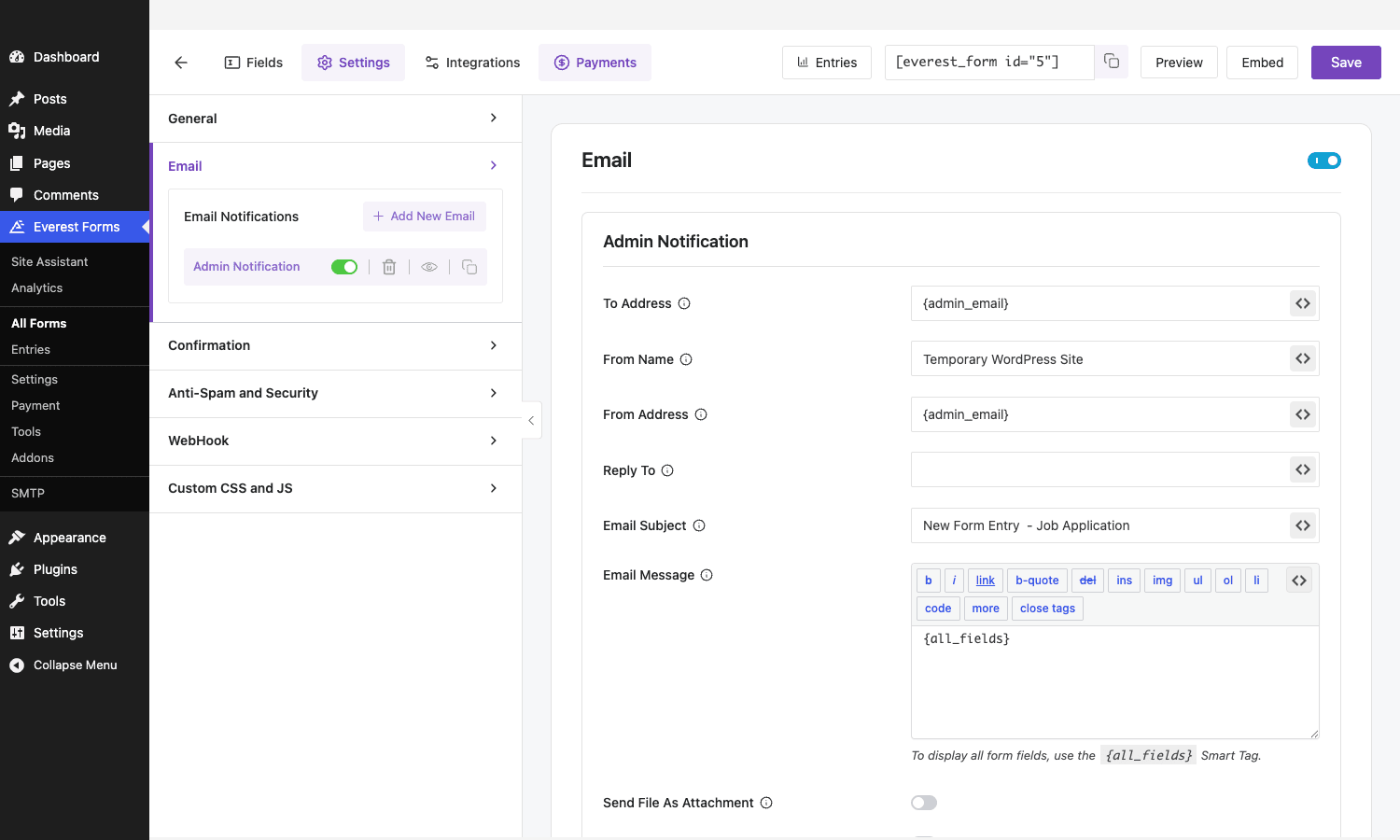
The top bar gives you four tabs: Fields, Settings, Integrations, and Payments. Settings is where the per-form configuration lives, and it’s organized into a tidy sub-nav: General, Email, Confirmation, Anti-Spam and Security, WebHook, and Custom CSS and JS.
The Email section is better than I expected. You can create more than one notification per form, each with its own recipients, subject, and body, each toggled on or off independently. So the admin gets the full entry, the applicant gets a clean confirmation, and the hiring manager gets a stripped-down ping. Smart tags like {all_fields} and {admin_email} fill in the dynamic bits, and there’s a "Send File As Attachment" toggle so uploaded files ride along on the notification email.
If I have a gripe with the builder, it’s that some of the advanced settings hide one click deeper than they should. The first time I went looking for the file-upload max-size control, I clicked around three panels before finding it under Advanced Options. Not a dealbreaker, just a "where did they put that" moment you’ll have a few times early on.
Conditional logic: show, hide, and branch
Conditional logic is the feature that separates a real form builder from a glorified contact box, and Everest Forms Pro handles it per field. Open a field, expand Conditional Logic, flip the toggle, and you get a rule builder: Show or Hide this field only if the following matches, with a field/operator/value row and AND/OR grouping for compound rules.
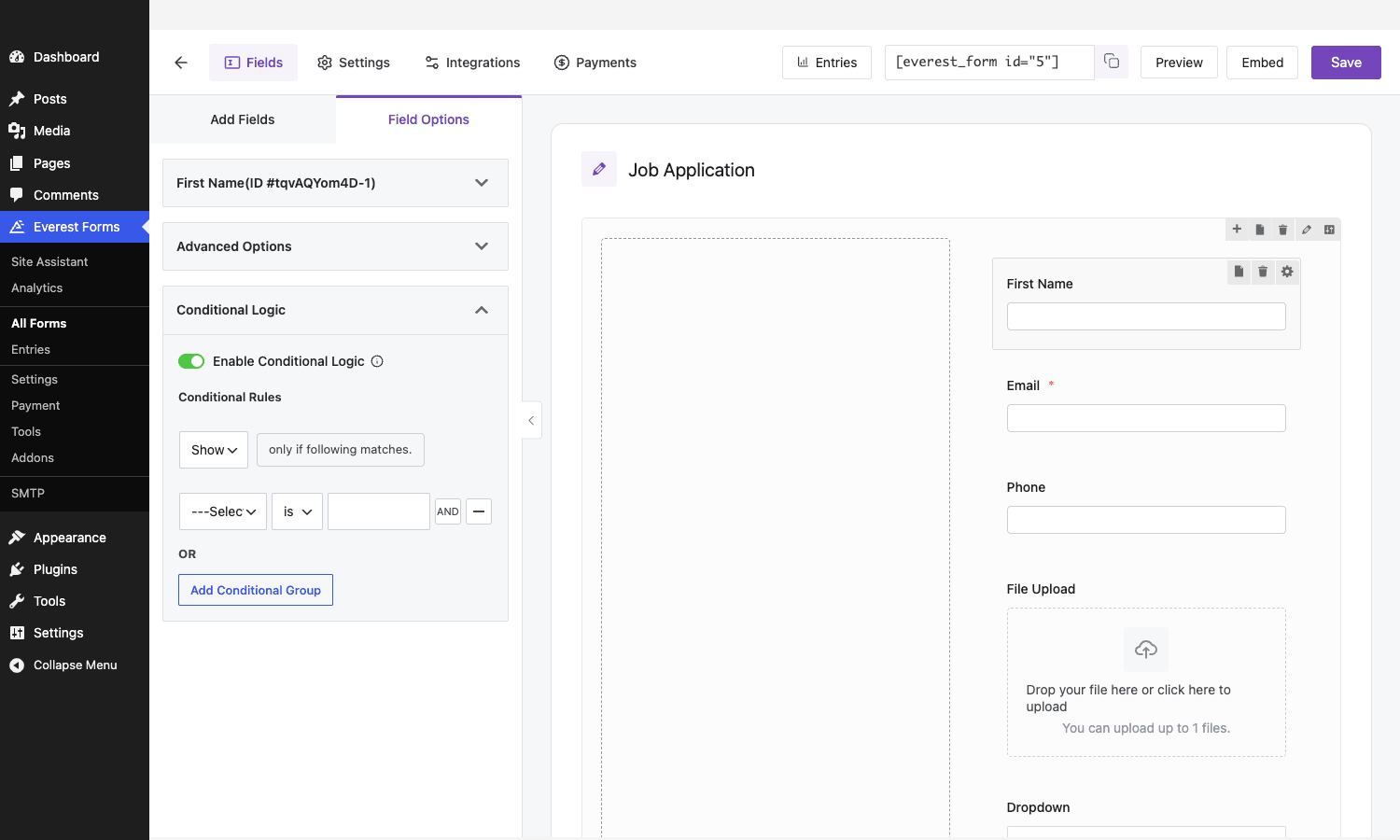
A concrete example. On that job application, I want the "Which role are you applying for?" dropdown to reveal a "Portfolio URL" field only when someone selects a design or front-end role. Without conditional logic, every applicant sees a portfolio field they don’t need, the form looks cluttered, and completion drops. With it, the form stays short for everyone and only grows when it’s relevant.
The operators cover the usual cases: is, is not, empty, not empty, greater than, less than, contains. In a recent update the team added support for date/time-based conditions and got conditional logic working correctly inside multi-part forms, which historically was a weak spot. Conditional logic also drives email routing, so you can send a notification to one team only when a certain answer is given. That’s the kind of thing that used to need a separate automation plugin.
One honest caveat: conditional logic in Everest Forms is client-side for display, but the plugin re-validates required hidden fields server-side on submit. If you’ve ever had a "required" field block a submission because it was conditionally hidden, you’ll know why that matters. Everest Forms handles the hidden-required case, but test it. Always test it.
Payments: Stripe, Square, PayPal, and subscriptions
This is where Everest Forms Pro punches above its price. It supports Stripe, Square, PayPal, and Authorize.Net, and crucially it does both one-time charges and recurring subscriptions without needing WooCommerce underneath.
The way it works: you drop in payment fields (a Single Item for a fixed price, or Quantity and Multiple Choice fields the buyer chooses from), then add a Subtotal, a Total, and optionally a Payment Summary field that itemizes the order before checkout. The total field does the arithmetic live as the user changes quantities or picks options. Then a gateway field (Stripe or Square) collects the card and processes the charge on submit.
For recurring billing there’s a dedicated Subscription Plan field, and in a recent release it picked up trial-period support. You define the interval and amount, and Everest Forms creates the subscription with the gateway. The Pro plugin keeps a payment log (now living under the Everest Forms dashboard submenu) with bulk actions and a gateway filter, plus a Payment History block and shortcode you can drop on a member-facing page.
Coupons are a nice touch. The coupon field supports percentage and flat discounts, usage limits, and stackable codes, so a "EARLYBIRD" and a "STUDENT" code can apply together if you allow it. I’ve seen plenty of form plugins where coupons are a separate paid add-on. Here it’s built in.
The honest limitation: because this isn’t WooCommerce, you don’t get a WooCommerce order object, a cart, inventory tracking, or the WooCommerce reporting suite. Everest Forms payments are for the "sell one thing, take one payment" case: an event ticket, a donation, an application fee, a single product. If you need a real store with a catalog and stock control, that’s still WooCommerce territory. For a single charge attached to a form, this is far simpler than spinning up a whole commerce stack.
Don’t collect raw card numbers when you have Stripe
Here’s the trap I want to talk you out of. Everest Forms Pro ships a field literally called Credit Card. It renders card-number, expiry, and CVC inputs right in your form. It looks convenient. Do not use it to actually store card data, and think hard before using it at all.
When card numbers are typed into plain inputs that submit to your server and land in wp_evf_entries, you have just dragged your entire WordPress install into PCI-DSS scope. That’s not a paperwork formality. PCI scope means you are responsible for the security of cardholder data, and a breach involving stored card numbers can carry fines in the tens of thousands of dollars per incident, mandatory forensic audits, and the kind of customer-trust damage that does not come back. WordPress sites get compromised constantly through unrelated plugin vulnerabilities. The day one of yours is, every card number sitting in your database is exposed, and the liability is yours.
The Stripe and Square fields exist precisely so you never touch raw card data. They tokenize the card in the browser using the gateway’s own hosted elements. The actual number goes straight to Stripe or Square over their connection, your server receives only a token, and the charge is created from that token. Your database never sees a PAN. This is the entire point of tokenized payment fields, and it moves the PCI burden onto the gateway, who is built to carry it.
So the rule is blunt: if you’re taking payments, use the Stripe or Square field, and confirm your entry records contain a transaction ID and a token, never a card number. The plain Credit Card field has narrow legitimate uses (offline processing through a terminal you key in manually), but for anything that touches the web, reach for tokenized gateways. The few minutes you save with the raw field are not worth the breach you might be funding.
Entry management and exports
Every submission lands in the Entries table, stored in your WordPress database. This is a Pro-grade area: in the free version, entries are limited, and the export and management tooling is what people pay for.
From the Entries screen you can view a single entry with all its field values, see which form it came from, check its status (read/unread, starred, spam, trash), and filter by form and date. Pro adds CSV and Excel export so you can pull submissions into a spreadsheet or feed them to another system. There’s a everest_forms_entries_table_extra_columns filter if you want to surface a specific field as its own column in the list, which is handy when you’re scanning a hundred applications for one data point.
The thing worth internalizing: your entries live in your database, in the wp_evf_entries and related tables. That has real implications. Backups need to include those tables or you lose submissions. GDPR data-deletion requests mean actually deleting the row, not just hiding it. And a form collecting sensitive data is a database collecting sensitive data, with all the responsibility that implies. The upside is you own the data outright, no third-party form service holding it hostage behind a monthly fee. The downside is you own the data outright, including the parts you’d rather someone else worried about.
Email marketing: syncing entries to your CRM
Everest Forms Pro can push form submissions into email-marketing and CRM platforms. The source includes integration bridges for the usual suspects: Mailchimp, ConvertKit, ActiveCampaign, Brevo (formerly Sendinblue), HubSpot, Zoho, Salesforce, AWeber, GetResponse, and Constant Contact, among others.
The pattern is the same across them: you connect an account with an API key, then map form fields to the platform’s contact fields, so a newsletter signup form becomes a contact in your list without you copy-pasting anything. There’s a everest_forms_email_marketing_whitelist_fields filter that controls exactly which fields are eligible to sync, which is your safety valve against accidentally shipping a sensitive field to a third party.
A note on the demo sandbox: the CRM connection screens only appear once the relevant integration add-on is active, so I couldn’t capture the live mapping UI here. But the field-mapping flow is consistent with how WPEverest builds these bridges, and the whitelist filter is the bit developers will actually care about.
If your stack already leans on a specific tool, several of these integrations are sold as focused add-ons too. The Everest Forms Mailchimp add-on is a good example if Mailchimp is your list of record.
Landing pages: forms without a theme around them
This one is easy to overlook and genuinely useful. Everest Forms Pro can render a form as a standalone landing page, with no theme header, no footer, no sidebar, just the form on a clean full-screen layout. You configure it under the form settings, pick a background, optionally hide the Everest Forms branding, and you get a distraction-free page at its own URL.
Why care? Because for a survey link in an email, a contest entry from a social post, or an event RSVP, the surrounding site is noise. A standalone landing page converts better because there’s nothing else to click. I’ve shipped survey campaigns where the difference between "form embedded in a busy page" and "form on its own landing page" was a double-digit completion-rate swing. There’s a everest_forms_landing_page_footer filter if you want to inject your own footer markup, so it doesn’t have to be totally bare.
Spam, security, and the things that quietly save you
Forms are a magnet for spam, and Everest Forms Pro bakes in defenses at the form level. Under Settings, Anti-Spam and Security, you get a honeypot (a hidden field bots fill in and humans never see), plus toggles for CleanTalk and Akismet integration, and a Block IP and Email list for the addresses that keep abusing your form.
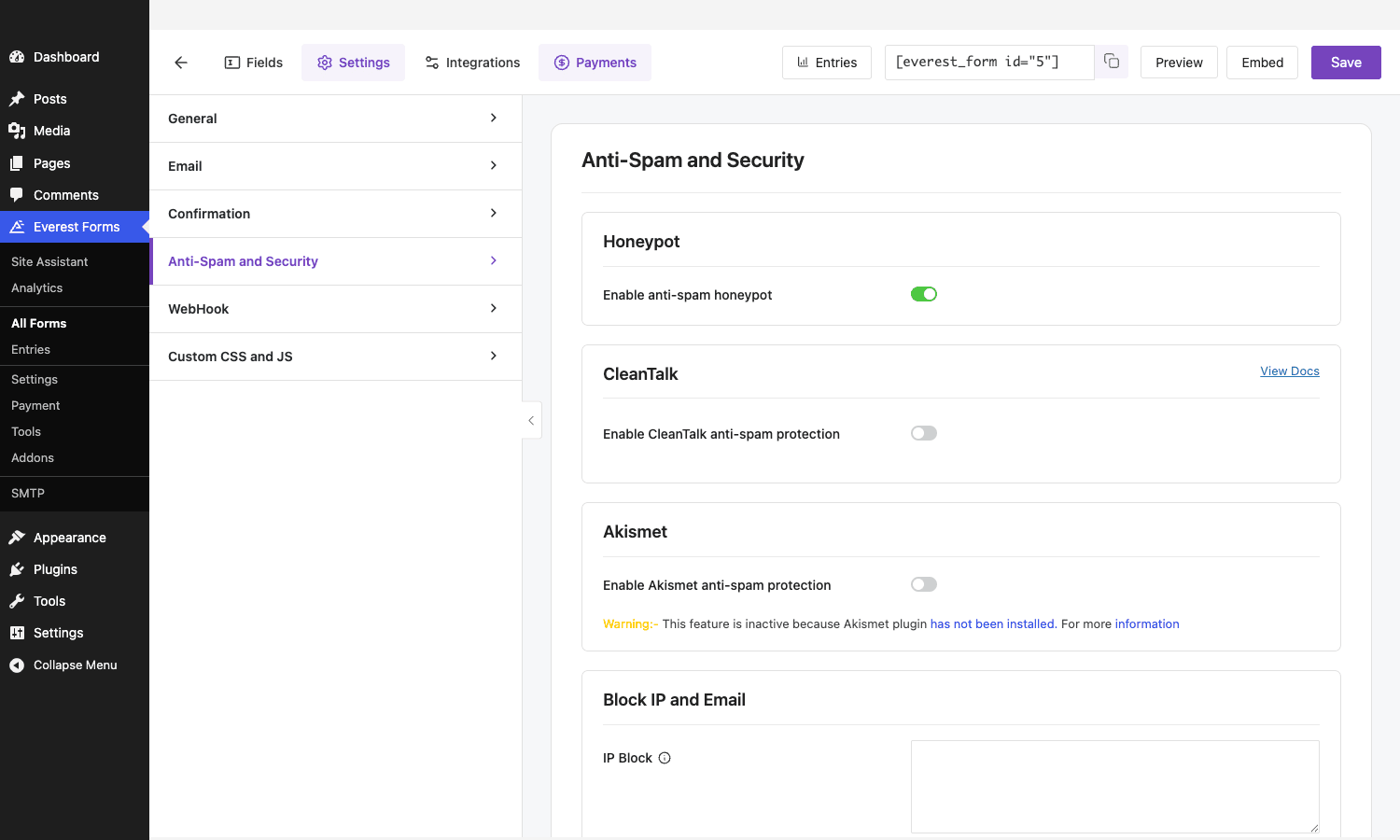
The builder also exposes reCAPTCHA, hCAPTCHA, Cloudflare Turnstile, and a simple Math Captcha as fields you can drop in. My usual setup: honeypot on by default (it’s free and invisible), Turnstile for public-facing forms (no annoying image puzzles), and the block list for the one persistent abuser every site eventually attracts. The honeypot alone kills most automated junk. The captcha layer catches the rest.
There’s a developer hook here too. The everest_forms_inline_honeypot_settings action lets you customize how the honeypot is wired, which is the kind of thing you reach for when a fussy theme or page builder interferes with the hidden field.
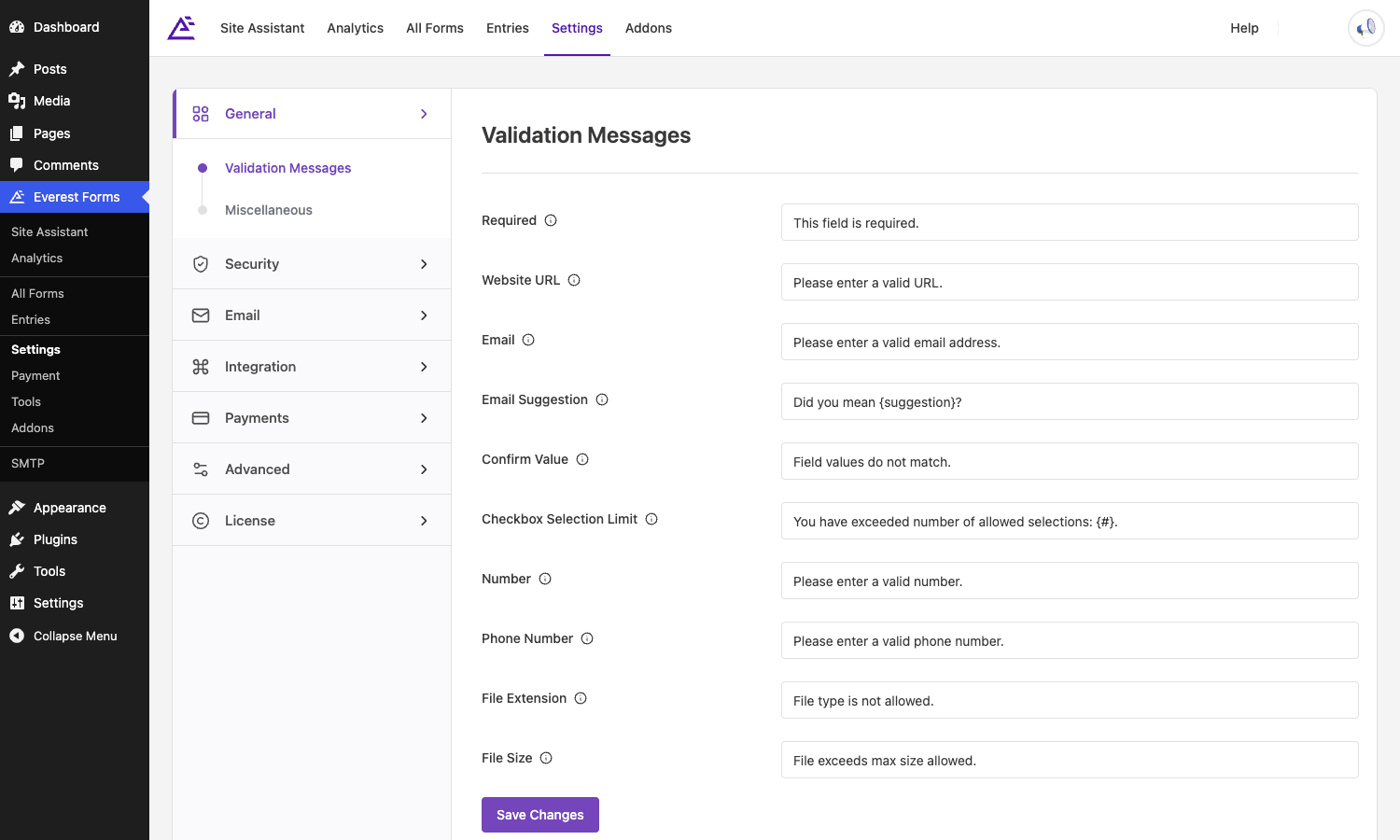
The global settings page ties all of this together. Here’s the top-level Settings screen with the full nav: General, Security, Email, Integration, Payments, Advanced, and License.
Everest Forms Pro vs WPForms vs Gravity Forms vs Fluent Forms
This is the comparison everyone wants, so let me put real numbers on the table instead of vibes. Pricing here reflects typical single-site or entry annual tiers at the time of writing; tiers shift, so treat these as the right order of magnitude.
Price. Everest Forms Pro lands at roughly $69 to $89 per year for a single site at its entry premium tier. WPForms Pro sits around $199 per year (its lower Plus tier near $99 lacks the heavier features). Gravity Forms starts near $59 per year for a single site but climbs to $259 for the Elite tier that unlocks every add-on. Fluent Forms Pro is around $90 per year single-site. So on raw entry price, Everest Forms and Fluent Forms are the value picks, Gravity scales up the steepest, and WPForms is the priciest entry into its full feature set.
Field count. Everest Forms Pro exposes 30+ field types including the payment family. Fluent Forms advertises a comparable 60+ when you count its input variants. Gravity Forms is leaner at around 30 standard fields, with more behind add-ons. WPForms has roughly 20-plus fields, several gated to higher tiers. For sheer field variety out of one purchase, Everest Forms and Fluent Forms lead.
Payments without WooCommerce. All four can take payments, but the gateway spread differs. Everest Forms Pro covers Stripe, Square, PayPal, and Authorize.Net with subscriptions built in. Gravity Forms needs a separate paid add-on per gateway. WPForms ties full Stripe support and recurring billing to its higher tiers. Fluent Forms includes Stripe, PayPal, Square, Mollie, and Razorpay. Everest Forms and Fluent Forms again give you the most gateways without extra purchases.
Page weight. This one’s harder to pin precisely because it depends on your form, but in the same ballpark a simple Everest Forms form loads in the low tens of kilobytes of CSS/JS, comparable to Fluent Forms, which markets itself hard on being lightweight (its core assets sit in the 30 KB to 40 KB range). Gravity Forms and WPForms tend to enqueue more, often 50 KB to 100 KB-plus once their conditional-logic and styling scripts load. If front-end weight is a hard constraint, Fluent Forms and Everest Forms are the lighter options. If you want to claw back even more, a caching layer like our WP Rocket review walks through deferring and minifying those scripts.
The short version: for the money, Everest Forms Pro and Fluent Forms give you the most fields and the most payment gateways per dollar, Gravity Forms has the deepest add-on catalog if budget isn’t the constraint, and WPForms trades price for a famously friendly UI. I’d reach for Everest Forms when I want payments and a big field library without a $200 invoice.
Developer reference: hooks, filters, and REST
This is the part I care about most, because a form plugin you can’t extend is a form plugin you’ll outgrow. Everest Forms Pro exposes a healthy set of actions and filters. All snippets go in your theme’s functions.php or a small custom plugin.
Add a custom currency to the payment fields. The everest_forms_currencies filter controls the currency dropdown across the payment settings.
add_filter( 'everest_forms_currencies', function ( $currencies ) {
    $currencies['NPR'] = array(
        'name'                => 'Nepalese Rupee',
        'symbol'              => 'Rs.',
        'symbol_pos'          => 'left',
        'thousand_separator'  => ',',
        'decimal_separator'   => '.',
        'decimals'            => 2,
    );
    return $currencies;
} );
Attach uploaded files to a notification email conditionally. The everest_forms_email_file_attachments filter passes the attachment list and full context, so you can decide per connection whether files ride along.
add_filter( 'everest_forms_email_file_attachments', function ( $attachments, $fields, $form_data, $context, $connection_id, $payment_id ) {
    // Only attach uploads on the admin notification, not the user confirmation.
    if ( 'admin' !== $context ) {
        return array();
    }
    return $attachments;
}, 10, 6 );
Control which fields actually render on the front end. everest_forms_visible_fields lets you hide a field based on the entry, the user, or anything else you can compute.
add_filter( 'everest_forms_visible_fields', function ( $visible, $field, $entry, $form_data ) {
    // Hide an internal-only "referrer code" field for logged-out visitors.
    if ( 'internal_ref' === ( $field['meta-key'] ?? '' ) && ! is_user_logged_in() ) {
        return false;
    }
    return $visible;
}, 10, 4 );
Limit what syncs to your CRM. everest_forms_email_marketing_whitelist_fields is your guardrail against shipping sensitive fields to a third-party list.
add_filter( 'everest_forms_email_marketing_whitelist_fields', function ( $whitelist ) {
    // Never sync the signature or file-upload fields to email-marketing tools.
    return array_diff( $whitelist, array( 'signature', 'file-upload' ) );
} );
Customize invoice line items on a user’s payment entry. everest_forms_user_payment_entry_line_items shapes how a member sees their own purchase history.
add_filter( 'everest_forms_user_payment_entry_line_items', function ( $lines, $entry, $form_data, $meta ) {
    foreach ( $lines as &$line ) {
        $line['label'] = strtoupper( $line['label'] );
    }
    return $lines;
}, 10, 4 );
React when entries are deleted. The everest_forms_before_delete_entries action fires before a delete, the place to mirror the deletion into an external system or audit log.
add_action( 'everest_forms_before_delete_entries', function ( $entry_id ) {
    error_log( sprintf( 'Everest Forms entry %d is being deleted.', (int) $entry_id ) );
} );
Add content to the entry detail view. everest_forms_entry_details_content and everest_forms_entry_details_sidebar_action let you inject panels and buttons into the single-entry admin screen, useful for "push to my system" actions.
add_action( 'everest_forms_entry_details_sidebar_action', function ( $entry, $form_data ) {
    printf(
        '<a href="%s" class="button">Send to fulfillment</a>',
        esc_url( admin_url( 'admin.php?page=my-fulfillment&entry=' . (int) $entry->entry_id ) )
    );
}, 10, 2 );
REST API. Everest Forms Pro registers REST controllers under the everest-forms-pro/v1 namespace (covering payment logs, API logs, and per-user payment entries) and an evfp/v1 namespace for analytics. If you’re building a headless front end or a mobile companion that needs to read payment history, that’s your surface. Authenticate with standard WordPress application passwords or your auth layer of choice, and remember these endpoints return payment data, so lock them down accordingly.
There’s more in the source if you go looking: everest_forms_process_smart_tags for custom merge tags, everest_forms_upload_file_name to rename uploads on the way in, everest_forms_change_csv_attachments for export tweaks, and the everest_forms_payment_subscriptions_block_status family for building your own subscription-management UI. The hook naming is consistent (everest_forms_* for the modern surface, a few legacy evf_* holdovers), so once you learn the pattern, finding the right hook is mostly a grep away.
FAQ
Does Everest Forms Pro need the free Everest Forms installed?
Yes, and this catches people out. Everest Forms Pro is an add-on, not a standalone plugin. The free Everest Forms base provides the builder framework and core fields; Pro layers the premium features on top. Install and activate both. If you activate only Pro, the builder won’t render and you’ll think the plugin is broken when it’s just missing its base.
Where are my form entries stored?
In your own WordPress database, primarily in the wp_evf_entries and related meta tables. Nothing is held on a third-party server. That’s good for ownership and bad for the responsibility it hands you: your backups must include those tables, GDPR deletion requests mean actually removing the rows, and a form collecting personal data makes your database a personal-data store under whatever privacy law applies to you. Plan your backup and retention policy with that in mind.
Can I accept payments without WooCommerce?
Yes. Everest Forms Pro talks to Stripe, Square, PayPal, and Authorize.Net directly, for both one-time charges and subscriptions. The trade-off is that you don’t get a WooCommerce order object, a cart, inventory, or WooCommerce’s reporting. It’s built for "one form, one charge" scenarios like application fees, donations, and event tickets. For a full catalog with stock control, use WooCommerce instead.
How does the Stripe field handle SCA and 3D Secure?
It uses Stripe’s tokenized elements and the PaymentIntents flow, which is what makes Strong Customer Authentication work. When a card issuer requires a 3D Secure challenge, the payment intent triggers it in the browser before the charge confirms. The card data never reaches your server, so you stay out of the heaviest PCI scope. Test with Stripe’s test cards (some are coded to force a 3DS challenge) before going live, because the redirect-and-return behavior is the part that most often surprises people.
Is the file-upload field safe to use for sensitive documents?
The field itself supports extension allow-lists and size caps, which you should set. But uploaded files land in your uploads directory, and by default WordPress uploads are publicly reachable if someone guesses the URL. For genuinely sensitive documents (IDs, medical forms), put the form behind authentication and protect the upload directory, or store files outside the web root with a custom handler hooked into everest_forms_upload_file_name. Don’t assume an obscure filename is security.
Can conditional logic hide a required field and still let the form submit?
Yes, this is handled. If a field is marked required but conditionally hidden, Everest Forms doesn’t block the submission on that hidden field. It’s a common bug in lesser builders, and the team has shipped specific fixes for the hidden-required and multi-part-form cases. Still, test your exact form, because conditional logic plus required fields plus multi-step is the combination most likely to surprise you.
Will it slow my site down?
Not meaningfully on a normal site. A simple Everest Forms form loads a modest amount of CSS and JS, in the same lightweight ballpark as Fluent Forms and lighter than some competitors. If you run many forms or want to squeeze the last few milliseconds, defer the form scripts and let a caching plugin handle minification. One form on a contact page is nothing to worry about.
Final thoughts
Everest Forms Pro is a genuinely capable form builder that happens to cost a lot less than the loudest names in the category. The field library is deep, the payment support is the real surprise (Stripe, Square, PayPal, and subscriptions without WooCommerce is rare at this price), and the developer hooks are consistent enough to build on. The builder’s React rewrite makes day-to-day use pleasant, even if a few settings hide one click too deep.
It isn’t flawless. The base-plus-Pro split confuses first-timers, some integration screens only appear once you activate the right add-on, and the plain Credit Card field is a footgun I wish they’d bury deeper. But none of those are reasons to walk away. They’re reasons to set it up carefully.
If you want to try every field and wire up a real Stripe payment on a live install, Everest Forms Pro is available on GPL Times with the documentation intact, so you can build the exact form your project needs and see the payment flow end to end. Pair it with the free base, drop in a honeypot, use the tokenized payment fields, and you’ve got a form stack that holds up.