

Paste a URL into a WordPress post. If it’s a YouTube link, you get a video. If it’s anything else, you usually get a sad blue underlined hyperlink. Native WordPress oEmbed covers roughly 30 sources out of the box, and most of those are video and social. The moment you want to embed a PDF, a Google Sheet, a Calendly slot picker, a Wistia channel, a Spotify show, or a 3D model, you’re back to copying iframe code from the vendor’s docs.
EmbedPress Pro fixes that. One Gutenberg block (and one Elementor widget, and one shortcode) handles 150+ sources, plus all the customization the vendors don’t expose by default, branding overlays, lazy load, click-to-load consent for GDPR, password protection, watch-time tracking, video ads, and a per-source settings panel for things like the YouTube API key and Vimeo OAuth.
This post walks through what the plugin does, how it differs from the free version on wordpress.org, how to use it as a writer, and what the developer side looks like (hooks, filters, REST endpoints, shortcode attributes).
Table of contents
- What EmbedPress Pro is
- The 150+ supported sources, by category
- What Pro adds on top of the free plugin
- Installing and setting up EmbedPress Pro
- Using the Gutenberg block
- Using the Elementor widget
- Using the shortcode
- Per-source settings: the YouTube example
- Custom branding overlay
- Custom ads, content protection, and lead capture
- Real-world use cases
- Developer reference: hooks, filters, REST endpoints
- Performance, compatibility, and gotchas
- Pricing and licensing
- Frequently asked questions
- Final thoughts
What EmbedPress Pro is
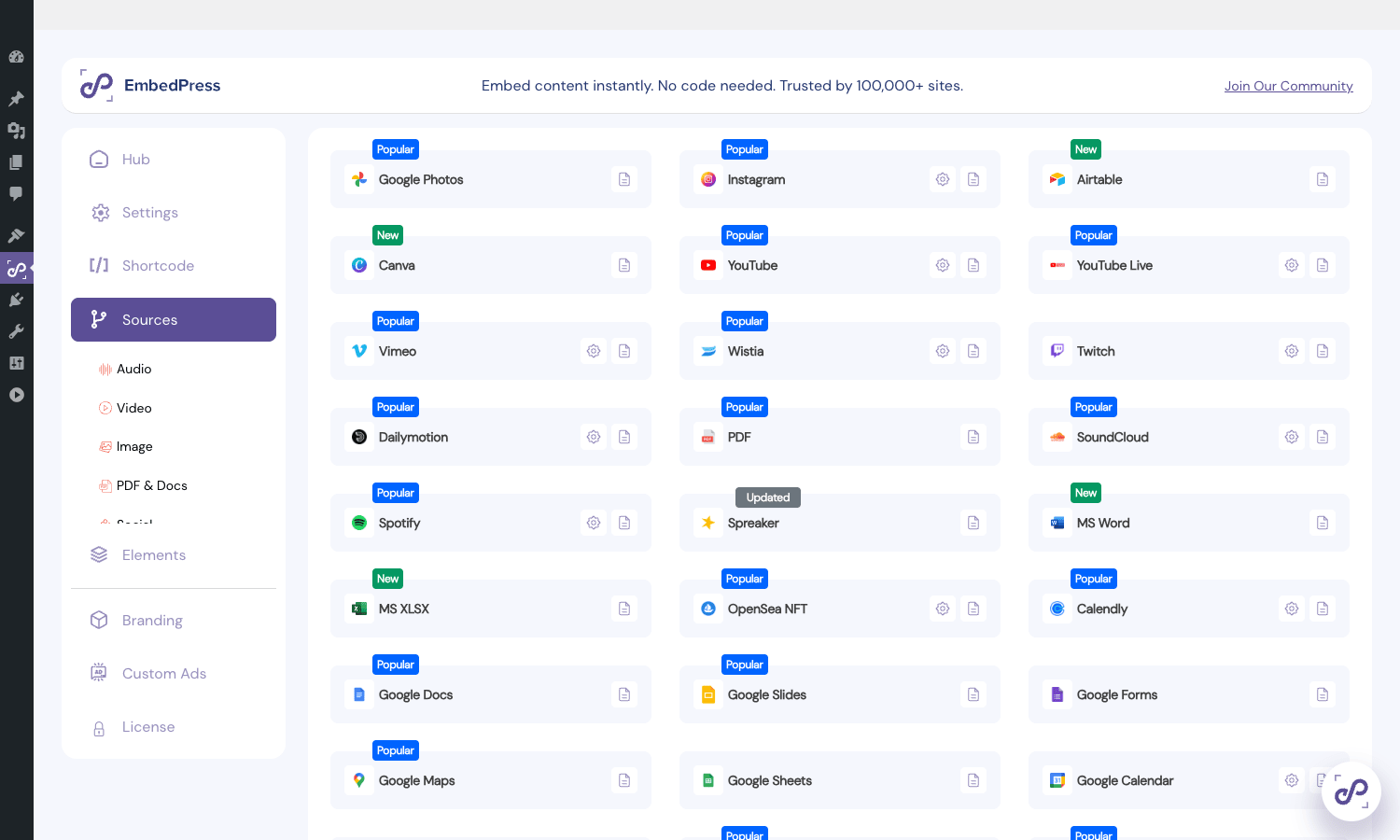
EmbedPress is two plugins, not one. The free version lives on wordpress.org with 100,000+ active installs and ships with the universal embed block, the shortcode, the admin dashboard, and the basic provider list (around 80 sources). The Pro plugin from WPDeveloper adds about 70 more sources (Google Docs/Sheets/Slides, Microsoft Office Online, OpenSea NFT, Calendly, AirTable, Whiteboard apps), unlocks per-source settings panels, branding overlays, content gating, ads, lead capture, completion tracking, drop-off heatmaps, and a CDN offloader for self-hosted videos. Pro requires the free plugin to be installed and active; it’s an add-on, not a standalone install.
The selling point is range. Most embed plugins are single-source (Instagram Feed Pro for Instagram, Custom Facebook Feed Pro for Facebook, Vimeotheque for Vimeo, WP-PDF Viewer for PDFs). EmbedPress Pro covers all of those territories with one license, one settings page, and one block in the editor. You won’t get the Smash Balloon depth for a hashtag feed (EmbedPress does single embeds, not feeds), but you cover 90 percent of the "embed this thing in a post" use cases in one go.
The Pro plugin is sold by WPDeveloper, the same team behind Essential Addons for Elementor, NotificationX, BetterDocs, Sheba.xyz, and a handful of other production-grade WP plugins. That matters because EmbedPress is one of those plugins where every release has to be tested against dozens of third-party APIs (Google changes their oEmbed response, Vimeo deprecates an endpoint, Wistia tightens CORS). A vendor that ships updates regularly is the difference between a clean PDF viewer and a broken one.
The 150+ supported sources, by category
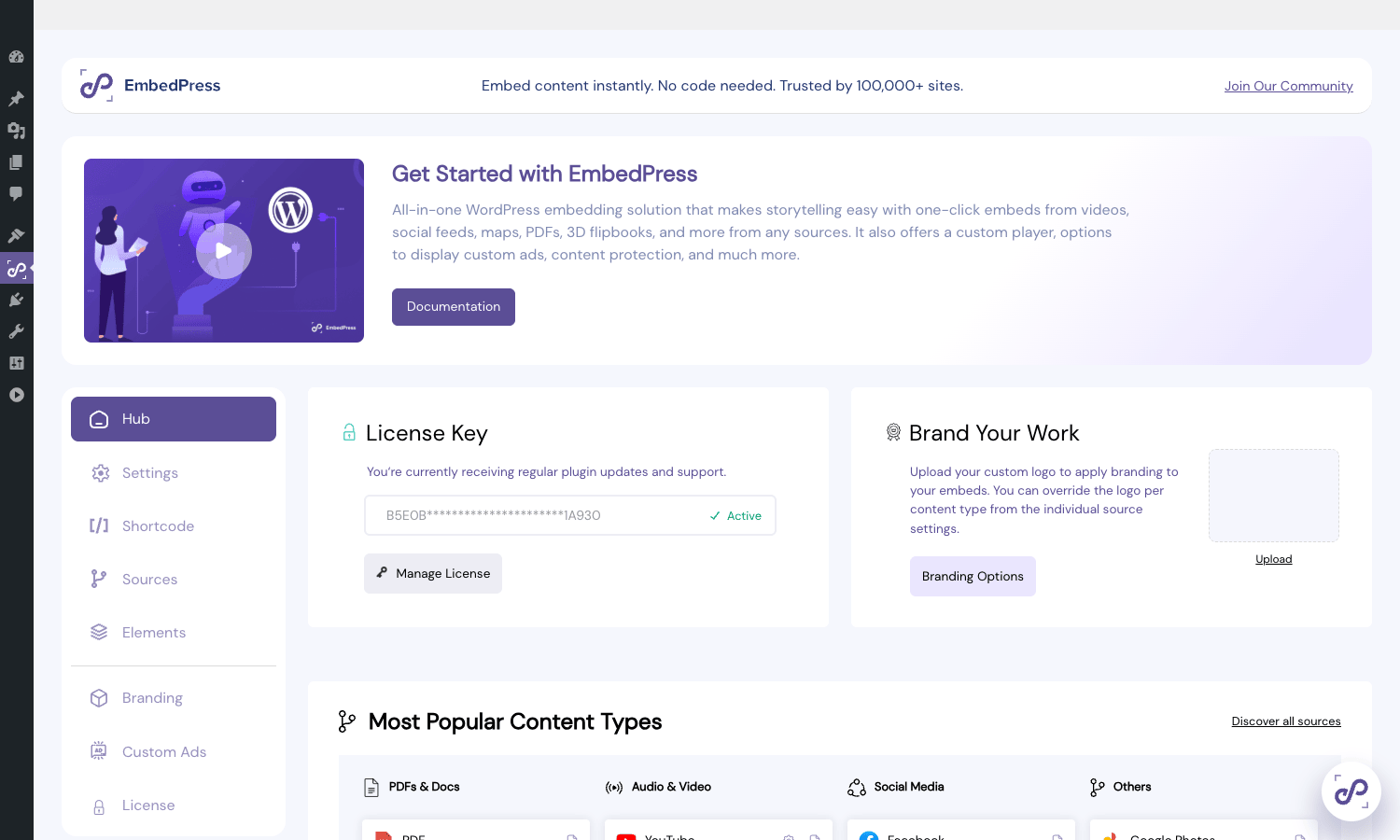
EmbedPress markets itself on the source count, which sits at 150+ in the Pro release (the free version is around 80). Listing every one is dull, so here’s the breakdown by category with the ones you’ll actually use highlighted.
Video. YouTube, YouTube Live, Vimeo, Wistia, Twitch, Dailymotion, Loom, Brightcove, JW Player, Streamable, TikTok, Animatron, Facebook video. The Pro plugin adds channel and playlist embedding for YouTube/Vimeo/Wistia/Twitch/Dailymotion (so you can drop in a whole creator’s library, not just one video). The plugin gets to the point that a single shortcode pulls a paginated YouTube channel gallery with the subscribe bar and a livechat overlay if the stream is live.
Audio. Spotify (tracks, albums, podcasts), SoundCloud (with playlist + custom color), Apple Music, Mixcloud, Deezer, Spreaker, Audiomack, Radiopublic. The SoundCloud Pro version lets you set the player accent color per embed instead of being stuck with the default orange.
Social posts and pages. Twitter/X, Facebook (posts, pages, videos), Instagram (posts and reels), Pinterest (pins and boards), Reddit, LinkedIn, Tumblr. These are single-post embeds; if you want a continuously updating feed of an Instagram or Facebook account, the Instagram Feed Pro and Custom Facebook Feed Pro plugins from Smash Balloon are still the right tool. EmbedPress is great for "embed this one Twitter thread inline" but it’s not a social feed renderer. Likewise for Twitter/X feeds, Custom Twitter Feeds Pro Elite is the feed plugin.
Documents. PDF (with the built-in PDF.js-based viewer), Google Docs, Google Sheets, Google Slides, Google Drawings, Google Forms, Microsoft Word, Microsoft Excel (XLSX via OneDrive), Microsoft PowerPoint, OpenDocument files, Dropbox shared files, Box shared files. The PDF viewer is the standout. You drop a .pdf URL into the block, get a viewer with toolbar (zoom, fullscreen, download, presentation mode), and Pro lets you disable the download button and recolor the toolbar to match your brand. Useful for sales decks, whitepapers, and product manuals.
Maps and calendars. Google Maps, OpenStreetMap, Google Calendar, Calendly, Apple Maps, ScribbleMaps. Calendly is the underrated one. Paste your https://calendly.com/your-slug/30min URL and you get the booking widget inline in the post (no popup script needed).
Images and galleries. Google Photos, Imgur, Flickr, 500px, DeviantArt, SmugMug, Issuu, Speaker Deck, SlideShare. Issuu and SlideShare are useful for embedding flipbook-style sales collateral.
Productivity and miscellaneous. GitHub Gist (single file or whole gist), CodePen, JSFiddle, Trello (boards and cards), AirTable, Typeform, Whiteboard apps (Miro, FigJam if shared publicly), OpenSea NFT (Pro-only), Canva designs, Polleverywhere, Animoto, Kickstarter campaign cards.
Even the documentation page on Calendly or Animoto would otherwise involve grabbing an iframe snippet, pasting it into a Custom HTML block, and worrying about whether the script tags execute. EmbedPress collapses all of that into "paste the URL."
What Pro adds on top of the free plugin
If you’ve used the free EmbedPress and you’re wondering what the upgrade actually buys you, this is the honest list.
More sources. Roughly 70 additional providers. The big ones unlocked by Pro are Google Docs/Sheets/Slides/Drawings/Forms, MS Office Online files, OpenSea, MS XLSX through OneDrive, Calendly’s full prefill API, and the Document presentation mode.
Per-source settings panels. The free version has a single "embed everything with defaults" approach. Pro gives you a dedicated settings page per source. YouTube alone has 15+ settings: API key (required for channel embeds), videos per page, start time, end time, autoplay, progress bar color, modest branding, hide related videos, hide control bar, force HD, captions, subscribe bar markup, livechat overlay. The same applies to Vimeo, Wistia, Twitch, Dailymotion, SoundCloud, Document, and Meetup.
Custom branding (logo overlay). Upload your own logo and have it watermark over YouTube, Vimeo, Wistia, Twitch, Dailymotion, and document embeds. The overlay position (top-left, top-right, bottom-left, bottom-right) and opacity are configurable per source. Useful for companies that want to reuse third-party video on their site without it screaming "this is just a YouTube embed."
Content gating (lock content). Wrap any embed in a login wall, only logged-in users see the video/document. Or set a password and only viewers who type it in see the content. Both work without you wiring up a membership plugin.
Custom ads on YouTube embeds. This is the unusual one. YouTube’s terms generally prevent overlaying ads on embeds, but EmbedPress does it client-side with a wrapper player: your ad (video or image) plays first, then the YouTube video. You can schedule when the ad plays, set a skip-after-N-seconds button, and route clicks to a redirect URL. Use sparingly and check your jurisdiction’s ad-disclosure rules.
Lazy load. Every embed becomes a click-to-load thumbnail until the viewer interacts. The free version has a basic version of this; Pro gives you a per-block toggle and a customizable thumbnail, title, and play-button color.
GDPR consent screen. Click-to-load is also a GDPR pattern: don’t load YouTube’s iframe (which sets tracking cookies) until the visitor explicitly clicks. EmbedPress Pro renders a custom consent overlay per source with your own text, accept-button copy, and image, and persists the consent in a cookie so the same visitor doesn’t see it twice.
Lead capture. Show an email-capture form on top of a video before it plays. Configurable per embed: required fields (email only, or email plus name), the consent text, the submit-button label, where the lead goes (saved to WP, optionally pushed to a connected CRM via the embedpress_lead_captured hook). Pairs well with FluentCRM Pro for self-hosted email marketing.
Video completion and drop-off tracking. For each YouTube/Vimeo/Wistia embed, Pro tracks the percentage of the video that the visitor watched. Aggregated per-video heatmaps show you where viewers drop off, and a completions log shows you who finished. With the LMS bridge (a single filter, see the developer section), a completion can mark a lesson complete in LearnDash, TutorLMS, or LifterLMS.
Broken-embed scanner. A scheduled REST endpoint scans every embed on your site and flags ones that 404 (a video was unlisted, a Tweet was deleted, a Google Doc had its sharing revoked). Useful on big content sites where someone might have embedded a Vimeo video five years ago and no one’s checked since.
CDN offloader. For self-hosted videos uploaded to the WP media library, Pro can rewrite the origin URL to a CDN URL (Bunny CDN, Cloudflare R2, S3 + CloudFront). Configurable via a filter, so you can swap any pattern you want.
That’s the practical delta. If your only need is "embed this YouTube video," the free plugin is fine. If your needs are "embed all of our sales videos with our logo, lazy-loaded, behind a click-to-load consent, with a lead form for the longer ones, and track who watched to the end," that’s the Pro buy.
Installing and setting up EmbedPress Pro
The install path is two plugins.
- Install the free EmbedPress from
Plugins > Add new > Search for "EmbedPress". Activate. - Upload the Pro zip via
Plugins > Add new > Upload plugin. Activate. - Optional: run the Setup Wizard at
EmbedPress > Setup Wizard, it asks 3-4 questions (which sources do you embed most, default lazy load on/off, GDPR consent on/off) and pre-configures the global settings.
That’s the install. The five-minute follow-up that’s worth doing:
- Go to
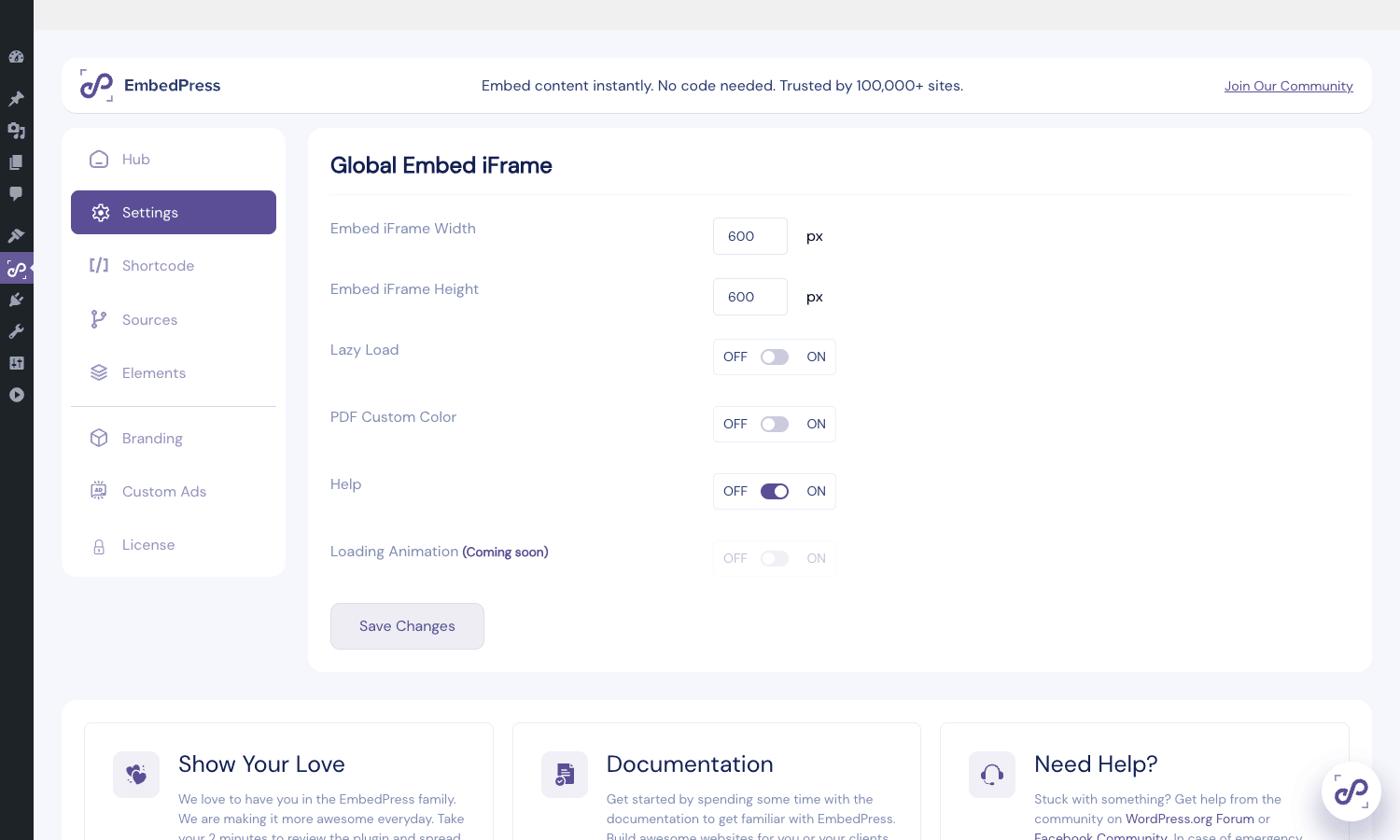
EmbedPress > Settingsand set your global iframe width and height (defaults are 600 x 600, which is square; for video most sites want 700 x 400 or 16:9). Turn on Lazy Load globally if you have more than 2-3 embeds per post. - Go to
EmbedPress > Sourcesand disable the sources you’ll never use. Disabling them cuts the JS footprint on the editor side and prevents accidental "wrong block" inserts. - Go to
EmbedPress > Elementsand disable any Gutenberg/Elementor sub-block you won’t use (e.g., if you never touch Twitch or Dailymotion, hide those from the inserter). - Go to
EmbedPress > Brandingand turn on Powered by EmbedPress off (it’s on by default, which puts a small "Powered by EmbedPress" stamp under document embeds). Or upload your own logo for the per-source overlay if you want branded video.
For sources that require an API key, YouTube channel embedding, Vimeo OAuth, Calendly enterprise prefill, set those keys under the per-source page (EmbedPress > Sources > YouTube, for example). The plugin still works for single-video YouTube embeds without an API key; you only need the key when you want to embed a whole channel.
Using the Gutenberg block
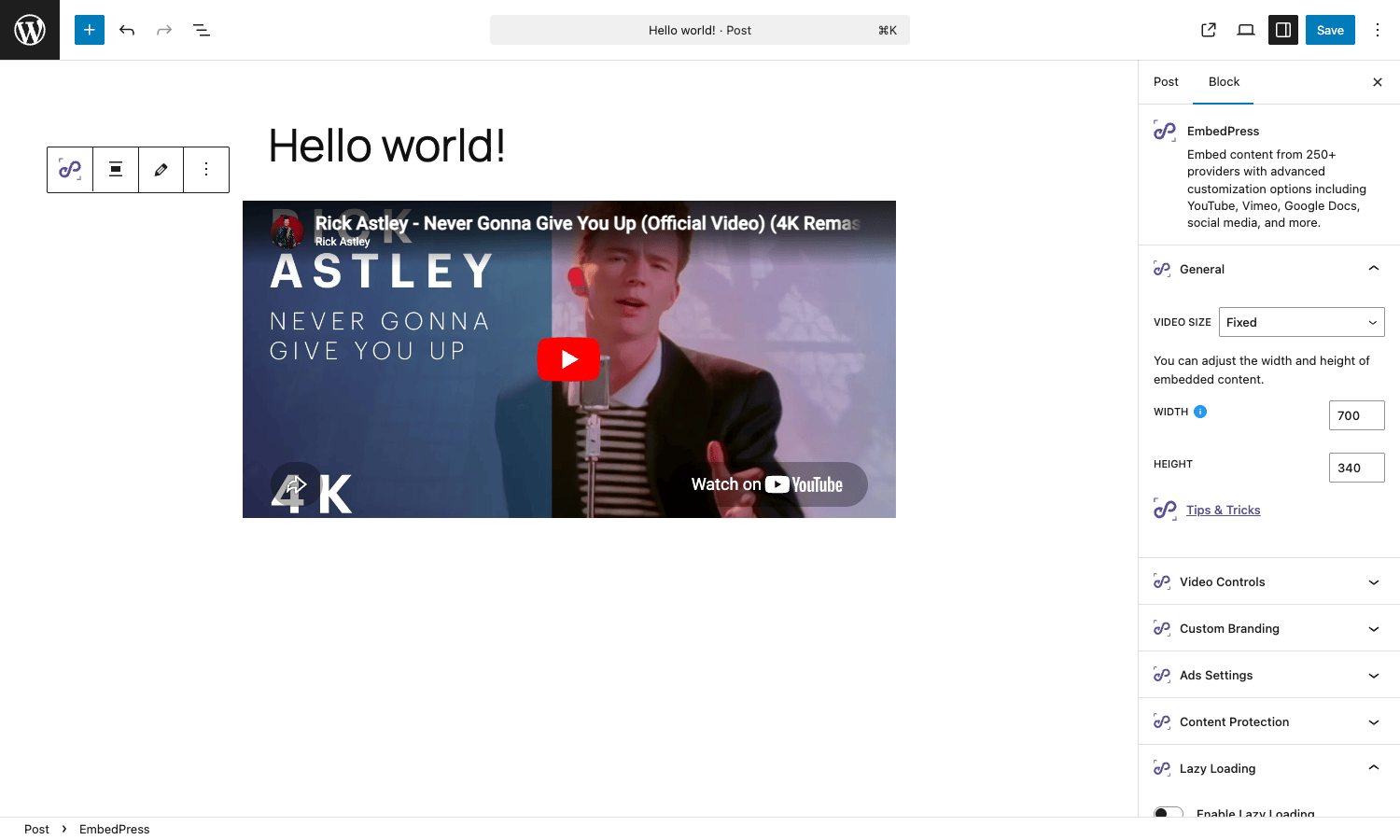
In the block editor, type /embed and pick "EmbedPress." You get a single block with a URL input. Paste any supported URL, click Embed, and the block renders the preview inline. The right sidebar then shows a stack of panels that change based on the source type.
For a YouTube URL the panels are:
- General. Width and height (Fixed or Responsive ratio), the URL.
- Video Controls. Autoplay, mute, loop, hide controls, start time, end time, modest branding, related videos, captions, force HD.
- Custom Branding. Toggle "Use custom logo," upload a PNG, set position and opacity.
- Ads Settings. Toggle "Show custom ads," pick the ad you configured under
EmbedPress > Custom Ads, set schedule. - Content Protection. Lock with password, lock for logged-in users, lock with content-gating form.
- Lazy Loading. Per-block toggle (overrides global). Choose custom thumbnail, play button color, title.
- CTA. Show a call-to-action button after the video ends (text, link, color).
- Content Share. Show social share buttons in the player overlay.
For a PDF URL the panels are different: Toolbar (show/hide, color), Presentation Mode toggle, Download button toggle, Position bar, Powered-by stamp. For a Google Slides URL, you get Loop and Auto-advance. The plugin recognizes the URL type and shows the right controls; you don’t have to pick a block subtype.
If you prefer dedicated blocks per source (e.g., you only ever embed PDFs and want a block called "EmbedPress PDF" in the inserter), those exist too under EmbedPress > Elements. You can leave the universal block on and add dedicated blocks for your top 2-3 sources, or use dedicated blocks only.
Using the Elementor widget
If you use Elementor Pro for your page building, EmbedPress Pro adds a parallel widget set under the "EmbedPress" category in the widget panel. The same universal widget, plus dedicated widgets per source (EmbedPress YouTube, EmbedPress PDF, EmbedPress Document, EmbedPress Calendar, EmbedPress Google Docs, etc.).
Each widget gets its own Style and Advanced tabs so you can use Elementor’s standard color picker, spacing, and motion effects on the embed wrapper. The Style tab lets you set border, shadow, and background on the embed container. The Advanced tab supports Elementor’s standard responsive controls (different settings per device).
Functionally the Elementor widgets are at parity with the Gutenberg block. Pick the one that matches the editor you build pages in.
If you also use a Gutenberg-block-based premium kit like Spectra Pro or Essential Addons for Elementor, there’s no conflict; EmbedPress sits in the embed slot and those plugins handle different layout and content blocks.
Using the shortcode
Classic editor users, page builders that don’t ship a dedicated embed widget, and CPT templates can use the shortcode. The pattern is:
[embedpress url="https://www.youtube.com/watch?v=dQw4w9WgXcQ"]
Attributes you’ll actually use:
width,height, pixel dimensions, or omit for global defaults.provider, force a provider (youtube,vimeo,pdf) if URL detection misfires.lazyload="true", override the global lazy-load setting.start_time="120",end_time="240", seek into a video (in seconds).autoplay="yes",controls="no", YouTube-specific.password_protect="hunter2", gate the embed behind a password.lock_content="logged_in", show only to authenticated users.pagename="my-tab", for sources that expose multiple sub-views (Google Drive folders, Wistia channels).
For shortcodes inside a page builder that runs them through its own filter (Elementor’s Shortcode widget, for example), wrap the shortcode in the builder’s standard shortcode field rather than nesting in HTML. The plugin’s output is filtered through embedpress:onAfterEmbed, so any final-pass customization still applies.
The plugin also exposes a Shortcode Generator UI at EmbedPress > Shortcode. Paste your link, click Generate, and copy the shortcode with all the right attributes pre-filled. Useful when you’re embedding from a wiki or a Notion-style editor that doesn’t have Gutenberg.
Per-source settings: the YouTube example
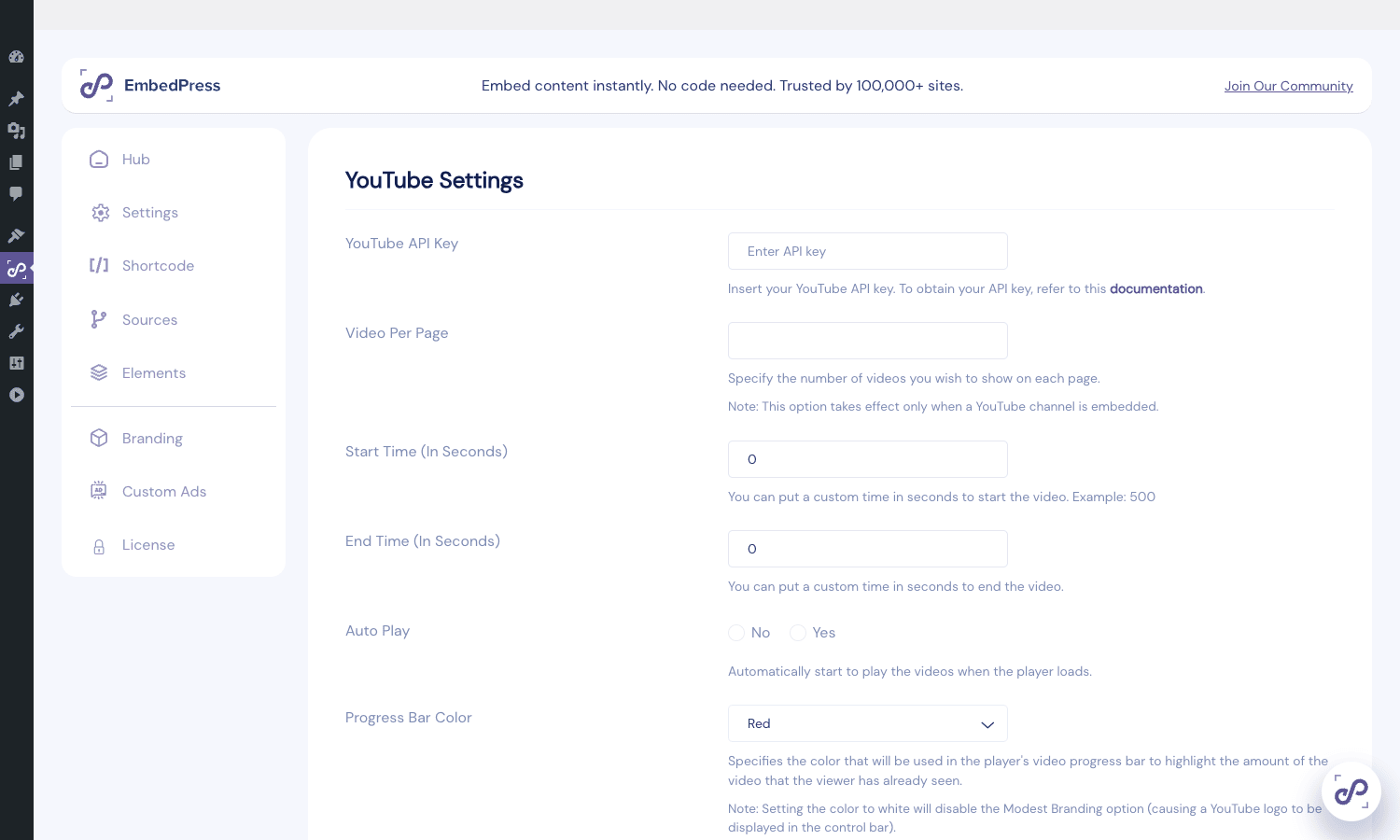
The Pro plugin’s per-source settings panel is the part that turns a generic embedder into something you can actually tune. Here’s what you get on the YouTube panel (EmbedPress > Sources > YouTube):
- YouTube API Key. Required if you want to embed a whole channel or a playlist gallery. Single-video embeds work without it. Get a key from the Google Cloud console under "YouTube Data API v3." (The EmbedPress docs site has a step-by-step guide for the Google Cloud project setup.)
- Videos Per Page. When embedding a channel, how many to show before pagination kicks in.
- Start Time / End Time (in seconds). Defaults for every YouTube embed unless overridden in the block.
- Auto Play. Yes/No. Browsers will respect their own autoplay rules (most require muted autoplay).
- Progress Bar Color. Picker. Note the docs warn that setting it to white disables Modest Branding.
- Modest Branding. Removes the YouTube logo from the control bar (still attached to the watermark in fullscreen).
- Related Videos. Show or suppress the "Up Next" overlay. As of YouTube’s API change, "suppress" actually means "show only the channel’s own related videos," which is usually what you want.
- Subscribe Bar. Renders a custom subscribe button overlay (channel name, subscriber count, subscribe CTA) on top of the player. Requires the API key.
- Live Chat Box. For YouTube Live URLs, show the chat box next to the player.
- Force HD Resolution. Pass
vq=hd1080to the player. (YouTube doesn’t always honor this, depends on the source video.) - Closed Captions. Force
cc_load_policy=1to default-on captions.
Each setting has a tooltip explaining it. The same shape of panel applies to Vimeo (OAuth credentials, color, title, byline, portrait toggles), Wistia, Twitch, Dailymotion, SoundCloud, Document, and Meetup. If you mostly do YouTube, you’ll spend 10 minutes on this panel and never come back. If you embed across multiple sources, plan to visit each one.
Custom branding overlay
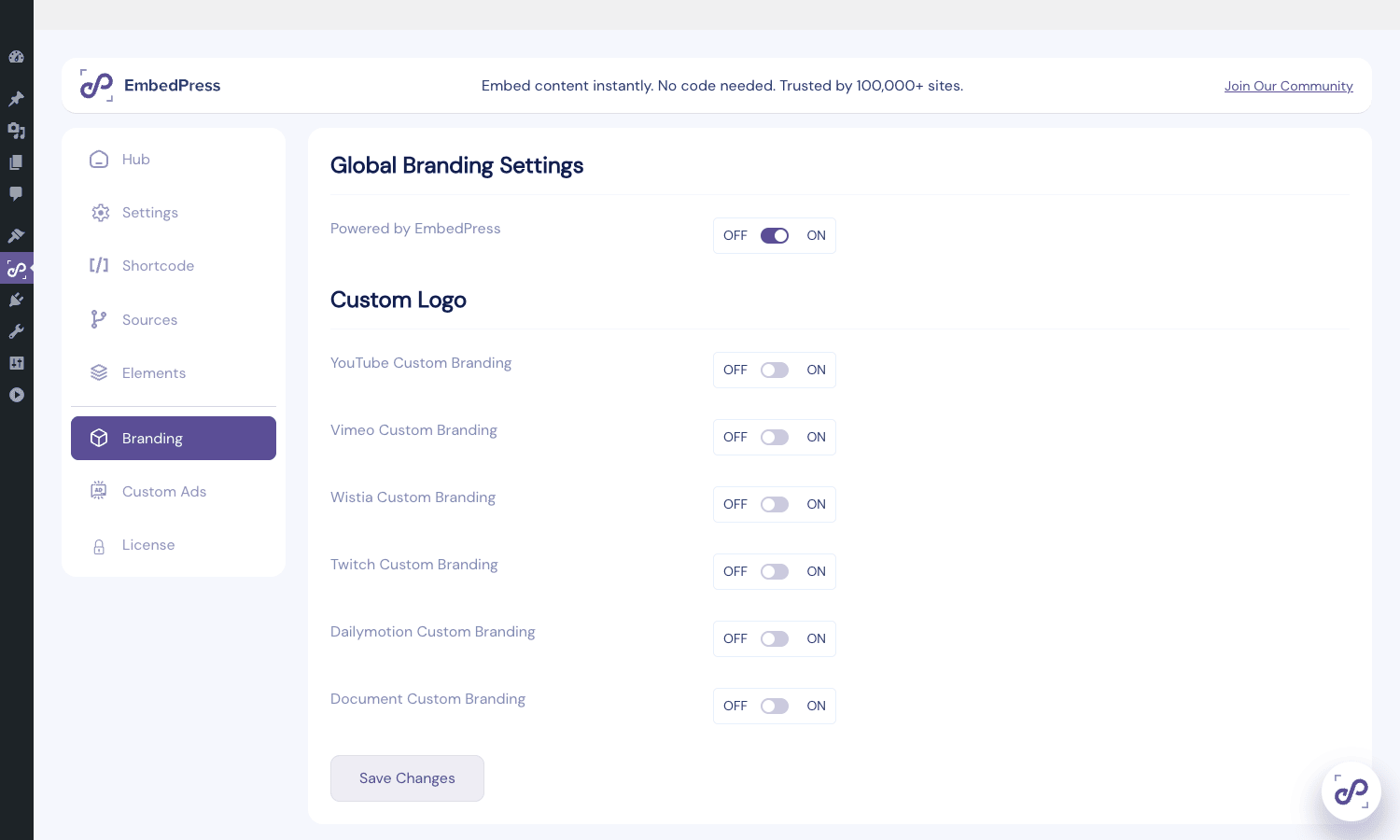
EmbedPress > Branding is where you turn on the "Powered by EmbedPress" footer (default on for documents) and configure your own logo overlay for video sources. Toggle the per-source switch (YouTube Custom Branding, Vimeo Custom Branding, Wistia Custom Branding, and so on), upload a logo, set position, set opacity. The logo sits on top of the iframe as an absolutely positioned <img> inside the EmbedPress wrapper <div>, which means it’s actually a real image on your DOM, not stamped into the video stream, perfectly fine for your own content but worth knowing if you’re trying to do something that involves the original video file.
For a YouTube embed with custom branding on, the rendered markup is roughly:
<div class="ep-wrapper ep-pro-branded" data-source="youtube">
 <iframe src="https://www.youtube.com/embed/abc123"...></iframe>
 <img class="ep-brand-overlay" src="/wp-content/uploads/your-logo.png"
 style="position: absolute; top: 16px; right: 16px; opacity: 0.85;">
</div>
The overlay CSS is enqueued from embedpress-pro/assets/css/branding.css. If you need to override position or behavior, add a small site CSS rule targeting .ep-brand-overlay.
Custom ads, content protection, and lead capture
Three Pro features sit under their own tabs and are worth a separate walk-through.
Custom Ads
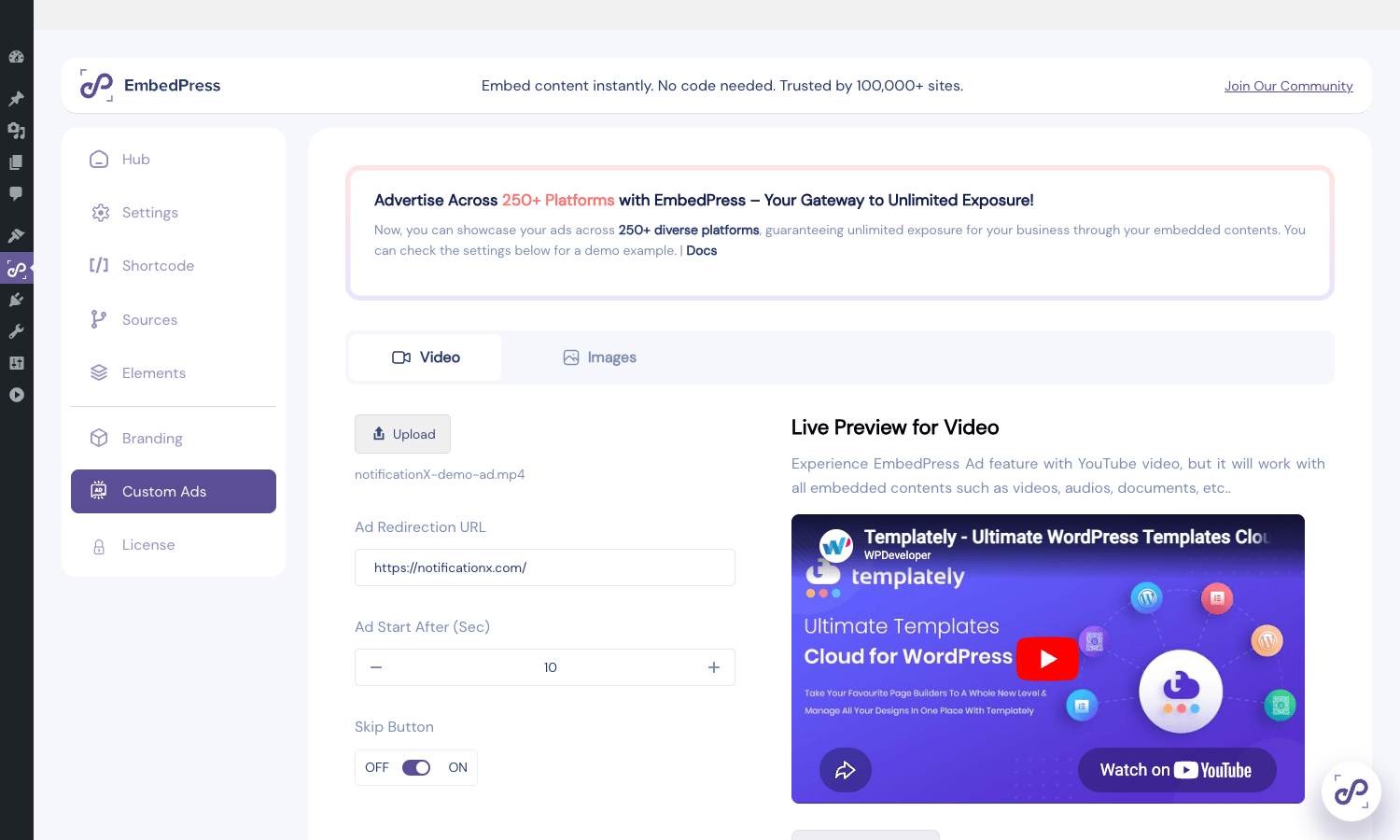
Configure once at EmbedPress > Custom Ads and reuse per-block. You can upload a video ad (MP4) or an image ad (PNG/JPG), set how many seconds in to start it, how long before the skip button shows, and where clicking the ad sends viewers (your campaign landing page).
The way it works: EmbedPress wraps the YouTube iframe in its own player chrome. When the visitor clicks Play, your ad plays in the iframe slot first, then on completion (or skip) the YouTube iframe takes over. The handoff is smooth on desktop; on mobile some browsers fail the autoplay handoff and require a second click.
This is the feature most worth careful thought before turning on. Overlaying ads on embedded YouTube videos sits in a gray area of YouTube’s terms; check before you ship something at scale. For self-hosted videos, document embeds, and other non-YouTube content, you’re in the clear.
Content Protection
Per-block toggles for "Login required" and "Password protected." Login-required shows the WordPress login form (or your custom login page if you’ve redirected it) inline in place of the embed when a logged-out visitor hits the post. Password-protected shows a small password input under a placeholder image until the right password is typed, then the embed renders.
The password is hashed and stored as a block attribute; viewer entries are not stored, only validated. Use this for content like client deliverables, paid course videos behind a paywall plugin, or limited-distribution embargo material.
Lead Capture
Enable per-block. The pre-roll form shows on top of the video with your configured fields. On submit, the lead is saved in the WP options table (and viewable at EmbedPress > Player & Engagement > Leads). The plugin fires the embedpress_lead_captured hook with the lead payload, which is your integration point for pushing the email to your CRM.
For sites that already run a marketing stack (FluentCRM Pro, MailChimp, Mailpoet, ConvertKit), wire the hook in 5 lines of PHP and you’ve got video-gated lead gen without standing up a separate landing-page tool.
Real-world use cases
A few patterns where EmbedPress Pro earns its license.
Course websites with mixed media. A typical LearnDash or TutorLMS course mixes self-hosted lesson videos, PDF worksheets, Google Slides decks, and a Calendly link for one-on-one office hours. Without EmbedPress you’d need three plugins. With it, every lesson is one block per piece of media, plus the completion tracker bridges video watch-time to LMS lesson completion via the embedpress_lms_lesson_id filter.
Sales and demo sites. Embed a Loom or Wistia walkthrough as the hero, gate the longer technical demo behind a lead form (so you collect the demo-request email before the video plays), watermark every video with your logo, lazy-load everything so the hero loads in under 2s.
Knowledge bases and docs sites. Tutorial videos under each docs article. Pair with BetterDocs Pro (same vendor) and you get a docs structure with rich embeds in each article, YouTube walkthroughs, Google Sheets reference tables, GitHub gist code samples, Calendly booking for "talk to support."
Real-estate and travel listings. Each listing has a Google Map (driving directions), a Matterport or Pannellum 360 walkthrough (embed via iframe), a Calendly slot for property viewings, and a PDF brochure for download. All in one post type, all four blocks come from EmbedPress.
Marketing pages with social proof. Embed your best Tweet, your top LinkedIn post, an Instagram reel from a happy customer, and a YouTube testimonial video, all on the same landing page. Lazy-load every one so the page loads instantly and the social embeds fetch on scroll.
Reports and whitepapers. Embed the PDF inline with the toolbar locked to "no download" (forces visitors to read on-site instead of grabbing the file). Recolor the toolbar to match your brand. Add a CTA after the document (a button that links to your Calendly).
Developer reference: hooks, filters, REST endpoints
EmbedPress Pro exposes a reasonable surface area for custom integrations. The Pro-specific hooks all carry the embedpress_ prefix (a few use ep_ with a provider suffix). The base embed pipeline uses embedpress:onBeforeEmbed and embedpress:onAfterEmbed, both inherited from the free plugin.
Hook: push captured leads to your CRM
add_action( 'embedpress_lead_captured', function( $lead ) {
 // $lead = [
 // 'email' => 'viewer@example.com',
 // 'name' => 'Viewer Name',
 // 'post_id' => 123,
 // 'video_url' => 'https://www.youtube.com/watch?v=...',
 // 'timestamp' => 1716393600,
 // ]
 if ( function_exists( 'FluentCrmApi' ) ) {
 $contact_api = FluentCrmApi( 'contacts' );
 $contact_api->createOrUpdate( [
 'email' => $lead['email'],
 'first_name' => $lead['name'],
 'source' => 'EmbedPress lead form',
 'tags' => [ 'video-lead', 'post-'. $lead['post_id'] ],
 ] );
 }
}, 10, 1 );
Hook: mark an LMS lesson complete when a video finishes
add_action( 'embedpress_video_completed', function( $payload ) {
 // $payload includes user_id, post_id, video_url, percent_watched.
 if ( $payload['percent_watched'] < 90 ) {
 return; // require at least 90% watched
 }
 if ( function_exists( 'learndash_process_mark_complete' ) ) {
 $lesson_id = (int) apply_filters(
 'embedpress_lms_lesson_id',
 0,
 $payload
 );
 if ( $lesson_id ) {
 learndash_process_mark_complete( $payload['user_id'], $lesson_id );
 }
 }
}, 10, 1 );
Filter: resolve a lesson_id from a video URL
If your LMS stores the video URL as lesson meta, return the lesson ID:
add_filter( 'embedpress_lms_lesson_id', function( $lesson_id, $payload ) {
 $query = new WP_Query( [
 'post_type' => 'sfwd-lessons',
 'meta_query' => [
 [
 'key' => '_lesson_video_url',
 'value' => $payload['video_url'],
 ],
 ],
 'posts_per_page' => 1,
 'fields' => 'ids',
 ] );
 return $query->have_posts()? (int) $query->posts[0] : $lesson_id;
}, 10, 2 );
Filter: register a custom Pro provider
The Pro plugin auto-loads provider classes listed in emebedpress_pro_providers (note the typo in the hook name, that’s exactly what the plugin uses). Add a class basename to that array to slot in your own:
add_filter( 'emebedpress_pro_providers', function( $providers ) {
 $providers[] = 'MyCustomVendor';
 return $providers;
} );

// Your class must live in includes/Providers/MyCustomVendor.php
// and follow the Embedpress\Pro\Providers\MyCustomVendor signature.
Filter: rewrite self-hosted video URLs to a CDN
add_filter( 'embedpress_cdn_url', function( $cdn_url, $origin_url, $attachment_id ) {
 // Replace WP uploads URL with a Bunny CDN URL.
 $upload_dir = wp_get_upload_dir();
 if ( strpos( $origin_url, $upload_dir['baseurl'] ) === 0 ) {
 return str_replace(
 $upload_dir['baseurl'],
 'https://my-zone.b-cdn.net/wp-content/uploads',
 $origin_url
 );
 }
 return $cdn_url;
}, 10, 3 );
Filter: limit Meetup events per embed
add_filter( 'embedpress_meetup_max_events', function() {
 return 25; // default is 10
} );
Filter: rewrite embed output (universal)
Inherited from the free plugin, this is the catch-all for "wrap or modify every embed":
add_filter( 'embedpress:onAfterEmbed', function( $embed ) {
 // $embed is an object with ->embed (HTML string) and ->url (original URL).
 // Wrap every embed in a custom container.
 $embed->embed = '<div class="my-site-embed-wrap">'. $embed->embed. '</div>';
 return $embed;
}, 90, 1 );
REST endpoints
All under the embedpress/v1 namespace.
| Method | Endpoint | Purpose |
|---|---|---|
| POST | /heatmap/sample |
Record a watch-position sample for a video |
| POST | /heatmap/data |
Fetch aggregated heatmap data for one video |
| GET | /heatmap/list |
List videos that have heatmap data |
| POST | /lead |
Capture a viewer email/name pair |
| GET | /leads |
List captured leads |
| POST | /completion |
Log a video completion event |
| GET | /completions |
List completion events |
| GET | /broken-embeds/list |
List embeds the scanner found broken |
| POST | /broken-embeds/recheck |
Re-scan all embeds |
Authentication is the standard WP REST nonce for editor-context endpoints (heatmap/sample, lead, completion); the list/admin endpoints require manage_options. If you want to integrate completion or lead data into an external dashboard, the GET endpoints are the cleanest path.
Gutenberg block name
The universal block is registered as embedpress/embedpress. Per-source dedicated blocks follow the pattern embedpress/<source>:
embedpress/youtube
embedpress/vimeo-block
embedpress/wistia
embedpress/twitch
embedpress/document
embedpress/google-docs
embedpress/google-sheets
embedpress/google-slides
embedpress/google-drawings
embedpress/google-maps
embedpress/google-calendar
embedpress/calendar
That’s the full list of registered block names if you ever need to enable or disable them at the JS layer with wp.blocks.unregisterBlockType().
Elementor widget names
Internal names follow the embedpress-pro-<source> pattern. The universal widget is embedpress-pro-universal. Use those when targeting via custom CSS class hooks or Elementor’s elementor/widget/render_content filter.
Performance, compatibility, and gotchas
EmbedPress Pro is fairly well-behaved on a fresh WordPress install. A few things worth knowing.
JavaScript footprint. The plugin enqueues the main JS bundle on the front end only when a page actually has an EmbedPress embed (it scans the rendered post content for the wrapper class). On the editor side it loads its block JS on every Gutenberg load, that’s a few hundred KB and can slow the editor on slower machines. Disabling unused sub-blocks under EmbedPress > Elements trims this.
Lazy load and Core Web Vitals. Turn lazy load on globally if you have multiple embeds per page. The lazy-load thumbnail is one server-side image (around 30-60 KB) versus the full embed iframe (which pulls 500 KB+ from the source vendor). On a page with five videos, lazy load alone can drop the LCP by 1-2 seconds. The plugin doesn’t currently use loading="lazy" on the lazy-thumbnail image itself, so if your hero is an embed you’ll still pay the thumbnail cost on first paint. For broader site speed work, pair with caching plugins and a real performance plugin.
Conflicts with other embed handlers. Other "improve oEmbed" plugins (Smart YouTube Pro, Easy YouTube Embed, the various Vimeo plugins) compete with EmbedPress for the same embed_oembed_html filter. Pick one. If you’re migrating from one of those, deactivate the old one before testing EmbedPress, then re-render any post that has an embed (a tiny content change forces WordPress to re-cache the oEmbed output).
Google Docs viewer rate limits. When you embed a Google Doc, EmbedPress requests the document via Google’s docs.google.com viewer. Google rate-limits anonymous requests, so a heavily-trafficked blog post with a Doc embed can intermittently render a "this document can’t be displayed" error. Use Google’s "Publish to web" feature on the doc to get a stable embed URL.
PDF.js viewer on very large PDFs. Embedding a 100+ page PDF will work but the in-browser viewer can be sluggish on mobile Safari. For huge PDFs offer a direct-download fallback (the plugin supports a CTA below the document).
The "emebedpress" typo. The provider-list filter is misspelled emebedpress_pro_providers (note the doubled "eme"). If you grep the plugin source for the correctly-spelled filter, you won’t find it. Spell it the way the plugin does.
Custom Player on Wistia. Wistia’s embed code has its own player skin and JS API. EmbedPress wraps Wistia in its own player to add the branding overlay and lead capture, which can suppress some native Wistia features (interactive transcript, A/B testing). Heavy Wistia users may prefer the native Wistia embed inline and skip the Pro wrapper for Wistia.
Setting up YouTube API key (the one annoying bit). YouTube channel/playlist embedding requires you to create a Google Cloud project, enable YouTube Data API v3, generate an API key, restrict it to your domain via HTTP referrer, and paste the key into EmbedPress. It’s a 10-minute task the first time but easy to mess up. If channel embeds aren’t working, 9 times out of 10 it’s the API key (missing, restricted to a different domain, or quota exhausted).
Pricing and licensing
WPDeveloper sells EmbedPress Pro on a per-site annual subscription model (Personal $59 for 1 site, Plus $129 for 5 sites, Agency $239 for 20 sites), with lifetime tiers available at higher cost. The license unlocks updates and support; the plugin keeps working if the license lapses, but you stop receiving updates.
If you have a single small project and you want vendor support directly, buy from WPDeveloper.
For a self-hosted alternative that doesn’t carry the API-key complexity for video sources, you can also look at Presto Player Pro, but Presto is video-only, it doesn’t replace EmbedPress for docs, social, maps, and the other 100+ source types.
Frequently asked questions
Do I need the free EmbedPress plugin installed too?
Yes. EmbedPress Pro is an add-on. Install free EmbedPress first (from Plugins > Add new), then upload and activate Pro. Pro won’t load without the free plugin active.
Will EmbedPress conflict with WordPress’ built-in oEmbed for YouTube/Vimeo?
No. EmbedPress hooks into the same embed_oembed_html filter that WordPress uses, but it takes over the rendering for sources it supports. For sources EmbedPress doesn’t handle, native oEmbed still runs.
Can I embed private YouTube/Vimeo videos?
For YouTube, only Unlisted videos can be embedded (Private videos require viewer login on YouTube’s side, which embeds don’t support). For Vimeo, Pro supports embedding password-protected videos and per-domain restricted videos via the OAuth integration on the Vimeo source settings panel.
Does the PDF viewer support multi-page navigation?
Yes. The built-in viewer is PDF.js-based with a toolbar that includes prev/next page, jump-to-page, zoom, fullscreen, and presentation mode. The download button can be hidden via the per-block setting.
How do I gate a YouTube embed behind a payment?
EmbedPress’ content protection covers password and login walls. For payment gating, combine it with a membership plugin: the membership plugin restricts access to the post, EmbedPress’ login-required setting renders a friendly login prompt inside the embed slot for non-members.
Can I embed a Google Sheet that’s not public?
Only if the sheet’s sharing is set to "Anyone with the link can view." Google’s embed iframe respects sharing permissions. If the sheet is restricted, the embed will show a Google permission error to viewers.
Will lazy-loaded embeds hurt SEO?
No. Lazy-loaded embeds still render the source URL in the page HTML and the lazy-load thumbnail (with alt text). Google’s crawlers see the URL and the placeholder. The actual iframe load happens on user interaction. From an SEO perspective the URL is what counts.
Does EmbedPress work with caching plugins?
Yes. The plugin output is standard HTML, so any page cache (WP Rocket, WP-Optimize, LiteSpeed Cache) caches the rendered embed wrapper. For very dynamic embeds (YouTube channel galleries that change), exclude the embed page from cache or set a short TTL.
Can I track who watched what video?
Yes, with limits. The completion tracker logs WP user ID (if logged in), post ID, video URL, and watch percentage to the plugin’s options storage. For anonymous viewers you only get the watch event, not an identity. To attribute completions to a marketing source, push the data to GA4 via MonsterInsights Pro or wire your own GA4 event in the embedpress_video_completed hook.
Is there a free trial?
WPDeveloper offers a 14-day refund window on direct purchases. The free version of EmbedPress is also a real working plugin (80+ sources, single Gutenberg block, basic settings) and is the recommended way to try the workflow before committing to Pro.
What happens if my license expires?
Embeds keep working forever. You lose access to updates and to the EmbedPress vendor support channel. If a future WordPress release breaks one of the providers (which has happened a couple of times with YouTube’s API changes), you won’t get the fix without renewing.
Final thoughts
EmbedPress Pro is one of those plugins that feels overkill until the second time you’ve copied an iframe snippet from a vendor’s docs and pasted it into a Custom HTML block. The first time it’s annoying. The second time you realize you’ve now got an iframe with no alt text, no consent screen, no lazy load, no responsive behavior, and no way to track whether anyone actually watched the video.
This plugin does the chore of "make embedded content first-class in WordPress" properly. The free version handles most of what individual creators need; Pro is the upgrade for sites that take video and document embedding seriously, agency sites, course platforms, SaaS marketing teams, knowledge bases.
The strongest features in my view are the per-source settings panels (especially YouTube, which has 15+ knobs that materially affect the player UX), the click-to-load consent screen (GDPR compliance without a separate cookie plugin), and the lead-capture pre-roll (a working video paywall in 5 minutes). The custom-ads feature is interesting but think hard before deploying on YouTube content.
If you mostly embed YouTube videos and the occasional PDF, stay on the free plugin and save the license fee. If you embed across 5+ source types, want branded video, want to gate any of it, or want completion tracking that feeds back into your LMS or CRM, EmbedPress Pro.