


There’s a whole category of WordPress plugins that try to solve the same problem: "I have a lot of posts (or products, or members, or taxonomy terms) and the default WordPress archive page is not good enough." Some, like FacetWP, focus purely on the filtering side and leave the layout to your theme. Others, like JetSmartFilters, target one or two page builders and rely on those builders to render the listing. WP Grid Builder sits in a slightly unusual spot: it ships both halves. You get a visual card designer that controls what each grid item looks like, and you get the AJAX facet system that filters those grids in real time. One plugin, one admin area, one indexer.
I spent a few hours with WP Grid Builder on a fresh WordPress install. This is a long review aimed at both site owners who just want a working filtered shop or portfolio, and at developers who want to know which hooks exist before they buy into a new system.
Table of contents
- What WP Grid Builder is
- Core features
- How it works (for users)
- Installation and setup
- The visual card designer
- Facets and AJAX filtering
- Page builder integrations
- Bundled add-ons
- Real-world use cases
- Developer reference
- Performance, compatibility, and gotchas
- Pricing and licensing
- How WP Grid Builder compares
- Frequently asked questions
- Final thoughts
What WP Grid Builder is
WP Grid Builder is a premium WordPress plugin built by French developer Loïc Blascos. The plugin’s core job is to display a queryable, filterable collection of content (posts, custom post types, users, taxonomy terms, even media library items) in a styled grid, and to give the visitor real-time filters that update the grid via AJAX without a full page reload.
What separates it from "just another filter plugin" is the card designer. Every grid item is rendered by a saved "card" template that you build in a Gutenberg-like block editor. The card can include any combination of thumbnail, title, excerpt, meta data, taxonomy terms, custom fields, dynamic tokens, buttons, icons, even raw HTML or shortcodes. Once a card is saved, it’s reusable across as many grids as you want.
The plugin’s WordPress admin menu shows up as a top-level item labelled "WP Grid Builder" with sub-menus for Grids, Cards, Facets and Styles. There’s also a settings modal accessible from a gear icon in the top right of any of these screens.
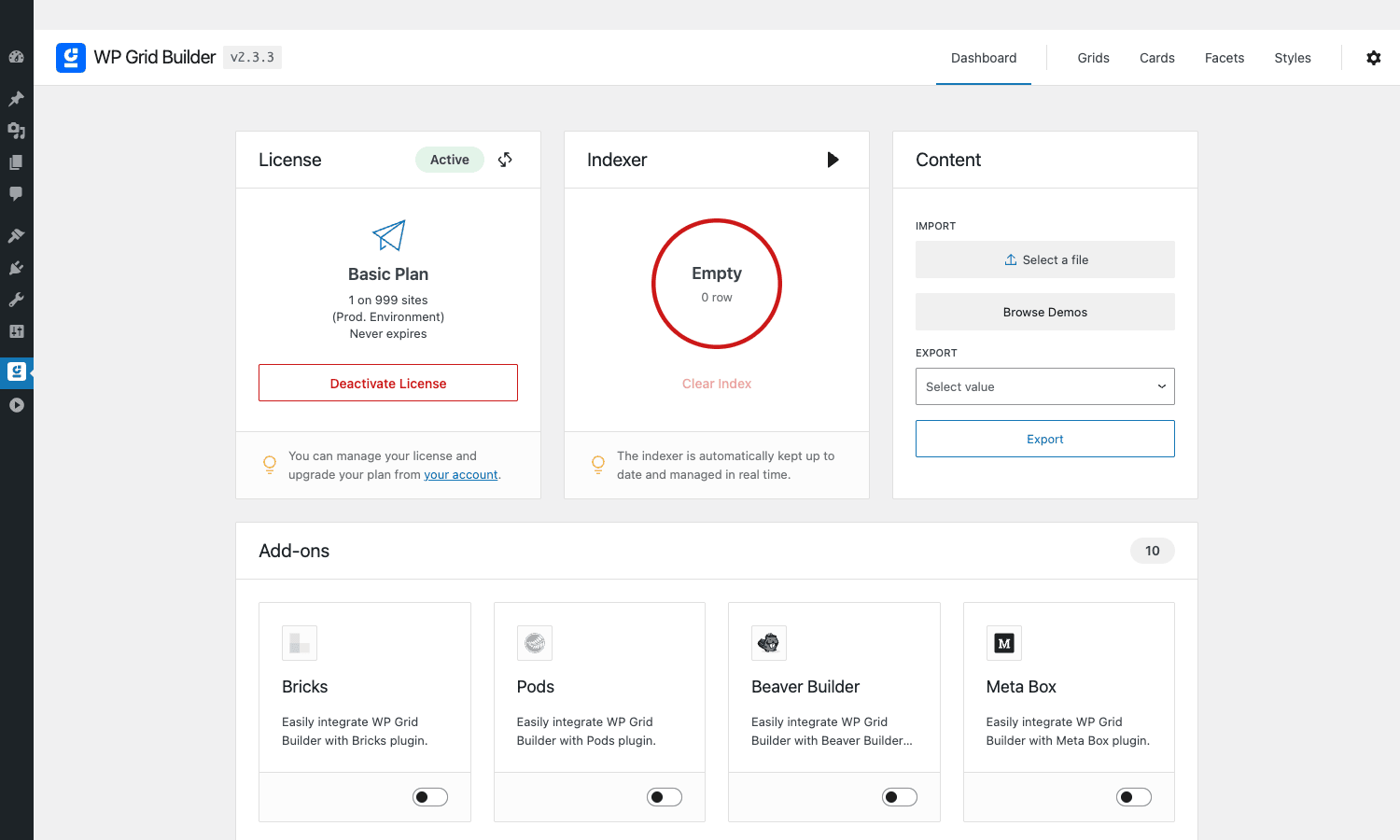
The dashboard is the first thing you see after activation. It surfaces three useful blocks: license status, the indexer health (more on that later), and a content area for importing demo grids or exporting your settings. Below the fold, every bundled add-on appears as a toggleable card. Flip the switch and the add-on loads on the next page.
WP Grid Builder is positioned as an alternative to FacetWP, Search & Filter Pro, JetSmartFilters and Toolset Views. The thing that consistently pulls people to it is the no-code card editor. If you’ve ever tried to build a "shop card" in FacetWP by editing your theme’s content-product.php, you know that the moment you change themes or want a second card layout the work doesn’t transfer. WP Grid Builder treats cards as first-class data objects in the database, separate from your theme.
Core features
Here’s the short version of what you actually get when you install the plugin and turn on every add-on.
- Visual card designer. A block-based editor for designing what each grid item looks like. Drag in thumbnail, title, terms, custom fields, buttons, icons, HTML, CSS. Save the card and reuse it across grids.
- Three grid layouts. Masonry, Metro and Justified, plus a Carousel mode that wraps any of those in a slider. Full-width or contained, configurable per breakpoint.
- Real-time AJAX faceted filtering. Eight facet types out of the box: checkbox, radio, range slider, select, search field, date, color swatch, hierarchy. Plus utility facets: sort, reset, per page, load more, pagination, result count, A-Z index.
- Custom indexer. A dedicated database table for facet choices, built and maintained by a cron job. Facet clicks read this index instead of hammering
WP_Queryfor every filter. - HTML5 browser history. The URL updates as the visitor filters; back/forward buttons restore previous filter states; copy-pasted URLs reload the same filtered view.
- Multi-content support. Build grids from posts, any custom post type, users, or taxonomy terms. Filter any source by any field, including ACF, Pods and Meta Box custom fields.
- Page builder integrations. Native widgets/modules for Elementor, Beaver Builder, Bricks, Oxygen and Gutenberg. Shortcodes also work in any builder that accepts them.
- WooCommerce-aware. Built-in support for product taxonomies, price ranges, stock status, sale flags, attribute filtering. Works with both shop and category pages.
- Multisite support. Per-site grids and facets; no cross-site bleed.
- Lightbox. Optional built-in lightbox for image, video and Vimeo/YouTube/Wistia content with no extra plugin.
- Lazy loading and LQIP. Low-quality image placeholders generated on the fly to keep CLS low.
- Import/export. Settings, grids, cards and facets export as a single JSON file. Move work between staging and production in one click.
How it works (for users)
The mental model is small and worth learning before you click anything.
A grid is a saved query plus a layout: "9 of the most recent posts in the Photography category, in a 3-column masonry layout, using the Default card template." A card is the visual template used to render each item in the grid. A facet is a filter UI element (checkbox list, search box, slider) that’s bound to a field on the query. A style is a reusable preset of colors, spacing, and typography that grids and facets can inherit.
You build them in roughly that order: card first (so it can be reused), then a grid that points at the card, then the facets you want to expose, then drop the grid + facets onto a page via shortcode or a page builder widget.
The first time you open All Grids it’s empty. Click Import Demos and the plugin offers three starting points: a blog grid, a portfolio grid and an eCommerce grid. Each one comes with matching cards and facets so you can poke at a fully wired example instead of starting from scratch.
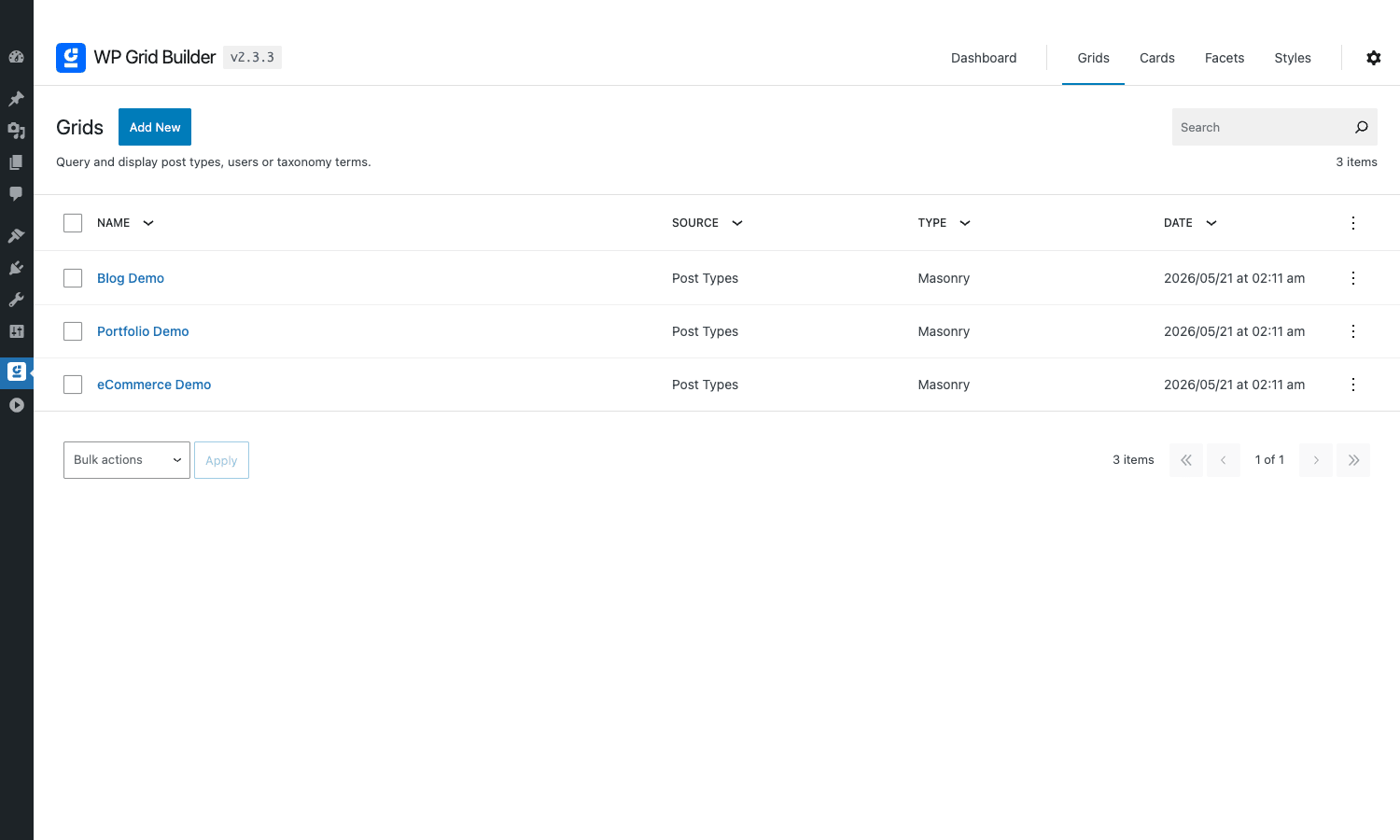
I’d really recommend importing the demos on a fresh install. The plugin’s surface is wide and the demos answer a lot of "wait, how does this connect to that?" questions in five minutes that the docs cover in twenty.
Installation and setup
Installation is exactly what you expect for a WordPress plugin. From wp-admin > Plugins > Add New > Upload Plugin, pick the zip file, activate. The plugin adds a top-level "WP Grid Builder" menu in the WordPress sidebar.
The license activation lives on the Dashboard tab. Paste your key, click Activate, and the indicator turns green. The Add-ons section below it lists every available add-on with a toggle switch; flip the ones you need on, leave the others off. Each toggled add-on loads on the next page request, no separate plugin installation.
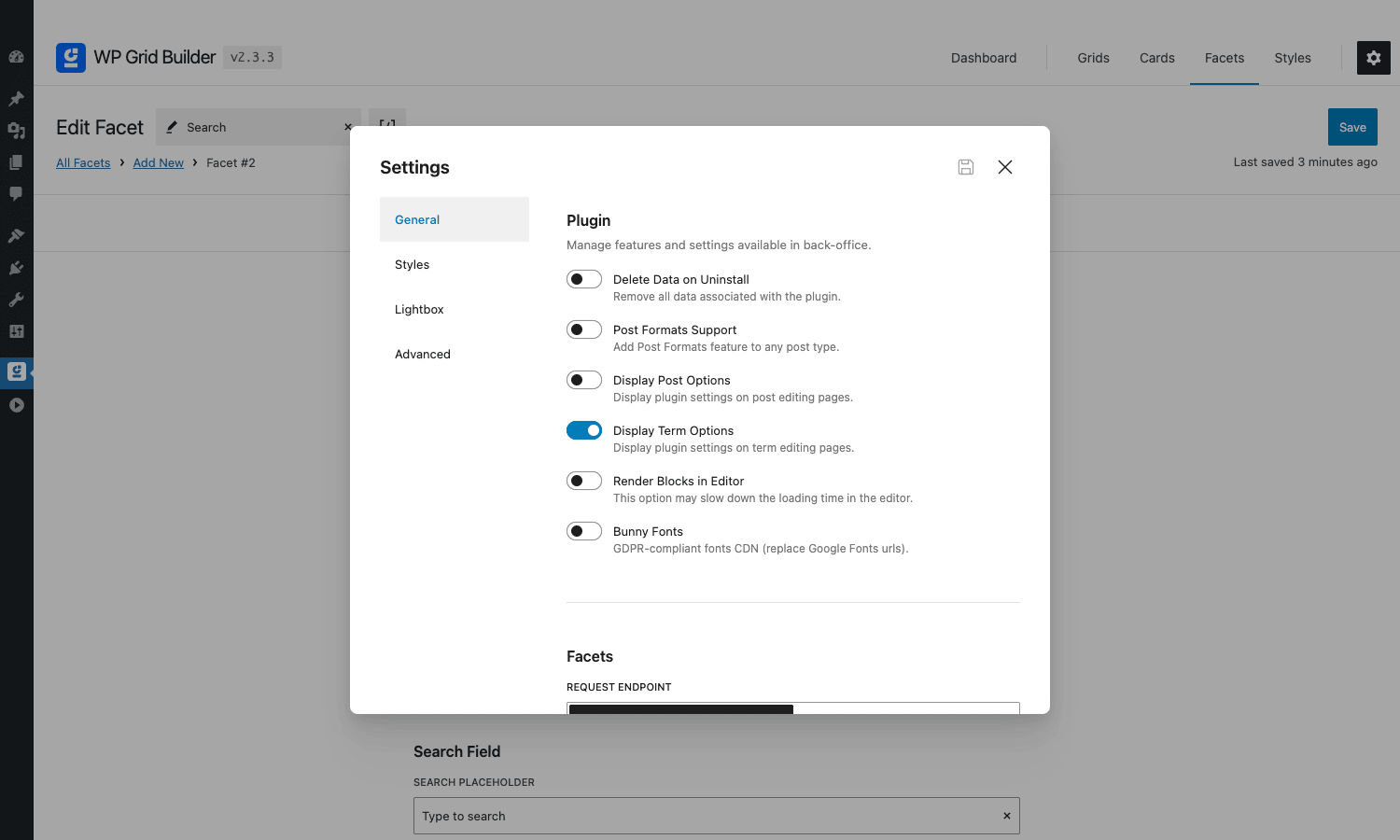
Before you build your first grid, walk through the Settings modal (the gear icon top-right). Three settings save real headaches later:
- Display Post Options. Turn this on if you want a per-post WP Grid Builder meta box on individual posts; useful for excluding specific posts from grids.
- Bunny Fonts. Toggle on if you serve EU traffic and want GDPR-friendly font hosting.
- Render Blocks in Editor. Off by default. Leaving it off keeps the Gutenberg editor fast even on long posts; turn on only if you want true previews of grid blocks inside the block editor.
Bigger sites with a lot of facetable content will also want to look at the indexer interval under Settings > Advanced. The default is fine for sites with under a few thousand items; for catalogs in the tens of thousands, raise the cron frequency and the per-batch limit.
The visual card designer
This is the feature that pulls people from competing plugins. The card designer is a self-contained block editor, similar in feel to the WordPress block editor but scoped to a single card. You open a card from the All Cards screen and you get a canvas in the middle, a block inserter on the left, and a settings panel on the right.
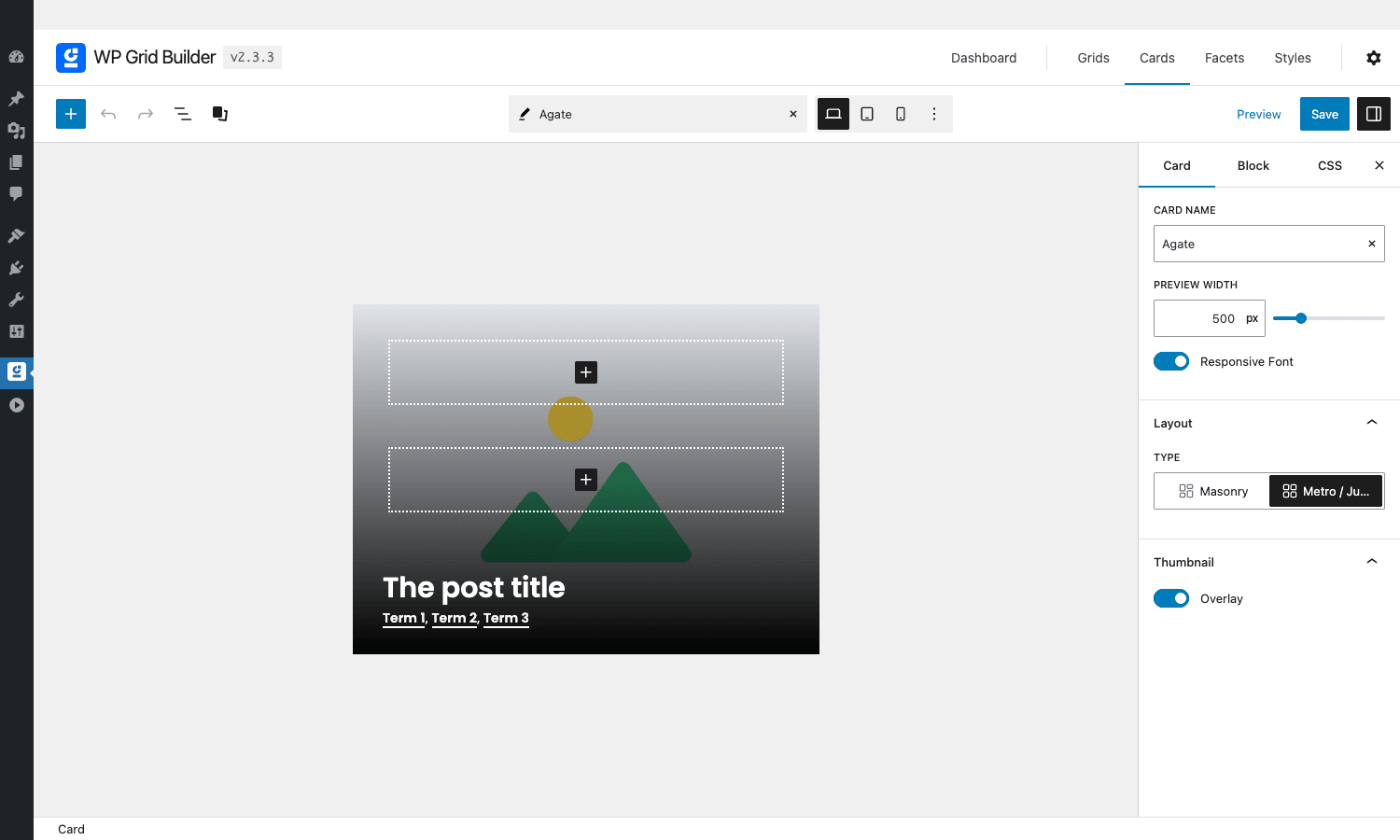
Inside a card you can drop blocks like:
- Thumbnail (with overlay support, hover effects, lazy loading)
- Title (heading level configurable, links to the post by default)
- Content / excerpt (with truncation, fade-out gradient)
- Date, author, comments, reading time
- Terms (taxonomy chips, with separator and link control)
- Custom field (any meta key, with prefix/suffix, conditional show/hide)
- Buttons and icons (250 SVG icons bundled, hover colors, link targets)
- HTML / shortcode (for anything the plugin doesn’t already cover)
Every block has Card / Block / CSS tabs in the right panel. The Card tab governs the whole card (responsive font scaling, preview width, layout type, thumbnail behavior). The Block tab governs the selected block (alignment, padding, color, typography). The CSS tab lets you write raw CSS scoped to the card without leaving the editor.
The previewer is responsive. There’s a desktop / tablet / mobile toggle at the top, and a slider that lets you set an exact preview width. You design once, the card looks correct at any breakpoint.
The library of pre-built blocks covers most layout patterns I’ve needed. The two I’ve reached for most often are the conditional Custom Field block (only render the price if it’s set, only show the "Sale" badge if the product is on sale) and the Terms block (with the option to link each term to its archive page).
If you’ve used JetEngine listings, the mental model is similar but the editor here is faster: there’s no jumping between an Elementor canvas and the JetEngine listing settings, everything lives in one screen.
Facets and AJAX filtering
Facets are the other half of the plugin. The All Facets screen shows every facet you’ve created with the facet type, the source field, and a link to edit.
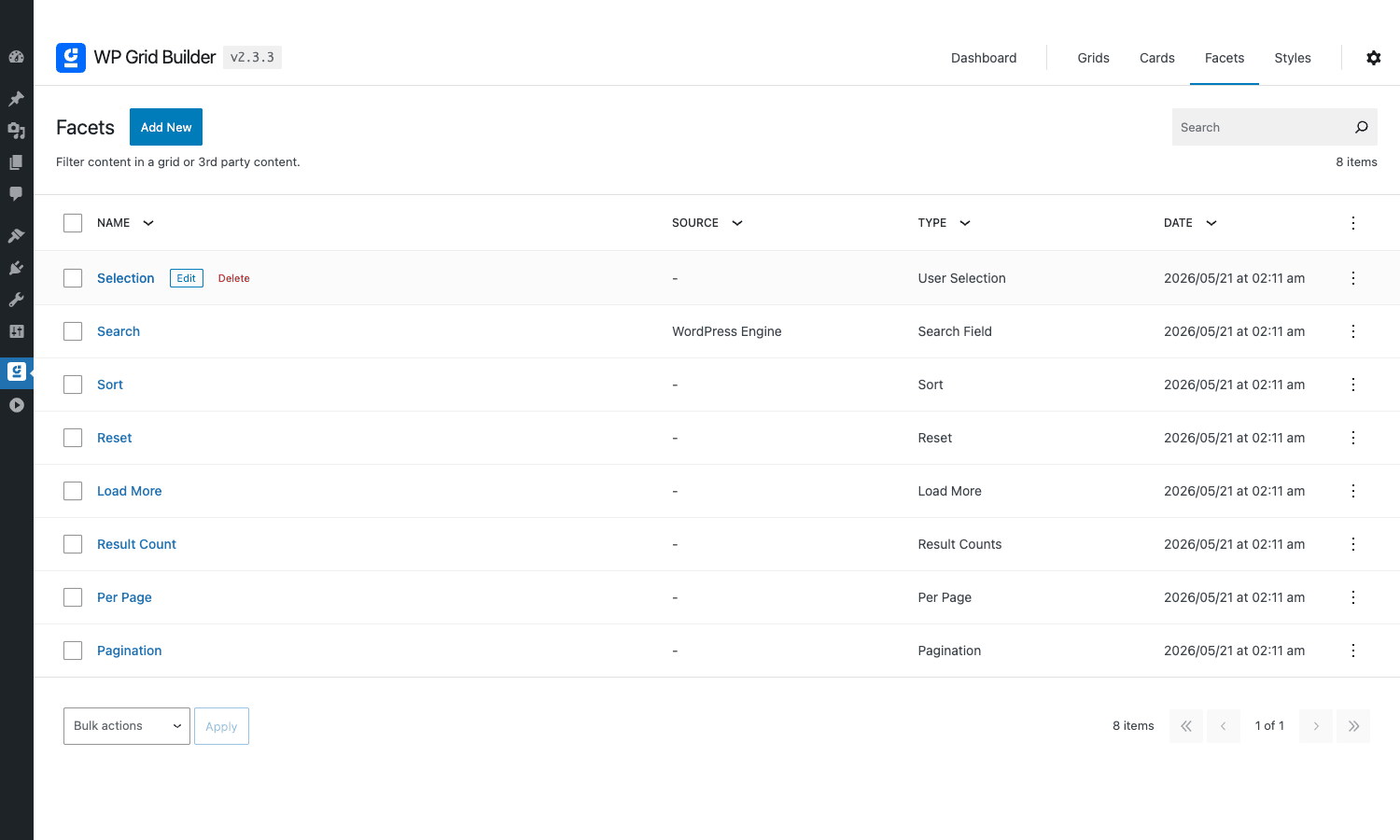
When you create a new facet you pick a behavior first: Filter Content, Sort Content, Reset, Load More, Result Count, Per Page, or Pagination. Then for "Filter Content" you pick a Filter Type: checkbox list, radio, search field, range slider, date picker, color swatch, hierarchy tree, autocomplete, A-Z index, button group, or number range.
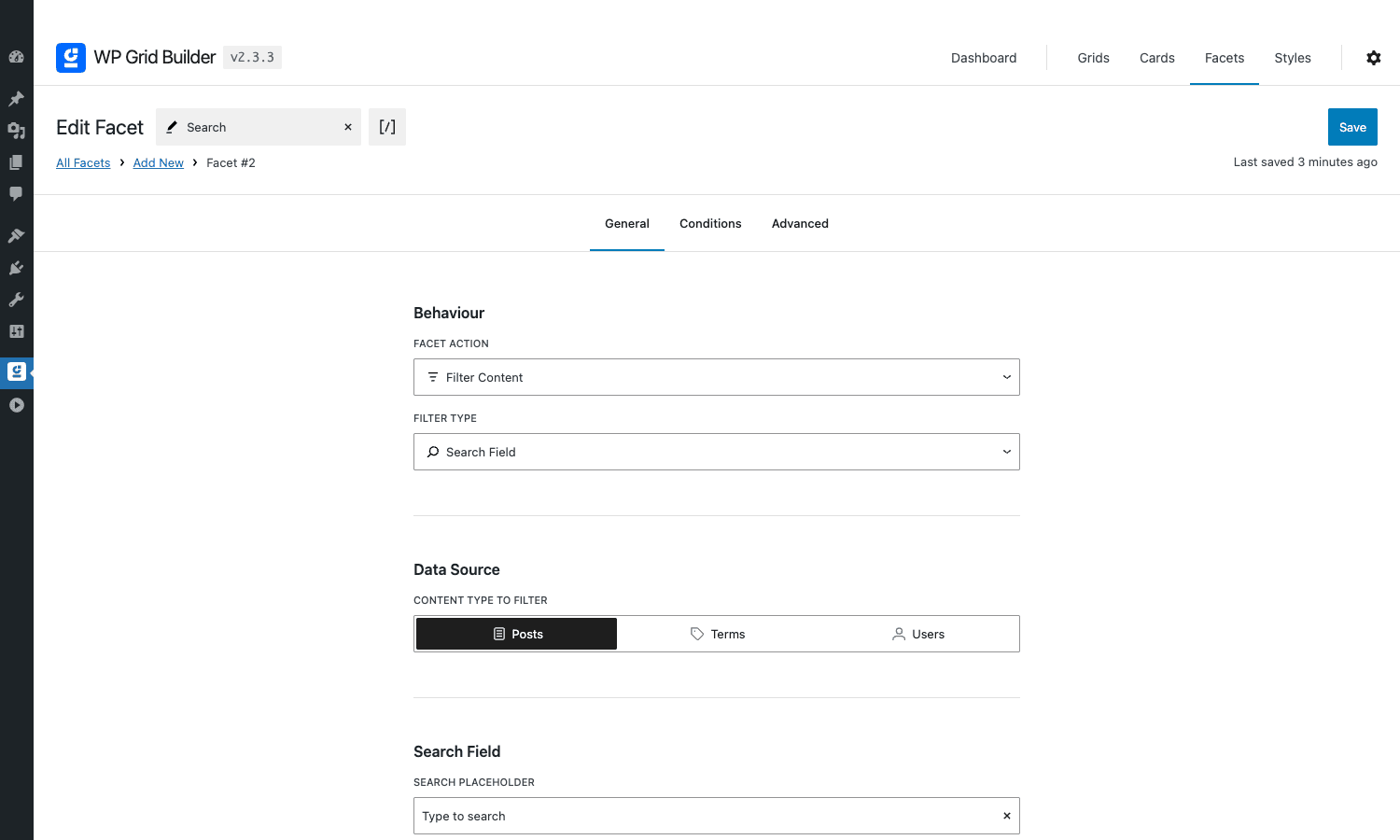
The data source is the next decision. You point a facet at either:
- Posts: a post field (status, type, date), a taxonomy, or any custom field (including ACF, Pods, Meta Box).
- Terms: a taxonomy property.
- Users: a user field or user meta.
Once the source is set, the General tab takes care of the visible behavior: placeholder text, sort order, hide empty values, count display, auto submit, animation, transition.
The Conditions tab is where this plugin pulls ahead of simpler facet plugins. You can show or hide a facet based on the current selection of another facet, the current grid result count, the current URL parameters, or the visitor’s logged-in state. So you can build a flow like "show the Color facet only when the Category facet has Apparel selected" without any code.
The Advanced tab handles things like custom CSS class, query string key, and ARIA labels for accessibility. The facets emit ARIA roles by default; the plugin advertises WCAG support and the markup I inspected in DevTools matches.
When a visitor clicks a facet, the plugin fires a request to wpgb/v1/fetch. The endpoint reads the indexer table (a dedicated database table populated by the cron job), runs a focused query, and returns the updated card HTML plus the updated facet counts. Browser history is updated so the URL reflects the new filter state.
Page builder integrations
Most filtering plugins commit to one or two page builders. WP Grid Builder ships integrations for almost every popular one.
- Gutenberg. Three native blocks (
wp-grid-builder/grid,wp-grid-builder/facet,wp-grid-builder/template) registered viaregister_block_type. They appear under a "WP Grid Builder" category in the block inserter. - Elementor. A widget bundle that adds Grid, Facet and Template widgets to the Elementor panel. The Grid widget exposes every setting from the admin grid editor as Elementor controls, so you can override per-page.
- Beaver Builder. Equivalent Beaver modules. The bundle also plays nicely with Beaver Themer if you want to put a grid inside a Themer layout.
- Bricks. Native Bricks elements for grid, facet and template. The Bricks add-on also exposes the visual card data inside Bricks’ Query Loop so you can use Bricks’ own loop with WP Grid Builder data.
- Oxygen. Component bundle for the Oxygen builder.
Whichever route you take, the underlying data is the same. A grid built in the admin shows up identically whether it’s rendered via shortcode, Gutenberg block, or Elementor widget.
The shortcodes are the lowest-common-denominator option and always work:
[wpgb_grid id=1]
[wpgb_facet id=2]
[wpgb_template id=3]
Pair a grid shortcode with one or more facet shortcodes on the same page and the AJAX wiring happens automatically. You can also place the grid and the facets in different locations on the page (sidebar facets, main column grid, for example), the plugin just needs both to be present in the DOM.
Bundled add-ons
Worth knowing what each one actually adds.
- Bricks. Native Bricks elements + Bricks Query Loop integration. Required for serious Bricks use.
- Pods. Source data from Pods custom content types and Pods fields. Pulls Pods field definitions into the card designer and facet picker.
- Beaver Builder. Beaver modules for grid, facet, template.
- Meta Box. Read Meta Box fields in cards and facets. Useful if your custom fields live in Meta Box.
- Oxygen. Components for the Oxygen builder.
- Elementor. Widget bundle.
- Multilingual. WPML and Polylang awareness. Facets respect the current language; the indexer rebuilds per-language.
- Caching. Plays nice with WP Rocket (and similar page caches). Exposes a cache key that gets cleared when grids change.
- Map Facet. Adds a Mapbox / OpenStreetMap map view that filters by visible map area, plus location-based facet types (distance from address, etc.).
- LearnDash. Source data from LearnDash courses, lessons, quizzes; built-in facets for course difficulty, lesson count, progress.
For ACF Pro the integration is in core (no separate add-on). The Card designer’s Custom Field block lists every ACF field with its proper label, and Facets read ACF data sources natively.
Each add-on is a toggle, not a separate plugin upload. From the dashboard you flip the ones you want on, and the plugin loads the relevant code on the next request. If you only need the WooCommerce + Elementor combo, you can leave the other six add-ons off and skip the disk and memory footprint.
Real-world use cases
A few concrete scenarios where WP Grid Builder is the right tool.
Filtered WooCommerce shop
Replace the default shop page with a WP Grid Builder grid showing every product, then add facets for category, price range, attribute (color, size), stock status, and average rating. Drop a search facet at the top, a sort facet next to it, and pagination at the bottom. The whole shop becomes an AJAX experience and stays SEO-friendly because the URL updates on each filter change.
Portfolio with project tag filters
For freelance designers, agencies and photographers: a grid sourced from a custom Project post type, a card showing the cover image with a hover overlay, and a row of category-tag chips at the top that the visitor can click to filter. Add a Lightbox facet on the card image so visitors can open full-size shots without leaving the page.
Knowledge base or docs library
Source: a Docs custom post type. Card: title, excerpt, last-updated date, category badge. Facets: Topic (taxonomy), Difficulty (custom field), Search. The Result Count facet shows "Showing 18 of 142 articles" as the visitor narrows the search. The hierarchy facet works particularly well for nested doc categories.
Members or team directory
Source: WordPress users (or a Members CPT if you store more fields than the default user table). Card: avatar, name, role, location. Facets: Department, Skills (multi-select), Location (text search with autocomplete). The autocomplete facet type is the right choice for any field with many distinct values, like Skills, where a checkbox list would be unmanageable.
Real estate listings
Source: a Property CPT. Card: hero image, address, bed/bath count, price, status badge. Facets: Price (range slider), Beds (number), Property Type (checkbox), Map (Map Facet add-on for "search this area"). The Map facet is the differentiator here, very few competing plugins offer it without third-party integration.
Filterable course catalog (LearnDash)
With the LearnDash add-on toggled on, source = LearnDash courses, card = course image, title, lesson count, difficulty. Facets: course category, difficulty, duration, instructor. Good fit for any LMS site where browsing the course library is a separate experience from the dashboard.
Developer reference
WP Grid Builder exposes well over 100 PHP filters and around 30 PHP actions. The naming is consistent: every hook is prefixed wp_grid_builder/... so they’re easy to grep for. Below are the hooks I’ve found myself reaching for most.
Filter: customize the grid query
Modify the WP_Query args used by a specific grid. Useful for "only show posts authored by the current user" or "exclude posts older than 6 months" without editing the grid in admin.
add_filter( 'wp_grid_builder/grid/query', function ( $args, $grid_id ) {
 if ( 12 !== (int) $grid_id ) {
 return $args;
 }
 $args['author'] = get_current_user_id();
 return $args;
}, 10, 2 );
Filter: register a dynamic tag
Dynamic tags are tokens like {post_title} or {wpgb_acf:my_field} that the card designer can drop into any text field. Register your own to surface arbitrary data.
add_filter( 'wp_grid_builder/dynamic_tags', function ( $tags ) {
 $tags['my_plugin_distance'] = [
 'name' => __( 'Distance from user', 'my-plugin' ),
 'category' => 'custom',
 'render' => function ( $post_id ) {
 return my_plugin_calc_distance( $post_id, $_GET['lat'] ?? 0, $_GET['lng'] ?? 0 );
 },
 ];
 return $tags;
} );
Filter: change a facet’s choices before render
Useful when you want a facet to show only a subset of choices, or to relabel choices, or to inject "All" at the top.
add_filter( 'wp_grid_builder/facet/choices', function ( $choices, $facet ) {
 if ( 'category' !== $facet['name'] ) {
 return $choices;
 }
 // Hide categories with fewer than 3 posts from the facet list
 return array_filter( $choices, fn( $c ) => (int) $c['count'] >= 3 );
}, 10, 2 );
Filter: register a custom facet source
For complex sites that store data outside of post meta (custom tables, external APIs), expose a new "source" so it shows up in the facet editor’s data source picker.
add_filter( 'wp_grid_builder/custom_fields', function ( $sources ) {
 $sources['my_distance'] = [
 'name' => __( 'Distance to point', 'my-plugin' ),
 'type' => 'number',
 'query' => function ( $field, $facet ) {
 // Return SQL fragment or array of values for the indexer
 return my_plugin_distance_index( $facet );
 },
 ];
 return $sources;
} );
Action: run code on facet rendering
Fire side effects when a specific facet renders. Handy for analytics, lazy enqueuing scripts, or injecting markup.
add_action( 'wp_grid_builder/facet/render', function ( $facet ) {
 if ( 'price' === $facet['name'] ) {
 wp_enqueue_script( 'my-price-tooltip' );
 }
} );
Action: react to grid save
The save action fires whenever a grid is saved from the admin. Use it to clear external caches or sync to a CDN.
add_action( 'wp_grid_builder/save/grid', function ( $grid_id, $data ) {
 do_action( 'my_app_cache_invalidate', 'grid:' . $grid_id );
}, 10, 2 );
Action: hook into the indexer
When the indexer finishes processing a facet, this action fires. Use it for monitoring or to chain custom indexing jobs.
add_action( 'wp_grid_builder/indexer/facet_indexed', function ( $facet_id, $rows ) {
 error_log( sprintf( 'Facet %d indexed: %d rows', $facet_id, $rows ) );
}, 10, 2 );
Filter: gate admin REST endpoints
If you want non-admin users to manage grids (e.g., editors on a multisite), override the default permission check.
add_filter( 'wp_grid_builder/admin_rest_api/permission', function ( $can ) {
 return current_user_can( 'edit_others_posts' );
} );
Filter: change card wrapper tag
The default wrapper for each card is a <div>. If you want each card to be a semantic <article>, swap the tag.
add_filter( 'wp_grid_builder/card/tag', function ( $tag, $card_id ) {
 return 'article';
}, 10, 2 );
Filter: scope conditions to user role
Useful for membership sites where some facets only apply to logged-in members.
add_filter( 'wp_grid_builder/condition/value', function ( $value, $condition ) {
 if ( 'user_role' === $condition['name'] ) {
 $user = wp_get_current_user();
 return $user ? $user->roles[0] ?? 'guest' : 'guest';
 }
 return $value;
}, 10, 2 );
REST endpoints
For developers building external integrations (mobile app, headless React frontend), the public REST endpoints are:
GET /wp-json/wpgb/v1/fetch: fetch grid results for a given filter state. Accepts grid ID + facet selections.GET /wp-json/wpgb/v1/search: autocomplete/typeahead lookup for search facets.POST /wp-json/wpgb/v2/filter: async filter endpoint used for facet count refreshes.
Admin endpoints under wpgb/v2/* cover CRUD for grids, cards, facets and styles. They’re protected by the wp_grid_builder/admin_rest_api/permission filter shown above.
Custom widget API
For developers maintaining a site that still uses classic WordPress widgets, the plugin registers three widgets via the classic WP_Widget API:
WPGB_Grid_WidgetWPGB_Facet_WidgetWPGB_Template_Widget
Each accepts the saved object’s ID and renders inside any sidebar.
Performance, compatibility, and gotchas
WP Grid Builder is genuinely faster than most filter plugins thanks to the indexer. The indexer is a dedicated MySQL table that stores precomputed facet choices, counts, and post associations. When a visitor clicks a facet, the AJAX request reads this table instead of running a fresh WP_Query with meta_query (which is what most filter plugins do, and what kills database performance on big catalogs).
The trade-off: the indexer needs maintenance. On every post save/update/delete, the affected rows are re-indexed. The cron job picks up changes that happened while the cron was paused. On very large sites (50k+ posts), the initial indexing run can take 10-30 minutes; subsequent incremental updates are fast.
Things to watch:
Edge cases
- Indexer stuck or out of date. If your dashboard shows "Empty 0 row" forever, your cron may be blocked. Check that
DISABLE_WP_CRONis not set, or set up a real system cron pointing atwp-cron.php. The plugin also exposes a manual "Re-index all" button on the Dashboard. - Page cache and AJAX. If you use a page cache plugin, make sure the AJAX endpoint isn’t cached. WP Rocket and W3 Total Cache exclude
?wpgb_*query strings by default thanks to the bundled Caching add-on, but for other caches you may need a custom rule. - Object cache + indexer. Heavy object caching (Redis) can sometimes return stale facet counts immediately after a post save. The plugin invalidates the relevant keys, but if you see drift, a quick
wp cache flushresolves it. - Conflict with theme JavaScript. Themes that intercept link clicks (single-page-app themes, Ajaxify Pro, certain Bricks templates) can swallow the facet click before WP Grid Builder’s handler sees it. Test in a clean theme like Twenty Twenty-Four before blaming the plugin.
- Translation strings in facets. When using WPML/Polylang, the indexer needs to be rebuilt per language. The Multilingual add-on handles this, but the first build after switching languages can take a minute.
Compatibility notes
I tested with WordPress 6.6, PHP 8.2, WooCommerce, ACF Pro, Bricks, Elementor Pro and Yoast SEO Premium all active. No conflicts. The plugin’s JS is shipped as ES modules with a UMD fallback, so it works on older browsers but loads efficiently on modern ones.
Block editor performance was a concern on a previous version; recent builds default "Render Blocks in Editor" to off, so editing a long post with a grid block is fast.
Mobile rendering
Cards adapt to mobile via the per-breakpoint settings inside the card designer (column count, gap, padding, font scaling). The default behavior is sensible: 3 columns desktop → 2 tablet → 1 mobile. The "Responsive Font" toggle inside Card settings auto-scales typography with the card width, so titles don’t overflow on narrow viewports.
Accessibility
Facets emit ARIA roles, the grid wrapper exposes role="list" and each card role="listitem". Keyboard navigation works for checkbox/radio/button facets. The plugin advertises WCAG 2.1 AA support and the markup mostly backs that up; I’d still test with a real screen reader if accessibility is mission critical for your project.
Pricing and licensing
WP Grid Builder is sold on wpgridbuilder.com with several tiers. The official pricing model is Personal (single site), Professional (small agency), Agency (unlimited sites), plus a Lifetime option. Add-ons are bundled into Pro and Agency; Personal pays per add-on. There’s a 14-day money-back guarantee on the vendor site.
Updates are pushed to the GPL Times store when the upstream plugin releases new versions.
The plugin is GPL-3.0-or-later licensed, so legally you’re free to redistribute and modify the code. The upstream subscription pays for vendor support and update access; if you don’t need those, the GPL distribution is functionally identical.
How WP Grid Builder compares
The category is crowded. Three of the most common alternatives to WP Grid Builder and how they differ:
vs FacetWP
FacetWP is the closest peer. The two plugins solve the same problem (faceted filtering of post archives), with similar speed, similar facet types, and overlapping page builder support. The key difference is how the listing is rendered: FacetWP defers to your existing theme template (content-product.php, archive.php) and you wire it up with a small shortcode plus theme code. WP Grid Builder ships its own visual card designer, so you don’t touch theme files at all.
Pick FacetWP if your theme already does great archive layouts and you only need to add filtering. Pick WP Grid Builder if you want to design cards independent of your theme, or if you’re building multiple grids with different card styles (a portfolio with one card and a shop with another).
vs JetSmartFilters
JetSmartFilters is Crocoblock’s filter plugin, primarily aimed at Elementor and Bricks users who already use JetEngine for listings. JSF doesn’t render the listing itself; it filters whatever listing the Elementor or Bricks query loop renders.
Pick JetSmartFilters if you’re already in the Crocoblock ecosystem and you want filters that integrate with JetEngine listings. Pick WP Grid Builder if you want grid + filter from one vendor with one UI and a less-coupled card system.
vs Toolset Views
Toolset Views is the older-school option: a template-based listing system from the Toolset team. Powerful, but the learning curve is steep and the UI feels its age. WP Grid Builder’s visual card designer covers most of what Views does without the Twig-like template syntax.
vs Search & Filter Pro
Search & Filter Pro is a thin filter on top of WP_Query, with no card designer or indexer. It’s cheaper and simpler. If you have under a few thousand posts and don’t need a designed grid, SF Pro is a reasonable, smaller choice. For anything larger or where the card design matters, WP Grid Builder is the better fit.
vs Essential Grid
Essential Grid comes at grids from the opposite end. Where WP Grid Builder is faceted-filtering-first (its identity is fast, indexed search of large archives), Essential Grid is design-first: a portfolio and gallery builder with a drag layered skin editor, even/masonry/cobbles layouts, and social-feed sources. Pick WP Grid Builder when the job is filtering and search across a big content set. Pick Essential Grid when the job is a designed portfolio, gallery, or blog grid and rich item styling matters more than facets.
vs custom code
The honest "build it yourself" route is doable for small projects: write a custom WP_Query template, add a few $_GET filters, output cards in a CSS grid. The breakpoint where WP Grid Builder starts paying for itself is around the third grid (multiple card styles, multiple facet sets, multiple pages). Past that point, the saved-grids-and-saved-cards database model saves enough time to justify the plugin cost outright.
Frequently asked questions
Does WP Grid Builder work with my theme?
Almost certainly yes. The plugin renders grids in its own wrapper with scoped CSS, so theme conflicts are rare. The most common gotcha is themes that intercept link clicks for their own SPA-like behavior; if you see filters not working, temporarily switch to Twenty Twenty-Four to isolate.
Can I use it without a page builder?
Yes. Use the Gutenberg blocks or the shortcodes ([wpgb_grid id=1]). No Elementor/Bricks/Beaver required.
Does it support WooCommerce variations?
Yes. The WooCommerce integration exposes product variation attributes (color, size) as facet sources. Variation pricing, stock and sale flags are all queryable.
Will it slow down my site?
The frontend script is around 30-40 KB compressed and loads only on pages with a grid present. The indexer adds one custom database table that’s queried on facet clicks. In my testing, a filtered grid request returns in well under a second on a 10,000-product catalog using shared hosting. For sites with 50,000+ items, dedicated or VPS hosting is recommended.
Can I export a grid from staging to production?
Yes. The Export tool on the Dashboard produces a JSON file containing all grids, cards, facets and styles. Import on the destination site through the same dashboard. Settings and structure transfer; the actual post content doesn’t (use a separate content migration tool for that).
How do I show different cards for different categories?
Build multiple cards in the Card editor, then create a separate grid for each category with the matching card assigned. Alternatively, use the conditional Block visibility inside a single card to show different blocks based on category, which is fewer grids to maintain.
Does it work with custom post types from ACF?
Yes. ACF Pro custom post types and field groups are detected automatically. The Card designer’s Custom Field block lists every ACF field; the Facet editor’s source picker lets you point at any ACF field including repeaters, flexible content and gallery sub-fields.
What about WPForms or Fluent Forms entries?
Out of the box no, but you can use the wp_grid_builder/custom_fields filter (shown above) to register form-entry tables as facet sources. There’s no official integration with form plugins because forms aren’t a typical archive target, but the API supports it.
Can I use it on a multilingual site?
Yes, with the Multilingual add-on toggled on. It supports WPML and Polylang. Each language gets its own facet index. Facet labels and choice values are translatable through the usual WPML String Translation panel.
Is there a way to track filter usage for analytics?
The wp_grid_builder/facet/render action fires on every facet render and you can hook into the frontend wpgb.applied JavaScript event to push to GA4, Plausible or any other analytics tool. There’s no built-in analytics dashboard.
How does it handle SEO for filtered pages?
The plugin updates the URL with filter parameters on each interaction, so filtered states are bookmarkable and shareable. Whether you want Google to index those filtered URLs is a separate question; for most stores, you don’t (it creates near-duplicate content). Pair WP Grid Builder with a SEO plugin like Yoast SEO Premium or Rank Math Pro to noindex parameterized URLs.
Is the plugin GDPR-compliant?
The plugin itself doesn’t drop cookies. The Bunny Fonts setting in the General settings panel switches Google Fonts to GDPR-safe Bunny CDN if you’re using webfonts in cards.
Final thoughts
WP Grid Builder isn’t the cheapest filtering plugin and it’s not the simplest. Search & Filter Pro is cheaper, JetSmartFilters is more tightly bound to Elementor and Bricks. What WP Grid Builder offers that the others don’t is a serious, no-nonsense visual card designer paired with a fast indexer, and that combination has held up across every site I’ve tried it on.
The point I keep coming back to: the card designer is the differentiator. Once you’ve designed a portfolio card or a product card in WP Grid Builder, you can drop that card into any new grid, on any post type, with any filter combination, and it just works. That separation of "design once" and "query many" is the right architectural choice for any site that’s going to grow beyond a single archive page.
If you maintain a few WordPress sites a year and you keep running into the "the theme’s shop page is fine but it needs better filters" problem, this plugin is worth a serious look. Build a Blog Demo grid in five minutes, push it through the Elementor or Bricks integration, and you’ll have a good sense of whether the plugin fits your project before you spend more time on it.