

You’ve published eighty blog posts. Go count how many of them link to each other. I’ll wait, it won’t take long, because the answer is usually close to zero.
That gap is the quietest SEO problem on most WordPress sites, and it’s exactly the one Link Whisper exists to fix. Internal linking is the task everyone knows they should do and almost nobody keeps up with. You write a post, you publish it, you move on, and the post you wrote four months ago that could send it some link equity just sits there, forgotten.
I’ve run Link Whisper across a couple of content sites and a sandbox I set up just to test it for this review. This is the honest version: what it does well, what it genuinely changed in my workflow, and the parts where the marketing is a little ahead of the reality. If you’ve been linking your posts by hand (or not at all), stick around, because the difference is bigger than you’d think.
Table of Contents
- What Link Whisper actually does
- Why internal linking matters (the short, honest version)
- The in-editor link suggestions: the part you’ll use daily
- The sitewide Internal Links Report
- Finding and fixing orphaned content
- Auto-linking, and how not to wreck your site with it
- The broken link checker
- Click tracking: do your internal links actually get clicked?
- Google Search Console and target keywords
- Setting it up and running your first scan
- Don’t auto-link the same keyword across your whole site
- Developer reference: hooks, filters, and REST routes
- Troubleshooting the problems people actually hit
- Compatibility: editors, builders, hosting, multisite
- Pricing and licensing
- Link Whisper vs manual linking vs Internal Link Juicer vs Rank Math hints
- FAQ
- Is Link Whisper worth it?
What Link Whisper actually does
Link Whisper is a WordPress plugin built by Spencer Haws (the guy behind Niche Pursuits) whose whole job is to make internal linking fast enough that you’ll actually do it. It does two big things, and a handful of smaller ones.
The first big thing: while you’re writing or editing a post, it reads your content, scans the rest of your site, and suggests other posts you could link to (and posts that could link back to this one). You see the suggested sentence, the suggested target, and you tick a box to insert the link. No hunting through your archive, no copy-pasting URLs.
The second big thing: it gives you a sitewide report of what links to what. Inbound internal links, outbound internal links, outbound external links, per post, in one sortable table. For the first time you can actually see your link structure instead of guessing at it.
Around those two pillars it stacks orphaned-content detection, a keyword-to-URL auto-linker, a broken link checker, click tracking, a URL changer, and a Google Search Console integration. It’s a lot of plugin. Whether you need all of it is a fair question, and I’ll be straight with you about that as we go.
One thing to set straight early: the core suggestion engine is keyword and phrase matching, not magic. It looks for phrases in your text that match the titles and target keywords of your other posts. There’s an optional AI layer (more on that later) that you can bolt on with your own OpenAI key, but the default behavior is good old text matching. That’s not a knock, it works well, but if you went in expecting a semantic AI that "understands" your content out of the box, set that expectation now.
Why internal linking matters (the short, honest version)
Skip this section if you already live and breathe internal links. If you don’t, here’s the two-minute version that makes the rest of this review click.
Internal links do three jobs. They pass authority around your site, so a strong page can lend ranking power to a weaker, newer one. They help Google discover and understand your content, because crawlers follow links and use anchor text as a topical signal (Google’s own link best practices spell this out). And they keep readers on your site longer by pointing them to the next relevant thing instead of the back button.
Here’s the catch most people miss. The pages that need internal links the most are your newest ones, and they’re the hardest to link because you’d have to go back and edit dozens of old posts to point at them. So nobody does it. New posts launch as orphans (zero inbound internal links), and they sit there underperforming for months.
This is the exact mess Link Whisper is built to clean up. It surfaces the old posts that should link to your new one, and it shows you the orphans you forgot about. The whole pitch is "stop flying blind," and on that promise it delivers.
The in-editor link suggestions: the part you’ll use daily
This is the feature that sold the plugin, and it’s the one you’ll touch every single time you write. When you open a post in the editor, Link Whisper adds a "Suggested Links" box. Inside, it shows sentences from your draft where it found a phrase that matches another post on your site, alongside the post it thinks you should link to.
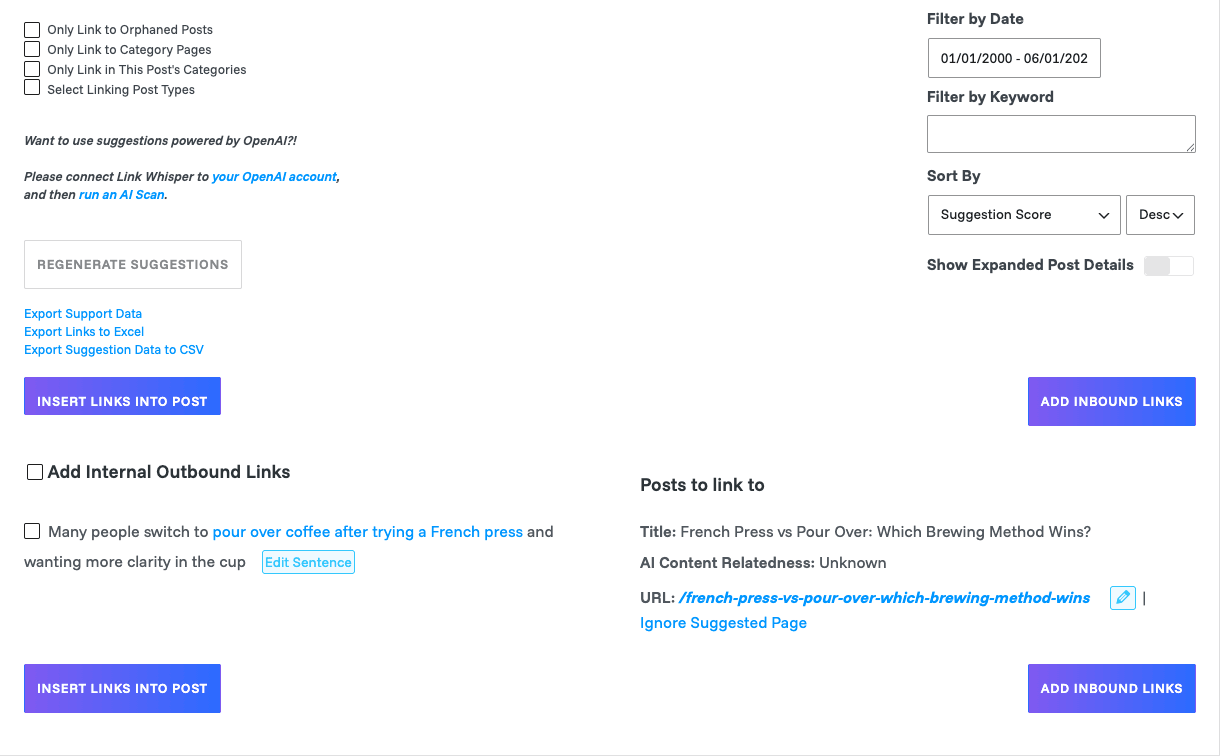
Look at the shot above. On the left, it found the sentence "Many people switch to pour over coffee after trying a French press" and highlighted the anchor phrase. On the right, it matched that to my post "French Press vs Pour Over: Which Brewing Method Wins?" with the suggested URL ready to go. You tick the checkbox, hit Insert Links Into Post, and the link is in your content. That’s the whole loop, and it takes seconds.
A few things I appreciate here:
- You can edit the suggested sentence and anchor before inserting. The default anchor is whatever phrase it matched, but you’re not stuck with it. The "Edit Sentence" button lets you reword so the link reads naturally.
- It works in both directions. The "Outbound Internal Links" tab suggests posts to link TO from the one you’re editing. The "Inbound Internal Links" tab finds older posts that should link to the post you’re working on, and lets you add those links from this one screen. That second tab is the real time-saver, because going back to edit old posts is the part you’d never do manually.
- Filters keep the noise down. You can filter suggestions by date, by keyword, sort by suggestion score, and restrict to specific post types or even just orphaned posts. There’s a "Max Number of Suggestions to Display" setting (the default is 8) so you’re not buried.
The honest part: because it’s phrase matching, you will get suggestions that are technically correct but contextually wrong. It’ll happily suggest linking the word "guide" in your coffee post to your "beginner guide to investing" post if both exist. The score helps, and the filters help, but you cannot bulk-accept blindly. You have to read each one. More on why that matters in the anti-pattern section below.
You might be wondering whether all this scanning slows down your editor. In my testing on a small site it added a noticeable but tolerable beat when the box first loads its suggestions, maybe a second or two. On a large site it can be slower, and there’s a developer hook to tune the processing time, which I’ll cover later.
The sitewide Internal Links Report
If the editor box is the daily tool, the Internal Links Report is the strategic one. It’s a table of every post and page on your site with three columns that matter: inbound internal links, outbound internal links, and outbound external links.
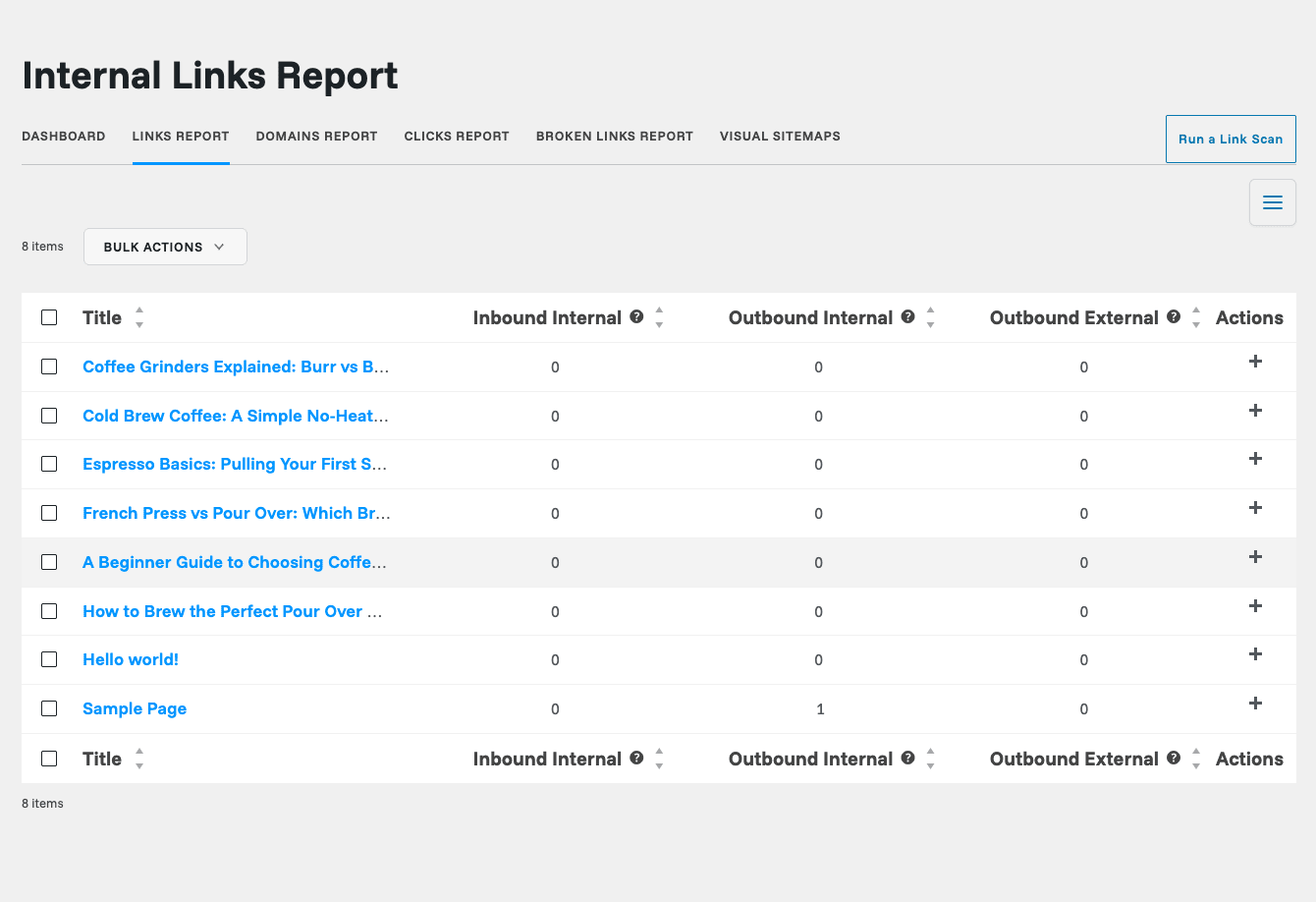
The first time you look at this, it’s a little humbling. In my sandbox above, every post shows 0 inbound internal links, which is exactly the orphan problem in black and white. On a real site you’ll see your pillar pages hoarding all the links while your money pages sit at one or two. Sort by inbound internal links ascending and you’ve got an instant to-do list.
You can expand any row with the "+" action to add links right from the report without opening the post, which is genuinely handy when you’re doing a bulk cleanup session. There are also other report views sitting behind the dashboard: a Domains Report that shows which external sites you link out to the most (useful for spotting broken affiliate links or over-reliance on one source), and reports for link density and anchor length if you want to nerd out on whether you’re over-linking.
Tip: Use the Internal Links Report as a monthly ritual, not a one-time thing. Spend twenty minutes once a month sorting by inbound links and propping up your weakest pages. That’s the habit Link Whisper makes possible, and it’s where the real ranking gains come from.
The whole dashboard pulls these numbers into one snapshot view so you can see the health of your linking at a glance.
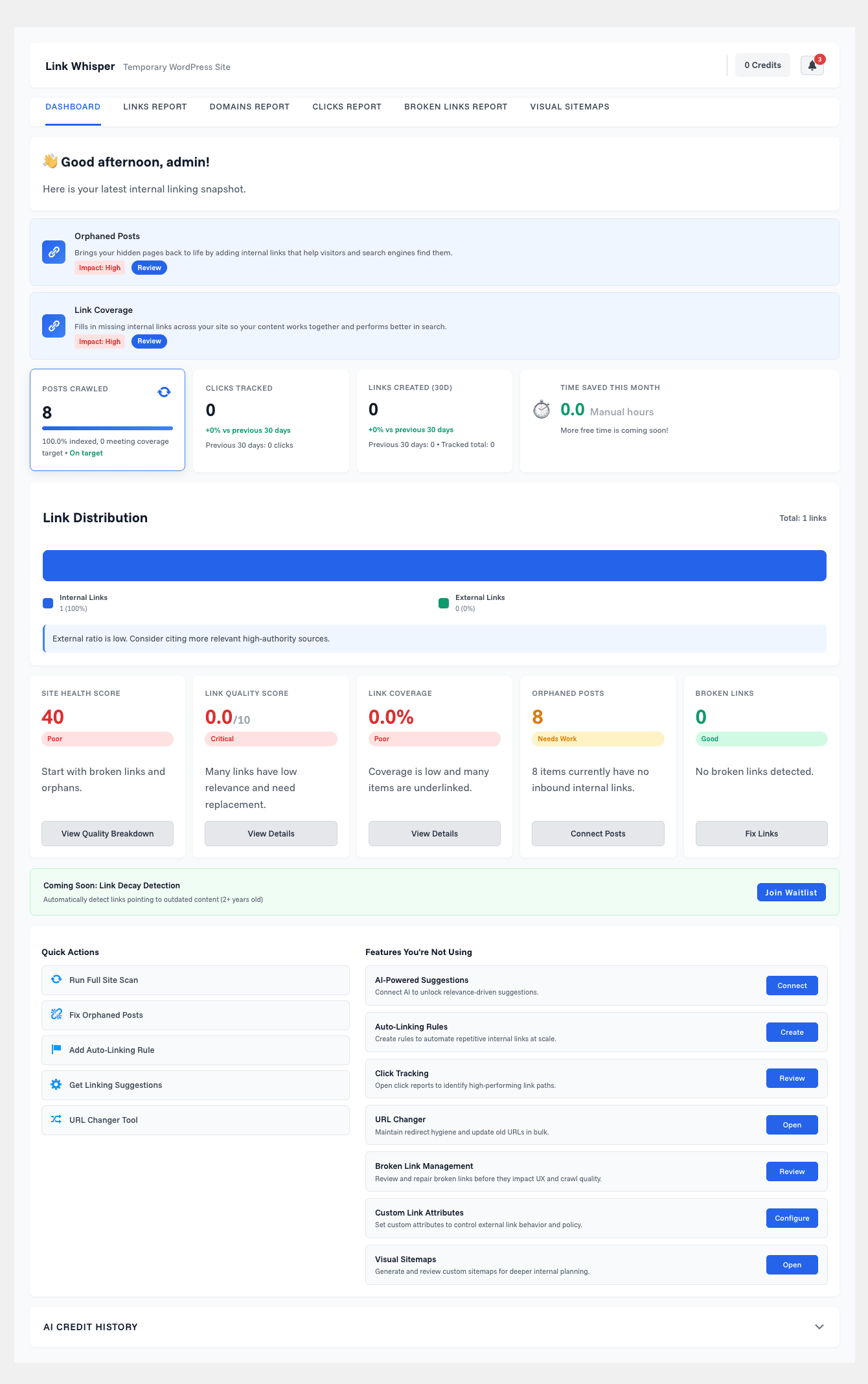
The dashboard gives you a site health score, posts scanned, orphaned post count, broken links, and a link distribution chart, plus quick actions to jump into a scan or the orphaned report. It’s the cockpit. I’d be lying if I said the score number means much in absolute terms, but watching it move as you clean up your links is satisfying and a decent motivator.
Finding and fixing orphaned content
An orphaned post is one with zero inbound internal links. Nothing on your site points to it. Google can still find it through your sitemap, but it gets none of the authority your other pages could pass it, and readers almost never stumble onto it. Orphans are dead weight, and most sites are full of them without realizing.
Link Whisper has a dedicated Orphaned Posts Report that filters your content down to just the posts nothing links to.
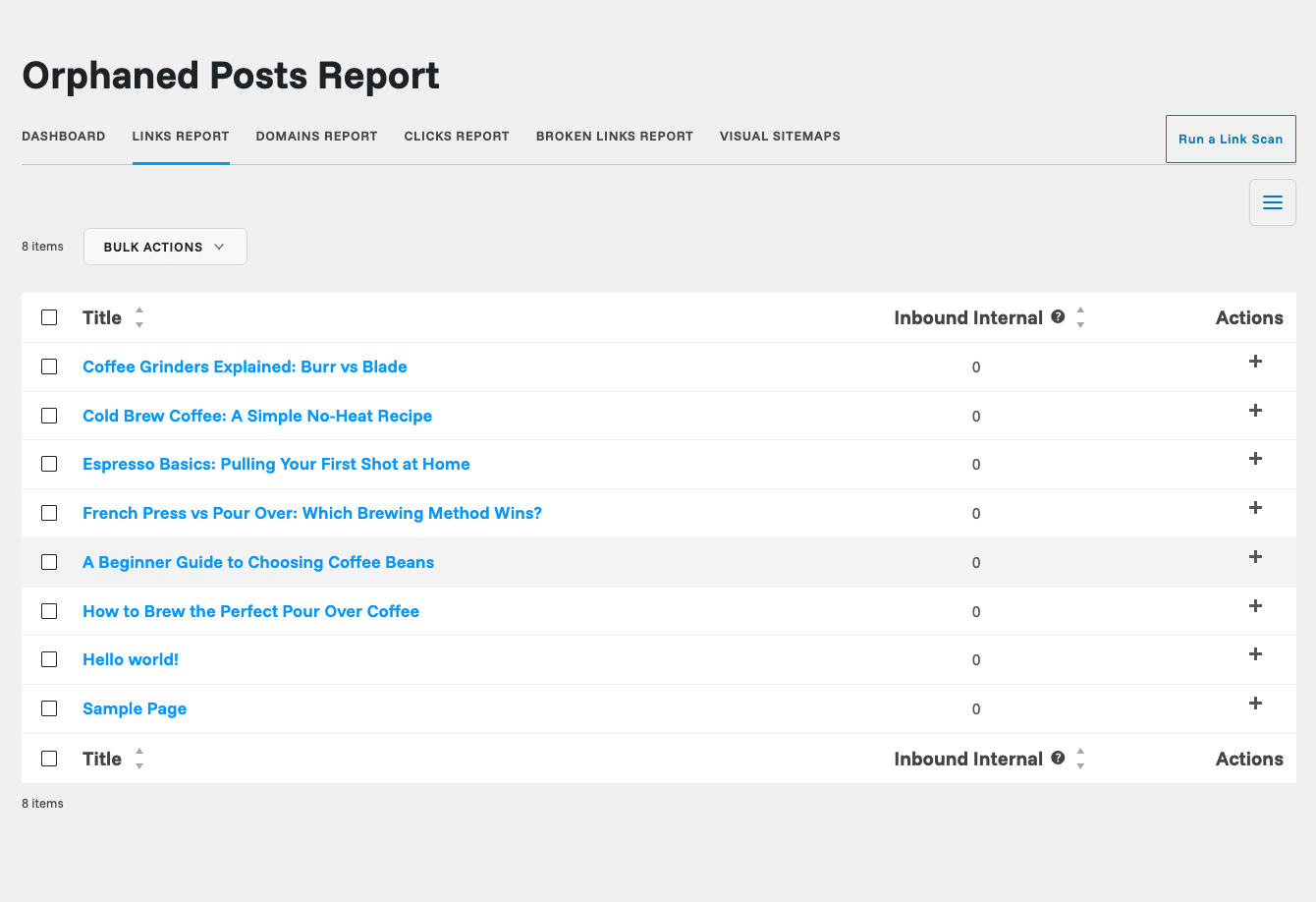
From here the workflow is obvious: pick an orphan, find a couple of relevant older posts, and add inbound links pointing at it. You can do this straight from the report, or open the orphan in the editor and use the "Inbound Internal Links" tab to pull links in. Either way, you’re systematically rescuing pages that were invisible.
Where this shines: affiliate and review sites. If you run an affiliate site, your money pages (the product reviews and comparison posts) are the ones that absolutely cannot be orphans, and they’re often the ones that are, because you wrote them quickly and never circled back to link them up. The orphaned report turns that into a five-minute fix per page.
If you run a recipe blog, it’s the same story with seasonal content. That pumpkin pie post you wrote two years ago is an orphan that could be quietly ranking if your newer autumn recipes linked back to it. On a docs or knowledge base, orphans are help articles nobody can navigate to, which directly hurts support deflection.
Auto-linking, and how not to wreck your site with it
Auto-linking is the feature with the most power and the most rope to hang yourself with. You define a rule: a keyword, and the URL it should link to. From then on, Link Whisper automatically turns that keyword into a link across your site wherever it appears.
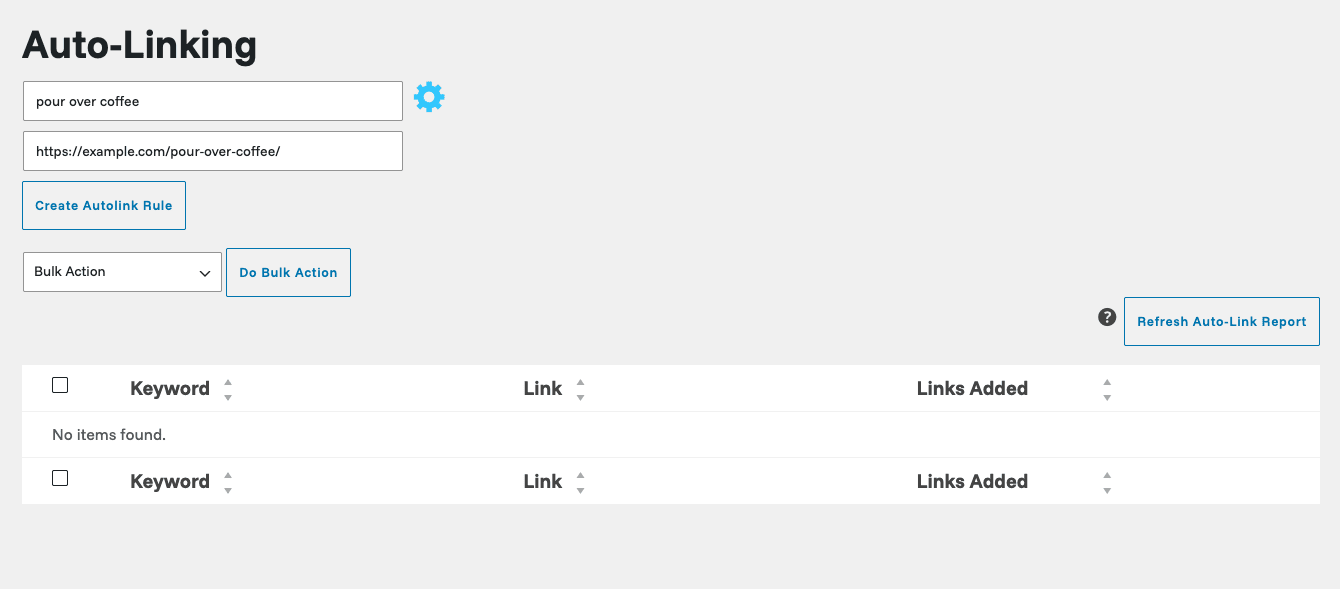
The rule editor (that little gear icon next to the keyword field) gives you a lot of control, and you’ll want it. You can set:
- Only link once per post, so the keyword doesn’t turn into a link five times in one article.
- A limit on total insertions, capping how many auto-links a rule creates sitewide.
- Case sensitivity, long-tail prioritization, and a date restriction so the rule only applies to posts published after a certain date.
- Category restrictions, so a rule only fires inside specific categories.
You can also bulk-import rules from a CSV. The plugin ships with a sample file (autolink-import-sample.csv) showing every column, which is the fastest way to set up dozens of rules at once if you’re migrating from a spreadsheet of keyword-to-URL mappings.
Heads-up: auto-linking is where people get themselves into trouble, and I mean it. It’s tempting to set a rule for your main keyword and let it link everywhere. Don’t. Over-optimized exact-match anchors at scale are a classic spam signal, and a single rule firing across two hundred posts looks exactly like what a spammer does. Use the "link once per post" toggle, set insertion limits, and keep auto-linking for genuinely useful navigational terms (your "contact us," a glossary term, a cornerstone definition) rather than your prized money keyword. The whole anti-pattern section below is dedicated to this, because it’s the mistake I see most.
The broken link checker
Internal links rot. You change a slug, you delete an old post, you fix a typo in a URL, and suddenly links scattered across your archive point nowhere. Link Whisper scans for broken internal and external links and lists them in one report.
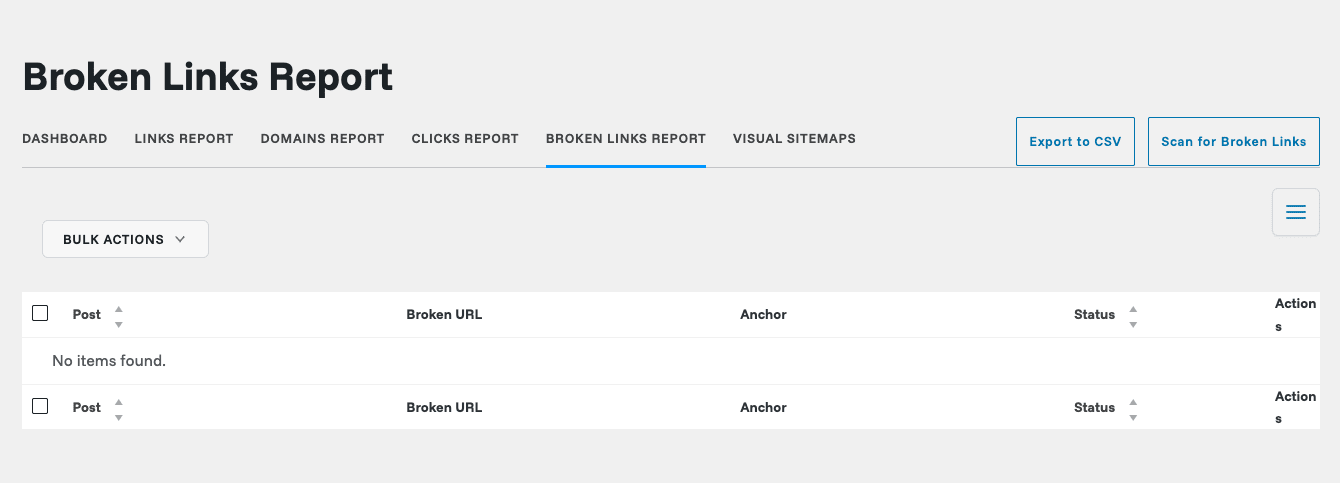
The report shows you the post the broken link lives in, the broken URL, the anchor text, and the HTTP status it got back. Under the hood it flags links that return status codes like 404, 500, 503, and a few others as broken. You can fix a broken link straight from the report (it’ll update the URL across every place it appears) or export the whole list to CSV to work through it elsewhere.
The honest part: this is a solid feature, but it’s not the reason to buy Link Whisper. If broken links are your only concern, dedicated checkers do it more thoroughly. Here it’s a useful bonus that lives next to your linking work, which is convenient. And convenience is worth something, because a broken link checker you’ll actually open beats a better one you forget exists.
There’s also a URL Changer tool worth a mention: if you need to change a post’s URL, it’ll update every internal link pointing at the old URL automatically, so you don’t strand a bunch of links the moment you rename a slug.
Click tracking: do your internal links actually get clicked?
This is the feature I didn’t expect to care about and ended up liking. Link Whisper can track how many times your internal links get clicked, then show you the numbers per post.
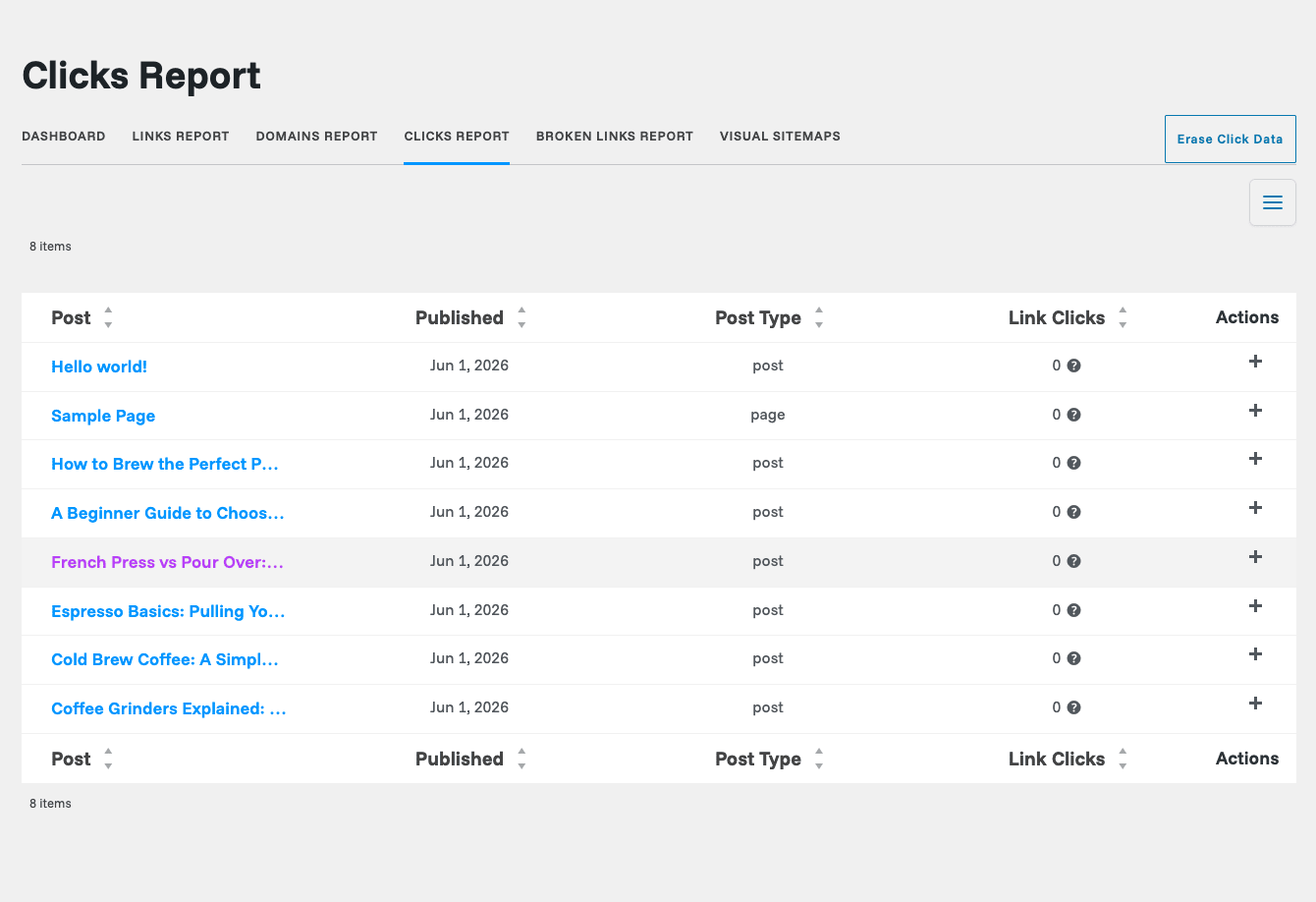
Why does this matter? Because adding internal links is only half the job. If you’re stuffing links readers never click, you’re decorating, not helping. Click tracking tells you which links actually move people through your site, so you can double down on the placements that work and rethink the ones that don’t. It’s the closest thing to a feedback loop for your linking strategy.
Note: click tracking gathers a tracking ID and the visitor’s IP to count clicks, and it stores that in its own database table with a scheduled cleanup. There’s a setting to disable the IP gathering if you’d rather keep things lean for privacy, and I’d suggest reviewing it against your privacy policy if you’re in a GDPR-sensitive market. It’s not on by accident, but you should know it’s collecting that data.
Google Search Console and target keywords
This is the feature that nudges Link Whisper from "internal linking tool" toward "internal linking strategy tool." Connect your Google Search Console account and Link Whisper pulls in the keywords your pages already rank for and the impressions they’re getting.
The point is to find linking opportunities based on real data instead of guesses. If a page is getting impressions for a keyword but sitting on page two, a few well-placed internal links with that anchor might be exactly the push it needs. Search Console tells you which pages are on the edge, and Link Whisper helps you build the links to nudge them over.
Pair that with Target Keywords, where you assign a focus keyword to each post and Link Whisper hunts for places across your site where that keyword appears and could become a link. It’s the same suggestion engine, but pointed at your strategic terms instead of just whatever phrases happen to match.
The honest part: the GSC connection is genuinely useful, but it’s also the feature most likely to give you setup grief. OAuth connections to Google break, tokens expire, and if your site is behind certain security setups the authorization handshake can fail. When it works it’s great. When it doesn’t, you’ll spend twenty minutes re-authorizing. Budget for that.
Setting it up and running your first scan
Getting started is refreshingly guided. Here’s the path, step by step, with what to expect at each one.
Step 1: Install and activate. Upload the plugin under Plugins » Add New » Upload Plugin, activate it, and you’ll see a new Link Whisper item in your admin sidebar. On first run, the only thing visible is the setup wizard, which is by design. The full menu (reports, auto-linking, and the rest) only appears after your first scan, so don’t panic if it looks bare at first.
Step 2: Run the One Click Setup wizard. Go to Link Whisper » One Click Setup. The wizard walks you through three steps: identify your "money pages" (the posts you most want links pointing to), optionally connect Google Search Console, and then scan and link your site. You can skip the money pages and the Search Console steps if you just want to get going.
Step 3: Let the scan run. This is the one part that takes patience. Link Whisper reads every post and page on your site to build its link index. On a small site it’s done in under a minute. On a site with thousands of posts, this scan is the heaviest thing the plugin ever does, and it can take a while and lean on your server. Run it during a quiet traffic window if your site is large.
Step 4: Configure the General Settings. Once the scan is done, head to Link Whisper » Settings. This is where you tune the engine to your site.
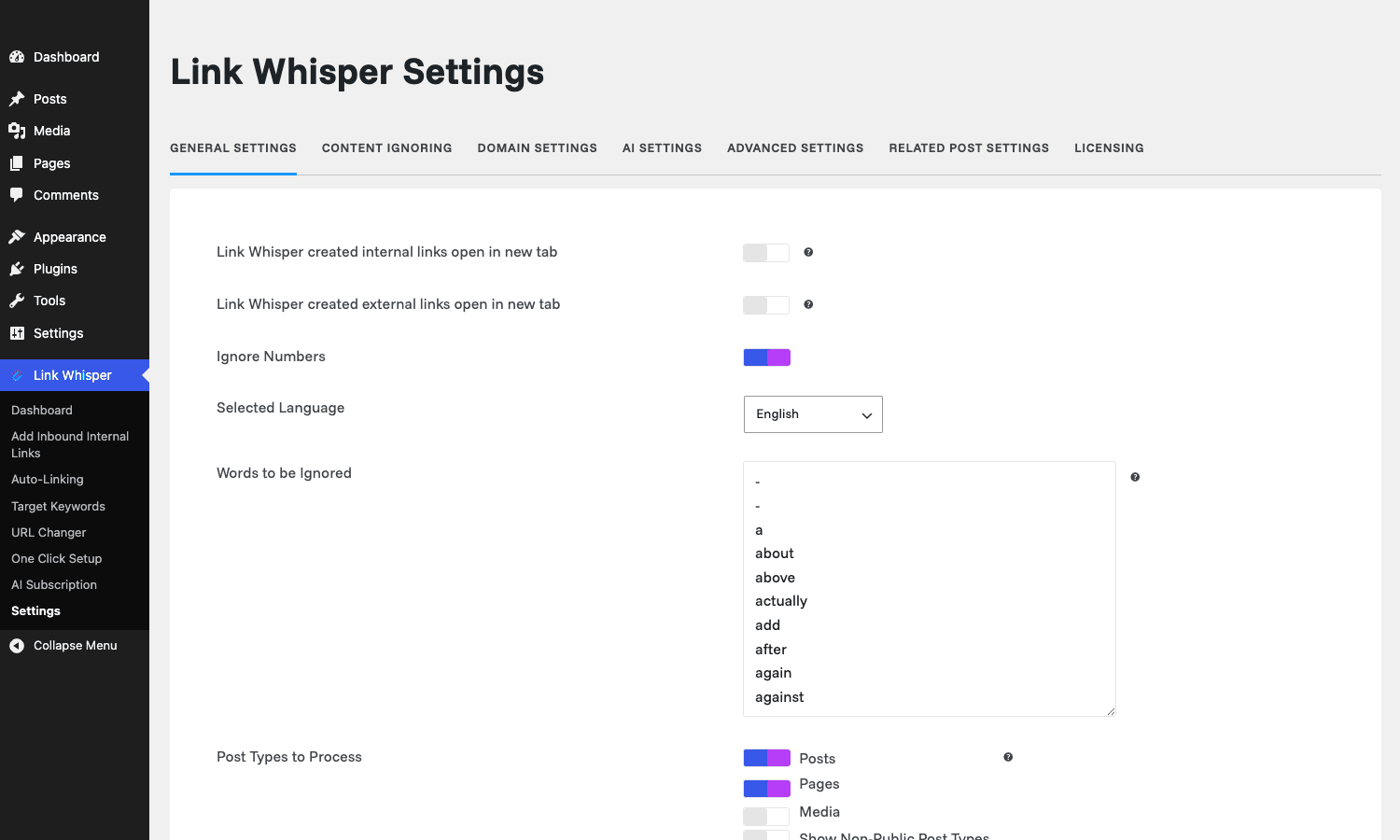
The settings worth your attention right away:
- Post Types to Process. By default it handles posts and pages. If you run WooCommerce or a custom post type, enable those here so products and custom content get suggestions too.
- Number of Sentences to Skip. Defaults to 3, meaning it won’t suggest links in the opening sentences. Keeps your intros clean.
- Max Outbound Links Per Post and Max Inbound Links Per Post. Both default to "No Limit." On a large site I’d cap these so a single post doesn’t become a link farm.
- Links open in new tab. Off by default for internal links, which is correct. Leave internal links opening in the same tab.
- Words to be Ignored. A stopword list so common words ("a," "about," "after") never get treated as link anchors. You can add your own.
There are more tabs (Content Ignoring, Domain Settings, AI Settings, Advanced, Related Post, Licensing), but the General tab is the one that shapes 90% of the behavior. Set it once and you rarely touch it again.
Don’t auto-link the same keyword across your whole site
This is the mistake I want to save you from, because it’s the one that can actually hurt you, not just annoy you.
Here’s the scenario. You sell a product, say project management software, and "project management software" is your golden keyword. You’re excited about auto-linking, so you create one rule: link "project management software" to your sales page, everywhere it appears, no limits. You feel clever. You just built two hundred internal links in one click.
You’ve also just built two hundred identical exact-match anchor links pointing at one page, and that is a textbook over-optimization pattern. Google’s algorithms have spent years learning that natural internal linking has varied anchors and sensible density. A site where one phrase always links to one page, hundreds of times, looks engineered. At best those links get discounted. At worst, on a site already skating on thin ice, it contributes to a manual action or an algorithmic demotion.
There’s a reader cost too. A keyword that’s linked in every paragraph is exhausting to read and screams "SEO site." Trust drops, bounce rate climbs, and you wanted more engagement, not less.
The fix is discipline, and Link Whisper gives you the tools for it. Use the "only link once per post" toggle so a keyword links at most once per article. Set an insertion limit so the rule caps out at a reasonable sitewide number. Vary your anchors by creating a few rules with different natural phrases instead of one rule hammering the exact-match term. And reserve auto-linking for terms where a link genuinely helps navigation, not for your one keyword you’re desperate to rank. Auto-linking is a scalpel, not a firehose. Treat it like one and it’s a real asset. Treat it like a firehose and you’ll be undoing the damage for months.
Developer reference: hooks, filters, and REST routes
Under the hood Link Whisper is built around the Wpil_ class prefix and exposes a respectable set of wpil_ hooks. Everything below I pulled from the plugin source, so these exist. Here are the ones worth knowing, with realistic examples.
Cap the per-batch processing time on slow hosts. The scan and linking jobs run in time-limited batches (default 90 seconds). On shared hosting that hits resource limits, lower it so each batch finishes inside your host’s PHP timeout.
add_filter( 'wpil_filter_processing_time_limit', function ( $limit ) {
    return 30; // seconds per batch, safer on constrained hosts
} );
Change the capability required to use Link Whisper’s admin pages. By default the main pages check manage_categories. If you want editors (not just admins) to manage internal links, swap the capability.
add_filter( 'wpil_filter_main_permission_check', function ( $capability ) {
    return 'edit_others_posts';
} );
Customize the title attribute on auto-inserted links. Useful if you want a consistent title on every autolink for accessibility or tracking.
add_filter( 'wpil_filter_autolink_title', function ( $title, $wp_object, $keyword ) {
    return 'Read more about ' . $keyword;
}, 10, 3 );
Send broken-link notification emails somewhere other than the admin. By default status emails go to the site admin address. Redirect or add recipients.
add_filter( 'wpil_email_notification_addresses', function ( $addresses ) {
    $addresses[] = 'seo@example.com';
    return $addresses;
} );
Add classes Link Whisper should ignore when scanning links. It already skips page-numbers, navigation, and nav-link. Add your own (say a "related-posts" widget class) so those links don’t count toward your reports.
add_filter( 'wpil_filter_link_attr_classes', function ( $ignore_classes ) {
    $ignore_classes[] = 'related-posts-widget';
    return $ignore_classes;
} );
Filter which roles appear in the role-based settings. Pairs with the permission filter when you’re building a custom editorial workflow.
add_filter( 'wpil_filter_available_roles', function ( $roles ) {
    unset( $roles['subscriber'] );
    return $roles;
} );
Turn off telemetry entirely. Link Whisper collects anonymous usage data by default. One filter kills it.
add_filter( 'wpil_disable_telemetry', '__return_true' );
Hook into link insertion events. When a link is added to a post or term, Link Whisper fires an action you can hang your own logic on (cache purge, logging, a webhook).
add_action( 'wpil_meta_content_data_add_link', function ( $object_id, $type, $meta ) {
    // $type is 'post' or 'term'
    error_log( "Link Whisper added a link to {$type} {$object_id}" );
}, 10, 3 );
Output your own related-posts markup. If you’d rather render related posts yourself, flip the filter and use the action.
add_filter( 'wpil_use_custom_related_posts', '__return_true' );
add_action( 'wpil_output_custom_related_posts', function ( $data ) {
    // render your own related posts block from $data
} );
There are more filters in the source if you go digging (wpil_disable_content_link_formatting, wpil_filter_active_link_attrs, wpil_add_link_attr_change_url, wpil_filter_autolink_ids_alternate_locations, wpil_filter_menu_listings, plus staging-URL swap filters for migrations), but the set above covers the things most developers reach for.
REST routes. Link Whisper registers a handful of endpoints under the link-whisper namespace: link-whisper/code (the Google Search Console OAuth callback), link-whisper/site-interlinking (the cross-site interlinking feature for managing links across connected sites), and link-whisper/ai-auth (the AI subscription auth handler). All are permission-gated and not shown in the public REST index, so they’re internal plumbing rather than a public API you’d build against.
Troubleshooting the problems people actually hit
The first scan is slow or times out on a big site. This is the number one complaint, and it’s real. The initial scan reads every post you have. On a multi-thousand-post site it can crawl, and on cheap hosting it can hit a PHP timeout mid-scan. The fixes: run it during low traffic, and if it’s timing out, use the wpil_filter_processing_time_limit filter to shrink the batch size so each chunk finishes inside your host’s limit. The scan resumes in batches, so a slow scan still completes, it just takes several passes.
The suggestions look off or irrelevant. Remember, the core engine is phrase matching, not semantic understanding. If you’re getting weird suggestions, tighten things up: assign target keywords to your posts so it has better anchors to match, add noise words to the ignore list, and lean on the suggestion score sorting. If you want genuinely contextual suggestions, that’s what the optional AI scan is for, but it costs credits or your own OpenAI key.
Auto-linking inserted too many links. If you set a rule too aggressively, you can see the count under "Links Added" in the auto-linking table, and you can refresh or delete the rule, which removes the links it created. This is exactly why you set "link once per post" and insertion limits before you let a rule loose, not after.
Links aren’t appearing on the front end. Two usual suspects. First, caching: if you’ve got a page cache, the old version is being served, so purge it after inserting links. Second, the block vs classic question: Link Whisper inserts links into your post content, and on a heavily block-based or page-builder layout it sometimes can’t cleanly insert into certain block types. If a link won’t insert, the content lives in a block Link Whisper treats as unprocessable, and you’ll need to add that link manually.
Google Search Console won’t connect. OAuth is finicky. Re-run the authorization, make sure you’re authorizing with the Google account that owns the Search Console property, and if your site has aggressive security rules check that the REST callback endpoint (link-whisper/code) isn’t being blocked.
Compatibility: editors, builders, hosting, multisite
Editors. Link Whisper works in both the block editor (Gutenberg) and the classic editor. In Gutenberg, the suggestions box lives in the meta-box area below the editor canvas. It also handles standard post and page content reliably.
Page builders. This is the soft spot. Elementor, Divi, Beaver Builder, and similar builders store content in their own structures rather than plain post content. Link Whisper can read and suggest links for builder content in many cases, but insertion into deeply nested builder modules is hit or miss. If your whole site is built in Elementor, test on a few posts before assuming it’ll insert everywhere. For standard WordPress content it’s rock solid; for builder-heavy layouts, verify.
WooCommerce. It treats products as a post type, so once you enable the product post type in settings, you get suggestions and reporting for your store pages too. Interlinking related products is a legitimate use case.
Hosting and PHP. It runs on any reasonably modern WordPress and PHP setup. The thing that strains hosting isn’t day-to-day use, it’s that initial sitewide scan and the report generation on very large sites. Decent hosting handles it fine; budget shared hosting on a 5,000-post site will feel it.
Multisite. Link Whisper supports multisite, and the premium tiers cover multiple sites under one license. There’s also a connected-sites feature for managing internal linking across separate installs, which is niche but genuinely useful if you run a network.
SEO plugins. It coexists fine with the big SEO plugins. Link Whisper handles internal linking; your SEO plugin handles meta, schema, and sitemaps. They don’t fight. If you run Rank Math or Yoast SEO Premium, Link Whisper slots in alongside them rather than replacing anything. Those plugins have light internal-link hints of their own, but they’re nowhere near as deep, which brings us to the comparison.
Pricing and licensing
Link Whisper comes in two halves. There’s a free version on the WordPress.org repository that gives you basic in-editor suggestions and the core reports, which is a fair way to feel out whether the workflow fits you. Then there’s the premium plugin, which is where auto-linking, the broken link checker, click tracking, Google Search Console integration, target keywords, and the heavier reporting live.
The premium licensing is tiered by the number of sites: a single-site license, a small multi-site bundle, and a larger agency bundle, all billed annually. The free version is genuinely usable for a small blog. But the features that turn Link Whisper from "nice suggestion box" into "internal linking command center" are all on the premium side, so if you’re serious about the strategy, that’s the version you want.
You can get the premium plugin through the Link Whisper listing on GPL Times, which is the full premium plugin delivered under the GPL store. If you want to road-test the suggestion workflow on a single site before committing, the free version on WordPress.org is the no-cost way in, and you can step up to the full plugin once you’ve felt the difference.
Link Whisper vs manual linking vs Internal Link Juicer vs Rank Math hints
The fairest way to judge Link Whisper is against the alternatives you’d actually consider. Here’s how it stacks up.
| Approach | Cost | Suggestions | Sitewide report | Orphan detection | Best for |
|---|---|---|---|---|---|
| Linking by hand | $0 | None, you remember | None | None, you guess | Tiny sites under 20 posts |
| Rank Math internal-link hints | Free / paid SEO plugin | Basic, per-post | No dedicated report | No | Sites already on Rank Math wanting light hints |
| Internal Link Juicer | Around $59/yr single site | Auto-link focused | Limited reporting | Partial | Auto-linking purists on German/EU sites |
| Link Whisper Premium | Around $77/yr single site | Strong, two-directional | Full sortable report | Yes, dedicated report | Content sites serious about link structure |
Let me put real numbers and trade-offs on that.
Manual linking costs nothing and gives you total control, but it doesn’t scale past about 20 posts. On a 100-post site, going back to add inbound links to a new article means opening dozens of old posts. Realistically you’d spend 30 to 45 minutes per new post doing it right, which is why nobody does it. Link Whisper turns that 30-plus minutes into about 2 minutes from the editor box.
Rank Math (and Yoast) ship light internal-link suggestions, but they’re an afterthought bolted onto an SEO suite, not the main event. There’s no sitewide inbound/outbound report, no orphan detection, no auto-linking engine, no click tracking. If you only want a gentle nudge while writing and you’re already running an SEO plugin, the built-in hints are fine and free. If you want to actually manage your link structure, they’re not in the same category. AIOSEO’s Link Assistant is the closest competitor among the SEO suites, and it’s the genuine alternative if you’re already on AIOSEO.
Internal Link Juicer is the closest dedicated rival, and it’s auto-linking first. It does keyword-to-URL auto-linking very well and tends to run a bit cheaper, around $59 per year for a single site versus roughly $77 for Link Whisper. But it leans heavily on the auto-link model and its reporting and orphan tooling are thinner. Link Whisper’s edge is the in-editor manual suggestions, the proper sitewide report, and the orphan and click data, which together make it a strategy tool rather than just an auto-linker.
The short version: if you’ve got under 20 posts, link by hand. If you live in an SEO suite and want a nudge, use its built-in hints. If auto-linking is literally all you want, Internal Link Juicer is a cheaper single-purpose pick. If you want to see and shape your whole internal link structure, Link Whisper is the one that does all four jobs.
FAQ
Does Link Whisper slow down my site?
For your visitors, no, not in any way they’ll notice. The heavy work (scanning, building the link index, generating reports) happens in the admin, not on page loads. The one real performance cost is the initial sitewide scan, which on a large site is genuinely demanding on your server. After that, the front-end impact is negligible. If you’re worried, the click-tracking script is the only thing it adds to the front end, and you can leave that off.
Are the suggestions real AI?
By default, no, and I want to be clear about this because the marketing can blur it. The core suggestion engine is keyword and phrase matching: it finds phrases in your text that match the titles and target keywords of your other posts. There’s an optional AI layer you can enable with your own OpenAI API key (or by buying AI credits) that scores and improves suggestions using actual language models. But out of the box, what you’re getting is smart text matching, not semantic understanding. It works well, just don’t expect mind-reading on day one.
Will auto-linking get my site penalized?
It can if you abuse it, which is exactly why the anti-pattern section above exists. Auto-linking the same exact-match keyword across hundreds of posts is an over-optimization pattern Google’s algorithms recognize. Used carefully (link once per post, insertion limits, varied anchors, reserved for navigational terms), it’s perfectly safe and useful. The tool isn’t the problem; using it like a firehose is.
Does it work with Gutenberg and Elementor?
Gutenberg, yes, fully, the suggestions box sits below the editor. Elementor and other page builders are more complicated: Link Whisper can read and suggest for builder content, but inserting links into deeply nested builder modules is unreliable. If your site is built entirely in a page builder, test on a few posts before assuming it’ll work everywhere. For standard post and page content it’s completely solid.
How does it handle a really large site?
The reporting and the first scan are the stress points. On a site with thousands of posts, the initial scan is heavy and may run in several batches, and the reports take longer to generate. Use the processing time limit filter to keep batches inside your host’s PHP timeout, run the scan during low traffic, and consider better hosting if you’re on a large site and a budget plan. It does work at scale, it just asks more of your server to get there.
Can I undo links Link Whisper added?
Yes. Links you add through the suggestion box are normal links in your content, so you can delete them like any other link. Auto-link rules are reversible too: deleting or refreshing a rule removes the links it created, since those are inserted dynamically rather than hard-baked into your saved content. That dynamic insertion is also why auto-links don’t clutter your raw post content.
Do I need Google Search Console connected?
No, it’s optional. Link Whisper works fully without it. The GSC integration adds a layer of real ranking data to surface linking opportunities (which pages are getting impressions for which keywords), which is genuinely useful for strategy. But if you skip it, you still get all the suggestions, reports, orphan detection, and auto-linking. Connect it later if you want the extra signal.
What’s the real difference between free and premium?
The free version gives you the in-editor suggestions and the basic reports, which is enough to feel the workflow on a small blog. Premium adds the features that make it a strategy tool: auto-linking, the broken link checker, click tracking, Google Search Console integration, target keywords, the URL changer, and the deeper reporting. If you’re a hobbyist with 30 posts, free might be all you need. If you’re running a content business, the premium features are the point.
Does it edit my actual post content or insert links dynamically?
Manual links you accept from the suggestion box are written into your post content as real links. Auto-link rules, by contrast, are applied dynamically when the page renders, which is why they’re easy to bulk-remove and don’t bloat your saved content. It’s a sensible split: the links you deliberately place stay put, the automated ones stay flexible.
Is Link Whisper worth it?
If you publish regularly and your internal linking is a mess (and it almost certainly is, because everyone’s is), Link Whisper pays back the time you spend setting it up within the first cleanup session. The in-editor suggestions alone changed how I link, turning a task I dreaded into a couple of clicks per post. The sitewide report and orphan detection gave me a clear, finite to-do list instead of a vague guilt about "I should link my posts better."
It’s not flawless. The phrase-matching engine needs supervision, the first scan is heavy on big sites, auto-linking is dangerous in careless hands, and page-builder support is shaky. None of that is a dealbreaker, it’s just the honest shape of the thing. Go in knowing it’s a tool that makes you fast, not a robot that does your thinking.
For a content site that takes SEO seriously, it’s one of the few plugins where I can point at a specific, measurable habit it enabled (a monthly internal-linking pass that I actually keep) and say it earned its place. You can pick up the premium plugin from the Link Whisper page on GPL Times and put it to work on your own archive the same afternoon. If you want to go deeper on the SEO side of things, our walkthrough of setting up All in One SEO Pro pairs well, since internal linking and on-page SEO are two halves of the same job.