


If you’ve ever stitched the Meta Pixel, GA4, the Google Ads tag, and a TikTok pixel into the same WordPress site, you know how messy it gets. Three or four head snippets, a handful of "lite" plugins, half a dozen conditional events fired by hand. PixelYourSite Pro is the plugin you reach for when you want all of that managed from one screen.
It’s not new (the team has been building this since the original Facebook Pixel days), and it’s not flashy. What it is, is the most complete pixel manager you can install on WordPress without paying for a SaaS subscription.
Table of contents
- What PixelYourSite Pro is
- Key features at a glance
- How the plugin actually works
- Installation and first configuration
- Configuring each pixel
- Standard events, custom events, and triggers
- WooCommerce and EDD integration
- Real-world scenarios
- Developer reference: hooks, filters, REST
- Performance, compatibility, and gotchas
- Pricing and licensing
- Frequently asked questions
- Final thoughts
What PixelYourSite Pro is
PixelYourSite Pro is a single WordPress plugin that takes the role of about half a dozen separate tracking plugins. It installs and manages the Meta Pixel (with full Conversions API), Google Analytics 4, the Google Ads tag with Enhanced Conversions, the TikTok Pixel (browser and Events API server-side), the Pinterest Tag, the Bing/Microsoft UET tag, and a Google Tag Manager container. There’s also a Head & Footer module for pasting in anything else (LinkedIn Insight, X/Twitter, Snapchat, a custom script).
The plugin is built by the PixelYourSite team out of Bucharest. They’ve been doing this for years, going back to when the only pixel anybody cared about was Facebook’s. The free version on wordpress.org handles a Meta Pixel and basic GA4. The Pro version, which is what most shop owners eventually upgrade to, adds the rest of the platforms, Conversions API, custom events, WooCommerce and EDD integration, advanced matching, GDPR / Google Consent Mode v2 support, the visual Event Setup Tool, and the developer hooks I’ll walk through later.
Why does this matter? Two reasons.
First, ad platforms have spent the last few years pushing tracking from browser-side cookies to server-side APIs. Conversions API (CAPI) for Meta, the Events API for TikTok, server-side GTM for Google. Doing that right by hand on WordPress is painful. PixelYourSite Pro just does it.
Second, every pixel speaks a slightly different dialect. Meta wants content_ids and content_type. GA4 wants items arrays. Google Ads wants value and currency. The plugin maps your WooCommerce or EDD order into the right shape for each one, so you don’t have to.
Key features at a glance
- All the major ad pixels in one plugin: Meta Pixel + Conversions API, GA4, Google Ads (with Enhanced Conversions), TikTok Pixel + Events API, Pinterest Tag, Microsoft/Bing UET, and a Google Tag Manager container. Head & Footer module for LinkedIn, Snapchat, X/Twitter, or anything else.
- Server-side tracking: Conversions API events fire from your server (not just the browser), so iOS 14+ ATT, ad blockers, and cookie banners don’t black-hole your conversion data.
- WooCommerce and EDD integration: every standard ecommerce event (ViewContent, AddToCart, InitiateCheckout, AddPaymentInfo, Purchase) is wired up automatically, on every checkout path the plugin supports (classic shortcode checkout, Blocks checkout, CartFlows).
- Visual Event Setup Tool: load any page on your own site inside an in-admin iframe and click the element you want to track. The plugin saves the selector and fires an event without you writing JS.
- Custom events: build your own events triggered by URL, click, form submit, scroll, or time on page. Send them to whichever pixels you want with whatever parameters you want.
- Advanced matching: hashed email / phone / name / location attached to every event for better attribution (this is what makes Meta’s CAPI work properly).
- Google Consent Mode v2 and ConsentMagic compatibility: integrates with most major consent plugins so events are gated until the visitor opts in.
- Filter & Hook list inside the admin: a dedicated page that lists every
apply_filtersanddo_actionthe plugin exposes, with one-click jump to docs. Whoever wrote this clearly thinks about developers. - System Report: dumps your environment, active modules, plugin versions, and recent event log into a single text blob you can paste into a support ticket.
How the plugin actually works
Conceptually the plugin has three layers.
Pixel modules. Each ad platform is a module. The Meta module knows how to write the Meta Pixel <script> to the head, how to send a server-side event, what parameter names Meta expects, and how to handle the no-script fallback. The Google Analytics module does the same for GA4. They’re not aware of each other.
Event registry. The plugin keeps a registry of events. Standard events (ViewContent, AddToCart, Purchase, Lead, etc.) are registered at boot, and custom events you create in the admin get added to the registry. Each event knows which pixels it should fire on and which parameters it should send.
Trigger layer. Events fire when their trigger condition is met. For WooCommerce, the trigger is a hook (woocommerce_checkout_order_processed for Purchase). For custom events, the trigger can be a URL pattern, a CSS-selector click, a form submit, a scroll depth, or time on page.
When something triggers, the plugin asks every enabled pixel module to translate the event into its own format and fire it (browser-side via the pixel’s JS API, server-side via the platform’s HTTP API). This separation is why a single Purchase becomes seven outbound events without you wiring them up individually.
Here’s the Dashboard you land on when you open the plugin:
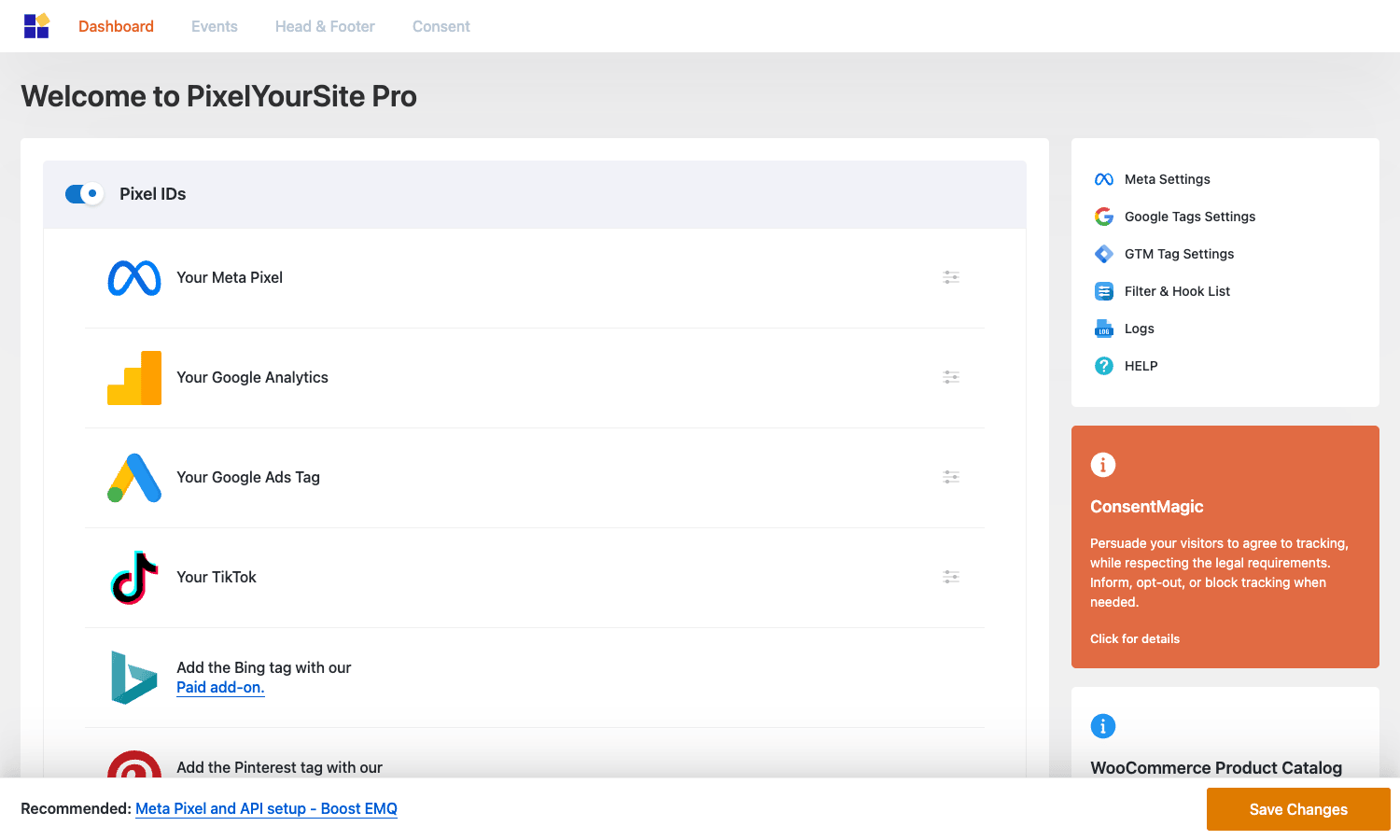
Every ad platform you support gets a row. Pop in the pixel ID, flip the toggle, save. That’s the basic flow.
Installation and first configuration
The install path is short. Either you use the WordPress.org "PixelYourSite" plugin and then install the Pro add-on on top, or you go straight to the Pro plugin (single zip). Once active, the plugin shows up as a top-level PixelYourSite menu in the WP admin.
The first run drops you on the Dashboard tab where you can paste in each pixel ID:
- Your Meta Pixel: the 15-digit Meta/Facebook Pixel ID.
- Your Google Analytics: the GA4 Measurement ID (
G-XXXXXXX). - Your Google Ads Tag: the Google Ads tag ID (
AW-XXXXXXX) and one or more conversion labels. - Your TikTok: the TikTok Pixel ID.
- Pinterest and Bing: ad add-ons that activate the relevant module when configured.
- GTM: if you’d rather route everything through Google Tag Manager, enter the GTM-XXXX container ID and the plugin will publish a
dataLayeryou can listen to from GTM.
Save. Reload your front-end. Open the browser dev tools, switch to the Network tab, and you should see network calls to connect.facebook.net, googletagmanager.com, analytics.tiktok.com, and so on.
There’s a "Recommended: Meta Pixel and API setup – Boost EMQ" banner at the bottom of every admin page. It’s a link to the plugin author’s free guide on event match quality. Worth reading once.
Walking through Meta / Facebook settings
Pop open the Meta Settings tab from the right rail and you get the per-platform options:
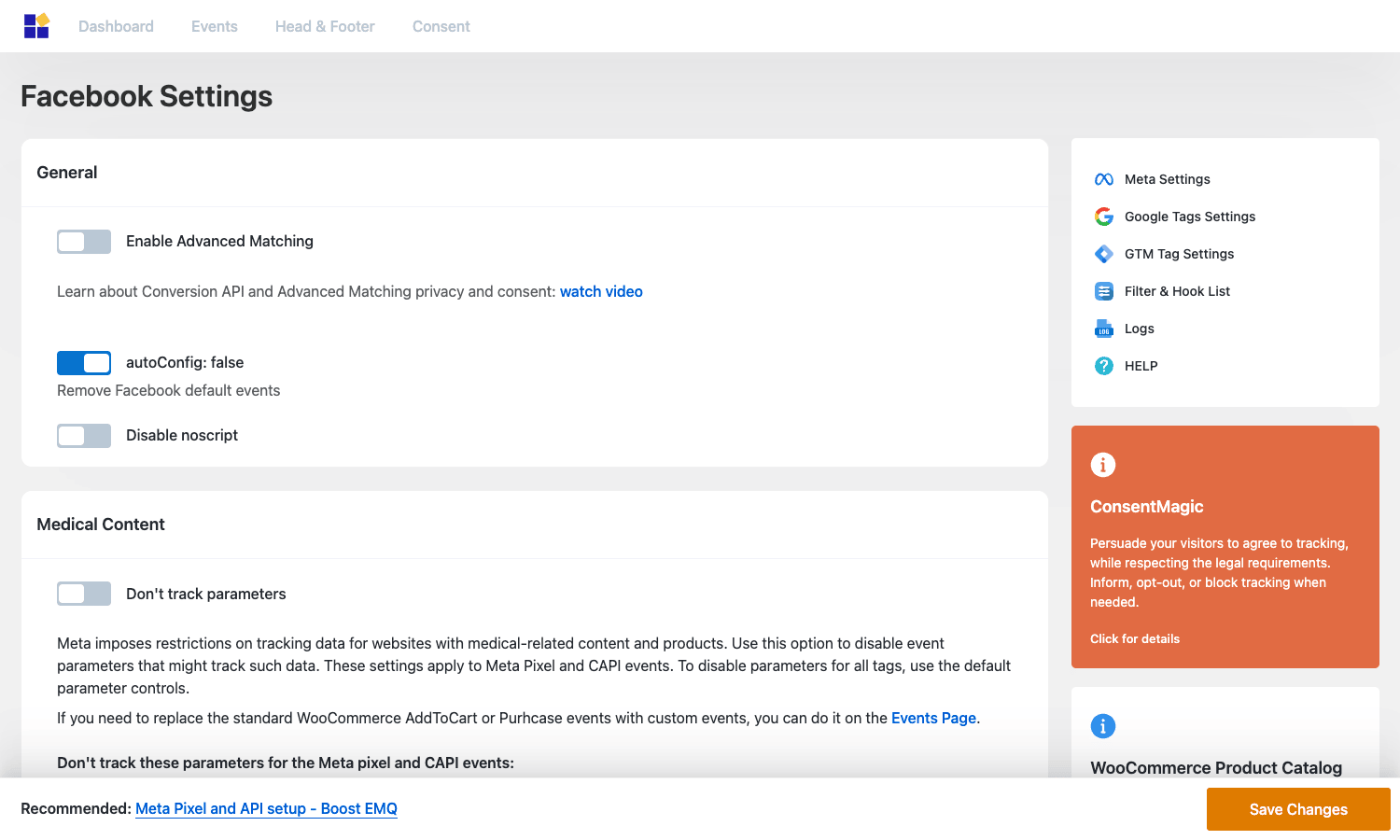
A few things worth calling out here:
- Enable Advanced Matching sends a hashed email, phone, first name, last name, and location with each event. It’s how Meta connects a browser session to a Facebook user and it dramatically improves event match quality. Turn it on.
- autoConfig controls whether Meta’s auto-tracking JS picks up button clicks, form submits, and similar interactions in addition to the events you fire. Most people want this off so they have explicit control.
- Disable noscript removes the
<noscript><img></noscript>fallback. Leave this off unless you have a specific reason. - Medical Content lets you strip event parameters that could be interpreted as health data, a workaround for Meta’s restrictions on medical-related sites.
Conversions API setup lives under here too. You paste in the Meta access token and the plugin starts firing server-side mirrors of every browser event. That’s the iOS 14 / ATT / ad-blocker bypass story in one toggle.
Google Tags, GA4, Google Ads
The Google Tags Settings tab covers GA4 + Google Ads in one place because they share a tag now:
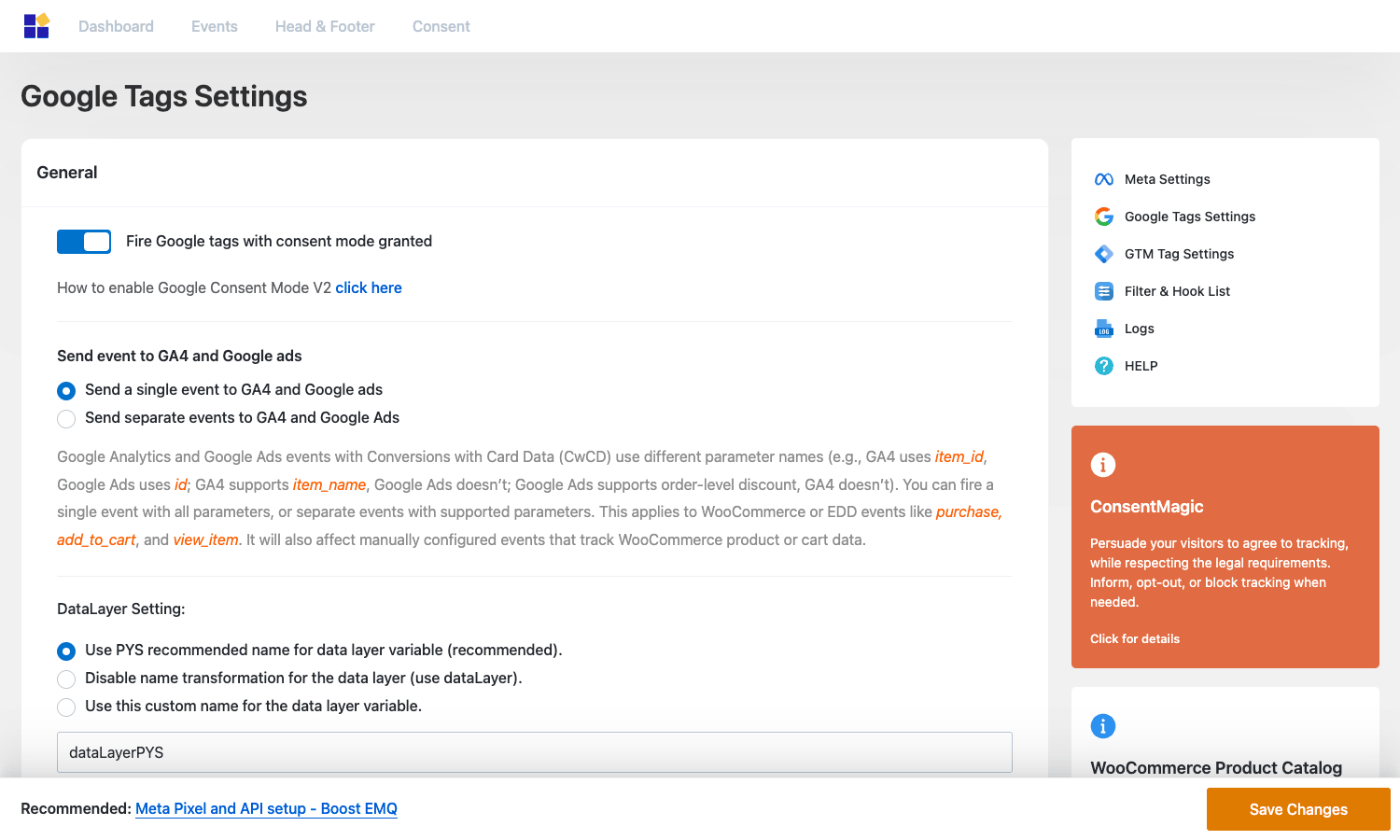
The thing to know: GA4 and Google Ads expect slightly different parameter names. GA4 uses item_id and item_name. Google Ads uses id and supports item_name. The plugin lets you choose whether to send one combined event that satisfies both, or two separate events with each pixel’s exact parameter names. The "Send a single event" option is the safer default. The "Send separate events" option gives you per-platform precision at the cost of one extra outbound request.
The toggle for Google Consent Mode v2 is on the same screen. Enable it and the plugin will write the consent-mode gtag('consent', 'default',...) initialisation, and update consent state when your consent plugin tells it the visitor accepted (or denied) ad / analytics storage.
GTM container
If you’d rather centralise tag management in Google Tag Manager, the GTM Tag Settings tab is your friend:
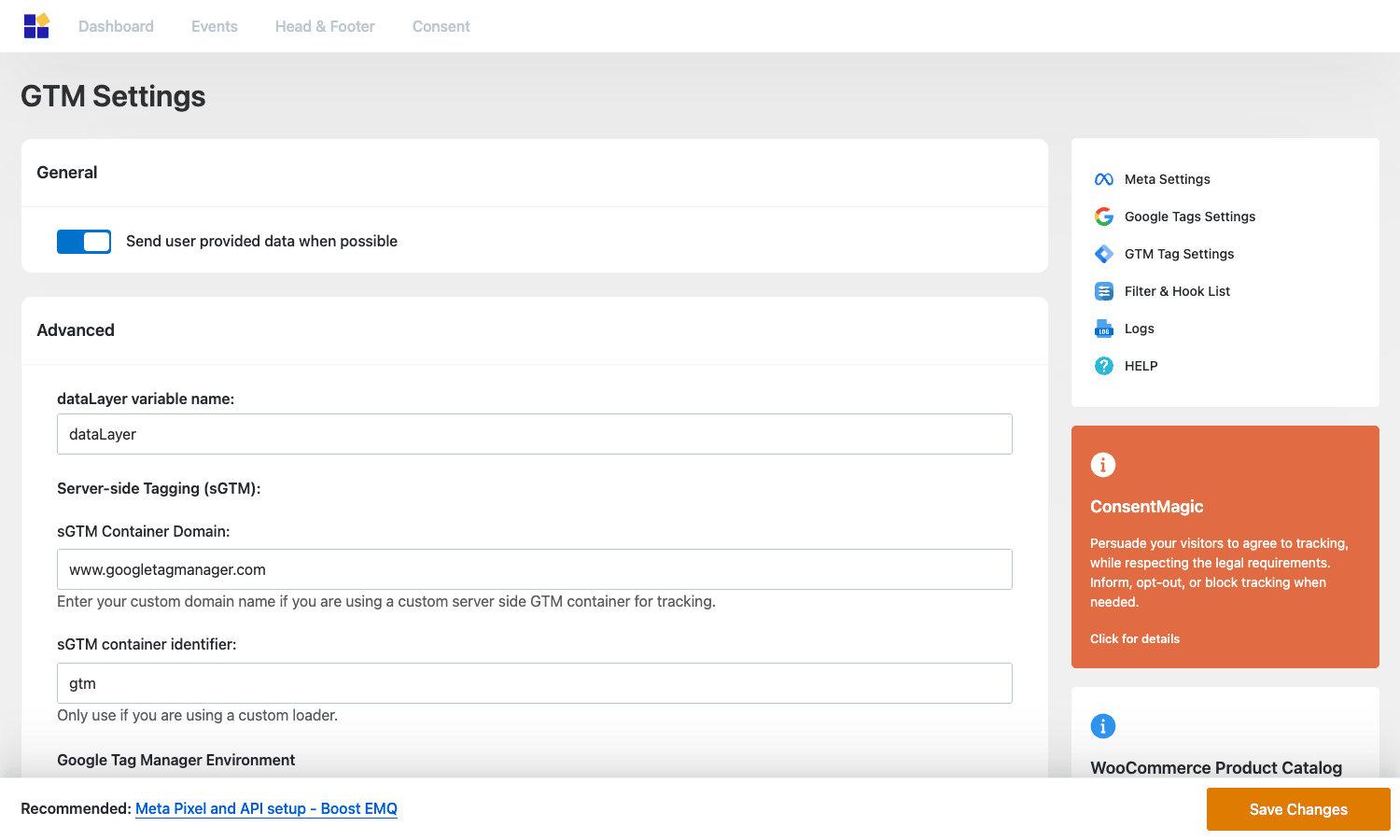
The plugin writes a JS data layer (dataLayerPYS by default, configurable) and the GTM container snippet. Every event PixelYourSite fires is also pushed to the dataLayer with named parameters, so you can build any custom GTM tag against it. There’s optional support for a custom server-side GTM container domain too. Useful if you run your own server-side GTM endpoint for cookie persistence.
Configuring each pixel
PixelYourSite Pro splits "configure the pixel ID" (Dashboard) from "configure how the pixel behaves" (the per-pixel settings tabs in the right rail). It makes sense once you see it.
The right-rail nav on every plugin screen includes:
- Meta Settings: Advanced Matching, CAPI, autoConfig, Medical Content, noscript, etc.
- Google Tags Settings: GA4 + Ads behaviour, consent mode, item id mapping.
- GTM Tag Settings: GTM container, dataLayer name, server-side GTM endpoint.
- Filter & Hook List: the dev reference (see below).
- Logs: per-event log of everything the plugin fired (or skipped), useful for debugging.
- HELP: link to the plugin’s docs site.
The orange ConsentMagic and WooCommerce Product Catalog boxes you see on each screenshot are upsells to the author’s other paid add-ons. They’re informational only and won’t fire any events.
Standard events, custom events, and triggers
The Events tab is the heart of the plugin if you go beyond ecommerce-out-of-the-box.
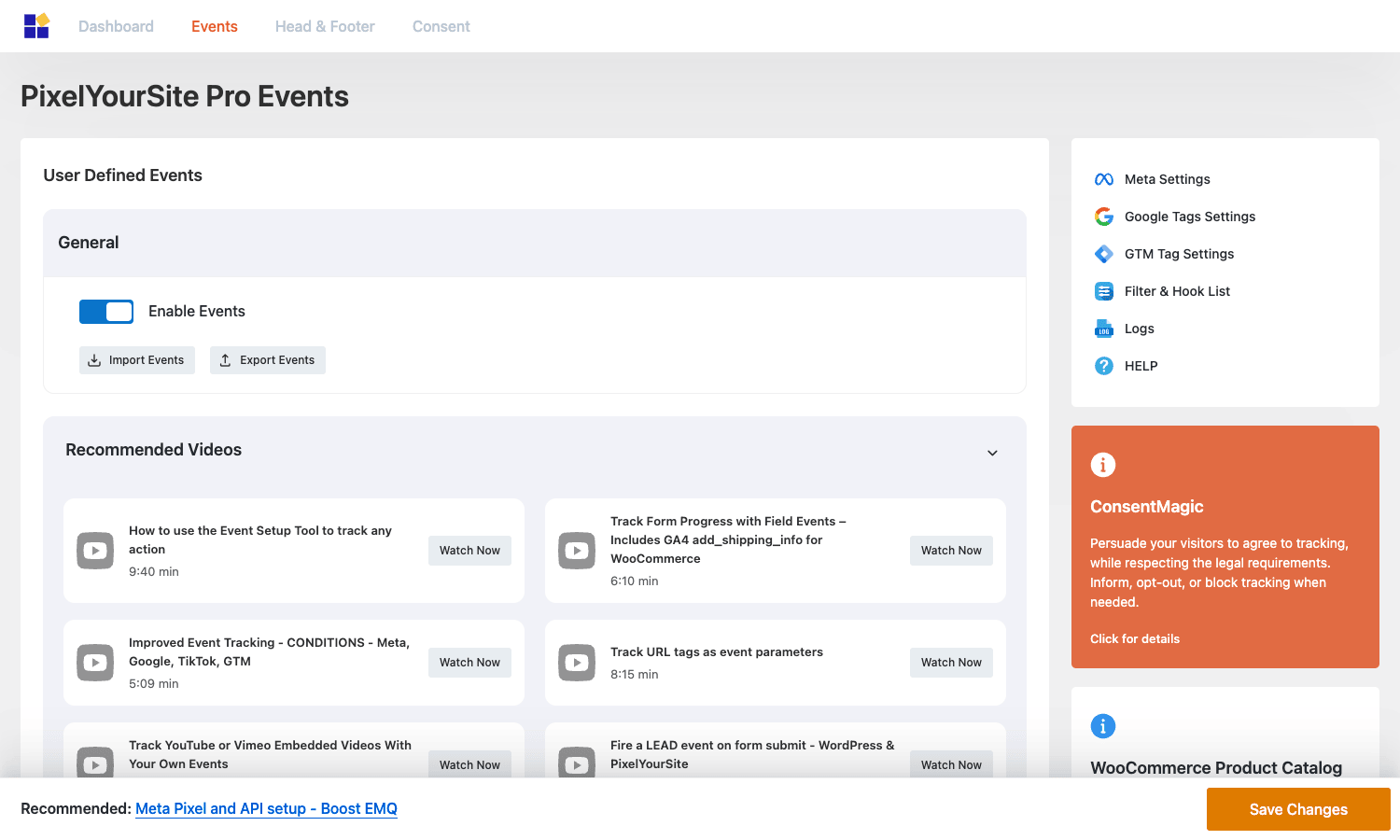
The first toggle, Enable Events, is the master switch for custom events. The Import Events / Export Events buttons let you move event definitions between sites (a real lifesaver if you manage a staging + production pair, or several client sites with similar setups).
Below that is the Start Event Setup Tool, which loads any URL on your site inside an admin iframe and lets you click elements to record selectors. If you’ve used Google Tag Manager’s preview mode you already know the idea, this is the same thing in plugin form.
And the Events List is where every custom event you create lives. Hit "Add" and you get the event editor:
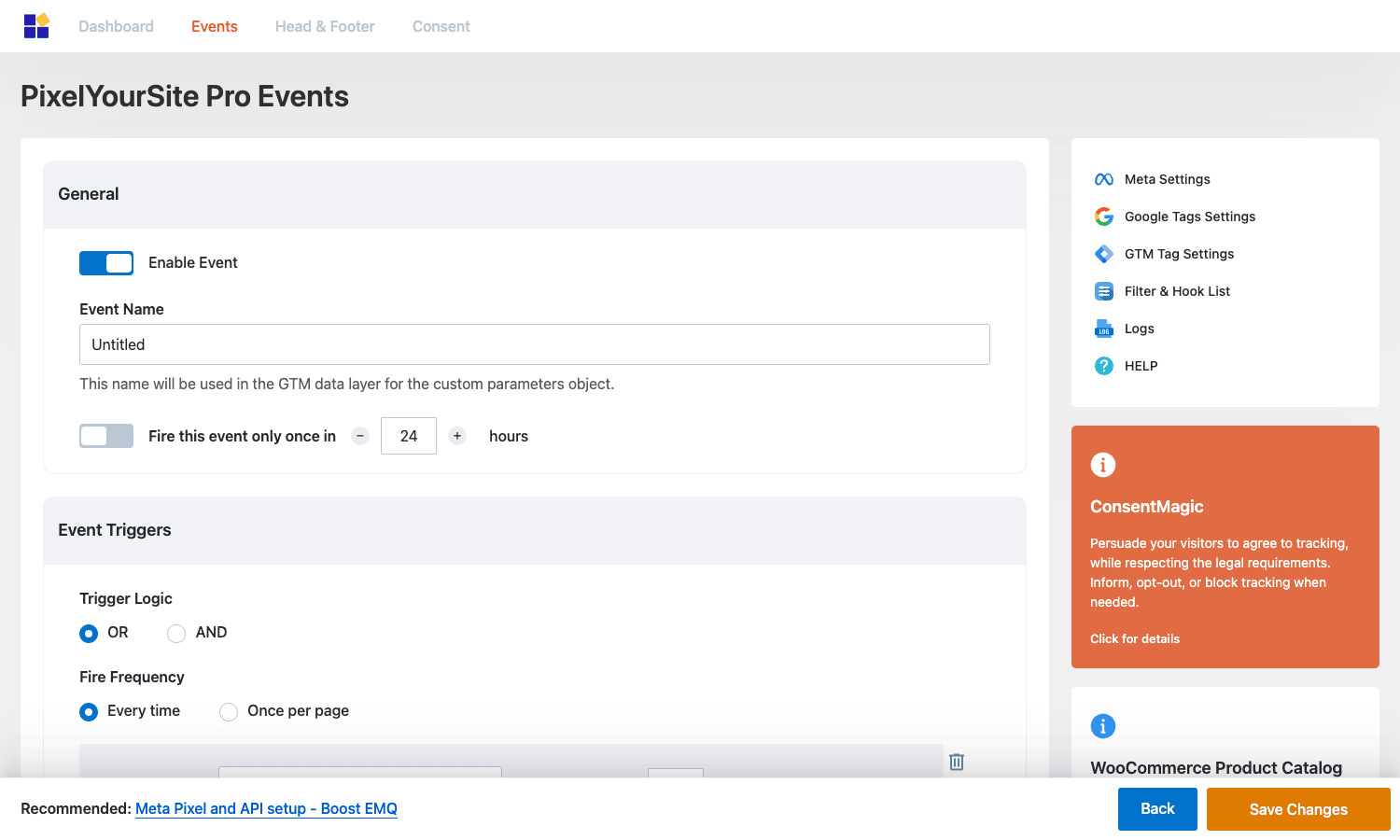
Each custom event has three blocks:
- General: name, the "fire this event only once in N hours" deduplication, and an enable toggle.
- Event Triggers: one or more triggers (URL match, page tag, click selector, form submit, scroll, time on page) combined with OR or AND logic, plus how often the event should fire on a given page.
- Event Parameters: which pixels the event should fire on, what
value,currency,content_ids, custom params, etc. it should send to each.
Standard events that come pre-configured (you don’t have to create them) include the entire ecommerce funnel for WooCommerce / EDD plus general site events: Lead, CompleteRegistration, Subscribe, Search, Contact, ViewCategory, AddToWishlist, SignUp.
The dynamic parameters feature is where this stops being a "click a few toggles" plugin and starts being a real tag manager. You can use placeholders like {form.field_name}, {url.param:utm_source}, {post_meta:key}, and {user.email} inside event parameter values. When the event fires, the placeholder is replaced with the live value. So you can build, for example, a Lead event that captures the email from a Contact Form 7 submission and sends it (hashed) as the Meta CAPI external_id.
WooCommerce and EDD integration
The biggest reason most people install PixelYourSite Pro is WooCommerce tracking. Here’s what it wires up automatically once WooCommerce is active:
- ViewContent on product pages.
- ViewCategory on shop archive / category pages.
- AddToCart on Add to Cart button click and AJAX add.
- AddToWishlist if a wishlist plugin is detected.
- InitiateCheckout on the checkout page load.
- AddPaymentInfo when payment method is selected.
- Purchase on
woocommerce_checkout_order_processedANDwoocommerce_store_api_checkout_update_order_meta(the Blocks checkout path), so the new and old checkout both work.
For each, you can decide:
- Which pixels the event should fire on.
- What
content_idsshould look like (SKU vs WooCommerce product ID). - What
valueshould be: gross, net, with shipping, without, with tax. - Whether the event should send extra custom parameters from the order or cart.
- Whether the server-side mirror via CAPI / Events API should fire.
EDD (Easy Digital Downloads) gets a parallel set of options on the EDD tab. CartFlows gets its own tab. There’s also a hidden "user reports" feature that overlays per-customer event data on the WooCommerce New Order email, so the store owner can see a summary of what a buyer did before purchasing. You can turn that off if it’s noisy.
If you’re running WooCommerce-only and want the most ecommerce-specific tracker possible, Pixel Manager for WooCommerce is a closer-tailored option (no non-WC events, but extremely good Woo coverage including refunds and subscriptions). PixelYourSite Pro is the broader choice if your site has tracking needs outside of WooCommerce (lead forms, custom funnels, content site events, etc.) on top of the WooCommerce events.
Real-world scenarios
A few patterns I’ve seen work well in production.
Scenario 1: a Shopify-style attribution stack on WooCommerce
You want the same kind of multi-pixel attribution that big DTC brands run on Shopify, but you’re on WooCommerce and don’t want a SaaS subscription. PixelYourSite Pro covers about 80% of that on its own. Turn on Meta Pixel + CAPI, GA4 + Enhanced Conversions, TikTok Pixel + Events API, and Microsoft Bing if you run any Bing Ads. Enable Advanced Matching on all of them. The result is server-side mirrors of every ecommerce event on four ad platforms, all firing from one settings page.
Scenario 2: a content site monetising via affiliate or display
You don’t sell anything directly, you just want to know which articles bring conversions. Set up a custom event called affiliate_click with a CSS-selector trigger (a.affiliate, a[rel~="sponsored"]) and fire it as a Meta Lead and a GA4 select_content. Add {post_id} as a custom parameter. Now your GA4 reports can break down affiliate clicks by post, and Meta has a Lead event to optimise audiences against.
Scenario 3: B2B lead generation with Gravity Forms or a similar forms plugin
A SaaS marketing site collects demo-request form submissions through Gravity Forms. Create a custom event with a form-submit trigger filtered by the form ID. Pull the email field as {form.email} and send it (hashed, automatically) to Meta CAPI as external_id plus a Lead event with value 0 and currency USD. The plugin will also pass that email into GA4 as a user-provided identifier (if Google Enhanced Conversions is enabled). Result: Meta and Google both know about every demo signup, even if the form is on a separate page from the pixel install.
Scenario 4: GDPR-friendly EU site
You’re in the EU and your visitors must opt in before tracking starts. Install your consent plugin of choice. Turn on Google Consent Mode v2 under Google Tags Settings, configure the consent integration on the Consent tab, and you’re done. Until the visitor accepts ad-storage, Meta and TikTok pixels do nothing, and Google fires consent-mode "pingbacks" only. After consent, everything fires normally.
Scenario 5: paired with email + analytics tooling
PixelYourSite Pro handles the ad-pixel side. Pair it with MonsterInsights if you want pretty GA4 reports inside WP admin, or FluentCRM Pro for self-hosted email automation that fires off the same Lead / Purchase events. And if you also need site performance work, the cache layer in WP-Optimize Premium plays nicely with PixelYourSite (the plugin enqueues pixel JS in a way that doesn’t break with caching).
Developer reference: hooks, filters, REST
For everything PixelYourSite Pro does in the UI, it exposes a matching hook or filter for code. Here’s the most useful subset.
The in-admin hook reference
There’s a dedicated tab in the plugin called Filter & Hook List that lists every hook with a one-line description:
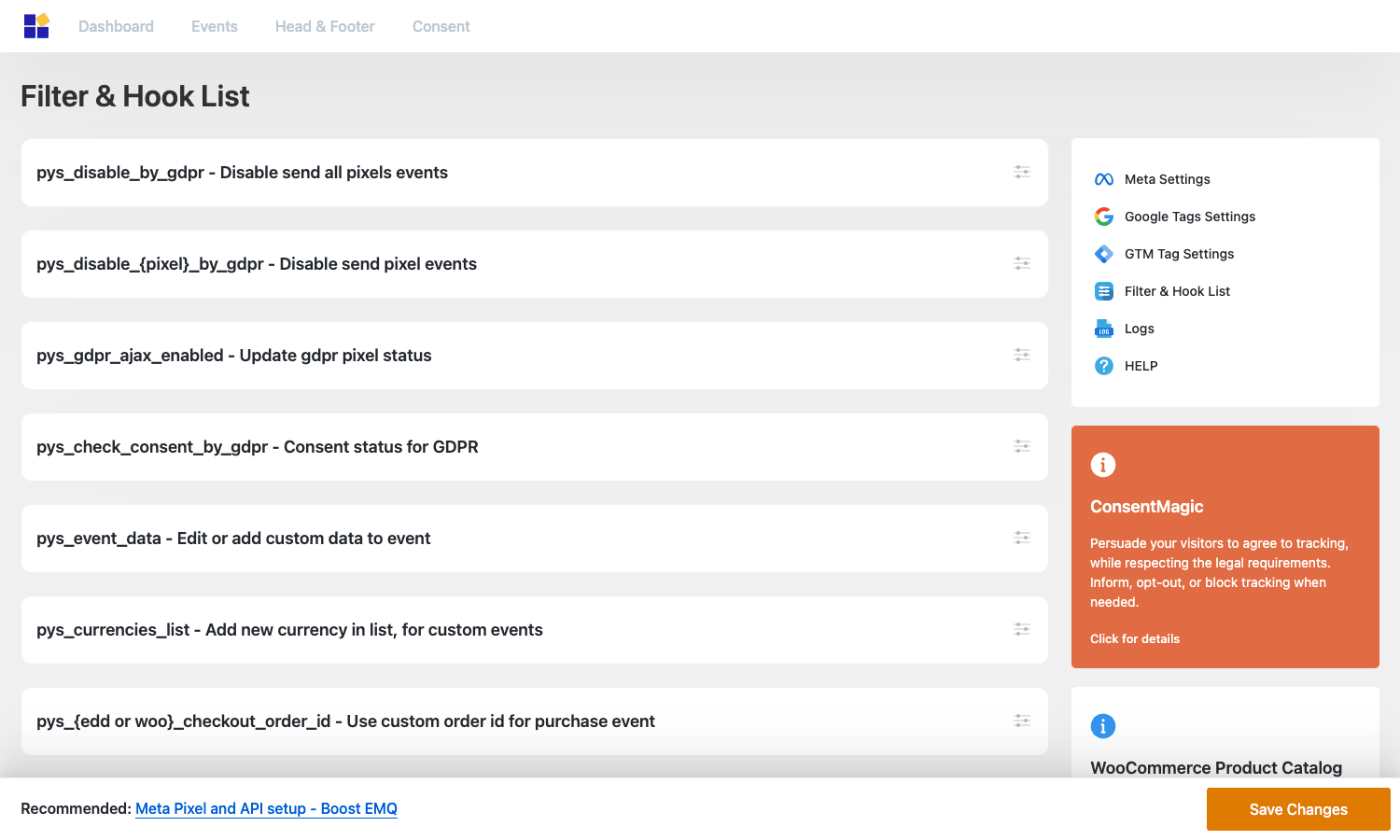
It’s not the entire surface area (the page focuses on the most-used filters), but it’s a good starting point. The rest you can find by grepping the plugin source.
Filter: turn off all events for the current request
Use pys_disable_by_gdpr (boolean). Return true to silence every pixel for the request. Useful in a custom consent flow, or for debugging.
add_filter( 'pys_disable_by_gdpr', function( $disabled ) {
 if ( isset( $_COOKIE['my_consent'] ) && $_COOKIE['my_consent'] === 'denied' ) {
 return true;
 }
 return $disabled;
} );
There are per-platform versions too: pys_disable_facebook_by_gdpr, pys_disable_tiktok_by_gdpr, pys_disable_analytics_by_gdpr, pys_disable_google_ads_by_gdpr, pys_disable_pinterest_by_gdpr, pys_disable_bing_by_gdpr, pys_disable_reddit_by_gdpr. So you can leave GA4 firing while suppressing Meta if you only have consent for analytics, not advertising.
Filter: change event parameters before fire
The event registry runs through pys_event_data before dispatch. You can rewrite parameters, change the value, attach extra data, or null the event out entirely.
add_filter( 'pys_event_data', function( $event, $context ) {
 // Round Purchase value to 2 decimals.
 if ( $event['name'] === 'Purchase' && isset( $event['params']['value'] ) ) {
 $event['params']['value'] = number_format( (float) $event['params']['value'], 2, '.', '' );
 }
 return $event;
}, 10, 2 );
Filter: add a custom currency
If you run a niche currency (crypto token, internal credits) Meta and Google won’t know about, add it so the plugin doesn’t choke:
add_filter( 'pys_currencies_list', function( $currencies ) {
 $currencies['ZWL'] = 'Zimbabwean Dollar';
 return $currencies;
} );
Filter: control Google Consent Mode defaults
The four consent-mode signal filters let you set the default state per signal without writing the gtag init by hand:
add_filter( 'pys_analytics_storage_mode', '__return_true' ); // default 'granted'
add_filter( 'pys_ad_storage_mode', '__return_false' ); // default 'denied'
add_filter( 'pys_ad_user_data_mode', '__return_false' );
add_filter( 'pys_ad_personalization_mode','__return_false' );
Action: react to a TikTok server event
After every TikTok Events API call, the plugin fires pys_send_tiktok_server_event with the payload. Use this to log or mirror events to your own analytics:
add_action( 'pys_send_tiktok_server_event', function( $events ) {
 error_log( 'TikTok CAPI sent '. count( $events ). ' events' );
} );
Action: register a custom pixel
The pixel registry fires pys_register_pixels during plugin boot. You can hook in and register your own pixel module if you need something the plugin doesn’t ship (Snapchat browser-side as a first-class module, for instance):
add_action( 'pys_register_pixels', function( $plugin ) {
 // $plugin is the main PYS instance.
 // Implement a class that extends PixelYourSite\Settings + Pixel base classes
 // and call $plugin->registerPixel( new MyCustomPixel() ).
} );
This is genuinely advanced territory (you need to read class-pixel.php and the existing modules to understand the contract) but the door is open.
Filter: register an admin tab
If you want your own settings page nested inside the PixelYourSite admin, pys_admin_secondary_nav_tabs lets you slot one in:
add_filter( 'pys_admin_secondary_nav_tabs', function( $tabs ) {
 $tabs['mycustom'] = [
 'label' => 'My Custom Tab',
 'render_cb' => 'my_custom_tab_render',
 ];
 return $tabs;
} );
REST endpoints
PixelYourSite Pro registers a pys-est/v1 namespace used by the Event Setup Tool to enumerate modules and post types:
GET /wp-json/pys-est/v1/modulesGET /wp-json/pys-est/v1/post-types
These are admin-only. They’re not a public REST API for sending events. If you want to send custom events from another backend service, the recommended path is to call Meta CAPI / TikTok Events API directly with your own server code and skip the plugin for that flow (the plugin is for events that originate inside WordPress).
Custom post type for events
Each custom event is stored as a pys_event post (private CPT). You can list events with WP_Query:
$events = new WP_Query( [
 'post_type' => 'pys_event',
 'posts_per_page' => -1,
 'post_status' => 'any',
] );
Useful if you want to write a migration script or import events from a JSON dump.
Performance, compatibility, and gotchas
A few things worth knowing before you ship this on a busy site.
Frontend script weight. The plugin enqueues a single bundled JS file in the footer (a few dozen KB compressed), plus the third-party pixel scripts themselves (Meta’s fbevents.js, GA4’s gtag.js, TikTok’s pixel JS, etc.). If you have six pixels enabled, you’re pulling six third-party scripts. There’s no way around that with any pixel manager. Cache the front-end aggressively and let the third-party scripts load deferred (PixelYourSite already deferred-loads them where it can).
Conversions API needs server time. Every CAPI / Events API call adds a few hundred milliseconds to the request that triggers it (a checkout submit, a form post). The plugin uses an async background queue (techcrunch/wp-async-task) to ship those calls in the background so they don’t block the user response. Make sure your WP-Cron is healthy or the queue can stall.
Caching plugins and pixel JS. All major cache layers (the GPL Times catalog includes WP-Optimize Premium and similar) work fine. The pixel JS is enqueued through standard wp_enqueue_script, so cache plugins handle it correctly. Just be careful with "exclude from cache for logged-in users" rules: PixelYourSite ships dynamic per-user data in the inline script (Advanced Matching identifiers), so the inline script needs to be present in the cached HTML.
Blocks (Gutenberg) checkout. Earlier versions of the plugin only hooked classic shortcode checkout. The Store API path (woocommerce_store_api_checkout_update_order_meta) was added later. If you’re on the WooCommerce Blocks checkout, double-check that Purchase events are firing. They should, with the modern plugin.
WPML / multi-language sites. The plugin reads wpml_default_language and respects the active language for content-related event parameters. If you’re sending GA4 events that get aggregated across languages, you may want to add a language custom parameter manually so you can segment in GA4 reports.
Consent mode pitfalls. Google Consent Mode v2 is unforgiving. If you set analytics_storage = denied by default, GA4 will still receive a pingback (cookieless ping) for modeling, which counts as a data hit in GA4 but won’t include user identifiers. People sometimes assume "denied = no traffic" and panic when GA4 still shows numbers. That’s expected.
iOS 14 ATT and EMQ. Conversions API is only as good as the data you send. Enable Advanced Matching, send external_id (Meta) / user_data (Google) wherever possible, and check your Event Match Quality score in Meta Events Manager. The plugin author has a free guide linked from every admin page that walks through tuning EMQ.
The orange ConsentMagic banner. It’s there on every admin screen and you can’t dismiss it. It’s promoting the author’s separate paid consent product. If it bothers you, hide it with a tiny CSS rule:
.pys-banner-consent-magic { display: none!important; }
Database growth. The plugin doesn’t store event data long-term in your database. Each event is built on the fly. Logs are circular (configurable size). So this isn’t a "creates a million postmeta rows" kind of plugin. Good.
Updating from free to Pro. If you had the free wordpress.org "PixelYourSite" plugin first, the Pro version is additive. Install Pro alongside, your existing pixel ID and configuration carry over. You don’t need to deactivate the free plugin first.
Pricing and licensing
PixelYourSite Pro is sold by its author as an annual or lifetime license, single site or unlimited. The author’s site lists tiers like Personal (1 site), Studio (3 sites), Agency (10 sites), and Lifetime (unlimited). There’s also a separate paid add-on called Super Pack that adds extras: LinkedIn as a first-class module, Snapchat as a first-class module, X/Twitter, Reddit server-side, dynamic parameter helpers, multi-pixel-per-page support, and a few other niceties. ConsentMagic (the author’s consent product) is sold separately too.
GPL-licensed plugins like this one are free to redistribute, which is what GPL Times does. PixelYourSite Pro is in the GPL Times store for a flat membership fee, and that build includes the full Pro feature set including Conversions API.
A note on support: the author’s paid license includes their support and rapid updates. For most shops that’s a fine trade.
Frequently asked questions
Do I need both the free PixelYourSite plugin AND the Pro one?
Historically yes (Pro was an add-on to the free base plugin), and that’s still the recommended install path with the official version. The GPL Times Pro build is a single-zip install that doesn’t need the free plugin alongside.
Is the Meta Conversions API really worth it?
If you’re spending money on Meta ads, yes. iOS 14+ ATT, third-party cookies dying, and ad blockers all chip away at browser-side pixel data. CAPI fires from your server, which Meta can match back to a Facebook user using hashed identifiers (email, phone, fbp cookie). On most stores I’ve seen the move to CAPI alone restore 15-30% of "lost" Purchase events.
Does this plugin slow down my site?
The plugin’s own code adds negligible weight (one JS file, a small inline script). The performance hit is from the third-party pixel scripts themselves, and that’s true of any pixel manager. To minimise it: enable defer on pixel JS (the plugin does this where possible), cache the front-end, and don’t enable pixels you’re not actually using.
Can I send the same event to multiple pixels with different parameters?
Yes. For each event (standard or custom), you pick which pixels it fires on, and each pixel’s parameter section is independent. So your Purchase event can send value and currency to all four pixels, but include a custom content_category only on Meta, and a transaction_id only on GA4.
Does it support Google Analytics 4 ecommerce reporting?
Yes. The plugin sends GA4 ecommerce events with the proper items array structure (item_id, item_name, item_category, price, quantity). Your GA4 Enhanced Ecommerce reports will populate normally. You can also send revenue to Google Ads as Enhanced Conversions for better attribution there.
How does this compare to Pixel Manager for WooCommerce?
Pixel Manager for WooCommerce is laser-focused on WooCommerce and tracks every ecommerce edge case (refunds, partial refunds, subscription renewals, multi-currency) in great detail. PixelYourSite Pro covers WooCommerce well but also handles lead-gen, content, and arbitrary custom events on non-WooCommerce sites. If your site is "WooCommerce and nothing else", Pixel Manager is the tighter fit. If your site has a mix of store + content + lead funnels, PixelYourSite Pro is the more flexible option. They aren’t competitors as much as different sweet spots.
What about MonsterInsights?
MonsterInsights is excellent for Google Analytics specifically (GA4 setup, in-admin dashboards, real-time reports). It doesn’t do Meta Pixel, TikTok Pixel, or Conversions API. The two plugins are complementary, not redundant: MonsterInsights for "how do I view my Google Analytics inside WordPress", PixelYourSite Pro for "how do I get my conversion data into Meta and TikTok and Google Ads and Bing".
Does the plugin work with caching and CDN?
Yes. The plugin enqueues scripts through standard WordPress hooks, which all major cache plugins respect. CDNs are fine because the pixel scripts themselves are served from their vendor domains, not your origin. The inline initialisation script needs to be present in the cached HTML, which is the default behaviour.
Can I track form submissions from forms that aren’t a built-in integration?
Yes. Custom events with a form-submit trigger can target any form on your site by ID or class selector. Form field values are accessible as {form.field_name} placeholders. This works for almost any forms plugin: WPForms, Gravity Forms, Contact Form 7, Fluent Forms, Forminator, Ninja Forms, and Elementor Forms.
What happens if I disable the plugin?
Pixel events stop firing immediately. Configuration is preserved in the database, so you can reactivate without losing your setup. If you uninstall (not just deactivate), you’ll be prompted whether to delete the plugin’s data or keep it.
Final thoughts
PixelYourSite Pro is one of those plugins that doesn’t make for a sexy demo but. The combination of every major pixel in one place, full server-side CAPI/Events API support, custom events with a visual setup tool, and an actual hook reference page makes it the obvious WordPress install for any site that takes ad attribution seriously.
If you’re starting from a stack of three or four "lite" tracking plugins (one Facebook pixel plugin, one GA plugin, one TikTok snippet pasted in functions.php), consolidating onto PixelYourSite Pro will simplify your admin and meaningfully improve your event match quality across platforms. If you’re already running it, the Pro / Super Pack / ConsentMagic combo is a complete enough stack that most sites don’t need anything else for tracking.
For background reading on the platform-side APIs the plugin talks to, the Meta Conversions API docs and the GA4 measurement reference are both worth bookmarking, alongside the PixelYourSite knowledge base and the free PixelYourSite plugin on WordPress.org (the base plugin you can pair with the Pro add-on).