

Most WordPress membership plugins try to do two jobs at once: gate the content and collect the money. That second job, payments, is what makes them sprawling and slow. SureMembers takes the opposite bet. It does access control well, hands billing off to whatever you already use, and keeps a single tidy admin screen on top.
If you sell courses, communities, paid newsletters, downloadable files, or a member-only library, this is the plugin I’d reach for when MemberPress feels like overkill.
Table of Contents
- What SureMembers is and where it fits
- Core features
- How memberships work in plain English
- Installation and first-run setup
- Building your first membership
- How to gate individual posts and blocks
- Drip content, expiration, and the unauthorized-access screen
- Selling access: SureCart, WooCommerce, EDD, free signups
- Real-world use cases
- Developer reference: hooks, filters, REST, shortcodes
- Performance, compatibility, and gotchas
- SureMembers vs MemberPress, Restrict Content Pro, and the rest
- Pricing and licensing
- Frequently asked questions
- Final thoughts
What SureMembers is and where it fits
SureMembers is a content-restriction plugin for WordPress. It’s made by the Brainstorm Force team (the same people behind the Astra theme, Spectra Pro blocks, CartFlows Pro, Convert Pro, and SureCart), so it slots into that broader stack cleanly. The plugin’s free counterpart and changelog live on the WordPress.org listing, and the official docs are at suremembers.com.
The reason SureMembers feels different the second you open it: it doesn’t try to be a payment processor. You won’t find a Stripe configuration screen, you won’t be asked for tax tables, you won’t pick currencies. Those jobs belong to SureCart, WooCommerce, or Easy Digital Downloads. SureMembers’ job ends at "who is allowed to read this page".
That split keeps the plugin small, the UI uncluttered, and the upgrade path clear. If you outgrow free signups, you bolt on a billing engine. The access logic doesn’t change.
I’ve used it on a small paid Substack-style WordPress site, a tutorials-and-downloads library, and a private community area on a freelance client’s site. Every time, the setup took maybe twenty minutes from install to first protected page.
Core features
- Memberships (a.k.a. access groups): the core unit. A Membership is a named bundle of access rules. "Premium Tier", "Course Beta Cohort", "Free Newsletter".
- Content protection by type: gate individual posts, pages, custom post types, whole categories, whole tags, and Elementor sections. Per-block gating is available inside Gutenberg.
- Drip content scheduling: release content N days after signup, on a specific date, or in numbered stages. Useful for cohort courses and onboarding sequences.
- Multiple access methods: manual grant, free signup, paid via SureCart, paid via WooCommerce, paid via WooCommerce Subscriptions, WooCommerce coupons, EDD, or programmatic grant from your own code.
- Unauthorized-access actions: redirect, show a preview teaser, replace with a custom message, or hide the post entirely from loops.
- Role sync: assign a WordPress user role to members of a given membership automatically. Membership ends, role ends.
- Membership priority: when a user belongs to multiple memberships, priority decides which restriction message and unauthorized-action wins.
- Per-membership expiration: time-based ("revoke after 30 days") or absolute ("revoke on 31 December").
- Login Customizer: custom login URL (replace
/wp-login.php), brand colors, logo, background. - Login restrictions: force one session per user, lock specific roles out of
/wp-admin. - LearnDash, LifterLMS, TutorLMS, BuddyBoss integrations: gate courses, lessons, and community spaces by membership.
- Email notifications: welcome on grant, expiration warning, post-expiration notice. Editable templates with merge tags.
- REST API: namespace
suremembers/v1so you can grant/revoke from external systems. - CSV import: bring members across from another membership plugin.
- Modern admin UI: the whole admin is a single React app. No tabbed legacy screens, no separate menu items scattered through
/wp-admin.
How memberships work in plain English
Forget the WordPress jargon for a second. Here’s the mental model.
You make a Membership called, say, "Premium Library". You attach two things to it: (1) a list of content this membership unlocks (some posts, a category, two PDFs), and (2) rules for what happens if someone who isn’t in the membership tries to view that content (redirect, teaser, custom message).
You then add users to that membership. You can do this manually (you’ve already been paid by some other channel), automatically when they buy something in SureCart or WooCommerce, automatically on free signup, or via your own code.
That’s the whole model. Two lists: content this membership covers, users in the membership. SureMembers checks every page load: is the user in any membership that covers this content? Yes -> show it. No -> apply the unauthorized rule.
The reason this is nice: there’s no separate "subscription" concept, no levels-and-rules matrix to puzzle over, no membership-status state machine. A user either has the membership or doesn’t.
Installation and first-run setup
After uploading and activating, SureMembers drops an onboarding wizard onto your screen. You can step through it or skip and go straight to the dashboard. There’s nothing in the wizard you can’t change later, so feel free to skip.
The first time you open the SureMembers admin you’ll see this:
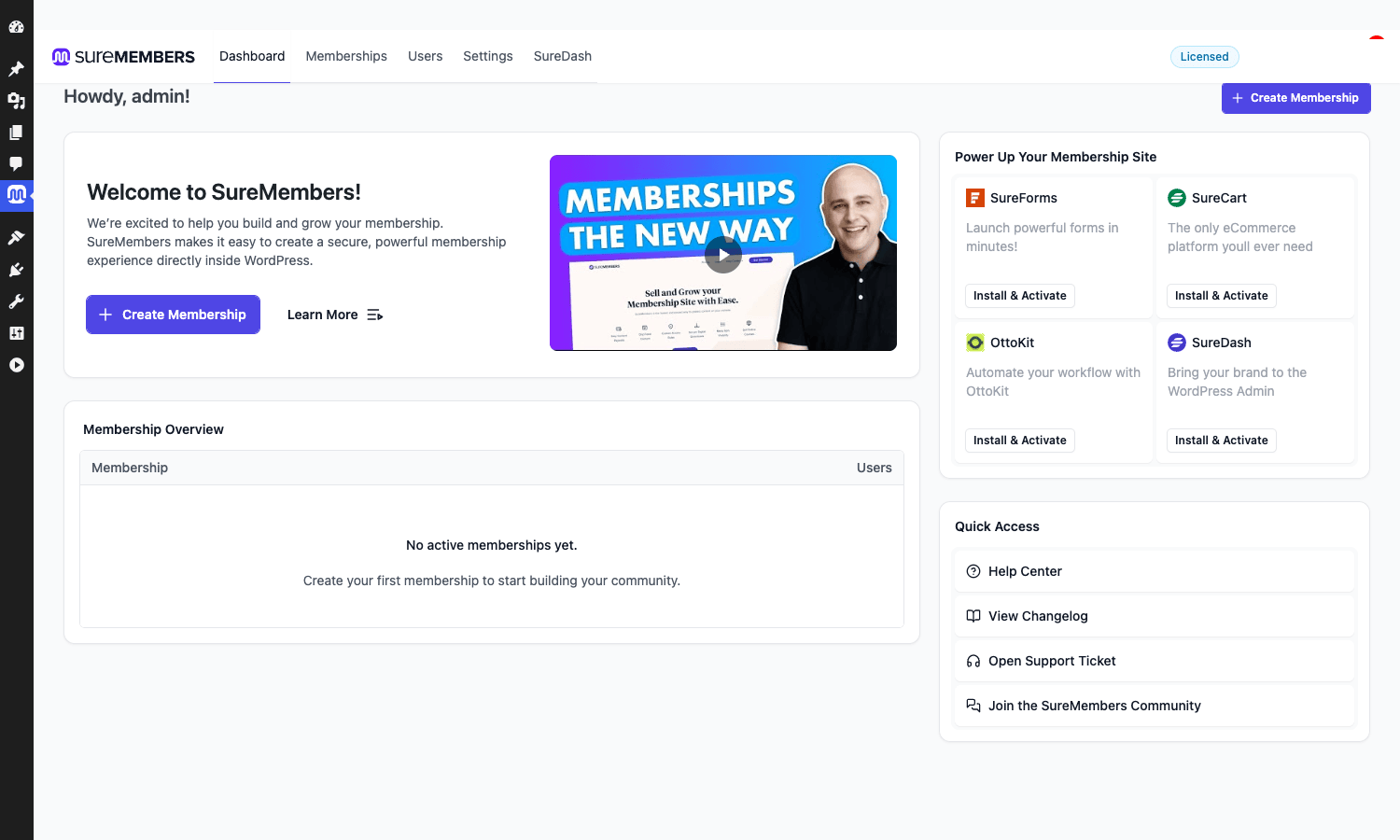
Five top-level tabs: Dashboard, Memberships, Users, Settings, SureDash. SureDash is the new shared admin layer across Brainstorm Force plugins. You can ignore it for now.
A few things worth doing right away, before you build any memberships:
- Go to Settings -> Admin Settings. If you want a default membership granted to everyone who registers on the site, set it in "Assign memberships to new registrations". Useful for a free tier that everyone gets, then you upgrade them into a paid tier on purchase.
- Decide whether to hide restricted posts from public loops (the WordPress index page, archive pages, search results). The toggle is the same screen. If your protected content has spoiler-y titles, hide it. If the titles are part of the marketing, leave it visible and let the preview message do the work.
- Skim Settings -> Login Customizer if you want a branded login experience instead of the stock WordPress one.
That’s all the global setup. Now you can start building memberships.
Building your first membership
Go to Memberships in the SureMembers admin. If you’ve never made one, you’ll see a screen like this:
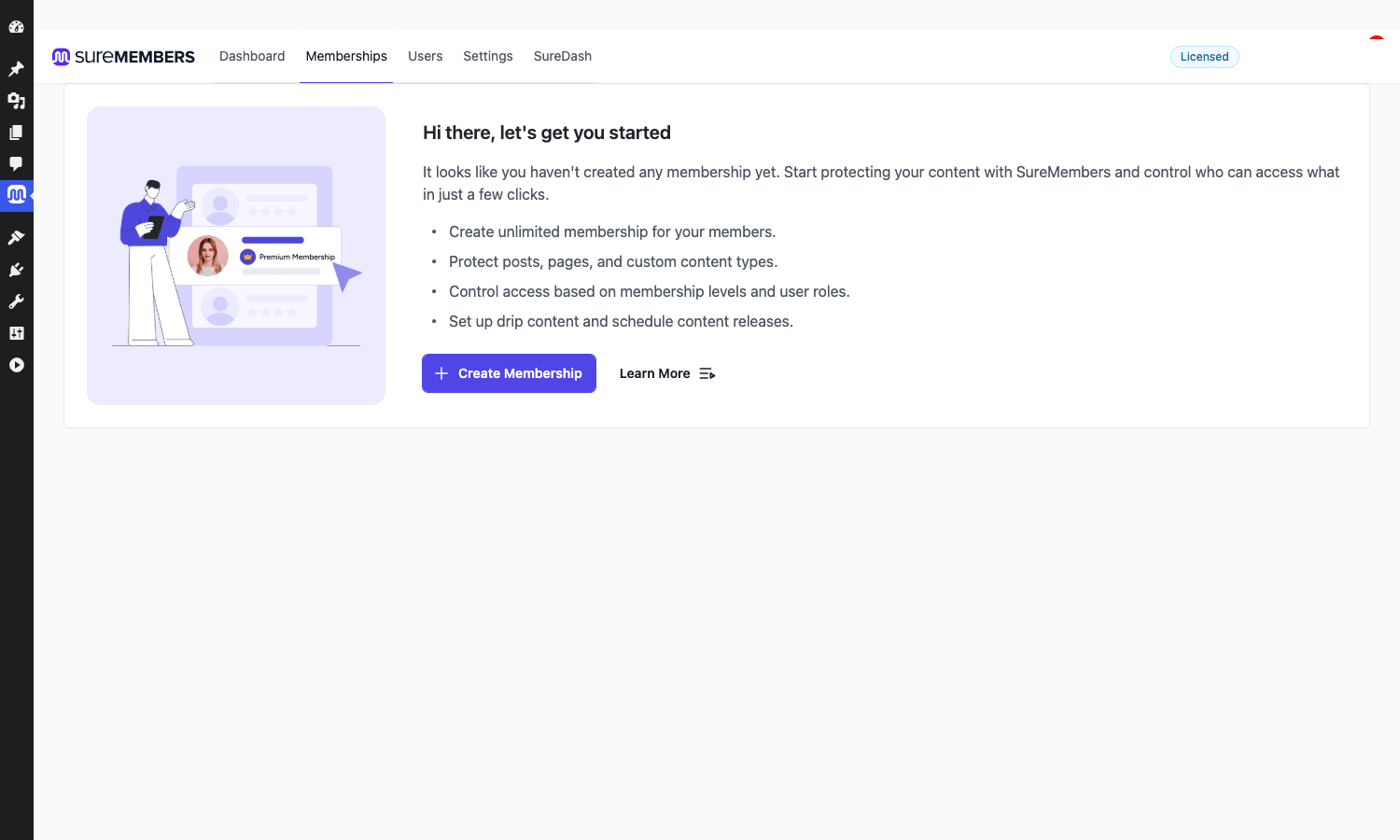
Click Create Membership. The editor opens with five panels:
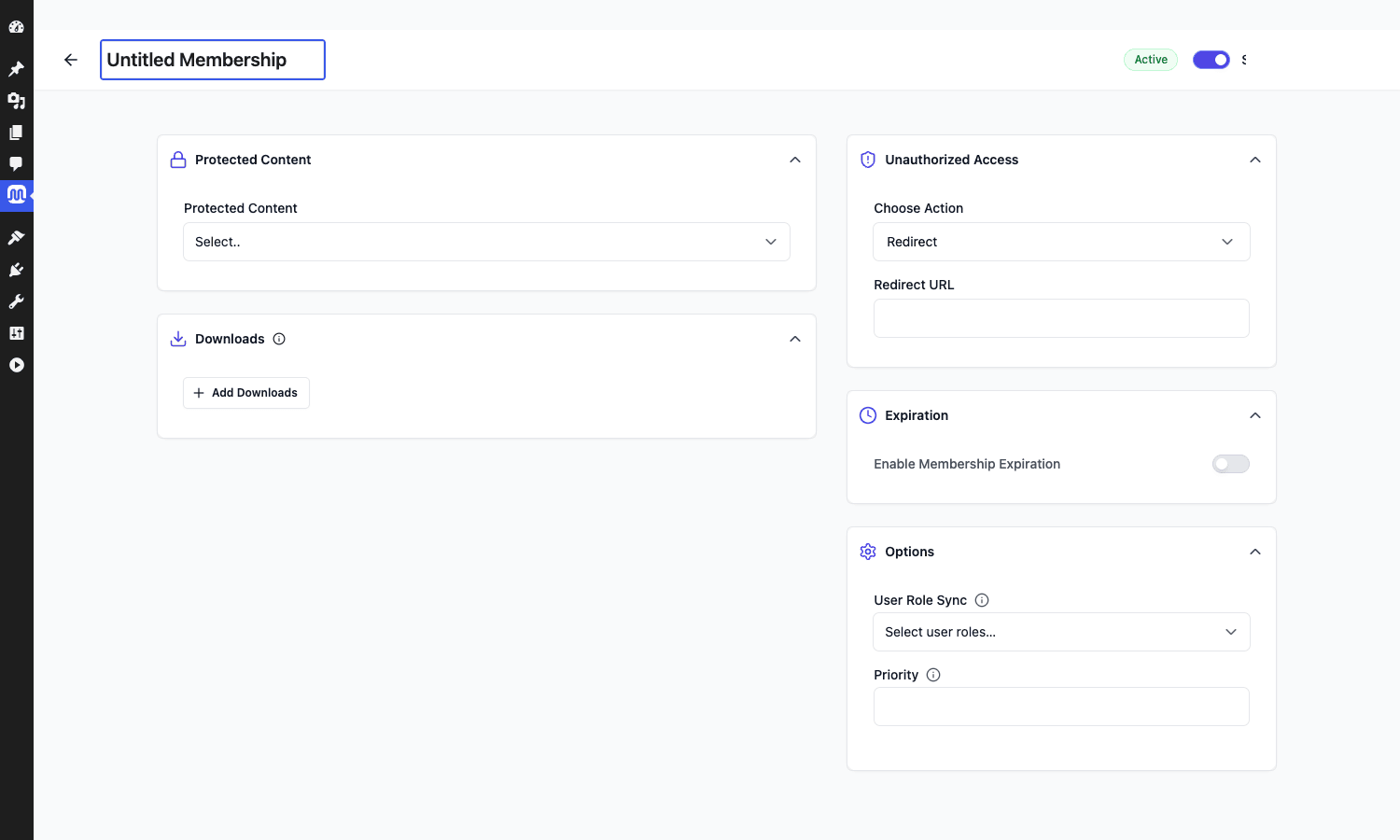
Give the membership a name at the top (call it "Premium Library" or whatever you like). Then walk down the panels:
Protected Content
The first dropdown lets you pick what this membership unlocks. Options include:
- Individual posts, pages, or custom post type entries
- Whole post categories
- Whole tags
- Specific custom post types in bulk
- Elementor templates
- BuddyBoss groups and forums (if BuddyBoss is active)
You can stack any number of these into a single membership. "Premium Library" could be "everything in the premium category, plus three specific pages, plus the entire course custom post type."
Downloads
A private folder lives inside wp-content/uploads/suremembers-private/. Files dropped in there are served by a PHP handler that checks membership before streaming the file. Add files (PDFs, mp3s, zips, anything) to the Downloads list and the membership unlocks them.
The folder name itself is filterable, see the Developer Reference below.
Unauthorized Access
This is what non-members see when they try to view protected content. Three actions:
- Redirect: send them somewhere else (typical: a sales/landing page or a login page).
- Preview: show a short teaser plus a configurable message (typical: "the first 100 words plus a paywall card").
- Hide: strip the post from loops entirely.
The preview message is a rich text field, so you can drop in a "Join now" button, an embedded video, or whatever marketing block fits. There’s also a "show featured image on preview" toggle that I usually leave on, because a thumbnail makes the page look less stripped-down.
Expiration
Turn this on if memberships should auto-expire. Two modes:
- After N days from grant: rolling 30/90/365-day memberships.
- On a specific date: good for cohort programs ("expires on the last day of the cohort").
When expiration fires, the user is silently removed from the membership and a (configurable) email goes out.
Options
Two settings here that don’t fit anywhere else:
- User Role Sync: pick a WordPress role to assign to anyone in this membership. The role is assigned on grant, removed on revoke. This is the easiest way to wire SureMembers up to other plugins that gate on user role (a forum plugin, a comment plugin, custom WP capability checks).
- Priority: when a user belongs to multiple memberships and they overlap on content, the higher-priority one wins for messaging and redirect URL. Defaults are usually fine; you only touch this if you build tiered access (free / pro / vip).
Hit Save. The membership exists. Now you need to put people in it.
How to gate individual posts and blocks
Two ways to do this, depending on whether you’re protecting a whole post or just part of one.
Whole-post gating from the post editor
Open any post in the Gutenberg editor. There’s a SureMembers icon in the top toolbar, next to the Block Inserter:
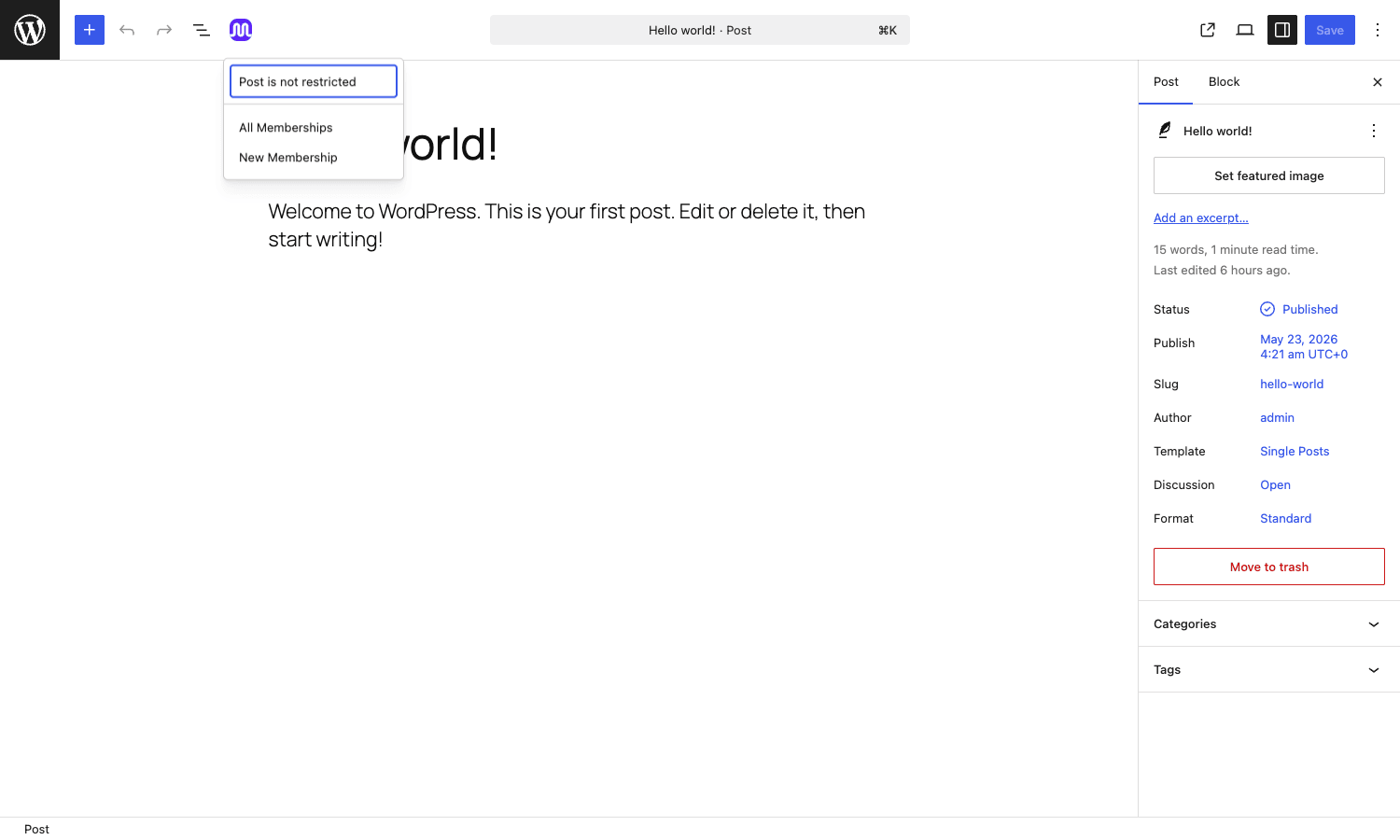
Click it. A popover shows up with your existing memberships. Pick one (or several) and the post is now locked. Click "Post is not restricted" to unlock.
This is also how you’d protect a whole page, a custom post type entry, a LearnDash lesson, or anything else that lives in the block editor.
Per-block gating
For blogs where most of the post is public and only one section should be member-only, click any block in the editor, switch to the Block tab in the sidebar, and you’ll find a "SureMembers" panel with the same membership picker. The block (and everything in it) is hidden from non-members. The rest of the post stays public.
This is the niche feature MemberPress and Restrict Content Pro don’t have out of the box. Per-block gating is great for "free first three paragraphs, then a paywall," "free article with a member-only download button," or "public Q&A page with the answers locked."
Per-category or per-CPT gating
You don’t tag every post one by one. Add the category or tag to the membership’s Protected Content list and every post in it inherits the membership. Same for whole custom post types ("all entries in course").
Shortcode gating
If you’re working in a Classic Editor post or a page builder that doesn’t have a SureMembers control, use the shortcode. (See the developer reference for the exact form.)
Drip content, expiration, and the unauthorized-access screen
Three features that, together, make up most of what people buy a membership plugin for.
Drip content
Drip means: someone signs up today, but they only see the rest of the content piece by piece over the next weeks. SureMembers handles drip on the membership editor itself. Add a drip rule, pick content (posts, pages, CPT entries), and set the schedule:
- After N days from grant. "Lesson 1 immediately, Lesson 2 after 7 days, Lesson 3 after 14 days."
- Absolute date. "Bonus content unlocks on 1 January."
Non-members see the gated message. Members who haven’t reached that drip day see a different message (the filter suremembers_restricted_dripped_message lets you customise the wording, by default it reads "this content will be available in X days"). Members past the drip day see the full content.
Drip rules stack with the main Protected Content list, they don’t replace it. So you can have "all posts in premium immediately, plus three bonus posts that drip on days 7, 14, and 30."
Expiration
Two flavours, as mentioned earlier: time-from-grant or fixed date. Each membership can have its own expiration policy. The grant date is recorded per user, so the "30 days from grant" countdown starts independently for each member.
If you sell yearly subscriptions through SureCart or WooCommerce Subscriptions, you don’t need to set expiration on the SureMembers side. The billing engine sends a "subscription expired" event and SureMembers revokes the membership in response. Expiration on the membership itself is for cases where SureMembers is the source of truth (free tiers with a 90-day trial, fixed-length cohorts, gift memberships).
The unauthorized-access screen
When a non-member hits a locked page, one of three things happens.
Redirect sends them to a URL. The URL field accepts dynamic placeholders (the original post slug, the user’s email if known) which is helpful if your sales page wants to show a "you tried to read X, here’s what membership unlocks X" message.
Preview shows the first N words of the post, then a custom block. You write that block in a TinyMCE-style editor: paragraph text, links, an image, an HTML embed for a video or a buy button. I usually drop in a tiny "Members get the full article plus the download" panel here. Then a "Join now" button that links to either a SureCart product or a WooCommerce product page, depending on which billing engine the site uses.
Hide is the nuclear option. The post drops out of WP loops entirely. Non-members can’t find it via search, archives, or the homepage. Useful for hush-hush content (a paid client portal page that shouldn’t be discoverable).
Selling access: SureCart, WooCommerce, EDD, free signups
You can grant a SureMembers membership through any of these:
SureCart (the natural pairing)
SureCart is the billing engine the SureMembers team builds. The integration is a couple of clicks: in SureCart, edit a product, scroll to "Integrations", choose SureMembers, pick a membership. On every successful purchase the buyer is granted the membership. On refund or cancellation, they’re revoked.
This is the smoothest path if you’re starting fresh and don’t already have WooCommerce or EDD. SureCart handles checkout, taxes, payment methods, customer portal, and recurring billing. SureMembers handles access. Two plugins, two clear jobs.
WooCommerce
If you already run a WooCommerce store, the SureMembers WooCommerce integration adds a "SureMembers" panel on each product’s edit screen. Tick the memberships that product grants. On order status processing or completed, the buyer gets the memberships. On cancelled, refunded, failed, pending, trash, or deleted, the memberships are revoked. (You can change which statuses trigger grant/revoke through filters: suremembers_wc_grant_status and suremembers_wc_revoke_status.)
WooCommerce Subscriptions is supported too. The integration tracks subscription status (active -> grant, cancelled / on-hold / expired -> revoke). For renewal failures, SureCart can pause access via the pending-cancel status if you want a grace period.
There’s also a coupon integration. Apply a coupon to a SureMembers-flagged code, and that coupon grants the linked membership. Good for "use coupon BETA-100 to get 30 days free."
If you’re on WooCommerce already and don’t want SureCart, this works fine. Compare to WooCommerce Memberships on the WooCommerce side, the trade-off is that SureMembers’ admin is a lot tidier but you’re integrating two plugins instead of one.
EDD
The Easy Digital Downloads integration is similar to WooCommerce: per-product membership assignment, grant on completed purchase, revoke on refund. Good if you sell digital downloads and want a "buy this PDF, get 90 days of the member library" model.
Free signup
Set a default membership in Settings -> Admin Settings -> Assign memberships to new registrations and every new WordPress user gets it automatically. Combined with the role sync, this is the easiest way to run a free-tier-everyone-gets model.
Programmatic grant from your own code
For everything else, you call Access::grant_access( $user_id, $access_group_ids ) from anywhere in your codebase. This is how you’d wire SureMembers up to a third-party billing system (Lemon Squeezy, Paddle, Gumroad) or to a custom signup flow. The developer reference below has the exact snippet.
Real-world use cases
A few setups I’ve actually shipped or seen others ship with SureMembers, with the rough configuration.
A paid newsletter on WordPress
Membership: "Newsletter Subscribers", protects: a single category (newsletter). Unauthorized action: Preview with the first 80 words and a "Subscribe for full access" card. SureCart product Monthly Newsletter at a low monthly fee grants the membership. WooCommerce isn’t installed. Free preview posts live outside the newsletter category and read normally.
A course library with drip onboarding
Membership: "Premium Library", protects: the course custom post type and the lesson CPT. Drip schedule: lessons 1-3 immediately, lesson 4 after 14 days, lesson 5 after 28 days. WooCommerce Subscriptions product grants the membership; expiration is left blank because the subscription engine handles revoke. A second membership, "Alumni", with priority above "Premium Library", grants permanent access to anyone who finishes the cohort, manually granted by an admin.
Private downloads for past clients
Membership: "Client Portal". No course content, just a single page (private dashboard) plus a Downloads list (project files, invoices, contract PDFs). Manual grant only, no payment integration. Each client gets the membership for the duration of their project, then expiration is set manually on a fixed date.
A community knowledge base
Membership: "Members". Protects: the entire site (every published post and page). Combined with role sync to the WordPress subscriber role, plus a forum plugin that respects the role. Free signup via the default-on-registration setting. The forum is technically free, but only members can see it because the role flips when they confirm their email.
Mixed free-and-paid blog
The most common one. Free blog posts published normally, no membership attached. Behind-the-paywall posts tagged premium or filed in the premium category. One membership called "Premium" protects that category. Each premium post gets a teaser via the Preview unauthorized action. This is the WordPress equivalent of the Substack hard-paywall-on-some-posts model.
Developer reference: hooks, filters, REST, shortcodes
Time to get nerdy. SureMembers exposes a healthy set of hooks for customising behaviour. Everything is prefixed suremembers_ and uses the standard WordPress action/filter mechanism. Here are the most useful ones with realistic snippets.
Hook: react to a membership grant
The cleanest hook to extend. suremembers_user_access_group_granted fires per group when a user is added to a membership. suremembers_after_access_grant fires once per batch (after all grants in a single call).
add_action( 'suremembers_user_access_group_granted', function( $user_id, $ag_id, $access_group_ids ) {
    // Send a custom welcome email via Mailgun, log to a CRM, ping Slack, etc.
    error_log( "User {$user_id} joined membership {$ag_id}" );

    // Add the user to a Mailchimp list, for example:
    do_action( 'my_app_add_to_list', $user_id, 'list-' . $ag_id );
}, 10, 3 );
The revoke counterpart is suremembers_user_access_group_revoked with the same arguments.
Hook: grant a membership from your own code
There’s no documented public API for granting access, but the internal call is stable and used by every integration. Call it like this:
use SureMembers\Inc\Access;

// On a custom webhook handler (Paddle, Lemon Squeezy, Stripe, anything):
add_action( 'init', function() {
    if ( ! isset( $_GET['my_grant_token'] ) ) {
        return;
    }

    // Verify the token, look up the user, look up the membership IDs.
    $user_id    = 42;
    $membership_ids = [ 101 ]; // the IDs of the wsm_access_group posts

    Access::grant_access( $user_id, $membership_ids );
} );
The complement is Access::revoke_access( $user_id, $membership_ids ).
Filter: change the WooCommerce statuses that grant access
If you want WooCommerce orders with status on-hold to also grant access (say, because you accept bank transfers and want to give provisional access while the payment lands), add on-hold to the grant list.
add_filter( 'suremembers_wc_grant_status', function( $statuses, $order_id ) {
    $statuses[] = 'on-hold';
    return $statuses;
}, 10, 2 );
The revoke filter suremembers_wc_revoke_status works identically. Same idea for subscriptions: suremembers_wcs_grant_status (default active).
Filter: rewrite the restriction message
The HTML shown on a gated page (when the unauthorized action is "preview" or "hide") passes through suremembers_restricted_unauthorized_message. Useful if you want to inject a global affiliate banner or a different login form.
add_filter( 'suremembers_restricted_unauthorized_message', function( $html, $restriction ) {
    $cta = '<a class="button" href="' . esc_url( site_url( '/pricing' ) ) . '">See plans</a>';
    return $html . '<div class="paywall-footer">' . $cta . '</div>';
}, 10, 2 );
Filter: customise the drip-content message
The default reads "This content will be available in X days". Override that copy globally with suremembers_restricted_dripped_message.
add_filter( 'suremembers_restricted_dripped_message', function( $default, $readable_time ) {
    return sprintf(
        '<p class="drip-message">Sit tight, this unlocks in %s. We email you the moment it goes live.</p>',
        esc_html( $readable_time )
    );
}, 10, 2 );
Filter: hide restricted posts from search and archives
Out of the box, restricted posts still appear in archive listings (with the title visible and the body locked). If you’d rather hide them entirely from search and category pages, flip suremembers_show_restricted_post_in_loop to false.
add_filter( 'suremembers_show_restricted_post_in_loop', '__return_false' );
Filter: gate the auto-grant email
By default, every grant triggers a welcome email. Veto it conditionally with suremembers_send_email_notification. The first argument is $should_skip (true means skip), not $should_send, so return true to mute.
add_filter( 'suremembers_send_email_notification', function( $skip, $user_id, $template_key, $access_group_id ) {
    // Don't send the welcome email if the user was granted by admin (not a purchase).
    if ( $template_key === 'access_granted' && current_user_can( 'manage_options' ) ) {
        return true;
    }
    return $skip;
}, 10, 4 );
Action: hook into the membership-save flow
When an admin saves a membership, suremembers_after_submit_form fires with the post ID and the WP_Post. Use it to log to a versioned audit table, or to fan out membership changes to other systems.
add_action( 'suremembers_after_submit_form', function( $post_id, $post ) {
    // Log every membership save into a custom table for change tracking.
    global $wpdb;
    $wpdb->insert( $wpdb->prefix . 'my_membership_audit', [
        'membership_id' => $post_id,
        'changed_by'    => get_current_user_id(),
        'changed_at'    => current_time( 'mysql' ),
    ] );
}, 10, 2 );
REST API
SureMembers registers its REST routes under the namespace suremembers/v1. The plugin uses these internally for the React admin app and for the onboarding wizard. They are protected by capability checks (admin-only by default). The interesting ones for your own integrations:
POST /suremembers/v1/grant– grant a membership to a user.POST /suremembers/v1/revoke– revoke.GET /suremembers/v1/users– paginated users list with their memberships.
Because these are admin-only, calling them from a third-party app means generating an application password for an admin account. For high-traffic webhook integrations, you’re better off calling the PHP Access::grant_access() directly inside an early init hook than going through the REST layer.
Shortcode
For inline gating in Classic Editor posts or page builders without a SureMembers control, use the shortcode:
[suremembers_restrict access_group_ids="12"]
This paragraph is only visible to members of membership ID 12.
[/suremembers_restrict]
You can pass multiple IDs comma-separated (access_group_ids="12,15") and any user in any of those memberships will see the content. Non-members see either the preview message of the first listed membership, or an empty paragraph if no preview is configured.
Per-block restriction control
Inside the Gutenberg editor, every block gets a SureMembers panel in its sidebar. The plugin filters which screens this panel appears on via suremembers_blocks_restriction_allowed_screens (defaults to [ 'post', 'widgets', 'customize', 'site-editor' ]). If you want per-block restrictions inside a custom post type that uses Gutenberg but isn’t in this list, add it:
add_filter( 'suremembers_blocks_restriction_allowed_screens', function( $screens ) {
    $screens[] = 'course'; // for a custom 'course' post type
    return $screens;
} );
Performance, compatibility, and gotchas
A few honest things to be aware of.
Performance
SureMembers’ rule engine runs on every page load (specifically, on template_redirect). It queries the user’s memberships, intersects them against the content’s protection rules, and decides whether to show or redirect. That work is cached per request, so a single page hit doesn’t repeat the lookup, but if you’re on a very low-end shared host the extra database queries are noticeable on the first uncached page load.
In practice: on a server with object caching (Redis or Memcached) this is invisible. On a stock RunCloud or Cloudways setup the impact is around 5-15 ms per request, well within any reasonable budget. If you serve mostly to logged-out visitors and rely on page caching, restricted pages are usually excluded from the page cache anyway (otherwise everyone would see the cached "logged-in" version). That’s true for any membership plugin, not just SureMembers.
Compatibility
Plays well with most popular plugins. Confirmed working: WooCommerce, WooCommerce Subscriptions, Easy Digital Downloads, SureCart, LearnDash, LifterLMS, TutorLMS, BuddyBoss, Elementor, Spectra, Astra, WP Rocket (just make sure to exclude member-only URLs from page caching), WP Fastest Cache, WPML, Polylang.
Conflicts I’ve seen are rare and usually about page caching, not the plugin itself. If your "preview" content shows up to members or your "members only" content shows up to logged-out users, the first thing to check is whether a caching plugin is serving a stale version.
Gotchas
A handful of behaviours that aren’t obvious:
- The post type
wsm_access_groupis hidden from the admin sidebar. All membership management goes through the SureMembers tab, not through a normal WP admin menu. If you’re hunting for it in Posts or Pages, you won’t find it. - The
assign to new registrationssetting fires on theuser_registeraction, not on email confirmation. If you require email verification before granting access, you’ll need to hook into your verification plugin’s confirmation action and callAccess::grant_access()from there instead. - Membership priority is a global tiebreaker, not per-content. If a user belongs to memberships A (priority 1) and B (priority 5), and they hit a piece of content protected by both, A’s unauthorized message and redirect URL win. You can’t say "for this piece of content, prefer B’s settings." This is rarely a problem in practice but worth knowing if you build complex tier hierarchies.
- Drip is per-user, calculated from the grant date. If you grant a user on day 0 with a "lesson unlocks on day 7" drip, then revoke and re-grant on day 14, the lesson is immediately available because the system uses the most recent grant date. If you want a true once-per-user lockout, do the math in your own code and use
Access::revoke_access()programmatically. - The shortcode falls back to the first membership’s settings. If you write
[suremembers_restrict access_group_ids="12,15"]and the unauthorized user sees the preview, the preview message comes from membership 12, not 15. Order matters. - Downloads live in
wp-content/uploads/suremembers-private/with a.htaccessdeny rule. That works on Apache, and on Nginx with alocationblock that proxies through PHP. On Nginx without that block (some default LEMP setups), direct file URLs may be reachable. Test before relying on it for high-value files. The filtersuremembers_private_folder_namelets you rename the folder if you want.
SureMembers vs MemberPress, Restrict Content Pro, and the rest
The membership-plugin space is crowded. Here’s how I think about SureMembers next to the alternatives.
vs MemberPress Pro
MemberPress Pro is the de-facto standard. It does what SureMembers does, plus billing, plus affiliate management, plus a course module, plus reporting. It’s heavier (more database tables, more screens, more boot time) and the admin UI has more legacy surface area.
You’d pick MemberPress if: you want one plugin to do everything, you sell directly through Stripe/PayPal without WooCommerce, you need a course module without adding LearnDash.
You’d pick SureMembers if: you already have WooCommerce or SureCart, you want a lighter footprint, you like the React admin, you don’t need a course module.
vs Restrict Content Pro
Restrict Content Pro is similar in scope to MemberPress: gating plus billing in one plugin. The admin is more dated, and it has its own ecosystem of add-ons. SureMembers feels considerably more modern in 2026. RCP is still solid, especially if you’ve used it for years.
vs Paid Memberships Pro
Paid Memberships Pro has a free core, which is its big differentiator. You can run a basic membership site without paying for anything until you need advanced features. The free tier is genuinely usable. Compared to SureMembers, PMP is older in feel and the per-level configuration is denser.
vs WishList Member
WishList Member is one of the oldest membership plugins on WordPress. The interface shows its age but the depth of features is there. WishList separates membership and billing too, similar to SureMembers, but the admin experience is worlds apart.
vs Ultimate Membership Pro
Ultimate Membership Pro is the CodeCanyon classic in this space. Bundles its own pricing and gateway integrations, has a lot of features, and the admin is a tab-heavy classic WP admin layout. If you want everything in one plugin and don’t mind the older UI, it’s a fine choice.
Vendor-stack picks
If you’re building from scratch and you don’t have strong opinions, the SureMembers + SureCart pairing is the lowest-friction option. Two plugins, both modern, both built by the same team, both designed to talk to each other. Add Astra + CartFlows + Spectra and you’ve got the whole Brainstorm Force stack with a coherent feel.
Pricing and licensing
SureMembers is sold as a standalone plugin with annual or lifetime tiers, and it’s also bundled into some SureCart Pro plans. The free tier of SureCart works with SureMembers out of the box, which gives you a credible starter stack: SureCart Free for one product type + SureMembers for access control + Stripe for payments. You only need a paid plan when you outgrow the SureCart free limits.
For GPL builds, SureMembers is on this site: SureMembers on GPL Times. License keys aren’t required for the access-control features to work, though the licensing screen still lives under Settings -> Licensing if you ever need it.
The licensing model is GPL: you install on as many sites as you want, you get the same plugin code, and updates ship through your downloads area.
Frequently asked questions
Can SureMembers handle subscriptions without a third-party plugin?
Not directly. SureMembers grants or revokes access; it doesn’t run recurring billing. To run subscriptions, pair it with SureCart (built-in recurring), WooCommerce Subscriptions, or your own subscription engine. Once the billing engine fires a status change (renewal, cancellation, expiry), SureMembers grants or revokes the membership.
Does it work without WooCommerce or SureCart?
Yes. You can run SureMembers entirely on manual grants, free signups, and programmatic grants from custom code. That covers a private client portal, a free community, a beta cohort, or any case where you collect money through some channel that doesn’t talk to WordPress at all (a Stripe payment link, a bank transfer, in-person sales).
Can I import members from another membership plugin?
Yes. The Settings -> Import screen has a CSV import that accepts user email + membership name, and it’ll create memberships on the fly if the named ones don’t exist. Useful for migrating from MemberPress, Paid Memberships Pro, or a custom spreadsheet of past clients.
How does the drip feature compare to MemberPress drips?
The mechanics are similar, but SureMembers’ drip schedule lives on the membership itself, not on the content. So one membership defines one schedule that applies to every member of that membership. MemberPress puts the drip on each piece of content, which is more flexible but more tedious to set up for large catalogs. Pick the model that fits your content shape.
Can a user be in multiple memberships?
Yes, and that’s the recommended pattern for tiered access. A user might be in "Free Newsletter" + "Premium Library" + "Founders Club" all at once. The Priority field on each membership decides which restriction message wins when a content piece is protected by more than one of them.
What happens to a user’s progress in LearnDash when their SureMembers access is revoked?
LearnDash progress is stored independently. SureMembers revokes the membership and the user loses access to the course, but their lesson completions and quiz scores remain in the database. If you re-grant access later (say, they renew their subscription), they pick up right where they left off. This is the right behaviour for most cases. If you want to wipe progress on revoke, hook into suremembers_user_access_group_revoked and delete the LearnDash user-progress rows yourself.
Does it work with Elementor?
Yes. There’s an Elementor module that adds a "SureMembers" section to each widget’s Advanced controls, where you can pick a membership. Sections, columns, and individual widgets can all be gated. Editor preview shows the gated content with a small badge so you know what’s visible to whom.
What’s the difference between "Hide" and "Redirect"?
Hide drops the post from public loops entirely (homepage, archives, search). Non-members can’t even find the URL. Redirect lets the URL stay discoverable but bounces visitors to a different page when they try to read it. Hide is for content that shouldn’t exist as far as non-members are concerned. Redirect is for content that exists and should be findable, but where viewing it requires membership.
Final thoughts
If you’ve ever tried to set up a membership site on WordPress, you know the standard story: install a giant plugin, navigate seven nested settings screens, configure two payment gateways, build a "members area" page, hide it from the menu, drop in a shortcode, debug why search still finds the protected post. SureMembers chops a lot of that complexity off by simply not trying to be everything. It does content gating, and it does it well.
The split with SureCart for billing is what makes the whole thing feel modern. You don’t have to commit to one ecosystem; you can run the SureMembers + WooCommerce combo today, switch to SureMembers + SureCart next year, and your access rules don’t change. That’s a rare property in this category.
The places where it falls short are honest ones: no built-in payment processing, no reporting/analytics dashboard, no native course module. If those matter to you, MemberPress or Ultimate Membership Pro might be a better fit. For most people though, the trade is fine: pair it with a billing engine you already know, get a much cleaner admin, ship faster.
Try SureMembers on GPL Times and have your first protected post live in twenty minutes.