

I have handed a WordPress admin to clients in four very different shapes. A boutique agency reselling WordPress to small businesses where the dashboard had to say "Acme Web Studio" not "WordPress". A SaaS that ran WordPress under the hood and never wanted the client to see a WP logo. A school district multisite where every sub-site needed its own school branding. A healthcare client whose HIPAA reviewers wanted to know exactly which "Howdy, admin" strings the platform displayed and how to change them.
I have tried most of the obvious answers. Admin Menu Editor Pro is great at the menu but leaves the login screen untouched. White Label CMS does a clean job of the dashboard but stops short of email templates. LoginPress is sharp on the login page and nothing else. I have shipped sites where the recipe was LoginPress + a custom-CSS plugin + a custom role editor + a wp_die_handler filter in functions.php for the error pages, then crossed my fingers when WordPress updated. On multisite the cracks were worse. You set everything on the main site and pray nobody activates a theme on a sub-site that ignores your overrides.
Branda Pro is WPMU DEV’s answer to that mess. One plugin covers admin theme, login customizer, dashboard widgets, footer, email branding, maintenance mode, favicons, signup screens, role permissions, and tracking codes. The multisite story is the part I want to spend the most time on, because that is where every other plugin in this category quietly gives up.
This is a long article. I have shipped Branda on real sites, picked at the source, and dug up the comparable specs for the obvious alternatives. If you have already done a Branda rollout, you can skip the intro and head straight to the developer reference.
Table of Contents
- What is Branda Pro?
- Why white-labeling matters more than most agencies admit
- Key modules at a glance
- Installation, activation, and the first ten minutes
- The module dashboard explained
- Building a "client view" admin in 25 minutes with Branda
- The login customizer: where Branda?
Branda Pro is a white-label and branding plugin for WordPress and WordPress multisite built by WPMU DEV, the same team behind Smush Pro, Defender security, and Hustle Pro. The plugin is also sometimes called Ultimate Branding (its older slug, still visible in the directory layout) and the internal
wp_optionsrows. It is a single plugin, not a bundle, so you can install it on a stock WordPress site without pulling in the rest of the WPMU DEV catalog.Branda is modular. The core plugin is small. Each branding feature, the admin bar logo, the login screen colors, the dashboard widget, the email template, lives in its own module under
inc/modules/<group>/<name>.phpand only loads when you activate it. The plugin ships with 28 modules spread across 5 groups: Admin Area, Widgets, Emails, Front-end, Utilities. You can run Branda with a single module enabled (just the login customizer, say) and the rest of the codebase will not even include itself.The pitch is the same one every white-label plugin makes: turn WordPress into your studio’s product. What sets Branda apart is the breadth of surfaces it covers and the multisite-aware architecture. On a Network install, every module has a network-level default that subsites inherit, plus a per-site override switch. That is the missing piece in almost every other plugin in this space.
Why white-labeling matters more than most agencies admit
Skip this section if you have shipped a white-labeled WordPress admin before.
If you have not, the case for white-labeling is sometimes dismissed as an ego thing ("the client wants to see your logo, not WordPress"). It is more than that.
When you hand a client a CMS, the client’s mental model of the product is shaped by the surfaces they touch every day. If those surfaces say "WordPress" in five different places, the client treats WordPress as the vendor. They Google "how do I do X in WordPress", land on a tutorial that tells them to edit
wp-config.php, and you get a support ticket at 11 pm asking why their site is white. If those surfaces say "Acme Web Studio" instead, the client opens a ticket with you first, because the platform feels like yours.White-labeling also changes the support burden. The cheapest support tickets are the ones a client never opens. Every "what does this WordPress notice mean" question disappears when the notice is replaced with a one-liner you wrote. Every "I can’t find the page editor" disappears when you have hidden 8 unused menu items. Every "the password reset email is going to spam" disappears when the email is templated to look like it came from your domain instead of
wordpress@acme.example.That last one is where a lot of white-labeling efforts quietly fail. Plenty of plugins polish the admin and the login screen. Far fewer also handle the system emails. Branda covers all three layers.
Key modules at a glance
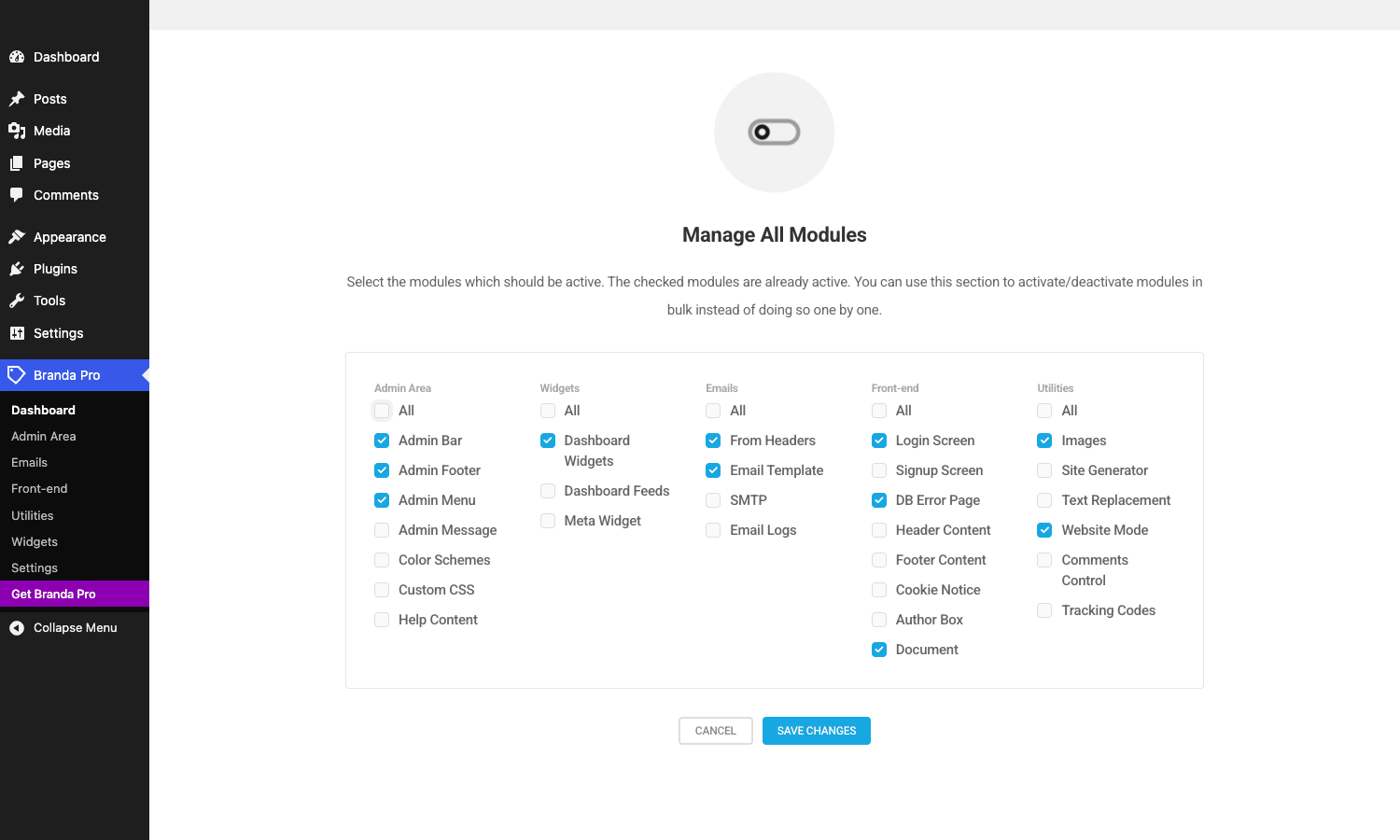
Branda ships 28 modules. Most sites need 6 or 7 of them. Here is what each group does and which modules actually move the needle.
- Admin Area (9 modules). Admin Bar replaces the WP logo with yours and hides the "Howdy" string. Admin Footer rewrites the "Thank you for creating with WordPress" line. Admin Menu lets you hide, reorder, rename, and add custom items in the left-hand WordPress menu, per role. Admin Message lets you pin a custom notice to the dashboard ("Site maintenance scheduled for Friday"). Color Schemes adds a custom admin color palette. Custom CSS lets you bolt on per-module styles. Help Content replaces the contextual help tabs. Most agencies enable 4 of these and ignore the rest.
- Widgets (3 modules). Dashboard Widgets hides or removes the stock WordPress dashboard widgets (Activity, Quick Draft, WordPress Events, etc.) per role. Dashboard Feeds lets you pull in your own RSS feeds as widgets. Meta Widget rebrands the front-end Meta widget so it does not say "WordPress.org".
- Emails (5 modules). From Headers sets the From name and email address for every system email. Email Template wraps every email in your own HTML shell, with merge variables for site name, message, current date, etc. SMTP routes outgoing mail through a real SMTP server (SendGrid, Mailgun, Amazon SES). Email Logs records every email sent (Pro). Google OAuth gives you OAuth-based SMTP if you want to use Gmail.
- Front-end (8 modules). Login Screen is the customizer for
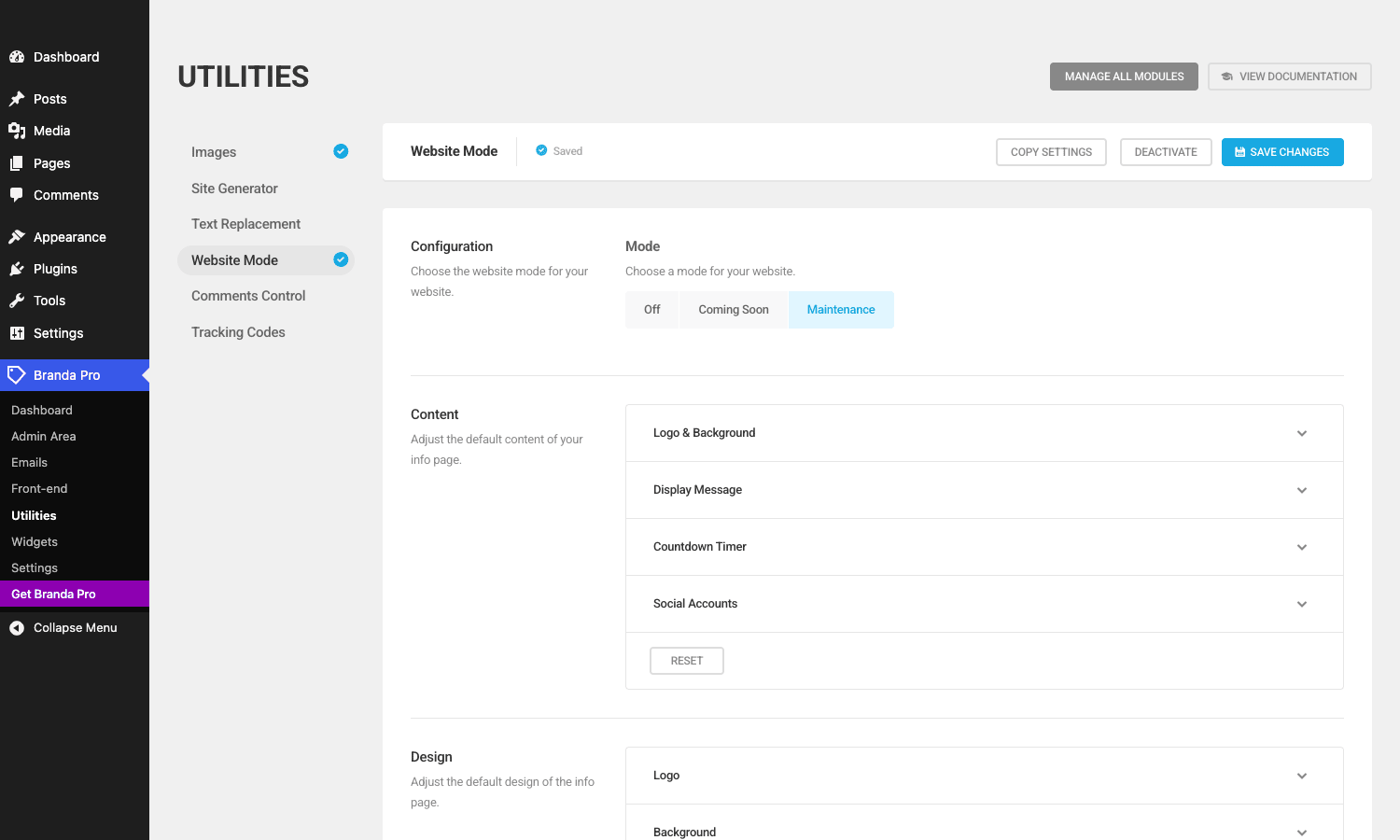
wp-login.php. Signup Screen handles user registration. DB Error Page rewrites the "Error establishing a database connection" page. Cookie Notice ships a compliance bar. Author Box rewrites the author bio block. Document handles favicons, site icons, and meta. Header/Footer Content lets you inject extra HTML into the front-end head and footer. - Utilities (6 modules). Images replaces the WordPress login logo, the placeholder image, and a dozen other built-in assets. Site Generator lets a multisite super admin spin up sub-sites with preset branding. Text Replacement is a global find-and-replace ("WordPress" -> "Acme CMS") across the admin. Website Mode toggles maintenance or coming-soon. Comments Control adds per-role comment moderation rules. Tracking Codes drops GA, Tag Manager, Facebook Pixel, or arbitrary JS into the head or body.
The thing I want to call out: the modular activation is not a marketing toggle. Each module is its own PHP file with its own class, registered through
Branda_Loader, and the loader literally does notrequire_oncefiles for modules that are off. If you only run the login customizer, the email-template code and the SMTP code never load. That keeps the admin overhead small.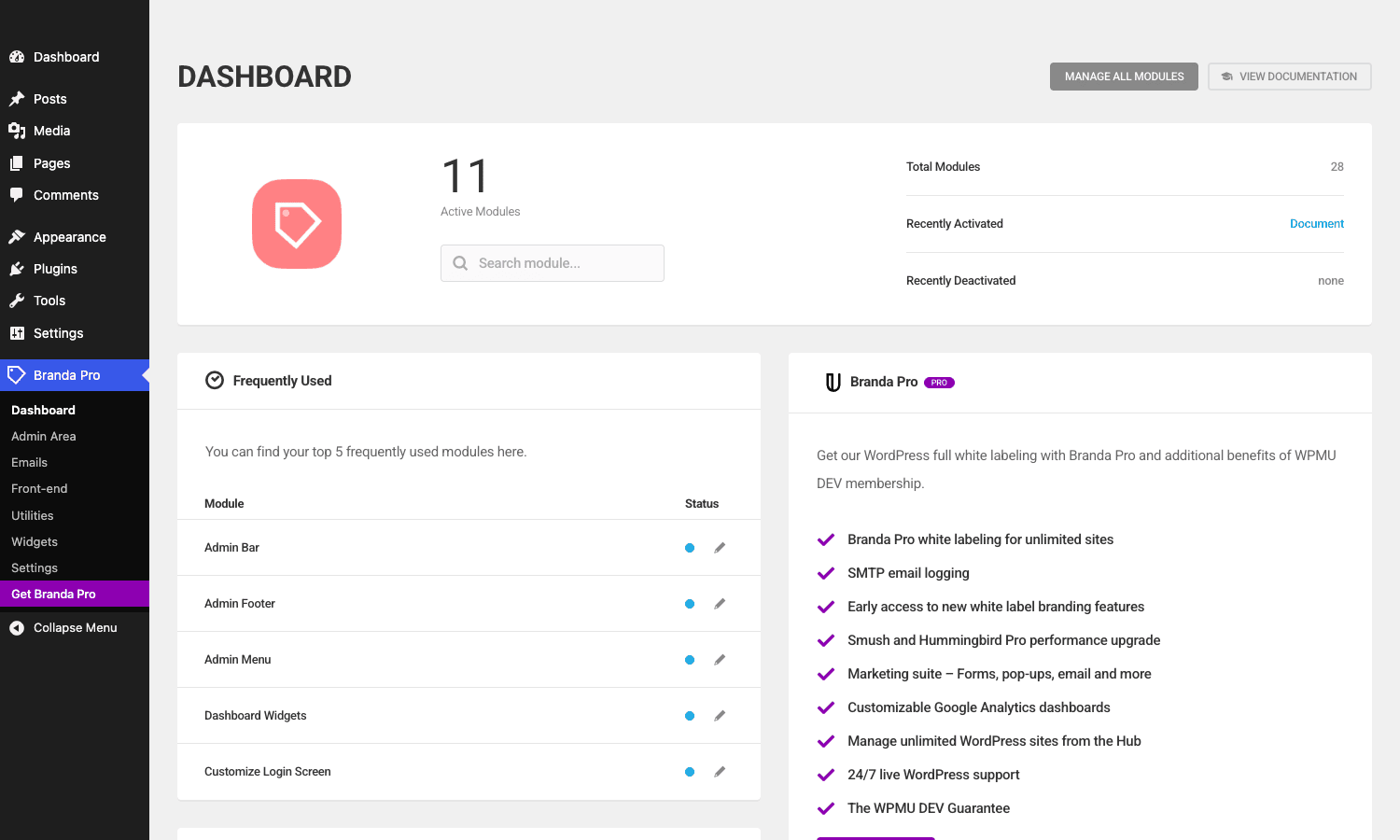
Installation, activation, and the first ten minutes
Standard WordPress plugin install. Upload the zip from Plugins > Add New > Upload Plugin, hit Activate, and Branda lands in your admin sidebar as "Branda Pro" with a tag icon. The plugin does not run a setup wizard. The first thing you see is a Dashboard panel that tells you 0 modules are active and invites you to either pick one from the frequently-used list or hit "Manage All Modules" to bulk-enable.
You should resist the urge to enable everything. Branda’s footprint is module-driven, so each module you turn on is more code in your admin page. Pick the 6 or 7 you actually need.
For an agency white-label rollout, my starter set is: Admin Bar, Admin Footer, Admin Menu, Dashboard Widgets, Login Screen, Email Template, From Headers, and Images. That covers logo replacement on the admin bar and login screen, the dashboard chrome, the dashboard widgets you do not want clients to see, the system email branding, and the WordPress assets you would otherwise see flash up before your CSS kicks in.
A note on the WPMU DEV Dashboard prompt. After activation you will see a banner asking you to log into your WPMU DEV account. This is opt-in. Branda functions perfectly without it; the integration is for license validation and the WPMU DEV Hub (their multi-site management dashboard). If you are running the GPL-licensed version you can dismiss this and it does not affect any module. I have a section below on actually getting rid of the nag, because the default Dismiss is not permanent.
The module dashboard explained
The Branda dashboard panel (Branda Pro > Dashboard) is one of the few admin pages I do not skip. The top row shows your active-module count, recently activated, recently deactivated, and a search box. Below that, "Frequently Used" lists the 5 modules you touch most often, with a status dot (blue = active, grey = off) and a pencil to jump straight to the settings. The right column is a WPMU DEV upsell that you can ignore.
The sub-navigation on the left (Dashboard, Admin Area, Emails, Front-end, Utilities, Widgets, Settings) maps to the 5 module groups plus a global Settings page. Each group page lays out its modules in a vertical tab pattern: the module list on the left, the active module’s settings on the right. That layout is consistent across every group. Once you have configured one module you have configured all of them.
A small quality-of-life thing: every module page has a "Copy Settings" button. It serializes the module’s options to a textarea you can paste into another site’s matching module. This is a poor person’s import/export and it works.
Building a "client view" admin in 25 minutes with Branda
Here is a real workflow I have run on three agency sites. Time-boxed, no skipping ahead.
Minutes 0-3. Hide the WordPress logo and Howdy string. Branda Pro > Admin Area > Admin Bar. Under "Menu Items" check "Hide" next to
wp-logo. Under the same panel scroll to "Greetings" and replace "Howdy" with your own string ("Welcome,"). Save. Reload the admin and the top-left WordPress logo is gone.Minutes 3-6. Replace the footer. Same group, Admin Footer tab. The textarea ships with the default
<span id="footer-thankyou">Thank you for creating with WordPress.</span>. Replace it with your own HTML. I usually useDesigned and powered by <a href="https://acme.example">Acme Web Studio</a>.and leave the version-number footer block (the "Version 6.x" on the right) untouched, because clients sometimes need that for support.Minutes 6-12. Lock the admin menu down. Admin Menu tab. The default is "Show All". Switch to "Hide Specific Items" and you get a list of every top-level and sub-level menu item, with a per-role visibility checkbox. For a client (role: editor or custom), I hide Tools, Comments (if they do not run comments), Appearance > Editor, all of Plugins, all of Users, and Settings. That collapses the admin to the 4 menus they actually use: Dashboard, Posts, Pages, Media.
Minutes 12-18. Customize the login. Branda Pro > Front-end > Login Screen. Logo & Background expander: upload your logo, set the alt text, point the logo URL at your studio site. Page background: pick a brand color or upload an image. The form section lets you tweak the input colors, the button color, the borders. I usually only touch the page background and button color and leave the form white.
Minutes 18-22. Set the from headers and email template. Branda Pro > Emails > From Headers. From name: your studio name. From email: an address on your own domain (do not use the default
wordpress@yoursite.examplebecause most SMTP routes will mark it as suspicious). Email Template tab: pick a template, paste your logo URL, drop in your variables.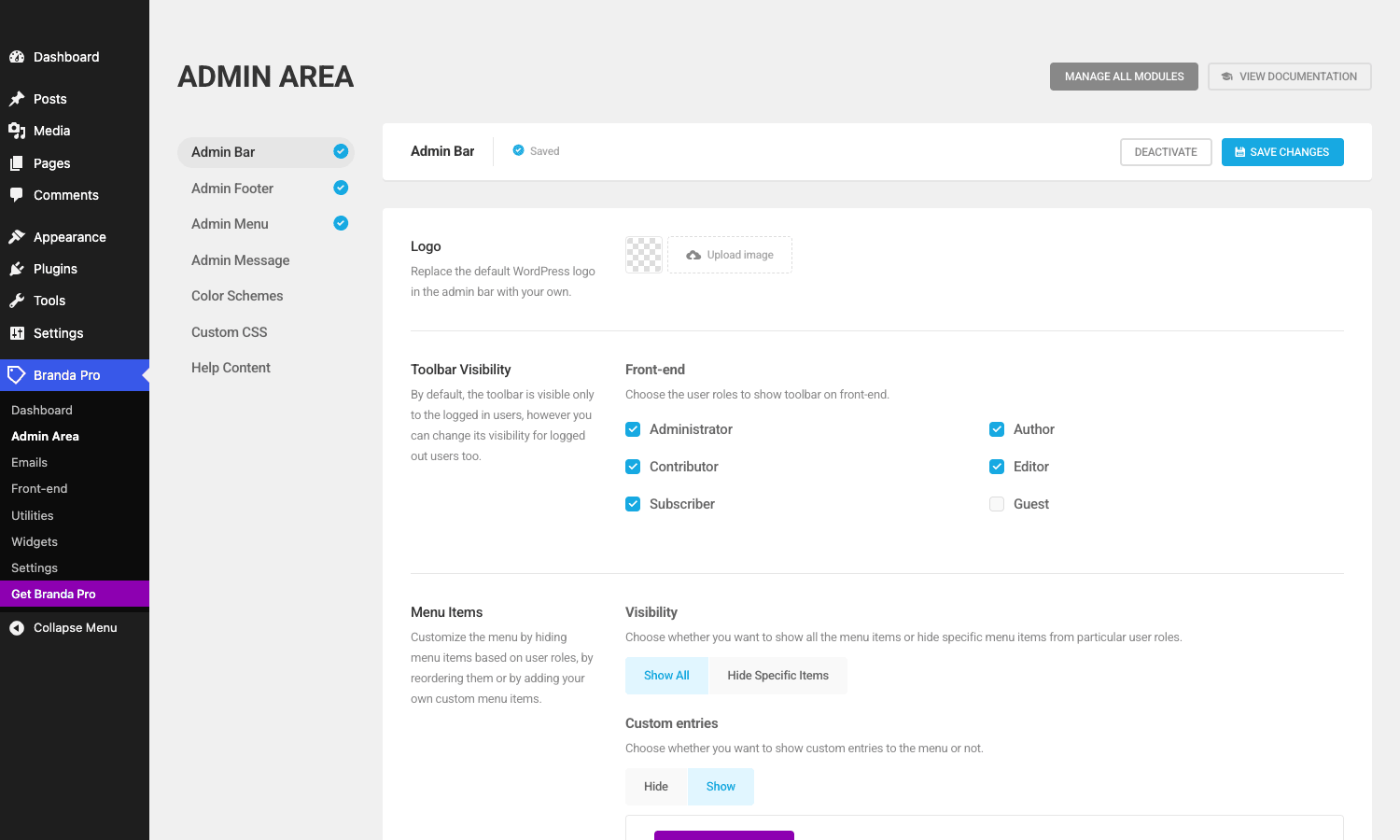
Minutes 22-25. Set tracking codes if you need them. Branda Pro > Utilities > Tracking Codes. Paste your Tag Manager or GA snippet, choose head/body, save.
That is it. The admin now looks like a product you built. You did not edit
functions.php, you did not write CSS, you did not touch the database.The login customizer: where Branda. It is roughly feature-equivalent to a standalone plugin like LoginPress Pro, and in a couple of areas (background slideshows, per-role redirect rules) it goes further.
The page is split into three tabs: Template, Content, Design.
Template lets you start from a pre-built design or "Start from Scratch". The built-in templates are a mixed bag, half are nice, half feel dated, but they save you 20 minutes if you do not want to design from a blank canvas.
Content is everything the login form says. You upload the logo image (replaces the WordPress mark), set the logo URL (clicking the logo takes the user somewhere; default is wordpress.org, which is exactly what you do not want), set the alt text, and write a welcome message above the form. You can also set a background image OR a single color.
Design controls the visual styling: logo width, opacity, position, margins, rounded corners, the background mode (color, image, slideshow), the form colors (input label, input text, border, background, button label, button background, form background, form border, form shadow), and the focus / active states. There are 30+ color pickers. It is a lot. The default values are sensible so you can ignore most of them and just override the few you care about.
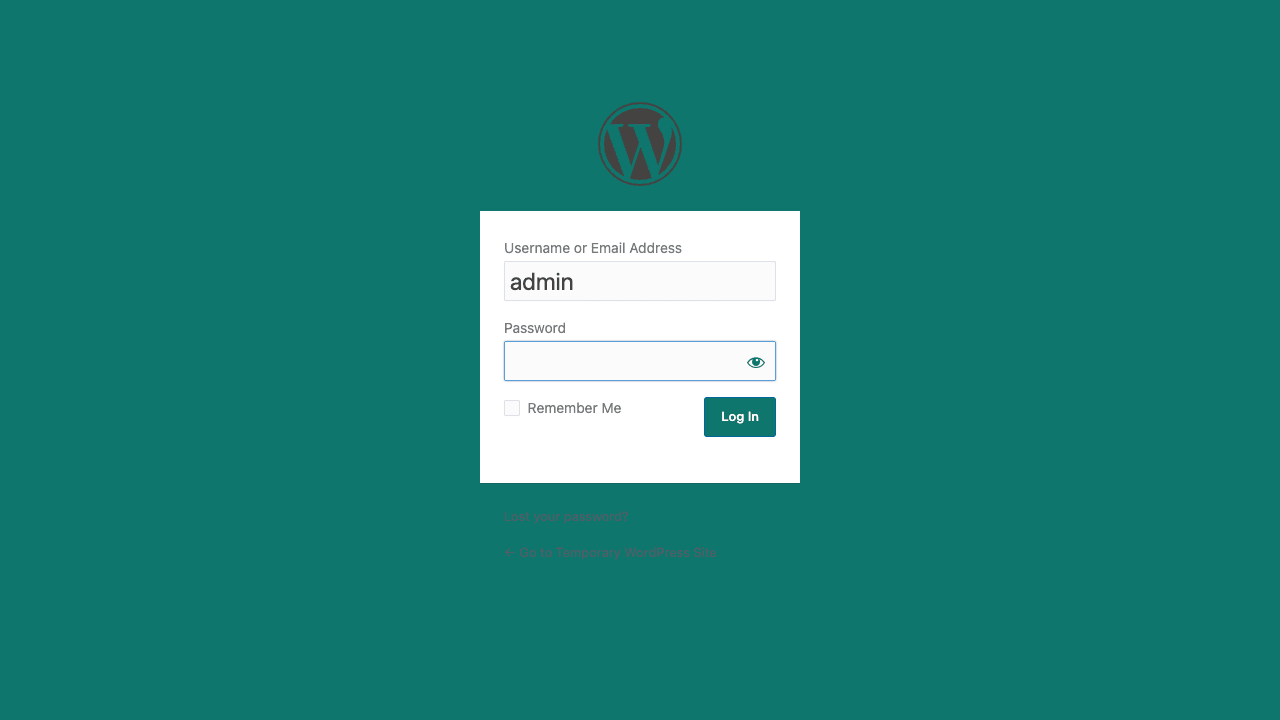
The screenshot below shows my test setup, deep teal background (
#0F766E), branded login button, custom welcome message above the form. Total time to configure: under 5 minutes.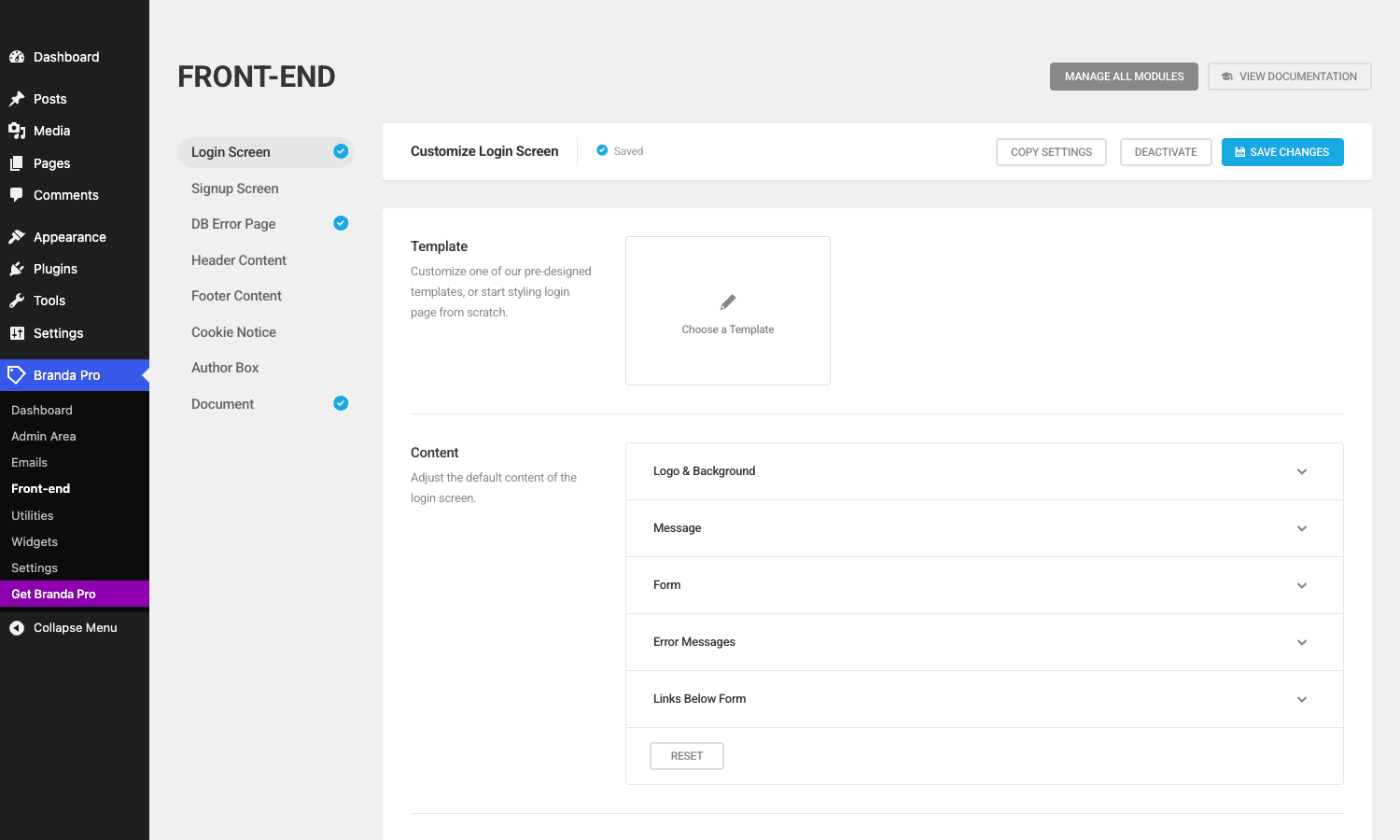
One thing the module does not do: change the URL of
wp-login.php. If you want to move the login page to/my-secret-login/, you need a separate plugin like WPS Hide Login. I cover that in the boundaries section below.Email branding: the module other plugins skip
This is where Branda earns its agency-tier price tag. White-labeling the admin and the login screen is a solved problem; a half-dozen plugins do it. Templating system emails is much rarer.
Branda’s Email Template module wraps every WordPress system email (password reset, new user welcome, comment moderation, the lot) in your HTML shell. The shell can be one of the bundled templates (DISCO, Handwritten, iLetter, MINIMISE, TryWater, Dark Simplicity, Simplicity) or "Start from Scratch" with your own HTML.
The merge variables are the part to pay attention to. Above the HTML editor you get a row of clickable variable buttons: Email Subject, Message, From Name, From Email, Admin Email, Sidebar Title, Site URL, Site Name, Site Description, Current Date, Current Time. Click one and the variable token (
{EMAIL_MESSAGE},{SITE_NAME}, etc.) drops into the editor at your cursor. The plugin replaces those tokens at send time. So your template stays generic and the same shell wraps a password reset and a comment notification.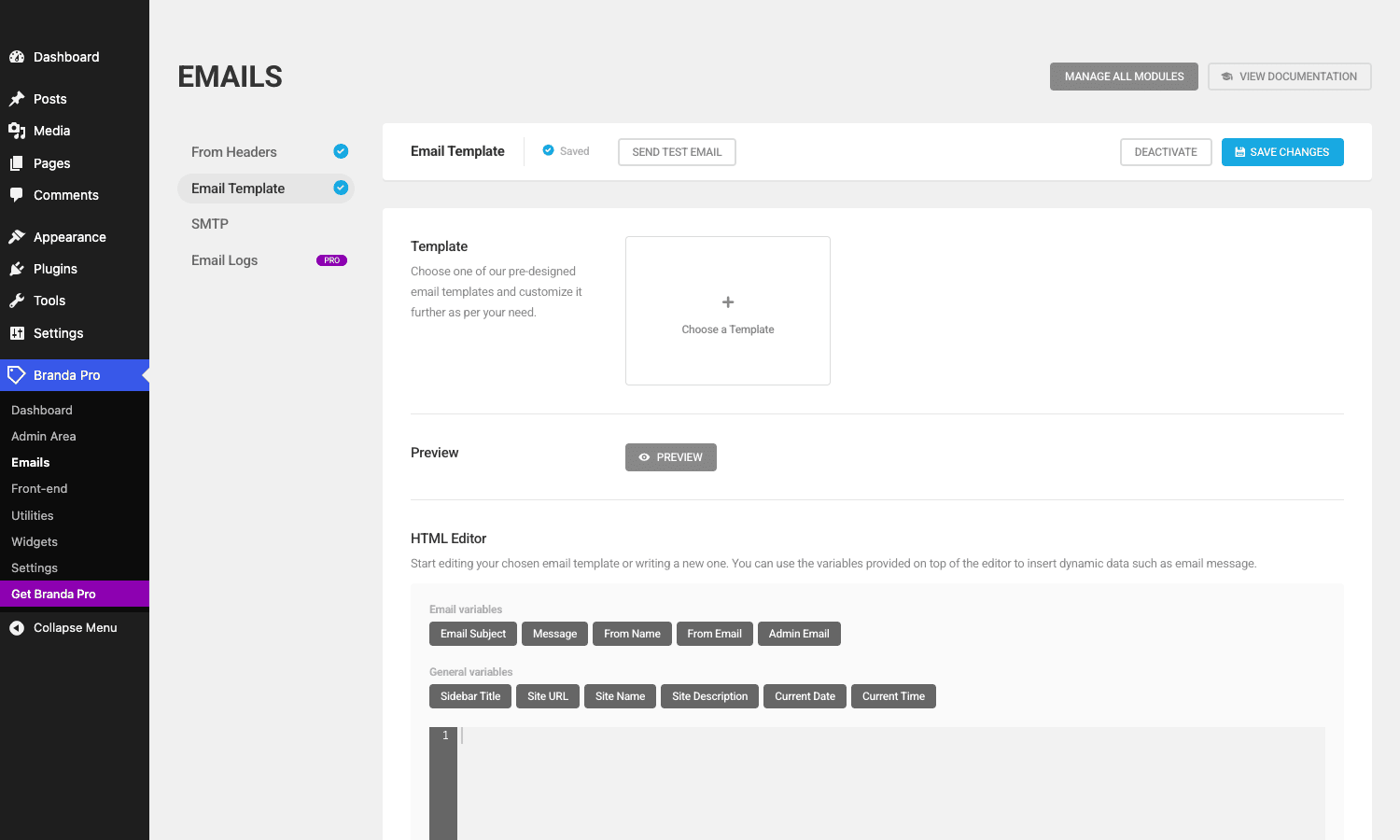
There is one honest critique. The HTML editor is a CodeMirror-backed textarea, not a visual builder. If you want a drag-and-drop email designer you will be disappointed. The flip side: you get to write real HTML, you can preview a sample render before saving, and you can copy your template between sites with one click. For an agency that wants pixel control, I prefer the raw editor.
The companion From Headers module sets the global From name and From email. Set this before you turn on the Email Template module. Without it, your fancy template still ships from
wordpress@yoursite.example, and Gmail will quietly spam-folder half your password resets.For the third email module worth mentioning, SMTP routes outgoing mail through a real provider. Branda’s SMTP module is feature-parity with WP Mail SMTP’s free version. If you already use Postmark or a transactional service with their own WP plugin, leave Branda’s SMTP module off.
The multisite story: network defaults + per-site overrides done right
This is the section that decides whether Branda is worth the price. Most "white-label WordPress" plugins are single-site. The few that handle multisite do it by storing one global config and applying it to every sub-site uniformly. Branda’s architecture is different.
On a Network install, every Branda module has two layers of settings. The network default lives in
wp_sitemeta(tablewp_sitemeta, option keyultimatebranding_settings_<module>). The per-site override lives in the sub-site’swp_<id>_options(option key with the same shape). When a module renders, it callsbranda_get_option(), which first checks the sub-site’s options table, then falls back towp_sitemeta. Each module has a per-site toggle (Network Admin > Branda > Subsite Configuration) that decides whether a sub-site is allowed to override.Here is what that looks like in practice. An agency runs a school-district multisite. The agency wants every school site to share the same email template (from headers, footer text, system emails) but each school chooses its own login screen logo and colors. At the network level, set Email Template, From Headers, and Admin Footer to "Network Default Only" (sub-sites cannot override). Set Login Screen to "Allow Subsite Override". Now every school site inherits the agency-branded emails and every school admin can swap out their own login screen logo, with zero involvement from the agency.
I have not found this level of granularity in any other branding plugin. White Label CMS supports multisite but does not let individual sub-sites override the network default. Adminify and Admin Menu Editor Pro are single-site only. AME Pro can be activated network-wide but settings are still per-site (no inheritance).
A second thing Branda gets right on multisite: the Site Generator module. Super admins can define a "branded site template" that gets applied to every new sub-site created on the network. Pre-set the login logo, the dashboard widgets, the email template. When a new sub-site is created, those settings clone in immediately, so the new site is on-brand from day one without anyone having to log in and configure it.
There is one specific multisite gotcha I want to call out. Per-site overrides require you to be in the sub-site’s admin context, not the Network Admin. If you switch to Network Admin and visit Branda Pro, you only see the network defaults; the override toggles are not there. Solo-site admins who upgrade from single-site sometimes hit this and assume the override system is broken. It is not, you just need to switch context (My Sites > Dashboard for the sub-site, then Branda Pro).
Branda vs White Label CMS vs Adminify vs Admin Menu Editor Pro: when each one wins
I have shipped all four. They overlap in unhelpful ways, so here is a real comparison with specs, not just impressions.
Spec Branda Pro White Label CMS Pro Adminify Pro Admin Menu Editor Pro Module count 28 modules across 5 groups 5 main sections (Dashboard, Login, Menu, Branding, Settings) 8 modules 0 (single-feature plugin) Login customizer Yes (full Template/Content/Design) Yes (basic logo + colors) Yes (templates + colors) No Admin theme Yes (Color Schemes module) No Yes (full color scheme builder) No Email template branding Yes (HTML shell + merge variables + 7 templates) No No No Email From Headers Yes No No No SMTP Yes No No No Admin menu editor Yes (per-role, hide/reorder/add custom) Yes (basic hide-only) Yes (per-role) Yes (deepest of the four; per-role, drag-drop, conditional logic, plugin-pages, action menu items) Maintenance / coming-soon Yes No No No Multisite support Network default + per-site override Network-active, no per-site overrides Single-site only Single-site only (network-active works but settings stay per-site) Bundled CSS/JS weight (admin pages) ~44 KB CSS + 50 KB JS minified ~12 KB CSS + 8 KB JS ~38 KB CSS + 60 KB JS ~28 KB CSS + 40 KB JS License pricing (as of writing) Bundled with WPMU DEV Hub (~$49/mo) or standalone via GPL $79 one-time (lifetime) $69/yr (single site) $39/site/yr A few things to note. White Label CMS is the most cost-effective if you only need dashboard + login + menu cleanup and you do not care about email branding or multisite. Adminify has the prettiest admin theme builder (more granular palette controls than Branda), but it stops at the admin and the login screen. Admin Menu Editor Pro is the only one with truly deep menu editing (conditional menu items, per-action visibility, integration with Admin Columns Pro for column hiding) and it is the right pick if you only care about the menu and nothing else.
Branda wins on three axes: module breadth (28 modules vs the field’s 5-8), email branding (the only one of the four that templates system emails), and multisite (the only one with per-site overrides). It loses on bundled price if you do not already pay for WPMU DEV Hub and on admin-menu depth if your needs are menu-only.
A practical recommendation: if you run a single site and you only need the login screen, get LoginPress Pro. If you run a single site and you need broad white-labeling minus the email part, get Adminify or White Label CMS. If you run multisite, or you care about email branding, get Branda.
Don’t enable Branda’s admin theme on multisite without testing
This is the most expensive bug I have hit with Branda, and it is worth its own section because the fix is not obvious.
Branda’s Color Schemes module (under Admin Area) lets you define a new WordPress admin color palette. On a single site this is harmless; you pick the palette in your Profile and only your account uses it. On a multisite network the module behaves differently. If you check "Apply to all users" at the network level, the palette is force-applied to every user across every sub-site, overriding their personal preferences and (this is the bug) overriding any custom admin CSS that any other plugin on a sub-site is injecting.
Two real failure modes I have seen: (1) a sub-site running WPMU DEV Hustle for popups had its popup builder UI turn unreadable because the Branda palette overrode Hustle’s button colors; (2) a sub-site running Elementor had its top-bar contrast drop to a fail because Branda’s
--wp-admin-theme-coloroverrode the variables Elementor reads. Neither is Branda’s fault per se; both are CSS cascade collisions.The fix is two-part. First, never enable Color Schemes globally on a multisite without testing each sub-site that runs a UI-heavy plugin. Second, if you do enable it, scope your custom palette to the WordPress admin selectors only (
.wp-admin,#wpadminbar,#adminmenuwrap) and avoid touching the generic CSS variables (--wp-admin-theme-color,--wp-admin-theme-color-darker-10, etc.) that other plugins read.If you want to white-label the admin colors without the multisite blast radius, use Branda’s Custom CSS module instead and write narrowly-scoped rules. That is the safer pattern, even if it takes longer.
The WPMU DEV Dashboard nag: how to actually dismiss it
If you install Branda from the WPMU DEV channel (rather than the GPL-licensed version), the plugin shows a banner on every dashboard view asking you to log in to your WPMU DEV account so it can connect to the WPMU DEV Hub. Dismissing the banner with the X works for the current session but the banner returns on the next page load. The friction is real. I have rolled out Branda on agency sites and had clients ask "what is this ‘connect to WPMU DEV’ thing".
There are three ways to deal with it.
- Connect to WPMU DEV. If you have a paid subscription this is the cleanest fix. The banner goes away permanently.
- Use the GPL-licensed version. The GPL distribution of Branda has the WPMU DEV Dashboard integration disabled, so the banner does not appear. That is the version available on gpltimes.com.
- Filter it out. If you have a paid build but you do not want the banner, add this to your
functions.phpor a mu-plugin:
add_action( 'admin_init', function() {
 remove_action( 'all_admin_notices', array( 'WPMUDEV_Dashboard_Notice', 'render_notice' ), 99 );
 add_filter( 'wpmudev_dashboard_notice_can_view', '__return_false' );
}, 100 );
The filter is not officially documented but it is in the source and has been stable for the last several releases of the Dashboard plugin.
What Branda doesn’t replace (and when you still need WPS Hide Login)
Branda is broad but it is not infinite. There are three things it does not do, and you should know which third-party plugin to reach for instead.
Changing the wp-login.php URL. Branda customizes the appearance of
wp-login.phpbut does not move it. If your security threat model includes hiding the login URL from script kiddies, you need WPS Hide Login or iThemes Security to rewrite the URL. The two plugins coexist with Branda cleanly; Branda’s login customizer hooks intologin_enqueue_scriptsand friends, which fire regardless of the URL.Two-factor authentication. Branda’s login customizer is purely cosmetic. For 2FA, plug in a dedicated plugin (Two Factor by the WordPress.org team, or Defender Pro which is the WPMU DEV stablemate).
Front-end design. Branda does not touch your theme. The front-end modules (Author Box, Cookie Notice, Header/Footer Content) drop snippets into the theme, but the theme’s actual design is untouched. Branda is an admin/login plugin, not a page builder.
That trio in mind, Branda is happy living alongside everything else. I have shipped it with Elementor, with [WooCommerce], with Astra, and with multiple security plugins. No conflicts beyond the admin-theme one I called out above.
Developer reference: hooks, filters, options, classes
This is the section that justifies the "developer" half of this article. Branda exposes a real plugin API, which is unusual for a "branding plugin"; most plugins in this category ignore developers entirely.
Plugin internals
The plugin loads through
Branda_Loader(ininc/class-branda-loader.php). Loader walksinc/modules/looking for active modules andrequire_onces the matching PHP files. Activation state is stored in the optionultimatebranding_activated_modules(network-wide on multisite, per-site on single-site).The base class for every module is
Branda_Base(ininc/class-branda-base.php). It provides three hooks every module uses:get_value()to read a module setting,update_value()to save it, andget_module_options()to fetch the whole settings array. The plugin hooks heavily into WordPress’s login_enqueue_scripts andlogin_headerurlactions to render the login customizer, so those are the WP hooks to know if you ever need to debug a conflict.The settings UI is rendered through
Branda_Simple_Options(ininc/class-simple-options.php), which takes a PHP config array and produces the Shared UI form. If you write a custom module, this is the class to extend.Useful filters
The filter API is rich. Here is the shortlist worth knowing.
branda_can_load_module(bool $can_load,string $module). Return false to prevent a module from loading even if it is activated in the dashboard. Useful for environment-specific branding (load full Branda in production, only the login customizer in staging):add_filter( 'branda_can_load_module', function( $can_load, $module ) { if ( defined( 'WP_ENV' ) && WP_ENV === 'staging' ) { $allowed = array( 'login-screen' ); return in_array( $module, $allowed, true ); } return $can_load; }, 10, 2 );ub_get_option(mixed $value,string $option,mixed $default). Filter the value of any Branda option at read time. Use this to override settings programmatically (for example, force a specific from-email per environment without editing the saved option):add_filter( 'ub_get_option-from_name_email', function( $value, $option, $default ) { if ( defined( 'WP_ENV' ) && WP_ENV!== 'production' ) { $value['name'] = '['. WP_ENV. '] Acme'; } return $value; }, 10, 3 );The
ub_get_option-<option>variant is the per-option filter (note the dash, not an underscore) and is the one I reach for most often.branda_module_check_for_subsite(bool $is_subsite,string $module_key,array $module). Multisite-only. Decides whether a sub-site is allowed to override a network-default module. Return true to force per-site override for a specific sub-site:add_filter( 'branda_module_check_for_subsite', function( $is_subsite, $key, $module ) { if ( get_current_blog_id() === 5 && $key === 'login-screen' ) { return true; } return $is_subsite; }, 10, 3 );branda_force_local_option(bool $force,string $option). Closely related. Forces a specific option to read from the local sub-site options table even if the network default exists. Use this for options that should never inherit (per-site Google Analytics IDs, for example).branda_footer_text(string $text,string $module). Filter the dashboard footer text after Branda has rewritten it. Useful for inserting dynamic content (last-deployed timestamp, environment name):add_filter( 'branda_footer_text', function( $text, $module ) { return $text. ' (env: '. wp_get_environment_type(). ')'; }, 10, 2 );Useful actions
branda_module_activated(string $module) andbranda_module_deactivated(string $module), fire when a module’s activation state changes. Useful for clearing object caches or logging admin actions:add_action( 'branda_module_activated', function( $module ) { error_log( sprintf( '[Branda] Module activated by user %d: %s', get_current_user_id(), $module ) ); });**
branda_uninstall_plugin. A no-arg action that fires when the plugin is being deleted. Tidy up any add-on options here.branda_custom_admin_menu_loaded(array $menu). Fires after the Admin Menu module has applied its rewrites. The$menuarray is the global$menuWordPress uses to render the left sidebar. Inspect it or mutate it for late-stage tweaks.branda_admin_stats_write(string $option). Fires when an admin saves a Branda option. Hook in for audit logging.Options storage
Every Branda module stores its settings in a single option named with the module’s slug (sometimes prefixed
ultimatebranding_). On multisite, those keys live inwp_sitemeta. On single-site or for per-site overrides, they live inwp_options. The activation state is inultimatebranding_activated_modulesas a serialized array of'<group>/<module-file>' => 'on'pairs.If you want to inspect Branda’s current state from WP-CLI:
wp option get ultimatebranding_activated_modules --format=json
wp option get from_name_email
wp option get login_screen
And to mass-set settings during deployment (great for staging-to-prod sync):
wp option update from_name_email '{"name":"Acme","email":"hello@acme.example"}' --format=jsonREST endpoints
Branda registers one REST endpoint, under
branda/v1, for the Email Logs module. It returns paginated email-log entries. If you do not run the Email Logs module the endpoint does not register, which is the right behavior.Custom post type
The Email Logs module registers a private
branda_email_logCPT (and aub_log_typetaxonomy) to store logged emails. These are non-public so they do not surface in your sitemap or front-end queries. If you want to query them programmatically:$logs = get_posts( array( 'post_type' => 'branda_email_log', 'posts_per_page' => 50, 'meta_query' => array( array( 'key' => 'to', 'value' => 'support@acme.example' ), ), ) );Writing a custom Branda module
This is undocumented but possible. Drop a PHP file at
wp-content/mu-plugins/my-branda-extension.php:<?php add_action( 'plugins_loaded', function() { if (! class_exists( 'Branda_Base' ) ) { return; } class My_Custom_Module extends Branda_Base { public function __construct() { $this->module = 'my-custom-module'; $this->name = __( 'My Custom Module', 'my-text-domain' ); $this->group = 'admin'; // admin, content, emails, front-end, utilities, widgets parent::__construct(); } } new My_Custom_Module(); }, 20 );The module will show up in the Branda dashboard alongside the built-ins.
Performance footprint and the few real gotchas
I ran Query Monitor against a stock WordPress install with Branda installed and 11 modules active. Numbers:
- Admin-page query count. +14 to +22 queries depending on the module mix (Email Logs adds the most). All cached after first load.
- Admin-page PHP memory. +1.8 MB peak on a clean WordPress 6.x install.
- Admin-page asset weight. 44 KB minified CSS + 50 KB minified JS, served from
wp-content/plugins/ultimate-branding/assets/. Loaded only on Branda pages, not on the rest of the admin. - Front-end asset weight. Zero by default. The Login Screen module’s CSS only loads on
wp-login.php. The front-end modules (Author Box, Cookie Notice) only load when their shortcodes or hooks render. - Database overhead. Branda stores one option per module; on a typical 8-module install you add 8-10 rows to
wp_options. No autoload bloat (Branda’s options areautoload = nofor the heavy modules).
The numbers are healthy. Branda is not lightweight (it is a 40k-line plugin) but the modular loader keeps the runtime cost small.
Two gotchas worth flagging.
Maintenance mode and admin DNS. If your site uses different DNS for admin and front-end (some agency setups put
admin.example.comon a different origin to the public site), Branda’s maintenance mode will only block the front-end origin and admins can still log in. That is the desired behavior, but if you have a CDN in front that caches the maintenance page, you need to purge the CDN’s cache when you turn maintenance off, or visitors will see the maintenance page for hours after you flip the switch.Email Logs CPT and database growth. The Email Logs module stores every outgoing email as a CPT row, including the rendered HTML body. On a high-volume site (transactional emails for an e-commerce store, say) the
wp_poststable grows fast. Branda has a prune setting (ub_logging_prune_whenfilter, default "2 weeks ago") but you should monitor table size if you run this module on a busy site.Pricing and licensing
Branda Pro is part of the WPMU DEV plugin family. On WPMU DEV directly it is bundled with the Hub plan ($49/mo or $588/yr at standard pricing) which also includes Smush Pro, Defender Pro, Hustle Pro, Forminator Pro, and the rest of the WPMU DEV catalog. There is no standalone-Branda single-purchase tier; you either subscribe to the Hub or you do not.
Same code, same plugin file, no license-check phone-home. If you do not need the WPMU DEV Hub’s other plugins, the GPL route is the practical pick.
A note on GPL ethics: WPMU DEV’s plugins are GPLv2-licensed by the vendor (not by a third party), which means the redistribution is fully sanctioned. Branda is one of the few "branding" plugins where the GPL community can build, install, and use it without ambiguity. We host the full plugin so you can deploy it to as many client sites as you want.
FAQ
Why doesn’t Branda change the wp-login.php URL?
By design. URL rewriting touches WordPress’s rewrite rules and the
wp-login.phpfile directly, which conflicts with security plugins that already do this (WPS Hide Login, iThemes Security). Branda stays in its lane and customizes the appearance of the login page; if you also need to hide the URL, run a dedicated plugin alongside.Can I export Branda settings from one site to another?
Yes, with a caveat. Every module’s settings page has a "Copy Settings" button that serializes the options to a textarea you can paste into another site’s matching module. This is per-module, not per-site, so a full Branda migration involves clicking Copy on each active module and pasting on the target. There is no one-shot "export everything" button, which is annoying on a 10-module setup. The workaround for bulk migration is WP-CLI:
wp option get <branda_option> | wp @target option update <branda_option> -per option.Does Branda work in WordPress multisite the way I expect?
Mostly yes. Network defaults work, per-site overrides work, and the Subsite Configuration page in Network Admin lets you decide which modules can be overridden per site. The two confusion points: (1) you have to be in the sub-site’s admin context (not Network Admin) to see the per-site override toggle, which trips solo-admins; (2) the Color Schemes and Custom CSS modules cascade globally if you enable them network-wide and can collide with sub-site plugins (see the anti-pattern section above).
Why is Branda’s admin theme fighting with my custom plugin’s UI?
If you enabled Color Schemes or Custom CSS at the network level, Branda is injecting CSS into every admin page on every sub-site. That CSS uses
!importantin a few places and overrides the WordPress CSS custom properties (--wp-admin-theme-coloretc.) that many plugins read. The fix is to either scope your Branda CSS narrowly (selectors prefixed with.wp-adminand avoiding the theme-color variables) or deactivate Color Schemes globally and use theProfile > Admin Color Schemeper-user route instead.How do I disable the WPMU DEV upgrade prompts permanently?
Three options: (a) connect the plugin to a WPMU DEV account, (b) use the GPL-licensed version which ships with the Dashboard integration disabled, or (c) drop the
remove_action/add_filtersnippet I shared above into a mu-plugin. Option (b) is the lowest-friction.Does Branda support WooCommerce email templates?
No. Branda’s Email Template module wraps WordPress system emails (password reset, new user, comment notification, admin notifications). WooCommerce emails go through WooCommerce’s own template system (
wp-content/plugins/woocommerce/templates/emails/) and Branda does not touch them. For WooCommerce branding you need a dedicated WC email customizer plugin.Can I use Branda on a headless WordPress setup?
Partially. The Admin Area modules (Admin Bar, Admin Footer, Admin Menu, Color Schemes, Custom CSS) all work on the WordPress admin regardless of how you serve the front-end. The Front-end modules (Author Box, Cookie Notice, Header Content) inject into the rendered theme HTML, so they only matter if your headless setup still uses the WordPress front-end (i.e. you have a Next.js or Gatsby front but kept WP for previewing). On a fully decoupled setup, only enable the admin and email modules.
What happens to my Branda settings if I deactivate the plugin?
They stay in the database. Branda does not clean up on deactivation (only on uninstall via the
branda_uninstall_pluginaction). So if you deactivate, install another branding plugin, then reactivate Branda later, your settings come back. Useful for trial-running alternatives.Final thoughts
Branda Pro is the most complete white-label plugin in the WordPress catalog, full stop. The breadth is real: 28 modules covering admin, login, dashboard, emails, front-end snippets, maintenance mode, favicons, signup screens. The multisite story is the cleanest in the category. The developer hooks are well-named and useful enough that you can extend Branda from a mu-plugin without forking the source.
Where it loses points: the WPMU DEV Dashboard nag on paid builds, the email editor being a raw HTML textarea rather than a visual builder, and the multisite color-scheme footgun. None of these are dealbreakers but they are honest friction you will hit in week one.
Who should pick it: agencies running multisite networks, agencies handing WordPress to small-business clients who need a "this is Acme CMS, not WordPress" feel, SaaS products built on top of WordPress, and anyone who has tried to template system emails by hand and given up.
Who should pass: solo bloggers who do not need any white-labeling, sites that already pay for AME Pro and only care about the menu, and sites where the only ask is hiding the login URL (use WPS Hide Login alone for that).
If Branda fits your stack, the WordPress white-label suite from WPMU DEV is on gpltimes.com as a single-file zip. Drop it into a multisite, switch on the eight modules you need, and you have replaced six plugins in an afternoon.