

If you run a WordPress site that gets any traffic from the EU, the cookie banner is not optional. You need real opt-in, no scripts firing before consent, and a record of what every visitor agreed to. Borlabs Cookie is the German-built plugin that takes this seriously. It blocks Google Analytics, the Facebook Pixel, YouTube embeds, Maps, and anything else third-party until the visitor clicks accept, then writes a consent log you can show to a data-protection authority.
This guide walks the whole thing end to end. We’ll cover what Borlabs Cookie actually does, how to set it up on a fresh WordPress install, what the dialog looks like to a real visitor, how to wire pre-built service templates for GA4 and YouTube, and then we go deep on the developer side: shortcodes, the REST API, every filter the plugin exposes, and the patterns devs use to extend it.
Table of Contents
- What is Borlabs Cookie?
- Why GDPR cookie consent is hard to fake
- Key features at a glance
- How it works for visitors
- Installation and setup
- The setup assistant walkthrough
- Service Groups and Services explained
- Content, script, and style blockers
- The consent log
- Dialog appearance and translations
- Common real-world configurations
- Developer reference
- Performance, compatibility, and gotchas
- How Borlabs Cookie compares to other consent plugins
- Pricing and licensing
- Frequently asked questions
- Final thoughts
What is Borlabs Cookie?
Borlabs Cookie is a premium WordPress consent-management plugin made by Borlabs GmbH in Hamburg, Germany. It sits between your visitor and any third-party script you’ve loaded on the site, holds those scripts back until consent is given, presents a configurable banner with accept and decline options, and keeps a per-visitor record of what was accepted and when.
In the GDPR world this is called consent management. The European rules on cookie consent say that any cookie or tracker that isn’t strictly necessary for the site to function (so: anything advertising, analytics, embeds with tracking, A/B tools, fingerprinting) must wait for explicit, freely given, informed opt-in. Borlabs Cookie is one of a handful of plugins built specifically to enforce that on WordPress, and it has historically been the choice for sites with a German-speaking audience because it follows the stricter TTDSG and ePrivacy reading of the law that German DPAs tend to enforce.
You can think of it as four moving parts that fit together:
- A dialog that the visitor sees on first visit and can re-open at any time.
- A library of Services (Google Analytics, GA4, GTM, Meta Pixel, YouTube, Vimeo, reCAPTCHA, Maps, Hotjar, Hubspot, Stripe checkout, Mailchimp, and many more) with sensible defaults for purpose, provider, retention, and the snippet that runs after consent.
- Blockers (content, script, and style) that intercept third-party HTML,
<script>tags, and stylesheets before they execute and replace them with a "click to load" placeholder when consent is missing. - A consent log that records each visitor’s choices with a hashed identifier and a timestamp, valid as legal evidence in front of a data-protection authority.
That fourth piece, the log, is the part most cheap or free banners skip. It’s why Borlabs gets installed on sites that take an actual legal opinion before publishing.
Why GDPR cookie consent is hard to fake
You might be wondering whether you really need a dedicated plugin for this. Can’t you write a custom banner and call it a day?
You can, but the regulators have been quite clear about what counts and what doesn’t. A "by continuing to use this site you accept cookies" bar is not consent under GDPR. An "X" that closes the banner without recording a choice is not consent. A pre-ticked checkbox is not consent. A site that loads Google Analytics before the visitor clicks accept is in breach regardless of what the banner says afterwards. France’s CNIL has fined Google and Amazon for exactly that pattern. Italy’s Garante has fined Edgar Allan Poe Foundation, Le Marche tourism board, and dozens of newspapers. Germany’s DPAs have gone after small e-commerce shops.
So whatever banner you ship has to do at least these things:
- Block third-party scripts before consent. Not just "set a flag", but literally not run
gtag.jsor the Meta Pixel base code until the visitor opts in. - Offer an equally-easy "decline all" right next to "accept all". A configuration where decline is hidden two clicks deep has been ruled non-compliant by CNIL.
- Record what every visitor consented to, with a timestamp, in a form you can produce on demand.
- Let visitors withdraw consent as easily as they gave it.
This is what Borlabs Cookie automates. The script blocker actually keeps gtag.js out of the page until you have opt-in. The dialog ships with equal-prominence accept and decline. The consent log stores per-visitor records you can search and export. None of that is rocket science, but writing it from scratch (and keeping it correct as the law changes) is a real project.
Key features at a glance
- Dialog with accept-all, decline, and granular preferences: three buttons of equal prominence, with the layout configurable as a centered modal, top bar, or bottom bar, light or dark.
- Service Groups: Essential, Statistics, Marketing, External Media as starting groups (you can add more). Visitors toggle whole groups at once or drill into individual services.
- Pre-built service templates for Google Analytics, GA4, Google Tag Manager, Facebook Pixel, Microsoft Clarity, YouTube, Vimeo, Twitter/X, Instagram, Google Maps, reCAPTCHA, Hotjar, Hubspot, Stripe, Mailchimp, and many more. You pick from a library and the opt-in code, provider, and cookie inventory are filled in for you.
- Content blockers: block embedded iframes (YouTube, Maps, Vimeo) and replace them with a click-to-load preview that triggers a per-service opt-in.
- Script blockers: intercept
<script>tags by URL or inline content match, hold them back, and unblock them only after the right service category is accepted. - Style blockers: same idea for
<link rel="stylesheet">and inline<style>blocks (Google Fonts is the textbook case). - Cookie scanner: local and cloud-side scan that finds cookies on your site you haven’t mapped to a service yet, and suggests templates from the library.
- Consent log: one row per visitor consent event, with hashed UID, timestamp, cookie version, and the selection state of each service group.
- IAB TCF v2.2 framework: full Transparency and Consent Framework support (see the IAB Europe TCF spec for the underlying standard), vendor list, third-party hostname filter, signals for ad networks that follow the spec.
- Google Consent Mode v2: emits the right
ad_storage,analytics_storage,ad_user_data, andad_personalizationsignals so Google Ads measurement degrades gracefully when consent is denied. - Geo-targeting: show different dialogs (or skip the dialog entirely) based on visitor country, useful if your EU/EEA traffic is small.
- Multilingual: adapters for WPML and Polylang ship in the box, and the dialog text is fully translatable per language.
- REST API + extensive filter hooks: well-defined extension points for developers.
- Compatibility patches: built-in workarounds for Hummingbird, Elementor caches, and other plugins that fight with cookie consent flow.
- Setup assistant: first-run wizard that scans the site for embeds and proposes services and content blockers automatically.
How it works for visitors
Here is what a real visitor experiences when they land on a site running Borlabs Cookie for the first time.
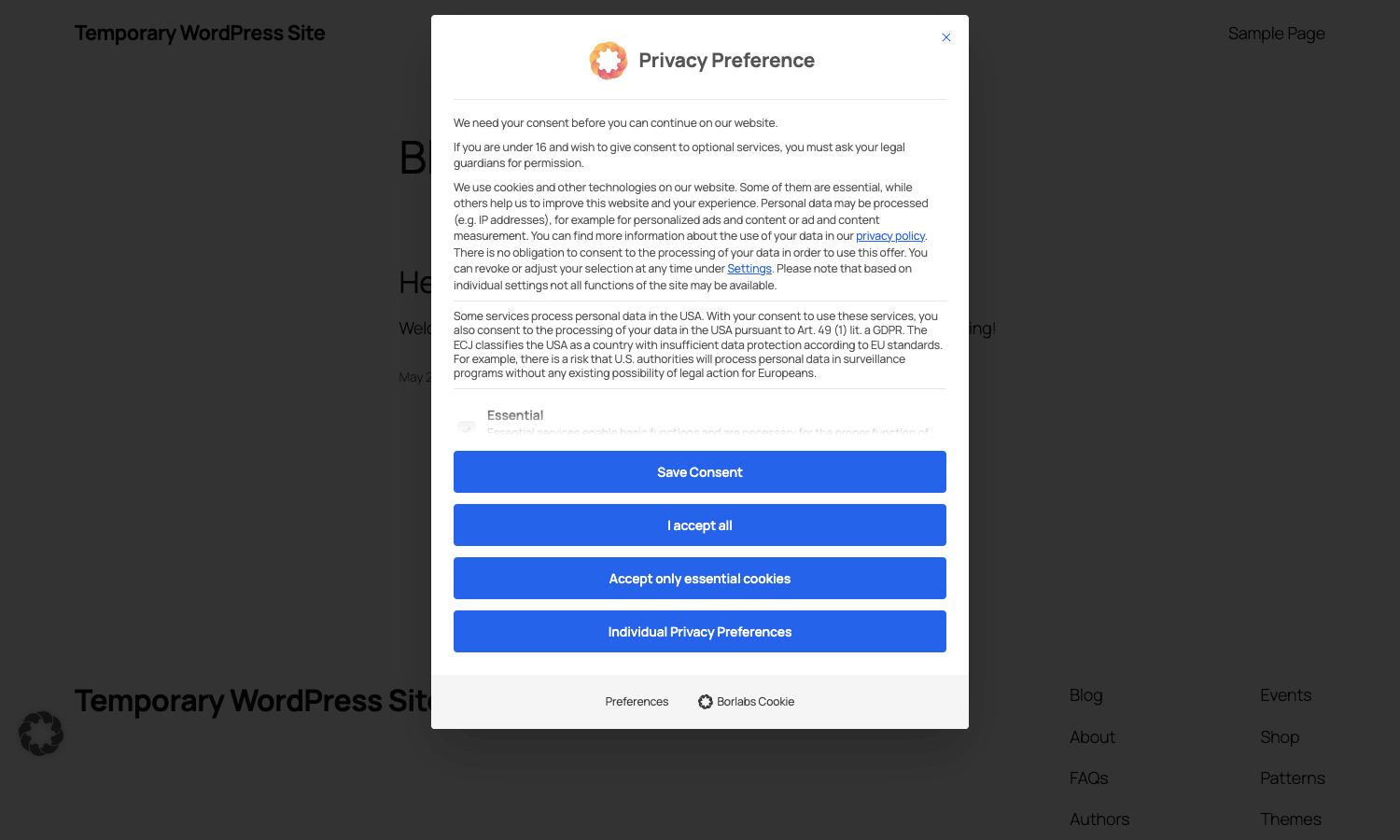
The default layout is a centered modal that takes focus on first visit. The intro paragraph explains in plain language that the site uses cookies, that some are essential and some are not, and that the visitor can adjust their choices later. Below that paragraph are the four buttons that matter:
- Save Consent: saves whatever the visitor has currently selected.
- I accept all: opts in to every service group.
- Accept only essential cookies: the decline-all equivalent. Essential services run, everything else stays blocked.
- Individual Privacy Preferences: expands the dialog into the granular per-group, per-service view.
If the visitor clicks "I accept all", every third-party script in the page (Google Analytics, the Meta Pixel, the YouTube embed, whatever you’ve configured) is allowed to run. Behind the scenes, a cookie called borlabs-cookie is set on the visitor’s browser with their selection encoded as JSON, and a row is written to the consent log.
If the visitor clicks "Accept only essential cookies", only the Essential group runs. Borlabs sets the same borlabs-cookie cookie with the rejected groups marked. The third-party scripts stay out of the page.
If the visitor expands "Individual Privacy Preferences", they get a per-group toggle list. They can accept Statistics but reject Marketing, or accept YouTube but reject Google Maps, with whatever granularity you’ve configured. The dialog explains each service in human terms: provider, purpose, cookies set, retention period, country of data processing, and a link to the provider’s own privacy policy.
The dialog can be re-opened at any time. The default install ships with two ways to do that: a tiny floating "fingerprint" widget in the corner of the page (you can hide it), and a [borlabs-cookie type="btn-consent-preferences"] shortcode you can put in your footer or privacy policy page.
The visitor’s selection survives across pages, across sessions until the cookie expires, and across cookie-version bumps (when you change your service configuration in a way that requires re-consent, Borlabs forces the dialog to re-appear).
Installation and setup
You install Borlabs Cookie like any other premium WordPress plugin: upload the .zip, activate, then open the new "Borlabs Cookie" menu in the WP admin sidebar.
The first screen you land on is the Dashboard. Until you flip the master switch, the plugin sits in setup mode and the dialog does not appear to visitors.
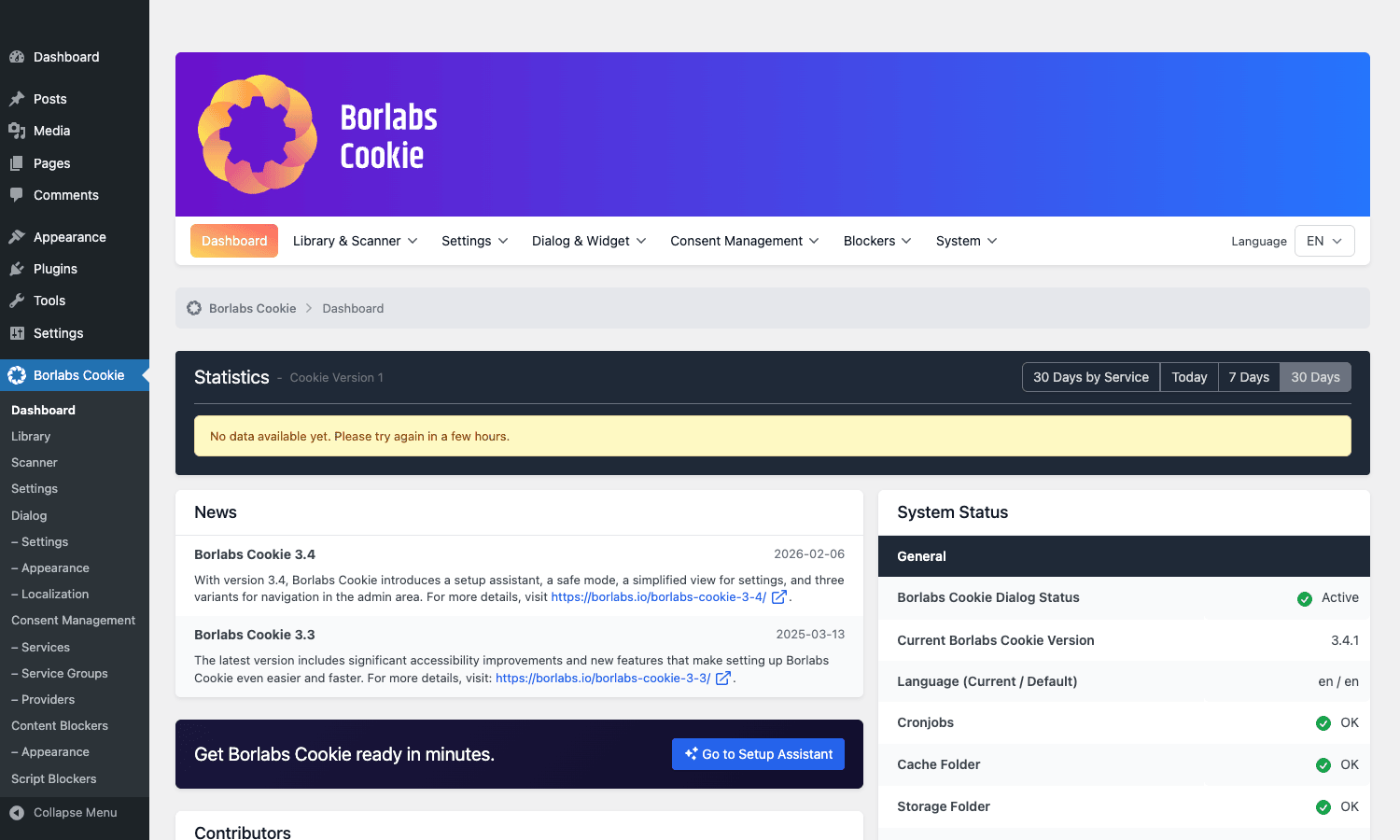
The dashboard is a single page with three panels:
- Statistics: a 30-day bar chart of consent events (once you have traffic), and Today / 7-day / 30-day rollups by service group.
- News: release notes pulled from borlabs.io, useful for spotting "the Meta Pixel template changed, you should re-check yours" announcements.
- System Status: quick health check: is the plugin active, what cookie version are you on, what’s the writable status of the cache, log, and storage folders. If any of these go red, the relevant feature breaks.
To turn the plugin on for real, you go to Settings > General Settings and flip the "Borlabs Cookie Status" toggle to active. From that moment on, every visitor sees the dialog until they make a choice.
The minimum sane configuration after that is:
- Add at least one Service. The library has GA4, GTM, Facebook Pixel, YouTube, and dozens more ready to import. Pick the ones that match the trackers on your site.
- Add at least one Content Blocker for any embed you actually use (YouTube and Maps are the usual two).
- Open Dialog & Widget > Settings and decide whether you want the centered modal, the top bar, or the bottom bar.
- Open Dialog > Localization and re-read every line of the dialog copy. The defaults are good but you should at least change the privacy policy link.
- Go to your privacy page and add a
[borlabs-cookie type="btn-consent-preferences"]button so visitors can re-open the dialog.
That’s it for a basic install. The Setup Assistant covers the same ground but holds your hand through it.
The setup assistant walkthrough
Recent versions of Borlabs Cookie ship with a guided first-run wizard. It’s optional, you can ignore it and go panel by panel, but for non-developer users it saves a lot of clicking.
The wizard does five things, roughly in order:
- Site scan. It crawls your home page (and a sample of inner pages if you point it at them) looking for known third-party scripts, embeds, and tracking pixels. For each one it finds it suggests an existing service template from the library: "We detected
connect.facebook.net/en_US/fbevents.js, would you like to enable the Facebook Pixel service?" - Service import. For everything you confirm in step one, Borlabs creates the service entry with the correct opt-in code, provider record, and cookie inventory.
- Content blockers. For each iframe embed type it found (YouTube, Maps, Vimeo, social embeds), it creates a matching content blocker so those iframes get a click-to-load placeholder.
- Dialog defaults. It picks a dialog layout and color scheme based on your active theme’s accent color.
- Legal pages. It detects your existing Privacy Policy and Imprint/Legal Notice pages (or offers to create them) and links the dialog to them.
The output of the assistant is a working install you can ship. You’ll still want to read every service entry and confirm the legal copy matches what your DPO would write, but you’re not starting from zero.
Service Groups and Services explained
This is the conceptual heart of the plugin, so it’s worth a moment.
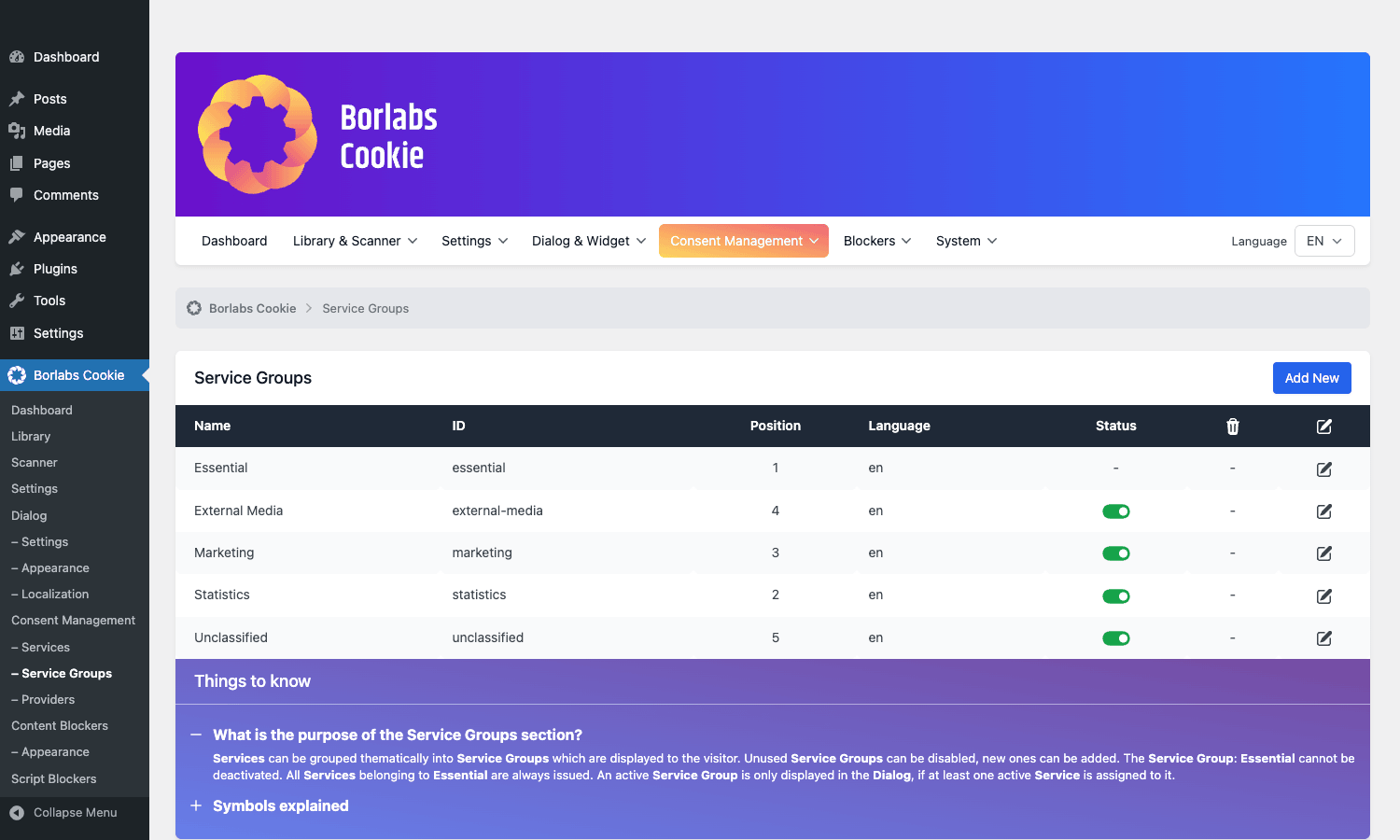
A Service Group is a category of consent. The four shipped by default are:
- Essential. Always on. The visitor cannot opt out, because the services in here are required for the site to function (your session cookie, your shopping cart, your security challenge).
- Statistics. Analytics like Google Analytics, Matomo, Hotjar heatmaps. Opt-in.
- Marketing. Advertising and remarketing pixels (Meta, Google Ads, LinkedIn, TikTok, Pinterest). Opt-in.
- External Media. Embeds that load third-party content with their own cookies (YouTube, Vimeo, Google Maps, Twitter widgets). Opt-in.
You can rename these, change their order, add new ones, and remove ones you don’t need. The Service Groups panel looks like this:
A Service is the specific third-party tool inside a group. So in Statistics you might have Google Analytics 4, Hotjar, and Microsoft Clarity. In Marketing you might have Meta Pixel and Google Ads. In External Media you might have YouTube and Google Maps. Each Service knows:
- Which group it belongs to.
- The provider (Google LLC, Meta Platforms Ireland, etc) and country of data processing.
- The opt-in code that runs when consent is given (this is usually the
<script>snippet from the vendor’s docs). - The opt-out code that runs when consent is withdrawn (often a
gtag('consent', 'update', ...)call, or just deleting the cookies the vendor set). - The fallback / placeholder code that runs while consent is missing.
- The list of cookies set, with names, purposes, retention periods, and storage host.
- A link to the vendor’s own privacy policy.
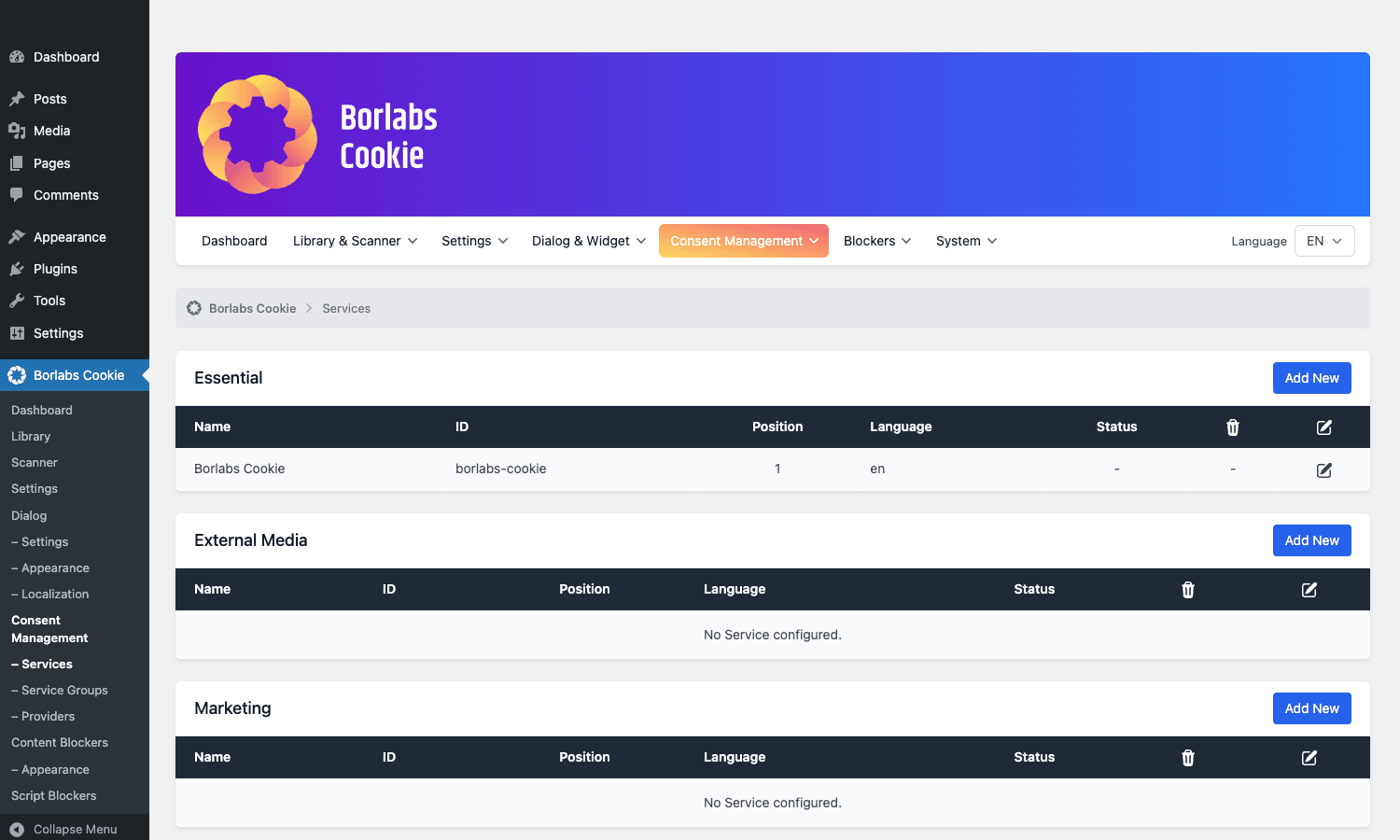
The library has templates for over 90 common services. You browse the library, click "Add", and the plugin populates all of the above for you. You can then tweak (change the GA4 measurement ID to yours, for example) and save.
Two patterns worth knowing:
- Opt-in code is what unblocks the tracker. If you’re moving from a script blocker to an opt-in code, the difference is: script blocker matches existing
<script>tags in your page and unblocks them post-consent; opt-in code injects fresh<script>once consent fires. Either approach works. - Cookie inventory feeds the dialog. The cookies listed under each service show up in the "Individual Privacy Preferences" expanded view. If you don’t fill them in, the dialog looks lighter on disclosure than it should.
Content, script, and style blockers
This is where Borlabs goes from "consent dialog" to "actually compliant".
A Content Blocker wraps a chunk of HTML (usually an <iframe>) and replaces it with a click-to-load preview when consent is missing. The classic example is a YouTube embed. Without consent, dropping a YouTube embed in your post loads a JavaScript player that sets a VISITOR_INFO1_LIVE cookie before the visitor ever clicks play. With a Content Blocker, the iframe is replaced by a placeholder: "This video is blocked. Click here to load it from YouTube. By clicking, you consent to YouTube’s data processing."
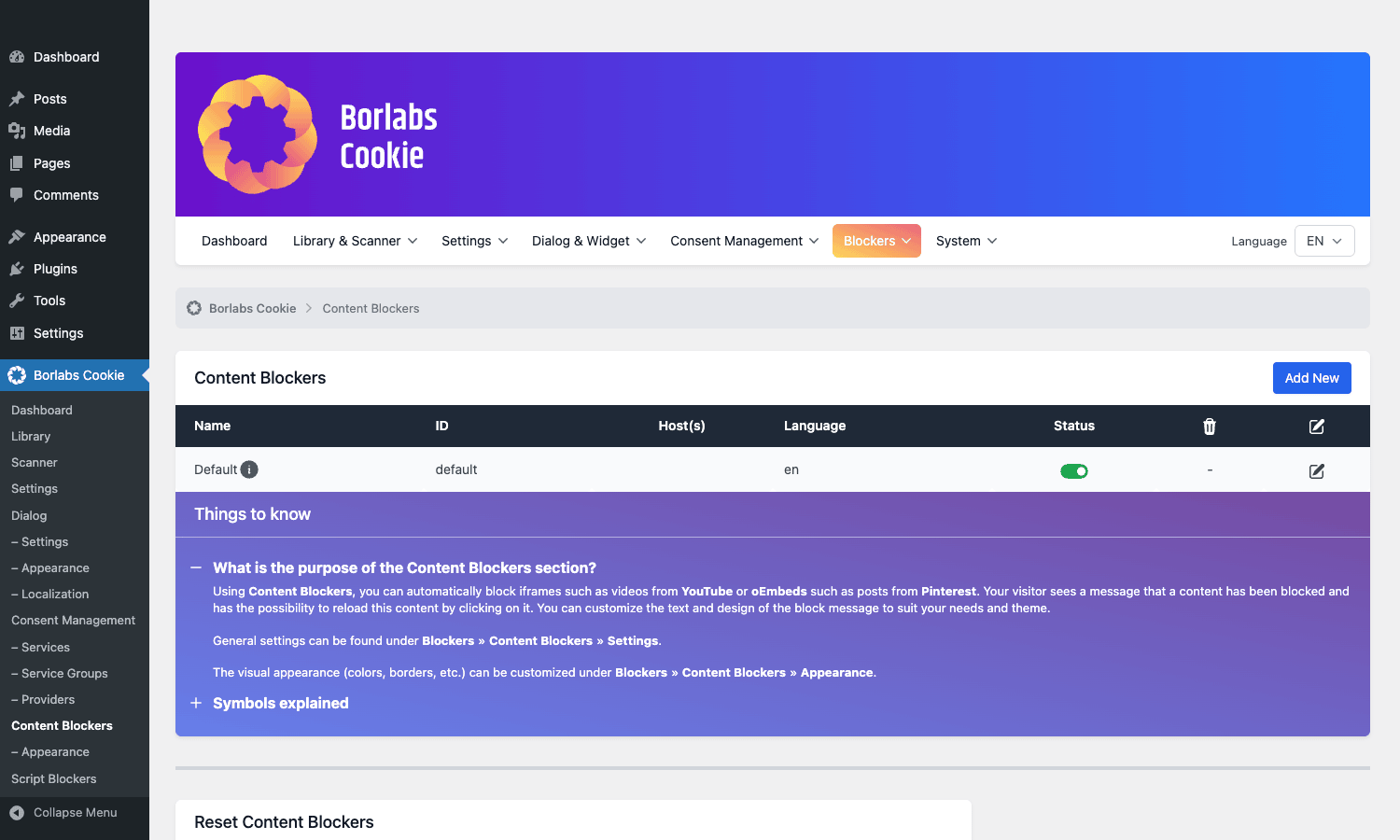
Each Content Blocker has:
- A hosts list (e.g.
youtube.com,youtu.be,youtube-nocookie.com). The plugin watches the page for iframes whosesrcmatches any of these and intercepts them. - A service binding: this content blocker maps to the YouTube service. So when the visitor clicks "load this once", or accepts the External Media group in the dialog, the iframe loads.
- A preview text and image shown in the placeholder.
For inline content that’s not an iframe, you wrap the HTML with the [borlabs-cookie type="content-blocker" id="<key>"]<inline-html>[/borlabs-cookie] shortcode and it gets the same click-to-load treatment.
A Script Blocker is the same idea for <script> tags. You give it a match string (a substring of the script’s src, or for inline scripts, a string from inside the tag), and Borlabs intercepts the script before the browser executes it. After consent, the script is allowed through. Script Blockers are what you use when a tracker isn’t loaded via your code (so you can’t gate it yourself with an opt-in code), but instead comes from a theme, another plugin, or a header injection.
A Style Blocker does the same for <link rel="stylesheet"> and inline <style> blocks. Google Fonts is the canonical example, since loading a Google-hosted font on first paint is technically a request to Google’s servers with the visitor’s IP and Referer, which some German DPAs consider a third-party data transfer requiring consent. With a Style Blocker, the font stylesheet is held back until the visitor accepts.
Note: the EU/EEA regulators agree on the spirit but differ on the letter. The CJEU’s Schrems II ruling and German court decisions on Google Fonts have shifted what counts as a "consent-required" third-party request. Borlabs gives you the tooling to be cautious, you decide how cautious to set the dial.
The consent log
If you ever get a regulatory inquiry or a subject access request, this is the panel you open.
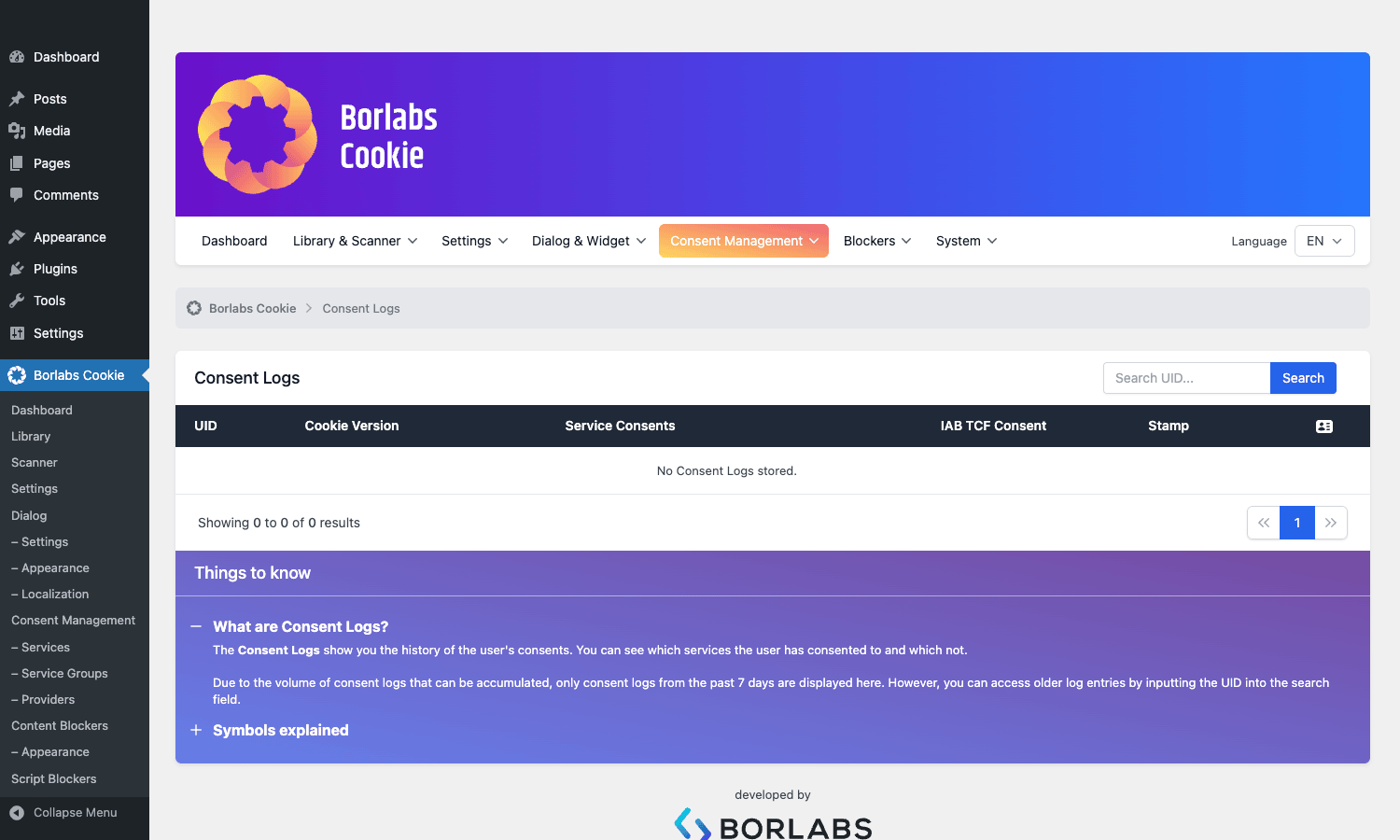
Each row is one consent event: a visitor clicked Save, Accept All, or Decline, and Borlabs recorded it with:
- A UID (a pseudonymous identifier, not the visitor’s IP, not a session ID, not anything that links back to a name).
- The cookie version that was active at the time of the choice (when you re-version your config, old log entries stay tied to the old version).
- The service consents that were given, group by group.
- The IAB TCF consent string if you’re using TCF.
- A timestamp in your site’s local time.
If a visitor opens a ticket with you saying "I never consented to having my data sent to Facebook", you can search the log by their UID (which shows in your URL when they re-open the dialog) and produce the record.
The log keeps a configurable retention window (default 12 months) and auto-expires older rows. Export is also available, so a yearly archive to S3 or similar is straightforward.
Dialog appearance and translations
The visual look of the banner is driven from a single panel.
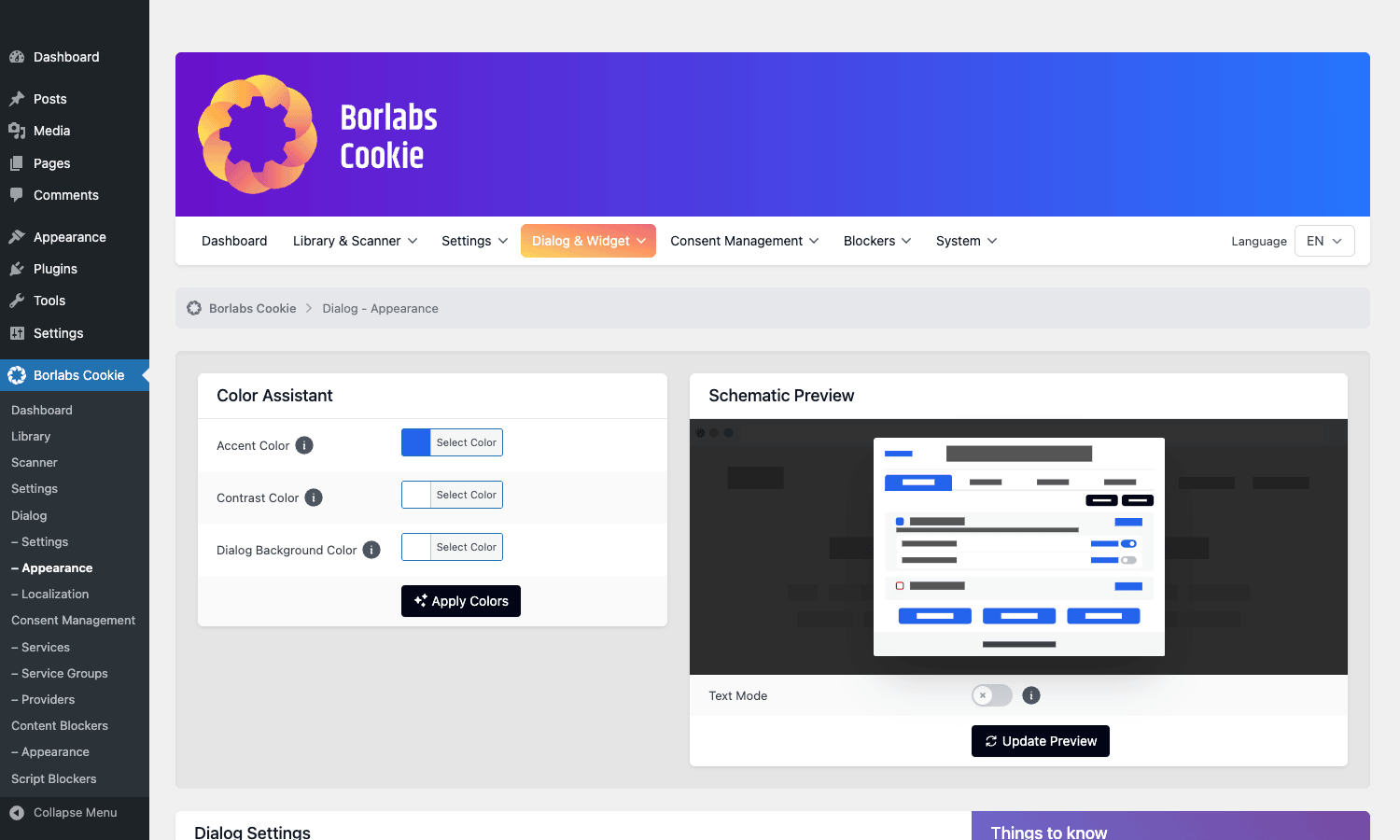
Three controls do most of the work:
- Color Assistant. Pick an accent, contrast, and background color and the plugin generates a coherent scheme. There’s a "schematic preview" to the right of the assistant that updates live so you can see what visitors will get.
- Text Mode. A toggle that switches between the verbose default copy and a compact mode. Pick verbose unless your designer is fighting you on banner height.
- Layout. Centered modal (the default and most legally bulletproof), top bar, or bottom bar.
Translations live in Dialog > Localization. Out of the box, English and German are fully translated. If you’re running WPML or Polylang, the plugin’s adapter exposes per-language strings to the language switcher, so visitors browsing the French version of your site see the French dialog automatically. If you’re running TranslatePress, the dialog strings show up in the translation editor as regular front-end strings.
This last bit is one of the reasons Borlabs is popular on multilingual sites. A cookie banner that ships in English on a French shop is technically a non-consent because "informed" means "in a language the visitor understands". Borlabs makes per-language translation a first-class workflow.
Common real-world configurations
A few configurations come up over and over.
A small content site with Google Analytics only
This is the simplest setup. You add the Google Analytics 4 service from the library, you replace the placeholder measurement ID with yours, you make sure your gtag script tag is matched by a Script Blocker (or just use the opt-in code path), and you’re done. The dialog asks the visitor to accept Statistics, GA4 fires only after acceptance, and your reports start filling in.
For sites running MonsterInsights Pro (the popular GA plugin that handles the GA4 wiring for you), Borlabs has an explicit compatibility path: you enable the MonsterInsights GA4 service in Borlabs and disable MonsterInsights’ own consent module. Borlabs is then the single source of truth for whether GA4 fires.
A WooCommerce store running Meta Pixel and Google Ads
This is where the pixel manager pattern shows its value. Plugins like Pixel Manager for WooCommerce and PixelYourSite Pro inject the Meta Pixel and Google Ads tags into your checkout pages. By themselves they have their own consent toggles, but those toggles often default to "fire anyway" which is exactly what GDPR forbids.
The pattern is: in Borlabs, enable the Meta Pixel and Google Ads services with Marketing group binding. In your pixel manager plugin, set its consent mode to "respect Borlabs Cookie". Most pixel managers detect Borlabs and offer this as a dropdown. With that pairing, your checkout fires the conversion pixel only if the visitor opted in to Marketing.
Google Consent Mode v2 is the other half of this story. With Consent Mode enabled, the Google tags load early but in a "denied" state, and they switch to "granted" only when the visitor consents. Borlabs ships a Consent Mode v2 integration that emits the right signals automatically.
A site with YouTube embeds and Google Maps
For this you don’t even need Statistics or Marketing consent, just External Media. Enable the YouTube and Google Maps content blockers. Every YouTube embed on the site becomes a click-to-load placeholder. Every Maps iframe becomes a click-to-load placeholder. Visitors who want to watch a video get a one-line consent prompt right next to the video, which often converts better than a sitewide banner anyway.
A multilingual site
Install WPML or Polylang Pro (or TranslatePress Business), then in Dialog > Localization add a row per language and translate each string. Borlabs’ WPML/Polylang adapter picks the right language automatically based on what the current page is rendering. Visitors on the French URL see the French dialog, no extra wiring.
A high-traffic news site with strict TTDSG enforcement
In Germany, the TTDSG (now called Section 25 TDDDG) is stricter than the GDPR alone, especially around analytics. If you’re publishing news in DE, you typically want: dialog as a modal (not a bar that can be dismissed without choosing), decline-all as visible as accept-all, no service in any group except Essential firing before consent, and a consent log retained long enough to defend yourself in front of a DPA inquiry. Borlabs’s defaults already match this profile, which is exactly why it’s the dominant choice in the DE WordPress market.
Developer reference
Borlabs Cookie is heavier on its admin UI than on its developer API, but the hooks it exposes are well-organized and stable. All filter names use camelCase with a borlabsCookie/ prefix. Action names follow the same pattern.
Filters are dispatched through a thin adapter class (Borlabs\Cookie\Adapter\WpFunction), but they’re regular WordPress filters as far as your code is concerned. You hook them with add_filter() and add_action() the same way you’d hook a core filter.
Hook: modify a service’s opt-in code
This is the hook to reach for when you want to wrap or alter the snippet that runs after a visitor accepts a service. Useful if you need to add a custom dataLayer.push() before GA4 fires, or pass a UID to your CDP.
add_filter(
 'borlabsCookie/scriptBuilder/service/modifyOptInCode/google-analytics-4',
 function ( $code, $service ) {
 $prepend = "window.dataLayer = window.dataLayer || [];\n";
 $prepend .= "dataLayer.push({'event': 'borlabs_consent_granted', 'service': 'ga4'});\n";

 return $prepend . $code;
 },
 10,
 2
);
The third path segment after service/ is the service’s key (what you typed in the "Key" field when you created the service, lowercase with hyphens). So a custom service called "My CDP" with key my-cdp would be hooked at borlabsCookie/scriptBuilder/service/modifyOptInCode/my-cdp.
Hook: validate a service before saving
If you have your own rules ("every service must have a privacy policy URL", say), use the validate filter. The validator object you receive has addError() so you can attach messages that appear to the admin user in the form UI.
add_filter(
 'borlabsCookie/service/validate',
 function ( $validator, $postData ) {
 if ( empty( $postData['privacyPolicyUrl'] ) ) {
 $validator->addError(
 'privacyPolicyUrl',
 __( 'Privacy policy URL is required on this site.', 'mytheme' )
 );
 }

 return $validator;
 },
 10,
 2
);
Hook: skip the Content Blocker on certain pages
If you have a page where content blocking is causing more trouble than it’s worth (a marketing landing page that’s already gated, an internal staging URL), short-circuit the blocker with this filter.
add_filter(
 'borlabsCookie/contentBlocker/skipInitialization',
 function () {
 if ( is_page( 'campaign-landing' ) ) {
 return true;
 }

 return null;
 }
);
Return true to skip, return null to fall through to the plugin’s normal logic.
Hook: customize the dialog CSS
The plugin builds the dialog’s stylesheet from the Color Assistant settings. If you want to inject your own rules (typography overrides, a custom border, brand-specific spacing), filter the built CSS just before it gets cached.
add_filter(
 'borlabsCookie/styleBuilder/modifyCss',
 function ( $css ) {
 $css .= "\n#BorlabsCookieBox { font-family: 'Inter', sans-serif; }";
 $css .= "\n.brlbs-cmpnt-dialog-button-primary { letter-spacing: 0.02em; }";

 return $css;
 }
);
Hook: hosts to exclude from content blocking
Sometimes you embed a known-safe iframe (an internal video, your own subdomain) that you don’t want intercepted. Add its hostname to the excluded list.
add_filter(
 'borlabsCookie/contentBlocker/modifyExcludedHostnames',
 function ( $hostnames ) {
 $hostnames[] = 'videos.example.com';
 $hostnames[] = 'staging.example.com';

 return $hostnames;
 }
);
Hook: cross-domain cookie consent
If you run multiple domains and want a visitor’s consent to follow them (so they don’t see the banner twice), enable cross-domain mode in settings and then use the cross-domain filters to control what’s shared.
add_filter(
 'borlabsCookie/crossDomainCookie/modifyConsents',
 function ( $consents, $context ) {
 // Strip a sensitive flag before sharing across domains.
 unset( $consents['internal_only_service'] );

 return $consents;
 },
 10,
 2
);
Hook: clear a third-party plugin’s cache when consent changes
When a visitor toggles consent, you sometimes want to bust a page cache that was generated under the old consent state. Borlabs fires actions for known plugins (Hummingbird, Elementor) and a filter to decide whether to clear.
add_filter(
 'borlabsCookie/thirdPartyCacheClearer/shouldClearCache',
 function ( $shouldClear, $context ) {
 // Always clear if the change involved Marketing services.
 if ( in_array( 'marketing', $context['changedGroups'] ?? [], true ) ) {
 return true;
 }

 return $shouldClear;
 },
 10,
 2
);
Action: hook into Hummingbird cache clear
add_action(
 'borlabsCookie/compatibilityPatch/internal/hummingbird/clearCache',
 function () {
 // Also clear my own object cache here.
 wp_cache_flush();
 }
);
REST endpoints you can talk to
Borlabs registers a REST namespace at borlabs-cookie/v1. Some of the endpoints you might call from a custom dashboard or external monitoring:
GET /wp-json/borlabs-cookie/v1/consent/log: paginated list of consent log rows. Requires the same capability you set on the admin Consent Log panel.GET /wp-json/borlabs-cookie/v1/consent/statistic: aggregate counts for a date range, used by the dashboard chart.GET /wp-json/borlabs-cookie/v1/dialog/visibility: whether the dialog should be visible for the current request (used by the front-end JS to decide whether to render).POST /wp-json/borlabs-cookie/v1/scan-request: kick off a fresh cookie scan.
Shortcodes (with examples)
A single shortcode tag, [borlabs-cookie], with different type attributes. Here are the ones you’ll actually use.
A button visitors click to re-open the dialog:
[borlabs-cookie type="btn-consent-preferences" title="Cookie settings"]
A button to toggle a single service on or off:
[borlabs-cookie type="btn-switch-consent" id="google-analytics-4"]
Wrap inline HTML so it’s blocked until the visitor consents to a specific service:
[borlabs-cookie type="content-blocker" id="youtube"]
<iframe src="https://www.youtube.com/embed/..." ...></iframe>
[/borlabs-cookie]
Wrap a tracker snippet so it runs only after a specific service is accepted:
[borlabs-cookie type="service" id="hotjar"]
<script>
// Hotjar snippet here.
</script>
[/borlabs-cookie]
Render the per-visitor consent history (often used on a "your privacy" account page):
[borlabs-cookie type="consent-history"]
Render the visitor’s anonymous consent UID (useful when a visitor opens a support ticket):
[borlabs-cookie type="uid"]
Legacy aliases (cookie, cookie-group, cookie-list, btn-cookie-preference) still work, but new sites should use the modern names.
Performance, compatibility, and gotchas
A few things worth flagging.
Output buffering. Borlabs uses an output buffer to intercept the rendered HTML and inject blocked-content placeholders. This is normally fine, but it can interact badly with plugins that also output-buffer (some page builders, some optimizers). If you see a blank page or a chunk of HTML duplicated, disable the output buffer in Borlabs’ general settings as a first diagnostic. The plugin exposes a filter for this: borlabsCookie/outputBufferManager/status.
Page caches. A cached page is served to every visitor identically, but the dialog content depends on the visitor’s consent state. Borlabs handles this by rendering the dialog client-side and reading the cookie via JavaScript. As long as your cache is HTML-only and doesn’t cache the consent cookie itself, you’re fine. WP Rocket, LiteSpeed, and WP-Optimize all play well by default.
Cloudflare APO. Cloudflare Automatic Platform Optimization caches the full HTML at the edge. If you’re using APO and you see the dialog appear after a flash of un-blocked content, the order is wrong: APO is serving cached HTML before Borlabs’ JS gets to intercept. Fix by either disabling APO or by adding the Borlabs borlabs-cookie cookie to APO’s bypass list.
Elementor. Elementor’s lightbox and gallery widgets sometimes embed iframes in a way that bypasses Borlabs’ content blocker pattern. Borlabs ships an internal compatibility patch for Elementor caches; enable it in Settings > Compatibility Patches.
Speed. The plugin adds about 30-40 KB of JS and 10-15 KB of CSS on the front end (gzipped). The block-and-replace logic runs once on page load, so the time-to-interactive impact is small. If you’re chasing Core Web Vitals, the bigger wins come from blocking third-party scripts in the first place, which Borlabs already does. (Unconsented YouTube embeds are a textbook LCP killer.)
Multisite. Borlabs runs on WordPress multisite, but each site keeps its own consent log and configuration. There’s no cross-site consent sharing within a network; for that you’d want cross-domain cookie mode.
Cookie scanner false positives. The local scanner can flag cookies your own plugins set as "unmapped". They’re not a problem, but it’s noisy. Either map them to an Essential service or add the cookie name to the scanner’s ignore list.
Decline-all UX. The default dialog ships with a clearly-labeled "Accept only essential cookies" button next to "I accept all". Don’t move it three clicks deep just because someone in marketing thinks it’ll hurt conversions. The CNIL has fined sites for that exact dark pattern. If you really need to A/B test consent UX, run it within the bounds of GDPR (so: same prominence, same number of clicks).
How Borlabs Cookie compares to other consent plugins
The cookie consent space on WordPress is crowded. Here’s how Borlabs sits among the alternatives you’ll see compared to it.
Borlabs Cookie vs Complianz Privacy Suite
Complianz is the other heavyweight in this space, built by Dutch developers and very popular in the Netherlands and Belgium. It’s broader in scope: in addition to the cookie banner it generates privacy policies, cookie policies, and DPA documentation from a questionnaire. Borlabs is narrower (it does consent, you bring your own privacy policy) but goes deeper on the consent flow itself, especially around granular per-service control and IAB TCF.
If you want one plugin that produces every privacy document the law expects, Complianz is the easier choice. If you’ve already got your legal docs drafted and you want the most configurable banner on the market, Borlabs is the better fit.
Borlabs Cookie vs Real Cookie Banner
Real Cookie Banner is the newer challenger, also German-built, and it has a generous free tier on wordpress.org. It’s a strong product. The trade-off is the free version is heavily upsell-driven (banner says "powered by Real Cookie Banner" unless you pay), and the templating library is smaller than Borlabs’. The dev API on Real Cookie Banner is also less mature.
Borlabs Cookie vs CookieYes
CookieYes is the most popular free option globally. It’s fine for a small site with one or two trackers. It gets less compelling at the upper end: TCF support is paid, content blockers are paid, multilingual is paid, and the consent log retention is short.
Borlabs Cookie vs Cookiebot
Cookiebot is a SaaS product (not strictly a WordPress plugin, though there’s a connector). It scans your site externally and maintains a database of known cookies. The pricing is per-domain-per-month and gets expensive on multi-domain setups. The advantage is the external scanner finds cookies even when your site is behind authentication; the disadvantage is the per-month bill.
Borlabs Cookie vs Iubenda / OneTrust
These are enterprise SaaS. If you’re already a Fortune 500 with a legal department running OneTrust globally, you’re not switching to Borlabs. If you’re a WordPress shop with one to ten sites, Borlabs is cheaper, faster to set up, and lives in your WordPress admin instead of a separate dashboard.
The summary: Borlabs is the right pick when you specifically need German-grade strictness, granular per-service control, a usable developer API, and you already have your privacy policy. Pick Complianz if you also need the documentation generation. Pick Cookiebot if you need external scanning of authenticated areas. Pick OneTrust if your IT department has already chosen it.
Pricing and licensing
Borlabs Cookie is a commercial plugin sold by Borlabs GmbH directly. They offer an annual subscription per site (with discounts for multi-site bundles) and a lifetime license. The annual gives you updates and support for twelve months; the lifetime gives you both for the life of the product. The free version of "Borlabs Cookie 2.x" that you’ll occasionally see references to no longer exists; the current product is paid-only.
The plugin works the same way regardless of how you got it; the GPL release is the same code, just distributed under the terms of the GNU GPL that the plugin is already licensed under.
A practical setup tip: install on staging first, click through every panel, run the Setup Assistant, and play with the dialog visuals. If after a day of evaluation it feels like the right tool, deploy to production and (if you want vendor support and the official onboarding) buy a license direct from Borlabs.
Frequently asked questions
Do I need Borlabs Cookie if my site doesn’t load Google Analytics?
If your site loads nothing third-party at all (no Google Fonts loaded from Google, no embedded YouTube videos, no Facebook share buttons, no Stripe checkout, no Cloudflare reCAPTCHA, no anything from another domain), and you don’t write tracking cookies of your own beyond a session cookie, then technically GDPR does not require a banner.
That’s a rare profile in practice. Most "simple" WordPress sites load Google Fonts from fonts.googleapis.com, which (in Germany, after the 2022 LG München ruling) is a consent-requiring third-party transfer. So in most cases, yes, you do.
Is Borlabs Cookie enough by itself for full GDPR compliance?
No. The plugin handles the cookie consent layer, which is one piece of GDPR. You still need a privacy policy, a process for subject access requests, a register of processing activities, and (if you have EU staff) a data protection officer. Borlabs gives you the cookie banner and the consent log; the rest is your legal-and-process work.
Does Borlabs Cookie work with Google Consent Mode v2?
Yes. The plugin emits the ad_storage, analytics_storage, ad_user_data, and ad_personalization signals expected by Google Consent Mode v2 automatically when the matching services are toggled. You enable Consent Mode in the Google service settings and Borlabs handles the rest.
Will it slow my site down?
The front-end JS is around 30-40 KB gzipped and runs once on page load. The block-and-replace logic intercepts third-party scripts before they execute, which can actually speed up your site (one un-consented YouTube embed can cost more than the entire Borlabs runtime). On Core Web Vitals tests, sites with Borlabs typically improve their LCP and CLS, not regress.
How do I let visitors withdraw consent?
Two ways. There’s a built-in floating widget (a small fingerprint icon, configurable in the Widget panel) that re-opens the dialog. Or you can add [borlabs-cookie type="btn-consent-preferences"] to your privacy page so visitors have a clear button to click. GDPR requires withdrawal to be as easy as giving consent, so include one of these somewhere persistent.
Does it work with WPML, Polylang, or TranslatePress?
Yes, all three. The plugin ships adapters for WPML and Polylang in the box, and the dialog strings are translatable per language. With TranslatePress, the dialog text shows up in the front-end string editor like any other content. So your French visitors see French dialog text, German visitors see German, and so on.
Can I host all my cookies on Google Analytics and just opt out of the rest?
Yes. Add the Google Analytics 4 service from the library, bind it to the Statistics group, and don’t add any Marketing services. Visitors who accept Statistics will be measured by GA; visitors who decline won’t. You won’t be able to remarket without a Marketing service, but if you don’t run ads, that’s fine.
What happens to my consent log if I cancel my Borlabs license?
The plugin will stop receiving updates, but the existing data stays in your database. You can keep using the version you have, or export the log via the import/export panel and migrate to another tool. The data belongs to you, not Borlabs.
Is the IAB TCF v2.2 framework necessary?
Only if you work with ad networks that require it (programmatic display, Google AdSense in its TCF mode, certain SSPs). If you don’t sell ads or don’t use TCF-required vendors, you can leave TCF disabled. The plugin works fine without it.
Final thoughts
Cookie consent is one of those problems that looks small until you look closely. From the outside it’s just a banner. From the inside it’s a state machine that has to gate third-party scripts, record evidence, survive page caches, work in three languages, integrate with your ad platforms’ consent signaling, and stand up to a DPA inquiry.
Borlabs Cookie is the WordPress plugin that takes the whole problem seriously rather than the banner alone. The pre-built service library means you’re not writing opt-in code for GA4 from scratch. The Content Blockers mean YouTube embeds stop being LCP killers. The consent log means you have an answer when an inquiry shows up. The developer hooks mean you can extend it the way you’d extend anything else in WordPress.
If you’re picking a consent plugin for a site that needs to hold up legally, especially anywhere in the EU/EEA and especially in Germany, this is the safe pick. Install it on staging, click through the Setup Assistant, point your YouTube embeds and analytics scripts at it, and watch it work. Once it’s behaving the way you want, push to production with a calm head.
You’re not going to get an audit-proof site from any single plugin. But the cookie layer, which is the most visible and most frequently fined part of GDPR enforcement, you can solve.